4.HOW DID YOU USE NEW MEDIA
TECHNOLOGIES IN THE
CONSTRUCTION AND RESEARCH,
PLANNING AND EVALUATION STAGES?

By Farida Islam
NEW MEDIA
 New media is a term for different forms of electronic

communication that are used through computer technology. It
refers to being easily accessible, interactive and involves creative
participation. ‘Old’ media forms are for example print newspapers
and magazines. Examples of new media that I have used in the
process of constructing my research, planning and evaluation
stages are Blogger, Prezi, Slideshare, Mindmeister, Glogster,
Wordle and YouTube.
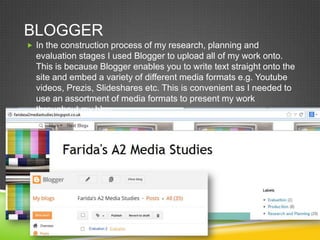
BLOGGER
 In the construction process of my research, planning and

evaluation stages I used Blogger to upload all of my work onto.
This is because Blogger enables you to write text straight onto the
site and embed a variety of different media formats e.g. Youtube
videos, Prezis, Slideshares etc. This is convenient as I needed to
use an assortment of media formats to present my work
throughout my blog.
SLIDESHARE
 Another website that I used to display my work on is Slideshare.

On this site you upload a PowerPoint that you have created and
then an online form of this will be published for people to view. I
found this website helpful as it was straightforward and easy to
use. The slideshare is easily accessible as you are able to share
and embed the link to other sites and view it on the original site
itself.

MINDMEISTER

 Mindmiester allows their users to create online mind-maps that

are interactive and fun for the audience when they’re viewing it. I
used this website throughout the research and planning stages to
present my work. The benefits of using this site is that it isn’t
strictly text as I can also include images, videos, audio notes etc.
It is also easily accessible as you can embed the link or share it
onto various sites.
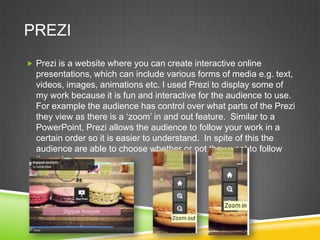
PREZI
 Prezi is a website where you can create interactive online

presentations, which can include various forms of media e.g. text,
videos, images, animations etc. I used Prezi to display some of
my work because it is fun and interactive for the audience to use.
For example the audience has control over what parts of the Prezi
they view as there is a ‘zoom’ in and out feature. Similar to a
PowerPoint, Prezi allows the audience to follow your work in a
certain order so it is easier to understand. In spite of this the
audience are able to choose whether or not they want to follow
the order.
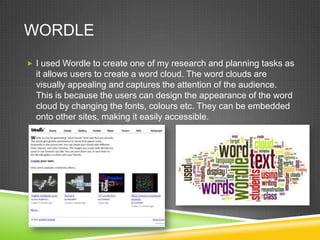
WORDLE
 I used Wordle to create one of my research and planning tasks as

it allows users to create a word cloud. The word clouds are
visually appealing and captures the attention of the audience.
This is because the users can design the appearance of the word
cloud by changing the fonts, colours etc. They can be embedded
onto other sites, making it easily accessible.
YOUTUBE
 When creating my preliminary task video and music video I used

YouTube to upload my videos onto. YouTube is a video-sharing
website that is easily accessible and contains unregulated
content, therefore it fits within the definition of new media.
Similarly to other sites YouTube is interactive which enables the
audience to give feedback through the use of comments and the
‘Like’ and ‘Dislike’ buttons. This was an advantage as you are
able to receive audience feedback on your products and then
develop them. YouTube also has several editing features that the
user can apply onto their video before or after they upload their
video. For instance there is an ‘anti-shake’ feature that stabilises
the video and reduces shakiness. This is helpful as it makes our
videos look professional rather than amateurish.
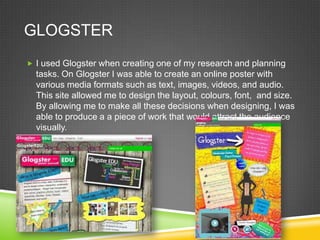
GLOGSTER
 I used Glogster when creating one of my research and planning

tasks. On Glogster I was able to create an online poster with
various media formats such as text, images, videos, and audio.
This site allowed me to design the layout, colours, font, and size.
By allowing me to make all these decisions when designing, I was
able to produce a a piece of work that would attract the audience
visually.

Evaluation 4

  • 1.
    4.HOW DID YOUUSE NEW MEDIA TECHNOLOGIES IN THE CONSTRUCTION AND RESEARCH, PLANNING AND EVALUATION STAGES? By Farida Islam
  • 2.
    NEW MEDIA  Newmedia is a term for different forms of electronic communication that are used through computer technology. It refers to being easily accessible, interactive and involves creative participation. ‘Old’ media forms are for example print newspapers and magazines. Examples of new media that I have used in the process of constructing my research, planning and evaluation stages are Blogger, Prezi, Slideshare, Mindmeister, Glogster, Wordle and YouTube.
  • 4.
    BLOGGER  In theconstruction process of my research, planning and evaluation stages I used Blogger to upload all of my work onto. This is because Blogger enables you to write text straight onto the site and embed a variety of different media formats e.g. Youtube videos, Prezis, Slideshares etc. This is convenient as I needed to use an assortment of media formats to present my work throughout my blog.
  • 5.
    SLIDESHARE  Another websitethat I used to display my work on is Slideshare. On this site you upload a PowerPoint that you have created and then an online form of this will be published for people to view. I found this website helpful as it was straightforward and easy to use. The slideshare is easily accessible as you are able to share and embed the link to other sites and view it on the original site itself. MINDMEISTER  Mindmiester allows their users to create online mind-maps that are interactive and fun for the audience when they’re viewing it. I used this website throughout the research and planning stages to present my work. The benefits of using this site is that it isn’t strictly text as I can also include images, videos, audio notes etc. It is also easily accessible as you can embed the link or share it onto various sites.
  • 6.
    PREZI  Prezi isa website where you can create interactive online presentations, which can include various forms of media e.g. text, videos, images, animations etc. I used Prezi to display some of my work because it is fun and interactive for the audience to use. For example the audience has control over what parts of the Prezi they view as there is a ‘zoom’ in and out feature. Similar to a PowerPoint, Prezi allows the audience to follow your work in a certain order so it is easier to understand. In spite of this the audience are able to choose whether or not they want to follow the order.
  • 7.
    WORDLE  I usedWordle to create one of my research and planning tasks as it allows users to create a word cloud. The word clouds are visually appealing and captures the attention of the audience. This is because the users can design the appearance of the word cloud by changing the fonts, colours etc. They can be embedded onto other sites, making it easily accessible.
  • 8.
    YOUTUBE  When creatingmy preliminary task video and music video I used YouTube to upload my videos onto. YouTube is a video-sharing website that is easily accessible and contains unregulated content, therefore it fits within the definition of new media. Similarly to other sites YouTube is interactive which enables the audience to give feedback through the use of comments and the ‘Like’ and ‘Dislike’ buttons. This was an advantage as you are able to receive audience feedback on your products and then develop them. YouTube also has several editing features that the user can apply onto their video before or after they upload their video. For instance there is an ‘anti-shake’ feature that stabilises the video and reduces shakiness. This is helpful as it makes our videos look professional rather than amateurish.
  • 9.
    GLOGSTER  I usedGlogster when creating one of my research and planning tasks. On Glogster I was able to create an online poster with various media formats such as text, images, videos, and audio. This site allowed me to design the layout, colours, font, and size. By allowing me to make all these decisions when designing, I was able to produce a a piece of work that would attract the audience visually.