Evaluating the User Experience of Virtual
Learning Environments Using Biometric Data
Experimental Setup Description and Preparation
Renée Schulz
Osaka University
renee.schulz@ist.osaka-u.ac.jp
Ghislain Maurice Norbert Isabwe
University of Agder
maurice.isabwe@uia.no
About the Project
• Collaboration between Norway and Japan
• Funded by JSPS through Forskningsrådet
2
• Main project: Usability and procedure learnability in Clinical Procedure Libraries
(ECPLs)
• Link to ResearchGate: https://www.researchgate.net/project/Usability-and-
Procedure-Learnability-of-Evidence-based-Interactive-Clinical-Systems
• This project: based at University of Agder; Department of ICT: Biometric Sensor
Data to evaluate the Usability of Learning Systems/ How to design for
improvement of learning and teaching quality
Introduction: Teachers‘ Motivation and Design
• LMS/VLE are used by: students and teachers
• Teachers are users AND designers
• Two seperate kinds of motivation and motivation showstoppers
• How do they evaluate their own design?
3
3 defining factors for teachers‘ motivation:
Human factors (most often related to skills, attitudes, opinions and
confidence)
Intrinsic values (including satisfaction, level of interest, joy and
entertainment)
Requirements towards the tool itself (including usability, interactivity
level, monitor progress, specialization, adaptability, and learning
requirements)[1]
Introduction: HCD and Design for Teachers
• Human-centred Design for VLEs (as usbale interactive systems)
4
[ISO 9141 – 210]
Introduction: HCD and Design for Teachers
• Human-centred Design for VLEs (as usbale interactive systems)
5
[ISO 9141 – 210]
This research project
mostly operates on
testing and evaluation
based on the existing
system and different
teachers‘ designs
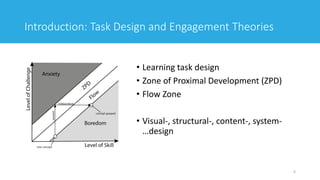
Introduction: Task Design and Engagement Theories
• Learning task design
• Zone of Proximal Development (ZPD)
• Flow Zone
• Visual-, structural-, content-, system-
…design
6
Introduction
• Task Design
• Gamification and (game) task design
• Intrinsic and extrinsic motivation
7
Graphics used and produced for [2]
The Subject of Research:
• The VLEs: Canvas and MUELE
8
UiA Canvas Dashbord
Free Canvas Instructure Dashbord
Login page of MUELE
9
10
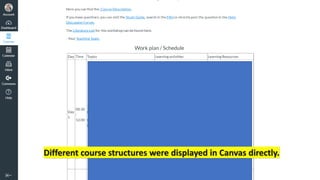
Different course structures were displayed in Canvas directly.
11
12
This slide is used to display similarities to Canvas
and the general structure of MUELE.
Research Questions
( 1 ) How emotionally satisfying is the navigation in a VLE?
( 2 ) How engaging are the students’ interactions using the
forum tool in a VLE?
( 3 ) What is the relationship between the visual attention
patterns and engagement in the learning materials?
13
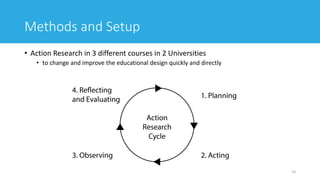
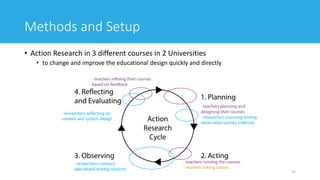
Methods and Setup
• Action Research in 3 different courses in 2 Universities
• to change and improve the educational design quickly and directly
14
Methods and Setup
• Action Research in 3 different courses in 2 Universities
• to change and improve the educational design quickly and directly
15
16
Methods and Setup: Usability Laboratory
[One of the usability laboratories at University of Agder.]
17
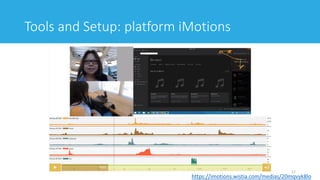
Tools and Setup: platform iMotions
https://imotions.wistia.com/medias/20mqvyk8lo
Tools and Setup
• Shimmmer3 GSR+ (Galvanic Skin Response)
• Optical Pulse Sensing Probe (Finger)
• Optical pulse sensors (Earlobe)
• GSR+ Electrodes (x2)
• Biophysical 9" leads (x2)
• 1x Wrist Strap
• Applications
• GSR+ can be used for:
• Affective Computing and Cognitive Factors Research
• Stress Detection and Analysis
• Emotional Engagement
• Psychological Arousal (Mental Effort, Excitement, Shock)
• Relaxation Training and Psychotherapy
18[http://www.shimmersensing.com/products/shimmer3-wireless-gsr-sensor]
• The galvanic skin response (GSR, which falls under the umbrella term of
electrodermal activity, or EDA) refers to changes in sweat gland activity that are
reflective of the intensity of our emotional state, otherwise known as emotional
arousal.
• … measuring of the continuous variations in the electrical characteristics of
the skin, i.e. for instance the conductance, caused by the variation of the human
body sweating.
19[https://www.brainsigns.com/en/science/s2/technologies/gsr]
Tools and Setup
Tools and Setup
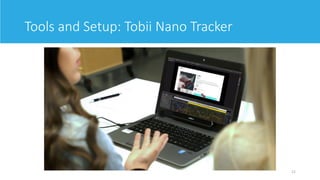
Tobii Nano Eye Tracker allows for further analysis on:
“Advanced analytic tools for screen-based multimedia”
• Stimuli (images, videos, websites, games, software interfaces and 3D environments
• Individual and aggregate gaze replays
• Static and dynamic areas of interest (AOIs), manual and semi-automated options
• Automated metrics such as time to first fixation, time spent, ratio, revisits, fixation count, mouse
clicks, key-strokes etc.
• Static and dynamic heatmaps
• Raw data including X,Y coordinates of eye position,
• pupil size, and distance to the screen
• Automated gaze mapping on websites, both on screen and mobile phones for fast and automatic
analysis
20
[https://www.tobiipro.com/de/produkte/tobii-pro-nano/]
21
Tools and Setup: Tobii Nano Tracker
Tools and Setup
• Affectiva AFFDEX
„facial coding: understand users’ unfiltered responses & a
wide range of emotional responses “
• Measures 7 emotions and 20 facial expressions; filter by
demo and survey data.
• Seamlessly integrates with your survey and research
methodology; works with any panel provider.
• Easy to use SaaS solution; all you need is a standard webcam
and internet connectivity.
• Norms to benchmark the effectiveness of your content by
geography, product category, media length and repeat view
22
[https://www.affectiva.com/product/affdex-for-market-research/]
Tools and Setup
Why Eye Tracking?
• Diagnosis of problem areas
• A/B testing: quntifiable data to prove better permorming areas
• Benchmarking of experiences up against competition
• Measure non-verbalized emotions and Feelings
• Understand visual attention and cognitive states
23
[iMotions UX Brochure]
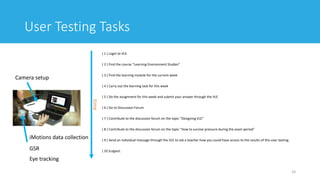
User Testing Tasks
( 1 ) Login to VLE
( 2 ) Find the course “Learning Environment Studies”
( 3 ) Find the learning module for the current week
( 4 ) Carry out the learning task for this week
( 5 ) Do the assignment for this week and submit your answer through the VLE
( 6 ) Go to Discussion Forum
( 7 ) Contribute to the discussion forum on the topic “Designing VLE”
( 8 ) Contribute to the discussion forum on the topic “How to survive pressure during the exam period”
( 9 ) Send an individual message through the VLE to ask a teacher how you could have access to the results of this user testing.
( 10 )Logout.
24
Camera setup
iMotions data collection
GSR
Eye tracking
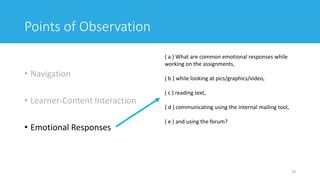
time
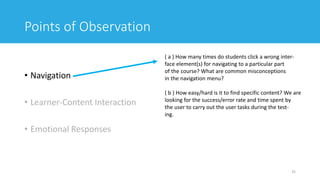
Points of Observation
• Navigation
• Learner-Content Interaction
• Emotional Responses
25
( a ) How many times do students click a wrong inter-
face element(s) for navigating to a particular part
of the course? What are common misconceptions
in the navigation menu?
( b ) How easy/hard is it to find specific content? We are
looking for the success/error rate and time spent by
the user to carry out the user tasks during the test-
ing.
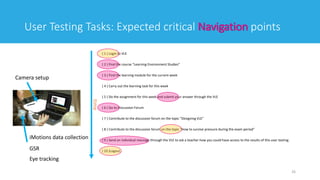
User Testing Tasks: Expected critical Navigation points
( 1 ) Login to VLE
( 2 ) Find the course “Learning Environment Studies”
( 3 ) Find the learning module for the current week
( 4 ) Carry out the learning task for this week
( 5 ) Do the assignment for this week and submit your answer through the VLE
( 6 ) Go to Discussion Forum
( 7 ) Contribute to the discussion forum on the topic “Designing VLE”
( 8 ) Contribute to the discussion forum on the topic “How to survive pressure during the exam period”
( 9 ) Send an individual message through the VLE to ask a teacher how you could have access to the results of this user testing.
( 10 )Logout.
26
Camera setup
iMotions data collection
GSR
Eye tracking
time
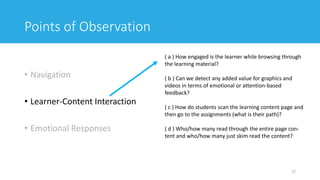
Points of Observation
• Navigation
• Learner-Content Interaction
• Emotional Responses
27
( a ) How engaged is the learner while browsing through
the learning material?
( b ) Can we detect any added value for graphics and
videos in terms of emotional or attention-based
feedback?
( c ) How do students scan the learning content page and
then go to the assignments (what is their path)?
( d ) Who/how many read through the entire page con-
tent and who/how many just skim read the content?
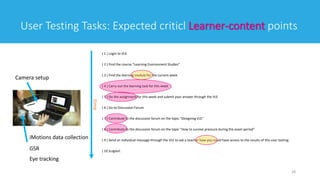
User Testing Tasks: Expected criticl Learner-content points
( 1 ) Login to VLE
( 2 ) Find the course “Learning Environment Studies”
( 3 ) Find the learning module for the current week
( 4 ) Carry out the learning task for this week
( 5 ) Do the assignment for this week and submit your answer through the VLE
( 6 ) Go to Discussion Forum
( 7 ) Contribute to the discussion forum on the topic “Designing VLE”
( 8 ) Contribute to the discussion forum on the topic “How to survive pressure during the exam period”
( 9 ) Send an individual message through the VLE to ask a teacher how you could have access to the results of this user testing.
( 10 )Logout.
28
Camera setup
iMotions data collection
GSR
Eye tracking
time
Points of Observation
• Navigation
• Learner-Content Interaction
• Emotional Responses
29
( a ) What are common emotional responses while
working on the assignments,
( b ) while looking at pics/graphics/video,
( c ) reading text,
( d ) communicating using the internal mailing tool,
( e ) and using the forum?
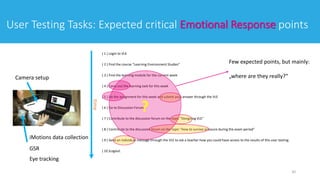
User Testing Tasks: Expected critical Emotional Response points
( 1 ) Login to VLE
( 2 ) Find the course “Learning Environment Studies”
( 3 ) Find the learning module for the current week
( 4 ) Carry out the learning task for this week
( 5 ) Do the assignment for this week and submit your answer through the VLE
( 6 ) Go to Discussion Forum
( 7 ) Contribute to the discussion forum on the topic “Designing VLE”
( 8 ) Contribute to the discussion forum on the topic “How to survive pressure during the exam period”
( 9 ) Send an individual message through the VLE to ask a teacher how you could have access to the results of this user testing.
( 10 )Logout.
30
Camera setup
iMotions data collection
GSR
Eye tracking
time
?
Few expected points, but mainly:
„where are they really?“
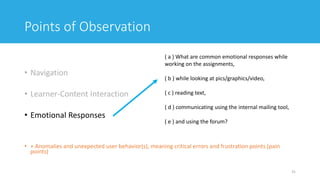
Points of Observation
• Navigation
• Learner-Content Interaction
• Emotional Responses
• + Anomalies and unexpected user behavior(s), meaning critical errors and frustration points (pain
points)
31
( a ) What are common emotional responses while
working on the assignments,
( b ) while looking at pics/graphics/video,
( c ) reading text,
( d ) communicating using the internal mailing tool,
( e ) and using the forum?
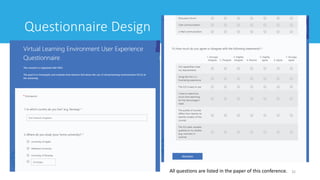
Questionnaire Design
32All questions are listed in the paper of this conference.
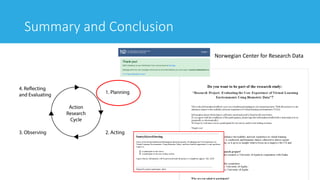
Summary and Conclusion
33
Norwegian Center for Research Data
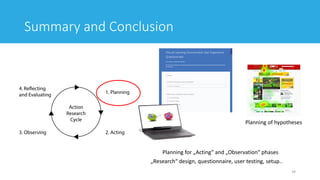
Summary and Conclusion
34
Planning of hypotheses
Planning for „Acting“ and „Observation“ phases
„Research“ design, questionnaire, user testing, setup..
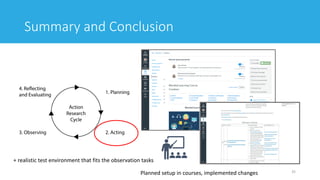
Summary and Conclusion
35Planned setup in courses, implemented changes
+ realistic test environment that fits the observation tasks
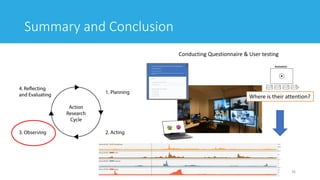
Summary and Conclusion
36
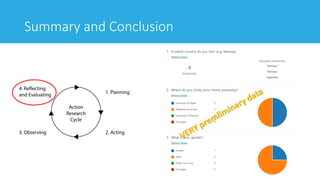
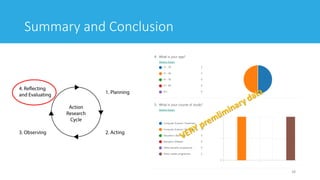
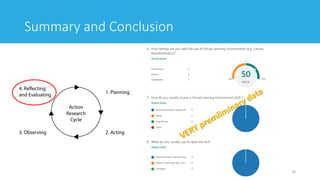
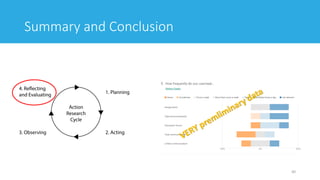
Conducting Questionnaire & User testing
Where is their attention?
Summary and Conclusion
37
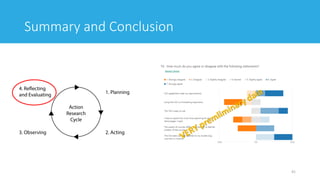
Summary and Conclusion
38
Summary and Conclusion
39
Summary and Conclusion
40
Summary and Conclusion
41
Thank you!
Renée Schulz
renee.schulz@uia.no /
renee.schulz@ist.osaka-u.ac.jp
@Sciencefication
42
References
[1] Schulz, R., Isabwe, G. M., & Reichert, F. (2015, September). Investigating teachers’ motivation to use ICT
tools in higher education. In 2015 Internet Technologies and Applications (ITA) (pp. 62-67). IEEE.
[2] Schulz, R. P. (2017). Listening to Teachers’ Needs: Human-centred Design for Mobile Technology in Higher
Education. Doctoral dissertations at University of Agder.
43

Evaluating the User Experience of Virtual Learning Environments Using Biometric Data: Experimental Setup Description and Preparation

  • 1.
    Evaluating the UserExperience of Virtual Learning Environments Using Biometric Data Experimental Setup Description and Preparation Renée Schulz Osaka University renee.schulz@ist.osaka-u.ac.jp Ghislain Maurice Norbert Isabwe University of Agder maurice.isabwe@uia.no
  • 2.
    About the Project •Collaboration between Norway and Japan • Funded by JSPS through Forskningsrådet 2 • Main project: Usability and procedure learnability in Clinical Procedure Libraries (ECPLs) • Link to ResearchGate: https://www.researchgate.net/project/Usability-and- Procedure-Learnability-of-Evidence-based-Interactive-Clinical-Systems • This project: based at University of Agder; Department of ICT: Biometric Sensor Data to evaluate the Usability of Learning Systems/ How to design for improvement of learning and teaching quality
  • 3.
    Introduction: Teachers‘ Motivationand Design • LMS/VLE are used by: students and teachers • Teachers are users AND designers • Two seperate kinds of motivation and motivation showstoppers • How do they evaluate their own design? 3 3 defining factors for teachers‘ motivation: Human factors (most often related to skills, attitudes, opinions and confidence) Intrinsic values (including satisfaction, level of interest, joy and entertainment) Requirements towards the tool itself (including usability, interactivity level, monitor progress, specialization, adaptability, and learning requirements)[1]
  • 4.
    Introduction: HCD andDesign for Teachers • Human-centred Design for VLEs (as usbale interactive systems) 4 [ISO 9141 – 210]
  • 5.
    Introduction: HCD andDesign for Teachers • Human-centred Design for VLEs (as usbale interactive systems) 5 [ISO 9141 – 210] This research project mostly operates on testing and evaluation based on the existing system and different teachers‘ designs
  • 6.
    Introduction: Task Designand Engagement Theories • Learning task design • Zone of Proximal Development (ZPD) • Flow Zone • Visual-, structural-, content-, system- …design 6
  • 7.
    Introduction • Task Design •Gamification and (game) task design • Intrinsic and extrinsic motivation 7 Graphics used and produced for [2]
  • 8.
    The Subject ofResearch: • The VLEs: Canvas and MUELE 8 UiA Canvas Dashbord Free Canvas Instructure Dashbord Login page of MUELE
  • 9.
  • 10.
    10 Different course structureswere displayed in Canvas directly.
  • 11.
  • 12.
    12 This slide isused to display similarities to Canvas and the general structure of MUELE.
  • 13.
    Research Questions ( 1) How emotionally satisfying is the navigation in a VLE? ( 2 ) How engaging are the students’ interactions using the forum tool in a VLE? ( 3 ) What is the relationship between the visual attention patterns and engagement in the learning materials? 13
  • 14.
    Methods and Setup •Action Research in 3 different courses in 2 Universities • to change and improve the educational design quickly and directly 14
  • 15.
    Methods and Setup •Action Research in 3 different courses in 2 Universities • to change and improve the educational design quickly and directly 15
  • 16.
    16 Methods and Setup:Usability Laboratory [One of the usability laboratories at University of Agder.]
  • 17.
    17 Tools and Setup:platform iMotions https://imotions.wistia.com/medias/20mqvyk8lo
  • 18.
    Tools and Setup •Shimmmer3 GSR+ (Galvanic Skin Response) • Optical Pulse Sensing Probe (Finger) • Optical pulse sensors (Earlobe) • GSR+ Electrodes (x2) • Biophysical 9" leads (x2) • 1x Wrist Strap • Applications • GSR+ can be used for: • Affective Computing and Cognitive Factors Research • Stress Detection and Analysis • Emotional Engagement • Psychological Arousal (Mental Effort, Excitement, Shock) • Relaxation Training and Psychotherapy 18[http://www.shimmersensing.com/products/shimmer3-wireless-gsr-sensor]
  • 19.
    • The galvanicskin response (GSR, which falls under the umbrella term of electrodermal activity, or EDA) refers to changes in sweat gland activity that are reflective of the intensity of our emotional state, otherwise known as emotional arousal. • … measuring of the continuous variations in the electrical characteristics of the skin, i.e. for instance the conductance, caused by the variation of the human body sweating. 19[https://www.brainsigns.com/en/science/s2/technologies/gsr] Tools and Setup
  • 20.
    Tools and Setup TobiiNano Eye Tracker allows for further analysis on: “Advanced analytic tools for screen-based multimedia” • Stimuli (images, videos, websites, games, software interfaces and 3D environments • Individual and aggregate gaze replays • Static and dynamic areas of interest (AOIs), manual and semi-automated options • Automated metrics such as time to first fixation, time spent, ratio, revisits, fixation count, mouse clicks, key-strokes etc. • Static and dynamic heatmaps • Raw data including X,Y coordinates of eye position, • pupil size, and distance to the screen • Automated gaze mapping on websites, both on screen and mobile phones for fast and automatic analysis 20 [https://www.tobiipro.com/de/produkte/tobii-pro-nano/]
  • 21.
    21 Tools and Setup:Tobii Nano Tracker
  • 22.
    Tools and Setup •Affectiva AFFDEX „facial coding: understand users’ unfiltered responses & a wide range of emotional responses “ • Measures 7 emotions and 20 facial expressions; filter by demo and survey data. • Seamlessly integrates with your survey and research methodology; works with any panel provider. • Easy to use SaaS solution; all you need is a standard webcam and internet connectivity. • Norms to benchmark the effectiveness of your content by geography, product category, media length and repeat view 22 [https://www.affectiva.com/product/affdex-for-market-research/]
  • 23.
    Tools and Setup WhyEye Tracking? • Diagnosis of problem areas • A/B testing: quntifiable data to prove better permorming areas • Benchmarking of experiences up against competition • Measure non-verbalized emotions and Feelings • Understand visual attention and cognitive states 23 [iMotions UX Brochure]
  • 24.
    User Testing Tasks (1 ) Login to VLE ( 2 ) Find the course “Learning Environment Studies” ( 3 ) Find the learning module for the current week ( 4 ) Carry out the learning task for this week ( 5 ) Do the assignment for this week and submit your answer through the VLE ( 6 ) Go to Discussion Forum ( 7 ) Contribute to the discussion forum on the topic “Designing VLE” ( 8 ) Contribute to the discussion forum on the topic “How to survive pressure during the exam period” ( 9 ) Send an individual message through the VLE to ask a teacher how you could have access to the results of this user testing. ( 10 )Logout. 24 Camera setup iMotions data collection GSR Eye tracking time
  • 25.
    Points of Observation •Navigation • Learner-Content Interaction • Emotional Responses 25 ( a ) How many times do students click a wrong inter- face element(s) for navigating to a particular part of the course? What are common misconceptions in the navigation menu? ( b ) How easy/hard is it to find specific content? We are looking for the success/error rate and time spent by the user to carry out the user tasks during the test- ing.
  • 26.
    User Testing Tasks:Expected critical Navigation points ( 1 ) Login to VLE ( 2 ) Find the course “Learning Environment Studies” ( 3 ) Find the learning module for the current week ( 4 ) Carry out the learning task for this week ( 5 ) Do the assignment for this week and submit your answer through the VLE ( 6 ) Go to Discussion Forum ( 7 ) Contribute to the discussion forum on the topic “Designing VLE” ( 8 ) Contribute to the discussion forum on the topic “How to survive pressure during the exam period” ( 9 ) Send an individual message through the VLE to ask a teacher how you could have access to the results of this user testing. ( 10 )Logout. 26 Camera setup iMotions data collection GSR Eye tracking time
  • 27.
    Points of Observation •Navigation • Learner-Content Interaction • Emotional Responses 27 ( a ) How engaged is the learner while browsing through the learning material? ( b ) Can we detect any added value for graphics and videos in terms of emotional or attention-based feedback? ( c ) How do students scan the learning content page and then go to the assignments (what is their path)? ( d ) Who/how many read through the entire page con- tent and who/how many just skim read the content?
  • 28.
    User Testing Tasks:Expected criticl Learner-content points ( 1 ) Login to VLE ( 2 ) Find the course “Learning Environment Studies” ( 3 ) Find the learning module for the current week ( 4 ) Carry out the learning task for this week ( 5 ) Do the assignment for this week and submit your answer through the VLE ( 6 ) Go to Discussion Forum ( 7 ) Contribute to the discussion forum on the topic “Designing VLE” ( 8 ) Contribute to the discussion forum on the topic “How to survive pressure during the exam period” ( 9 ) Send an individual message through the VLE to ask a teacher how you could have access to the results of this user testing. ( 10 )Logout. 28 Camera setup iMotions data collection GSR Eye tracking time
  • 29.
    Points of Observation •Navigation • Learner-Content Interaction • Emotional Responses 29 ( a ) What are common emotional responses while working on the assignments, ( b ) while looking at pics/graphics/video, ( c ) reading text, ( d ) communicating using the internal mailing tool, ( e ) and using the forum?
  • 30.
    User Testing Tasks:Expected critical Emotional Response points ( 1 ) Login to VLE ( 2 ) Find the course “Learning Environment Studies” ( 3 ) Find the learning module for the current week ( 4 ) Carry out the learning task for this week ( 5 ) Do the assignment for this week and submit your answer through the VLE ( 6 ) Go to Discussion Forum ( 7 ) Contribute to the discussion forum on the topic “Designing VLE” ( 8 ) Contribute to the discussion forum on the topic “How to survive pressure during the exam period” ( 9 ) Send an individual message through the VLE to ask a teacher how you could have access to the results of this user testing. ( 10 )Logout. 30 Camera setup iMotions data collection GSR Eye tracking time ? Few expected points, but mainly: „where are they really?“
  • 31.
    Points of Observation •Navigation • Learner-Content Interaction • Emotional Responses • + Anomalies and unexpected user behavior(s), meaning critical errors and frustration points (pain points) 31 ( a ) What are common emotional responses while working on the assignments, ( b ) while looking at pics/graphics/video, ( c ) reading text, ( d ) communicating using the internal mailing tool, ( e ) and using the forum?
  • 32.
    Questionnaire Design 32All questionsare listed in the paper of this conference.
  • 33.
    Summary and Conclusion 33 NorwegianCenter for Research Data
  • 34.
    Summary and Conclusion 34 Planningof hypotheses Planning for „Acting“ and „Observation“ phases „Research“ design, questionnaire, user testing, setup..
  • 35.
    Summary and Conclusion 35Plannedsetup in courses, implemented changes + realistic test environment that fits the observation tasks
  • 36.
    Summary and Conclusion 36 ConductingQuestionnaire & User testing Where is their attention?
  • 37.
  • 38.
  • 39.
  • 40.
  • 41.
  • 42.
    Thank you! Renée Schulz renee.schulz@uia.no/ renee.schulz@ist.osaka-u.ac.jp @Sciencefication 42
  • 43.
    References [1] Schulz, R.,Isabwe, G. M., & Reichert, F. (2015, September). Investigating teachers’ motivation to use ICT tools in higher education. In 2015 Internet Technologies and Applications (ITA) (pp. 62-67). IEEE. [2] Schulz, R. P. (2017). Listening to Teachers’ Needs: Human-centred Design for Mobile Technology in Higher Education. Doctoral dissertations at University of Agder. 43