The ÆGIS concept, with updates
from the Pan-European Workshop
         and User Forum
 Peter Korn, Accessibility Principal
   & ÆGIS Technical Manager
Presentation Overview

• What is ÆGIS
• Brief history of ICT Accessibility
• Steps to build an accessible...
    ...physical world ...ICT environment
• The Open Accessibility Framework (OAF)
• Updates from the Pan-European workshop
What is ÆGIS?

• EC-funded FP7 project to “...build
  accessibility into future mainstream ICT...”
• Focus on...
  – future: look at where accessibility is going
  – mainstream: do research as close to products
    as practical
  – ICT: desktop, web, mobile; communication
What is “ÆGIS”?

• Open Accessibility Everywhere:
  Groundwork, Infrastructure, Standards
• Inspiration from Greek myth
  – ÆGIS is the shield of Zeus
  – Now means a shield, protection, or sponsorship
  – For us: building accessibility into ICT is a way
    to protect people at risk of exclusion
What is “ÆGIS”... in Letters & Words?

•   open: collaborate with existing communities
•   Accessibility: focus of the project
•   Everywhere: desktop, web, mobile
•   Groundwork: start from users, user needs
•   Infrastructure: build it in to ICT
•   Standards: define, then build to standards
Key Goals of the ÆGIS Project

• Develop a complete framework to building
  accessibility into ICT
  – Prove it with users in desktop, web, and mobile
• Help developers & authors as well as users
• Address accessibility cost issues
  – Leverage popular open source apps, platforms
  – Use commodity hardware where possible
More Key Goals of the ÆGIS Project

• Seek to advance the state of the art
  – Framework for magnification
  – Concept Coding Framework for authoring
  – Face tracking, eye tracking, gesture switches
  – Aid to developers, authors
  – “Platform on a platform” challenges
A Brief History of ICT Accessibility
• Late 1960s – early 1980s 1st generation access
  – Character based screens
  – Blind access via Optacon, screen readers from text
    buffers
  – Low vision access via custom video card
  – Input device replacements (special keyboards, etc.)
More Brief History of ICT Accessibility
• Late 1980s – early 2000s 2nd generation access
  – Graphical desktop
  – Blind access via off-screen model: reverse engineered hack
  – Low vision access via software magnification: also a hack
  – Evolution of voice recognition systems
  – Switch access software
  – Specialized apps for cognitive impairments
rd
  Emergence of 3 Generation Access

• Starts in 1997
  – Java Accessibility API &
    Pluggable Look & Feel of Swing
  – W3C Web Accessibility Initiative
  – MSAA
  – Roots in two earlier attempts:
     • RAP & AccessAware
rd
    Focus of 3 Generation Access

• Provide everything needed by AT via APIs
  – Address “platform-on-a-platform” issues
  – Accessibility standards start to appear
  – WCAG, UAAG, ATAG, ISO 13066
  – Similar shift for accessibility as with printing
     • Direct app-to-printer interfaces became mediated
       by the operating system
        – OS-defined printer driver APIs
Steps to Physical Accessibility – creation
         Step 1: Define “Accessible”
• How wide must a door be for a wheelchair
  to fit through it?
• How much force must you need to open a
  window?
• How do we make an elevator accessible -
  tones, Braille...
Steps to Physical Accessibility – creation
       Step 2: Stock building materials
• Sets of standard doors - all wide enough for
  a wheelchair
• Sets of standard windows - with little force
  needed to open
• Standard elevators - with tones, Braille,
  tactile symbols
Steps to Physical Accessibility – creation
     Step 3: Tools for accessible building
• Manuals & standards for installing windows,
  doors, elevators
• Specs. for wheelchair ramps; testing ramp
  elevation
• Special tools for installing windows, doors,
  elevators, etc.
Steps to Physical Accessibility – use
 Step 4: Locate the building where it will work

• Is the building near public transit?
• Is there a wheelchair ramp leading up to
  the building?
• Can people find the crosswalk buttons
Steps to Physical Accessibility – use
    Step 5: Make the accessible buildings

• Follow the plans, use the stock building
  materials, locate the building where it
  should go
• And then build it
Steps to Physical Accessibility – use
Step 6: Disseminate access devices people need

• Distribute wheelchairs
  (that work with the ramps)
• Provide canes for the blind, train seeing
  eye dogs
• Diagnose hearing problems, prescribe
  hearing aids
Steps to ICT Accessibility – creation
         Step 1: Define “Accessible”
• Define keyboard navigation scheme
• Define theme mechanisms for high
  contrast, large print
• Define an accessibility API for
  communication with AT
Steps to ICT Accessibility – creation
       Step 2: Stock UI elements, toolkits
• Build sets of desktop UI elements
  – Menus, windows, etc.
• Build sets of web UI elements
  – Charts, drag & drop, etc.
• Build sets of mobile UI elements
  – Text fields, radio buttons, etc.
Steps to ICT Accessibility – creation
  Step 3: Tools for developing accessible ICT
• Manuals & standards for how to make
  accessible applications
• Developer tools that provide stock
  accessible UI elements
• Developer tools that flag programmatically
  determinable inaccessible app designs
Steps to ICT Accessibility – use
Step 4: Make platform accessible, able to run AT

• Does the platform expose accessibility
  APIs from the applications?
• Can the user select a high contrast, large
  print theme?
• Does the platform have text-to-speech,
  Braille, for AT to use?
Steps to ICT Accessibility – use
 Step 5: Make the accessible ICT applications

• Follow the plans, use the stock UI
  elements & toolkits, deploy on an
  accessible platform
• And then build the apps
Steps to ICT Accessibility – use
Step 6: Disseminate access devices people need

• Ensure blind have access to screen
  readers for the platform
• Ensure low vision have access to screen
  magnification
• Ensure access to augmentative/alternative
  communication systems, etc.
Open Accessibility Framework

• Core idea of the ÆGIS project
• ÆGIS OAF deliverables:
  1.Document describing the framework of 3rd
    generation accessibility, validated by ÆGIS
    prototypes and feedback
  2.Prototypes implement OAF, proven in ÆGIS
    • Many prototypes contributed back in open source
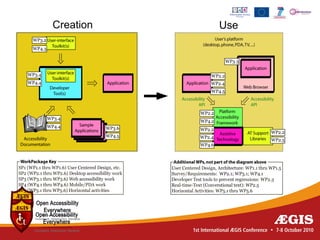
Open Accessibility Framework cont.

• Addresses all facets of building
  accessibility into ICT
• Completely analogous to physical
  accessibility
  – Looks at “creation” and “use” sides
• It is essentially the “Steps to ICT
  Accessibility” of previous slides
ÆGIS Technology Focus Areas

• Desktop
  – Build on 3rd gen. accessibility already in GNOME
  – Focus on authoring assistance in
    OpenOffice.org
  – DAISY, Braille, Concept Coding Framework
  – Blind, low-vision, physical impairment, cognitive
    impairment, developers / testers
ÆGIS Technology Focus Areas, cont.

• Web
  – Work in all facets of OAF (except AT)
  – UI element sets used in developer tools to
    create apps that run in user agents on desktop
    platforms (with AT)
• Mobile
  – Work in all facets of OAF (including AT)
Creation   Use
Updates from Pan-European Workshop

• <updates to go here, added the night
  before, at the conclusion of the workshop>

EU policies in e-inclusion

  • 1.
    The ÆGIS concept,with updates from the Pan-European Workshop and User Forum Peter Korn, Accessibility Principal & ÆGIS Technical Manager
  • 2.
    Presentation Overview • Whatis ÆGIS • Brief history of ICT Accessibility • Steps to build an accessible... ...physical world ...ICT environment • The Open Accessibility Framework (OAF) • Updates from the Pan-European workshop
  • 3.
    What is ÆGIS? •EC-funded FP7 project to “...build accessibility into future mainstream ICT...” • Focus on... – future: look at where accessibility is going – mainstream: do research as close to products as practical – ICT: desktop, web, mobile; communication
  • 4.
    What is “ÆGIS”? •Open Accessibility Everywhere: Groundwork, Infrastructure, Standards • Inspiration from Greek myth – ÆGIS is the shield of Zeus – Now means a shield, protection, or sponsorship – For us: building accessibility into ICT is a way to protect people at risk of exclusion
  • 5.
    What is “ÆGIS”...in Letters & Words? • open: collaborate with existing communities • Accessibility: focus of the project • Everywhere: desktop, web, mobile • Groundwork: start from users, user needs • Infrastructure: build it in to ICT • Standards: define, then build to standards
  • 6.
    Key Goals ofthe ÆGIS Project • Develop a complete framework to building accessibility into ICT – Prove it with users in desktop, web, and mobile • Help developers & authors as well as users • Address accessibility cost issues – Leverage popular open source apps, platforms – Use commodity hardware where possible
  • 7.
    More Key Goalsof the ÆGIS Project • Seek to advance the state of the art – Framework for magnification – Concept Coding Framework for authoring – Face tracking, eye tracking, gesture switches – Aid to developers, authors – “Platform on a platform” challenges
  • 8.
    A Brief Historyof ICT Accessibility • Late 1960s – early 1980s 1st generation access – Character based screens – Blind access via Optacon, screen readers from text buffers – Low vision access via custom video card – Input device replacements (special keyboards, etc.)
  • 9.
    More Brief Historyof ICT Accessibility • Late 1980s – early 2000s 2nd generation access – Graphical desktop – Blind access via off-screen model: reverse engineered hack – Low vision access via software magnification: also a hack – Evolution of voice recognition systems – Switch access software – Specialized apps for cognitive impairments
  • 10.
    rd Emergenceof 3 Generation Access • Starts in 1997 – Java Accessibility API & Pluggable Look & Feel of Swing – W3C Web Accessibility Initiative – MSAA – Roots in two earlier attempts: • RAP & AccessAware
  • 11.
    rd Focus of 3 Generation Access • Provide everything needed by AT via APIs – Address “platform-on-a-platform” issues – Accessibility standards start to appear – WCAG, UAAG, ATAG, ISO 13066 – Similar shift for accessibility as with printing • Direct app-to-printer interfaces became mediated by the operating system – OS-defined printer driver APIs
  • 12.
    Steps to PhysicalAccessibility – creation Step 1: Define “Accessible” • How wide must a door be for a wheelchair to fit through it? • How much force must you need to open a window? • How do we make an elevator accessible - tones, Braille...
  • 13.
    Steps to PhysicalAccessibility – creation Step 2: Stock building materials • Sets of standard doors - all wide enough for a wheelchair • Sets of standard windows - with little force needed to open • Standard elevators - with tones, Braille, tactile symbols
  • 14.
    Steps to PhysicalAccessibility – creation Step 3: Tools for accessible building • Manuals & standards for installing windows, doors, elevators • Specs. for wheelchair ramps; testing ramp elevation • Special tools for installing windows, doors, elevators, etc.
  • 15.
    Steps to PhysicalAccessibility – use Step 4: Locate the building where it will work • Is the building near public transit? • Is there a wheelchair ramp leading up to the building? • Can people find the crosswalk buttons
  • 16.
    Steps to PhysicalAccessibility – use Step 5: Make the accessible buildings • Follow the plans, use the stock building materials, locate the building where it should go • And then build it
  • 17.
    Steps to PhysicalAccessibility – use Step 6: Disseminate access devices people need • Distribute wheelchairs (that work with the ramps) • Provide canes for the blind, train seeing eye dogs • Diagnose hearing problems, prescribe hearing aids
  • 18.
    Steps to ICTAccessibility – creation Step 1: Define “Accessible” • Define keyboard navigation scheme • Define theme mechanisms for high contrast, large print • Define an accessibility API for communication with AT
  • 19.
    Steps to ICTAccessibility – creation Step 2: Stock UI elements, toolkits • Build sets of desktop UI elements – Menus, windows, etc. • Build sets of web UI elements – Charts, drag & drop, etc. • Build sets of mobile UI elements – Text fields, radio buttons, etc.
  • 20.
    Steps to ICTAccessibility – creation Step 3: Tools for developing accessible ICT • Manuals & standards for how to make accessible applications • Developer tools that provide stock accessible UI elements • Developer tools that flag programmatically determinable inaccessible app designs
  • 21.
    Steps to ICTAccessibility – use Step 4: Make platform accessible, able to run AT • Does the platform expose accessibility APIs from the applications? • Can the user select a high contrast, large print theme? • Does the platform have text-to-speech, Braille, for AT to use?
  • 22.
    Steps to ICTAccessibility – use Step 5: Make the accessible ICT applications • Follow the plans, use the stock UI elements & toolkits, deploy on an accessible platform • And then build the apps
  • 23.
    Steps to ICTAccessibility – use Step 6: Disseminate access devices people need • Ensure blind have access to screen readers for the platform • Ensure low vision have access to screen magnification • Ensure access to augmentative/alternative communication systems, etc.
  • 24.
    Open Accessibility Framework •Core idea of the ÆGIS project • ÆGIS OAF deliverables: 1.Document describing the framework of 3rd generation accessibility, validated by ÆGIS prototypes and feedback 2.Prototypes implement OAF, proven in ÆGIS • Many prototypes contributed back in open source
  • 25.
    Open Accessibility Frameworkcont. • Addresses all facets of building accessibility into ICT • Completely analogous to physical accessibility – Looks at “creation” and “use” sides • It is essentially the “Steps to ICT Accessibility” of previous slides
  • 26.
    ÆGIS Technology FocusAreas • Desktop – Build on 3rd gen. accessibility already in GNOME – Focus on authoring assistance in OpenOffice.org – DAISY, Braille, Concept Coding Framework – Blind, low-vision, physical impairment, cognitive impairment, developers / testers
  • 27.
    ÆGIS Technology FocusAreas, cont. • Web – Work in all facets of OAF (except AT) – UI element sets used in developer tools to create apps that run in user agents on desktop platforms (with AT) • Mobile – Work in all facets of OAF (including AT)
  • 28.
  • 29.
    Updates from Pan-EuropeanWorkshop • <updates to go here, added the night before, at the conclusion of the workshop>