Accessibility
Testing on the
Cheap
Tools and tips to creating and maintaining
an accessible web presence.
TEST? WHAT FOR?
What accessibility testing actually tests for
Accessibility in three
thoughts
• Technology compatibility
• Make digital content as understandable to technology as
possible.
• Fair and equal
• Make the experience equivalent regardless of factors we cannot
control.
• Universal access
• Don’t restrict anyone from getting where they want to go.
POUR, as per the W3C
• Perceivable
• Users must be able to perceive the information being presented (it can't be
invisible to all of their senses)
• Operable
• Users must be able to operate the interface (the interface cannot require
interaction that a user cannot perform)
• Understandable
• Users must be able to understand the information as well as the operation
of the user interface (the content or operation cannot be beyond their
understanding)
• Robust
• Users must be able to access the content as technologies advance (as
technologies and user agents evolve, the content should remain
accessible)
Standards and policy
• Americans with Disabilities Act (ADA)
• Web Content Accessibility Guidelines
• 1.0 and 2.0
• Section 508 of the Federal Rehabilitation Act of 1973, 1998
• Oklahoma Electronic and Information Technology Accessibility
(EITA) statute, effective 2005
• Based on WCAG 1.0
• Still helpful, just limited
Some elements of
accessibility
• What is the user interaction like?
• Keyboard access
• Visible focus
• Color use and contrast
• Assistive technology compatibility
• Semantic structure
• <h1>, <label>, <ul>, <th>, <td> etc.
• Multimedia
• Browsers
• Assistive technology
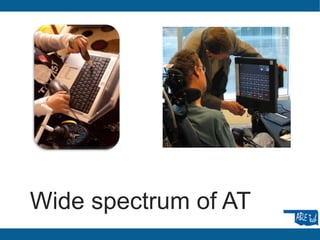
Wide spectrum of AT
TESTING ON THE
CHEAP
Tools to help you verify accessibility
without spending a pile of cash.
Browser toolbars (mostly)
• Browser plug-ins and add-ons
• WAVE toolbar for Firefox and website
• http://wave.webaim.org/toolbar/
• http://wave.webaim.org/
• Firefox Developer toolbar
• https://addons.mozilla.org/en-US/firefox/addon/web-developer/
• Juicy Studio Accessibility Toolbar for Firefox
• https://addons.mozilla.org/en-us/firefox/addon/juicy-studio-accessibility-
too/
• Jim Thatcher’s Favelets for Firefox
• http://jimthatcher.com/favelets/
• The Paciello Group Toolbar for Internet Explorer
• http://www.paciellogroup.com/resources/wat-ie-about.html
More free, included or low-
cost testing tools
• Stand-alone tools
• The Paciello Group Colour Contrast Analyser
• http://www.paciellogroup.com/resources/contrastAnalyser
• Native authoring tool accessibility checkers
• Microsoft PowerPoint, Word 2010, 2013
• Adobe Acrobat Professional X, XI
• Screen reading software
• Non-Visual Desktop Access (NVDA) for Windows
• http://www.nvda-project.org/
• JAWS for Windows
• http://www.freedomscientific.com/products/fs/jaws-product-page.asp
• VoiceOver is native on Mac OS and iOS
Caveats and tips
• Don’t focus on one screen reader for testing
• Don’t rely on one testing method, especially for dynamic sites
or software
• Unplug your mouse
• Inspect Element(s)
• Use a good checklist
• Know what the checklist is trying to find
• Focus on your content
Checklists and resources
• Oklahoma EITA Technical Assistance Document
• http://www.ok.gov/about/documents/tad%202005.pdf
• WebAIM Section 508
• http://webaim.org/standards/508/checklist
• WebAIM WCAG 2.0 (A, AA and AAA)
• http://webaim.org/standards/wcag/checklist
• Accessibility Priority Tool
• http://usability.com.au/2013/01/accessibility-priority-tool/
• Goodwitch Hands-On Checklist
• Google ahoy…

Accessibility Testing on the Cheap

  • 1.
    Accessibility Testing on the Cheap Toolsand tips to creating and maintaining an accessible web presence.
  • 2.
    TEST? WHAT FOR? Whataccessibility testing actually tests for
  • 3.
    Accessibility in three thoughts •Technology compatibility • Make digital content as understandable to technology as possible. • Fair and equal • Make the experience equivalent regardless of factors we cannot control. • Universal access • Don’t restrict anyone from getting where they want to go.
  • 4.
    POUR, as perthe W3C • Perceivable • Users must be able to perceive the information being presented (it can't be invisible to all of their senses) • Operable • Users must be able to operate the interface (the interface cannot require interaction that a user cannot perform) • Understandable • Users must be able to understand the information as well as the operation of the user interface (the content or operation cannot be beyond their understanding) • Robust • Users must be able to access the content as technologies advance (as technologies and user agents evolve, the content should remain accessible)
  • 5.
    Standards and policy •Americans with Disabilities Act (ADA) • Web Content Accessibility Guidelines • 1.0 and 2.0 • Section 508 of the Federal Rehabilitation Act of 1973, 1998 • Oklahoma Electronic and Information Technology Accessibility (EITA) statute, effective 2005 • Based on WCAG 1.0 • Still helpful, just limited
  • 6.
    Some elements of accessibility •What is the user interaction like? • Keyboard access • Visible focus • Color use and contrast • Assistive technology compatibility • Semantic structure • <h1>, <label>, <ul>, <th>, <td> etc. • Multimedia • Browsers • Assistive technology
  • 7.
  • 8.
    TESTING ON THE CHEAP Toolsto help you verify accessibility without spending a pile of cash.
  • 9.
    Browser toolbars (mostly) •Browser plug-ins and add-ons • WAVE toolbar for Firefox and website • http://wave.webaim.org/toolbar/ • http://wave.webaim.org/ • Firefox Developer toolbar • https://addons.mozilla.org/en-US/firefox/addon/web-developer/ • Juicy Studio Accessibility Toolbar for Firefox • https://addons.mozilla.org/en-us/firefox/addon/juicy-studio-accessibility- too/ • Jim Thatcher’s Favelets for Firefox • http://jimthatcher.com/favelets/ • The Paciello Group Toolbar for Internet Explorer • http://www.paciellogroup.com/resources/wat-ie-about.html
  • 10.
    More free, includedor low- cost testing tools • Stand-alone tools • The Paciello Group Colour Contrast Analyser • http://www.paciellogroup.com/resources/contrastAnalyser • Native authoring tool accessibility checkers • Microsoft PowerPoint, Word 2010, 2013 • Adobe Acrobat Professional X, XI • Screen reading software • Non-Visual Desktop Access (NVDA) for Windows • http://www.nvda-project.org/ • JAWS for Windows • http://www.freedomscientific.com/products/fs/jaws-product-page.asp • VoiceOver is native on Mac OS and iOS
  • 11.
    Caveats and tips •Don’t focus on one screen reader for testing • Don’t rely on one testing method, especially for dynamic sites or software • Unplug your mouse • Inspect Element(s) • Use a good checklist • Know what the checklist is trying to find • Focus on your content
  • 12.
    Checklists and resources •Oklahoma EITA Technical Assistance Document • http://www.ok.gov/about/documents/tad%202005.pdf • WebAIM Section 508 • http://webaim.org/standards/508/checklist • WebAIM WCAG 2.0 (A, AA and AAA) • http://webaim.org/standards/wcag/checklist • Accessibility Priority Tool • http://usability.com.au/2013/01/accessibility-priority-tool/ • Goodwitch Hands-On Checklist • Google ahoy…

Editor's Notes

  • #4 Don’t discriminate- legalUser environment, disability, temp disability, age,Just extend your set of unknowns past browser, platformDisability, including visual, hearing, mobility, cognitive, situational disability, partial disabilitiesGoogle, screen reading software - ATDEMO
  • #6 508 will include digital documents