

Embedded For You Magazine ESAT – ISPPhysical Computing using Arduinoand ISP Programmer for Atmel AVRPCB Partner : Academy Of Embedded Technology
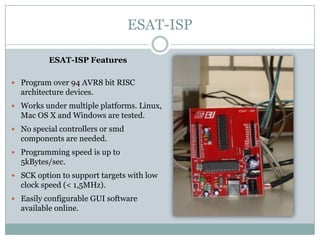
ESAT-ISPESAT-ISP FeaturesProgram over 94 AVR8 bit RISC architecture devices.Works under multiple platforms. Linux, Mac OS X and Windows are tested.No special controllers or smd components are needed.Programming speed is up to 5kBytes/sec.SCK option to support targets with low clock speed (< 1,5MHz). Easily configurable GUI software available online.
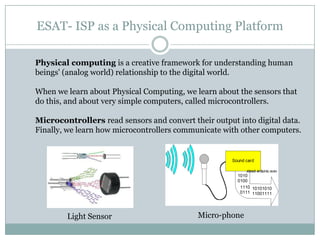
ESAT- ISP as a Physical Computing PlatformPhysical computing is a creative framework for understanding human beings' (analog world) relationship to the digital world. When we learn about Physical Computing, we learn about the sensors that do this, and about very simple computers, called microcontrollers. Microcontrollers read sensors and convert their output into digital data. Finally, we learn how microcontrollers communicate with other computers.	Light SensorMicro-phone
Arduino is a tool for making computers that can sense and control more of the physical world than your desktop computer. It's an open-source physical computing platform based on a simple microcontroller board, and a development environment for writing software for the board. Arduino is a Open source Physical/Embedded Computing Platform ..Arduino simplifies the process of working with microcontrollers, and it offers some advantage for teachers, students, and interested amateurs over other systems.Compatibility  of ESAT – ISP with Arduino development system can be used to develop application using Arduino Platform.For more information logon to www.arduino.ccESAT- ISP as a Physical Computing Platform
Online Arduino CommunityArduino Playground is a wiki where all the users of Arduino can contribute and benefit from their collective research. For more information logon to http://www.arduino.cc/playground/
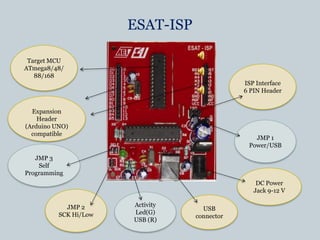
ESAT-ISPTarget MCUATmega8/48/88/168ISP Interface6 PIN HeaderExpansionHeader(Arduino UNO)compatibleJMP 1Power/USBJMP 3Self ProgrammingDC Power Jack 9-12 VJMP 2SCK Hi/LowActivity Led(G)USB (R)USB connector
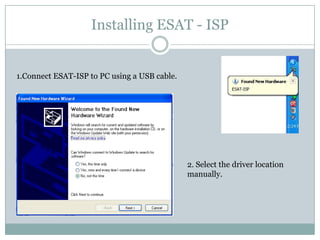
Installing ESAT - ISP1.Connect ESAT-ISP to PC using a USB cable.2. Select the driver location manually.
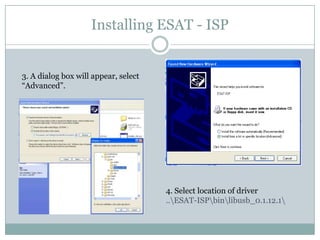
Installing ESAT - ISP3. A dialog box will appear, select    “Advanced”.4. Select location of driver ..\ESAT-ISP\bin\libusb_0.1.12.1\
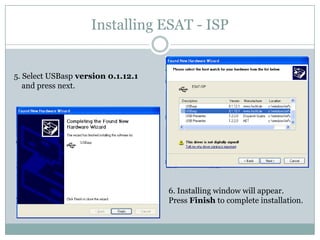
Installing ESAT - ISP5. Select USBasp version 0.1.12.1     and press next.6. Installing window will appear.Press Finish to complete installation.
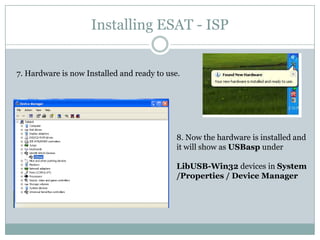
Installing ESAT - ISP7. Hardware is now Installed and ready to use.8. Now the hardware is installed and it will show as USBasp under LibUSB-Win32 devices in System /Properties / Device Manager
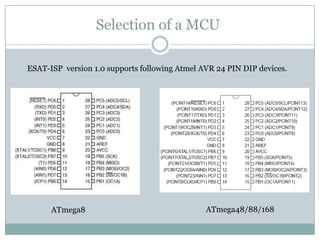
Selection of a MCU	ESAT-ISP  version 1.0 supports following Atmel AVR 24 PIN DIP devices.ATmega48/88/168 ATmega8
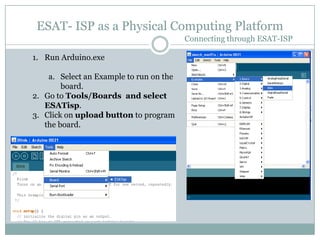
ESAT- ISP as a Physical Computing PlatformConnecting through ESAT-ISPRun Arduino.exeSelect an Example to run on the board.Go to Tools/Boards  and select ESATisp.Click on upload button to program the board.
To correctly program the board make  sure to  erase the board before each  upload operation using Khazma programmer.(Download  Khazma Programmer from here)			orCopy it from 	CD:\ESAT-ISP\Tools\ProgrammerSelect your device.Click on erase.6.	If you get an error make sure you are using	correct  jumper settings on ESAT-ISP board	(See Jumper settings section).ESAT- ISP as a Physical Computing PlatformConnecting through ESAT-ISP
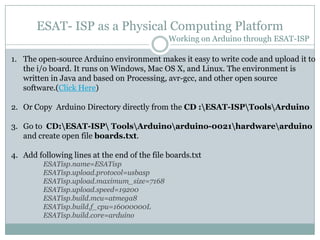
ESAT- ISP as a Physical Computing PlatformWorking on Arduino through ESAT-ISPThe open-source Arduino environment makes it easy to write code and upload it to the i/o board. It runs on Windows, Mac OS X, and Linux. The environment is written in Java and based on Processing, avr-gcc, and other open source software.(Click Here)Or Copy  Arduino Directory directly from the CD :\ESAT-ISP\Tools\Arduino3.	Go to  CD:\ESAT-ISP\ Tools\Arduino\arduino-0021\hardware\arduino	and create open file boards.txt.Add following lines at the end of the file boards.txtESATisp.name=ESATispESATisp.upload.protocol=usbaspESATisp.upload.maximum_size=7168ESATisp.upload.speed=19200ESATisp.build.mcu=atmega8ESATisp.build.f_cpu=16000000LESATisp.build.core=arduino
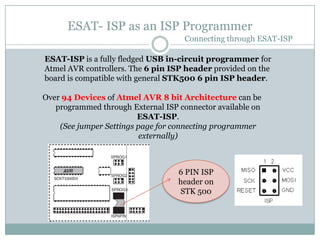
ESAT- ISP as an ISP ProgrammerConnecting through ESAT-ISP	ESAT-ISP is a fully fledged USB in-circuit programmer for Atmel AVR controllers. The 6 pin ISP header provided on the board is compatible with general STK500 6 pin ISP header.Over 94 Devices ofAtmel AVR 8 bit Architecture can be programmed through External ISP connector available on ESAT-ISP.	(See jumper Settings page for connecting programmer externally)6 PIN ISP header on STK 500
ESAT- ISP as a Physical Computing PlatformHow to program external devices ?Extend a connector compatible to 6 PIN ISP header Connect your hardware to 6 PIN ISP header of ESAT- ISP board.If the target MCU on your hardware is  self powered .(connect the 	JMP 1 to Power)If the target MCU is not self powered ,DC socket jack available on ESAT-ISP can be used to provide the power externally.ESAT can be as a development board for 28 PIN devices like ATmega8/48/88/128Place the MCU in the 28 PIN ZIF socket provided on board.The target MCU can be powered through USB in case power supply is not available.(Connect JMP1 to USB)6.	Use Khazma Programmer or any software compatible with USBasp application to program he device. For further details  on USBasp application logon to http://www.fischl.de/usbasp/
ESAT-ISP Jumper SettingsJumper SettingsJMP1	- Target MCU Power Source SelectionUSB : 	This mode is used to power the target MCU External/On 	board from  USB.Power:	This mode is used to power the target MCU External/On 	board from  external DC supply.(recommended)CAUTION : When using JMP1 –USB to power the target make sure the 	         current consumption of circuit does not exceed 500 ma.JMP2	- Programming frequency  selection SCK Hi/LowConnected (SCK  Low):Generally used for programming MCU 	    			having factory set fuses. (recommended)Disconnected(SCK HI ):Fast programming of Target MCU.JMP3	-  Self Programming(Do not Connect)Connected  : Used for upgrading the software of ESAT-ISP.Disconnected : (Recommended)
Subscription : subscribe@embedded4u.comArticles Submission: submit@embedded4u.comQueries : support@aet-embedtech.comFor Inquiries & Feedback : Click HereStudents looking for Guidance and help contact support@aet-embedtech.comWebsite : www.embedded4u.comEmbedded For You MagazineDedicated to Embedded World
Thank YouRegister Here  to provide feedback and receive updates from us !!

ESAT– ISP

  • 1.
    Embedded For YouMagazine ESAT – ISPPhysical Computing using Arduinoand ISP Programmer for Atmel AVRPCB Partner : Academy Of Embedded Technology
  • 2.
    ESAT-ISPESAT-ISP FeaturesProgram over94 AVR8 bit RISC architecture devices.Works under multiple platforms. Linux, Mac OS X and Windows are tested.No special controllers or smd components are needed.Programming speed is up to 5kBytes/sec.SCK option to support targets with low clock speed (< 1,5MHz). Easily configurable GUI software available online.
  • 3.
    ESAT- ISP asa Physical Computing PlatformPhysical computing is a creative framework for understanding human beings' (analog world) relationship to the digital world. When we learn about Physical Computing, we learn about the sensors that do this, and about very simple computers, called microcontrollers. Microcontrollers read sensors and convert their output into digital data. Finally, we learn how microcontrollers communicate with other computers. Light SensorMicro-phone
  • 4.
    Arduino is atool for making computers that can sense and control more of the physical world than your desktop computer. It's an open-source physical computing platform based on a simple microcontroller board, and a development environment for writing software for the board. Arduino is a Open source Physical/Embedded Computing Platform ..Arduino simplifies the process of working with microcontrollers, and it offers some advantage for teachers, students, and interested amateurs over other systems.Compatibility of ESAT – ISP with Arduino development system can be used to develop application using Arduino Platform.For more information logon to www.arduino.ccESAT- ISP as a Physical Computing Platform
  • 5.
    Online Arduino CommunityArduinoPlayground is a wiki where all the users of Arduino can contribute and benefit from their collective research. For more information logon to http://www.arduino.cc/playground/
  • 6.
    ESAT-ISPTarget MCUATmega8/48/88/168ISP Interface6PIN HeaderExpansionHeader(Arduino UNO)compatibleJMP 1Power/USBJMP 3Self ProgrammingDC Power Jack 9-12 VJMP 2SCK Hi/LowActivity Led(G)USB (R)USB connector
  • 7.
    Installing ESAT -ISP1.Connect ESAT-ISP to PC using a USB cable.2. Select the driver location manually.
  • 8.
    Installing ESAT -ISP3. A dialog box will appear, select “Advanced”.4. Select location of driver ..\ESAT-ISP\bin\libusb_0.1.12.1\
  • 9.
    Installing ESAT -ISP5. Select USBasp version 0.1.12.1 and press next.6. Installing window will appear.Press Finish to complete installation.
  • 10.
    Installing ESAT -ISP7. Hardware is now Installed and ready to use.8. Now the hardware is installed and it will show as USBasp under LibUSB-Win32 devices in System /Properties / Device Manager
  • 11.
    Selection of aMCU ESAT-ISP version 1.0 supports following Atmel AVR 24 PIN DIP devices.ATmega48/88/168 ATmega8
  • 12.
    ESAT- ISP asa Physical Computing PlatformConnecting through ESAT-ISPRun Arduino.exeSelect an Example to run on the board.Go to Tools/Boards and select ESATisp.Click on upload button to program the board.
  • 13.
    To correctly programthe board make sure to erase the board before each upload operation using Khazma programmer.(Download Khazma Programmer from here) orCopy it from CD:\ESAT-ISP\Tools\ProgrammerSelect your device.Click on erase.6. If you get an error make sure you are using correct jumper settings on ESAT-ISP board (See Jumper settings section).ESAT- ISP as a Physical Computing PlatformConnecting through ESAT-ISP
  • 14.
    ESAT- ISP asa Physical Computing PlatformWorking on Arduino through ESAT-ISPThe open-source Arduino environment makes it easy to write code and upload it to the i/o board. It runs on Windows, Mac OS X, and Linux. The environment is written in Java and based on Processing, avr-gcc, and other open source software.(Click Here)Or Copy Arduino Directory directly from the CD :\ESAT-ISP\Tools\Arduino3. Go to CD:\ESAT-ISP\ Tools\Arduino\arduino-0021\hardware\arduino and create open file boards.txt.Add following lines at the end of the file boards.txtESATisp.name=ESATispESATisp.upload.protocol=usbaspESATisp.upload.maximum_size=7168ESATisp.upload.speed=19200ESATisp.build.mcu=atmega8ESATisp.build.f_cpu=16000000LESATisp.build.core=arduino
  • 15.
    ESAT- ISP asan ISP ProgrammerConnecting through ESAT-ISP ESAT-ISP is a fully fledged USB in-circuit programmer for Atmel AVR controllers. The 6 pin ISP header provided on the board is compatible with general STK500 6 pin ISP header.Over 94 Devices ofAtmel AVR 8 bit Architecture can be programmed through External ISP connector available on ESAT-ISP. (See jumper Settings page for connecting programmer externally)6 PIN ISP header on STK 500
  • 16.
    ESAT- ISP asa Physical Computing PlatformHow to program external devices ?Extend a connector compatible to 6 PIN ISP header Connect your hardware to 6 PIN ISP header of ESAT- ISP board.If the target MCU on your hardware is self powered .(connect the JMP 1 to Power)If the target MCU is not self powered ,DC socket jack available on ESAT-ISP can be used to provide the power externally.ESAT can be as a development board for 28 PIN devices like ATmega8/48/88/128Place the MCU in the 28 PIN ZIF socket provided on board.The target MCU can be powered through USB in case power supply is not available.(Connect JMP1 to USB)6. Use Khazma Programmer or any software compatible with USBasp application to program he device. For further details on USBasp application logon to http://www.fischl.de/usbasp/
  • 17.
    ESAT-ISP Jumper SettingsJumperSettingsJMP1 - Target MCU Power Source SelectionUSB : This mode is used to power the target MCU External/On board from USB.Power: This mode is used to power the target MCU External/On board from external DC supply.(recommended)CAUTION : When using JMP1 –USB to power the target make sure the current consumption of circuit does not exceed 500 ma.JMP2 - Programming frequency selection SCK Hi/LowConnected (SCK Low):Generally used for programming MCU having factory set fuses. (recommended)Disconnected(SCK HI ):Fast programming of Target MCU.JMP3 - Self Programming(Do not Connect)Connected : Used for upgrading the software of ESAT-ISP.Disconnected : (Recommended)
  • 18.
    Subscription : subscribe@embedded4u.comArticlesSubmission: submit@embedded4u.comQueries : support@aet-embedtech.comFor Inquiries & Feedback : Click HereStudents looking for Guidance and help contact support@aet-embedtech.comWebsite : www.embedded4u.comEmbedded For You MagazineDedicated to Embedded World
  • 19.
    Thank YouRegister Here to provide feedback and receive updates from us !!