John Pallister Wolsingham School and Community College - UK November 2008 The ePortfolio Process Supporting Training and the Trainer
The Background  - increasing demand: for training to equip employees for a competitive and rapidly changing world Need to harness new and emerging technologies Changing demands of ‘jobs’  - Need to retrain for a more ‘fluid’ employment market Likely to have many different jobs in lifetime for 'evidence’ that shows that employees ‘can do’  generic skills and competencies   Functional skills Employability skills Citizenship skill Learning and thinking skills Vocationally specific skills … . for access to anywhere, anytime training
Increasing Demand for skills  employees need to be able to ‘do’ something to be able to function pace of developments often requires skills and competencies to be evidenced faster than new qualifications can be developed E.g.  People working with new technologies, Web 2 etc need to work in different ways  need to train people to work in these ways need for 'evidence’ that shows that employees ‘can’
The Background –  training environments:   Rapidly evolving practice -  Information and Communications technologies (inc Web 2)   Mobile technologies Converging technologies  pervasive and invasive  technologies online environments - tools, spaces and communities
Trainers work with: Groups – large and small Individuals In Venues/environments including: training rooms the work place hotels on-line  …….
Trainers: facilitate  support Mentor coach Teach …… …… Quite a job! -  a changing and evolving role
BUT,  regardless of the situation,  Trainers need to: Find out what the learner already knows or can do Then  Engage the learner Get their interest Retain their interest Challenge and motivate And  Support the learner
Our Trainees increasingly: Work in environments that require them to use ICT Expect to use ICT in all aspects of their work Carry phones with video cameras, music playback, audio recording etc. Want to communicate via blogs, chat rooms, text messaging, voice over internet, MSN etc. Want to play on computer/Internet games  have 'digital identities' and ICT based, social networks via MySpace etc are living and learning in a rapidly changing world
An ePortfolio: many different definitions for ePortfolios - common elements:  digital evidence owned by a learner;  structured and stored in some way that enables the evidence to found presented or shared with others [teachers, parents, peers, potential employers/HE/Training providers]; evidence being stored is likely to include: Evidence of skills and competencies plans and aspirations achievements  Learning experiences reflections and thinking A portfolio of digital evidence owned and managed by the learner?
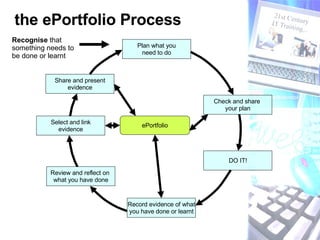
the ePortfolio Process Plan what you need to do Check and share  your plan DO IT! Record evidence of what you have done or learnt Share and present evidence Select and link evidence ePortfolio Review and reflect on  what you have done Recognise  that something needs to be done or learnt
What is in it for the Learner? provides a good basis for new training/learning  -  helps the Trainer to understand what the Learner ‘can do’/’has done’   Encourage learners to take an active part in their own learning –  encourage reflection, planning and dialogue about learning  places the learner at the centre of the learning process - supports Personalised learning   Can motivate and engage the learner Can raise learner self esteem Can support progression and provide opportunities for learners to develop a 'presentational' or self-marketing portfolio Can provide somewhere for learners to store evidence to support assessment processes Can be hosted on-line enabling both the Trainer/Trainee to access the ePortfolio, at a ‘distance’  -  supporting dialogue and formative assessment
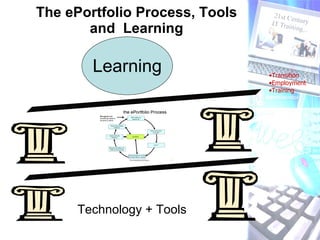
The ePortfolio Process, Tools and  Learning Transition Employment Training Technology + Tools Learning
Need to focus on learning not the tools Tools and technology will change  Life-long, life-wide hosting, inter-operability and anywhere, anytime access are important challenges But  if the ePortfolio process has value why not use it now, harnessing the available technologies?
Engaging Learners –   The tools and technology Use tools that enables them to:  use multimedia evidence  customise and take owner ship of their ePortfolio Decide how their ePortfolio is structured be creative with multimedia evidence
Engaging Learners – policy Integrate the ePortfolio process into everyday practice –  a natural  ‘way of working’ Promote the advantages of the ePortfolio process to learners, employers and staff +  parents, HE etc Build in time and  opportunities for Trainers to sit down and look at Learner ePortfolios Provide a range of different audiences –  audience gives value to the process Train Trainers so that they can support learners who are using ePortfolios
Engaging Learners –  The learning environment Create a learning climate where:   Learners are provided with opportunities to reflect and evaluate what they have planned, done, made, experienced or learnt.  Learners feel comfortable sharing their reflections and revealing their own strengths and weaknesses  Trainers value the ePortfolio process and are able to provide feedback and support to learners  The process is valued more than just the product Spelling mistakes etc. are accepted - Always work in progress
Engaging Learners –  Make sure they know what it is  that they will need to do Make sure that they understand the ePortfolio process and how it fits in with what they already do –  watch the  ‘Compiling your ePortfolio’  Podcast Emphasis the Assessment for learning –  pupils will improve most if they understand the aim of their learning, where they are in relation to this aim and how they can achieve the aim (or close the gap in their knowledge) being part of the review process empowers pupils to take action to improve their performance.  http://www.qca.org.uk/qca_4338.aspx
Engaging Learners –  Working with them … (1) Find time to talk to learners and encourage them to reflect on what they have done, learnt, achieved or plan to do Encourage them to record their reflections  and  then, following the discussions that sharing their reflections prompted, revise their plans.  Encourage learners think carefully about where/how they should link in new evidence –  this makes them focus on the ‘bigger picture’ of their learning and achievements
Engaging Learners –  working with them … (2) highlight success and achievement, help them  to recognise what  they  have done to ‘generate’ the success –  link reflections into their ePortfolio  encourage them to identify their strengths and what has worked well for them – build these into future plans -  link reflections into their ePortfolio encourage them to look for opportunities to improve – what they need to do next time to improve their performance
The ePortfolio process supporting the professional development of the Trainer: Evidence  trainer competence –  including new  training techniques  Support professional development –  the trainer as a learner – supporting reflective practice Support progression -  support reviews and job/contract applications The Trainer better able to support learners who themselves are using ePortfolios
The ePortfolio process requires, and supports a shift from teaching to learning? The ePortfolio process has the potential to support both the Trainee and the Trainer? The ePortfolio process is at the core of any PLE?
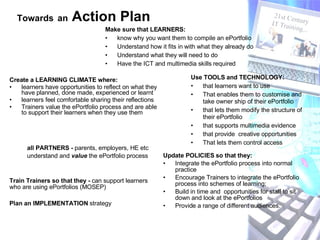
Create a LEARNING CLIMATE where: learners have opportunities to reflect on what they have planned, done made, experienced or learnt learners feel comfortable sharing their reflections Trainers value the ePortfolio process and are able to support their learners when they use them Update POLICIES so that they: Integrate the ePortfolio process into normal practice  Encourage Trainers to integrate the ePortfolio process into schemes of learning;  Build in time and  opportunities for staff to sit down and look at the ePortfolios Provide a range of different audiences. Use TOOLS and TECHNOLOGY: that learners want to use That enables them to customise and take owner ship of their ePortfolio that lets them modify the structure of their ePortfolio that supports multimedia evidence that provide  creative opportunities That lets them control access Make sure that LEARNERS:   know why you want them to compile an ePortfolio  Understand how it fits in with what they already do Understand what they will need to do Have the ICT and multimedia skills required Train Trainers so that they -  can support learners who are using ePortfolios (MOSEP) all PARTNERS -  parents, employers, HE etc understand and  value  the ePortfolio process  Towards   an  Action Plan   Plan an IMPLEMENTATION  strategy
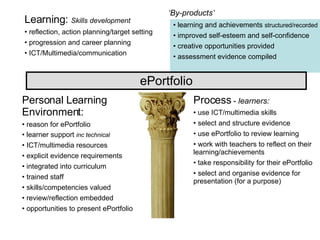
Personal Learning Environment: reason for ePortfolio learner support  inc technical ICT/multimedia resources explicit evidence requirements integrated into curriculum trained staff skills/competencies valued review/reflection embedded opportunities to present ePortfolio Process  -  learners: use ICT/multimedia skills select and structure evidence use ePortfolio to review learning work with teachers to reflect on their learning/achievements take responsibility for their ePortfolio select and organise evidence for presentation (for a purpose) Learning:  Skills development   reflection, action planning/target setting progression and career planning ICT/Multimedia/communication learning and achievements  structured/recorded   improved self-esteem and self-confidence creative opportunities provided assessment evidence compiled ePortfolio ‘ By-products’

ePortfolios supporting training and the trainer

  • 1.
    John Pallister WolsinghamSchool and Community College - UK November 2008 The ePortfolio Process Supporting Training and the Trainer
  • 2.
    The Background - increasing demand: for training to equip employees for a competitive and rapidly changing world Need to harness new and emerging technologies Changing demands of ‘jobs’ - Need to retrain for a more ‘fluid’ employment market Likely to have many different jobs in lifetime for 'evidence’ that shows that employees ‘can do’ generic skills and competencies Functional skills Employability skills Citizenship skill Learning and thinking skills Vocationally specific skills … . for access to anywhere, anytime training
  • 3.
    Increasing Demand forskills employees need to be able to ‘do’ something to be able to function pace of developments often requires skills and competencies to be evidenced faster than new qualifications can be developed E.g. People working with new technologies, Web 2 etc need to work in different ways need to train people to work in these ways need for 'evidence’ that shows that employees ‘can’
  • 4.
    The Background – training environments: Rapidly evolving practice - Information and Communications technologies (inc Web 2) Mobile technologies Converging technologies pervasive and invasive technologies online environments - tools, spaces and communities
  • 5.
    Trainers work with:Groups – large and small Individuals In Venues/environments including: training rooms the work place hotels on-line …….
  • 6.
    Trainers: facilitate support Mentor coach Teach …… …… Quite a job! - a changing and evolving role
  • 7.
    BUT, regardlessof the situation, Trainers need to: Find out what the learner already knows or can do Then Engage the learner Get their interest Retain their interest Challenge and motivate And Support the learner
  • 8.
    Our Trainees increasingly:Work in environments that require them to use ICT Expect to use ICT in all aspects of their work Carry phones with video cameras, music playback, audio recording etc. Want to communicate via blogs, chat rooms, text messaging, voice over internet, MSN etc. Want to play on computer/Internet games have 'digital identities' and ICT based, social networks via MySpace etc are living and learning in a rapidly changing world
  • 9.
    An ePortfolio: manydifferent definitions for ePortfolios - common elements: digital evidence owned by a learner; structured and stored in some way that enables the evidence to found presented or shared with others [teachers, parents, peers, potential employers/HE/Training providers]; evidence being stored is likely to include: Evidence of skills and competencies plans and aspirations achievements Learning experiences reflections and thinking A portfolio of digital evidence owned and managed by the learner?
  • 10.
    the ePortfolio ProcessPlan what you need to do Check and share your plan DO IT! Record evidence of what you have done or learnt Share and present evidence Select and link evidence ePortfolio Review and reflect on what you have done Recognise that something needs to be done or learnt
  • 11.
    What is init for the Learner? provides a good basis for new training/learning - helps the Trainer to understand what the Learner ‘can do’/’has done’ Encourage learners to take an active part in their own learning – encourage reflection, planning and dialogue about learning places the learner at the centre of the learning process - supports Personalised learning Can motivate and engage the learner Can raise learner self esteem Can support progression and provide opportunities for learners to develop a 'presentational' or self-marketing portfolio Can provide somewhere for learners to store evidence to support assessment processes Can be hosted on-line enabling both the Trainer/Trainee to access the ePortfolio, at a ‘distance’ - supporting dialogue and formative assessment
  • 12.
    The ePortfolio Process,Tools and Learning Transition Employment Training Technology + Tools Learning
  • 13.
    Need to focuson learning not the tools Tools and technology will change Life-long, life-wide hosting, inter-operability and anywhere, anytime access are important challenges But if the ePortfolio process has value why not use it now, harnessing the available technologies?
  • 14.
    Engaging Learners – The tools and technology Use tools that enables them to: use multimedia evidence customise and take owner ship of their ePortfolio Decide how their ePortfolio is structured be creative with multimedia evidence
  • 15.
    Engaging Learners –policy Integrate the ePortfolio process into everyday practice – a natural ‘way of working’ Promote the advantages of the ePortfolio process to learners, employers and staff + parents, HE etc Build in time and opportunities for Trainers to sit down and look at Learner ePortfolios Provide a range of different audiences – audience gives value to the process Train Trainers so that they can support learners who are using ePortfolios
  • 16.
    Engaging Learners – The learning environment Create a learning climate where: Learners are provided with opportunities to reflect and evaluate what they have planned, done, made, experienced or learnt. Learners feel comfortable sharing their reflections and revealing their own strengths and weaknesses Trainers value the ePortfolio process and are able to provide feedback and support to learners The process is valued more than just the product Spelling mistakes etc. are accepted - Always work in progress
  • 17.
    Engaging Learners – Make sure they know what it is that they will need to do Make sure that they understand the ePortfolio process and how it fits in with what they already do – watch the ‘Compiling your ePortfolio’ Podcast Emphasis the Assessment for learning – pupils will improve most if they understand the aim of their learning, where they are in relation to this aim and how they can achieve the aim (or close the gap in their knowledge) being part of the review process empowers pupils to take action to improve their performance. http://www.qca.org.uk/qca_4338.aspx
  • 18.
    Engaging Learners – Working with them … (1) Find time to talk to learners and encourage them to reflect on what they have done, learnt, achieved or plan to do Encourage them to record their reflections and then, following the discussions that sharing their reflections prompted, revise their plans. Encourage learners think carefully about where/how they should link in new evidence – this makes them focus on the ‘bigger picture’ of their learning and achievements
  • 19.
    Engaging Learners – working with them … (2) highlight success and achievement, help them to recognise what they have done to ‘generate’ the success – link reflections into their ePortfolio encourage them to identify their strengths and what has worked well for them – build these into future plans - link reflections into their ePortfolio encourage them to look for opportunities to improve – what they need to do next time to improve their performance
  • 20.
    The ePortfolio processsupporting the professional development of the Trainer: Evidence trainer competence – including new training techniques Support professional development – the trainer as a learner – supporting reflective practice Support progression - support reviews and job/contract applications The Trainer better able to support learners who themselves are using ePortfolios
  • 21.
    The ePortfolio processrequires, and supports a shift from teaching to learning? The ePortfolio process has the potential to support both the Trainee and the Trainer? The ePortfolio process is at the core of any PLE?
  • 22.
    Create a LEARNINGCLIMATE where: learners have opportunities to reflect on what they have planned, done made, experienced or learnt learners feel comfortable sharing their reflections Trainers value the ePortfolio process and are able to support their learners when they use them Update POLICIES so that they: Integrate the ePortfolio process into normal practice Encourage Trainers to integrate the ePortfolio process into schemes of learning; Build in time and opportunities for staff to sit down and look at the ePortfolios Provide a range of different audiences. Use TOOLS and TECHNOLOGY: that learners want to use That enables them to customise and take owner ship of their ePortfolio that lets them modify the structure of their ePortfolio that supports multimedia evidence that provide creative opportunities That lets them control access Make sure that LEARNERS: know why you want them to compile an ePortfolio Understand how it fits in with what they already do Understand what they will need to do Have the ICT and multimedia skills required Train Trainers so that they - can support learners who are using ePortfolios (MOSEP) all PARTNERS - parents, employers, HE etc understand and value the ePortfolio process Towards an Action Plan Plan an IMPLEMENTATION strategy
  • 23.
    Personal Learning Environment:reason for ePortfolio learner support inc technical ICT/multimedia resources explicit evidence requirements integrated into curriculum trained staff skills/competencies valued review/reflection embedded opportunities to present ePortfolio Process - learners: use ICT/multimedia skills select and structure evidence use ePortfolio to review learning work with teachers to reflect on their learning/achievements take responsibility for their ePortfolio select and organise evidence for presentation (for a purpose) Learning: Skills development reflection, action planning/target setting progression and career planning ICT/Multimedia/communication learning and achievements structured/recorded improved self-esteem and self-confidence creative opportunities provided assessment evidence compiled ePortfolio ‘ By-products’