Pr ofessional
Development and
Technolog y
Getting Teachers Into the Game
The Problem:
Districts can provide all the
technology in the world, but it
the staff doesn’t feel
competent it won’t get used.
The Solution:
Provide training for staff that
allows them to master the
material
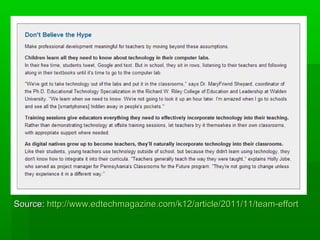
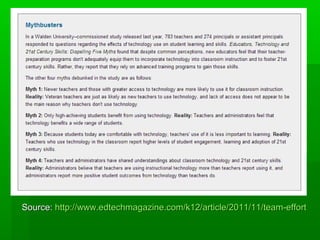
Source: http://www.edtechmagazine.com/k12/article/2011/11/team-effort
We MUST provide opportunities for our
teachers to truly be the students when it
comes to their own professional learning.


Instead of offering 3-6 hour workshops (do we teach k-12
students in 3 and 6 hour sessions?), offer 30-45 minute
sessions where teachers learn one or two new things with
immediate application in a hands-on and relevant way.



Encourage teachers to walk away with something that they
can use with their students in the next week.



Allow time for teachers to collaborate and learn together
during professional development.



Provide resources in print and video format for teachers to
review what was learned on their own time, and in their
own way.

Source:

http://educationismylife.com/instructional-technology-professional-development-by-design
Coaching will help you
improve.
With an instructional technology coach in place,
not only do the teachers receive professional
development and training sessions throughout
the school year, but they have the opportunities
to put into practice what they’ve learned at those
trainings with the support and guidance they
need to take risks and try new things. In an ideal
model, the coach provides support for the
teachers in the following ways:

Source:
http://educationismylife.com/instructional-technology-professional-development-by-design
Before The coach is there to plan
technology-rich and contentspecific learning activities and
projects with the teachers. Higherorder tasks, 21st century skills and
relevant standards are discussed
and implemented in the plan.

Source:
http://educationismylife.com/instructional-technology-professional-development-by-
During The coach is in the classroom with
the teacher and students when a
new activity involving technology
takes place to provide both
instructional and technological
support, in a co-teaching capacity
in some cases.

Source:
http://educationismylife.com/instructional-technology-professional-development-by-
After The coach reflects with the teacher
after the project or activity is
complete on the effectiveness of the
activity, changes for next time, and
the comfort of the teacher to
implement this type of technology
infusion in the future.

Source:
http://educationismylife.com/instructional-technology-professional-development-by-des
This type of professional development
through coaching provides not only
professional development when it is
needed most, in the classroom with
the teacher, but because the teacher
is truly learning how to integrate
technology in a true project or activity
with students, it is immediately
relevant and meaningful.
Source: http://educationismylife.com/instructional-technology-professional-development-by-design/
The 5 J Approach
 job-related, focused on the core competencies of the
classroom, not technology
 just enough, emphasizing increased comfort, not
proficiency, with computers and management of limited
technology resources
 just in time, meaning teacher are provided with skills as
and when needed
 just in case teachers need to plan for contingencies
 accompanied by a "just try it" attitude, wherein instructors
apply both pressure and support to compel teachers to use
what they've learned.
Source: http://elearnmag.acm.org/featured.cfm?aid=1865476
Source: http://www.techknowlogia.com/TKL_Articles/PDF/435.pdf
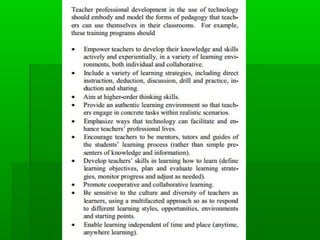
Most teachers want to learn to use
educational technology effectively, but they
lack the conceptual framework, time,
computer access and support necessary to
do so.4 A well planned, ongoing
professional development program, based
in a theoretical model, linked to curricular
objectives, incorporating formative
evaluation activities, and sustained by
sufficient financial and staff support is
essential if teachers are to use technology
effectively to improve student learning.
Source: http://thejournal.com/articles/2012/03/14/getting-teachers-up-to-speedwith-technology.aspx?=THE21
Develop better
training.
Historically the district conducted a one-day session
where teachers were trained on how to use the
technology. To beef up that program Race and her
team worked together with the school's IT department
to develop a district-wide training model. It was broken
up into four sessions that were two to three hours long
and centered on a specific piece of technology (such
as a smart board or class responder system). The
sessions comprised live lectures, Q&A sessions, online
videos, homework assignments, and even tests that
teachers had to take before proceeding to the next
segment.
Make technology the
incentive.
Before Western Heights School District handed
out Mobi mobile interactive whiteboards to
teachers the latter had to sign up for and attend
at least one related training session. During the
training teachers learned how to use the
technology, which allows them to operate their
screens while moving around their classrooms.
The training was handled by a technology
coordinator who used live video streaming and
other tools to demonstrate the whiteboards'
usefulness in the classroom.
Take teachers out of their comfort
zones.

Sometimes you have to treat teachers like
students to get them to use technology
effectively. At Westville Community District
II in Westville, IL, new technology initiatives
always include ample professional
development. That training typically finds
teachers pushing outside of their comfort
zones to learn how to maximize the tools.
Don’t try to force it.
Understand that teachers are at different stages
when it comes to technology and that not all of
them will be quick to embrace and integrate the
new tools that you're handing them. To break
through that barrier, Race said, her district has
cultivated a handful of "innovators"--tech-savvy
educators who can spread the gospel of
technology and its value in the classroom.
"Teachers can be very challenging to teach," said
Race. "Don't force anything too fast on them; and
rely on a few innovators to create the envy and
interest necessary to get everybody else on
board."
Let teachers decide if they want it, or
not.
Heather Borowski, instructional technology
coordinator, said the district learned that while
some teachers were enamored by the technology,
others thought that creating the associated
materials would eat up too much of their time. To
address the issue and get more teachers onboard,
the district held day-long instructional sessions on
how to use the equipment and build lessons
around it. It also invested in a cloud-based
software program that allows teachers to prepare
lessons and collaborate with one another and
formed mentoring groups lead by those instructors
who have successfully adopted the technology in
their classrooms.

Professional development and technology

  • 1.
    Pr ofessional Development and Technology Getting Teachers Into the Game
  • 2.
    The Problem: Districts canprovide all the technology in the world, but it the staff doesn’t feel competent it won’t get used.
  • 3.
    The Solution: Provide trainingfor staff that allows them to master the material
  • 4.
  • 5.
  • 6.
    We MUST provideopportunities for our teachers to truly be the students when it comes to their own professional learning.  Instead of offering 3-6 hour workshops (do we teach k-12 students in 3 and 6 hour sessions?), offer 30-45 minute sessions where teachers learn one or two new things with immediate application in a hands-on and relevant way.  Encourage teachers to walk away with something that they can use with their students in the next week.  Allow time for teachers to collaborate and learn together during professional development.  Provide resources in print and video format for teachers to review what was learned on their own time, and in their own way. Source: http://educationismylife.com/instructional-technology-professional-development-by-design
  • 7.
    Coaching will helpyou improve. With an instructional technology coach in place, not only do the teachers receive professional development and training sessions throughout the school year, but they have the opportunities to put into practice what they’ve learned at those trainings with the support and guidance they need to take risks and try new things. In an ideal model, the coach provides support for the teachers in the following ways: Source: http://educationismylife.com/instructional-technology-professional-development-by-design
  • 8.
    Before The coachis there to plan technology-rich and contentspecific learning activities and projects with the teachers. Higherorder tasks, 21st century skills and relevant standards are discussed and implemented in the plan. Source: http://educationismylife.com/instructional-technology-professional-development-by-
  • 9.
    During The coachis in the classroom with the teacher and students when a new activity involving technology takes place to provide both instructional and technological support, in a co-teaching capacity in some cases. Source: http://educationismylife.com/instructional-technology-professional-development-by-
  • 10.
    After The coachreflects with the teacher after the project or activity is complete on the effectiveness of the activity, changes for next time, and the comfort of the teacher to implement this type of technology infusion in the future. Source: http://educationismylife.com/instructional-technology-professional-development-by-des
  • 11.
    This type ofprofessional development through coaching provides not only professional development when it is needed most, in the classroom with the teacher, but because the teacher is truly learning how to integrate technology in a true project or activity with students, it is immediately relevant and meaningful. Source: http://educationismylife.com/instructional-technology-professional-development-by-design/
  • 12.
    The 5 JApproach  job-related, focused on the core competencies of the classroom, not technology  just enough, emphasizing increased comfort, not proficiency, with computers and management of limited technology resources  just in time, meaning teacher are provided with skills as and when needed  just in case teachers need to plan for contingencies  accompanied by a "just try it" attitude, wherein instructors apply both pressure and support to compel teachers to use what they've learned. Source: http://elearnmag.acm.org/featured.cfm?aid=1865476
  • 13.
  • 14.
    Most teachers wantto learn to use educational technology effectively, but they lack the conceptual framework, time, computer access and support necessary to do so.4 A well planned, ongoing professional development program, based in a theoretical model, linked to curricular objectives, incorporating formative evaluation activities, and sustained by sufficient financial and staff support is essential if teachers are to use technology effectively to improve student learning.
  • 17.
  • 18.
    Develop better training. Historically thedistrict conducted a one-day session where teachers were trained on how to use the technology. To beef up that program Race and her team worked together with the school's IT department to develop a district-wide training model. It was broken up into four sessions that were two to three hours long and centered on a specific piece of technology (such as a smart board or class responder system). The sessions comprised live lectures, Q&A sessions, online videos, homework assignments, and even tests that teachers had to take before proceeding to the next segment.
  • 19.
    Make technology the incentive. BeforeWestern Heights School District handed out Mobi mobile interactive whiteboards to teachers the latter had to sign up for and attend at least one related training session. During the training teachers learned how to use the technology, which allows them to operate their screens while moving around their classrooms. The training was handled by a technology coordinator who used live video streaming and other tools to demonstrate the whiteboards' usefulness in the classroom.
  • 20.
    Take teachers outof their comfort zones. Sometimes you have to treat teachers like students to get them to use technology effectively. At Westville Community District II in Westville, IL, new technology initiatives always include ample professional development. That training typically finds teachers pushing outside of their comfort zones to learn how to maximize the tools.
  • 21.
    Don’t try toforce it. Understand that teachers are at different stages when it comes to technology and that not all of them will be quick to embrace and integrate the new tools that you're handing them. To break through that barrier, Race said, her district has cultivated a handful of "innovators"--tech-savvy educators who can spread the gospel of technology and its value in the classroom. "Teachers can be very challenging to teach," said Race. "Don't force anything too fast on them; and rely on a few innovators to create the envy and interest necessary to get everybody else on board."
  • 22.
    Let teachers decideif they want it, or not. Heather Borowski, instructional technology coordinator, said the district learned that while some teachers were enamored by the technology, others thought that creating the associated materials would eat up too much of their time. To address the issue and get more teachers onboard, the district held day-long instructional sessions on how to use the equipment and build lessons around it. It also invested in a cloud-based software program that allows teachers to prepare lessons and collaborate with one another and formed mentoring groups lead by those instructors who have successfully adopted the technology in their classrooms.