INTRODUCTION TO RESEARCH FOR ENGLISH 112 Spring 2010 Jami Bryan, Electronic Services Librarian
OUTCOMES FOR TODAY What is Research? What is College Level Research? What is credibility?  How do I evaluate resources? What are some effective search strategies? What’s in a library catalog?  What’s in a library database? What tools are best for this assignment?
WHAT IS RESEARCH?
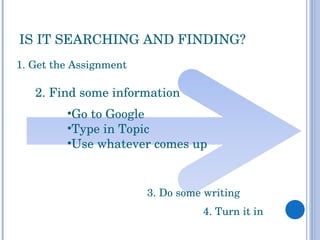
IS IT SEARCHING AND FINDING? 1. Get the Assignment 4. Turn it in 2. Find some information 3. Do some writing  Go to Google Type in Topic Use whatever comes up
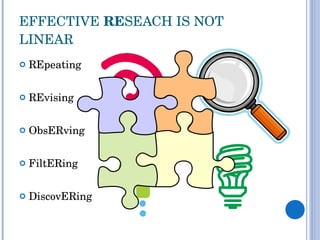
EFFECTIVE  RE SEACH IS NOT LINEAR REpeating REvising ObsERving FiltERing DiscovERing
RE ALLY? You already do this! Apply your skills and  experience to  College Level Research Learning this now will help you EXCEL  In other classes At other schools Workplace
COLLEGE LEVEL RESEARCH
COLLEGE LEVEL RESEARCH Creating useful search terms and strategies REpeating and REvising ObsERving Knowing which tools to search ObsERving DiscovERing Evaluating what you find FiltERing DiscovERing
CREATING USEFUL SEARCH TERMS
HOW TO SEARCH? Getting Search Terms Pull out key words and concepts from your topic  Determine Synonyms, Related Terms, or other Variations Think Nouns REvise Terms as Searching  REpeat across different tools (Catalog, Databases)
TOPIC:  AIRPORT SCANNERS Basic Concepts: Airport Scanners Related Terms: Transportation Travel Security Rights Full-Body United States Start with what you already know and think about what you might like to know!
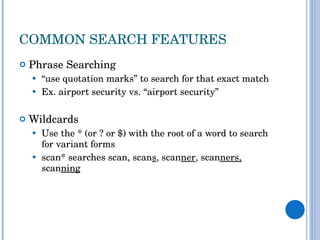
COMMON SEARCH FEATURES Phrase Searching  “ use quotation marks” to search for that exact match Ex. airport security vs. “airport security” Wildcards Use the * (or ? or $) with the root of a word to search for variant forms scan* searches scan, scan s , scan ner , scan ners,  scan ning
CONNECT TERMS WITH AND, OR, & NOT Dogs DOGS CATS Cat  AND  Dog = Cat Dog = Items with  Both  Cat and Dog Cat  OR  Dog Items with  Cat , Items with  Dog , and Items with  Both  Cat and Dog Cat  NOT  Dog Items with  Cat Only , not Items with Both Cat and Dog Cat Dog
TOPIC:  AIRPORT SCANNERS Initial Search Strategies: “ airport scanners”  airport scan* airport scanner AND security airport scanner AND full-body “ airport scanners” OR “airport full-body scanners”
KNOWING WHICH TOOLS TO SEARCH
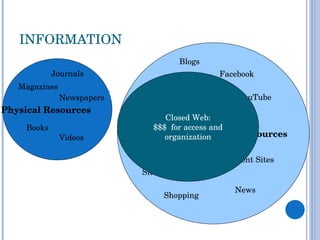
INFORMATION Closed Web: $$$  for access and organization Physical Resources  Books Videos Magazines Newspapers Journals Web Resources Facebook Company Sites Shopping Blogs YouTube Government Sites News E-books Online Periodicals
TOOLS AND RESOURCES Search Engines Library Catalogs  Databases
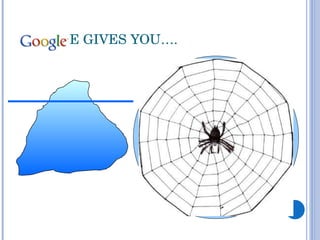
GOOGLE GIVES YOU…. Web Resources MySpace Company Sites Shopping Blogs YouTube Government Sites Games
LIBRARIES GIVE YOU…. Databases/ Online Books and Periodicals Closed Web: $$$  for access and organization Physical Resources  Books Videos Magazines Newspapers Journals
TOOLS AND RESOURCES Search Engines Publicly available  web resources  Library Catalogs  Books  (including e-books) Journals, Magazines and Newspapers  Titles   Databases Articles  in Journals, Magazines and Newspapers
WHAT IS A LIBRARY CATALOG?  A listing of all of the items available in a particular library, whether physical or web-based.  Books E-books Videos Magazine and Journal  titles What you won’t find in the Catalog:  Individual  articles  from magazines, journals and newspapers (go to the Databases for these)
LIBRARY VOCABULARY Circulating – item can go out of the library Call number – the item’s location on the shelf in the library Periodicals – newspapers, magazines and journals Journal – periodical dedicated to a particular subject
WHAT ARE YOU GETTING IN A DATABASE? Citations Author, article title, periodical title, date, volume, issue, page number. Abstract Summary of the article, useful in evaluating and filtERing the content. Often Full-text Entire content of the article. Things to obsERve: Terms to use for better results and better searches Full-text in that database?
TOPIC:  AIRPORT SCANNERS Later Search Strategies: “ airport scanners”  “ airport scanners” and full-body airline passengers AND scanners airline passenger* AND scan* airline passengers AND security airport security
EVALUATING INFORMATION
BASIC DISTINCTIONS  Popular vs. Scholarly  Popular sources are written for general audiences  Scholarly sources are written by experts for experts Primary vs. Secondary  Primary sources are firsthand accounts by a participant or direct observer  Secondary sources provide an analysis, explanation or restatement
CREDIBILITY...WHO’S GOT IT? capable of being believed; believable: a credible statement.  worthy of belief or confidence; trustworthy: a credible witness. Dictionary.com Unabridged . Random House, Inc. 12 Nov. 2009. <Dictionary.com  http://dictionary.reference.com/browse/credibility >.
BE SKEPTICAL! What you can do: Rely on library catalog and databases Look for scholarly or academic sources Find out who's responsible for the information, such as the author and publisher.  Consider the purpose of the source (e.g., to entertain or educate?)  Consider the date. See each source for what it offers.
CITING SOURCES Display your credibility through your citations/reference list By showing the types of sources you used, you allow others to find and judge those sources for themselves By citing quotations and ideas taken from other works, you: show respect for that author’s  intellectual property  avoid  plagiarism
IP AND PLAGIARISM Intellectual property: “refers to creations of the mind: inventions, literary and artistic works, and symbols, names, images, and designs used in commerce” WIPO. (n.d.). What is intellectual property?  World Intellectual Property Organization . Retrieved April 2, 2010 from  http://www.wipo.int/about-ip/en/ Plagiarism: “the practice of taking someone else's work or ideas and passing them off as one's own.”  Soanes, C. & Stevenson, A. (Eds.). (2005). Plagiarism.  The Oxford Dictionary of English . Retrieved from  http://www.oxfordreference.com
CITATION RESOURCES Library’s list of citation help: My recommendations: Use the Cite This or similar feature in the databases or use Citation Machine  CAUTION: These aren’t always accurate, so check the citations yourself OWL: Handouts: Research and Documenting Sources
TIPS FOR YOUR ASSIGNMENT
YOUR ASSIGNMENT Argumentative research paper in the Rogerian style Several credible sources on BOTH sides of the argument/position Recommended Tools: Databases: Issues and Controversies on File  Opposing Viewpoints Academic Search Complete Proquest Subject-specific databases based on topic Library Catalog
LIBRARY LOGISTICS NOVAcard LAN login Printing procedures Access from Off-campus Catalog Databases
NEED HELP? HAVE QUESTIONS? Come to the Library Ask a Librarian Contact me [email_address] 703-323-3867 Make our  day – Ask  for help!

English 112 Instruction

  • 1.
    INTRODUCTION TO RESEARCHFOR ENGLISH 112 Spring 2010 Jami Bryan, Electronic Services Librarian
  • 2.
    OUTCOMES FOR TODAYWhat is Research? What is College Level Research? What is credibility? How do I evaluate resources? What are some effective search strategies? What’s in a library catalog? What’s in a library database? What tools are best for this assignment?
  • 3.
  • 4.
    IS IT SEARCHINGAND FINDING? 1. Get the Assignment 4. Turn it in 2. Find some information 3. Do some writing Go to Google Type in Topic Use whatever comes up
  • 5.
    EFFECTIVE RESEACH IS NOT LINEAR REpeating REvising ObsERving FiltERing DiscovERing
  • 6.
    RE ALLY? Youalready do this! Apply your skills and experience to College Level Research Learning this now will help you EXCEL In other classes At other schools Workplace
  • 7.
  • 8.
    COLLEGE LEVEL RESEARCHCreating useful search terms and strategies REpeating and REvising ObsERving Knowing which tools to search ObsERving DiscovERing Evaluating what you find FiltERing DiscovERing
  • 9.
  • 10.
    HOW TO SEARCH?Getting Search Terms Pull out key words and concepts from your topic Determine Synonyms, Related Terms, or other Variations Think Nouns REvise Terms as Searching REpeat across different tools (Catalog, Databases)
  • 11.
    TOPIC: AIRPORTSCANNERS Basic Concepts: Airport Scanners Related Terms: Transportation Travel Security Rights Full-Body United States Start with what you already know and think about what you might like to know!
  • 12.
    COMMON SEARCH FEATURESPhrase Searching “ use quotation marks” to search for that exact match Ex. airport security vs. “airport security” Wildcards Use the * (or ? or $) with the root of a word to search for variant forms scan* searches scan, scan s , scan ner , scan ners, scan ning
  • 13.
    CONNECT TERMS WITHAND, OR, & NOT Dogs DOGS CATS Cat AND Dog = Cat Dog = Items with Both Cat and Dog Cat OR Dog Items with Cat , Items with Dog , and Items with Both Cat and Dog Cat NOT Dog Items with Cat Only , not Items with Both Cat and Dog Cat Dog
  • 14.
    TOPIC: AIRPORTSCANNERS Initial Search Strategies: “ airport scanners” airport scan* airport scanner AND security airport scanner AND full-body “ airport scanners” OR “airport full-body scanners”
  • 15.
  • 16.
    INFORMATION Closed Web:$$$ for access and organization Physical Resources Books Videos Magazines Newspapers Journals Web Resources Facebook Company Sites Shopping Blogs YouTube Government Sites News E-books Online Periodicals
  • 17.
    TOOLS AND RESOURCESSearch Engines Library Catalogs Databases
  • 18.
    GOOGLE GIVES YOU….Web Resources MySpace Company Sites Shopping Blogs YouTube Government Sites Games
  • 19.
    LIBRARIES GIVE YOU….Databases/ Online Books and Periodicals Closed Web: $$$ for access and organization Physical Resources Books Videos Magazines Newspapers Journals
  • 20.
    TOOLS AND RESOURCESSearch Engines Publicly available web resources Library Catalogs Books (including e-books) Journals, Magazines and Newspapers Titles Databases Articles in Journals, Magazines and Newspapers
  • 21.
    WHAT IS ALIBRARY CATALOG? A listing of all of the items available in a particular library, whether physical or web-based. Books E-books Videos Magazine and Journal titles What you won’t find in the Catalog: Individual articles from magazines, journals and newspapers (go to the Databases for these)
  • 22.
    LIBRARY VOCABULARY Circulating– item can go out of the library Call number – the item’s location on the shelf in the library Periodicals – newspapers, magazines and journals Journal – periodical dedicated to a particular subject
  • 23.
    WHAT ARE YOUGETTING IN A DATABASE? Citations Author, article title, periodical title, date, volume, issue, page number. Abstract Summary of the article, useful in evaluating and filtERing the content. Often Full-text Entire content of the article. Things to obsERve: Terms to use for better results and better searches Full-text in that database?
  • 24.
    TOPIC: AIRPORTSCANNERS Later Search Strategies: “ airport scanners” “ airport scanners” and full-body airline passengers AND scanners airline passenger* AND scan* airline passengers AND security airport security
  • 25.
  • 26.
    BASIC DISTINCTIONS Popular vs. Scholarly Popular sources are written for general audiences Scholarly sources are written by experts for experts Primary vs. Secondary Primary sources are firsthand accounts by a participant or direct observer Secondary sources provide an analysis, explanation or restatement
  • 27.
    CREDIBILITY...WHO’S GOT IT?capable of being believed; believable: a credible statement. worthy of belief or confidence; trustworthy: a credible witness. Dictionary.com Unabridged . Random House, Inc. 12 Nov. 2009. <Dictionary.com http://dictionary.reference.com/browse/credibility >.
  • 28.
    BE SKEPTICAL! Whatyou can do: Rely on library catalog and databases Look for scholarly or academic sources Find out who's responsible for the information, such as the author and publisher. Consider the purpose of the source (e.g., to entertain or educate?) Consider the date. See each source for what it offers.
  • 29.
    CITING SOURCES Displayyour credibility through your citations/reference list By showing the types of sources you used, you allow others to find and judge those sources for themselves By citing quotations and ideas taken from other works, you: show respect for that author’s intellectual property avoid plagiarism
  • 30.
    IP AND PLAGIARISMIntellectual property: “refers to creations of the mind: inventions, literary and artistic works, and symbols, names, images, and designs used in commerce” WIPO. (n.d.). What is intellectual property? World Intellectual Property Organization . Retrieved April 2, 2010 from http://www.wipo.int/about-ip/en/ Plagiarism: “the practice of taking someone else's work or ideas and passing them off as one's own.” Soanes, C. & Stevenson, A. (Eds.). (2005). Plagiarism. The Oxford Dictionary of English . Retrieved from http://www.oxfordreference.com
  • 31.
    CITATION RESOURCES Library’slist of citation help: My recommendations: Use the Cite This or similar feature in the databases or use Citation Machine CAUTION: These aren’t always accurate, so check the citations yourself OWL: Handouts: Research and Documenting Sources
  • 32.
    TIPS FOR YOURASSIGNMENT
  • 33.
    YOUR ASSIGNMENT Argumentativeresearch paper in the Rogerian style Several credible sources on BOTH sides of the argument/position Recommended Tools: Databases: Issues and Controversies on File Opposing Viewpoints Academic Search Complete Proquest Subject-specific databases based on topic Library Catalog
  • 34.
    LIBRARY LOGISTICS NOVAcardLAN login Printing procedures Access from Off-campus Catalog Databases
  • 35.
    NEED HELP? HAVEQUESTIONS? Come to the Library Ask a Librarian Contact me [email_address] 703-323-3867 Make our day – Ask for help!