© Ian Sommerville 2018
Cloud-based software
© Ian Sommerville 2018:Cloud-based Software
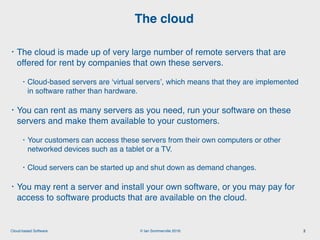
• The cloud is made up of very large number of remote servers that are
offered for rent by companies that own these servers.
• Cloud-based servers are ‘virtual servers’, which means that they are implemented
in software rather than hardware.
• You can rent as many servers as you need, run your software on these
servers and make them available to your customers.
• Your customers can access these servers from their own computers or other
networked devices such as a tablet or a TV.
• Cloud servers can be started up and shut down as demand changes.
• You may rent a server and install your own software, or you may pay for
access to software products that are available on the cloud.
The cloud
2
© Ian Sommerville 2018:Cloud-based Software
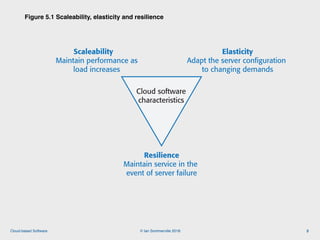
Figure 5.1 Scaleability, elasticity and resilience
3
Cloud software
characteristics
Elasticity
Adapt the server configuration
to changing demands
Resilience
Maintain service in the
event of server failure
Scaleability
Maintain performance as
load increases
Figure 5.1 Scaleability, elasticity and resilience
© Ian Sommerville 2018:Cloud-based Software
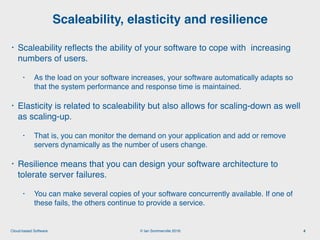
• Scaleability reflects the ability of your software to cope with increasing
numbers of users.
• As the load on your software increases, your software automatically adapts so
that the system performance and response time is maintained.
• Elasticity is related to scaleability but also allows for scaling-down as well
as scaling-up.
• That is, you can monitor the demand on your application and add or remove
servers dynamically as the number of users change.
• Resilience means that you can design your software architecture to
tolerate server failures.
• You can make several copies of your software concurrently available. If one of
these fails, the others continue to provide a service.
Scaleability, elasticity and resilience
4
© Ian Sommerville 2018:Cloud-based Software
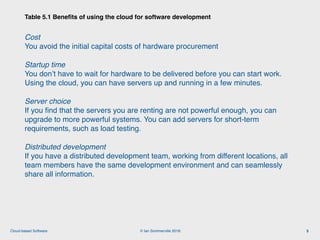
Cost

You avoid the initial capital costs of hardware procurement
Startup time

You don’t have to wait for hardware to be delivered before you can start work.
Using the cloud, you can have servers up and running in a few minutes.
Server choice 

If you find that the servers you are renting are not powerful enough, you can
upgrade to more powerful systems. You can add servers for short-term
requirements, such as load testing.
Distributed development 

If you have a distributed development team, working from different locations, all
team members have the same development environment and can seamlessly
share all information.
Table 5.1 Benefits of using the cloud for software development
5
© Ian Sommerville 2018:Cloud-based Software
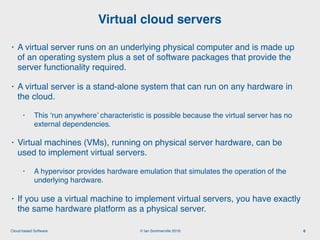
• A virtual server runs on an underlying physical computer and is made up
of an operating system plus a set of software packages that provide the
server functionality required.
• A virtual server is a stand-alone system that can run on any hardware in
the cloud.
• This ‘run anywhere’ characteristic is possible because the virtual server has no
external dependencies.
• Virtual machines (VMs), running on physical server hardware, can be
used to implement virtual servers.
• A hypervisor provides hardware emulation that simulates the operation of the
underlying hardware.
• If you use a virtual machine to implement virtual servers, you have exactly
the same hardware platform as a physical server.
Virtual cloud servers
6
© Ian Sommerville 2018:Cloud-based Software
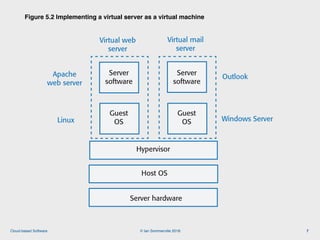
Figure 5.2 Implementing a virtual server as a virtual machine
7
Host OS
Server hardware
Hypervisor
Guest
OS
Figure 5.2 Implementing a virtual server as a virtual machine
Server
software
Virtual web
server
Linux
Apache
web server
Guest
OS
Server
software
Virtual mail
server
Windows Server
Outlook
© Ian Sommerville 2018:Cloud-based Software
• If you are running a cloud-based system with many instances of
applications or services, these all use the same operating system, you
can use a simpler virtualization technology called ‘containers’.
• Using containers accelerates the process of deploying virtual servers on
the cloud.
• Containers are usually megabytes in size whereas VMs are gigabytes.
• Containers can be started and shut down in a few seconds rather than the few
minutes required for a VM.
• Containers are an operating system virtualization technology that allows
independent servers to share a single operating system.
• They are particularly useful for providing isolated application services where
each user sees their own version of an application.
Container-based virtualization
8
© Ian Sommerville 2018:Cloud-based Software
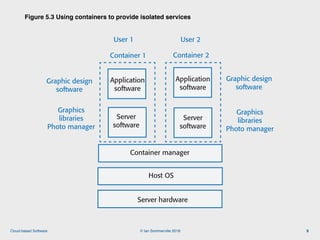
Figure 5.3 Using containers to provide isolated services
9
Host OS
Server hardware
Container manager
Figure 5.3 Using containers to provided isolated services
Server
software
Server
software
Application
software
Application
software
Graphics
libraries
Photo manager
Graphics
libraries
Photo manager
Graphic design
software
Graphic design
software
Container 2Container 1
User 2User 1
© Ian Sommerville 2018:Cloud-based Software
• Containers were developed by Google around 2007 but containers
became a mainstream technology around 2015.
• An open-source project called Docker provided a standard means of
container management that is fast and easy to use.
• Docker is a container management system that allows users to define
the software to be included in a container as a Docker image.
• It also includes a run-time system that can create and manage
containers using these Docker images.
Docker
10
© Ian Sommerville 2018:Cloud-based Software
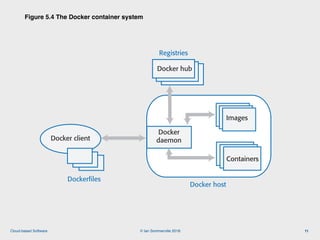
Figure 5.4 The Docker container system
11
Docker client
Dockerfiles
Docker host
Docker hub
Registries
Docker
daemon
Images
Containers
Figure 5.4 The Docker container system
© Ian Sommerville 2018:Cloud-based Software
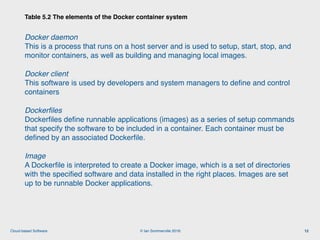
Docker daemon

This is a process that runs on a host server and is used to setup, start, stop, and
monitor containers, as well as building and managing local images.
Docker client

This software is used by developers and system managers to define and control
containers
Dockerfiles

Dockerfiles define runnable applications (images) as a series of setup commands
that specify the software to be included in a container. Each container must be
defined by an associated Dockerfile.
Image

A Dockerfile is interpreted to create a Docker image, which is a set of directories
with the specified software and data installed in the right places. Images are set
up to be runnable Docker applications.
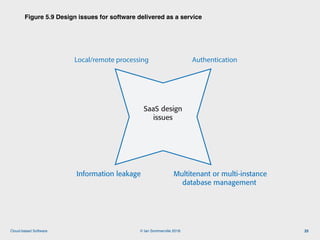
Table 5.2 The elements of the Docker container system
12
© Ian Sommerville 2018:Cloud-based Software
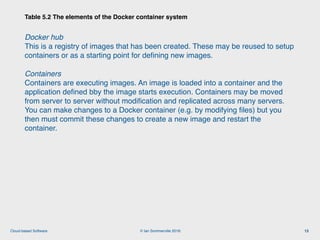
Docker hub

This is a registry of images that has been created. These may be reused to setup
containers or as a starting point for defining new images.
Containers

Containers are executing images. An image is loaded into a container and the
application defined bby the image starts execution. Containers may be moved
from server to server without modification and replicated across many servers.
You can make changes to a Docker container (e.g. by modifying files) but you
then must commit these changes to create a new image and restart the
container.
Table 5.2 The elements of the Docker container system
13
© Ian Sommerville 2018:Cloud-based Software
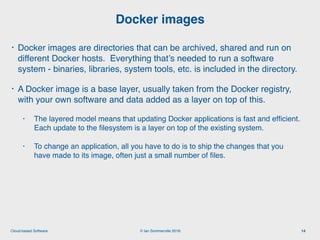
• Docker images are directories that can be archived, shared and run on
different Docker hosts. Everything that’s needed to run a software
system - binaries, libraries, system tools, etc. is included in the directory.
• A Docker image is a base layer, usually taken from the Docker registry,
with your own software and data added as a layer on top of this.
• The layered model means that updating Docker applications is fast and efficient.
Each update to the filesystem is a layer on top of the existing system.
• To change an application, all you have to do is to ship the changes that you
have made to its image, often just a small number of files.
Docker images
14
© Ian Sommerville 2018:Cloud-based Software
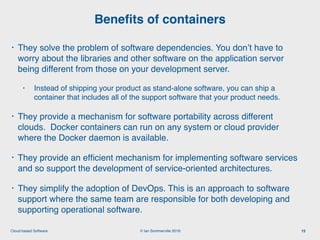
• They solve the problem of software dependencies. You don’t have to
worry about the libraries and other software on the application server
being different from those on your development server.
• Instead of shipping your product as stand-alone software, you can ship a
container that includes all of the support software that your product needs.
• They provide a mechanism for software portability across different
clouds. Docker containers can run on any system or cloud provider
where the Docker daemon is available.
• They provide an efficient mechanism for implementing software services
and so support the development of service-oriented architectures.
• They simplify the adoption of DevOps. This is an approach to software
support where the same team are responsible for both developing and
supporting operational software.
Benefits of containers
15
© Ian Sommerville 2018:Cloud-based Software
• The idea of a service that is rented rather than owned is fundamental to
cloud computing.
• Infrastructure as a service (IaaS)
• Cloud providers offer different kinds of infrastructure service such as a compute
service, a network service and a storage service that you can use to implement
virtual servers.
• Platform as a service (PaaS)
• This is an intermediate level where you use libraries and frameworks provided by
the cloud provider to implement your software. These provide access to a range of
functions, including SQL and NoSQL databases.
• Software as a service (SaaS)
• Your software product runs on the cloud and is accessed by users through a web
browser or mobile app.
Everything as a service
16
© Ian Sommerville 2018:Cloud-based Software
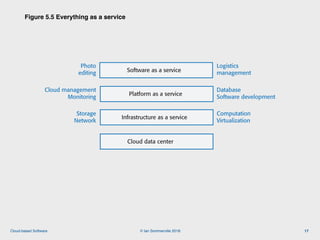
Figure 5.5 Everything as a service
17
Cloud data center
Infrastructure as a service
Platform as a service
Software as a service
Figure 5.5 Everything as a service
Storage
Network
Computation
Virtualization
Cloud management
Monitoring
Database
Software development
Photo
editing
Logistics
management
© Ian Sommerville 2018:Cloud-based Software
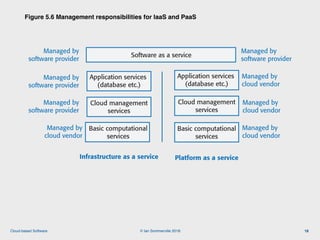
Figure 5.6 Management responsibilities for IaaS and PaaS
18
Basic computational
services
Infrastructure as a service Platform as a service
Basic computational
services
Managed by
cloud vendor
Application services
(database etc.)
Cloud management
services
Application services
(database etc.)
Cloud management
services
Software as a service
Managed by
cloud vendor
Managed by
cloud vendor
Managed by
cloud vendor
Managed by
software provider
Managed by
software provider
Managed by
software provider
Managed by
software provider
Figure 5.6 Management responsibilities for IaaS and PaaS
© Ian Sommerville 2018:Cloud-based Software
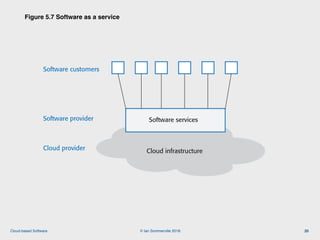
• Increasingly, software products are being delivered as a service, rather
than installed on the buyer’s computers.
• If you deliver your software product as a service, you run the software
on your servers, which you may rent from a cloud provider.
• Customers don’t have to install software and they access the remote
system through a web browser or dedicated mobile app.
• The payment model for software as a service is usually a subscription
model.
• Users pay a monthly fee to use the software rather than buy it outright.
Software as a service
19
© Ian Sommerville 2018:Cloud-based Software
Figure 5.7 Software as a service
20
Cloud infrastructure
Software services
Figure 5.7 Software as a service
Cloud provider
Software provider
Software customers
© Ian Sommerville 2018:Cloud-based Software
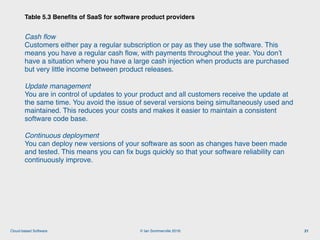
Cash flow

Customers either pay a regular subscription or pay as they use the software. This
means you have a regular cash flow, with payments throughout the year. You don’t
have a situation where you have a large cash injection when products are purchased
but very little income between product releases.
Update management

You are in control of updates to your product and all customers receive the update at
the same time. You avoid the issue of several versions being simultaneously used and
maintained. This reduces your costs and makes it easier to maintain a consistent
software code base.
Continuous deployment

You can deploy new versions of your software as soon as changes have been made
and tested. This means you can fix bugs quickly so that your software reliability can
continuously improve.
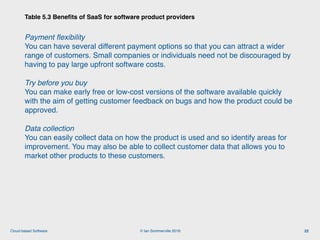
Table 5.3 Benefits of SaaS for software product providers
21
© Ian Sommerville 2018:Cloud-based Software
Payment flexibility

You can have several different payment options so that you can attract a wider
range of customers. Small companies or individuals need not be discouraged by
having to pay large upfront software costs.
Try before you buy

You can make early free or low-cost versions of the software available quickly
with the aim of getting customer feedback on bugs and how the product could be
approved.
Data collection

You can easily collect data on how the product is used and so identify areas for
improvement. You may also be able to collect customer data that allows you to
market other products to these customers.
Table 5.3 Benefits of SaaS for software product providers
22
© Ian Sommerville 2018:Cloud-based Software
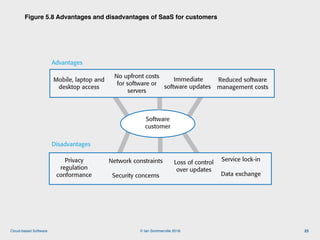
Figure 5.8 Advantages and disadvantages of SaaS for customers
23
Software
customer
No upfront costs
for software or
servers
Disadvantages
Reduced software
management costs
Advantages
Immediate
software updates
Mobile, laptop and
desktop access
Privacy
regulation
conformance
Network constraints
Security concerns
Loss of control
over updates
Service lock-in
Data exchange
Figure 5.8 Advantages and disadvantages of SaaS for customers
© Ian Sommerville 2018:Cloud-based Software
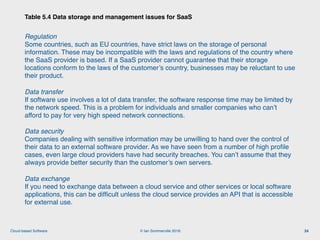
Regulation

Some countries, such as EU countries, have strict laws on the storage of personal
information. These may be incompatible with the laws and regulations of the country where
the SaaS provider is based. If a SaaS provider cannot guarantee that their storage
locations conform to the laws of the customer’s country, businesses may be reluctant to use
their product.
Data transfer

If software use involves a lot of data transfer, the software response time may be limited by
the network speed. This is a problem for individuals and smaller companies who can’t
afford to pay for very high speed network connections.
Data security

Companies dealing with sensitive information may be unwilling to hand over the control of
their data to an external software provider. As we have seen from a number of high profile
cases, even large cloud providers have had security breaches. You can’t assume that they
always provide better security than the customer’s own servers.
Data exchange

If you need to exchange data between a cloud service and other services or local software
applications, this can be difficult unless the cloud service provides an API that is accessible
for external use.
Table 5.4 Data storage and management issues for SaaS
24
© Ian Sommerville 2018:Cloud-based Software
Figure 5.9 Design issues for software delivered as a service
25
SaaS design
issues
Local/remote processing Authentication
Information leakage Multitenant or multi-instance
database management
Figure 5.9 Design issues for software delivered as a service
© Ian Sommerville 2018:Cloud-based Software
• Local/remote processing
• A software product may be designed so that some features are executed locally in the
user’s browser or mobile app and some on a remote server.
• Local execution reduces network traffic and so increases user response speed. This
is useful when users have a slow network connection.
• Local processing increases the electrical power needed to run the system.
• Authentication
• If you set up your own authentication system, users have to remember another set of
authentication credentials.
• Many systems allow authentication using the user’s Google, Facebook or LinkedIn
credentials.
• For business products, you may need to set up a federated authentication system,
which delegates authentication to the business where the user works.
SaaS design issues (1)
26
© Ian Sommerville 2018:Cloud-based Software
• Information leakage
• If you have multiple users from multiple organizations, a security risk is that
information leaks from one organization to another.
• There are a number of different ways that this can happen, so you need to be
very careful in designing your security system to avoid this.
• Multi-tenant and multi-instance systems
• In a multi-tenant system, all customers are served by a single instance of the
system and a multitenant database.
• In a multi-instance system, a separate copy of the system and database
is made available for each user.
SaaS design issues (2)
27
© Ian Sommerville 2018:Cloud-based Software
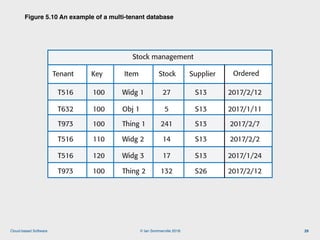
• A multi-tenant database is partitioned so that customer companies have
their own space and can store and access their own data.
• There is a single database schema, defined by the SaaS provider, that is shared
by all of the system’s users.
• Items in the database are tagged with a tenant identifier, representing a
company that has stored data in the system. The database access software
uses this tenant identifier to provide ‘logical isolation’, which means that users
seem to be working with their own database.
Multi-tenant systems
28
© Ian Sommerville 2018:Cloud-based Software
Figure 5.10 An example of a multi-tenant database
29
Stock management
Tenant Key Item Stock Supplier Ordered
T516 100 Widg 1 27 S13 2017/2/12
T632 100 Obj 1 5 S13 2017/1/11
T973 100 Thing 1 241 S13 2017/2/7
T516 110 Widg 2 14 S13 2017/2/2
T516 120 Widg 3 17 S13 2017/1/24
T973 100 Thing 2 132 S26 2017/2/12
Figure 5.10 An example of a multitenant database
© Ian Sommerville 2018:Cloud-based Software
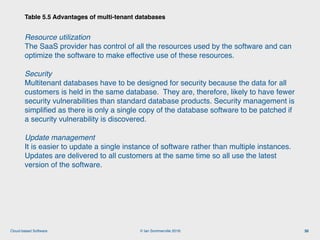
Resource utilization

The SaaS provider has control of all the resources used by the software and can
optimize the software to make effective use of these resources.
Security

Multitenant databases have to be designed for security because the data for all
customers is held in the same database. They are, therefore, likely to have fewer
security vulnerabilities than standard database products. Security management is
simplified as there is only a single copy of the database software to be patched if
a security vulnerability is discovered.
Update management 

It is easier to update a single instance of software rather than multiple instances.
Updates are delivered to all customers at the same time so all use the latest
version of the software.
Table 5.5 Advantages of multi-tenant databases
30
© Ian Sommerville 2018:Cloud-based Software
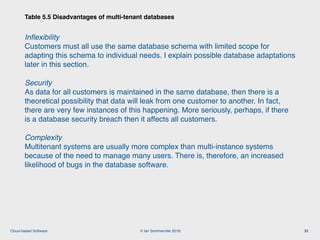
Inflexibility

Customers must all use the same database schema with limited scope for
adapting this schema to individual needs. I explain possible database adaptations
later in this section.
Security

As data for all customers is maintained in the same database, then there is a
theoretical possibility that data will leak from one customer to another. In fact,
there are very few instances of this happening. More seriously, perhaps, if there
is a database security breach then it affects all customers.
Complexity

Multitenant systems are usually more complex than multi-instance systems
because of the need to manage many users. There is, therefore, an increased
likelihood of bugs in the database software.
Table 5.5 Disadvantages of multi-tenant databases
31
© Ian Sommerville 2018:Cloud-based Software
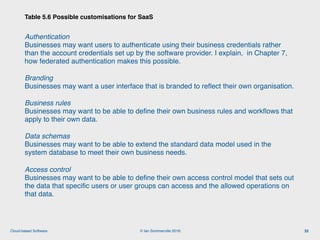
Authentication

Businesses may want users to authenticate using their business credentials rather
than the account credentials set up by the software provider. I explain, in Chapter 7,
how federated authentication makes this possible.
Branding

Businesses may want a user interface that is branded to reflect their own organisation.
Business rules

Businesses may want to be able to define their own business rules and workflows that
apply to their own data.
Data schemas

Businesses may want to be able to extend the standard data model used in the
system database to meet their own business needs.
Access control

Businesses may want to be able to define their own access control model that sets out
the data that specific users or user groups can access and the allowed operations on
that data.
Table 5.6 Possible customisations for SaaS
32
© Ian Sommerville 2018:Cloud-based Software
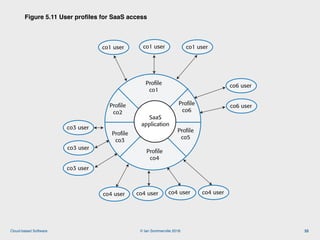
Figure 5.11 User profiles for SaaS access
33
SaaS
application
Profile
co1
Profile
co2
Profile
co3
Profile
co4
Profile
co6
Profile
co5
co1 user
Figure 5.11 User profiles for SaaS access
co1 user co1 user
co4 user co4 user co4 user
co6 user
co6 user
co3 user
co3 user
co3 user
co4 user
© Ian Sommerville 2018:Cloud-based Software
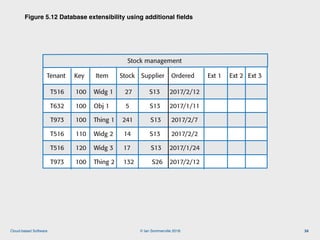
Figure 5.12 Database extensibility using additional fields
34
Stock management
Tenant Key Item Stock Supplier Ordered Ext 1 Ext 2 Ext 3
T516 100 Widg 1 27 S13 2017/2/12
T632 100 Obj 1 5 S13 2017/1/11
T973 100 Thing 1 241 S13 2017/2/7
T516 110 Widg 2 14 S13 2017/2/2
T516 120 Widg 3 17 S13 2017/1/24
T973 100 Thing 2 132 S26 2017/2/12
Figure 5.12 Database extensibility using additional fields
© Ian Sommerville 2018:Cloud-based Software
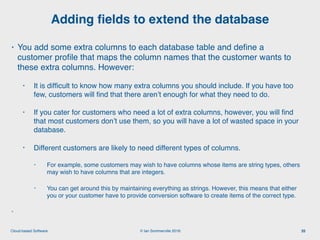
• You add some extra columns to each database table and define a
customer profile that maps the column names that the customer wants to
these extra columns. However:
• It is difficult to know how many extra columns you should include. If you have too
few, customers will find that there aren’t enough for what they need to do.
• If you cater for customers who need a lot of extra columns, however, you will find
that most customers don’t use them, so you will have a lot of wasted space in your
database.
• Different customers are likely to need different types of columns.
• For example, some customers may wish to have columns whose items are string types, others
may wish to have columns that are integers.
• You can get around this by maintaining everything as strings. However, this means that either
you or your customer have to provide conversion software to create items of the correct type.
•
Adding fields to extend the database
35
© Ian Sommerville 2018:Cloud-based Software
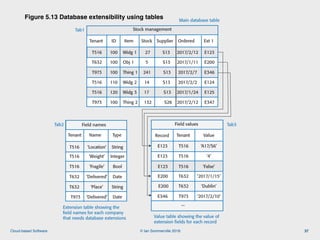
• An alternative approach to database extensibility is to allow customers to
add any number of additional fields and to define the names, types and
values of these fields.
• The names and types of these values are held in a separate table,
accessed using the tenant identifier.
• Unfortunately, using tables in this way adds complexity to the database
management software.
• Extra tables must be managed and information from them integrated into the
database.   
Extending a database using tables
36
© Ian Sommerville 2018:Cloud-based Software
Figure 5.13 Database extensibility using tables
37
Stock management
Tenant ID Item Stock Supplier Ordered Ext 1
T516 100 Widg 1 27 S13 2017/2/12
T632 100 Obj 1 5 S13 2017/1/11
T973 100 Thing 1 241 S13 2017/2/7
T516 110 Widg 2 14 S13 2017/2/2
T516 120 Widg 3 17 S13 2017/1/24
T973 100 Thing 2 132 S26 2017/2/12
E123
E200
E346
E124
E125
E347
Tenant Name Type
T516
T516
T516
T632
T632
T973 ‘Delivered’ Date
‘Location’
‘Weight’
‘Fragile’
String
Integer
Bool
‘Delivered’ Date
‘Place’ String
Field names
Tenant Value
T516
T516
T516
T632
T632
T973 ‘2017/2/10’
‘A17/S6’
‘4’
‘False’
‘2017/1/15’
‘Dublin’
Record
E123
E123
E123
E200
E200
E346
Field values
...
Figure 5.13 Database extensibility using tables
Tab1
Tab2 Tab3
Main database table
Extension table showing the
field names for each company
that needs database extensions Value table showing the value of
extension fields for each record
© Ian Sommerville 2018:Cloud-based Software
• Information from all customers is stored in the same database in a multii-
multi-tenant system so a software bug or an attack could lead to the data
of some or all customers being exposed to others.
• Key security issues are multilevel access control and encryption.
• Multilevel access control means that access to data must be controlled at both
the organizational level and the individual level.
• You need to have organizational level access control to ensure that any
database operations only act on that organization’s data. The individual user
accessing the data should also have their own access permissions.
• Encryption of data in a multitenant database reassures corporate users
that their data cannot be viewed by people from other companies if some
kind of system failure occurs.
Database security
38
© Ian Sommerville 2018:Cloud-based Software
• Multi-instance systems are SaaS systems where each customer has its own
system that is adapted to its needs, including its own database and security
controls.
• Multi-instance, cloud-based systems are conceptually simpler than multi-tenant
systems and avoid security concerns such as data leakage from one organization
to another.
• There are two types of multi-instance system:
• VM-based multi-instance systems are multi-instance systems where the software
instance and database for each customer runs in its own virtual machine. All users from
the same customer may access the shared system database.
• Container-based multi-instance systems* These are multi-instance systems where each
user has an isolated version of the software and database running in a set of containers.
• This approach is suited to products in which users mostly work independently, with
relatively little data sharing. Therefore, it is best used for software that serves individuals
rather than business customers or for business products that are not data-intensive.
Multi-instance databases
39
© Ian Sommerville 2018:Cloud-based Software
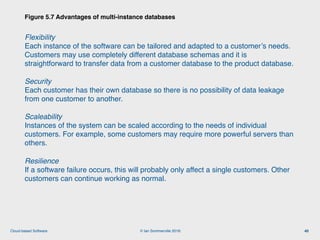
Flexibility 

Each instance of the software can be tailored and adapted to a customer’s needs.
Customers may use completely different database schemas and it is
straightforward to transfer data from a customer database to the product database.
Security 

Each customer has their own database so there is no possibility of data leakage
from one customer to another.
Scaleability

Instances of the system can be scaled according to the needs of individual
customers. For example, some customers may require more powerful servers than
others.
Resilience

If a software failure occurs, this will probably only affect a single customers. Other
customers can continue working as normal.
Figure 5.7 Advantages of multi-instance databases
40
© Ian Sommerville 2018:Cloud-based Software
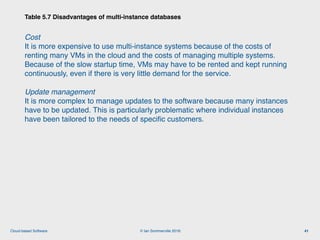
Cost 

It is more expensive to use multi-instance systems because of the costs of
renting many VMs in the cloud and the costs of managing multiple systems.
Because of the slow startup time, VMs may have to be rented and kept running
continuously, even if there is very little demand for the service.
Update management 

It is more complex to manage updates to the software because many instances
have to be updated. This is particularly problematic where individual instances
have been tailored to the needs of specific customers.
Table 5.7 Disadvantages of multi-instance databases
41
© Ian Sommerville 2018:Cloud-based Software
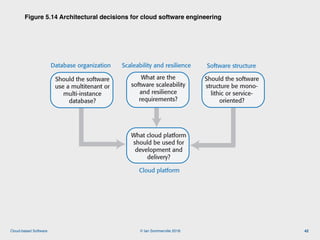
Figure 5.14 Architectural decisions for cloud software engineering
42
Should the software
use a multitenant or
multi-instance
database?
Figure 5.14 Architectural decisions for cloud software engineering
Software structure
Cloud platform
Scaleability and resilienceDatabase organization
What are the
software scaleability
and resilience
requirements?
Should the software
structure be mono-
lithic or service-
oriented?
What cloud platform
should be used for
development and
delivery?
© Ian Sommerville 2018:Cloud-based Software
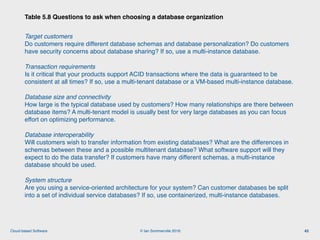
Target customers

Do customers require different database schemas and database personalization? Do customers
have security concerns about database sharing? If so, use a multi-instance database.
Transaction requirements

Is it critical that your products support ACID transactions where the data is guaranteed to be
consistent at all times? If so, use a multi-tenant database or a VM-based multi-instance database.
Database size and connectivity

How large is the typical database used by customers? How many relationships are there between
database items? A multi-tenant model is usually best for very large databases as you can focus
effort on optimizing performance.
Database interoperability

Will customers wish to transfer information from existing databases? What are the differences in
schemas between these and a possible multitenant database? What software support will they
expect to do the data transfer? If customers have many different schemas, a multi-instance
database should be used.
System structure

Are you using a service-oriented architecture for your system? Can customer databases be split
into a set of individual service databases? If so, use containerized, multi-instance databases.
Table 5.8 Questions to ask when choosing a database organization
43
© Ian Sommerville 2018:Cloud-based Software
• The scaleability of a system reflects its ability to adapt automatically to
changes in the load on that system.
• The resilience of a system reflects its ability to continue to deliver critical
services in the event of system failure or malicious system use.
• You achieve scaleability in a system by making it possible to add new
virtual servers (scaling-out) or increase the power of a system server
(scaling-up) in response to increasing load.
• In cloud-based systems, scaling-out rather than scaling-up is the normal
approach used. Your software has to be organized so that individual software
components can be replicated and run in parallel.
• To achieve resilience, you need to be able to restart your software
quickly after a hardware or software failure.
Scalability and resilience
44
© Ian Sommerville 2018:Cloud-based Software
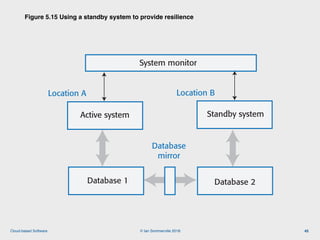
Figure 5.15 Using a standby system to provide resilience
45
Location A Location B
Figure 5.15 Using a standby system to provide resilience
System monitor
Active system Standby system
Database 1 Database 2
Database
mirror
© Ian Sommerville 2018:Cloud-based Software
• Resilience relies on redundancy:
• Replicas of the software and data are maintained in different locations.
• Database updates are mirrored so that the standby database is a working copy
of the operational database.
• A system monitor continually checks the system status. It can switch to the
standby system automatically if the operational system fails.
• You should use redundant virtual servers that are not hosted on the
same physical computer and locate servers in different locations.
• Ideally, these servers should be located in different data centers.
• If a physical server fails or if there is a wider data center failure, then operation
can be switched automatically to the software copies elsewhere.
Resilience
46
© Ian Sommerville 2018:Cloud-based Software
• An object-oriented approach to software engineering has been that been
extensively used for the development of client-server systems built
around a shared database.
• The system itself is, logically, a monolithic system with distribution across
multiple servers running large software components. The traditional multi-
tier client server architecture is based on this distributed system model.
• The alternative to a monolithic approach to software organization is a
service-oriented approach where the system is decomposed into fine-
grain, stateless services.
• Because it is stateless, each service is independent and can be replicated,
distributed and migrated from one server to another.
• The service-oriented approach is particularly suitable for cloud-based software,
with services deployed in containers.
System structure
47
© Ian Sommerville 2018:Cloud-based Software
• Cloud platforms include general-purpose clouds such as Amazon Web
Services or lesser known platforms oriented around a specific
application, such as the SAP Cloud Platform. There are also smaller
national providers that provide more limited services but who may be
more willing to adapt their services to the needs of different customers.
• There is no ‘best’ platform and you should choose a cloud provider
based on your background and experience, the type of product that you
are developing and the expectations of your customers.
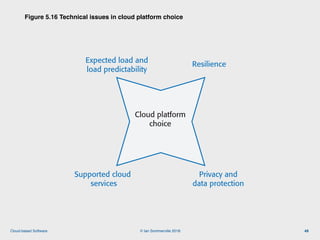
• You need to consider both technical issues and business issues when
choosing a cloud platform for your product.
Cloud platform
48
© Ian Sommerville 2018:Cloud-based Software
Figure 5.16 Technical issues in cloud platform choice
49
Figure 5.16 Technical issues in cloud platform choice
Expected load and
load predictability
Resilience
Supported cloud
services
Privacy and
data protection
Cloud platform
choice
© Ian Sommerville 2018:Cloud-based Software
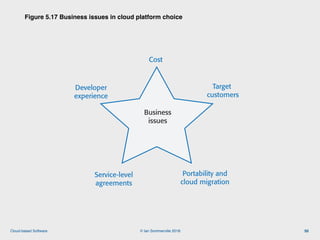
Figure 5.17 Business issues in cloud platform choice
50
Figure 5.17 Business issues in cloud platform choice
Target
customers
Cost
Portability and
cloud migration
Business
issues
Service-level
agreements
Developer
experience
© Ian Sommerville 2018:Cloud-based Software
• The cloud is made up of a large number of virtual servers that you can rent for
your own use. You and your customers access these servers remotely over the
internet and pay for the amount of server time used.
• Virtualization is a technology that allows multiple server instances to be run on
the same physical computer. This means that you can create isolated instances
of your software for deployment on the cloud.
• Virtual machines are physical server replicas on which you run your own
operating system, technology stack and applications.
• Containers are a lightweight virtualization technology that allow rapid replication
and deployment of virtual servers. All containers run the same operating
system. Docker is currently the most widely used container technology.
• A fundamental feature of the cloud is that ‘everything’ can be delivered as a
service and accessed over the internet. A service is rented rather than owned
and is shared with other users.
Key points 1
51
© Ian Sommerville 2018:Cloud-based Software
• Infrastructure as a service (IaaS) means computing, storage and other services
are available over the cloud. There is no need to run your own physical servers.
• Platform as a service (PaaS) means using services provided by a cloud platform
vendor to make it possible to auto-scale your software in response to demand.
• Software as a service (SaaS) means that application software is delivered as a
service to users. This has important benefits for users, such as lower capital costs,
and software vendors, such as simpler deployment of new software releases.
• Multitenant systems are SaaS systems where all users share the same database,
which may be adapted at run-time to their individual needs. Multi-instance
systems are SaaS applications where each user has their own separate database.
• The key architectural issues for cloud-based software are the cloud platform to be
used, whether to use a multitenant or multi-instance database, the scaleability and
resilience requirements, and whether to use objects or services as the basic
components in the system.
Key points 2
52

Engineering Software Products: 5. cloud based software

  • 1.
    © Ian Sommerville2018 Cloud-based software
  • 2.
    © Ian Sommerville2018:Cloud-based Software • The cloud is made up of very large number of remote servers that are offered for rent by companies that own these servers. • Cloud-based servers are ‘virtual servers’, which means that they are implemented in software rather than hardware. • You can rent as many servers as you need, run your software on these servers and make them available to your customers. • Your customers can access these servers from their own computers or other networked devices such as a tablet or a TV. • Cloud servers can be started up and shut down as demand changes. • You may rent a server and install your own software, or you may pay for access to software products that are available on the cloud. The cloud 2
  • 3.
    © Ian Sommerville2018:Cloud-based Software Figure 5.1 Scaleability, elasticity and resilience 3 Cloud software characteristics Elasticity Adapt the server configuration to changing demands Resilience Maintain service in the event of server failure Scaleability Maintain performance as load increases Figure 5.1 Scaleability, elasticity and resilience
  • 4.
    © Ian Sommerville2018:Cloud-based Software • Scaleability reflects the ability of your software to cope with increasing numbers of users. • As the load on your software increases, your software automatically adapts so that the system performance and response time is maintained. • Elasticity is related to scaleability but also allows for scaling-down as well as scaling-up. • That is, you can monitor the demand on your application and add or remove servers dynamically as the number of users change. • Resilience means that you can design your software architecture to tolerate server failures. • You can make several copies of your software concurrently available. If one of these fails, the others continue to provide a service. Scaleability, elasticity and resilience 4
  • 5.
    © Ian Sommerville2018:Cloud-based Software Cost
 You avoid the initial capital costs of hardware procurement Startup time
 You don’t have to wait for hardware to be delivered before you can start work. Using the cloud, you can have servers up and running in a few minutes. Server choice 
 If you find that the servers you are renting are not powerful enough, you can upgrade to more powerful systems. You can add servers for short-term requirements, such as load testing. Distributed development 
 If you have a distributed development team, working from different locations, all team members have the same development environment and can seamlessly share all information. Table 5.1 Benefits of using the cloud for software development 5
  • 6.
    © Ian Sommerville2018:Cloud-based Software • A virtual server runs on an underlying physical computer and is made up of an operating system plus a set of software packages that provide the server functionality required. • A virtual server is a stand-alone system that can run on any hardware in the cloud. • This ‘run anywhere’ characteristic is possible because the virtual server has no external dependencies. • Virtual machines (VMs), running on physical server hardware, can be used to implement virtual servers. • A hypervisor provides hardware emulation that simulates the operation of the underlying hardware. • If you use a virtual machine to implement virtual servers, you have exactly the same hardware platform as a physical server. Virtual cloud servers 6
  • 7.
    © Ian Sommerville2018:Cloud-based Software Figure 5.2 Implementing a virtual server as a virtual machine 7 Host OS Server hardware Hypervisor Guest OS Figure 5.2 Implementing a virtual server as a virtual machine Server software Virtual web server Linux Apache web server Guest OS Server software Virtual mail server Windows Server Outlook
  • 8.
    © Ian Sommerville2018:Cloud-based Software • If you are running a cloud-based system with many instances of applications or services, these all use the same operating system, you can use a simpler virtualization technology called ‘containers’. • Using containers accelerates the process of deploying virtual servers on the cloud. • Containers are usually megabytes in size whereas VMs are gigabytes. • Containers can be started and shut down in a few seconds rather than the few minutes required for a VM. • Containers are an operating system virtualization technology that allows independent servers to share a single operating system. • They are particularly useful for providing isolated application services where each user sees their own version of an application. Container-based virtualization 8
  • 9.
    © Ian Sommerville2018:Cloud-based Software Figure 5.3 Using containers to provide isolated services 9 Host OS Server hardware Container manager Figure 5.3 Using containers to provided isolated services Server software Server software Application software Application software Graphics libraries Photo manager Graphics libraries Photo manager Graphic design software Graphic design software Container 2Container 1 User 2User 1
  • 10.
    © Ian Sommerville2018:Cloud-based Software • Containers were developed by Google around 2007 but containers became a mainstream technology around 2015. • An open-source project called Docker provided a standard means of container management that is fast and easy to use. • Docker is a container management system that allows users to define the software to be included in a container as a Docker image. • It also includes a run-time system that can create and manage containers using these Docker images. Docker 10
  • 11.
    © Ian Sommerville2018:Cloud-based Software Figure 5.4 The Docker container system 11 Docker client Dockerfiles Docker host Docker hub Registries Docker daemon Images Containers Figure 5.4 The Docker container system
  • 12.
    © Ian Sommerville2018:Cloud-based Software Docker daemon
 This is a process that runs on a host server and is used to setup, start, stop, and monitor containers, as well as building and managing local images. Docker client
 This software is used by developers and system managers to define and control containers Dockerfiles
 Dockerfiles define runnable applications (images) as a series of setup commands that specify the software to be included in a container. Each container must be defined by an associated Dockerfile. Image
 A Dockerfile is interpreted to create a Docker image, which is a set of directories with the specified software and data installed in the right places. Images are set up to be runnable Docker applications. Table 5.2 The elements of the Docker container system 12
  • 13.
    © Ian Sommerville2018:Cloud-based Software Docker hub
 This is a registry of images that has been created. These may be reused to setup containers or as a starting point for defining new images. Containers
 Containers are executing images. An image is loaded into a container and the application defined bby the image starts execution. Containers may be moved from server to server without modification and replicated across many servers. You can make changes to a Docker container (e.g. by modifying files) but you then must commit these changes to create a new image and restart the container. Table 5.2 The elements of the Docker container system 13
  • 14.
    © Ian Sommerville2018:Cloud-based Software • Docker images are directories that can be archived, shared and run on different Docker hosts. Everything that’s needed to run a software system - binaries, libraries, system tools, etc. is included in the directory. • A Docker image is a base layer, usually taken from the Docker registry, with your own software and data added as a layer on top of this. • The layered model means that updating Docker applications is fast and efficient. Each update to the filesystem is a layer on top of the existing system. • To change an application, all you have to do is to ship the changes that you have made to its image, often just a small number of files. Docker images 14
  • 15.
    © Ian Sommerville2018:Cloud-based Software • They solve the problem of software dependencies. You don’t have to worry about the libraries and other software on the application server being different from those on your development server. • Instead of shipping your product as stand-alone software, you can ship a container that includes all of the support software that your product needs. • They provide a mechanism for software portability across different clouds. Docker containers can run on any system or cloud provider where the Docker daemon is available. • They provide an efficient mechanism for implementing software services and so support the development of service-oriented architectures. • They simplify the adoption of DevOps. This is an approach to software support where the same team are responsible for both developing and supporting operational software. Benefits of containers 15
  • 16.
    © Ian Sommerville2018:Cloud-based Software • The idea of a service that is rented rather than owned is fundamental to cloud computing. • Infrastructure as a service (IaaS) • Cloud providers offer different kinds of infrastructure service such as a compute service, a network service and a storage service that you can use to implement virtual servers. • Platform as a service (PaaS) • This is an intermediate level where you use libraries and frameworks provided by the cloud provider to implement your software. These provide access to a range of functions, including SQL and NoSQL databases. • Software as a service (SaaS) • Your software product runs on the cloud and is accessed by users through a web browser or mobile app. Everything as a service 16
  • 17.
    © Ian Sommerville2018:Cloud-based Software Figure 5.5 Everything as a service 17 Cloud data center Infrastructure as a service Platform as a service Software as a service Figure 5.5 Everything as a service Storage Network Computation Virtualization Cloud management Monitoring Database Software development Photo editing Logistics management
  • 18.
    © Ian Sommerville2018:Cloud-based Software Figure 5.6 Management responsibilities for IaaS and PaaS 18 Basic computational services Infrastructure as a service Platform as a service Basic computational services Managed by cloud vendor Application services (database etc.) Cloud management services Application services (database etc.) Cloud management services Software as a service Managed by cloud vendor Managed by cloud vendor Managed by cloud vendor Managed by software provider Managed by software provider Managed by software provider Managed by software provider Figure 5.6 Management responsibilities for IaaS and PaaS
  • 19.
    © Ian Sommerville2018:Cloud-based Software • Increasingly, software products are being delivered as a service, rather than installed on the buyer’s computers. • If you deliver your software product as a service, you run the software on your servers, which you may rent from a cloud provider. • Customers don’t have to install software and they access the remote system through a web browser or dedicated mobile app. • The payment model for software as a service is usually a subscription model. • Users pay a monthly fee to use the software rather than buy it outright. Software as a service 19
  • 20.
    © Ian Sommerville2018:Cloud-based Software Figure 5.7 Software as a service 20 Cloud infrastructure Software services Figure 5.7 Software as a service Cloud provider Software provider Software customers
  • 21.
    © Ian Sommerville2018:Cloud-based Software Cash flow
 Customers either pay a regular subscription or pay as they use the software. This means you have a regular cash flow, with payments throughout the year. You don’t have a situation where you have a large cash injection when products are purchased but very little income between product releases. Update management
 You are in control of updates to your product and all customers receive the update at the same time. You avoid the issue of several versions being simultaneously used and maintained. This reduces your costs and makes it easier to maintain a consistent software code base. Continuous deployment
 You can deploy new versions of your software as soon as changes have been made and tested. This means you can fix bugs quickly so that your software reliability can continuously improve. Table 5.3 Benefits of SaaS for software product providers 21
  • 22.
    © Ian Sommerville2018:Cloud-based Software Payment flexibility
 You can have several different payment options so that you can attract a wider range of customers. Small companies or individuals need not be discouraged by having to pay large upfront software costs. Try before you buy
 You can make early free or low-cost versions of the software available quickly with the aim of getting customer feedback on bugs and how the product could be approved. Data collection
 You can easily collect data on how the product is used and so identify areas for improvement. You may also be able to collect customer data that allows you to market other products to these customers. Table 5.3 Benefits of SaaS for software product providers 22
  • 23.
    © Ian Sommerville2018:Cloud-based Software Figure 5.8 Advantages and disadvantages of SaaS for customers 23 Software customer No upfront costs for software or servers Disadvantages Reduced software management costs Advantages Immediate software updates Mobile, laptop and desktop access Privacy regulation conformance Network constraints Security concerns Loss of control over updates Service lock-in Data exchange Figure 5.8 Advantages and disadvantages of SaaS for customers
  • 24.
    © Ian Sommerville2018:Cloud-based Software Regulation
 Some countries, such as EU countries, have strict laws on the storage of personal information. These may be incompatible with the laws and regulations of the country where the SaaS provider is based. If a SaaS provider cannot guarantee that their storage locations conform to the laws of the customer’s country, businesses may be reluctant to use their product. Data transfer
 If software use involves a lot of data transfer, the software response time may be limited by the network speed. This is a problem for individuals and smaller companies who can’t afford to pay for very high speed network connections. Data security
 Companies dealing with sensitive information may be unwilling to hand over the control of their data to an external software provider. As we have seen from a number of high profile cases, even large cloud providers have had security breaches. You can’t assume that they always provide better security than the customer’s own servers. Data exchange
 If you need to exchange data between a cloud service and other services or local software applications, this can be difficult unless the cloud service provides an API that is accessible for external use. Table 5.4 Data storage and management issues for SaaS 24
  • 25.
    © Ian Sommerville2018:Cloud-based Software Figure 5.9 Design issues for software delivered as a service 25 SaaS design issues Local/remote processing Authentication Information leakage Multitenant or multi-instance database management Figure 5.9 Design issues for software delivered as a service
  • 26.
    © Ian Sommerville2018:Cloud-based Software • Local/remote processing • A software product may be designed so that some features are executed locally in the user’s browser or mobile app and some on a remote server. • Local execution reduces network traffic and so increases user response speed. This is useful when users have a slow network connection. • Local processing increases the electrical power needed to run the system. • Authentication • If you set up your own authentication system, users have to remember another set of authentication credentials. • Many systems allow authentication using the user’s Google, Facebook or LinkedIn credentials. • For business products, you may need to set up a federated authentication system, which delegates authentication to the business where the user works. SaaS design issues (1) 26
  • 27.
    © Ian Sommerville2018:Cloud-based Software • Information leakage • If you have multiple users from multiple organizations, a security risk is that information leaks from one organization to another. • There are a number of different ways that this can happen, so you need to be very careful in designing your security system to avoid this. • Multi-tenant and multi-instance systems • In a multi-tenant system, all customers are served by a single instance of the system and a multitenant database. • In a multi-instance system, a separate copy of the system and database is made available for each user. SaaS design issues (2) 27
  • 28.
    © Ian Sommerville2018:Cloud-based Software • A multi-tenant database is partitioned so that customer companies have their own space and can store and access their own data. • There is a single database schema, defined by the SaaS provider, that is shared by all of the system’s users. • Items in the database are tagged with a tenant identifier, representing a company that has stored data in the system. The database access software uses this tenant identifier to provide ‘logical isolation’, which means that users seem to be working with their own database. Multi-tenant systems 28
  • 29.
    © Ian Sommerville2018:Cloud-based Software Figure 5.10 An example of a multi-tenant database 29 Stock management Tenant Key Item Stock Supplier Ordered T516 100 Widg 1 27 S13 2017/2/12 T632 100 Obj 1 5 S13 2017/1/11 T973 100 Thing 1 241 S13 2017/2/7 T516 110 Widg 2 14 S13 2017/2/2 T516 120 Widg 3 17 S13 2017/1/24 T973 100 Thing 2 132 S26 2017/2/12 Figure 5.10 An example of a multitenant database
  • 30.
    © Ian Sommerville2018:Cloud-based Software Resource utilization
 The SaaS provider has control of all the resources used by the software and can optimize the software to make effective use of these resources. Security
 Multitenant databases have to be designed for security because the data for all customers is held in the same database. They are, therefore, likely to have fewer security vulnerabilities than standard database products. Security management is simplified as there is only a single copy of the database software to be patched if a security vulnerability is discovered. Update management 
 It is easier to update a single instance of software rather than multiple instances. Updates are delivered to all customers at the same time so all use the latest version of the software. Table 5.5 Advantages of multi-tenant databases 30
  • 31.
    © Ian Sommerville2018:Cloud-based Software Inflexibility
 Customers must all use the same database schema with limited scope for adapting this schema to individual needs. I explain possible database adaptations later in this section. Security
 As data for all customers is maintained in the same database, then there is a theoretical possibility that data will leak from one customer to another. In fact, there are very few instances of this happening. More seriously, perhaps, if there is a database security breach then it affects all customers. Complexity
 Multitenant systems are usually more complex than multi-instance systems because of the need to manage many users. There is, therefore, an increased likelihood of bugs in the database software. Table 5.5 Disadvantages of multi-tenant databases 31
  • 32.
    © Ian Sommerville2018:Cloud-based Software Authentication
 Businesses may want users to authenticate using their business credentials rather than the account credentials set up by the software provider. I explain, in Chapter 7, how federated authentication makes this possible. Branding
 Businesses may want a user interface that is branded to reflect their own organisation. Business rules
 Businesses may want to be able to define their own business rules and workflows that apply to their own data. Data schemas
 Businesses may want to be able to extend the standard data model used in the system database to meet their own business needs. Access control
 Businesses may want to be able to define their own access control model that sets out the data that specific users or user groups can access and the allowed operations on that data. Table 5.6 Possible customisations for SaaS 32
  • 33.
    © Ian Sommerville2018:Cloud-based Software Figure 5.11 User profiles for SaaS access 33 SaaS application Profile co1 Profile co2 Profile co3 Profile co4 Profile co6 Profile co5 co1 user Figure 5.11 User profiles for SaaS access co1 user co1 user co4 user co4 user co4 user co6 user co6 user co3 user co3 user co3 user co4 user
  • 34.
    © Ian Sommerville2018:Cloud-based Software Figure 5.12 Database extensibility using additional fields 34 Stock management Tenant Key Item Stock Supplier Ordered Ext 1 Ext 2 Ext 3 T516 100 Widg 1 27 S13 2017/2/12 T632 100 Obj 1 5 S13 2017/1/11 T973 100 Thing 1 241 S13 2017/2/7 T516 110 Widg 2 14 S13 2017/2/2 T516 120 Widg 3 17 S13 2017/1/24 T973 100 Thing 2 132 S26 2017/2/12 Figure 5.12 Database extensibility using additional fields
  • 35.
    © Ian Sommerville2018:Cloud-based Software • You add some extra columns to each database table and define a customer profile that maps the column names that the customer wants to these extra columns. However: • It is difficult to know how many extra columns you should include. If you have too few, customers will find that there aren’t enough for what they need to do. • If you cater for customers who need a lot of extra columns, however, you will find that most customers don’t use them, so you will have a lot of wasted space in your database. • Different customers are likely to need different types of columns. • For example, some customers may wish to have columns whose items are string types, others may wish to have columns that are integers. • You can get around this by maintaining everything as strings. However, this means that either you or your customer have to provide conversion software to create items of the correct type. • Adding fields to extend the database 35
  • 36.
    © Ian Sommerville2018:Cloud-based Software • An alternative approach to database extensibility is to allow customers to add any number of additional fields and to define the names, types and values of these fields. • The names and types of these values are held in a separate table, accessed using the tenant identifier. • Unfortunately, using tables in this way adds complexity to the database management software. • Extra tables must be managed and information from them integrated into the database.    Extending a database using tables 36
  • 37.
    © Ian Sommerville2018:Cloud-based Software Figure 5.13 Database extensibility using tables 37 Stock management Tenant ID Item Stock Supplier Ordered Ext 1 T516 100 Widg 1 27 S13 2017/2/12 T632 100 Obj 1 5 S13 2017/1/11 T973 100 Thing 1 241 S13 2017/2/7 T516 110 Widg 2 14 S13 2017/2/2 T516 120 Widg 3 17 S13 2017/1/24 T973 100 Thing 2 132 S26 2017/2/12 E123 E200 E346 E124 E125 E347 Tenant Name Type T516 T516 T516 T632 T632 T973 ‘Delivered’ Date ‘Location’ ‘Weight’ ‘Fragile’ String Integer Bool ‘Delivered’ Date ‘Place’ String Field names Tenant Value T516 T516 T516 T632 T632 T973 ‘2017/2/10’ ‘A17/S6’ ‘4’ ‘False’ ‘2017/1/15’ ‘Dublin’ Record E123 E123 E123 E200 E200 E346 Field values ... Figure 5.13 Database extensibility using tables Tab1 Tab2 Tab3 Main database table Extension table showing the field names for each company that needs database extensions Value table showing the value of extension fields for each record
  • 38.
    © Ian Sommerville2018:Cloud-based Software • Information from all customers is stored in the same database in a multii- multi-tenant system so a software bug or an attack could lead to the data of some or all customers being exposed to others. • Key security issues are multilevel access control and encryption. • Multilevel access control means that access to data must be controlled at both the organizational level and the individual level. • You need to have organizational level access control to ensure that any database operations only act on that organization’s data. The individual user accessing the data should also have their own access permissions. • Encryption of data in a multitenant database reassures corporate users that their data cannot be viewed by people from other companies if some kind of system failure occurs. Database security 38
  • 39.
    © Ian Sommerville2018:Cloud-based Software • Multi-instance systems are SaaS systems where each customer has its own system that is adapted to its needs, including its own database and security controls. • Multi-instance, cloud-based systems are conceptually simpler than multi-tenant systems and avoid security concerns such as data leakage from one organization to another. • There are two types of multi-instance system: • VM-based multi-instance systems are multi-instance systems where the software instance and database for each customer runs in its own virtual machine. All users from the same customer may access the shared system database. • Container-based multi-instance systems* These are multi-instance systems where each user has an isolated version of the software and database running in a set of containers. • This approach is suited to products in which users mostly work independently, with relatively little data sharing. Therefore, it is best used for software that serves individuals rather than business customers or for business products that are not data-intensive. Multi-instance databases 39
  • 40.
    © Ian Sommerville2018:Cloud-based Software Flexibility 
 Each instance of the software can be tailored and adapted to a customer’s needs. Customers may use completely different database schemas and it is straightforward to transfer data from a customer database to the product database. Security 
 Each customer has their own database so there is no possibility of data leakage from one customer to another. Scaleability
 Instances of the system can be scaled according to the needs of individual customers. For example, some customers may require more powerful servers than others. Resilience
 If a software failure occurs, this will probably only affect a single customers. Other customers can continue working as normal. Figure 5.7 Advantages of multi-instance databases 40
  • 41.
    © Ian Sommerville2018:Cloud-based Software Cost 
 It is more expensive to use multi-instance systems because of the costs of renting many VMs in the cloud and the costs of managing multiple systems. Because of the slow startup time, VMs may have to be rented and kept running continuously, even if there is very little demand for the service. Update management 
 It is more complex to manage updates to the software because many instances have to be updated. This is particularly problematic where individual instances have been tailored to the needs of specific customers. Table 5.7 Disadvantages of multi-instance databases 41
  • 42.
    © Ian Sommerville2018:Cloud-based Software Figure 5.14 Architectural decisions for cloud software engineering 42 Should the software use a multitenant or multi-instance database? Figure 5.14 Architectural decisions for cloud software engineering Software structure Cloud platform Scaleability and resilienceDatabase organization What are the software scaleability and resilience requirements? Should the software structure be mono- lithic or service- oriented? What cloud platform should be used for development and delivery?
  • 43.
    © Ian Sommerville2018:Cloud-based Software Target customers
 Do customers require different database schemas and database personalization? Do customers have security concerns about database sharing? If so, use a multi-instance database. Transaction requirements
 Is it critical that your products support ACID transactions where the data is guaranteed to be consistent at all times? If so, use a multi-tenant database or a VM-based multi-instance database. Database size and connectivity
 How large is the typical database used by customers? How many relationships are there between database items? A multi-tenant model is usually best for very large databases as you can focus effort on optimizing performance. Database interoperability
 Will customers wish to transfer information from existing databases? What are the differences in schemas between these and a possible multitenant database? What software support will they expect to do the data transfer? If customers have many different schemas, a multi-instance database should be used. System structure
 Are you using a service-oriented architecture for your system? Can customer databases be split into a set of individual service databases? If so, use containerized, multi-instance databases. Table 5.8 Questions to ask when choosing a database organization 43
  • 44.
    © Ian Sommerville2018:Cloud-based Software • The scaleability of a system reflects its ability to adapt automatically to changes in the load on that system. • The resilience of a system reflects its ability to continue to deliver critical services in the event of system failure or malicious system use. • You achieve scaleability in a system by making it possible to add new virtual servers (scaling-out) or increase the power of a system server (scaling-up) in response to increasing load. • In cloud-based systems, scaling-out rather than scaling-up is the normal approach used. Your software has to be organized so that individual software components can be replicated and run in parallel. • To achieve resilience, you need to be able to restart your software quickly after a hardware or software failure. Scalability and resilience 44
  • 45.
    © Ian Sommerville2018:Cloud-based Software Figure 5.15 Using a standby system to provide resilience 45 Location A Location B Figure 5.15 Using a standby system to provide resilience System monitor Active system Standby system Database 1 Database 2 Database mirror
  • 46.
    © Ian Sommerville2018:Cloud-based Software • Resilience relies on redundancy: • Replicas of the software and data are maintained in different locations. • Database updates are mirrored so that the standby database is a working copy of the operational database. • A system monitor continually checks the system status. It can switch to the standby system automatically if the operational system fails. • You should use redundant virtual servers that are not hosted on the same physical computer and locate servers in different locations. • Ideally, these servers should be located in different data centers. • If a physical server fails or if there is a wider data center failure, then operation can be switched automatically to the software copies elsewhere. Resilience 46
  • 47.
    © Ian Sommerville2018:Cloud-based Software • An object-oriented approach to software engineering has been that been extensively used for the development of client-server systems built around a shared database. • The system itself is, logically, a monolithic system with distribution across multiple servers running large software components. The traditional multi- tier client server architecture is based on this distributed system model. • The alternative to a monolithic approach to software organization is a service-oriented approach where the system is decomposed into fine- grain, stateless services. • Because it is stateless, each service is independent and can be replicated, distributed and migrated from one server to another. • The service-oriented approach is particularly suitable for cloud-based software, with services deployed in containers. System structure 47
  • 48.
    © Ian Sommerville2018:Cloud-based Software • Cloud platforms include general-purpose clouds such as Amazon Web Services or lesser known platforms oriented around a specific application, such as the SAP Cloud Platform. There are also smaller national providers that provide more limited services but who may be more willing to adapt their services to the needs of different customers. • There is no ‘best’ platform and you should choose a cloud provider based on your background and experience, the type of product that you are developing and the expectations of your customers. • You need to consider both technical issues and business issues when choosing a cloud platform for your product. Cloud platform 48
  • 49.
    © Ian Sommerville2018:Cloud-based Software Figure 5.16 Technical issues in cloud platform choice 49 Figure 5.16 Technical issues in cloud platform choice Expected load and load predictability Resilience Supported cloud services Privacy and data protection Cloud platform choice
  • 50.
    © Ian Sommerville2018:Cloud-based Software Figure 5.17 Business issues in cloud platform choice 50 Figure 5.17 Business issues in cloud platform choice Target customers Cost Portability and cloud migration Business issues Service-level agreements Developer experience
  • 51.
    © Ian Sommerville2018:Cloud-based Software • The cloud is made up of a large number of virtual servers that you can rent for your own use. You and your customers access these servers remotely over the internet and pay for the amount of server time used. • Virtualization is a technology that allows multiple server instances to be run on the same physical computer. This means that you can create isolated instances of your software for deployment on the cloud. • Virtual machines are physical server replicas on which you run your own operating system, technology stack and applications. • Containers are a lightweight virtualization technology that allow rapid replication and deployment of virtual servers. All containers run the same operating system. Docker is currently the most widely used container technology. • A fundamental feature of the cloud is that ‘everything’ can be delivered as a service and accessed over the internet. A service is rented rather than owned and is shared with other users. Key points 1 51
  • 52.
    © Ian Sommerville2018:Cloud-based Software • Infrastructure as a service (IaaS) means computing, storage and other services are available over the cloud. There is no need to run your own physical servers. • Platform as a service (PaaS) means using services provided by a cloud platform vendor to make it possible to auto-scale your software in response to demand. • Software as a service (SaaS) means that application software is delivered as a service to users. This has important benefits for users, such as lower capital costs, and software vendors, such as simpler deployment of new software releases. • Multitenant systems are SaaS systems where all users share the same database, which may be adapted at run-time to their individual needs. Multi-instance systems are SaaS applications where each user has their own separate database. • The key architectural issues for cloud-based software are the cloud platform to be used, whether to use a multitenant or multi-instance database, the scaleability and resilience requirements, and whether to use objects or services as the basic components in the system. Key points 2 52