© Ian Sommerville 2018
Reliable Programming
© Ian Sommerville 2018:Reliable Programming
Software quality
2
• Creating a successful software product does not simply mean providing
useful features for users.
• You need to create a high-quality product that people want to use.
• Customers have to be confident that your product will not crash or lose
information, and users have to be able to learn to use the software
quickly and without mistakes.
© Ian Sommerville 2018:Reliable Programming
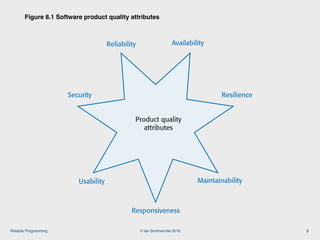
Figure 8.1 Software product quality attributes
3
Reliability
Security
MaintainabilityUsability
Figure 8.1 Product quality attributes
Responsiveness
Product quality
attributes
Availability
Resilience
© Ian Sommerville 2018:Reliable Programming
Programming for reliability
4
• There are three simple techniques for reliability improvement that can be
applied in any software company.
• Fault avoidance You should program in such a way that you avoid introducing
faults into your program.
• Input validation You should define the expected format for user inputs and
validate that all inputs conform to that format.
• Failure management You should implement your software so that program
failures have minimal impact on product users.
© Ian Sommerville 2018:Reliable Programming
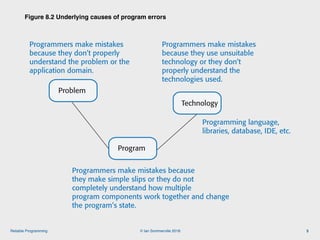
Figure 8.2 Underlying causes of program errors
5
Technology
Programmers make mistakes because
they make simple slips or they do not
completely understand how multiple
program components work together and change
the program’s state.
Figure 8.2 Underlying causes of program errors
Programming language,
libraries, database, IDE, etc.
Program
Programmers make mistakes
because they don’t properly
understand the problem or the
application domain.
Programmers make mistakes
because they use unsuitable
technology or they don’t
properly understand the
technologies used.
Problem
© Ian Sommerville 2018:Reliable Programming
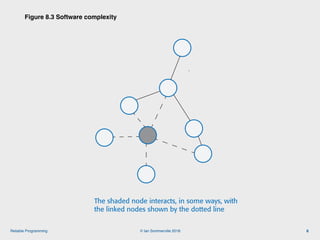
Figure 8.3 Software complexity
6
The shaded node interacts, in some ways, with
the linked nodes shown by the dotted line
Figure 8.3 Software complexity
© Ian Sommerville 2018:Reliable Programming
Program complexity
7
• Complexity is related to the number of relationships between elements in a
program and the type and nature of these relationships
• The number of relationships between entities is called the coupling. The
higher the coupling, the more complex the system.
• The shaded node in Figure 8.3 has a relatively high coupling because it has
relationships with six other nodes.
• A static relationship is one that is stable and does not depend on program
execution.
• Whether or not one component is part of another component is a static relationship.
• Dynamic relationships, which change over time, are more complex than
static relationships.
• An example of a dynamic relationship is the ‘calls’ relationship between functions.
© Ian Sommerville 2018:Reliable Programming
Types of complexity
8
• Reading complexity

This reflects how hard it is to read and understand the program.
• Structural complexity

This reflects the number and types of relationship between the
structures (classes, objects, methods or functions) in your program.
• Data complexity

This reflects the representations of data used and relationships between
the data elements in your program.
• Decision complexity

This reflects the complexity of the decisions in your program
© Ian Sommerville 2018:Reliable Programming
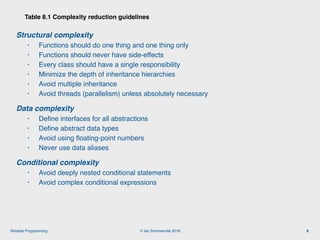
Structural complexity
• Functions should do one thing and one thing only
• Functions should never have side-effects
• Every class should have a single responsibility
• Minimize the depth of inheritance hierarchies
• Avoid multiple inheritance
• Avoid threads (parallelism) unless absolutely necessary
Data complexity
• Define interfaces for all abstractions
• Define abstract data types
• Avoid using floating-point numbers
• Never use data aliases
Conditional complexity
• Avoid deeply nested conditional statements
• Avoid complex conditional expressions
Table 8.1 Complexity reduction guidelines
9
© Ian Sommerville 2018:Reliable Programming
Ensure that every class has a single responsibility
10
• You should design classes so that there is only a single reason to
change a class.
• If you adopt this approach, your classes will be smaller and more cohesive.
• They will therefore be less complex and easier to understand and change.
• The notion of ‘a single reason to change’ is, I think, quite hard to
understand. However, in a blog post, Bob Martin explains the single
responsibility principle in a much better way:
• Gather together the things that change for the same reasons.
• Separate those things that change for different reasons.*
© Ian Sommerville 2018:Reliable Programming
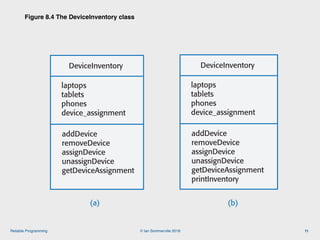
Figure 8.4 The DeviceInventory class
11
DeviceInventory
laptops
tablets
phones
device_assignment
addDevice
removeDevice
assignDevice
unassignDevice
getDeviceAssignment
DeviceInventory
laptops
tablets
phones
device_assignment
addDevice
removeDevice
assignDevice
unassignDevice
getDeviceAssignment
printInventory
Figure 8.4 The DeviceInventory class
(a) (b)
© Ian Sommerville 2018:Reliable Programming
Adding a printInventory method
12
• One way of making this change is to add a printInventory method, as
shown in Figure 8.4 (b).
• This change breaks the single responsibility principle as it then adds an
additional ‘reason to change’ the class.
• Without the printInventory method, the reason to change the class is that there
has been some fundamental change in the inventory, such as recording who is
using their personal phone for business purposes.
• However, if you add a print method, you are associating another data type (a
report) with the class. Another reason for changing this class might then be to
change the format of the printed report.
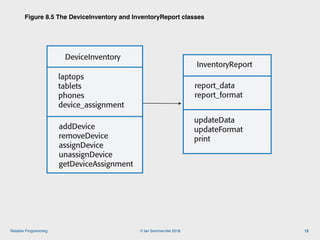
• Instead of adding a printInventory method to DeviceInventory, it is better
to add a new class to represent the printed report as shown in Figure 8.5.
•
© Ian Sommerville 2018:Reliable Programming
Figure 8.5 The DeviceInventory and InventoryReport classes
13
DeviceInventory
laptops
tablets
phones
device_assignment
addDevice
removeDevice
assignDevice
unassignDevice
getDeviceAssignment
InventoryReport
report_data
report_format
updateData
updateFormat
print
Figure 8.5 The DeviceInventory and InventoryReport classes
© Ian Sommerville 2018:Reliable Programming
Avoid deeply nested conditional statements
14
• Deeply nested conditional (if) statements are used when you need to
identify which of a possible set of choices is to be made.
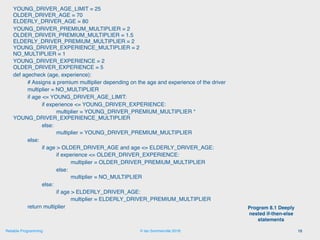
• For example, the function ‘agecheck’ in Program 8.1 is a short Python
function that is used to calculate an age multiplier for insurance
premiums.
• The insurance company’s data suggests that the age and experience of drivers
affects the chances of them having an accident, so premiums are adjusted to
take this into account.
• It is good practice to name constants rather than using absolute numbers, so
Program 8.1 names all constants that are used.
© Ian Sommerville 2018:Reliable Programming
YOUNG_DRIVER_AGE_LIMIT = 25

OLDER_DRIVER_AGE = 70

ELDERLY_DRIVER_AGE = 80
YOUNG_DRIVER_PREMIUM_MULTIPLIER = 2

OLDER_DRIVER_PREMIUM_MULTIPLIER = 1.5

ELDERLY_DRIVER_PREMIUM_MULTIPLIER = 2

YOUNG_DRIVER_EXPERIENCE_MULTIPLIER = 2

NO_MULTIPLIER = 1
YOUNG_DRIVER_EXPERIENCE = 2

OLDER_DRIVER_EXPERIENCE = 5
def agecheck (age, experience):
# Assigns a premium multiplier depending on the age and experience of the driver
multiplier = NO_MULTIPLIER
if age <= YOUNG_DRIVER_AGE_LIMIT:
if experience <= YOUNG_DRIVER_EXPERIENCE:
multiplier = YOUNG_DRIVER_PREMIUM_MULTIPLIER *

YOUNG_DRIVER_EXPERIENCE_MULTIPLIER
else:
multiplier = YOUNG_DRIVER_PREMIUM_MULTIPLIER
else:
if age > OLDER_DRIVER_AGE and age <= ELDERLY_DRIVER_AGE:
if experience <= OLDER_DRIVER_EXPERIENCE:
multiplier = OLDER_DRIVER_PREMIUM_MULTIPLIER
else:
multiplier = NO_MULTIPLIER
else:
if age > ELDERLY_DRIVER_AGE:
multiplier = ELDERLY_DRIVER_PREMIUM_MULTIPLIER
return multiplier
15
Program 8.1 Deeply
nested if-then-else
statements
© Ian Sommerville 2018:Reliable Programming
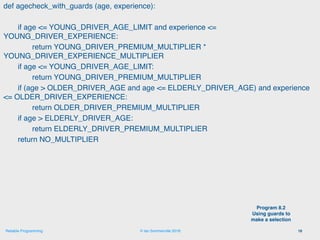
def agecheck_with_guards (age, experience):
if age <= YOUNG_DRIVER_AGE_LIMIT and experience <=
YOUNG_DRIVER_EXPERIENCE:
return YOUNG_DRIVER_PREMIUM_MULTIPLIER *
YOUNG_DRIVER_EXPERIENCE_MULTIPLIER
if age <= YOUNG_DRIVER_AGE_LIMIT:
return YOUNG_DRIVER_PREMIUM_MULTIPLIER
if (age > OLDER_DRIVER_AGE and age <= ELDERLY_DRIVER_AGE) and experience
<= OLDER_DRIVER_EXPERIENCE:
return OLDER_DRIVER_PREMIUM_MULTIPLIER
if age > ELDERLY_DRIVER_AGE:
return ELDERLY_DRIVER_PREMIUM_MULTIPLIER
return NO_MULTIPLIER
16
Program 8.2
Using guards to
make a selection
© Ian Sommerville 2018:Reliable Programming
Avoid deep inheritance hierarchies
17
• Inheritance allows the attributes and methods of a class, such as
RoadVehicle, can be inherited by sub-classes, such as Truck, Car and
MotorBike.
• Inheritance appears to be an effective and efficient way of reusing code and
of making changes that affect all subclasses.
• However, inheritance increases the structural complexity of code as it
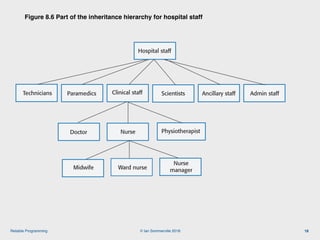
increases the coupling of subclasses. For example, Figure 8.6 shows part of
a 4-level inheritance hierarchy that could be defined for staff in a hospital.
• The problem with deep inheritance is that if you want to make changes to a
class, you have to look at all of its superclasses to see where it is best to
make the change.
• You also have to look at all of the related subclasses to check that the
change does not have unwanted consequences. It’s easy to make mistakes
when you are doing this analysis and introduce faults into your program.
© Ian Sommerville 2018:Reliable Programming
Figure 8.6 Part of the inheritance hierarchy for hospital staff
18
Hospital staff
Clinical staffParamedics Scientists Admin staffTechnicians Ancillary staff
Doctor PhysiotherapistNurse
Midwife Ward nurse
Nurse
manager
Figure 8.6 Part of the inheritance hierarchy for hospital staff
© Ian Sommerville 2018:Reliable Programming
Design pattern definition
19
• Definition
• A general reusable solution to a commonly-occurring problem within a
given context in software design. 
• Design patterns are object-oriented and describe solutions in terms of
objects and classes. They are not off-the-shelf solutions that can be
directly expressed as code in an object-oriented language.
• They describe the structure of a problem solution but have to be
adapted to suit your application and the programming language that you
are using.
•
© Ian Sommerville 2018:Reliable Programming
Programming principles
20
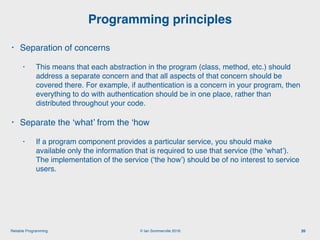
• Separation of concerns
• This means that each abstraction in the program (class, method, etc.) should
address a separate concern and that all aspects of that concern should be
covered there. For example, if authentication is a concern in your program, then
everything to do with authentication should be in one place, rather than
distributed throughout your code.
• Separate the ‘what’ from the ‘how
• If a program component provides a particular service, you should make
available only the information that is required to use that service (the ‘what’).
The implementation of the service (‘the how’) should be of no interest to service
users.
© Ian Sommerville 2018:Reliable Programming
Common types of design patterns
21
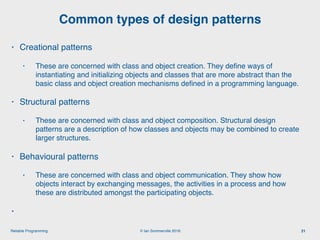
• Creational patterns
• These are concerned with class and object creation. They define ways of
instantiating and initializing objects and classes that are more abstract than the
basic class and object creation mechanisms defined in a programming language.
• Structural patterns
• These are concerned with class and object composition. Structural design
patterns are a description of how classes and objects may be combined to create
larger structures.
• Behavioural patterns
• These are concerned with class and object communication. They show how
objects interact by exchanging messages, the activities in a process and how
these are distributed amongst the participating objects.
•
© Ian Sommerville 2018:Reliable Programming
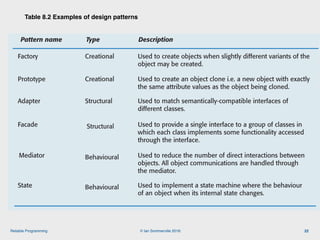
Table 8.2 Examples of design patterns
22
Pattern name Type Description
Adapter Structural Used to match semantically-compatible interfaces of
different classes.
Factory Creational Used to create objects when slightly different variants of the
object may be created.
Prototype Creational Used to create an object clone i.e. a new object with exactly
the same attribute values as the object being cloned.
Facade Structural Used to provide a single interface to a group of classes in
which each class implements some functionality accessed
through the interface.
Mediator Behavioural Used to reduce the number of direct interactions between
objects. All object communications are handled through
the mediator.
State Behavioural Used to implement a state machine where the behaviour
of an object when its internal state changes.
Table 8.2 Examples of creational, structural and behavioral design patterns
© Ian Sommerville 2018:Reliable Programming
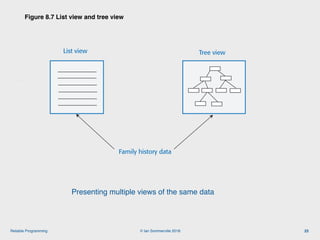
Figure 8.7 List view and tree view
23
List view Tree view
Family history data
Figure 8.7 List view and tree view of ancestors
Presenting multiple views of the same data
© Ian Sommerville 2018:Reliable Programming
Description

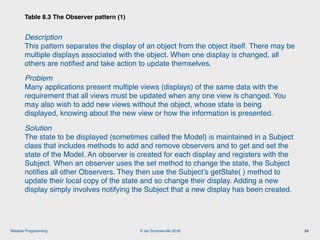
This pattern separates the display of an object from the object itself. There may be
multiple displays associated with the object. When one display is changed, all
others are notified and take action to update themselves.
Problem

Many applications present multiple views (displays) of the same data with the
requirement that all views must be updated when any one view is changed. You
may also wish to add new views without the object, whose state is being
displayed, knowing about the new view or how the information is presented.
Solution

The state to be displayed (sometimes called the Model) is maintained in a Subject
class that includes methods to add and remove observers and to get and set the
state of the Model. An observer is created for each display and registers with the
Subject. When an observer uses the set method to change the state, the Subject
notifies all other Observers. They then use the Subject’s getState( ) method to
update their local copy of the state and so change their display. Adding a new
display simply involves notifying the Subject that a new display has been created.

Table 8.3 The Observer pattern (1)
24
© Ian Sommerville 2018:Reliable Programming
Implementation

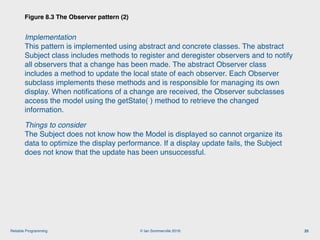
This pattern is implemented using abstract and concrete classes. The abstract
Subject class includes methods to register and deregister observers and to notify
all observers that a change has been made. The abstract Observer class
includes a method to update the local state of each observer. Each Observer
subclass implements these methods and is responsible for managing its own
display. When notifications of a change are received, the Observer subclasses
access the model using the getState( ) method to retrieve the changed
information.
Things to consider

The Subject does not know how the Model is displayed so cannot organize its
data to optimize the display performance. If a display update fails, the Subject
does not know that the update has been unsuccessful.
Figure 8.3 The Observer pattern (2)
25
© Ian Sommerville 2018:Reliable Programming
Pattern description
26
• Design patterns are usually documented in the stylized way. This
includes:
• a meaningful name for the pattern and a brief description of what it does;
• a description of the problem it solves;
• a description of the solution and its implementation;
• the consequences and trade-offs of using the pattern and other issues that you
should consider.
© Ian Sommerville 2018:Reliable Programming
Refactoring
27
• Refactoring means changing a program to reduce its complexity without
changing the external behaviour of that program.
• Refactoring makes a program more readable (so reducing the ‘reading
complexity’) and more understandable.
• It also makes it easier to change, which means that you reduce the
chances of making mistakes when you introduce new features.
• The reality of programming is that as you make changes and additions
to existing code, you inevitably increase its complexity.
• The code becomes harder to understand and change. The abstractions and
operations that you started with become more and more complex because you
modify them in ways that you did not originally anticipate.
•
© Ian Sommerville 2018:Reliable Programming
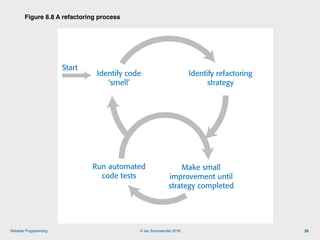
Figure 8.8 A refactoring process
28
Identify code
‘smell’
Identify refactoring
strategy
Figure 8.8 A refactoring process
Make small
improvement until
strategy completed
Run automated
code tests
Start
© Ian Sommerville 2018:Reliable Programming
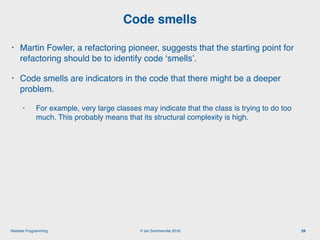
Code smells
29
• Martin Fowler, a refactoring pioneer, suggests that the starting point for
refactoring should be to identify code ‘smells’.
• Code smells are indicators in the code that there might be a deeper
problem.
• For example, very large classes may indicate that the class is trying to do too
much. This probably means that its structural complexity is high.
© Ian Sommerville 2018:Reliable Programming
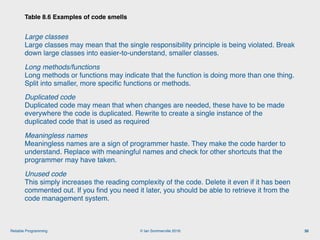
Large classes

Large classes may mean that the single responsibility principle is being violated. Break
down large classes into easier-to-understand, smaller classes.
Long methods/functions

Long methods or functions may indicate that the function is doing more than one thing.
Split into smaller, more specific functions or methods.
Duplicated code

Duplicated code may mean that when changes are needed, these have to be made
everywhere the code is duplicated. Rewrite to create a single instance of the
duplicated code that is used as required
Meaningless names

Meaningless names are a sign of programmer haste. They make the code harder to
understand. Replace with meaningful names and check for other shortcuts that the
programmer may have taken.
Unused code

This simply increases the reading complexity of the code. Delete it even if it has been
commented out. If you find you need it later, you should be able to retrieve it from the
code management system.
Table 8.6 Examples of code smells
30
© Ian Sommerville 2018:Reliable Programming
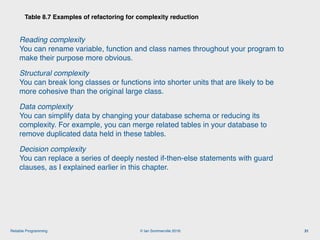
Reading complexity

You can rename variable, function and class names throughout your program to
make their purpose more obvious.
Structural complexity

You can break long classes or functions into shorter units that are likely to be
more cohesive than the original large class.
Data complexity

You can simplify data by changing your database schema or reducing its
complexity. For example, you can merge related tables in your database to
remove duplicated data held in these tables.
Decision complexity

You can replace a series of deeply nested if-then-else statements with guard
clauses, as I explained earlier in this chapter.
Table 8.7 Examples of refactoring for complexity reduction
31
© Ian Sommerville 2018:Reliable Programming
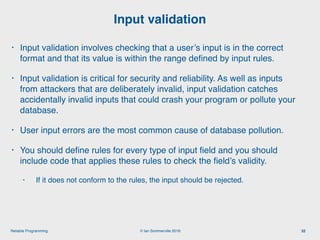
Input validation
32
• Input validation involves checking that a user’s input is in the correct
format and that its value is within the range defined by input rules.
• Input validation is critical for security and reliability. As well as inputs
from attackers that are deliberately invalid, input validation catches
accidentally invalid inputs that could crash your program or pollute your
database.
• User input errors are the most common cause of database pollution.
• You should define rules for every type of input field and you should
include code that applies these rules to check the field’s validity.
• If it does not conform to the rules, the input should be rejected.
© Ian Sommerville 2018:Reliable Programming
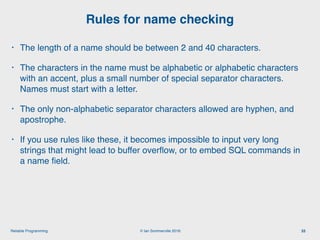
Rules for name checking
33
• The length of a name should be between 2 and 40 characters.
• The characters in the name must be alphabetic or alphabetic characters
with an accent, plus a small number of special separator characters.
Names must start with a letter.
• The only non-alphabetic separator characters allowed are hyphen, and
apostrophe.
• If you use rules like these, it becomes impossible to input very long
strings that might lead to buffer overflow, or to embed SQL commands in
a name field.
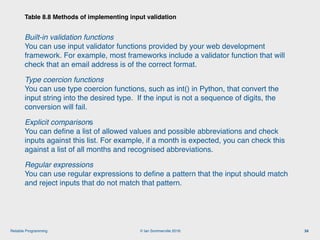
© Ian Sommerville 2018:Reliable Programming
Built-in validation functions

You can use input validator functions provided by your web development
framework. For example, most frameworks include a validator function that will
check that an email address is of the correct format.
Type coercion functions

You can use type coercion functions, such as int() in Python, that convert the
input string into the desired type. If the input is not a sequence of digits, the
conversion will fail.
Explicit comparisons

You can define a list of allowed values and possible abbreviations and check
inputs against this list. For example, if a month is expected, you can check this
against a list of all months and recognised abbreviations.
Regular expressions

You can use regular expressions to define a pattern that the input should match
and reject inputs that do not match that pattern.
Table 8.8 Methods of implementing input validation
34
© Ian Sommerville 2018:Reliable Programming
Regular expressions
35
• Regular expressions (REs) are a way of defining patterns.
• A search can be defined as a pattern and all items matching that pattern
are returned. For example, the following Unix command will list all the
JPEG files in a directory:
• ls | grep ..*.jpg$
• A single dot means ‘match any character’ and * means zero or more
repetitions of the previous character. Therefore ..* means ‘one or more
characters’. The file prefix is .jpg and the $ character means that it must
occur at the end of a line.
• In Program 8.3, REs are used to check the validity of names.
© Ian Sommerville 2018:Reliable Programming
def namecheck (s):
# checks that a name only includes alphabetic characters, -, or single quote
# names must be between 2 and 40 characters long
# quoted strings and -- are disallowed
namex = r"^[a-zA-Z][a-zA-Z-']{1,39}$"
if re.match (namex, s):
if re.search ("'.*'", s) or re.search ("--", s):
return False
else:
return True
else:
return False
36
Program 8.3 A name
checking function
© Ian Sommerville 2018:Reliable Programming
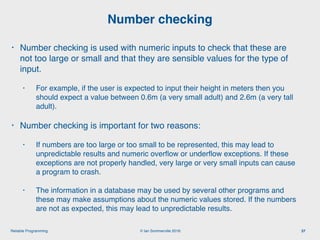
Number checking
37
• Number checking is used with numeric inputs to check that these are
not too large or small and that they are sensible values for the type of
input.
• For example, if the user is expected to input their height in meters then you
should expect a value between 0.6m (a very small adult) and 2.6m (a very tall
adult).
• Number checking is important for two reasons:
• If numbers are too large or too small to be represented, this may lead to
unpredictable results and numeric overflow or underflow exceptions. If these
exceptions are not properly handled, very large or very small inputs can cause
a program to crash.
• The information in a database may be used by several other programs and
these may make assumptions about the numeric values stored. If the numbers
are not as expected, this may lead to unpredictable results.
© Ian Sommerville 2018:Reliable Programming
Input range checks
38
• As well as checking the ranges of inputs, you may also perform checks
on these inputs to ensure that these represent sensible values.
• These protect your system from accidental input errors and may also
stop intruders who have gained access using a legitimate user’s
credentials from seriously damaging their account.
• For example, if a user is expected to enter the reading from an electricity
meter, then you should
• (a) check this is equal to or larger than the previous meter reading and
• (b) consistent with the user’s normal consumption.
© Ian Sommerville 2018:Reliable Programming
Failure management
39
• Software is so complex that, irrespective of how much effort you put into
fault avoidance, you will make mistakes. You will introduce faults into
your program that will sometimes cause it to fail.
• Program failures may also be a consequence of the failure of an
external service or component that your software depends on.
• Whatever the cause, you have to plan for failure and make provisions in
your software for that failure to be as graceful as possible.
© Ian Sommerville 2018:Reliable Programming
Failure categories
40
• Data failures
• The outputs of a computation are incorrect. For example, if someone’s year of birth is
1981 and you calculate their age by subtracting 1981 from the current year, you may
get an incorrect result. Finding this kind of error relies on users reporting data
anomalies that they have noticed.
• Program exceptions
• The program enters a state where normal continuation is impossible. If these
exceptions are not handled, then control is transferred to the run-time system which
halts execution. For example, if a request is made to open a file that does not exist
then an IOexception has occurred.
• Timing failures
• Interacting components fail to respond on time or where the responses of
concurrently-executing components are not properly synchronized. For example, if
service S1 depends on service S2 and S2 does not respond to a request, then S1
will fail.
© Ian Sommerville 2018:Reliable Programming
Failure effect minimisation
41
• Persistent data (i.e. data in a database or files) should not be lost or
corrupted;
• The user should be able to recover the work that they’ve done before
the failure occurred;
• Your software should not hang or crash;
• You should always ‘fail secure’ so that confidential data is not left in a
state where an attacker can gain access to it.
© Ian Sommerville 2018:Reliable Programming
Exception handling
42
• Exceptions are events that disrupt the normal flow of processing in a
program.
• When an exception occurs, control is automatically transferred to
exception management code.
• Most modern programming languages include a mechanism for
exception handling.
• In Python, you use **try-except** keywords to indicate exception
handling code; in Java, the equivalent keywords are **try-catch.**
•
© Ian Sommerville 2018:Reliable Programming
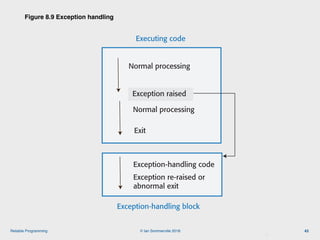
Figure 8.9 Exception handling
43
Exception-handling block
Executing code
Normal processing
Exception raised
Normal processing
Exit
Exception-handling code
Exception re-raised or
abnormal exit
Figure 8.9 Exception handling
© Ian Sommerville 2018:Reliable Programming
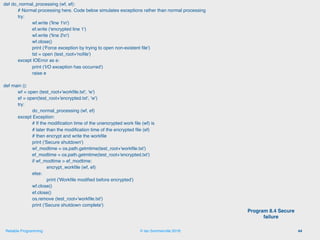
def do_normal_processing (wf, ef):
# Normal processing here. Code below simulates exceptions rather than normal processing
try:
wf.write ('line 1n')
ef.write ('encrypted line 1')
wf.write ('line 2n')
wf.close()
print ('Force exception by trying to open non-existent file')
tst = open (test_root+'nofile')
except IOError as e:
print ('I/O exception has occurred')
raise e
def main ():
wf = open (test_root+'workfile.txt', 'w')
ef = open(test_root+'encrypted.txt', 'w')
try:
do_normal_processing (wf, ef)
except Exception:
# If the modification time of the unencrypted work file (wf) is
# later than the modification time of the encrypted file (ef)
# then encrypt and write the workfile
print ('Secure shutdown')
wf_modtime = os.path.getmtime(test_root+'workfile.txt')
ef_modtime = os.path.getmtime(test_root+'encrypted.txt')
if wf_modtime > ef_modtime:
encrypt_workfile (wf, ef)
else:
print ('Workfile modified before encrypted')
wf.close()
ef.close()
os.remove (test_root+'workfile.txt')
print ('Secure shutdown complete')
44
Program 8.4 Secure
failure
© Ian Sommerville 2018:Reliable Programming
Auto-save and activity logging
45
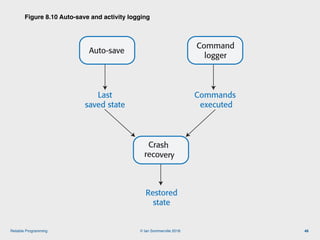
• Activity logging
• You keep a log of what the user has done and provide a way to replay that
against their data. You don’t need to keep a complete session record, simply a
list of actions since the last time the data was saved to persistent store.
• Auto-save
• You automatically save the user’s data at set intervals - say every 5 minutes.
This means that, in the event of a failure, you can restore the saved data with
the loss of only a small amount of work.
• Usually, you don’t have to save all of the data but simply save the changes that
have been made since the last explicit save.
•
© Ian Sommerville 2018:Reliable Programming
Figure 8.10 Auto-save and activity logging
46
Auto-save
Command
logger
Last
saved state
Commands
executed
Crash
recovery
Figure 8.10 Auto-save and activity logging
Restored
state
© Ian Sommerville 2018:Reliable Programming
External service failure
47
• If your software uses external services, you have no control over these
services and the only information that you have on service failure is
whatever is provided in the service’s API.
• As services may be written in different programming languages, these
errors can’t be returned as exception types but are usually returned as a
numeric code.
• When you are calling an external service, you should always check that
the return code of the called service indicates that it has operated
successfully.
• You should, also, if possible, check the validity of the result of the
service call as you cannot be certain that the external service has
carried out its computation correctly.
© Ian Sommerville 2018:Reliable Programming
def credit_checker (name, postcode, dob):
# Assume that the function check_credit_rating calls an external service
# to get a person's credit rating. It takes a name, postcode (zip code)
# and date of birth as parameters and returns a sequence with the database
# information (name, postcode, date of birth) plus a credit score between 0 and
# 600. The final element in the sequence is an error_code which may
# be 0 (successful completion), 1 or 2.
NAME = 0
POSTCODE = 1
DOB = 2
RATING = 3
RETURNCODE = 4
REQUEST_FAILURE = True
ASSERTION_ERROR = False
cr = ['', '', '', -1, 2]
# Check credit rating simulates call to external service
cr = check_credit_rating (name, postcode, dob)
try:
assert cr [NAME] == name and cr [POSTCODE] == postcode and cr [DOB] == dob 
and (cr [RATING] >= 0 and cr [RATING] <= 600) and 
(cr[RETURNCODE] >= 0 and cr[RETURNCODE] <= 2)
if cr[RETURNCODE] == 0:
do_normal_processing (cr)
else:
do_exception_processing (cr, name, postcode, dob, REQUEST_FAILURE)
except AssertionError:
do_exception_processing (cr, name, postcode, dob, ASSERTION_ERROR)
48
Program 8.5 Using assertions to
check results from an external
service
© Ian Sommerville 2018:Reliable Programming
Key points 1
49
• The most important quality attributes for most software products are reliability,
security, availability, usability, responsiveness and maintainability.
• To avoid introducing faults into your program, you should use programming practices
that reduce the probability that you will make mistakes.
• You should always aim to minimize complexity in your programs. Complexity makes
programs harder to understand. It increases the chances of programmer errors and
makes the program more difficult to change.
• Design patterns are tried and tested solutions to commonly occurring problems.
Using patterns is an effective way of reducing program complexity.
• Refactoring is the process of reducing the complexity of an existing program without
changing its functionality. It is good practice to refactor your program regularly to
make it easier to read and understand.
• Input validation involves checking all user inputs to ensure that they are in the format
that is expected by your program. Input validation helps avoid the introduction of
malicious code into your system and traps user errors that can pollute your database.
© Ian Sommerville 2018:Reliable Programming
Key points 2
50
• Regular expressions are a way of defining patterns that can match a range
of possible input strings. Regular expression matching is a compact and fast
way of checking that an input string conforms to the rules you have defined.
• You should check that numbers have sensible values depending on the type
of input expected. You should also check number sequences for feasibility.
• You should assume that your program may fail and to manage these failures
so that they have minimal impact on the user.
• Exception management is supported in most modern programming
languages. Control is transferred to your own exception handler to deal with
the failure when a program exception is detected.
• You should log user updates and maintain user data snapshots as your
program executes. In the event of a failure, you can use these to recover the
work that the user has done. You should also include ways of recognizing
and recovering from external service failures.

Engineering Software Products: 8. Reliable programming

  • 1.
    © Ian Sommerville2018 Reliable Programming
  • 2.
    © Ian Sommerville2018:Reliable Programming Software quality 2 • Creating a successful software product does not simply mean providing useful features for users. • You need to create a high-quality product that people want to use. • Customers have to be confident that your product will not crash or lose information, and users have to be able to learn to use the software quickly and without mistakes.
  • 3.
    © Ian Sommerville2018:Reliable Programming Figure 8.1 Software product quality attributes 3 Reliability Security MaintainabilityUsability Figure 8.1 Product quality attributes Responsiveness Product quality attributes Availability Resilience
  • 4.
    © Ian Sommerville2018:Reliable Programming Programming for reliability 4 • There are three simple techniques for reliability improvement that can be applied in any software company. • Fault avoidance You should program in such a way that you avoid introducing faults into your program. • Input validation You should define the expected format for user inputs and validate that all inputs conform to that format. • Failure management You should implement your software so that program failures have minimal impact on product users.
  • 5.
    © Ian Sommerville2018:Reliable Programming Figure 8.2 Underlying causes of program errors 5 Technology Programmers make mistakes because they make simple slips or they do not completely understand how multiple program components work together and change the program’s state. Figure 8.2 Underlying causes of program errors Programming language, libraries, database, IDE, etc. Program Programmers make mistakes because they don’t properly understand the problem or the application domain. Programmers make mistakes because they use unsuitable technology or they don’t properly understand the technologies used. Problem
  • 6.
    © Ian Sommerville2018:Reliable Programming Figure 8.3 Software complexity 6 The shaded node interacts, in some ways, with the linked nodes shown by the dotted line Figure 8.3 Software complexity
  • 7.
    © Ian Sommerville2018:Reliable Programming Program complexity 7 • Complexity is related to the number of relationships between elements in a program and the type and nature of these relationships • The number of relationships between entities is called the coupling. The higher the coupling, the more complex the system. • The shaded node in Figure 8.3 has a relatively high coupling because it has relationships with six other nodes. • A static relationship is one that is stable and does not depend on program execution. • Whether or not one component is part of another component is a static relationship. • Dynamic relationships, which change over time, are more complex than static relationships. • An example of a dynamic relationship is the ‘calls’ relationship between functions.
  • 8.
    © Ian Sommerville2018:Reliable Programming Types of complexity 8 • Reading complexity
 This reflects how hard it is to read and understand the program. • Structural complexity
 This reflects the number and types of relationship between the structures (classes, objects, methods or functions) in your program. • Data complexity
 This reflects the representations of data used and relationships between the data elements in your program. • Decision complexity
 This reflects the complexity of the decisions in your program
  • 9.
    © Ian Sommerville2018:Reliable Programming Structural complexity • Functions should do one thing and one thing only • Functions should never have side-effects • Every class should have a single responsibility • Minimize the depth of inheritance hierarchies • Avoid multiple inheritance • Avoid threads (parallelism) unless absolutely necessary Data complexity • Define interfaces for all abstractions • Define abstract data types • Avoid using floating-point numbers • Never use data aliases Conditional complexity • Avoid deeply nested conditional statements • Avoid complex conditional expressions Table 8.1 Complexity reduction guidelines 9
  • 10.
    © Ian Sommerville2018:Reliable Programming Ensure that every class has a single responsibility 10 • You should design classes so that there is only a single reason to change a class. • If you adopt this approach, your classes will be smaller and more cohesive. • They will therefore be less complex and easier to understand and change. • The notion of ‘a single reason to change’ is, I think, quite hard to understand. However, in a blog post, Bob Martin explains the single responsibility principle in a much better way: • Gather together the things that change for the same reasons. • Separate those things that change for different reasons.*
  • 11.
    © Ian Sommerville2018:Reliable Programming Figure 8.4 The DeviceInventory class 11 DeviceInventory laptops tablets phones device_assignment addDevice removeDevice assignDevice unassignDevice getDeviceAssignment DeviceInventory laptops tablets phones device_assignment addDevice removeDevice assignDevice unassignDevice getDeviceAssignment printInventory Figure 8.4 The DeviceInventory class (a) (b)
  • 12.
    © Ian Sommerville2018:Reliable Programming Adding a printInventory method 12 • One way of making this change is to add a printInventory method, as shown in Figure 8.4 (b). • This change breaks the single responsibility principle as it then adds an additional ‘reason to change’ the class. • Without the printInventory method, the reason to change the class is that there has been some fundamental change in the inventory, such as recording who is using their personal phone for business purposes. • However, if you add a print method, you are associating another data type (a report) with the class. Another reason for changing this class might then be to change the format of the printed report. • Instead of adding a printInventory method to DeviceInventory, it is better to add a new class to represent the printed report as shown in Figure 8.5. •
  • 13.
    © Ian Sommerville2018:Reliable Programming Figure 8.5 The DeviceInventory and InventoryReport classes 13 DeviceInventory laptops tablets phones device_assignment addDevice removeDevice assignDevice unassignDevice getDeviceAssignment InventoryReport report_data report_format updateData updateFormat print Figure 8.5 The DeviceInventory and InventoryReport classes
  • 14.
    © Ian Sommerville2018:Reliable Programming Avoid deeply nested conditional statements 14 • Deeply nested conditional (if) statements are used when you need to identify which of a possible set of choices is to be made. • For example, the function ‘agecheck’ in Program 8.1 is a short Python function that is used to calculate an age multiplier for insurance premiums. • The insurance company’s data suggests that the age and experience of drivers affects the chances of them having an accident, so premiums are adjusted to take this into account. • It is good practice to name constants rather than using absolute numbers, so Program 8.1 names all constants that are used.
  • 15.
    © Ian Sommerville2018:Reliable Programming YOUNG_DRIVER_AGE_LIMIT = 25
 OLDER_DRIVER_AGE = 70
 ELDERLY_DRIVER_AGE = 80 YOUNG_DRIVER_PREMIUM_MULTIPLIER = 2
 OLDER_DRIVER_PREMIUM_MULTIPLIER = 1.5
 ELDERLY_DRIVER_PREMIUM_MULTIPLIER = 2
 YOUNG_DRIVER_EXPERIENCE_MULTIPLIER = 2
 NO_MULTIPLIER = 1 YOUNG_DRIVER_EXPERIENCE = 2
 OLDER_DRIVER_EXPERIENCE = 5 def agecheck (age, experience): # Assigns a premium multiplier depending on the age and experience of the driver multiplier = NO_MULTIPLIER if age <= YOUNG_DRIVER_AGE_LIMIT: if experience <= YOUNG_DRIVER_EXPERIENCE: multiplier = YOUNG_DRIVER_PREMIUM_MULTIPLIER *
 YOUNG_DRIVER_EXPERIENCE_MULTIPLIER else: multiplier = YOUNG_DRIVER_PREMIUM_MULTIPLIER else: if age > OLDER_DRIVER_AGE and age <= ELDERLY_DRIVER_AGE: if experience <= OLDER_DRIVER_EXPERIENCE: multiplier = OLDER_DRIVER_PREMIUM_MULTIPLIER else: multiplier = NO_MULTIPLIER else: if age > ELDERLY_DRIVER_AGE: multiplier = ELDERLY_DRIVER_PREMIUM_MULTIPLIER return multiplier 15 Program 8.1 Deeply nested if-then-else statements
  • 16.
    © Ian Sommerville2018:Reliable Programming def agecheck_with_guards (age, experience): if age <= YOUNG_DRIVER_AGE_LIMIT and experience <= YOUNG_DRIVER_EXPERIENCE: return YOUNG_DRIVER_PREMIUM_MULTIPLIER * YOUNG_DRIVER_EXPERIENCE_MULTIPLIER if age <= YOUNG_DRIVER_AGE_LIMIT: return YOUNG_DRIVER_PREMIUM_MULTIPLIER if (age > OLDER_DRIVER_AGE and age <= ELDERLY_DRIVER_AGE) and experience <= OLDER_DRIVER_EXPERIENCE: return OLDER_DRIVER_PREMIUM_MULTIPLIER if age > ELDERLY_DRIVER_AGE: return ELDERLY_DRIVER_PREMIUM_MULTIPLIER return NO_MULTIPLIER 16 Program 8.2 Using guards to make a selection
  • 17.
    © Ian Sommerville2018:Reliable Programming Avoid deep inheritance hierarchies 17 • Inheritance allows the attributes and methods of a class, such as RoadVehicle, can be inherited by sub-classes, such as Truck, Car and MotorBike. • Inheritance appears to be an effective and efficient way of reusing code and of making changes that affect all subclasses. • However, inheritance increases the structural complexity of code as it increases the coupling of subclasses. For example, Figure 8.6 shows part of a 4-level inheritance hierarchy that could be defined for staff in a hospital. • The problem with deep inheritance is that if you want to make changes to a class, you have to look at all of its superclasses to see where it is best to make the change. • You also have to look at all of the related subclasses to check that the change does not have unwanted consequences. It’s easy to make mistakes when you are doing this analysis and introduce faults into your program.
  • 18.
    © Ian Sommerville2018:Reliable Programming Figure 8.6 Part of the inheritance hierarchy for hospital staff 18 Hospital staff Clinical staffParamedics Scientists Admin staffTechnicians Ancillary staff Doctor PhysiotherapistNurse Midwife Ward nurse Nurse manager Figure 8.6 Part of the inheritance hierarchy for hospital staff
  • 19.
    © Ian Sommerville2018:Reliable Programming Design pattern definition 19 • Definition • A general reusable solution to a commonly-occurring problem within a given context in software design.  • Design patterns are object-oriented and describe solutions in terms of objects and classes. They are not off-the-shelf solutions that can be directly expressed as code in an object-oriented language. • They describe the structure of a problem solution but have to be adapted to suit your application and the programming language that you are using. •
  • 20.
    © Ian Sommerville2018:Reliable Programming Programming principles 20 • Separation of concerns • This means that each abstraction in the program (class, method, etc.) should address a separate concern and that all aspects of that concern should be covered there. For example, if authentication is a concern in your program, then everything to do with authentication should be in one place, rather than distributed throughout your code. • Separate the ‘what’ from the ‘how • If a program component provides a particular service, you should make available only the information that is required to use that service (the ‘what’). The implementation of the service (‘the how’) should be of no interest to service users.
  • 21.
    © Ian Sommerville2018:Reliable Programming Common types of design patterns 21 • Creational patterns • These are concerned with class and object creation. They define ways of instantiating and initializing objects and classes that are more abstract than the basic class and object creation mechanisms defined in a programming language. • Structural patterns • These are concerned with class and object composition. Structural design patterns are a description of how classes and objects may be combined to create larger structures. • Behavioural patterns • These are concerned with class and object communication. They show how objects interact by exchanging messages, the activities in a process and how these are distributed amongst the participating objects. •
  • 22.
    © Ian Sommerville2018:Reliable Programming Table 8.2 Examples of design patterns 22 Pattern name Type Description Adapter Structural Used to match semantically-compatible interfaces of different classes. Factory Creational Used to create objects when slightly different variants of the object may be created. Prototype Creational Used to create an object clone i.e. a new object with exactly the same attribute values as the object being cloned. Facade Structural Used to provide a single interface to a group of classes in which each class implements some functionality accessed through the interface. Mediator Behavioural Used to reduce the number of direct interactions between objects. All object communications are handled through the mediator. State Behavioural Used to implement a state machine where the behaviour of an object when its internal state changes. Table 8.2 Examples of creational, structural and behavioral design patterns
  • 23.
    © Ian Sommerville2018:Reliable Programming Figure 8.7 List view and tree view 23 List view Tree view Family history data Figure 8.7 List view and tree view of ancestors Presenting multiple views of the same data
  • 24.
    © Ian Sommerville2018:Reliable Programming Description
 This pattern separates the display of an object from the object itself. There may be multiple displays associated with the object. When one display is changed, all others are notified and take action to update themselves. Problem
 Many applications present multiple views (displays) of the same data with the requirement that all views must be updated when any one view is changed. You may also wish to add new views without the object, whose state is being displayed, knowing about the new view or how the information is presented. Solution
 The state to be displayed (sometimes called the Model) is maintained in a Subject class that includes methods to add and remove observers and to get and set the state of the Model. An observer is created for each display and registers with the Subject. When an observer uses the set method to change the state, the Subject notifies all other Observers. They then use the Subject’s getState( ) method to update their local copy of the state and so change their display. Adding a new display simply involves notifying the Subject that a new display has been created.
 Table 8.3 The Observer pattern (1) 24
  • 25.
    © Ian Sommerville2018:Reliable Programming Implementation
 This pattern is implemented using abstract and concrete classes. The abstract Subject class includes methods to register and deregister observers and to notify all observers that a change has been made. The abstract Observer class includes a method to update the local state of each observer. Each Observer subclass implements these methods and is responsible for managing its own display. When notifications of a change are received, the Observer subclasses access the model using the getState( ) method to retrieve the changed information. Things to consider
 The Subject does not know how the Model is displayed so cannot organize its data to optimize the display performance. If a display update fails, the Subject does not know that the update has been unsuccessful. Figure 8.3 The Observer pattern (2) 25
  • 26.
    © Ian Sommerville2018:Reliable Programming Pattern description 26 • Design patterns are usually documented in the stylized way. This includes: • a meaningful name for the pattern and a brief description of what it does; • a description of the problem it solves; • a description of the solution and its implementation; • the consequences and trade-offs of using the pattern and other issues that you should consider.
  • 27.
    © Ian Sommerville2018:Reliable Programming Refactoring 27 • Refactoring means changing a program to reduce its complexity without changing the external behaviour of that program. • Refactoring makes a program more readable (so reducing the ‘reading complexity’) and more understandable. • It also makes it easier to change, which means that you reduce the chances of making mistakes when you introduce new features. • The reality of programming is that as you make changes and additions to existing code, you inevitably increase its complexity. • The code becomes harder to understand and change. The abstractions and operations that you started with become more and more complex because you modify them in ways that you did not originally anticipate. •
  • 28.
    © Ian Sommerville2018:Reliable Programming Figure 8.8 A refactoring process 28 Identify code ‘smell’ Identify refactoring strategy Figure 8.8 A refactoring process Make small improvement until strategy completed Run automated code tests Start
  • 29.
    © Ian Sommerville2018:Reliable Programming Code smells 29 • Martin Fowler, a refactoring pioneer, suggests that the starting point for refactoring should be to identify code ‘smells’. • Code smells are indicators in the code that there might be a deeper problem. • For example, very large classes may indicate that the class is trying to do too much. This probably means that its structural complexity is high.
  • 30.
    © Ian Sommerville2018:Reliable Programming Large classes
 Large classes may mean that the single responsibility principle is being violated. Break down large classes into easier-to-understand, smaller classes. Long methods/functions
 Long methods or functions may indicate that the function is doing more than one thing. Split into smaller, more specific functions or methods. Duplicated code
 Duplicated code may mean that when changes are needed, these have to be made everywhere the code is duplicated. Rewrite to create a single instance of the duplicated code that is used as required Meaningless names
 Meaningless names are a sign of programmer haste. They make the code harder to understand. Replace with meaningful names and check for other shortcuts that the programmer may have taken. Unused code
 This simply increases the reading complexity of the code. Delete it even if it has been commented out. If you find you need it later, you should be able to retrieve it from the code management system. Table 8.6 Examples of code smells 30
  • 31.
    © Ian Sommerville2018:Reliable Programming Reading complexity
 You can rename variable, function and class names throughout your program to make their purpose more obvious. Structural complexity
 You can break long classes or functions into shorter units that are likely to be more cohesive than the original large class. Data complexity
 You can simplify data by changing your database schema or reducing its complexity. For example, you can merge related tables in your database to remove duplicated data held in these tables. Decision complexity
 You can replace a series of deeply nested if-then-else statements with guard clauses, as I explained earlier in this chapter. Table 8.7 Examples of refactoring for complexity reduction 31
  • 32.
    © Ian Sommerville2018:Reliable Programming Input validation 32 • Input validation involves checking that a user’s input is in the correct format and that its value is within the range defined by input rules. • Input validation is critical for security and reliability. As well as inputs from attackers that are deliberately invalid, input validation catches accidentally invalid inputs that could crash your program or pollute your database. • User input errors are the most common cause of database pollution. • You should define rules for every type of input field and you should include code that applies these rules to check the field’s validity. • If it does not conform to the rules, the input should be rejected.
  • 33.
    © Ian Sommerville2018:Reliable Programming Rules for name checking 33 • The length of a name should be between 2 and 40 characters. • The characters in the name must be alphabetic or alphabetic characters with an accent, plus a small number of special separator characters. Names must start with a letter. • The only non-alphabetic separator characters allowed are hyphen, and apostrophe. • If you use rules like these, it becomes impossible to input very long strings that might lead to buffer overflow, or to embed SQL commands in a name field.
  • 34.
    © Ian Sommerville2018:Reliable Programming Built-in validation functions
 You can use input validator functions provided by your web development framework. For example, most frameworks include a validator function that will check that an email address is of the correct format. Type coercion functions
 You can use type coercion functions, such as int() in Python, that convert the input string into the desired type. If the input is not a sequence of digits, the conversion will fail. Explicit comparisons
 You can define a list of allowed values and possible abbreviations and check inputs against this list. For example, if a month is expected, you can check this against a list of all months and recognised abbreviations. Regular expressions
 You can use regular expressions to define a pattern that the input should match and reject inputs that do not match that pattern. Table 8.8 Methods of implementing input validation 34
  • 35.
    © Ian Sommerville2018:Reliable Programming Regular expressions 35 • Regular expressions (REs) are a way of defining patterns. • A search can be defined as a pattern and all items matching that pattern are returned. For example, the following Unix command will list all the JPEG files in a directory: • ls | grep ..*.jpg$ • A single dot means ‘match any character’ and * means zero or more repetitions of the previous character. Therefore ..* means ‘one or more characters’. The file prefix is .jpg and the $ character means that it must occur at the end of a line. • In Program 8.3, REs are used to check the validity of names.
  • 36.
    © Ian Sommerville2018:Reliable Programming def namecheck (s): # checks that a name only includes alphabetic characters, -, or single quote # names must be between 2 and 40 characters long # quoted strings and -- are disallowed namex = r"^[a-zA-Z][a-zA-Z-']{1,39}$" if re.match (namex, s): if re.search ("'.*'", s) or re.search ("--", s): return False else: return True else: return False 36 Program 8.3 A name checking function
  • 37.
    © Ian Sommerville2018:Reliable Programming Number checking 37 • Number checking is used with numeric inputs to check that these are not too large or small and that they are sensible values for the type of input. • For example, if the user is expected to input their height in meters then you should expect a value between 0.6m (a very small adult) and 2.6m (a very tall adult). • Number checking is important for two reasons: • If numbers are too large or too small to be represented, this may lead to unpredictable results and numeric overflow or underflow exceptions. If these exceptions are not properly handled, very large or very small inputs can cause a program to crash. • The information in a database may be used by several other programs and these may make assumptions about the numeric values stored. If the numbers are not as expected, this may lead to unpredictable results.
  • 38.
    © Ian Sommerville2018:Reliable Programming Input range checks 38 • As well as checking the ranges of inputs, you may also perform checks on these inputs to ensure that these represent sensible values. • These protect your system from accidental input errors and may also stop intruders who have gained access using a legitimate user’s credentials from seriously damaging their account. • For example, if a user is expected to enter the reading from an electricity meter, then you should • (a) check this is equal to or larger than the previous meter reading and • (b) consistent with the user’s normal consumption.
  • 39.
    © Ian Sommerville2018:Reliable Programming Failure management 39 • Software is so complex that, irrespective of how much effort you put into fault avoidance, you will make mistakes. You will introduce faults into your program that will sometimes cause it to fail. • Program failures may also be a consequence of the failure of an external service or component that your software depends on. • Whatever the cause, you have to plan for failure and make provisions in your software for that failure to be as graceful as possible.
  • 40.
    © Ian Sommerville2018:Reliable Programming Failure categories 40 • Data failures • The outputs of a computation are incorrect. For example, if someone’s year of birth is 1981 and you calculate their age by subtracting 1981 from the current year, you may get an incorrect result. Finding this kind of error relies on users reporting data anomalies that they have noticed. • Program exceptions • The program enters a state where normal continuation is impossible. If these exceptions are not handled, then control is transferred to the run-time system which halts execution. For example, if a request is made to open a file that does not exist then an IOexception has occurred. • Timing failures • Interacting components fail to respond on time or where the responses of concurrently-executing components are not properly synchronized. For example, if service S1 depends on service S2 and S2 does not respond to a request, then S1 will fail.
  • 41.
    © Ian Sommerville2018:Reliable Programming Failure effect minimisation 41 • Persistent data (i.e. data in a database or files) should not be lost or corrupted; • The user should be able to recover the work that they’ve done before the failure occurred; • Your software should not hang or crash; • You should always ‘fail secure’ so that confidential data is not left in a state where an attacker can gain access to it.
  • 42.
    © Ian Sommerville2018:Reliable Programming Exception handling 42 • Exceptions are events that disrupt the normal flow of processing in a program. • When an exception occurs, control is automatically transferred to exception management code. • Most modern programming languages include a mechanism for exception handling. • In Python, you use **try-except** keywords to indicate exception handling code; in Java, the equivalent keywords are **try-catch.** •
  • 43.
    © Ian Sommerville2018:Reliable Programming Figure 8.9 Exception handling 43 Exception-handling block Executing code Normal processing Exception raised Normal processing Exit Exception-handling code Exception re-raised or abnormal exit Figure 8.9 Exception handling
  • 44.
    © Ian Sommerville2018:Reliable Programming def do_normal_processing (wf, ef): # Normal processing here. Code below simulates exceptions rather than normal processing try: wf.write ('line 1n') ef.write ('encrypted line 1') wf.write ('line 2n') wf.close() print ('Force exception by trying to open non-existent file') tst = open (test_root+'nofile') except IOError as e: print ('I/O exception has occurred') raise e def main (): wf = open (test_root+'workfile.txt', 'w') ef = open(test_root+'encrypted.txt', 'w') try: do_normal_processing (wf, ef) except Exception: # If the modification time of the unencrypted work file (wf) is # later than the modification time of the encrypted file (ef) # then encrypt and write the workfile print ('Secure shutdown') wf_modtime = os.path.getmtime(test_root+'workfile.txt') ef_modtime = os.path.getmtime(test_root+'encrypted.txt') if wf_modtime > ef_modtime: encrypt_workfile (wf, ef) else: print ('Workfile modified before encrypted') wf.close() ef.close() os.remove (test_root+'workfile.txt') print ('Secure shutdown complete') 44 Program 8.4 Secure failure
  • 45.
    © Ian Sommerville2018:Reliable Programming Auto-save and activity logging 45 • Activity logging • You keep a log of what the user has done and provide a way to replay that against their data. You don’t need to keep a complete session record, simply a list of actions since the last time the data was saved to persistent store. • Auto-save • You automatically save the user’s data at set intervals - say every 5 minutes. This means that, in the event of a failure, you can restore the saved data with the loss of only a small amount of work. • Usually, you don’t have to save all of the data but simply save the changes that have been made since the last explicit save. •
  • 46.
    © Ian Sommerville2018:Reliable Programming Figure 8.10 Auto-save and activity logging 46 Auto-save Command logger Last saved state Commands executed Crash recovery Figure 8.10 Auto-save and activity logging Restored state
  • 47.
    © Ian Sommerville2018:Reliable Programming External service failure 47 • If your software uses external services, you have no control over these services and the only information that you have on service failure is whatever is provided in the service’s API. • As services may be written in different programming languages, these errors can’t be returned as exception types but are usually returned as a numeric code. • When you are calling an external service, you should always check that the return code of the called service indicates that it has operated successfully. • You should, also, if possible, check the validity of the result of the service call as you cannot be certain that the external service has carried out its computation correctly.
  • 48.
    © Ian Sommerville2018:Reliable Programming def credit_checker (name, postcode, dob): # Assume that the function check_credit_rating calls an external service # to get a person's credit rating. It takes a name, postcode (zip code) # and date of birth as parameters and returns a sequence with the database # information (name, postcode, date of birth) plus a credit score between 0 and # 600. The final element in the sequence is an error_code which may # be 0 (successful completion), 1 or 2. NAME = 0 POSTCODE = 1 DOB = 2 RATING = 3 RETURNCODE = 4 REQUEST_FAILURE = True ASSERTION_ERROR = False cr = ['', '', '', -1, 2] # Check credit rating simulates call to external service cr = check_credit_rating (name, postcode, dob) try: assert cr [NAME] == name and cr [POSTCODE] == postcode and cr [DOB] == dob and (cr [RATING] >= 0 and cr [RATING] <= 600) and (cr[RETURNCODE] >= 0 and cr[RETURNCODE] <= 2) if cr[RETURNCODE] == 0: do_normal_processing (cr) else: do_exception_processing (cr, name, postcode, dob, REQUEST_FAILURE) except AssertionError: do_exception_processing (cr, name, postcode, dob, ASSERTION_ERROR) 48 Program 8.5 Using assertions to check results from an external service
  • 49.
    © Ian Sommerville2018:Reliable Programming Key points 1 49 • The most important quality attributes for most software products are reliability, security, availability, usability, responsiveness and maintainability. • To avoid introducing faults into your program, you should use programming practices that reduce the probability that you will make mistakes. • You should always aim to minimize complexity in your programs. Complexity makes programs harder to understand. It increases the chances of programmer errors and makes the program more difficult to change. • Design patterns are tried and tested solutions to commonly occurring problems. Using patterns is an effective way of reducing program complexity. • Refactoring is the process of reducing the complexity of an existing program without changing its functionality. It is good practice to refactor your program regularly to make it easier to read and understand. • Input validation involves checking all user inputs to ensure that they are in the format that is expected by your program. Input validation helps avoid the introduction of malicious code into your system and traps user errors that can pollute your database.
  • 50.
    © Ian Sommerville2018:Reliable Programming Key points 2 50 • Regular expressions are a way of defining patterns that can match a range of possible input strings. Regular expression matching is a compact and fast way of checking that an input string conforms to the rules you have defined. • You should check that numbers have sensible values depending on the type of input expected. You should also check number sequences for feasibility. • You should assume that your program may fail and to manage these failures so that they have minimal impact on the user. • Exception management is supported in most modern programming languages. Control is transferred to your own exception handler to deal with the failure when a program exception is detected. • You should log user updates and maintain user data snapshots as your program executes. In the event of a failure, you can use these to recover the work that the user has done. You should also include ways of recognizing and recovering from external service failures.