BA(CEE)
Core Module
ENG2281
Integrating Information Technology in the ESL
Classroom
Session 9
Blended learning in second language
teaching and learning
1
Prepared by Ruby Yang, Department of English, HKIEd
What is blending learning?
• Blended learning refers to “a language course which
combines a face-to-face classroom component with an
appropriate use of technology” (Sharma & Barrett, 2007,
p. 7).
• The term technology covers a wide range of new
technologies. It also includes the use of computers as a
means of communication, such as chat and email, virtual
learning environments (VLEs), blogs and wikis.
2
What is blending learning?
• Thorne (2003, p. 16) suggests that blended learning is a
mix of:
▫ Multimedia technology
▫ CD-ROM video streaming
▫ Virtual classroom
▫ Voicemail, email and conference calls
▫ Online text animation and video streaming
33
What does blending learning include?
44
5
Components of blended learning
• Synchronous & asynchronous conferencing
• Face-to-face interaction
• Course website
• Online quiz/assessment
• Email
• PowerPoint slides
• Phone conferencing
• Digital sound and movie
• Print materials
• Digital lecture delivery
• Video conferencing
• Digital whiteboard
(Macdonald, 2006, p. 36)
Why is blended learning important?
• Blended learning represents a real opportunity to
create learning experiences that can provide the
right learning at the right time and in the right
place for each and every individual.
• It can be truly universal, crossing global
boundaries and bringing groups of learners
together through different cultures and time zone
(Thorne, 2003, p. 18).
66
Key principles for adopting a
blended-learning approach
• Separate the role of the teacher and the role of
technology
• Teach in a principled way
Teaching is driven by the pedagogy and
supported by the technology
• Use technology to complement and enhance face-
to-face learning
7
Using portable devices
• Digital audio recorders (e.g. MP3 players)
• Digital cameras
• Digital camcorders
• Mobile phones
• PDAs
• iPods
8
9
Mobile phones
• The common features of mobile phones now
include Internet access, SMS text-messaging,
cameras, and video-recording.
10
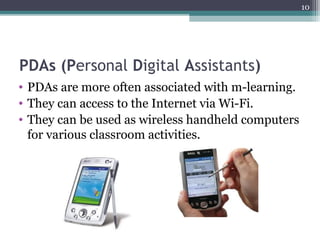
PDAs (Personal Digital Assistants)
• PDAs are more often associated with m-learning.
• They can access to the Internet via Wi-Fi.
• They can be used as wireless handheld computers
for various classroom activities.
11
iPods
• Using iPods in education
e.g. Apple in Education
http://www.apple.com/education/
12
Discussion
• Talk to your classmates some benefits and
challenges of using mobile technologies in
language teaching and learning.
Computer-mediated communication
Text chat (a synchronous form of communication)
• Windows Live Messenger
http://windowslive.com/desktop/messenger
• Yahoo Messenger
http://messenger.yahoo.com/
13
Computer-mediated communication
• Email
• Forums and bulletin boards
A bulletin board is an electronic version of a
noticeboard where a user can leave a message
for everyone to read (Sharma & Barrett, 2007).
• Video-conferencing
• Audio-conferencing (e.g. Skype)
• Virtual Learning Environments
14
15
Virtual Learning Environments (VLEs)
• Moodle
Moodle is a Course Management System
(CMS), also known as a Learning
Management System (LMS) or a Virtual
Learning Environment (VLE). It is a free Open
Source web application that educators can use
to create effective online learning sites.
http://moodle.org/
E-content sharing
Sharing photos:
• Flickr
http://www.flickr.com/
• Picasa
http://picasa.google.com/
Sharing presentations:
• Slideshare
http://www.slideshare.net/
16
Discussion
• Discuss with your classmates how Flickr/Picasa
and Slideshare can be used in English language
teaching and learning.
17
18
Social Networking
• Social Networking is a website that allows
individuals of similar interests spend time
together. They communicate with each other by
voice, video conferencing, instant messaging, and
blogs (Sharp, 2009).
19
Some popular social networking
websites
• Facebook
http://www.facebook.com/
• MySpace
http://www.myspace.com/
• Twitter
A user can update a blog from a cellphone, send
text messages, do instant messaging, and email.
http://twitter.com/
20
Assessment for blended learning
• Assessing online participation
• Inviting feedback
• Reflecting on learning
E.g. Collecting feedback/information by creating
a form in Google Docs.
21
References
Sharma, P. & Barrett, B. (2007). Blended learning: Using
technology in and beyond the language classroom.
Oxford: Macmillan Education.
Sharp, V. F. (2009). Computer education for teachers:
Integrating technology into classroom teaching (6th
ed).
Hoboken, N.J.: John Wiley.
Thorne, K. (2003). Blended learning: How to integrate
online & traditional learning. London; Sterling, VA:
Kogan Page.

Eng2281 session 9 ba(cee)

  • 1.
    BA(CEE) Core Module ENG2281 Integrating InformationTechnology in the ESL Classroom Session 9 Blended learning in second language teaching and learning 1 Prepared by Ruby Yang, Department of English, HKIEd
  • 2.
    What is blendinglearning? • Blended learning refers to “a language course which combines a face-to-face classroom component with an appropriate use of technology” (Sharma & Barrett, 2007, p. 7). • The term technology covers a wide range of new technologies. It also includes the use of computers as a means of communication, such as chat and email, virtual learning environments (VLEs), blogs and wikis. 2
  • 3.
    What is blendinglearning? • Thorne (2003, p. 16) suggests that blended learning is a mix of: ▫ Multimedia technology ▫ CD-ROM video streaming ▫ Virtual classroom ▫ Voicemail, email and conference calls ▫ Online text animation and video streaming 33
  • 4.
    What does blendinglearning include? 44
  • 5.
    5 Components of blendedlearning • Synchronous & asynchronous conferencing • Face-to-face interaction • Course website • Online quiz/assessment • Email • PowerPoint slides • Phone conferencing • Digital sound and movie • Print materials • Digital lecture delivery • Video conferencing • Digital whiteboard (Macdonald, 2006, p. 36)
  • 6.
    Why is blendedlearning important? • Blended learning represents a real opportunity to create learning experiences that can provide the right learning at the right time and in the right place for each and every individual. • It can be truly universal, crossing global boundaries and bringing groups of learners together through different cultures and time zone (Thorne, 2003, p. 18). 66
  • 7.
    Key principles foradopting a blended-learning approach • Separate the role of the teacher and the role of technology • Teach in a principled way Teaching is driven by the pedagogy and supported by the technology • Use technology to complement and enhance face- to-face learning 7
  • 8.
    Using portable devices •Digital audio recorders (e.g. MP3 players) • Digital cameras • Digital camcorders • Mobile phones • PDAs • iPods 8
  • 9.
    9 Mobile phones • Thecommon features of mobile phones now include Internet access, SMS text-messaging, cameras, and video-recording.
  • 10.
    10 PDAs (Personal DigitalAssistants) • PDAs are more often associated with m-learning. • They can access to the Internet via Wi-Fi. • They can be used as wireless handheld computers for various classroom activities.
  • 11.
    11 iPods • Using iPodsin education e.g. Apple in Education http://www.apple.com/education/
  • 12.
    12 Discussion • Talk toyour classmates some benefits and challenges of using mobile technologies in language teaching and learning.
  • 13.
    Computer-mediated communication Text chat(a synchronous form of communication) • Windows Live Messenger http://windowslive.com/desktop/messenger • Yahoo Messenger http://messenger.yahoo.com/ 13
  • 14.
    Computer-mediated communication • Email •Forums and bulletin boards A bulletin board is an electronic version of a noticeboard where a user can leave a message for everyone to read (Sharma & Barrett, 2007). • Video-conferencing • Audio-conferencing (e.g. Skype) • Virtual Learning Environments 14
  • 15.
    15 Virtual Learning Environments(VLEs) • Moodle Moodle is a Course Management System (CMS), also known as a Learning Management System (LMS) or a Virtual Learning Environment (VLE). It is a free Open Source web application that educators can use to create effective online learning sites. http://moodle.org/
  • 16.
    E-content sharing Sharing photos: •Flickr http://www.flickr.com/ • Picasa http://picasa.google.com/ Sharing presentations: • Slideshare http://www.slideshare.net/ 16
  • 17.
    Discussion • Discuss withyour classmates how Flickr/Picasa and Slideshare can be used in English language teaching and learning. 17
  • 18.
    18 Social Networking • SocialNetworking is a website that allows individuals of similar interests spend time together. They communicate with each other by voice, video conferencing, instant messaging, and blogs (Sharp, 2009).
  • 19.
    19 Some popular socialnetworking websites • Facebook http://www.facebook.com/ • MySpace http://www.myspace.com/ • Twitter A user can update a blog from a cellphone, send text messages, do instant messaging, and email. http://twitter.com/
  • 20.
    20 Assessment for blendedlearning • Assessing online participation • Inviting feedback • Reflecting on learning E.g. Collecting feedback/information by creating a form in Google Docs.
  • 21.
    21 References Sharma, P. &Barrett, B. (2007). Blended learning: Using technology in and beyond the language classroom. Oxford: Macmillan Education. Sharp, V. F. (2009). Computer education for teachers: Integrating technology into classroom teaching (6th ed). Hoboken, N.J.: John Wiley. Thorne, K. (2003). Blended learning: How to integrate online & traditional learning. London; Sterling, VA: Kogan Page.

Editor's Notes

  • #2 <number><number>
  • #9 Digital camcorders record directly onto a DVD.
  • #11 M-learning (mobile learning) The wireless Internet access allows file-sharing between teachers and students and among students themselves (Chinnery, 2006).
  • #13 Benefits: Portability / easily to be used outside classrooms Challenges The cost to educational institutions of purchasing mobile technology equipment could be staggering. Limited social interaction