PREPARED BY RAVI KUMAR LANKE Page 1
Enabling Remote Desktop Connection on Windows 7 64 bit
PREPARED BY RAVI KUMAR LANKE Page 2
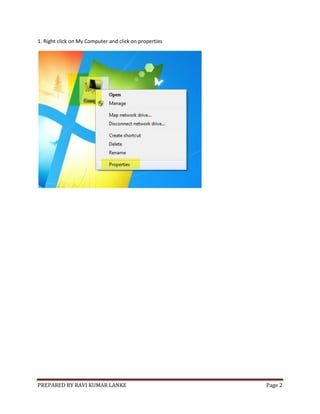
1. Right click on My Computer and click on properties
PREPARED BY RAVI KUMAR LANKE Page 3
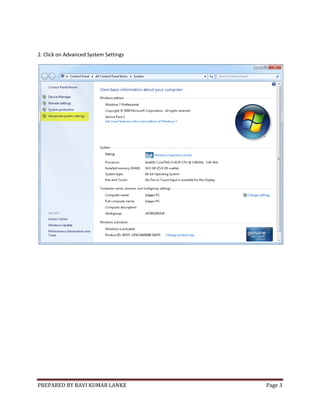
2. Click on Advanced System Settings
PREPARED BY RAVI KUMAR LANKE Page 4
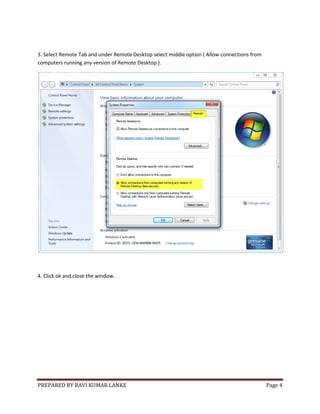
3. Select Remote Tab and under Remote Desktop select middle option ( Allow connections from
computers running any version of Remote Desktop ).
4. Click ok and close the window.
PREPARED BY RAVI KUMAR LANKE Page 5
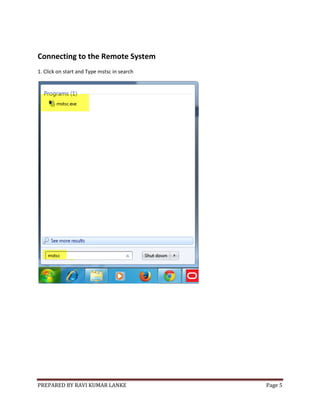
Connecting to the Remote System
1. Click on start and Type mstsc in search
PREPARED BY RAVI KUMAR LANKE Page 6
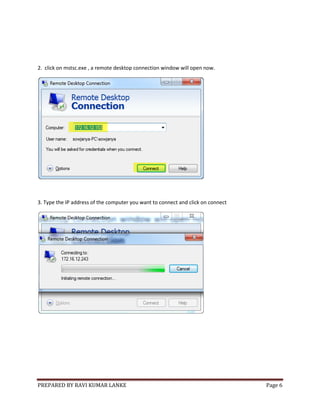
2. click on mstsc.exe , a remote desktop connection window will open now.
3. Type the IP address of the computer you want to connect and click on connect
PREPARED BY RAVI KUMAR LANKE Page 7
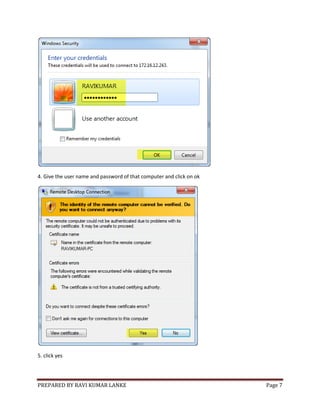
4. Give the user name and password of that computer and click on ok
5. click yes
PREPARED BY RAVI KUMAR LANKE Page 8
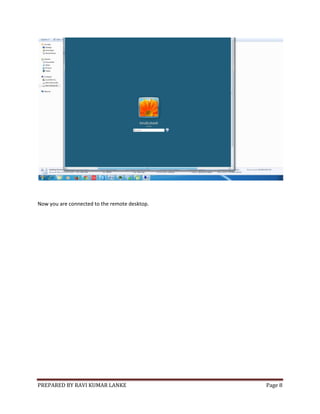
Now you are connected to the remote desktop.

Enabling remote desktop connection on windows 7 64 bit

  • 1.
    PREPARED BY RAVIKUMAR LANKE Page 1 Enabling Remote Desktop Connection on Windows 7 64 bit
  • 2.
    PREPARED BY RAVIKUMAR LANKE Page 2 1. Right click on My Computer and click on properties
  • 3.
    PREPARED BY RAVIKUMAR LANKE Page 3 2. Click on Advanced System Settings
  • 4.
    PREPARED BY RAVIKUMAR LANKE Page 4 3. Select Remote Tab and under Remote Desktop select middle option ( Allow connections from computers running any version of Remote Desktop ). 4. Click ok and close the window.
  • 5.
    PREPARED BY RAVIKUMAR LANKE Page 5 Connecting to the Remote System 1. Click on start and Type mstsc in search
  • 6.
    PREPARED BY RAVIKUMAR LANKE Page 6 2. click on mstsc.exe , a remote desktop connection window will open now. 3. Type the IP address of the computer you want to connect and click on connect
  • 7.
    PREPARED BY RAVIKUMAR LANKE Page 7 4. Give the user name and password of that computer and click on ok 5. click yes
  • 8.
    PREPARED BY RAVIKUMAR LANKE Page 8 Now you are connected to the remote desktop.