1 © 2008 Julian Dyke
Oracle VM
Julian Dyke
Independent Consultant
juliandyke.com
Web Version - October 2008
© 2008 Julian Dyke juliandyke.com
2
Agenda
 Virtualization
 Oracle VM
 Oracle VM Server
 Oracle VM Agent
 Oracle VM Manager
© 2008 Julian Dyke juliandyke.com
3
Virtualization
© 2008 Julian Dyke juliandyke.com
4
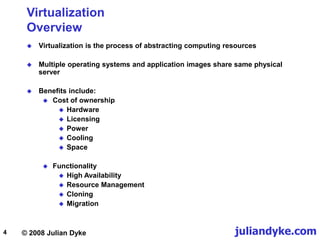
Virtualization
Overview
 Virtualization is the process of abstracting computing resources
 Multiple operating systems and application images share same physical
server
 Benefits include:
 Cost of ownership
 Hardware
 Licensing
 Power
 Cooling
 Space
 Functionality
 High Availability
 Resource Management
 Cloning
 Migration
© 2008 Julian Dyke juliandyke.com
5
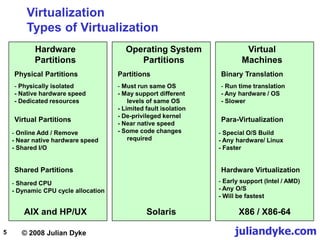
Hardware
Partitions
Physical Partitions
- Physically isolated
- Native hardware speed
- Dedicated resources
Virtual Partitions
- Online Add / Remove
- Near native hardware speed
- Shared I/O
Shared Partitions
AIX and HP/UX
Virtualization
Types of Virtualization
- Shared CPU
- Dynamic CPU cycle allocation
Operating System
Partitions
Partitions
- Must run same OS
- May support different
levels of same OS
- Limited fault isolation
- De-privileged kernel
- Near native speed
- Some code changes
required
Solaris
Virtual
Machines
Binary Translation
- Run time translation
- Any hardware / OS
- Slower
Para-Virtualization
- Special O/S Build
- Any hardware/ Linux
- Faster
Hardware Virtualization
X86 / X86-64
- Early support (Intel / AMD)
- Any O/S
- Will be fastest
© 2008 Julian Dyke juliandyke.com
6
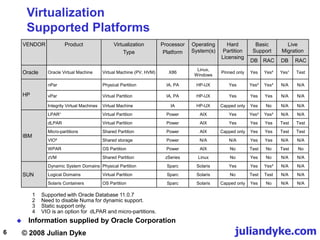
Virtualization
Supported Platforms
 Information supplied by Oracle Corporation
VENDOR Product Virtualization
Type
Processor
Platform
Operating
System(s)
Hard
Partition
Licensing
Basic
Support
Live
Migration
DB RAC DB RAC
Oracle Oracle Virtual Machine Virtual Machine (PV, HVM) X86
Linux,
Windows
Pinned only Yes Yes³ Yes¹ Test
HP
nPar Physical Partition IA, PA HP-UX Yes Yes² Yes³ N/A N/A
vPar Virtual Partition IA, PA HP-UX Yes Yes Yes N/A N/A
Integrity Virtual Machines Virtual Machine IA HP-UX Capped only Yes No N/A N/A
IBM
LPAR¹ Virtual Partition Power AIX Yes Yes³ Yes³ N/A N/A
dLPAR Virtual Partition Power AIX Yes Yes Yes Test Test
Micro-partitions Shared Partition Power AIX Capped only Yes Yes Test Test
VIO4 Shared storage Power N/A N/A Yes Yes N/A N/A
WPAR OS Partition Power AIX No Test No Test No
zVM Shared Partition zSeries Linux No Yes No N/A N/A
SUN
Dynamic System Domains Physical Partition Sparc Solaris Yes Yes Yes³ N/A N/A
Logical Domains Virtual Partition Sparc Solaris No Test Test N/A N/A
Solaris Containers OS Partition Sparc Solaris Capped only Yes No N/A N/A
1 Supported with Oracle Database 11.0.7
2 Need to disable Numa for dynamic support.
3 Static support only.
4 VIO is an option for dLPAR and micro-partitions.
© 2008 Julian Dyke juliandyke.com
7
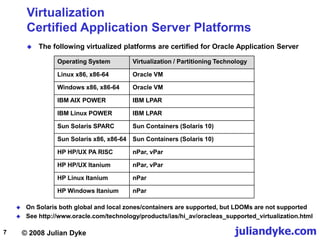
Virtualization
Certified Application Server Platforms
 The following virtualized platforms are certified for Oracle Application Server
Operating System Virtualization / Partitioning Technology
Linux x86, x86-64 Oracle VM
Windows x86, x86-64 Oracle VM
IBM AIX POWER IBM LPAR
IBM Linux POWER IBM LPAR
Sun Solaris SPARC Sun Containers (Solaris 10)
Sun Solaris x86, x86-64 Sun Containers (Solaris 10)
HP HP/UX PA RISC nPar, vPar
HP HP/UX Itanium nPar, vPar
HP Linux Itanium nPar
HP Windows Itanium nPar
 On Solaris both global and local zones/containers are supported, but LDOMs are not supported
 See http://www.oracle.com/technology/products/ias/hi_av/oracleas_supported_virtualization.html
© 2008 Julian Dyke juliandyke.com
8
VMware
Oracle Support Status
 Limited support for Oracle products on VMware
 Oracle has not certified any of its products on VMware
 Oracle will support customers running Oracle products running on VMware
 for issues known to occur on the native OS
 for issues that can be demonstrated not to be a result of using VMware
 See Metalink Note 249212.1 - Support Position for Oracle Products running on
VMware virtualized environments for more details
© 2008 Julian Dyke juliandyke.com
9
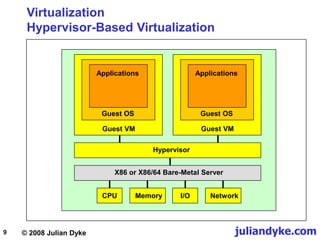
Virtualization
Hypervisor-Based Virtualization
Hypervisor
X86 or X86/64 Bare-Metal Server
Guest VM
Applications
Guest OS
CPU Memory I/O Network
Guest VM
Applications
Guest OS
© 2008 Julian Dyke juliandyke.com
10
Xen Hypervisor
Overview
 Xen hypervisor
 Small, lightweight, software virtual machine monitor
 Supports x86 and x86-64 only
 Executes multiple virtual machines on one physical system
 Each virtual machine has its own guest operating system
 Originally developed at Cambridge University
 Now open source
 Included in
 Oracle Enterprise Linux 5.0 and above
 Red Hat Enterprise Linux 5.0 and above
 SUSE Linux Enterprise Server 10
 Enhanced version included in Oracle VM Server
Beware - Oracle VM Manager overrides
some Xen default properties
© 2008 Julian Dyke juliandyke.com
11
Oracle VM
© 2008 Julian Dyke juliandyke.com
12
Oracle VM
Overview
 Server virtualization software
 Supports both Oracle and non-Oracle applications
 Claimed to be three times more efficient than other server virtualization
products
 Backed by Oracle support
 Available for free download
 edelivery.oracle.com/oracle/vm
 Guests supported include:
 Linux
 Windows
 Runs on x86 and x86-64 based systems
© 2008 Julian Dyke juliandyke.com
13
Oracle VM
Overview
 Oracle products certified with Oracle VM include:
 Oracle Database
 Oracle Fusion Middleware
 Oracle Applications
 Consists of
 Open Source server software
 integrated Web browser-based management console
© 2008 Julian Dyke juliandyke.com
14
Oracle VM
Virtual Machines
 Oracle VM allows users to create and manage Virtual Machines (VMs)
 VMs
 exist on same physical server
 behave like independent physical servers
 Each VM has its own
 virtual CPUs
 network interfaces
 storage
 operating system
© 2008 Julian Dyke juliandyke.com
15
Oracle VM
Components
 Oracle VM Server
 Self-contained virtualization environment
 Provides lightweight, secure, server-based platform forrunning VMs
 Based on updated version of Xen hypervisor technology
 Includes Oracle VM Agent
 Oracle VM Agent
 Installed with Oracle VM Server
 Communicates with Oracle VM Manager for management of virtual
machines
 Oracle VM Manager
 Provides user interface to manage Oracle VM servers and resources
 Standard Application Development Framework (ADF) web applications
© 2008 Julian Dyke juliandyke.com
16
Oracle VM
Architecture
dom0
OracleVM
Agent
domU domU domU
Hypervisor
Host Hardware CPU, Network, Memory, Disk
Java-based Management Server
Web Browser-based User Interface
Oracle VM Server
Oracle VM Manager
Oracle VM
Manager
Repository
© 2008 Julian Dyke juliandyke.com
17
Oracle VM
Supported Hardware
 Oracle VM requirements
 32 bit or 64 bit host
 i686-class processor
 all Intel Pentium Pro or newer models
 Intel Pentium 4 recommended as a minimum
 all AMD Athlon/Duron processors or newer models
 AMD Athlon recommended as a minimum
 For unmodified guest operating systems CPU must provide hardware
virtualization support
 Hardware virtualization optionally provided by the following processors:
 Intel Pentium D, Core, Core2, Xeon
 AMD Athlon, Opteron
© 2008 Julian Dyke juliandyke.com
18
Oracle VM
Supported Guest Operating Systems
 Oracle VM supports the following guest operating systems:
 Oracle Enterprise Linux 4
 Oracle Enterprise Linux 5
 Red Hat Enterprise Linux 3
 Red Hat Enterprise Linux 4
 Red Hat Enterprise Linux 5
 Microsoft Windows 2003
 Microsoft Windows Server 2003
 Microsoft Windows HP
 Note that Microsoft Windows is only supported on hardware virtualization
(HV) capable hardware
 Currently Windows runs significantly slower on Oracle VM than on native
hardware
 Oracle is developing paravirtualized Windows drivers to improve
performance of Windows on Oracle VM
© 2008 Julian Dyke juliandyke.com
19
Oracle VM
Product Certification
 Oracle VM is the only x86 based server virtualization environment on which
Oracle products are supported
 Oracle products currently certified with Oracle VM (September 2008) include:
 Oracle Database 10gR2 and11gR1
 Oracle RAC 10gR2 (10.2.0.4)
 Oracle Application Server 10gR2 and 10gR3
 Oracle Enterprise Manager 10.2.0.4
 Oracle Berkeley DB4.6
 Oracle TimesTen 7.0.3.1
 Oracle E-Business Suite11.5.10 and12
 Oracle PeopleSoft Enterprise 8.4.x and 9.0
 PeopleTools 8.49.07and above
 Oracle Siebel CRM 8.0
 Oracle Hyperion 9.3.1
 See Metalink Note 464754.1 - Certified Software on Oracle VM
© 2008 Julian Dyke juliandyke.com
20
Oracle VM
Product Certification
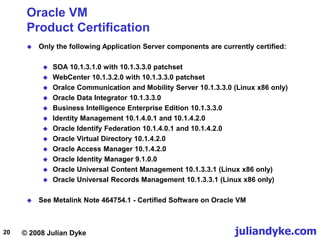
 Only the following Application Server components are currently certified:
 SOA 10.1.3.1.0 with 10.1.3.3.0 patchset
 WebCenter 10.1.3.2.0 with 10.1.3.3.0 patchset
 Oralce Communication and Mobility Server 10.1.3.3.0 (Linux x86 only)
 Oracle Data Integrator 10.1.3.3.0
 Business Intelligence Enterprise Edition 10.1.3.3.0
 Identity Management 10.1.4.0.1 and 10.1.4.2.0
 Oracle Identify Federation 10.1.4.0.1 and 10.1.4.2.0
 Oracle Virtual Directory 10.1.4.2.0
 Oracle Access Manager 10.1.4.2.0
 Oracle Identity Manager 9.1.0.0
 Oracle Universal Content Management 10.1.3.3.1 (Linux x86 only)
 Oracle Universal Records Management 10.1.3.3.1 (Linux x86 only)
 See Metalink Note 464754.1 - Certified Software on Oracle VM
© 2008 Julian Dyke juliandyke.com
21
Oracle VM
Oracle Single Instance Database Support
 As of September 2008 Oracle single instance databases are certified with
Oracle VM with the following restrictions
 x86 and x86-64 platforms
 Oracle Enterprise Linux 4.x, 5.x, Red Hat Enterprise Linux 4.x, 5.x
 Oracle 10.2.0.3 or above
 Oracle VM 2.1 or above
 Para-virtualized and hardware virtualized modes
 Use para-virtualized drivers in both modes
 Windows supported in Oracle 11.1.0.7 and above
 Live migration supported in Oracle 11.1.0.7 and above
© 2008 Julian Dyke juliandyke.com
22
Oracle VM
Oracle RAC Database Support
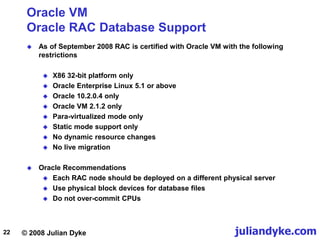
 As of September 2008 RAC is certified with Oracle VM with the following
restrictions
 X86 32-bit platform only
 Oracle Enterprise Linux 5.1 or above
 Oracle 10.2.0.4 only
 Oracle VM 2.1.2 only
 Para-virtualized mode only
 Static mode support only
 No dynamic resource changes
 No live migration
 Oracle Recommendations
 Each RAC node should be deployed on a different physical server
 Use physical block devices for database files
 Do not over-commit CPUs
© 2008 Julian Dyke juliandyke.com
23
Oracle VM
Oracle RAC Database Support
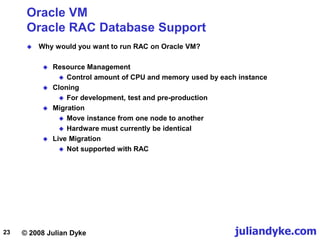
 Why would you want to run RAC on Oracle VM?
 Resource Management
 Control amount of CPU and memory used by each instance
 Cloning
 For development, test and pre-production
 Migration
 Move instance from one node to another
 Hardware must currently be identical
 Live Migration
 Not supported with RAC
© 2008 Julian Dyke juliandyke.com
24
Oracle VM
Oracle Support Costs
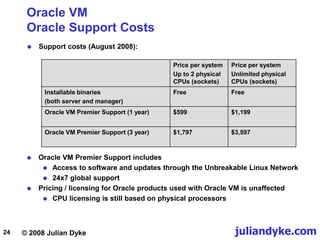
 Support costs (August 2008):
Price per system
Up to 2 physical
CPUs (sockets)
Price per system
Unlimited physical
CPUs (sockets)
Installable binaries
(both server and manager)
Free Free
Oracle VM Premier Support (1 year) $599 $1,199
Oracle VM Premier Support (3 year) $1,797 $3,597
 Oracle VM Premier Support includes
 Access to software and updates through the Unbreakable Linux Network
 24x7 global support
 Pricing / licensing for Oracle products used with Oracle VM is unaffected
 CPU licensing is still based on physical processors
© 2008 Julian Dyke juliandyke.com
25
Oracle VM
Server
© 2008 Julian Dyke juliandyke.com
26
Oracle VM Server
Installation
 Oracle VM Server installation is similar to current Enterprise Linux installation
© 2008 Julian Dyke juliandyke.com
27
Oracle VM Server
Installation
 Default partitioning layout for an 80GB disk:
Device Start End Size Type Mount Point
/dev/hdb
hdb1 1 13 101M ext3 /boot
hbb2 14 485 3074M ext3 /
hdb3 486 9598 72112M ocfs2 /OVS
hdb4 9599 9729 1027M Extended
hdb5 9599 9729 1027M swap
 Defaults can be overwritten during installation
 Note that all unallocated storage is assigned to /OVS
 Component list cannot be updated
 Package installation takes around 6 minutes
© 2008 Julian Dyke juliandyke.com
28
Oracle VM Server
Virtualization Types
 Oracle VM servers can be
 Para virtualized
 Hardware virtualized
 Para virtualization
 Requires virtualization aware kernel
 Available in Enterprise Linux 4 and 5 (Oracle and Red Hat)
 Currently best performance
 Hardware virtualization
 Can run unmodified kernels e.g Enterprise Linux 3, Windows etc
 Requires virtualization aware CPUs
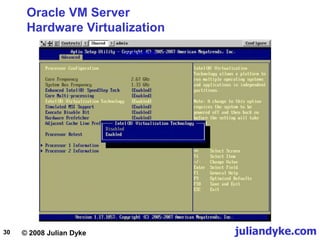
 Virtualization must be enabled in BIOS
© 2008 Julian Dyke juliandyke.com
29
Oracle VM Server
Hardware Virtualization
 Why is para-virtualization currently faster?
 Intel currently supports hardware virtualization of CPU
 VT-x on x86 / x86-64
 VT-i on Itanium
 In future processors Intel will support hardware virtualization for:
 Directed I/O
 VT-d
 Memory / Page Tables
 Extended Page Tables (EPT)
 Networking Devices
 VT-c
 When these are available hardware virtualization will be faster then para-
virtualization
 Note: AMD also provides hardware virtualization
© 2008 Julian Dyke juliandyke.com
30
Oracle VM Server
Hardware Virtualization
© 2008 Julian Dyke juliandyke.com
31
Oracle VM Server
Paravirtualization
 Para-virtualization requires a xen-aware kernel
 Available in Enterprise Linux 4 Update 5 and above
 For example for paravirtualized kernel /etc/grub.conf contains:
default=0
timeout=5
splashimage=(hd0,0)/grub/splash.xpm.gz
hiddenmenu
title Enterprise Linux (2.6.18-8.el5xen)
root (hd0,0)
kernel /vmlinuz-2.6.18-8.el5xen ro root=/dev/VolGroup00/LogVol00
console=xvc0 rhgb quiet
initrd /initrd-2.6.18-8.el5xen.img
 Default kernel is:
[root@server11 ~]# uname -r
2.6.18-8.1.15.1.16.el5xen
© 2008 Julian Dyke juliandyke.com
32
Oracle VM Server
Installation
 Example of /etc/issue for para-virtualized guest
Oracle VM server release 2.1.2
Hypervisor running in 64 bit mode with NO Hardware Virtualization support.
Network :
Management Interface :
If : eth0(Up) Mac : 00:17:3F:99:F3:7C IP address : 192.168.2.111
Configured Networks and Bridges :
If : eth0 Mac : 00:17:3F:99:F3:7C
If : eth1 Mac : 00:17:3F:9A:03:B9
If : xenbr0 Mac : FE:FF:FF:FF:FF:FF
If : xenbr1 Mac : FE:FF:FF:FF:FF:FF
CPU :
cpu family : 6
model : 15
model name : Intel(R) Pentium(R) Dual CPU E2160 @ 1.80GHz
[root@server11 ~]# cat /etc/redhat-release
Oracle VM server release 2.1.2
© 2008 Julian Dyke juliandyke.com
33
Oracle VM Server
Installation
 Example of /etc/issue for hardware virtualized guest
Oracle VM server release 2.1.2
Hypervisor running in 64 bit mode with Hardware Virtualization support.
Network :
Management Interface :
If : eth0(Up) Mac : 00:04:23:DC:1E:78 IP address :
Configured Networks and Bridges :
If : eth0 Mac : 00:04:23:DC:1E:78
If : eth1 Mac : 00:04:23:DC:1E:79
If : xenbr0 Mac : 00:04:23:DC:1E:78
If : xenbr1 Mac : 00:04:23:DC:1E:79
CPU :
cpu family : 6
model : 15
model name : Intel(R) Xeon(R) Dual CPU X5355 @ 2.66GHz
[root@server11 ~]# cat /etc/redhat-release
Oracle VM server release 2.1.2
© 2008 Julian Dyke juliandyke.com
34
Oracle VM Server
Xen Configuration
 Xen is configured in /etc/sysconfig/xendomains
 It should not be necessary to modify this file
 Services installed for xen include:
 xend
 xendomains
© 2008 Julian Dyke juliandyke.com
35
Oracle VM Server
OCFS2 Configuration
 OCFS2 is configured in /etc/ocfs2/cluster.conf
 Initially configured as single node. For example:
node:
ip_port = 7777
ip_address = 192.168.2.111
number = 0
name = server11.juliandyke.com
cluster = ocfs2
cluster:
node_count = 1
name = ocfs2
 Should be extended to contain all servers in pool
 Services installed for OCFS2 include:
 o2cb
 ocfs2
© 2008 Julian Dyke juliandyke.com
36
Oracle VM Server
OVS Configuration
 OVS release is reported in /etc/ovs-release
[root@server11 ~]# cat /etc/ovs-release
Oracle VM server release 2.1.2
 Services installed for Oracle VM include:
 ovs-agent
 ovsrepositories
 Oracle VM agent is configured in /etc/ovs-agent/agent.ini
© 2008 Julian Dyke juliandyke.com
37
Oracle VM Server
Shared Storage
 Multiple Oracle VM Servers must share storage
 Oracle VM uses OCFS2 by default
 Shared directory is created by Oracle VM Server installation
 Called /OVS
 Created as ocfs2
 Must be manually extended to other VM servers in pool
 Contains various pools including:
 iso_pool - contains ISO images
 running_pool - contains run-time images for guests
 seed_pool
 publish_pool
© 2008 Julian Dyke juliandyke.com
38
Oracle VM Server
Guest Installation
 Linux guest installation uses Anaconda
 Guest operating system MUST be installed from ISO images
 Cannot directly mount CD/ROM
 Installation can use
 NFS - from local or remote server
 HTTP - from remote web server
 FTP - from remove FTP server
 See Metalink Note 466005.1 - Mounting an ISO for Paravirtualized Guest
Operating System Installation
© 2008 Julian Dyke juliandyke.com
39
Oracle VM Server
Guest Installation
 Guest can be installed using
 virt-install
 operating system utility
 VM Manager
 GUI-based installation
 Install utilities are not entirely compatible e.g.
 virt-install creates configuration file in /etc/xen
 e.g. /etc/xen/guest11
 VM Manager creates additional configuration file called vm.cfg
 e.g. /OVS/running_pool/guest1/vm.cfg
 Prior to first installation create Oracle VM standard pools in /OVS:
[root@server11]# mkdir /OVS/running_pool
[root@server11]# mkdir /OVS/iso_pool
© 2008 Julian Dyke juliandyke.com
40
Oracle VM Server
Guest Installation using NFS
 NFS can be mounted on the local host
 NFS services must be started:
[root@server11]# service nfs start
Starting NFS services: [ OK ]
Starting NFS quotes: [ OK ]
Starting NFS daemon: [ OK ]
Starting NFS mountd: [ OK ]
 Firewall must be disabled:
[root@server11]# service iptables stop
Flushing firewall rules: [ OK ]
Setting chains to policy ACCEPT: filter [ OK ]
Unloading iptables modules: [ OK ]
[root@server11]# service portmap start
Starting portmap: [ OK ]
© 2008 Julian Dyke juliandyke.com
41
Oracle VM Server
Guest Installation using NFS
 If the installation software is delivered in a single (DVD-ROM) image
 Create a mount point
[root@server11]# mkdir /el
 If the installation is on a DVD then mount the device
[root@server11]# mount /dev/cdrom /el
 Export the file system
[root@server11]# exportfs *:/el
[root@server11]# mount -o ro,loop /dev/cdrom /el
 If the installation software is in an ISO file mount as a loopback device
 Verify the file has been exported
[root@server11]# exportfs
/el <world>
© 2008 Julian Dyke juliandyke.com
42
Oracle VM Server
Guest Installation using NFS
 If the installation software is delivered in multiple (CD-ROM) images
 Create a directory
[root@server11]# mkdir /el
 If the installation is on a CD-ROM then mount the device
[root@server11]# mount /dev/cdrom /media/iso
 Export the file system as shown on previous slide
[root@server11]# cd /media/iso
[root@server11]# cp -var * /media/iso
[root@server11]# mount -o ro,loop <filename> /media/iso
 If the installation software is in an ISO file mount as a loopback device
 Unmount the directory
[root@server11]# cd
[root@server11]# umount /media/iso
 Copy the contents to the /el directory
 Repeat for remaining disks or ISO images
© 2008 Julian Dyke juliandyke.com
43
Oracle VM Server
virt-install
 The virt-install can be executed by the root user either interactively or using
arguments
 For example interactively (as root)
[root@server11]# virt-install
What is the name of your virtual machine? guest1
How much RAM should be allocated (in megabytes?) 512
What would you like to use as the disk (path)? /OVS/running_pool/guest1
How large would you like the disk (/OVS/running_pool/guest1) to be
(in gigabytes)? 5
Would you like to enable graphics support? (yes or no) yes
What is the install location? nfs:server11:/el
 Using arguments:
[root@server11]# virt-install 
--name guest1 
--ram=512 
--file=/OVS/running_pool/guest1 
--file-size=5 
--location=nfs:192.168.2.111:/el 
--nographics
© 2008 Julian Dyke juliandyke.com
44
Oracle VM Server
virt-install
 During installation of Enterprise Linux guest you will be prompted for a
TCP/IP configuration
 Ensure that a Gateway IP address is specified otherwise installation will fail
with the following error:
That directory could not be mounted from the server
 By default guest O/S will be installed in /dev/xvda
© 2008 Julian Dyke juliandyke.com
45
Oracle VM Server
virt-install
 During initialization virt-install always reports the following error
libvir: Xen Daemon error: GET operation failed:
 This error can be ignored
 Folllowing restart of new operating system virt-install using text graphics
reports the following error
libvir: Xen Daemon error: internal error domain information incomplete,
missing kernel
Entity: line 25: parser error : Opening and ending tag mismatch: os line 5
and domain
</domain>
Entity: line 26: parser error : Premature end of data in tag domain line 1
 See Metalink Note 466563.1 - Oracle VM: First Boot after Installation of Guest
OS Fails with Text Console
 This error can also be ignored
© 2008 Julian Dyke juliandyke.com
46
Oracle VM Server
Xen Configuration
 Default virt-install of a guest O/S creates configuration /etc/xen
 e.g. /etc/xen/guest1
# Automatically generated xen config file
name = "guest1"
memory = "512"
disk = [ 'file:/OVS/running_pool/guest1,xvda,w', ]
vif = [ 'mac=00:16:3e:6d:c2:92, bridge=xenbr0', ]
uuid = "286c380b-4cd6-9308-5987-4ff05d4d2278"
bootloader="/usr/bin/pygrub"
vcpus=1
on_reboot = 'restart'
on_crash = 'restart'
© 2008 Julian Dyke juliandyke.com
47
Oracle VM Server
xm utility
 xm is the Xen management user interface
[root@server11]# xm create -c /etc/xen/guest1
 To shutdown a VM
[root@server11]# xm shutdown guest1
 To start a VM
 To list valid options
[root@server11]# xm help
[root@server11]# xm dmesg
 To print the message buffer
© 2008 Julian Dyke juliandyke.com
48
Oracle VM Server
xm utility
 To list running VMs
 To end the console session press CTRL-]
[root@server11]# xm list
Name ID Mem VCPUs State Time(s)
Domain-0 0 468 2 r----- 254.1
guest1 9 256 1 -b---- 19.7
guest2 10 256 1 -b---- 16.0
 To start a console session
[root@server11]# xm console 9
 where 9 is the ID in xm list
© 2008 Julian Dyke juliandyke.com
49
Oracle VM Server
xentop utility
 Similar to top
 Same as xm top
 Executed from dom0
 Shows current state of all domains including dom0 and guests
xentop - 10:23:58 Xen 3.1.4
3 domains: 1 running, 2 blocked, 0 paused, 0 crashed, 0 dying, 0 shutdown
Mem: 1037820k total, 1034928k used, 2892k free CPUs: 2 @ 1800MHz
NAME STATE CPU(sec) CPU(%) MEM(k) MEM(%) MAXMEM(k) MAXMEM(%) VCPUS
NETS NETTX(k) NETRX(k) VBDS VBD_OO VBD_RD VBD_WR SSID
Domain-0 -----r 256 0.3 479232 46.2 no limit n/a 2
8 1358489 9219 0 0 0 0 0
guest1 --b--- 20 0.1 262144 25.3 262144 25.3 1
1 6 9 1 0 3295 1834 0
guest2 --b--- 21 0.1 262144 25.3 262144 25.3 1
1 7 0 1 0 3240 1727 0
[root@server11 ~]# xentop
 For example
© 2008 Julian Dyke juliandyke.com
50
Oracle VM
Agent
© 2008 Julian Dyke juliandyke.com
51
Oracle VM Agent
Management
 By default Oracle VM Agent is configured with username admin and the
password specified during installation
 To check current status of Oracle VM Agent
[root@server11 ~]# service ovs-agent status
ok! process OVSPolicyServer exists
ok! process OVSMonitorServer exists
ok! process OVSLogServer exists
ok! process OVSAgentServer exists
ok! OVSAgentServer is alive
 To start Oracle VM Agent
[root@server11] service ovs-agent stop
OVSAgentServer shutdown...
OVSAgentServer stopped.
 To stop Oracle VM Agent
[root@server11] service ovs-agent start
OVSAgentServer is now starting...
OVSAgentServer started.
© 2008 Julian Dyke juliandyke.com
52
Oracle VM
Manager
© 2008 Julian Dyke juliandyke.com
53
Oracle VM Manager
Overview
 Oracle VM Manager
 Provides user interface to manage Oracle VM servers
 Standard Application Development Framework (ADF) web applications
 Manages VM lifecycle
 Creates VMs
 from installation media
 from VM templates
 Deletes VMs
 Power On / Off VMs
 Uploads VMs
 High Availability Deployment
 Live migration
 Dynamic Resource Management
 CPU, memory etc
 Static Resource Management
 ISO files, VM templates etc
© 2008 Julian Dyke juliandyke.com
54
Oracle VM Manager
Installation
 Insert CD-ROM or mount ISO image as loopback device
[root@server12]# mount -o ro,loop /dev/cdrom /mnt
 Run installer
[root@server12 ~]# /mnt/runInstaller.sh
Welcome to Oracle VM Manager 2.1.2
Please enter the choice: [1|2|3]
1. Install Oracle VM Manager
2. Uninstall Oracle VM Manager
3. Upgrade Oracle VM Manager
Starting Oracle VM Manager 2.1.2 installation ...
Do you want to install a new database or use an
existing one? [1|2]
1. Install a new Oracle XE database on localhost
2. Use an existing Oracle database in my network
 Installer prompts for port numbers and passwords
© 2008 Julian Dyke juliandyke.com
55
Oracle VM Manager
Starting and Stopping VM Manager
 The Oracle VM Manager application runs within an OC4J container
 To check the status of Oracle Containers for J2EE:
[root@server12]# service oc4j status
 To start the Oracle VM Manager:
[root@server12]# service oc4j start
 To stop the Oracle VM Manager:
[root@server12]# service oc4j stop
 To access Oracle VM Manager home page from a browser use:
http://<server_name>:8888/OVS
© 2008 Julian Dyke juliandyke.com
56
Oracle VM Manager
Accessing VM Manager
 To access Oracle VM Manager home page from a browser use:
http://<server_name>:8888/OVS
© 2008 Julian Dyke juliandyke.com
57
Oracle VM
Server Pools
 Multiple Oracle VM servers can be grouped into Server Pools
 Each server in a server pool has access to shared storage
 Can be NFS, SAN or iSCSI
 VMs can be started on any server in the pool that is available and has
resources free
 VMs can be live Migrated between any servers in the pool
 Except for RAC instances
 VMs can be auto-restarted across any servers in the pool
 For each VM a Preferred Server List can optionally be specified
© 2008 Julian Dyke juliandyke.com
58
Oracle VM
Server Pools
VM
Server Pool 1
VM VM VM VM VM VM
Server Pool 2
Oracle
VM
Server
Shared
Storage
Oracle
VM
Server
VM VM VM
Oracle
VM
Server
Shared
Storage
Oracle
VM
Server
Oracle
VM
Server
Oracle VM Manager
© 2008 Julian Dyke juliandyke.com
59
Oracle VM Manager
Server Pool Roles
 Each Oracle VM Server can have up to three roles:
 Server Pool Master Agent
 Utility Server
 Virtual Machine Server
 Each Server Pool must contain
 One Server Pool Master Agent
 One or more Utility Servers
 One or more Virtual Machine Servers
 One Oracle VM Server can perform all three roles
 Alternatively each role can be performed by different servers
© 2008 Julian Dyke juliandyke.com
60
Oracle VM
Server Pool Master Agent
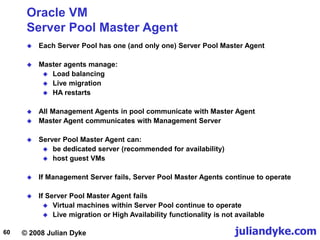
 Each Server Pool has one (and only one) Server Pool Master Agent
 Master agents manage:
 Load balancing
 Live migration
 HA restarts
 All Management Agents in pool communicate with Master Agent
 Master Agent communicates with Management Server
 Server Pool Master Agent can:
 be dedicated server (recommended for availability)
 host guest VMs
 If Management Server fails, Server Pool Master Agents continue to operate
 If Server Pool Master Agent fails
 Virtual machines within Server Pool continue to operate
 Live migration or High Availability functionality is not available
© 2008 Julian Dyke juliandyke.com
61
Oracle VM Manager
Utility Server
 Responsible for I/O intensive operations such as copying or moving files
 Used when creating or removing
 virtual machines
 servers
 server pools
 There can be one or more utility servers in a Server Pool
 If there is more than one, Server Pool Master chooses Utility Server with
maximum CPU resources to complete task
© 2008 Julian Dyke juliandyke.com
62
Oracle VM Manager
Server Pool Configuration
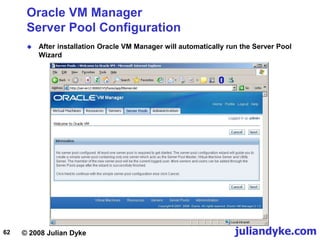
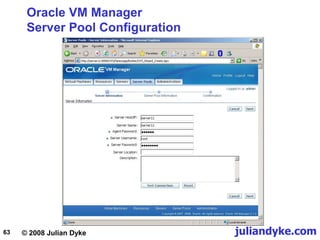
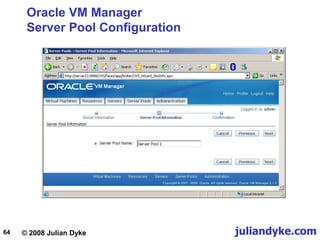
 After installation Oracle VM Manager will automatically run the Server Pool
Wizard
© 2008 Julian Dyke juliandyke.com
63
Oracle VM Manager
Server Pool Configuration
© 2008 Julian Dyke juliandyke.com
64
Oracle VM Manager
Server Pool Configuration
© 2008 Julian Dyke juliandyke.com
65
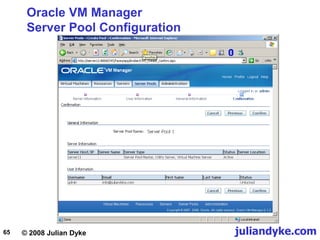
Oracle VM Manager
Server Pool Configuration
© 2008 Julian Dyke juliandyke.com
66
Oracle VM Manager
Templates
 Oracle supplies some templates which can be used to rapidly create VMs
 Operating system templates available in September 2008 included:
Template Kernel VCPUs RAM(GB) Storage(GB)
OVM_EL4U5_X86-HVM-10GB 2.6.9-55.0.1.2.100.1.ELsmp 2 2 10
OVM_EL4U5_X86_64-HVM-10GB 2.6.9-55.0.1.2.100.1.ELsmp 2 2 10
OVM_EL4U5_X86-HVM-4GB 2.6.9-55.0.1.2.100.1.ELsmp 1 1 4
OVM_EL4U5_X86_64-HVM-4GB 2.6.9-55.0.1.2.100.1.ELsmp 1 1 4
OVM_EL4U5_X86-PVM-10GB 2.6.9-55.0.1.2.9.1.ELxenU 2 2 10
OVM_EL4U5_X86-PVM-4GB 2.6.9-55.0.1.2.9.1.ELxenU 1 1 4
OVM_EL5_X86_64_HVM_10GB 2.6.18-8.1.15.100.1.el5 2 2 10
OVM_EL5_X86_64_HVM_4GB 2.6.18-8.1.15.100.1.el5 1 1 4
OVM_EL5U1_X86_64_HVM_10GB 2.6.18-53.0.0.100.1.el5 2 2 10
OVM_EL5U1_X86_64_HVM_4GB 2.6.18-53.0.0.100.1.el5 1 1 4
OVM_EL5U1_X86_64_PVM_10GB 2.6.18-53.1.4.9.1.el5xen 2 2 10
OVM_EL5U1_X86_64_HVM_4GB 2.6.18-53.1.4.9.1.el5xen 1 1 4
OVM_EL4U5_X86_HVM_ORACLE_11G 2.6.9-55.0.12.100.1.ELsmp 1 1 4
OVM_EL4U5_X86_PVM_ORACLE_11G 2.6.9-55.0.12.9.1.ELxenU 1 1 4
© 2008 Julian Dyke juliandyke.com
67
Oracle VM Manager
Guest VM Creation
© 2008 Julian Dyke juliandyke.com
68
Oracle VM Manager
Guest VM Creation
© 2008 Julian Dyke juliandyke.com
69
Oracle VM Manager
Guest VM Creation
© 2008 Julian Dyke juliandyke.com
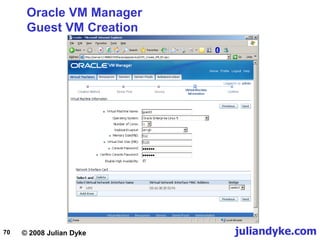
70
Oracle VM Manager
Guest VM Creation
© 2008 Julian Dyke juliandyke.com
71
Oracle VM Manager
Guest VM Creation
© 2008 Julian Dyke juliandyke.com
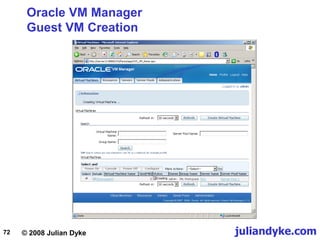
72
Oracle VM Manager
Guest VM Creation
© 2008 Julian Dyke juliandyke.com
73
Oracle VM Manager
Templates
 Oracle Database 11g disk images available in September 2008 included:
 Oracle Database 11g x86
 Oracle Database 11g x86-64
 Disk images are also available for:
 Oracle Enterprise Manager
 Siebel
 See Metalink Note 551261.1 - Oracle VM Guest Templates for Oracle
Enterprise Linux
© 2008 Julian Dyke juliandyke.com
74
Oracle VM
Conclusions
 Promising technology
 Full hardware virtualization should be very impressive
 Could be really useful for High Availability
 Still relatively immature technology
 Few customers using Oracle VM in production
 Still numerous installation and operational issues
 Beware of conflicts between Oracle VM Manager and Xen tools
 Use Oracle VM Manager if possible
 Documentation is relatively weak
 Often several ways to achieve same goal
 Not obvious which is best
 Start investigating now
 Worth considering when planning
 Probably not production-ready yet but not far away
© 2008 Julian Dyke juliandyke.com
75
References
 http://www.oracle.com/technologies/virtualization/index.html
 http://www.oracle.com/technology/documentation/vm.html
 http://wiki.oracle.com/page/Oracle+VM
© 2008 Julian Dyke juliandyke.com
76
Acknowledgements
info@juliandyke.com
 Thanks to the following for their assistance with the development of this
presentation:
 Steve Shaw - Intel Corporation
 Martin Bach - eDBA
 Simon Haslam - Veriton
 Michael Timpanaro-Perrotta - Oracle
 Adam Hawley - Oracle

Step by Step Oracle Virtual Manager Installation.ppt

  • 1.
    1 © 2008Julian Dyke Oracle VM Julian Dyke Independent Consultant juliandyke.com Web Version - October 2008
  • 2.
    © 2008 JulianDyke juliandyke.com 2 Agenda  Virtualization  Oracle VM  Oracle VM Server  Oracle VM Agent  Oracle VM Manager
  • 3.
    © 2008 JulianDyke juliandyke.com 3 Virtualization
  • 4.
    © 2008 JulianDyke juliandyke.com 4 Virtualization Overview  Virtualization is the process of abstracting computing resources  Multiple operating systems and application images share same physical server  Benefits include:  Cost of ownership  Hardware  Licensing  Power  Cooling  Space  Functionality  High Availability  Resource Management  Cloning  Migration
  • 5.
    © 2008 JulianDyke juliandyke.com 5 Hardware Partitions Physical Partitions - Physically isolated - Native hardware speed - Dedicated resources Virtual Partitions - Online Add / Remove - Near native hardware speed - Shared I/O Shared Partitions AIX and HP/UX Virtualization Types of Virtualization - Shared CPU - Dynamic CPU cycle allocation Operating System Partitions Partitions - Must run same OS - May support different levels of same OS - Limited fault isolation - De-privileged kernel - Near native speed - Some code changes required Solaris Virtual Machines Binary Translation - Run time translation - Any hardware / OS - Slower Para-Virtualization - Special O/S Build - Any hardware/ Linux - Faster Hardware Virtualization X86 / X86-64 - Early support (Intel / AMD) - Any O/S - Will be fastest
  • 6.
    © 2008 JulianDyke juliandyke.com 6 Virtualization Supported Platforms  Information supplied by Oracle Corporation VENDOR Product Virtualization Type Processor Platform Operating System(s) Hard Partition Licensing Basic Support Live Migration DB RAC DB RAC Oracle Oracle Virtual Machine Virtual Machine (PV, HVM) X86 Linux, Windows Pinned only Yes Yes³ Yes¹ Test HP nPar Physical Partition IA, PA HP-UX Yes Yes² Yes³ N/A N/A vPar Virtual Partition IA, PA HP-UX Yes Yes Yes N/A N/A Integrity Virtual Machines Virtual Machine IA HP-UX Capped only Yes No N/A N/A IBM LPAR¹ Virtual Partition Power AIX Yes Yes³ Yes³ N/A N/A dLPAR Virtual Partition Power AIX Yes Yes Yes Test Test Micro-partitions Shared Partition Power AIX Capped only Yes Yes Test Test VIO4 Shared storage Power N/A N/A Yes Yes N/A N/A WPAR OS Partition Power AIX No Test No Test No zVM Shared Partition zSeries Linux No Yes No N/A N/A SUN Dynamic System Domains Physical Partition Sparc Solaris Yes Yes Yes³ N/A N/A Logical Domains Virtual Partition Sparc Solaris No Test Test N/A N/A Solaris Containers OS Partition Sparc Solaris Capped only Yes No N/A N/A 1 Supported with Oracle Database 11.0.7 2 Need to disable Numa for dynamic support. 3 Static support only. 4 VIO is an option for dLPAR and micro-partitions.
  • 7.
    © 2008 JulianDyke juliandyke.com 7 Virtualization Certified Application Server Platforms  The following virtualized platforms are certified for Oracle Application Server Operating System Virtualization / Partitioning Technology Linux x86, x86-64 Oracle VM Windows x86, x86-64 Oracle VM IBM AIX POWER IBM LPAR IBM Linux POWER IBM LPAR Sun Solaris SPARC Sun Containers (Solaris 10) Sun Solaris x86, x86-64 Sun Containers (Solaris 10) HP HP/UX PA RISC nPar, vPar HP HP/UX Itanium nPar, vPar HP Linux Itanium nPar HP Windows Itanium nPar  On Solaris both global and local zones/containers are supported, but LDOMs are not supported  See http://www.oracle.com/technology/products/ias/hi_av/oracleas_supported_virtualization.html
  • 8.
    © 2008 JulianDyke juliandyke.com 8 VMware Oracle Support Status  Limited support for Oracle products on VMware  Oracle has not certified any of its products on VMware  Oracle will support customers running Oracle products running on VMware  for issues known to occur on the native OS  for issues that can be demonstrated not to be a result of using VMware  See Metalink Note 249212.1 - Support Position for Oracle Products running on VMware virtualized environments for more details
  • 9.
    © 2008 JulianDyke juliandyke.com 9 Virtualization Hypervisor-Based Virtualization Hypervisor X86 or X86/64 Bare-Metal Server Guest VM Applications Guest OS CPU Memory I/O Network Guest VM Applications Guest OS
  • 10.
    © 2008 JulianDyke juliandyke.com 10 Xen Hypervisor Overview  Xen hypervisor  Small, lightweight, software virtual machine monitor  Supports x86 and x86-64 only  Executes multiple virtual machines on one physical system  Each virtual machine has its own guest operating system  Originally developed at Cambridge University  Now open source  Included in  Oracle Enterprise Linux 5.0 and above  Red Hat Enterprise Linux 5.0 and above  SUSE Linux Enterprise Server 10  Enhanced version included in Oracle VM Server Beware - Oracle VM Manager overrides some Xen default properties
  • 11.
    © 2008 JulianDyke juliandyke.com 11 Oracle VM
  • 12.
    © 2008 JulianDyke juliandyke.com 12 Oracle VM Overview  Server virtualization software  Supports both Oracle and non-Oracle applications  Claimed to be three times more efficient than other server virtualization products  Backed by Oracle support  Available for free download  edelivery.oracle.com/oracle/vm  Guests supported include:  Linux  Windows  Runs on x86 and x86-64 based systems
  • 13.
    © 2008 JulianDyke juliandyke.com 13 Oracle VM Overview  Oracle products certified with Oracle VM include:  Oracle Database  Oracle Fusion Middleware  Oracle Applications  Consists of  Open Source server software  integrated Web browser-based management console
  • 14.
    © 2008 JulianDyke juliandyke.com 14 Oracle VM Virtual Machines  Oracle VM allows users to create and manage Virtual Machines (VMs)  VMs  exist on same physical server  behave like independent physical servers  Each VM has its own  virtual CPUs  network interfaces  storage  operating system
  • 15.
    © 2008 JulianDyke juliandyke.com 15 Oracle VM Components  Oracle VM Server  Self-contained virtualization environment  Provides lightweight, secure, server-based platform forrunning VMs  Based on updated version of Xen hypervisor technology  Includes Oracle VM Agent  Oracle VM Agent  Installed with Oracle VM Server  Communicates with Oracle VM Manager for management of virtual machines  Oracle VM Manager  Provides user interface to manage Oracle VM servers and resources  Standard Application Development Framework (ADF) web applications
  • 16.
    © 2008 JulianDyke juliandyke.com 16 Oracle VM Architecture dom0 OracleVM Agent domU domU domU Hypervisor Host Hardware CPU, Network, Memory, Disk Java-based Management Server Web Browser-based User Interface Oracle VM Server Oracle VM Manager Oracle VM Manager Repository
  • 17.
    © 2008 JulianDyke juliandyke.com 17 Oracle VM Supported Hardware  Oracle VM requirements  32 bit or 64 bit host  i686-class processor  all Intel Pentium Pro or newer models  Intel Pentium 4 recommended as a minimum  all AMD Athlon/Duron processors or newer models  AMD Athlon recommended as a minimum  For unmodified guest operating systems CPU must provide hardware virtualization support  Hardware virtualization optionally provided by the following processors:  Intel Pentium D, Core, Core2, Xeon  AMD Athlon, Opteron
  • 18.
    © 2008 JulianDyke juliandyke.com 18 Oracle VM Supported Guest Operating Systems  Oracle VM supports the following guest operating systems:  Oracle Enterprise Linux 4  Oracle Enterprise Linux 5  Red Hat Enterprise Linux 3  Red Hat Enterprise Linux 4  Red Hat Enterprise Linux 5  Microsoft Windows 2003  Microsoft Windows Server 2003  Microsoft Windows HP  Note that Microsoft Windows is only supported on hardware virtualization (HV) capable hardware  Currently Windows runs significantly slower on Oracle VM than on native hardware  Oracle is developing paravirtualized Windows drivers to improve performance of Windows on Oracle VM
  • 19.
    © 2008 JulianDyke juliandyke.com 19 Oracle VM Product Certification  Oracle VM is the only x86 based server virtualization environment on which Oracle products are supported  Oracle products currently certified with Oracle VM (September 2008) include:  Oracle Database 10gR2 and11gR1  Oracle RAC 10gR2 (10.2.0.4)  Oracle Application Server 10gR2 and 10gR3  Oracle Enterprise Manager 10.2.0.4  Oracle Berkeley DB4.6  Oracle TimesTen 7.0.3.1  Oracle E-Business Suite11.5.10 and12  Oracle PeopleSoft Enterprise 8.4.x and 9.0  PeopleTools 8.49.07and above  Oracle Siebel CRM 8.0  Oracle Hyperion 9.3.1  See Metalink Note 464754.1 - Certified Software on Oracle VM
  • 20.
    © 2008 JulianDyke juliandyke.com 20 Oracle VM Product Certification  Only the following Application Server components are currently certified:  SOA 10.1.3.1.0 with 10.1.3.3.0 patchset  WebCenter 10.1.3.2.0 with 10.1.3.3.0 patchset  Oralce Communication and Mobility Server 10.1.3.3.0 (Linux x86 only)  Oracle Data Integrator 10.1.3.3.0  Business Intelligence Enterprise Edition 10.1.3.3.0  Identity Management 10.1.4.0.1 and 10.1.4.2.0  Oracle Identify Federation 10.1.4.0.1 and 10.1.4.2.0  Oracle Virtual Directory 10.1.4.2.0  Oracle Access Manager 10.1.4.2.0  Oracle Identity Manager 9.1.0.0  Oracle Universal Content Management 10.1.3.3.1 (Linux x86 only)  Oracle Universal Records Management 10.1.3.3.1 (Linux x86 only)  See Metalink Note 464754.1 - Certified Software on Oracle VM
  • 21.
    © 2008 JulianDyke juliandyke.com 21 Oracle VM Oracle Single Instance Database Support  As of September 2008 Oracle single instance databases are certified with Oracle VM with the following restrictions  x86 and x86-64 platforms  Oracle Enterprise Linux 4.x, 5.x, Red Hat Enterprise Linux 4.x, 5.x  Oracle 10.2.0.3 or above  Oracle VM 2.1 or above  Para-virtualized and hardware virtualized modes  Use para-virtualized drivers in both modes  Windows supported in Oracle 11.1.0.7 and above  Live migration supported in Oracle 11.1.0.7 and above
  • 22.
    © 2008 JulianDyke juliandyke.com 22 Oracle VM Oracle RAC Database Support  As of September 2008 RAC is certified with Oracle VM with the following restrictions  X86 32-bit platform only  Oracle Enterprise Linux 5.1 or above  Oracle 10.2.0.4 only  Oracle VM 2.1.2 only  Para-virtualized mode only  Static mode support only  No dynamic resource changes  No live migration  Oracle Recommendations  Each RAC node should be deployed on a different physical server  Use physical block devices for database files  Do not over-commit CPUs
  • 23.
    © 2008 JulianDyke juliandyke.com 23 Oracle VM Oracle RAC Database Support  Why would you want to run RAC on Oracle VM?  Resource Management  Control amount of CPU and memory used by each instance  Cloning  For development, test and pre-production  Migration  Move instance from one node to another  Hardware must currently be identical  Live Migration  Not supported with RAC
  • 24.
    © 2008 JulianDyke juliandyke.com 24 Oracle VM Oracle Support Costs  Support costs (August 2008): Price per system Up to 2 physical CPUs (sockets) Price per system Unlimited physical CPUs (sockets) Installable binaries (both server and manager) Free Free Oracle VM Premier Support (1 year) $599 $1,199 Oracle VM Premier Support (3 year) $1,797 $3,597  Oracle VM Premier Support includes  Access to software and updates through the Unbreakable Linux Network  24x7 global support  Pricing / licensing for Oracle products used with Oracle VM is unaffected  CPU licensing is still based on physical processors
  • 25.
    © 2008 JulianDyke juliandyke.com 25 Oracle VM Server
  • 26.
    © 2008 JulianDyke juliandyke.com 26 Oracle VM Server Installation  Oracle VM Server installation is similar to current Enterprise Linux installation
  • 27.
    © 2008 JulianDyke juliandyke.com 27 Oracle VM Server Installation  Default partitioning layout for an 80GB disk: Device Start End Size Type Mount Point /dev/hdb hdb1 1 13 101M ext3 /boot hbb2 14 485 3074M ext3 / hdb3 486 9598 72112M ocfs2 /OVS hdb4 9599 9729 1027M Extended hdb5 9599 9729 1027M swap  Defaults can be overwritten during installation  Note that all unallocated storage is assigned to /OVS  Component list cannot be updated  Package installation takes around 6 minutes
  • 28.
    © 2008 JulianDyke juliandyke.com 28 Oracle VM Server Virtualization Types  Oracle VM servers can be  Para virtualized  Hardware virtualized  Para virtualization  Requires virtualization aware kernel  Available in Enterprise Linux 4 and 5 (Oracle and Red Hat)  Currently best performance  Hardware virtualization  Can run unmodified kernels e.g Enterprise Linux 3, Windows etc  Requires virtualization aware CPUs  Virtualization must be enabled in BIOS
  • 29.
    © 2008 JulianDyke juliandyke.com 29 Oracle VM Server Hardware Virtualization  Why is para-virtualization currently faster?  Intel currently supports hardware virtualization of CPU  VT-x on x86 / x86-64  VT-i on Itanium  In future processors Intel will support hardware virtualization for:  Directed I/O  VT-d  Memory / Page Tables  Extended Page Tables (EPT)  Networking Devices  VT-c  When these are available hardware virtualization will be faster then para- virtualization  Note: AMD also provides hardware virtualization
  • 30.
    © 2008 JulianDyke juliandyke.com 30 Oracle VM Server Hardware Virtualization
  • 31.
    © 2008 JulianDyke juliandyke.com 31 Oracle VM Server Paravirtualization  Para-virtualization requires a xen-aware kernel  Available in Enterprise Linux 4 Update 5 and above  For example for paravirtualized kernel /etc/grub.conf contains: default=0 timeout=5 splashimage=(hd0,0)/grub/splash.xpm.gz hiddenmenu title Enterprise Linux (2.6.18-8.el5xen) root (hd0,0) kernel /vmlinuz-2.6.18-8.el5xen ro root=/dev/VolGroup00/LogVol00 console=xvc0 rhgb quiet initrd /initrd-2.6.18-8.el5xen.img  Default kernel is: [root@server11 ~]# uname -r 2.6.18-8.1.15.1.16.el5xen
  • 32.
    © 2008 JulianDyke juliandyke.com 32 Oracle VM Server Installation  Example of /etc/issue for para-virtualized guest Oracle VM server release 2.1.2 Hypervisor running in 64 bit mode with NO Hardware Virtualization support. Network : Management Interface : If : eth0(Up) Mac : 00:17:3F:99:F3:7C IP address : 192.168.2.111 Configured Networks and Bridges : If : eth0 Mac : 00:17:3F:99:F3:7C If : eth1 Mac : 00:17:3F:9A:03:B9 If : xenbr0 Mac : FE:FF:FF:FF:FF:FF If : xenbr1 Mac : FE:FF:FF:FF:FF:FF CPU : cpu family : 6 model : 15 model name : Intel(R) Pentium(R) Dual CPU E2160 @ 1.80GHz [root@server11 ~]# cat /etc/redhat-release Oracle VM server release 2.1.2
  • 33.
    © 2008 JulianDyke juliandyke.com 33 Oracle VM Server Installation  Example of /etc/issue for hardware virtualized guest Oracle VM server release 2.1.2 Hypervisor running in 64 bit mode with Hardware Virtualization support. Network : Management Interface : If : eth0(Up) Mac : 00:04:23:DC:1E:78 IP address : Configured Networks and Bridges : If : eth0 Mac : 00:04:23:DC:1E:78 If : eth1 Mac : 00:04:23:DC:1E:79 If : xenbr0 Mac : 00:04:23:DC:1E:78 If : xenbr1 Mac : 00:04:23:DC:1E:79 CPU : cpu family : 6 model : 15 model name : Intel(R) Xeon(R) Dual CPU X5355 @ 2.66GHz [root@server11 ~]# cat /etc/redhat-release Oracle VM server release 2.1.2
  • 34.
    © 2008 JulianDyke juliandyke.com 34 Oracle VM Server Xen Configuration  Xen is configured in /etc/sysconfig/xendomains  It should not be necessary to modify this file  Services installed for xen include:  xend  xendomains
  • 35.
    © 2008 JulianDyke juliandyke.com 35 Oracle VM Server OCFS2 Configuration  OCFS2 is configured in /etc/ocfs2/cluster.conf  Initially configured as single node. For example: node: ip_port = 7777 ip_address = 192.168.2.111 number = 0 name = server11.juliandyke.com cluster = ocfs2 cluster: node_count = 1 name = ocfs2  Should be extended to contain all servers in pool  Services installed for OCFS2 include:  o2cb  ocfs2
  • 36.
    © 2008 JulianDyke juliandyke.com 36 Oracle VM Server OVS Configuration  OVS release is reported in /etc/ovs-release [root@server11 ~]# cat /etc/ovs-release Oracle VM server release 2.1.2  Services installed for Oracle VM include:  ovs-agent  ovsrepositories  Oracle VM agent is configured in /etc/ovs-agent/agent.ini
  • 37.
    © 2008 JulianDyke juliandyke.com 37 Oracle VM Server Shared Storage  Multiple Oracle VM Servers must share storage  Oracle VM uses OCFS2 by default  Shared directory is created by Oracle VM Server installation  Called /OVS  Created as ocfs2  Must be manually extended to other VM servers in pool  Contains various pools including:  iso_pool - contains ISO images  running_pool - contains run-time images for guests  seed_pool  publish_pool
  • 38.
    © 2008 JulianDyke juliandyke.com 38 Oracle VM Server Guest Installation  Linux guest installation uses Anaconda  Guest operating system MUST be installed from ISO images  Cannot directly mount CD/ROM  Installation can use  NFS - from local or remote server  HTTP - from remote web server  FTP - from remove FTP server  See Metalink Note 466005.1 - Mounting an ISO for Paravirtualized Guest Operating System Installation
  • 39.
    © 2008 JulianDyke juliandyke.com 39 Oracle VM Server Guest Installation  Guest can be installed using  virt-install  operating system utility  VM Manager  GUI-based installation  Install utilities are not entirely compatible e.g.  virt-install creates configuration file in /etc/xen  e.g. /etc/xen/guest11  VM Manager creates additional configuration file called vm.cfg  e.g. /OVS/running_pool/guest1/vm.cfg  Prior to first installation create Oracle VM standard pools in /OVS: [root@server11]# mkdir /OVS/running_pool [root@server11]# mkdir /OVS/iso_pool
  • 40.
    © 2008 JulianDyke juliandyke.com 40 Oracle VM Server Guest Installation using NFS  NFS can be mounted on the local host  NFS services must be started: [root@server11]# service nfs start Starting NFS services: [ OK ] Starting NFS quotes: [ OK ] Starting NFS daemon: [ OK ] Starting NFS mountd: [ OK ]  Firewall must be disabled: [root@server11]# service iptables stop Flushing firewall rules: [ OK ] Setting chains to policy ACCEPT: filter [ OK ] Unloading iptables modules: [ OK ] [root@server11]# service portmap start Starting portmap: [ OK ]
  • 41.
    © 2008 JulianDyke juliandyke.com 41 Oracle VM Server Guest Installation using NFS  If the installation software is delivered in a single (DVD-ROM) image  Create a mount point [root@server11]# mkdir /el  If the installation is on a DVD then mount the device [root@server11]# mount /dev/cdrom /el  Export the file system [root@server11]# exportfs *:/el [root@server11]# mount -o ro,loop /dev/cdrom /el  If the installation software is in an ISO file mount as a loopback device  Verify the file has been exported [root@server11]# exportfs /el <world>
  • 42.
    © 2008 JulianDyke juliandyke.com 42 Oracle VM Server Guest Installation using NFS  If the installation software is delivered in multiple (CD-ROM) images  Create a directory [root@server11]# mkdir /el  If the installation is on a CD-ROM then mount the device [root@server11]# mount /dev/cdrom /media/iso  Export the file system as shown on previous slide [root@server11]# cd /media/iso [root@server11]# cp -var * /media/iso [root@server11]# mount -o ro,loop <filename> /media/iso  If the installation software is in an ISO file mount as a loopback device  Unmount the directory [root@server11]# cd [root@server11]# umount /media/iso  Copy the contents to the /el directory  Repeat for remaining disks or ISO images
  • 43.
    © 2008 JulianDyke juliandyke.com 43 Oracle VM Server virt-install  The virt-install can be executed by the root user either interactively or using arguments  For example interactively (as root) [root@server11]# virt-install What is the name of your virtual machine? guest1 How much RAM should be allocated (in megabytes?) 512 What would you like to use as the disk (path)? /OVS/running_pool/guest1 How large would you like the disk (/OVS/running_pool/guest1) to be (in gigabytes)? 5 Would you like to enable graphics support? (yes or no) yes What is the install location? nfs:server11:/el  Using arguments: [root@server11]# virt-install --name guest1 --ram=512 --file=/OVS/running_pool/guest1 --file-size=5 --location=nfs:192.168.2.111:/el --nographics
  • 44.
    © 2008 JulianDyke juliandyke.com 44 Oracle VM Server virt-install  During installation of Enterprise Linux guest you will be prompted for a TCP/IP configuration  Ensure that a Gateway IP address is specified otherwise installation will fail with the following error: That directory could not be mounted from the server  By default guest O/S will be installed in /dev/xvda
  • 45.
    © 2008 JulianDyke juliandyke.com 45 Oracle VM Server virt-install  During initialization virt-install always reports the following error libvir: Xen Daemon error: GET operation failed:  This error can be ignored  Folllowing restart of new operating system virt-install using text graphics reports the following error libvir: Xen Daemon error: internal error domain information incomplete, missing kernel Entity: line 25: parser error : Opening and ending tag mismatch: os line 5 and domain </domain> Entity: line 26: parser error : Premature end of data in tag domain line 1  See Metalink Note 466563.1 - Oracle VM: First Boot after Installation of Guest OS Fails with Text Console  This error can also be ignored
  • 46.
    © 2008 JulianDyke juliandyke.com 46 Oracle VM Server Xen Configuration  Default virt-install of a guest O/S creates configuration /etc/xen  e.g. /etc/xen/guest1 # Automatically generated xen config file name = "guest1" memory = "512" disk = [ 'file:/OVS/running_pool/guest1,xvda,w', ] vif = [ 'mac=00:16:3e:6d:c2:92, bridge=xenbr0', ] uuid = "286c380b-4cd6-9308-5987-4ff05d4d2278" bootloader="/usr/bin/pygrub" vcpus=1 on_reboot = 'restart' on_crash = 'restart'
  • 47.
    © 2008 JulianDyke juliandyke.com 47 Oracle VM Server xm utility  xm is the Xen management user interface [root@server11]# xm create -c /etc/xen/guest1  To shutdown a VM [root@server11]# xm shutdown guest1  To start a VM  To list valid options [root@server11]# xm help [root@server11]# xm dmesg  To print the message buffer
  • 48.
    © 2008 JulianDyke juliandyke.com 48 Oracle VM Server xm utility  To list running VMs  To end the console session press CTRL-] [root@server11]# xm list Name ID Mem VCPUs State Time(s) Domain-0 0 468 2 r----- 254.1 guest1 9 256 1 -b---- 19.7 guest2 10 256 1 -b---- 16.0  To start a console session [root@server11]# xm console 9  where 9 is the ID in xm list
  • 49.
    © 2008 JulianDyke juliandyke.com 49 Oracle VM Server xentop utility  Similar to top  Same as xm top  Executed from dom0  Shows current state of all domains including dom0 and guests xentop - 10:23:58 Xen 3.1.4 3 domains: 1 running, 2 blocked, 0 paused, 0 crashed, 0 dying, 0 shutdown Mem: 1037820k total, 1034928k used, 2892k free CPUs: 2 @ 1800MHz NAME STATE CPU(sec) CPU(%) MEM(k) MEM(%) MAXMEM(k) MAXMEM(%) VCPUS NETS NETTX(k) NETRX(k) VBDS VBD_OO VBD_RD VBD_WR SSID Domain-0 -----r 256 0.3 479232 46.2 no limit n/a 2 8 1358489 9219 0 0 0 0 0 guest1 --b--- 20 0.1 262144 25.3 262144 25.3 1 1 6 9 1 0 3295 1834 0 guest2 --b--- 21 0.1 262144 25.3 262144 25.3 1 1 7 0 1 0 3240 1727 0 [root@server11 ~]# xentop  For example
  • 50.
    © 2008 JulianDyke juliandyke.com 50 Oracle VM Agent
  • 51.
    © 2008 JulianDyke juliandyke.com 51 Oracle VM Agent Management  By default Oracle VM Agent is configured with username admin and the password specified during installation  To check current status of Oracle VM Agent [root@server11 ~]# service ovs-agent status ok! process OVSPolicyServer exists ok! process OVSMonitorServer exists ok! process OVSLogServer exists ok! process OVSAgentServer exists ok! OVSAgentServer is alive  To start Oracle VM Agent [root@server11] service ovs-agent stop OVSAgentServer shutdown... OVSAgentServer stopped.  To stop Oracle VM Agent [root@server11] service ovs-agent start OVSAgentServer is now starting... OVSAgentServer started.
  • 52.
    © 2008 JulianDyke juliandyke.com 52 Oracle VM Manager
  • 53.
    © 2008 JulianDyke juliandyke.com 53 Oracle VM Manager Overview  Oracle VM Manager  Provides user interface to manage Oracle VM servers  Standard Application Development Framework (ADF) web applications  Manages VM lifecycle  Creates VMs  from installation media  from VM templates  Deletes VMs  Power On / Off VMs  Uploads VMs  High Availability Deployment  Live migration  Dynamic Resource Management  CPU, memory etc  Static Resource Management  ISO files, VM templates etc
  • 54.
    © 2008 JulianDyke juliandyke.com 54 Oracle VM Manager Installation  Insert CD-ROM or mount ISO image as loopback device [root@server12]# mount -o ro,loop /dev/cdrom /mnt  Run installer [root@server12 ~]# /mnt/runInstaller.sh Welcome to Oracle VM Manager 2.1.2 Please enter the choice: [1|2|3] 1. Install Oracle VM Manager 2. Uninstall Oracle VM Manager 3. Upgrade Oracle VM Manager Starting Oracle VM Manager 2.1.2 installation ... Do you want to install a new database or use an existing one? [1|2] 1. Install a new Oracle XE database on localhost 2. Use an existing Oracle database in my network  Installer prompts for port numbers and passwords
  • 55.
    © 2008 JulianDyke juliandyke.com 55 Oracle VM Manager Starting and Stopping VM Manager  The Oracle VM Manager application runs within an OC4J container  To check the status of Oracle Containers for J2EE: [root@server12]# service oc4j status  To start the Oracle VM Manager: [root@server12]# service oc4j start  To stop the Oracle VM Manager: [root@server12]# service oc4j stop  To access Oracle VM Manager home page from a browser use: http://<server_name>:8888/OVS
  • 56.
    © 2008 JulianDyke juliandyke.com 56 Oracle VM Manager Accessing VM Manager  To access Oracle VM Manager home page from a browser use: http://<server_name>:8888/OVS
  • 57.
    © 2008 JulianDyke juliandyke.com 57 Oracle VM Server Pools  Multiple Oracle VM servers can be grouped into Server Pools  Each server in a server pool has access to shared storage  Can be NFS, SAN or iSCSI  VMs can be started on any server in the pool that is available and has resources free  VMs can be live Migrated between any servers in the pool  Except for RAC instances  VMs can be auto-restarted across any servers in the pool  For each VM a Preferred Server List can optionally be specified
  • 58.
    © 2008 JulianDyke juliandyke.com 58 Oracle VM Server Pools VM Server Pool 1 VM VM VM VM VM VM Server Pool 2 Oracle VM Server Shared Storage Oracle VM Server VM VM VM Oracle VM Server Shared Storage Oracle VM Server Oracle VM Server Oracle VM Manager
  • 59.
    © 2008 JulianDyke juliandyke.com 59 Oracle VM Manager Server Pool Roles  Each Oracle VM Server can have up to three roles:  Server Pool Master Agent  Utility Server  Virtual Machine Server  Each Server Pool must contain  One Server Pool Master Agent  One or more Utility Servers  One or more Virtual Machine Servers  One Oracle VM Server can perform all three roles  Alternatively each role can be performed by different servers
  • 60.
    © 2008 JulianDyke juliandyke.com 60 Oracle VM Server Pool Master Agent  Each Server Pool has one (and only one) Server Pool Master Agent  Master agents manage:  Load balancing  Live migration  HA restarts  All Management Agents in pool communicate with Master Agent  Master Agent communicates with Management Server  Server Pool Master Agent can:  be dedicated server (recommended for availability)  host guest VMs  If Management Server fails, Server Pool Master Agents continue to operate  If Server Pool Master Agent fails  Virtual machines within Server Pool continue to operate  Live migration or High Availability functionality is not available
  • 61.
    © 2008 JulianDyke juliandyke.com 61 Oracle VM Manager Utility Server  Responsible for I/O intensive operations such as copying or moving files  Used when creating or removing  virtual machines  servers  server pools  There can be one or more utility servers in a Server Pool  If there is more than one, Server Pool Master chooses Utility Server with maximum CPU resources to complete task
  • 62.
    © 2008 JulianDyke juliandyke.com 62 Oracle VM Manager Server Pool Configuration  After installation Oracle VM Manager will automatically run the Server Pool Wizard
  • 63.
    © 2008 JulianDyke juliandyke.com 63 Oracle VM Manager Server Pool Configuration
  • 64.
    © 2008 JulianDyke juliandyke.com 64 Oracle VM Manager Server Pool Configuration
  • 65.
    © 2008 JulianDyke juliandyke.com 65 Oracle VM Manager Server Pool Configuration
  • 66.
    © 2008 JulianDyke juliandyke.com 66 Oracle VM Manager Templates  Oracle supplies some templates which can be used to rapidly create VMs  Operating system templates available in September 2008 included: Template Kernel VCPUs RAM(GB) Storage(GB) OVM_EL4U5_X86-HVM-10GB 2.6.9-55.0.1.2.100.1.ELsmp 2 2 10 OVM_EL4U5_X86_64-HVM-10GB 2.6.9-55.0.1.2.100.1.ELsmp 2 2 10 OVM_EL4U5_X86-HVM-4GB 2.6.9-55.0.1.2.100.1.ELsmp 1 1 4 OVM_EL4U5_X86_64-HVM-4GB 2.6.9-55.0.1.2.100.1.ELsmp 1 1 4 OVM_EL4U5_X86-PVM-10GB 2.6.9-55.0.1.2.9.1.ELxenU 2 2 10 OVM_EL4U5_X86-PVM-4GB 2.6.9-55.0.1.2.9.1.ELxenU 1 1 4 OVM_EL5_X86_64_HVM_10GB 2.6.18-8.1.15.100.1.el5 2 2 10 OVM_EL5_X86_64_HVM_4GB 2.6.18-8.1.15.100.1.el5 1 1 4 OVM_EL5U1_X86_64_HVM_10GB 2.6.18-53.0.0.100.1.el5 2 2 10 OVM_EL5U1_X86_64_HVM_4GB 2.6.18-53.0.0.100.1.el5 1 1 4 OVM_EL5U1_X86_64_PVM_10GB 2.6.18-53.1.4.9.1.el5xen 2 2 10 OVM_EL5U1_X86_64_HVM_4GB 2.6.18-53.1.4.9.1.el5xen 1 1 4 OVM_EL4U5_X86_HVM_ORACLE_11G 2.6.9-55.0.12.100.1.ELsmp 1 1 4 OVM_EL4U5_X86_PVM_ORACLE_11G 2.6.9-55.0.12.9.1.ELxenU 1 1 4
  • 67.
    © 2008 JulianDyke juliandyke.com 67 Oracle VM Manager Guest VM Creation
  • 68.
    © 2008 JulianDyke juliandyke.com 68 Oracle VM Manager Guest VM Creation
  • 69.
    © 2008 JulianDyke juliandyke.com 69 Oracle VM Manager Guest VM Creation
  • 70.
    © 2008 JulianDyke juliandyke.com 70 Oracle VM Manager Guest VM Creation
  • 71.
    © 2008 JulianDyke juliandyke.com 71 Oracle VM Manager Guest VM Creation
  • 72.
    © 2008 JulianDyke juliandyke.com 72 Oracle VM Manager Guest VM Creation
  • 73.
    © 2008 JulianDyke juliandyke.com 73 Oracle VM Manager Templates  Oracle Database 11g disk images available in September 2008 included:  Oracle Database 11g x86  Oracle Database 11g x86-64  Disk images are also available for:  Oracle Enterprise Manager  Siebel  See Metalink Note 551261.1 - Oracle VM Guest Templates for Oracle Enterprise Linux
  • 74.
    © 2008 JulianDyke juliandyke.com 74 Oracle VM Conclusions  Promising technology  Full hardware virtualization should be very impressive  Could be really useful for High Availability  Still relatively immature technology  Few customers using Oracle VM in production  Still numerous installation and operational issues  Beware of conflicts between Oracle VM Manager and Xen tools  Use Oracle VM Manager if possible  Documentation is relatively weak  Often several ways to achieve same goal  Not obvious which is best  Start investigating now  Worth considering when planning  Probably not production-ready yet but not far away
  • 75.
    © 2008 JulianDyke juliandyke.com 75 References  http://www.oracle.com/technologies/virtualization/index.html  http://www.oracle.com/technology/documentation/vm.html  http://wiki.oracle.com/page/Oracle+VM
  • 76.
    © 2008 JulianDyke juliandyke.com 76 Acknowledgements info@juliandyke.com  Thanks to the following for their assistance with the development of this presentation:  Steve Shaw - Intel Corporation  Martin Bach - eDBA  Simon Haslam - Veriton  Michael Timpanaro-Perrotta - Oracle  Adam Hawley - Oracle