ELL 2010 E-Learning in Learning Languages A teaching as inquiry project for Year 7 - 10 teachers of Learning Languages Learning Languages Facilitator Dawn Jarbeau
ELL Aim What’s the Purpose?
Workshop 1 Our Goals Review structure of the project Explore effective practice for  Learning Languages Establish personal inquiry focus question and a timeframe for the ELL Project Start developing a strategy for integrating e-learning in Languages
Organisation Workshops Relief Observations In depth support
 
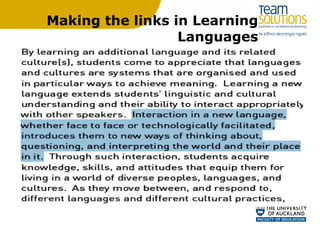
Making the links in Learning Languages
Take Some  Time  to  Think
Ellis who or what?
Take Some  Time  to  Write & Talk
Successful ELL Projects KNOW THE LEARNER
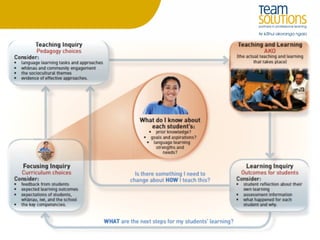
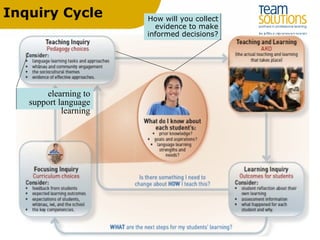
Inquiry Cycle How will you collect  evidence to make informed decisions?  elearning to support language learning
 
Slide title
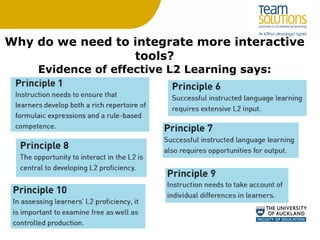
Why do we need to integrate more interactive tools? Evidence of effective L2 Learning says:
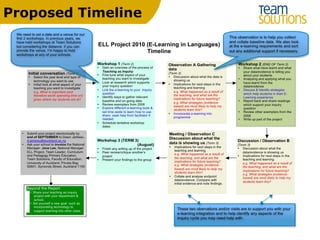
Proposed Timeline
Where to now? Dates Needs Plan
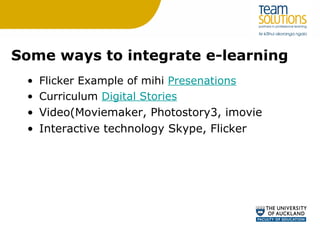
Some ways to integrate e-learning Flicker Example of mihi  Presenations Curriculum  Digital Stories Video(Moviemaker, Photostory3, imovie Interactive technology Skype, Flicker
Useful sites http://softwareforlearning.tki.org.nz/  - Supporting schools with e-learning http://www.boxoftricks.net/  - site established by a modern   languages teacher http ://cooltoolsforschools.wikispaces.com/  - Web 2.0 cool tools for schools
Popular sites http://wallwisher.com/  - Collaborative Post its http://delicious.com/   - Sign up for an account & search sites using others bookmarks http://www.slideshare.net/  - Find power points & share yours. http://www.glogster.com/edu  - Make your interactive poster easily and share it with friends.
More Tools http://voicethread.com/  - Collaborative space for video, voice, and text commenting.   http://www.wikispaces.com/ - Free Wikis for Everyone - Creating your own web page.

ELL workshop 2010

  • 1.
    ELL 2010 E-Learningin Learning Languages A teaching as inquiry project for Year 7 - 10 teachers of Learning Languages Learning Languages Facilitator Dawn Jarbeau
  • 2.
    ELL Aim What’sthe Purpose?
  • 3.
    Workshop 1 OurGoals Review structure of the project Explore effective practice for Learning Languages Establish personal inquiry focus question and a timeframe for the ELL Project Start developing a strategy for integrating e-learning in Languages
  • 4.
    Organisation Workshops ReliefObservations In depth support
  • 5.
  • 6.
    Making the linksin Learning Languages
  • 7.
    Take Some Time to Think
  • 8.
  • 9.
    Take Some Time to Write & Talk
  • 10.
    Successful ELL ProjectsKNOW THE LEARNER
  • 11.
    Inquiry Cycle Howwill you collect evidence to make informed decisions? elearning to support language learning
  • 12.
  • 13.
  • 14.
    Why do weneed to integrate more interactive tools? Evidence of effective L2 Learning says:
  • 15.
  • 16.
    Where to now?Dates Needs Plan
  • 17.
    Some ways tointegrate e-learning Flicker Example of mihi Presenations Curriculum Digital Stories Video(Moviemaker, Photostory3, imovie Interactive technology Skype, Flicker
  • 18.
    Useful sites http://softwareforlearning.tki.org.nz/ - Supporting schools with e-learning http://www.boxoftricks.net/ - site established by a modern languages teacher http ://cooltoolsforschools.wikispaces.com/ - Web 2.0 cool tools for schools
  • 19.
    Popular sites http://wallwisher.com/ - Collaborative Post its http://delicious.com/ - Sign up for an account & search sites using others bookmarks http://www.slideshare.net/ - Find power points & share yours. http://www.glogster.com/edu - Make your interactive poster easily and share it with friends.
  • 20.
    More Tools http://voicethread.com/ - Collaborative space for video, voice, and text commenting. http://www.wikispaces.com/ - Free Wikis for Everyone - Creating your own web page.

Editor's Notes

  • #3 Discussion/individual thought. To conduct the teaching as inquiry process, investigating the impact of technology on student outcomes in learning languages in years 7-10
  • #5 3 full day workshops which can be scheduled as half days to suit your needs 2 days relief will be reimbursed by the Ministry upon the completion of the projects, school provides 1 day 1 or more lesson observation(s) and a follow up discussion to facilitate data collection and analysis - Potentially through FARNET Support from the Learning Languages facilitator to develop Learning Language pedagogy and the inquiry process Support from the E-learning Facilitator to incorporate the chosen technology in teaching & learning
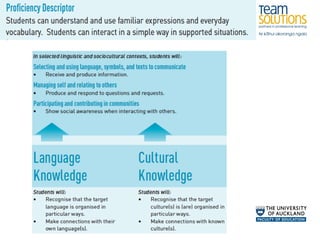
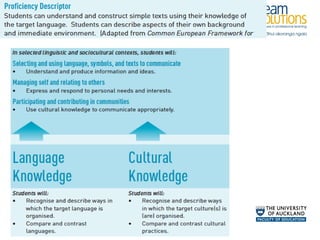
  • #8 Look at the wiki to find Proficiency statement & the Level 1 -4 Objectives. Think about your students and answers the four questions What is important (and therefore worth spending time on) given where my students are at? What strategies (evidence-based) are most likely to help my students learn this? What tool could I introduce that would support them? What happened as a result of the teaching, and what are the implications for future teaching? What worked and what do I need to change? How would you like to share you thinking?
  • #9 Can you identify the principles in your teaching? Think about which principle(s) you would like to base your project on.
  • #10 Look at the wiki to find Proficiency statement & the Level 1 -4 Objectives. Think about your students and answers the four questions What is important (and therefore worth spending time on) given where my students are at? What strategies (evidence-based) are most likely to help my students learn this? What tool could I introduce that would support them? What happened as a result of the teaching, and what are the implications for future teaching? What worked and what do I need to change? How would you like to share you thinking?
  • #11 Edgewater College Whangarei Girls
  • #18 Video Audio Web 2.0 tools Interactive whiteboards Communication with other classes/schools Flicker Example of mihi Presenations Curriculum Digital Stories Enhance pronunciation Interviews Listen to at home Podcast for revision Voicethread:Web-based integration of voice or text and pictures (link to www.voicethread.com) Collaborative learning Easy to use by students with internet access at home Audio (Audacity or Garageband)