Electronic Mail
1. Companies may use managed service providers (MSPs), such as Google and Microsoft, or they may use a self-hosted solution
2. The basic concept of email is simple. First, you write your email using your email client. This could be Google Mail in your web browser,
Microsoft Outlook, or another email client, such as Mozilla Thunderbird.
3. These are all mail user agents (MUAs), and this is where the journey of an email begins.
4. When you hit Send, your email client connects to a mail transfer agent (MTA), which is a different piece of software—for example,
Sendmail or Exim—and it usually runs on a remote mail server.
5. Your email is transferred using the Simple Mail Transfer Protocol (SMTP)
6. Once the MTA running on the mail server has received your message, it will send it to another MTA, which will eventually pass the
email to a message delivery agent (MDA)
7. An MDA is yet another piece of software with the job of actually delivering your email to the recipient’s inbox. MDA software is
frequently bundled with MTA software
8. Some MDAs you may come across are Procmail, Maildrop, and Dovecot. Citadel is an example of a feature-rich package that includes
an MTA and MDA. Microsoft Exchange is another example of such a package that you may know.
9. Your email will be delivered by the MDA to the recipient’s mailbox, which can be thought of as a location on a server where email is
stored and from which the recipient can access it
10. Once the email you sent arrives in the recipient’s mailbox, the recipient is able to access iInternet Message Access Protocol (IMAP)t
through their own MUA (or client). While SMTP is responsible for the sending of mail, the Post Office Protocol (POP) and are used for
accessing these emails once they’ve arrived in a mailbox
11. They are used for communication between the MUA and the mailbox. If you’re using an online mail client—that is, some form of
webmail—then the Hypertext Transfer Protocol (HTTP) will also be involved
12. Here will often be more steps along the journey of an email, but the MUA, MTA, and MDA are the principal stations
13. There are two mail servers shown in the figure, each with MTA and MDA software installed
Message Headers
1. Each of the systems through which an email passes on its journey will leave a little trace of itself within the email, not in the message
body, of course, but in the header where it is usually invisible to the average user
2. It is often possible to identify the technology and software used by different systems along the email’s journey thanks to this metadata
3. It may even be possible to determine the type of antivirus software the recipient is using to scan emails, which is valuable information
if you need to evade detection
4. Most email clients provide an option to view the source of email messages. Look for an option called View Source or Show Original
when reading an email message.
5. Note the multiple Received headers, which contain the IP addresses or hostnames through which this message has passed, including
internal IP addresses (192.168.111.80)
6. Software type information (Microsoft SMTP Server ID 15.0.1497.36 is the name of an MTA) and SSL
handshakes in use are also disclosed
7. If you check some of your own emails, you should notice other information, including any custom headers added by various
systems/software
8. This is where you might view additional details about the software your client is using, such as Exchange, Outlook, or Thunderbird
9. The email message data consists of an envelope and message body
Delivery Status Notifications (DSN)
1. It’s not only successfully delivered emails that lead to such information being disclosed.
2. For instance, you may have received an email telling you that your message could not be delivered at some point
3. These email messages are known as delivery status notifications (DSNs), and they can be useful to a hacker since they still contain
pieces of information added to your email during the chain as it tried to find its way
4. The DSN will often include this information for you to extract at your convenience.
5. This is not a passive activity since your message (actual packets of data) will reach the target systems
6. Doing this is a good way to determine additional IP addresses of hosts involved in a target network and other information that you
might be able to use later to gain access
7. Usually, every system in the chain adds a postmark along the way—all the way up to the MDA that was unable to deliver the email
Target is using Microsoft as their email provider; note the text “Microsoft SMTP Server” and hosts in the outlook.com
domain that have been highlighted. The original message contained information about Office 365, so a malicious hacker
might visit outlook.com and attempt to guess users’ passwords via webmail to access Office 365
Remember that the goal is not to gather information on an individual but to ascertain the IP addresses of hosts and other useful
information about systems. This activity is commonly referred to as spear phishing or phishing, whereby an attacker sends an email
crafted in some way to exploit the recipient into providing additional information or downloading malware. An attacker conducting
an effective phishing attack would need to have a solid understanding of the basic principles behind email !!!
The Simple Mail Transfer Protocol (SMTP)
1. Regardless of whether you use Microsoft Exchange, Office 365, Fastmail, Gmail, or some other provider for your email, it is SMTP
that actually dictates how messages are sent from MUAs to MTAs
2. Organizations like Microsoft may have proprietary protocols for internal use, but they still need SMTP to communicate with the
outside world
3. SMTP is an application layer protocol with regard to the Open Systems Interconnection (OSI) model
4. As with DNS , you can load up Wireshark to view the raw packets that comprise an email.
5. Unlike DNS, though, SMTP uses TCP rather than UDP for reliability. If a DNS query fails, it’s not the end of the world, as the request
can be made again
6. Most users would agree that they’d prefer the entirety of their email to be sent and received instead of a partial email
(or at least be requested to click Send again if there is a connection problem)
7. It is possible to locate a mail server using DNS
8.The Mail Exchange (MX) resource record can be requested, and this will point to the mail server responsible for the domain.
9. The mail server will be running an SMTP service; in other words, software that understands the Simple Mail Transfer Protocol.
Officially, SMTP operates on TCP ports 25 and 587
10. Port 25 does not offer encryption of data, whereas port 587 is used for sending encrypted emails
11. The MX records retrieved when performing a DNS lookup will specify a priority. This number determines the order in which
connection attempts are made
dig nar.az MX
13. A connection will first be made to the host with the lowest number (10 – mailgw01.azerconnect.az)
14. If this fails, the next server will be tried (20 – mailgw02.azerconnect.az). Remember, the lower the number, the higher the priority
15.Domains configured with a single MX record should be investigated to ensure that record is using round-robin DNS; that is, a DNS
record such as mail.company.com that resolves to more than one IP address
16. In the event you have only a single domain and/or single IP address hosting email, this introduces a single point of failure
dig vtb.az MX
17.A single point of failure is a target against which an attacker might seek to perform denial-of-service attacks for the purpose of
extortion
12. Here you can see that the appropriately named mailgw01.azerconnect.az and mailgw01.azerconnect.az are the
hostnames for the two servers responsible for accepting mail via the SMTP protocol for the nar.az domain
18. It is important that email is handled by more than one system, because in the event that the system is unavailable, email will not be
queued up or delivered to the target company
19. The best practice and most common MX configurations include at least two separate machines responsible for handling email to
deter extortion by denial-of-service attacks and also to improve email delivery and reliability
20. Go further and perform DNS lookups on these host names. Doing so will reveal multiple IP addresses for each.
dig mailgw01.azerconnect.az A dig mailgw02.azerconnect.az A
dig mail.vtb.az A
Sender Policy Framework
1. The Sender Policy Framework (SPF) is a mechanism designed to prevent people from forging (or spoofing) their email addresses, an
activity popular with spammers
2. This authentication method uses information stored in a DNS resource record
3. To request the SPF record specifically from that virtual name server, you could use the following dig command
dig @10.69.69.96 nsa.gov MX - Retrieve Mail exchange server hosts (MX)
Dig @10.69.69.96 mail1.nsa.gov TXT
4. This command requests records of type TXT (text) for mail1.nsa.gov by querying the name server with IP address 10.69.69.96
5. SPF uses text resource records to specify hosts that are authorized to send mail for a particular domain
6. This record specifies the version of SPF in use as well as the hosts that are permitted to use nsa.gov as the originating address
7. A mail transfer agent can perform a DNS lookup to verify this information before accepting any mail. In the example email headers
shown turanbank.az example, you might have noticed the following text:
8.Here the recipient’s mail server (protection.outlook.com: farhad.askarov@prosol.az) has checked that the IP address
95.86.131.140 is permitted to send mail as turanbank.az (HR@turanbank.az) by querying the SPF record
9. SPF only provides an advantage and protections at the recipient system when delivering for the host domain
10. Many email services are configured to not validate SPF, and so spoofed and phished emails may still be delivered from a domain with
SPF enabled
11. Domain Keys Identified Mail (DKIM) and Domain- based Message Authentication, Reporting, and Conformance (DMARC) are
additional technologies that work with Public Key Infrastructure (PKI) to prevent further phishing attacks by adding authentication that
an email originated from a target domain
Scanning a Mail Server
1.You will perform more comprehensive scanning of the target system, but a basic scan is a good starting point
nmap 10.211.56.9
2. As you can see, there are many open ports on this mail server
3. The open ports identify several common services seen when email is used—including IMAP, POP3 and SMTP
4. This is a typical mail server footprint
5. However, it is not always the case that such a feature-rich server is identified through MX records, and you may find only a single
open port for email use. Firewalls can also prevent your ability to scan a target effectively when probing across the Internet.
By default, Nmap does not try to complete the connection like this, instead sending a single packet that signifies the start of a TCP
handshake
It should be expected that a client’s infrastructure will be protected by a firewall (or multiple firewalls in some cases). Firewalls will drastically slow
down scanning and potentially reduce the accuracy of results. Nmap may not be able to determine whether a port is open or closed or what service
(if any) is running on it.
Clients will sometimes disable firewalls for you (for a specific source IP address, of course), and it is worth asking for the client to do this as it will
mean that you are able to obtain accurate results more quickly and effectively to get more done in the same amount of time. Some clients might not
understand why they should add exceptions to the firewall for you, while others may simply not feel safe doing so, which is also understandable and
acceptable.
Effective planning of your time means that you can often start several scans and leave them running while working on some other aspect of your
target’s infrastruc- ture. As your knowledge of network attacks grows, so too will your understanding of how to evade firewalls
6. Now that you have some basic information, you can start to connect to individual services or ports to try to gather more details.
Before doing that, run a second Nmap scan with the following options:
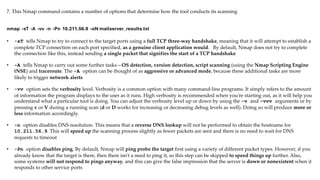
nmap -sT -A -vv -n -Pn 10.211.56.9 -oN mailserver_results.txt
7. This Nmap command contains a number of options that determine how the tool conducts its scanning
• -sT tells Nmap to try to connect to the target ports using a full TCP three-way handshake, meaning that it will attempt to establish a
complete TCP connection on each port specified, as a genuine client application would. By default, Nmap does not try to complete
the connection like this, instead sending a single packet that signifies the start of a TCP handshake
• -A tells Nmap to carry out some further tasks—OS detection, version detection, script scanning (using the Nmap Scripting Engine
(NSE) and traceroute. The -A option can be thought of as aggressive or advanced mode, because these additional tasks are more
likely to trigger network alerts
• -vv option sets the verbosity level. Verbosity is a common option with many command-line programs. It simply refers to the amount
of information the program displays to the user as it runs. High verbosity is recommended when you’re starting out, as it will help you
understand what a particular tool is doing. You can adjust the verbosity level up or down by using the -v and -vvv arguments or by
pressing v or V during a running scan (d or D works for increasing or decreasing debug levels as well). Doing so will produce more or
less information accordingly.
• -n option disables DNS resolution. This means that a reverse DNS lookup will not be performed to obtain the hostname for
10.211.56.9. This will speed up the scanning process slightly as fewer packets are sent and there is no need to wait for DNS
requests to timeout
• -Pn option disables ping. By default, Nmap will ping probe the target first using a variety of different packet types. However, if you
already know that the target is there, then there isn’t a need to ping it, so this step can be skipped to speed things up further. Also,
some systems will not respond to pings anyway, and this can give the false impression that the server is down or nonexistent when it
responds to other service ports
nmap -sT -A -vv -n -Pn 10.211.56.9 -oN mailserver_results.txt
• -p- is used to indicate all ports. By default, Nmap will scan only commonly used ports, and as you saw with your first scan of this
host, it reveals only a number of common services. What if there is something listening on a much higher port number? You can specify
individual ports by using the -p option and then the port number; for instance, -p 25. You did this when scanning UDP port 53 in
order to stop Nmap scanning ports in which you weren’t interested.
7. It would be negligent to overlook any TCP ports, which is why all ports are being scanned now
8. You never know what a client may be running on a high port number, and you may even find a backdoor left by someone else
9. In fact, although this can take a long time, scanning all UDP ports is also recommended for the same reason
10. For now, however, just focus on the TCP ports because full UDP port scans can take days or even weeks to complete accurately due to
connection timeouts and network firewalls in use
• -oN option outputs the results of the scan to a text file, which is specified previously as mailserver_results.txt
nmap -sT -A -vv -n -Pn 10.211.56.9 -oN mailserver_results.txt
11. In this example, the port is TCP port 25, the STATE is open, and the service running on this port is an SMTP service
12. The reason Nmap has determined that the port is open is that it has received a SYN-ACK TCP packet. This is part of that three-way
handshake mentioned earlier, and it signifies that the service is open and is awaiting an ACK (acknowledgment) response from the remote
end
13. Nmap has also detected the software running on this port and reports it as Exim smtpd 4.68.
14. Exim is the name of the software, and the d in smtpd stands for daemon. A daemon is a program running as a background process,
often started automatically when a system boots up. 4.68 is the version number of this Exim software.
15. Nmap has automatically gathered information from port 25 for you. Underneath the PORT, STATE, SERVICE, REASON, and VERSION
columns, you will find additional information about the service that may not make a lot of sense right now.
16. Let’s take a look at how you can gather that same information manually and find out exactly what it means as we go
17. This will help better explain the SMTP protocol and protocols in general.
18. First, we establish a TCP connection to port 25 on the target server. One way to connect to a port running on a remote server is to use
Netcat (or nc to give the common command)
19. Netcat is a versatile tool that you’ll be using often from now on. For now, we will simply use its ability to read from and write to a TCP
network connection. The syntax is straightforward.
nc 10.211.56.9 25
20. Netcat will attempt a TCP connection by default. All that you are doing here is opening a TCP connection.
21. It simply opens a raw connection. Luckily, the SMTP is pretty easy to understand. Let’s try imitating a mail user agent (or mail client).
Before you try sending anything, wait for this service’s welcoming banner:
Banner grabbing is the process of connecting to services on a machine and waiting for them to display (or send) their welcoming banner.
Sometimes, you will find that a lot of information is disclosed in this way. Wary system administrators will make sure that service banners give
away little or no information, so you cannot always rely on them. They can also be spoofed or set to provide incorrect information, of course. Port
scanning tools like Nmap will grab banners as part of their scanning process. This is still seen as a reliable way to gather information. Nevertheless,
always apply a healthy dose of common sense.
22. Now, use HELO to initiate a conversation with the SMTP service, giving it your hostname. You do not have to use hacker
here—anything will do. You could also try EHLO, for extended hello, which tells the server you want to use Extended SMTP
(ESMTP).
HELO hacker
23. It has acknowledged your greeting and replied with the hostname supplied along with the IP address of your Linux (yours may
differ, of course).
24. Next, you can try sending an email using this SMTP service. First, you must specify your email address—that is, the originating
address—like so:
mail from: hacker@gmail.com
25. Next, specify the recipient of your email
rcpt to: farhad.askarov@prosol.az
26. What you’re doing here is simply attempting to send email from some arbitrary email address to another arbitrary email address
27. If you try to use this mail server to send an email from some address to some other address , you should find that you receive the
following error message:
28. Fortunately for the owner of this mail server, this SMTP service is not configured as an open relay
29. This means that it will not relay or forward email onward to some random email address belonging to someone else’s domain
Open Relays
1. Open relays are a feature of SMTP and were once commonplace. They would be harnessed by malicious Internet users to send spam
2. As you might expect, the source email address can be spoofed, which means tracing its origin is difficult when attackers are using
hacked computers
3. The email server that we are examining is responsible for a fictitious company, and it should ideally only accept mail from inside that
company and send it out into the world.
4. This SMTP service running on port 25 is a mail transfer agent, and it does not need to concern itself with accepting email from the
outside world and into the company
5. This job is done by the mail delivery agent
6. You can get a list of recognized commands by typing the HELP command
help
7. The EXPN command can be used to expand a username to a complete email address.
8. You may have already identified (potential) email addresses or mailing list recipients through your previous or you could try
commonly used usernames like admin
expn admin
9. Something else to try is the VRFY command
vrfy admin
10. Try verifying another user—one that you’re pretty certain doesn’t exist
vrfy qwiueryiwueryiwueryiuhsdfkjbkjb
11. Supposedly, this highly unlikely username is also somebody to which we can deliver mail. You could try verifying other users, but
for this purpose, it seems that the information is probably not reliable
12. It would require a trivial effort to make a huge list of all of the users and their addresses by sending repeated requests to the SMTP
service. The VRFY command is usually disabled by default on modern mail servers for this reason.
13. It is important always to check any issue that you find and make sure that it is not a false positive. Many automated tools cannot do
this, so manual checks are important.
14. This is the value of an ethical hacker—machines cannot yet automate the hacking processes better than a human
nc 2.56.204.57 25
15. Lets view in real case SMTP Relay. Its possible enumerate local Ubuntu users
The Post Office Protocol (POP)
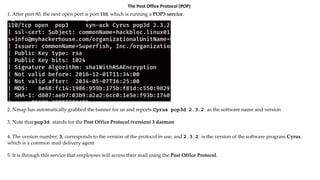
1. After port 80, the next open port is port 110, which is running a POP3 service.
2. Nmap has automatically grabbed the banner for us and reports Cyrus pop3d 2.3.2 as the software name and version
3. Note that pop3d stands for the Post Office Protocol (version) 3 daemon
4. The version number, 3, corresponds to the version of the protocol in use, and 2.3.2 is the version of the software program Cyrus,
which is a common mail delivery agent
5. It is through this service that employees will access their mail using the Post Office Protocol.
You will notice in the previous output that there is a certificate (ssl-cert) for some of the ports running on this server. These certificates are used
with Secure Sockets Layer (SSL) or Transport Security Layer (TLS) connections. It is now common for mail to be sent over encrypted channels rather
than as plain text, which was once the norm. Note that Transport Layer Security (TLS) is a modernized version of SSL, but the two acronyms are often
used together or interchangeably. For now, know that ports with these certificates, such as TCP port 110, will allow encrypted communications to
take place. This means users’ emails can be sent to and from the server, not as plain text but over an encrypted channel. In encrypted form, message
integrity and confidentiality are added to the email, but neither of these protects the mail server or the message proper, as attackers can still send
SMTP attacks. Nevertheless, they cannot be read trivially by a third party when encrypted in transit. Secure connections can be initiated with the
STARTTLS command. When it comes to SMTP, you might sometimes find that port 25 is not in use but that there is a service running on port 456
instead. This is still the SMTP protocol, but over SSL/TLS. Wherever you see SSL/TLS in use, bear in mind that such services may be vulnerable to SSL-
specific exploits, such as the Heartbleed bug.
6. So, there is a POP service running, specifically version 3 of POP. You may find some legacy POP2 services in your adventures on TCP
port 109, although they are quite rare today. Port 995 is also commonly used for POP3.
7. The issue with these POP services is that they often do not honor an account lock-out policy.
8. Wherever you see this kind of behavior, there is an opportunity for a brute-force attack
9. POP services are aging now and being replaced with more featured and modern protocols like IMAP.
The Internet Message Access Protocol
1. Another, more modern remote mailbox protocol is the Internet Message Access Protocol (IMAP). This commonly runs on ports
143 and 993.
2. This IMAP service is also being run by Cyrus. Only this time, there is an IMAP daemon
3. IMAP is less susceptible to brute-force attacks than POP3 and is typically integrated into modern software, including Microsoft
offerings such as Exchange and Active Directory
4. These Microsoft Windows–based services commonly tend to disable accounts after several invalid password attempts, so use caution
here.
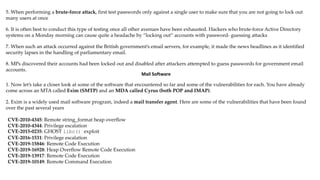
5. When performing a brute-force attack, first test passwords only against a single user to make sure that you are not going to lock out
many users at once
6. It is often best to conduct this type of testing once all other avenues have been exhausted. Hackers who brute-force Active Directory
systems on a Monday morning can cause quite a headache by “locking out” accounts with password- guessing attacks
7. When such an attack occurred against the British government’s email servers, for example, it made the news headlines as it identified
security lapses in the handling of parliamentary email.
8. MPs discovered their accounts had been locked out and disabled after attackers attempted to guess passwords for government email
accounts.
Mail Software
1. Now let’s take a closer look at some of the software that encountered so far and some of the vulnerabilities for each. You have already
come across an MTA called Exim (SMTP) and an MDA called Cyrus (both POP and IMAP).
2. Exim is a widely used mail software program, indeed a mail transfer agent. Here are some of the vulnerabilities that have been found
over the past several years
CVE-2010-4345: Remote string_format heap overflow
CVE-2010-4344: Privilege escalation
CVE-2015-0235: GHOST libc() exploit
CVE-2016-1531: Privilege escalation
CVE-2019-15846: Remote Code Execution
CVE-2019-16928: Heap Overflow Remote Code Execution
CVE-2019-13917: Remote Code Execution
CVE-2019-10149: Remote Command Execution
Sendmail
1. Sendmail developed by the open source and UNIX user community
2. It has a history of old yet curious vulnerabilities. A couple of interesting ones to read up on are as follows:
• CVE-2006-0058: Remote signal handling bug
• CVE-2003-0161: Remote prescan() code execution
3. Despite its age, Sendmail is still in use
4. There was once a version of Sendmail that contained a backdoor in the form of the Sendmail Wizard
5. Though you will not encounter the Sendmail Wizard today, this is how the backdoor was used: Upon connecting to the Sendmail SMTP
service, you would enter the WIZ command followed by a password. wizard
6. Originally intended to allow system administrators access to a limited shell on their
remote mail server, you can now see how this was an insecure idea, as anyone who
knew of this “feature” could do the same.
Cyrus
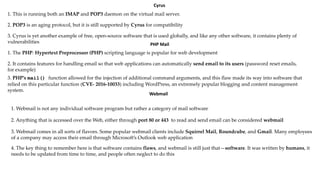
1. This is running both an IMAP and POP3 daemon on the virtual mail server.
2. POP3 is an aging protocol, but it is still supported by Cyrus for compatibility
3. Cyrus is yet another example of free, open-source software that is used globally, and like any other software, it contains plenty of
vulnerabilities PHP Mail
1. The PHP: Hypertext Preprocessor (PHP) scripting language is popular for web development
2. It contains features for handling email so that web applications can automatically send email to its users (password reset emails,
for example)
3. PHP’s mail() function allowed for the injection of additional command arguments, and this flaw made its way into software that
relied on this particular function (CVE- 2016-10033) including WordPress, an extremely popular blogging and content management
system.
Webmail
1. Webmail is not any individual software program but rather a category of mail software
2. Anything that is accessed over the Web, either through port 80 or 443 to read and send email can be considered webmail
3. Webmail comes in all sorts of flavors. Some popular webmail clients include Squirrel Mail, Roundcube, and Gmail. Many employees
of a company may access their email through Microsoft’s Outlook web application
4. The key thing to remember here is that software contains flaws, and webmail is still just that—software. It was written by humans, it
needs to be updated from time to time, and people often neglect to do this
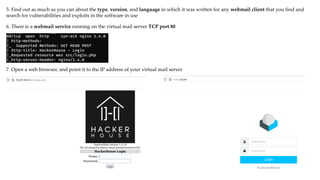
5. Find out as much as you can about the type, version, and language in which it was written for any webmail client that you find and
search for vulnerabilities and exploits in the software in use
6. There is a webmail service running on the virtual mail server TCP port 80
7. Open a web browser, and point it to the IP address of your virtual mail server
8. You could try guessing some usernames and passwords here, and you should definitely take note of any useful information displayed
on this page.
9. The first thing to note is the fact that this service is running on port 80 and communication takes place over plaintext. This means that
any password information sent to the service could be intercepted by an attacker who is suitably well-positioned in the infrastructure
10. Something else to point out is that webmail such as this is usually accessible from anywhere in the world, which is great for employees
working in different countries or traveling about, but it is also great for hackers as well, who can conduct their work from anywhere too
11. Organizations that do not require such universal access to their email services should think twice about employing such an approach.
If user is not already using multifactor authentication on a publicly accessible web mail application, you should advise that they enable it.
User Enumeration via Finger
1. The port scan for this mail server has revealed several such services
2. Let’s focus on one of those now: the Finger service. This is not a mail-specific service—you could come across it pretty much anywhere
3. The reason you’re looking at it now is because it will demonstrate how weaknesses in different services can be used together to
achieve results, such as in this instance, some level of access to the server
4. First, usernames will be obtained by probing the Finger service running on port 79
5. Then you will see how the POP3 service can be brute-forced using this list of names

Electronic_Mail_Attacks-1-35.pdf by xploit

  • 1.
    Electronic Mail 1. Companiesmay use managed service providers (MSPs), such as Google and Microsoft, or they may use a self-hosted solution 2. The basic concept of email is simple. First, you write your email using your email client. This could be Google Mail in your web browser, Microsoft Outlook, or another email client, such as Mozilla Thunderbird. 3. These are all mail user agents (MUAs), and this is where the journey of an email begins. 4. When you hit Send, your email client connects to a mail transfer agent (MTA), which is a different piece of software—for example, Sendmail or Exim—and it usually runs on a remote mail server. 5. Your email is transferred using the Simple Mail Transfer Protocol (SMTP) 6. Once the MTA running on the mail server has received your message, it will send it to another MTA, which will eventually pass the email to a message delivery agent (MDA)
  • 2.
    7. An MDAis yet another piece of software with the job of actually delivering your email to the recipient’s inbox. MDA software is frequently bundled with MTA software 8. Some MDAs you may come across are Procmail, Maildrop, and Dovecot. Citadel is an example of a feature-rich package that includes an MTA and MDA. Microsoft Exchange is another example of such a package that you may know. 9. Your email will be delivered by the MDA to the recipient’s mailbox, which can be thought of as a location on a server where email is stored and from which the recipient can access it 10. Once the email you sent arrives in the recipient’s mailbox, the recipient is able to access iInternet Message Access Protocol (IMAP)t through their own MUA (or client). While SMTP is responsible for the sending of mail, the Post Office Protocol (POP) and are used for accessing these emails once they’ve arrived in a mailbox 11. They are used for communication between the MUA and the mailbox. If you’re using an online mail client—that is, some form of webmail—then the Hypertext Transfer Protocol (HTTP) will also be involved
  • 3.
    12. Here willoften be more steps along the journey of an email, but the MUA, MTA, and MDA are the principal stations 13. There are two mail servers shown in the figure, each with MTA and MDA software installed
  • 4.
    Message Headers 1. Eachof the systems through which an email passes on its journey will leave a little trace of itself within the email, not in the message body, of course, but in the header where it is usually invisible to the average user 2. It is often possible to identify the technology and software used by different systems along the email’s journey thanks to this metadata 3. It may even be possible to determine the type of antivirus software the recipient is using to scan emails, which is valuable information if you need to evade detection 4. Most email clients provide an option to view the source of email messages. Look for an option called View Source or Show Original when reading an email message.
  • 5.
    5. Note themultiple Received headers, which contain the IP addresses or hostnames through which this message has passed, including internal IP addresses (192.168.111.80) 6. Software type information (Microsoft SMTP Server ID 15.0.1497.36 is the name of an MTA) and SSL handshakes in use are also disclosed
  • 6.
    7. If youcheck some of your own emails, you should notice other information, including any custom headers added by various systems/software 8. This is where you might view additional details about the software your client is using, such as Exchange, Outlook, or Thunderbird 9. The email message data consists of an envelope and message body Delivery Status Notifications (DSN) 1. It’s not only successfully delivered emails that lead to such information being disclosed. 2. For instance, you may have received an email telling you that your message could not be delivered at some point 3. These email messages are known as delivery status notifications (DSNs), and they can be useful to a hacker since they still contain pieces of information added to your email during the chain as it tried to find its way 4. The DSN will often include this information for you to extract at your convenience. 5. This is not a passive activity since your message (actual packets of data) will reach the target systems 6. Doing this is a good way to determine additional IP addresses of hosts involved in a target network and other information that you might be able to use later to gain access 7. Usually, every system in the chain adds a postmark along the way—all the way up to the MDA that was unable to deliver the email
  • 7.
    Target is usingMicrosoft as their email provider; note the text “Microsoft SMTP Server” and hosts in the outlook.com domain that have been highlighted. The original message contained information about Office 365, so a malicious hacker might visit outlook.com and attempt to guess users’ passwords via webmail to access Office 365
  • 8.
    Remember that thegoal is not to gather information on an individual but to ascertain the IP addresses of hosts and other useful information about systems. This activity is commonly referred to as spear phishing or phishing, whereby an attacker sends an email crafted in some way to exploit the recipient into providing additional information or downloading malware. An attacker conducting an effective phishing attack would need to have a solid understanding of the basic principles behind email !!!
  • 9.
    The Simple MailTransfer Protocol (SMTP) 1. Regardless of whether you use Microsoft Exchange, Office 365, Fastmail, Gmail, or some other provider for your email, it is SMTP that actually dictates how messages are sent from MUAs to MTAs 2. Organizations like Microsoft may have proprietary protocols for internal use, but they still need SMTP to communicate with the outside world 3. SMTP is an application layer protocol with regard to the Open Systems Interconnection (OSI) model 4. As with DNS , you can load up Wireshark to view the raw packets that comprise an email. 5. Unlike DNS, though, SMTP uses TCP rather than UDP for reliability. If a DNS query fails, it’s not the end of the world, as the request can be made again 6. Most users would agree that they’d prefer the entirety of their email to be sent and received instead of a partial email (or at least be requested to click Send again if there is a connection problem) 7. It is possible to locate a mail server using DNS 8.The Mail Exchange (MX) resource record can be requested, and this will point to the mail server responsible for the domain. 9. The mail server will be running an SMTP service; in other words, software that understands the Simple Mail Transfer Protocol. Officially, SMTP operates on TCP ports 25 and 587 10. Port 25 does not offer encryption of data, whereas port 587 is used for sending encrypted emails
  • 10.
    11. The MXrecords retrieved when performing a DNS lookup will specify a priority. This number determines the order in which connection attempts are made dig nar.az MX 13. A connection will first be made to the host with the lowest number (10 – mailgw01.azerconnect.az) 14. If this fails, the next server will be tried (20 – mailgw02.azerconnect.az). Remember, the lower the number, the higher the priority 15.Domains configured with a single MX record should be investigated to ensure that record is using round-robin DNS; that is, a DNS record such as mail.company.com that resolves to more than one IP address 16. In the event you have only a single domain and/or single IP address hosting email, this introduces a single point of failure dig vtb.az MX 17.A single point of failure is a target against which an attacker might seek to perform denial-of-service attacks for the purpose of extortion 12. Here you can see that the appropriately named mailgw01.azerconnect.az and mailgw01.azerconnect.az are the hostnames for the two servers responsible for accepting mail via the SMTP protocol for the nar.az domain
  • 11.
    18. It isimportant that email is handled by more than one system, because in the event that the system is unavailable, email will not be queued up or delivered to the target company 19. The best practice and most common MX configurations include at least two separate machines responsible for handling email to deter extortion by denial-of-service attacks and also to improve email delivery and reliability 20. Go further and perform DNS lookups on these host names. Doing so will reveal multiple IP addresses for each. dig mailgw01.azerconnect.az A dig mailgw02.azerconnect.az A dig mail.vtb.az A
  • 12.
    Sender Policy Framework 1.The Sender Policy Framework (SPF) is a mechanism designed to prevent people from forging (or spoofing) their email addresses, an activity popular with spammers 2. This authentication method uses information stored in a DNS resource record 3. To request the SPF record specifically from that virtual name server, you could use the following dig command dig @10.69.69.96 nsa.gov MX - Retrieve Mail exchange server hosts (MX) Dig @10.69.69.96 mail1.nsa.gov TXT 4. This command requests records of type TXT (text) for mail1.nsa.gov by querying the name server with IP address 10.69.69.96 5. SPF uses text resource records to specify hosts that are authorized to send mail for a particular domain
  • 13.
    6. This recordspecifies the version of SPF in use as well as the hosts that are permitted to use nsa.gov as the originating address 7. A mail transfer agent can perform a DNS lookup to verify this information before accepting any mail. In the example email headers shown turanbank.az example, you might have noticed the following text: 8.Here the recipient’s mail server (protection.outlook.com: farhad.askarov@prosol.az) has checked that the IP address 95.86.131.140 is permitted to send mail as turanbank.az (HR@turanbank.az) by querying the SPF record 9. SPF only provides an advantage and protections at the recipient system when delivering for the host domain 10. Many email services are configured to not validate SPF, and so spoofed and phished emails may still be delivered from a domain with SPF enabled 11. Domain Keys Identified Mail (DKIM) and Domain- based Message Authentication, Reporting, and Conformance (DMARC) are additional technologies that work with Public Key Infrastructure (PKI) to prevent further phishing attacks by adding authentication that an email originated from a target domain
  • 14.
    Scanning a MailServer 1.You will perform more comprehensive scanning of the target system, but a basic scan is a good starting point nmap 10.211.56.9 2. As you can see, there are many open ports on this mail server 3. The open ports identify several common services seen when email is used—including IMAP, POP3 and SMTP 4. This is a typical mail server footprint 5. However, it is not always the case that such a feature-rich server is identified through MX records, and you may find only a single open port for email use. Firewalls can also prevent your ability to scan a target effectively when probing across the Internet.
  • 15.
    By default, Nmapdoes not try to complete the connection like this, instead sending a single packet that signifies the start of a TCP handshake
  • 16.
    It should beexpected that a client’s infrastructure will be protected by a firewall (or multiple firewalls in some cases). Firewalls will drastically slow down scanning and potentially reduce the accuracy of results. Nmap may not be able to determine whether a port is open or closed or what service (if any) is running on it. Clients will sometimes disable firewalls for you (for a specific source IP address, of course), and it is worth asking for the client to do this as it will mean that you are able to obtain accurate results more quickly and effectively to get more done in the same amount of time. Some clients might not understand why they should add exceptions to the firewall for you, while others may simply not feel safe doing so, which is also understandable and acceptable. Effective planning of your time means that you can often start several scans and leave them running while working on some other aspect of your target’s infrastruc- ture. As your knowledge of network attacks grows, so too will your understanding of how to evade firewalls
  • 17.
    6. Now thatyou have some basic information, you can start to connect to individual services or ports to try to gather more details. Before doing that, run a second Nmap scan with the following options: nmap -sT -A -vv -n -Pn 10.211.56.9 -oN mailserver_results.txt
  • 18.
    7. This Nmapcommand contains a number of options that determine how the tool conducts its scanning • -sT tells Nmap to try to connect to the target ports using a full TCP three-way handshake, meaning that it will attempt to establish a complete TCP connection on each port specified, as a genuine client application would. By default, Nmap does not try to complete the connection like this, instead sending a single packet that signifies the start of a TCP handshake • -A tells Nmap to carry out some further tasks—OS detection, version detection, script scanning (using the Nmap Scripting Engine (NSE) and traceroute. The -A option can be thought of as aggressive or advanced mode, because these additional tasks are more likely to trigger network alerts • -vv option sets the verbosity level. Verbosity is a common option with many command-line programs. It simply refers to the amount of information the program displays to the user as it runs. High verbosity is recommended when you’re starting out, as it will help you understand what a particular tool is doing. You can adjust the verbosity level up or down by using the -v and -vvv arguments or by pressing v or V during a running scan (d or D works for increasing or decreasing debug levels as well). Doing so will produce more or less information accordingly. • -n option disables DNS resolution. This means that a reverse DNS lookup will not be performed to obtain the hostname for 10.211.56.9. This will speed up the scanning process slightly as fewer packets are sent and there is no need to wait for DNS requests to timeout • -Pn option disables ping. By default, Nmap will ping probe the target first using a variety of different packet types. However, if you already know that the target is there, then there isn’t a need to ping it, so this step can be skipped to speed things up further. Also, some systems will not respond to pings anyway, and this can give the false impression that the server is down or nonexistent when it responds to other service ports nmap -sT -A -vv -n -Pn 10.211.56.9 -oN mailserver_results.txt
  • 19.
    • -p- isused to indicate all ports. By default, Nmap will scan only commonly used ports, and as you saw with your first scan of this host, it reveals only a number of common services. What if there is something listening on a much higher port number? You can specify individual ports by using the -p option and then the port number; for instance, -p 25. You did this when scanning UDP port 53 in order to stop Nmap scanning ports in which you weren’t interested. 7. It would be negligent to overlook any TCP ports, which is why all ports are being scanned now 8. You never know what a client may be running on a high port number, and you may even find a backdoor left by someone else 9. In fact, although this can take a long time, scanning all UDP ports is also recommended for the same reason 10. For now, however, just focus on the TCP ports because full UDP port scans can take days or even weeks to complete accurately due to connection timeouts and network firewalls in use • -oN option outputs the results of the scan to a text file, which is specified previously as mailserver_results.txt nmap -sT -A -vv -n -Pn 10.211.56.9 -oN mailserver_results.txt
  • 20.
    11. In thisexample, the port is TCP port 25, the STATE is open, and the service running on this port is an SMTP service 12. The reason Nmap has determined that the port is open is that it has received a SYN-ACK TCP packet. This is part of that three-way handshake mentioned earlier, and it signifies that the service is open and is awaiting an ACK (acknowledgment) response from the remote end 13. Nmap has also detected the software running on this port and reports it as Exim smtpd 4.68. 14. Exim is the name of the software, and the d in smtpd stands for daemon. A daemon is a program running as a background process, often started automatically when a system boots up. 4.68 is the version number of this Exim software. 15. Nmap has automatically gathered information from port 25 for you. Underneath the PORT, STATE, SERVICE, REASON, and VERSION columns, you will find additional information about the service that may not make a lot of sense right now. 16. Let’s take a look at how you can gather that same information manually and find out exactly what it means as we go 17. This will help better explain the SMTP protocol and protocols in general.
  • 21.
    18. First, weestablish a TCP connection to port 25 on the target server. One way to connect to a port running on a remote server is to use Netcat (or nc to give the common command) 19. Netcat is a versatile tool that you’ll be using often from now on. For now, we will simply use its ability to read from and write to a TCP network connection. The syntax is straightforward. nc 10.211.56.9 25 20. Netcat will attempt a TCP connection by default. All that you are doing here is opening a TCP connection. 21. It simply opens a raw connection. Luckily, the SMTP is pretty easy to understand. Let’s try imitating a mail user agent (or mail client). Before you try sending anything, wait for this service’s welcoming banner: Banner grabbing is the process of connecting to services on a machine and waiting for them to display (or send) their welcoming banner. Sometimes, you will find that a lot of information is disclosed in this way. Wary system administrators will make sure that service banners give away little or no information, so you cannot always rely on them. They can also be spoofed or set to provide incorrect information, of course. Port scanning tools like Nmap will grab banners as part of their scanning process. This is still seen as a reliable way to gather information. Nevertheless, always apply a healthy dose of common sense.
  • 22.
    22. Now, useHELO to initiate a conversation with the SMTP service, giving it your hostname. You do not have to use hacker here—anything will do. You could also try EHLO, for extended hello, which tells the server you want to use Extended SMTP (ESMTP). HELO hacker 23. It has acknowledged your greeting and replied with the hostname supplied along with the IP address of your Linux (yours may differ, of course). 24. Next, you can try sending an email using this SMTP service. First, you must specify your email address—that is, the originating address—like so: mail from: hacker@gmail.com 25. Next, specify the recipient of your email rcpt to: farhad.askarov@prosol.az
  • 23.
    26. What you’redoing here is simply attempting to send email from some arbitrary email address to another arbitrary email address 27. If you try to use this mail server to send an email from some address to some other address , you should find that you receive the following error message: 28. Fortunately for the owner of this mail server, this SMTP service is not configured as an open relay 29. This means that it will not relay or forward email onward to some random email address belonging to someone else’s domain Open Relays 1. Open relays are a feature of SMTP and were once commonplace. They would be harnessed by malicious Internet users to send spam 2. As you might expect, the source email address can be spoofed, which means tracing its origin is difficult when attackers are using hacked computers 3. The email server that we are examining is responsible for a fictitious company, and it should ideally only accept mail from inside that company and send it out into the world. 4. This SMTP service running on port 25 is a mail transfer agent, and it does not need to concern itself with accepting email from the outside world and into the company 5. This job is done by the mail delivery agent
  • 24.
    6. You canget a list of recognized commands by typing the HELP command help 7. The EXPN command can be used to expand a username to a complete email address. 8. You may have already identified (potential) email addresses or mailing list recipients through your previous or you could try commonly used usernames like admin expn admin
  • 25.
    9. Something elseto try is the VRFY command vrfy admin 10. Try verifying another user—one that you’re pretty certain doesn’t exist vrfy qwiueryiwueryiwueryiuhsdfkjbkjb 11. Supposedly, this highly unlikely username is also somebody to which we can deliver mail. You could try verifying other users, but for this purpose, it seems that the information is probably not reliable 12. It would require a trivial effort to make a huge list of all of the users and their addresses by sending repeated requests to the SMTP service. The VRFY command is usually disabled by default on modern mail servers for this reason.
  • 26.
    13. It isimportant always to check any issue that you find and make sure that it is not a false positive. Many automated tools cannot do this, so manual checks are important. 14. This is the value of an ethical hacker—machines cannot yet automate the hacking processes better than a human nc 2.56.204.57 25 15. Lets view in real case SMTP Relay. Its possible enumerate local Ubuntu users
  • 28.
    The Post OfficeProtocol (POP) 1. After port 80, the next open port is port 110, which is running a POP3 service. 2. Nmap has automatically grabbed the banner for us and reports Cyrus pop3d 2.3.2 as the software name and version 3. Note that pop3d stands for the Post Office Protocol (version) 3 daemon 4. The version number, 3, corresponds to the version of the protocol in use, and 2.3.2 is the version of the software program Cyrus, which is a common mail delivery agent 5. It is through this service that employees will access their mail using the Post Office Protocol.
  • 29.
    You will noticein the previous output that there is a certificate (ssl-cert) for some of the ports running on this server. These certificates are used with Secure Sockets Layer (SSL) or Transport Security Layer (TLS) connections. It is now common for mail to be sent over encrypted channels rather than as plain text, which was once the norm. Note that Transport Layer Security (TLS) is a modernized version of SSL, but the two acronyms are often used together or interchangeably. For now, know that ports with these certificates, such as TCP port 110, will allow encrypted communications to take place. This means users’ emails can be sent to and from the server, not as plain text but over an encrypted channel. In encrypted form, message integrity and confidentiality are added to the email, but neither of these protects the mail server or the message proper, as attackers can still send SMTP attacks. Nevertheless, they cannot be read trivially by a third party when encrypted in transit. Secure connections can be initiated with the STARTTLS command. When it comes to SMTP, you might sometimes find that port 25 is not in use but that there is a service running on port 456 instead. This is still the SMTP protocol, but over SSL/TLS. Wherever you see SSL/TLS in use, bear in mind that such services may be vulnerable to SSL- specific exploits, such as the Heartbleed bug. 6. So, there is a POP service running, specifically version 3 of POP. You may find some legacy POP2 services in your adventures on TCP port 109, although they are quite rare today. Port 995 is also commonly used for POP3. 7. The issue with these POP services is that they often do not honor an account lock-out policy. 8. Wherever you see this kind of behavior, there is an opportunity for a brute-force attack 9. POP services are aging now and being replaced with more featured and modern protocols like IMAP.
  • 30.
    The Internet MessageAccess Protocol 1. Another, more modern remote mailbox protocol is the Internet Message Access Protocol (IMAP). This commonly runs on ports 143 and 993. 2. This IMAP service is also being run by Cyrus. Only this time, there is an IMAP daemon 3. IMAP is less susceptible to brute-force attacks than POP3 and is typically integrated into modern software, including Microsoft offerings such as Exchange and Active Directory 4. These Microsoft Windows–based services commonly tend to disable accounts after several invalid password attempts, so use caution here.
  • 31.
    5. When performinga brute-force attack, first test passwords only against a single user to make sure that you are not going to lock out many users at once 6. It is often best to conduct this type of testing once all other avenues have been exhausted. Hackers who brute-force Active Directory systems on a Monday morning can cause quite a headache by “locking out” accounts with password- guessing attacks 7. When such an attack occurred against the British government’s email servers, for example, it made the news headlines as it identified security lapses in the handling of parliamentary email. 8. MPs discovered their accounts had been locked out and disabled after attackers attempted to guess passwords for government email accounts. Mail Software 1. Now let’s take a closer look at some of the software that encountered so far and some of the vulnerabilities for each. You have already come across an MTA called Exim (SMTP) and an MDA called Cyrus (both POP and IMAP). 2. Exim is a widely used mail software program, indeed a mail transfer agent. Here are some of the vulnerabilities that have been found over the past several years CVE-2010-4345: Remote string_format heap overflow CVE-2010-4344: Privilege escalation CVE-2015-0235: GHOST libc() exploit CVE-2016-1531: Privilege escalation CVE-2019-15846: Remote Code Execution CVE-2019-16928: Heap Overflow Remote Code Execution CVE-2019-13917: Remote Code Execution CVE-2019-10149: Remote Command Execution
  • 32.
    Sendmail 1. Sendmail developedby the open source and UNIX user community 2. It has a history of old yet curious vulnerabilities. A couple of interesting ones to read up on are as follows: • CVE-2006-0058: Remote signal handling bug • CVE-2003-0161: Remote prescan() code execution 3. Despite its age, Sendmail is still in use 4. There was once a version of Sendmail that contained a backdoor in the form of the Sendmail Wizard 5. Though you will not encounter the Sendmail Wizard today, this is how the backdoor was used: Upon connecting to the Sendmail SMTP service, you would enter the WIZ command followed by a password. wizard 6. Originally intended to allow system administrators access to a limited shell on their remote mail server, you can now see how this was an insecure idea, as anyone who knew of this “feature” could do the same.
  • 33.
    Cyrus 1. This isrunning both an IMAP and POP3 daemon on the virtual mail server. 2. POP3 is an aging protocol, but it is still supported by Cyrus for compatibility 3. Cyrus is yet another example of free, open-source software that is used globally, and like any other software, it contains plenty of vulnerabilities PHP Mail 1. The PHP: Hypertext Preprocessor (PHP) scripting language is popular for web development 2. It contains features for handling email so that web applications can automatically send email to its users (password reset emails, for example) 3. PHP’s mail() function allowed for the injection of additional command arguments, and this flaw made its way into software that relied on this particular function (CVE- 2016-10033) including WordPress, an extremely popular blogging and content management system. Webmail 1. Webmail is not any individual software program but rather a category of mail software 2. Anything that is accessed over the Web, either through port 80 or 443 to read and send email can be considered webmail 3. Webmail comes in all sorts of flavors. Some popular webmail clients include Squirrel Mail, Roundcube, and Gmail. Many employees of a company may access their email through Microsoft’s Outlook web application 4. The key thing to remember here is that software contains flaws, and webmail is still just that—software. It was written by humans, it needs to be updated from time to time, and people often neglect to do this
  • 34.
    5. Find outas much as you can about the type, version, and language in which it was written for any webmail client that you find and search for vulnerabilities and exploits in the software in use 6. There is a webmail service running on the virtual mail server TCP port 80 7. Open a web browser, and point it to the IP address of your virtual mail server
  • 35.
    8. You couldtry guessing some usernames and passwords here, and you should definitely take note of any useful information displayed on this page. 9. The first thing to note is the fact that this service is running on port 80 and communication takes place over plaintext. This means that any password information sent to the service could be intercepted by an attacker who is suitably well-positioned in the infrastructure 10. Something else to point out is that webmail such as this is usually accessible from anywhere in the world, which is great for employees working in different countries or traveling about, but it is also great for hackers as well, who can conduct their work from anywhere too 11. Organizations that do not require such universal access to their email services should think twice about employing such an approach. If user is not already using multifactor authentication on a publicly accessible web mail application, you should advise that they enable it. User Enumeration via Finger 1. The port scan for this mail server has revealed several such services 2. Let’s focus on one of those now: the Finger service. This is not a mail-specific service—you could come across it pretty much anywhere 3. The reason you’re looking at it now is because it will demonstrate how weaknesses in different services can be used together to achieve results, such as in this instance, some level of access to the server 4. First, usernames will be obtained by probing the Finger service running on port 79 5. Then you will see how the POP3 service can be brute-forced using this list of names