e L e a r n in g e x a m p le s
These are a few of the elearning modules I ran across while I was researching.
They reflect a trend toward simulations and scenario practice. None of the
examples would be exactly right for CAB training, but are intended to help us
imagine how we might develop training of this type.

At the end of each section there is a link to LDTspace, a collaborative
workspace where you can post comments and share any ideas you may have.

              Use the left/right arrows on your keyboard to navigate.


                                                                            Menu
OXFAM
The following scenario based training from OXFAM allows the user to select different “clients”
(in this case farmers and merchants who face hunger and poverty). For each client, the user
can view circumstances and select from the choices they face as they try to stay afloat. There
are also opportunities to view supporting information


                                                                                          Menu
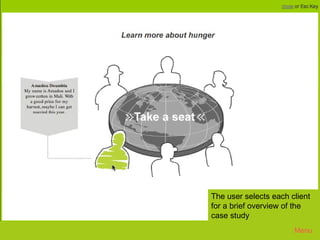
Oxfam 1


          The user selects each client
          for a brief overview of the
          case study
                                 Menu
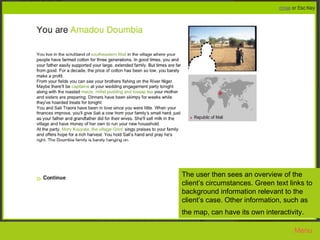
Oxfam 2


      The user then sees an overview of the
      client’s circumstances. Green text links to
      background information relevant to the
      client’s case. Other information, such as
      the map, can have its own interactivity.

                                           Menu
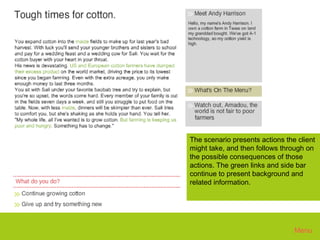
Oxfam 3


      The scenario presents actions the client
      might take, and then follows through on
      the possible consequences of those
      actions. The green links and side bar
      continue to present background and
      related information.


                                       Menu
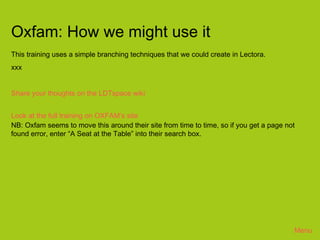
Oxfam: How we might use it
This training uses a simple branching techniques that we could create in Lectora.
xxx


Share your thoughts on the LDTspace wiki


Look at the full training on OXFAM’s site
NB: Oxfam seems to move this around their site from time to time, so if you get a page not
found error, enter “A Seat at the Table” into their search box.


                                                                                         Menu
AZURE
interview practice
This training allows learners to practice interviewing techniques.
The object of the training is to find the right questions to ask, in the right order, in order
to correctly identify the client’s circumstances and needs.


                                                                                           Menu
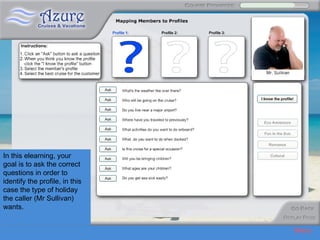
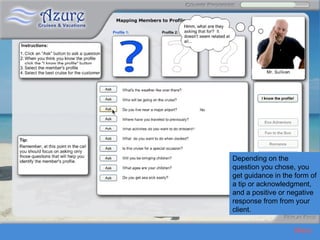
Azure 1


In this elearning, your
goal is to ask the correct
questions in order to
identify the profile, in this
case the type of holidaytraining from OXFAM allows the user to select different “clients” (in this
   This scenario based
the caller (Mr Sullivan)
   case farmers and merchants who face hunger), to view their circumstances and some of the
wants.
   choices they face as they try to stay afloat.

                                                                                                Menu
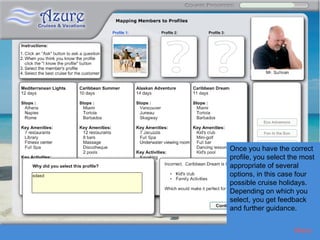
Azure 2


          Depending on the
          question you chose, you
          get guidance in the form of
          a tip or acknowledgment,
          and a positive or negative
          response from from your
          client.

                             Menu
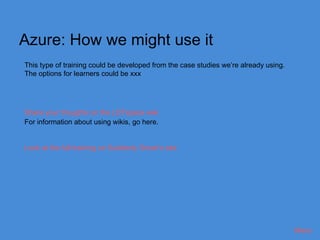
Azure 3


          Once you have the correct
          profile, you select the most
          appropriate of several
          options, in this case four
          possible cruise holidays.
          Depending on which you
          select, you get feedback
          and further guidance.


                               Menu
Azure: How we might use it
This type of training could be developed from the case studies we’re already using.
The options for learners could be xxx


Share your thoughts on the LDTspace wiki
For information about using wikis, go here.


Look at the full training on Suddenly Smart’s site


                                                                                      Menu
CRIME SCENE GAME
interview practice
This training allows learners to practice interviewing techniques. This game makes use
of branching to simulate what might happen in an interview. It’s quite plain, but xxx


                                                                                    Menu
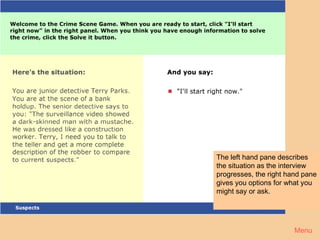
Crime 1


          The left hand pane describes
          the situation as the interview
          progresses, the right hand pane
          gives you options for what you
          might say or ask.


                                  Menu
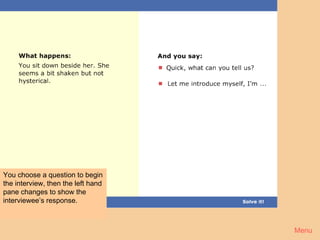
Crime 2


You choose a question to begin
the interview, then the left hand
pane changes to show the
interviewee’s response.


                                    Menu
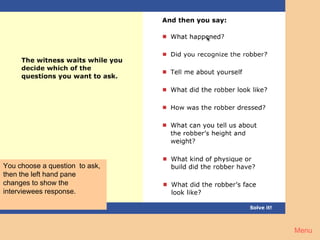
Crime 3


You choose a question to ask,
then the left hand pane
changes to show the
interviewees response.


                                Menu
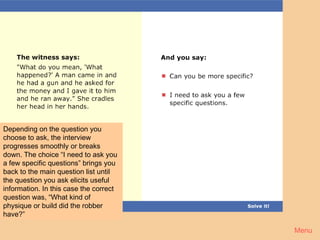
Crime 4


Depending on the question you
choose to ask, the interview
progresses smoothly or breaks
down. The choice “I need to ask you
a few specific questions” brings you
back to the main question list until
the question you ask elicits useful
information. In this case the correct
question was, “What kind of
physique or build did the robber
have?”

                                        Menu
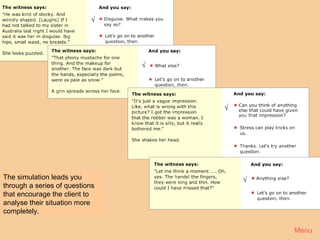
√


       Crime 5
                                √


                                    √


The simulation leads you                √
through a series of questions
that encourage the client to
analyse their situation more
completely.

                                            Menu
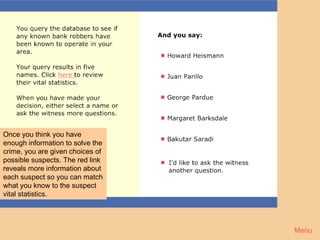
Crime 6


Once you think you have
enough information to solve the
crime, you are given choices of
possible suspects. The red link
reveals more information about
each suspect so you can match
what you know to the suspect
vital statistics.


                                  Menu
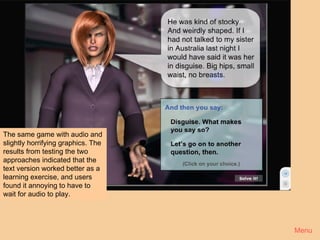
Crime 7


The same game with audio and
slightly horrifying graphics. The
results from testing the two
approaches indicated that the
text version worked better as a
learning exercise, and users
found it annoying to have to
wait for audio to play.


                                    Menu
Crime Scene: How we might use it
Xxx


Share your thoughts on the LDTspace wiki
For information about using wikis, go here.


Look at the full training on Horton’s site


                                              Menu
MANAGING PRODUCTIVITY
This training allows learners to practice dealing with common HR problems. The goal is to
chose a response to the problem that maximizes the productivity of the whole department.


                                                                                            Menu
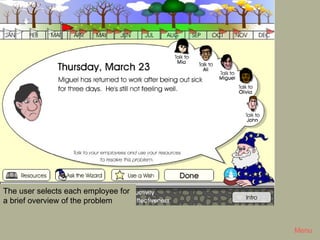
Productivity 1


The user selects each employee for
a brief overview of the problem


                                              Menu
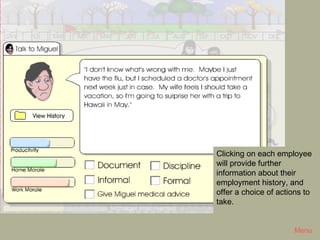
Productivity 2


                 Clicking on each employee
                 will provide further
                 information about their
                 employment history, and
                 offer a choice of actions to
                 take.


                                       Menu
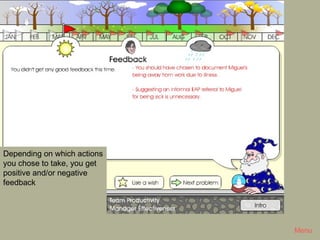
Productivity 3


Depending on which actions
you chose to take, you get
positive and/or negative
feedback


                                              Menu
Productivity: How we might use it
Xxx


Share your thoughts on the LDTspace wiki
For information about using wikis, go here.


Look at the full training on Allan Interaction’s site


                                                        Menu
MOTOROLA SALES PROCESS
This training introduces the learner to the six steps of the Motorola Sales Process and the
best practices of each step.


                                                                                              Menu
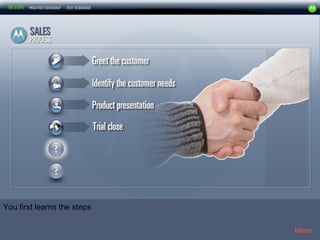
Motorola 1


You first learns the steps

                                          Menu
Motorola 2


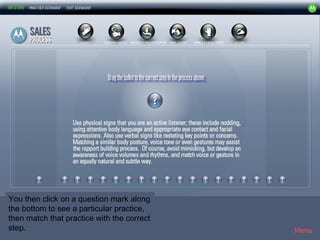
You then click on a question mark along
the bottom to see a particular practice,
then match that practice with the correct
step.                                        Menu
Motorola3


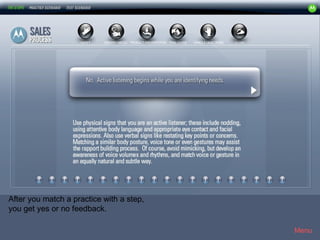
After you match a practice with a step,
you get yes or no feedback.

                                             Menu
Motorola4


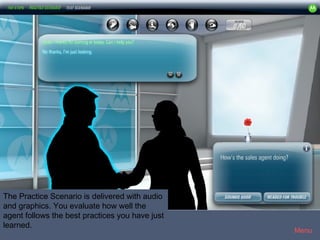
The Practice Scenario is delivered with audio
and graphics. You evaluate how well the
agent follows the best practices you have just
learned.
                                                 Menu
Motorola5


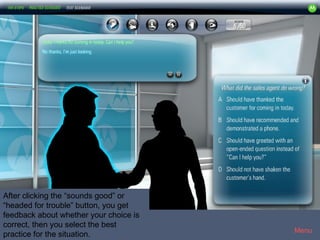
After clicking the “sounds good” or
“headed for trouble” button, you get
feedback about whether your choice is
correct, then you select the best
                                            Menu
practice for the situation.
Motorola6


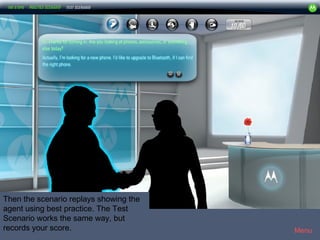
Then the scenario replays showing the
agent using best practice. The Test
Scenario works the same way, but
records your score.                         Menu
Motorola : How we might use it
Xxx


Share your thoughts on the LDTspace wiki
For information about using wikis, go here.


Look at the full training on Allan Interaction’s site


                                                        Menu
MISCELLANEOUS
other samples


 Share your thoughts on the LDTspace wiki
 For information about using wikis, go here.


                                               Menu
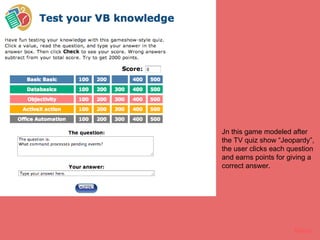
Jeopardy


           Jn this game modeled after
           the TV quiz show “Jeopardy”,
           the user clicks each question
           and earns points for giving a
           correct answer.


                                 Menu
Menu

Oxfam
Azure Cruise Selection
Crime Scene Game
Managing Productivity
Motorola Sales Process
Miscellaneous


                                Menu

Elearning Examples

  • 1.
    e L ea r n in g e x a m p le s These are a few of the elearning modules I ran across while I was researching. They reflect a trend toward simulations and scenario practice. None of the examples would be exactly right for CAB training, but are intended to help us imagine how we might develop training of this type. At the end of each section there is a link to LDTspace, a collaborative workspace where you can post comments and share any ideas you may have. Use the left/right arrows on your keyboard to navigate. Menu
  • 2.
    OXFAM The following scenariobased training from OXFAM allows the user to select different “clients” (in this case farmers and merchants who face hunger and poverty). For each client, the user can view circumstances and select from the choices they face as they try to stay afloat. There are also opportunities to view supporting information Menu
  • 3.
    Oxfam 1 The user selects each client for a brief overview of the case study Menu
  • 4.
    Oxfam 2 The user then sees an overview of the client’s circumstances. Green text links to background information relevant to the client’s case. Other information, such as the map, can have its own interactivity. Menu
  • 5.
    Oxfam 3 The scenario presents actions the client might take, and then follows through on the possible consequences of those actions. The green links and side bar continue to present background and related information. Menu
  • 6.
    Oxfam: How wemight use it This training uses a simple branching techniques that we could create in Lectora. xxx Share your thoughts on the LDTspace wiki Look at the full training on OXFAM’s site NB: Oxfam seems to move this around their site from time to time, so if you get a page not found error, enter “A Seat at the Table” into their search box. Menu
  • 7.
    AZURE interview practice This trainingallows learners to practice interviewing techniques. The object of the training is to find the right questions to ask, in the right order, in order to correctly identify the client’s circumstances and needs. Menu
  • 8.
    Azure 1 In thiselearning, your goal is to ask the correct questions in order to identify the profile, in this case the type of holidaytraining from OXFAM allows the user to select different “clients” (in this This scenario based the caller (Mr Sullivan) case farmers and merchants who face hunger), to view their circumstances and some of the wants. choices they face as they try to stay afloat. Menu
  • 9.
    Azure 2 Depending on the question you chose, you get guidance in the form of a tip or acknowledgment, and a positive or negative response from from your client. Menu
  • 10.
    Azure 3 Once you have the correct profile, you select the most appropriate of several options, in this case four possible cruise holidays. Depending on which you select, you get feedback and further guidance. Menu
  • 11.
    Azure: How wemight use it This type of training could be developed from the case studies we’re already using. The options for learners could be xxx Share your thoughts on the LDTspace wiki For information about using wikis, go here. Look at the full training on Suddenly Smart’s site Menu
  • 12.
    CRIME SCENE GAME interviewpractice This training allows learners to practice interviewing techniques. This game makes use of branching to simulate what might happen in an interview. It’s quite plain, but xxx Menu
  • 13.
    Crime 1 The left hand pane describes the situation as the interview progresses, the right hand pane gives you options for what you might say or ask. Menu
  • 14.
    Crime 2 You choosea question to begin the interview, then the left hand pane changes to show the interviewee’s response. Menu
  • 15.
    Crime 3 You choosea question to ask, then the left hand pane changes to show the interviewees response. Menu
  • 16.
    Crime 4 Depending onthe question you choose to ask, the interview progresses smoothly or breaks down. The choice “I need to ask you a few specific questions” brings you back to the main question list until the question you ask elicits useful information. In this case the correct question was, “What kind of physique or build did the robber have?” Menu
  • 17.
    Crime 5 √ √ The simulation leads you √ through a series of questions that encourage the client to analyse their situation more completely. Menu
  • 18.
    Crime 6 Once youthink you have enough information to solve the crime, you are given choices of possible suspects. The red link reveals more information about each suspect so you can match what you know to the suspect vital statistics. Menu
  • 19.
    Crime 7 The samegame with audio and slightly horrifying graphics. The results from testing the two approaches indicated that the text version worked better as a learning exercise, and users found it annoying to have to wait for audio to play. Menu
  • 20.
    Crime Scene: Howwe might use it Xxx Share your thoughts on the LDTspace wiki For information about using wikis, go here. Look at the full training on Horton’s site Menu
  • 21.
    MANAGING PRODUCTIVITY This trainingallows learners to practice dealing with common HR problems. The goal is to chose a response to the problem that maximizes the productivity of the whole department. Menu
  • 22.
    Productivity 1 The userselects each employee for a brief overview of the problem Menu
  • 23.
    Productivity 2 Clicking on each employee will provide further information about their employment history, and offer a choice of actions to take. Menu
  • 24.
    Productivity 3 Depending onwhich actions you chose to take, you get positive and/or negative feedback Menu
  • 25.
    Productivity: How wemight use it Xxx Share your thoughts on the LDTspace wiki For information about using wikis, go here. Look at the full training on Allan Interaction’s site Menu
  • 26.
    MOTOROLA SALES PROCESS Thistraining introduces the learner to the six steps of the Motorola Sales Process and the best practices of each step. Menu
  • 27.
    Motorola 1 You firstlearns the steps Menu
  • 28.
    Motorola 2 You thenclick on a question mark along the bottom to see a particular practice, then match that practice with the correct step. Menu
  • 29.
    Motorola3 After you matcha practice with a step, you get yes or no feedback. Menu
  • 30.
    Motorola4 The Practice Scenariois delivered with audio and graphics. You evaluate how well the agent follows the best practices you have just learned. Menu
  • 31.
    Motorola5 After clicking the“sounds good” or “headed for trouble” button, you get feedback about whether your choice is correct, then you select the best Menu practice for the situation.
  • 32.
    Motorola6 Then the scenarioreplays showing the agent using best practice. The Test Scenario works the same way, but records your score. Menu
  • 33.
    Motorola : Howwe might use it Xxx Share your thoughts on the LDTspace wiki For information about using wikis, go here. Look at the full training on Allan Interaction’s site Menu
  • 34.
    MISCELLANEOUS other samples Shareyour thoughts on the LDTspace wiki For information about using wikis, go here. Menu
  • 35.
    Jeopardy Jn this game modeled after the TV quiz show “Jeopardy”, the user clicks each question and earns points for giving a correct answer. Menu
  • 36.
    Menu Oxfam Azure Cruise Selection CrimeScene Game Managing Productivity Motorola Sales Process Miscellaneous Menu