
Introduction and quick startup
http://www.elasticsearch.org/
Topics to cover
• Elasticsearch and its introduction
–
–
–
–

Cluster
Node
Index
Shards
• Primary
• secondary

• Installation
• Setup and configuration
– Data Node
– Master Node
– Serving Node

• Queries
– Varies Queries
What is Elasticsearch?
• Elasticsearch is a search server based on
Lucene. It provides a distributed, multitenantcapable full-text search engine with a RESTful
web interface and schema-free JSON
documents. Elasticsearch is developed in Java
and is released as open source under the
terms of the Apache License.
What is Apache Lucene
• Apache LuceneTM is a high-performance, fullfeatured text search engine library written
entirely in Java. It is a technology suitable for
nearly any application that requires full-text
search, especially cross-platform.
Features
• Real time analytics
• Distributed
• High availability
– Automatic discovery of peers in a cluster

•
•
•
•
•
•
•

Multi tenant architecture
Full text
Document oriented
Schema free
RESTful API
Per-operation persistence
Easy to extend with a plugin system for new functionality
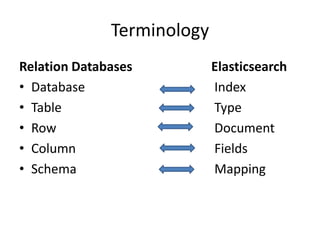
Terminology
Relation Databases
• Database
• Table
• Row
• Column
• Schema

Elasticsearch
Index
Type
Document
Fields
Mapping
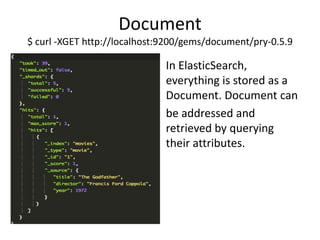
Document
$ curl -XGET http://localhost:9200/gems/document/pry-0.5.9

In ElasticSearch,
everything is stored as a
Document. Document can
be addressed and
retrieved by querying
their attributes.
Document Types
Lets us specify document properties, so we can differentiate the
objects

Shard
Each Shard is a separate native Lucene Index.
Replica
An exact copy of primary Shard. Helps in setting
up High Availability, increases query throughput.
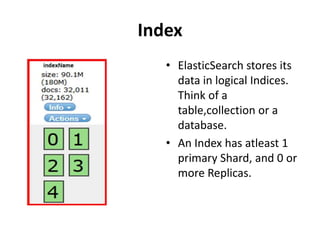
Index
• ElasticSearch stores its
data in logical Indices.
Think of a
table,collection or a
database.
• An Index has atleast 1
primary Shard, and 0 or
more Replicas.
Cluster
A collection of cooperating ElasticSearch nodes.
Gives better availability and performance via
Index Sharding and Replicas.
Installation
• Download and unzip the latest Elasticsearch
distribution
– http://www.elasticsearch.org/download/

• Run bin/elasticsearch -f on Unix,
or bin/elasticsearch.bat on Windows
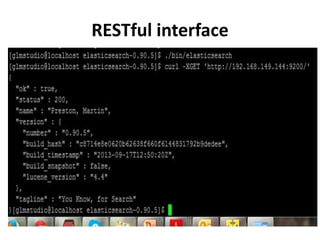
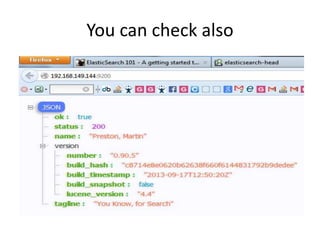
• Run curl -X GET http://localhost:9200/
Note:ElasticSearch is built using Java, and requires at least Java 6 in order to run.
RESTful interface
You can check also
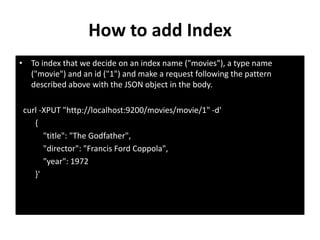
How to add Index
• To index that we decide on an index name ("movies"), a type name
("movie") and an id ("1") and make a request following the pattern
described above with the JSON object in the body.
curl -XPUT "http://localhost:9200/movies/movie/1" -d'
{
"title": "The Godfather",
"director": "Francis Ford Coppola",
"year": 1972
}'
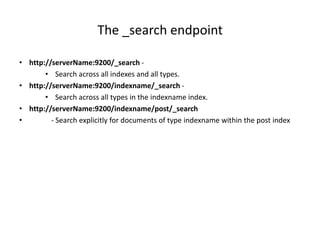
The _search endpoint
• http://serverName:9200/_search • Search across all indexes and all types.
• http://serverName:9200/indexname/_search • Search across all types in the indexname index.
• http://serverName:9200/indexname/post/_search
•
- Search explicitly for documents of type indexname within the post index
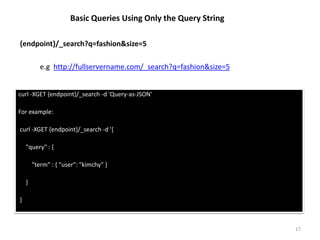
Basic Queries Using Only the Query String
{endpoint}/_search?q=fashion&size=5

e.g http://fullservername.com/_search?q=fashion&size=5

curl -XGET {endpoint}/_search -d 'Query-as-JSON'
For example:
curl -XGET {endpoint}/_search -d '{
"query" : {
"term" : { "user": "kimchy" }
}
}

17
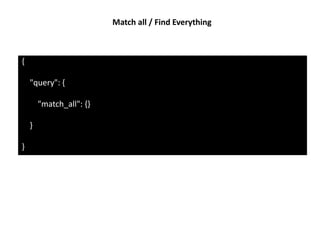
Match all / Find Everything

{

"query": {
"match_all": {}
}
}
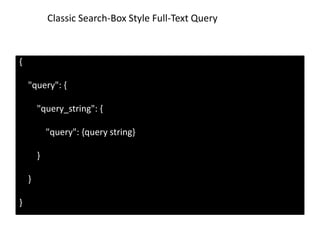
Classic Search-Box Style Full-Text Query

{

"query": {
"query_string": {
"query": {query string}
}
}
}
Thanks for reading it
– Roopendra Vishwakarma

Elasticsearch Introduction

  • 1.
    Introduction and quickstartup http://www.elasticsearch.org/
  • 2.
    Topics to cover •Elasticsearch and its introduction – – – – Cluster Node Index Shards • Primary • secondary • Installation • Setup and configuration – Data Node – Master Node – Serving Node • Queries – Varies Queries
  • 3.
    What is Elasticsearch? •Elasticsearch is a search server based on Lucene. It provides a distributed, multitenantcapable full-text search engine with a RESTful web interface and schema-free JSON documents. Elasticsearch is developed in Java and is released as open source under the terms of the Apache License.
  • 4.
    What is ApacheLucene • Apache LuceneTM is a high-performance, fullfeatured text search engine library written entirely in Java. It is a technology suitable for nearly any application that requires full-text search, especially cross-platform.
  • 5.
    Features • Real timeanalytics • Distributed • High availability – Automatic discovery of peers in a cluster • • • • • • • Multi tenant architecture Full text Document oriented Schema free RESTful API Per-operation persistence Easy to extend with a plugin system for new functionality
  • 6.
    Terminology Relation Databases • Database •Table • Row • Column • Schema Elasticsearch Index Type Document Fields Mapping
  • 7.
    Document $ curl -XGEThttp://localhost:9200/gems/document/pry-0.5.9 In ElasticSearch, everything is stored as a Document. Document can be addressed and retrieved by querying their attributes.
  • 8.
    Document Types Lets usspecify document properties, so we can differentiate the objects Shard Each Shard is a separate native Lucene Index.
  • 9.
    Replica An exact copyof primary Shard. Helps in setting up High Availability, increases query throughput.
  • 10.
    Index • ElasticSearch storesits data in logical Indices. Think of a table,collection or a database. • An Index has atleast 1 primary Shard, and 0 or more Replicas.
  • 11.
    Cluster A collection ofcooperating ElasticSearch nodes. Gives better availability and performance via Index Sharding and Replicas.
  • 12.
    Installation • Download andunzip the latest Elasticsearch distribution – http://www.elasticsearch.org/download/ • Run bin/elasticsearch -f on Unix, or bin/elasticsearch.bat on Windows • Run curl -X GET http://localhost:9200/ Note:ElasticSearch is built using Java, and requires at least Java 6 in order to run.
  • 13.
  • 14.
  • 15.
    How to addIndex • To index that we decide on an index name ("movies"), a type name ("movie") and an id ("1") and make a request following the pattern described above with the JSON object in the body. curl -XPUT "http://localhost:9200/movies/movie/1" -d' { "title": "The Godfather", "director": "Francis Ford Coppola", "year": 1972 }'
  • 16.
    The _search endpoint •http://serverName:9200/_search • Search across all indexes and all types. • http://serverName:9200/indexname/_search • Search across all types in the indexname index. • http://serverName:9200/indexname/post/_search • - Search explicitly for documents of type indexname within the post index
  • 17.
    Basic Queries UsingOnly the Query String {endpoint}/_search?q=fashion&size=5 e.g http://fullservername.com/_search?q=fashion&size=5 curl -XGET {endpoint}/_search -d 'Query-as-JSON' For example: curl -XGET {endpoint}/_search -d '{ "query" : { "term" : { "user": "kimchy" } } } 17
  • 18.
    Match all /Find Everything { "query": { "match_all": {} } }
  • 19.
    Classic Search-Box StyleFull-Text Query { "query": { "query_string": { "query": {query string} } } }
  • 20.
    Thanks for readingit – Roopendra Vishwakarma