Bobby Dodd
Principal
Gahanna Lincoln High School
http://bit.ly/1YpbBqT
Why?
• Why do I need to grow?
• Why do I need to get better at what I do?
• Why do I need to be the best I can be?
• Why do I really need those things?
– I’m good at what I do. Kids love me!
– I get Accomplished ratings each year!
What’s Your “Why”?
Then Choose to Do It
Make the Choice to Make a Change
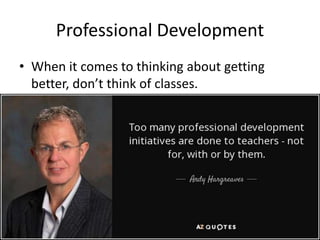
Professional Development
• When it comes to thinking about getting
better, don’t think of classes.
Think: “Its about growing myself”
• I can identify and access different apps and
websites to use for my professional growth
• I can utilize different apps and websites to
gain knowledge and share with others to grow
my profession.
• I can explain to others how and when to
access different apps and websites to grow
professionally.
Flipboard
• App and website for reading articles, journals, and
posts in any area that interests you.
• Create magazines that are based on specific interests
(ex. Education technology, Parenting Teens)
• Read articles/posts, share them with staff, students
and parents. (Ex. I share Parenting Teens articles with
my parents in newsletters)
• Access app any chance you get – try to go there once
every 2 days (Ex. During child practice, relaxing at
home)
Pocket
• App/website where you can store links (articles,
posts) to view later.
• You can categorize them into interests (similar to
Flipboard)
• It’s a simple download on a computer or app on
phone.
• Use at any time you are looking at articles/posts, but
don’t have time to read them (Ex. Waiting on
someone, have time but not enough time to read an
article/post)
Facebook
• Becoming more of a place to share professional
articles/posts, quotes, stories, experiences
• Start searching for different educators and leaders
who you want to connect with to learn more about
them professionally and personally.
• Great way to comment on articles/posts and get
more ideas from different educators & leaders.
• Access at any time during the day. I use it more
after school to learn what different educators and
leaders are doing in their schools.
Twitter
• App/website to research professional posts.
• Utilize hashtags (#) to find out more about specific
topics (ex. #spedchat, #sschat)
• Similar to Facebook, great way to learn get
information fast and efficiently – click on what you
like, don’t click on what you don’t.
• Access Twitter anytime during the day – best time to
post is in the 5:00 PM – 6:00 PM if you are looking
for a response back
Voxer
• App where you can communicate with anyone
similar to a walkie-talkie.
• You can share voice messages, text messages,
images, links, and videos.
• It is free or there is a pro-version for $3 per/month
• Useful for sharing professional resources, book chats,
security in schools, extension of Twitter chats.
• You can “vox” anytime, anywhere. The beauty is,
you can do it while driving or anything else.
Pinterest
• Pin your interests and read other pins from people
who share the same interests.
• Create your own board to organize your pins; share
with others.
• Great tool to use in the classroom with students for
projects.
• Find articles/posts on different areas and share with
others.
• Access Pinterest at any time; that is the great thing
about it.
YouTube
• Great place to find tutorial videos on anything.
• For example, “I don’t know how to screencast and
wouldn’t know where to start”
• “Our team wants to use common formative
assessments. Where do we start?”
• Every time you watch a video, you are growing.
• As long as you can “Search”, you can use YouTube.
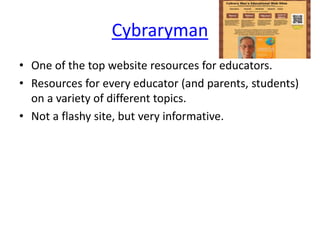
Cybraryman
• One of the top website resources for educators.
• Resources for every educator (and parents, students)
on a variety of different topics.
• Not a flashy site, but very informative.
Inc.com
• Resource that many would think is for business, but
is a great resource for educators and leaders too.
• For example, “I need to figure out how to get our
brand out to more people.”
• Great articles and posts from leading minds around
the world.
• Great app too. Huge presence on Twitter.
• Good for motivational posts & success tips.
GettingSmart.com
• Website resource for leaders and educators.
• Broken down into EdTech, Leadership and Learning.
• Ideas for uses of different types of assessments and
instructional methods.
• Very large presence on Twitter.
EducatorsTechnology.com
• Terrific website resource that has daily blogs on areas
from iPads, how to use Google Drive, and
infographics to name a few.
• For Google districts, a great resource on how to use
Google Drive and the different features Google Docs
offers.
DitchThatTextBook.com
• Website resource with great tips on a variety
of useful ideas and tips. Anything from
preparing students with useful skills to how to
use Google Apps.
• Great resource to share with staff members
for tips on how to use different resources.
Screencastomatic.com
• Record what you are doing on the screen.
• Record how to use different resources, website,
apps, tools and share them with others.
• How does this help ME get better?
– Train your staff or students on how to create screencasts
and have them share with you.
– Share screencasts every Friday during class or during Staff
Meetings or in your weekly update.
Blogs
• Find people and organizations to follow by using
social media tools such Twitter, Facebook, Pinterest,
and other website resources.
• Also uses different website resources (search
engines) to help find relevant blogs.
• Great way to reflect, but also get great ideas and
insights.
• Follow blogs that you enjoy so you can get the most
recent blogs sent to you.
Blabs
• Watch live streaming (or recorded) video about a
number of topics.
• App/website where you can search tags, people,
and/or topics to gain professional knowledge.
• For example, Blabs on successful hiring practices.
• Good way to watch videos at your leisure and learn
more about different topics or different people.
• Similar to Google Hangout
• Need a Twitter or Facebook account to get started.
WingClips
• Great website for motivational quotes/ideas
from different movies.
• Utilize quotes/ideas in classroom, with staff,
with parents.
• How will this make me grow?
– The different quotes and sayings can help spark
something for you: motivation, determination
Why Do I Need To Learn More About Technology?
• You may not be an expert in technology, but you
need to become more knowledgeable about it.
• You need to be able to share information with
students, staff, and parents about technology.
• It is not going away. Its only going to keep changing
and be in the forefront.
Why Are You Doing This?
Contact Information
Email: doddb@gjps.org
Twitter: @bobby__dodd
Instagram: bobby__dodd
Voxer: bobby__dodd
Pinterest: @glhsprincipal
Facebook:https://www.facebook.com/people/Bobb
y-Dodd/100007881709222
Blog: http://www.glhsprincipal.blogspot.com

Effectively Using Technology For Leading and Learning

  • 1.
    Bobby Dodd Principal Gahanna LincolnHigh School http://bit.ly/1YpbBqT
  • 2.
    Why? • Why doI need to grow? • Why do I need to get better at what I do? • Why do I need to be the best I can be? • Why do I really need those things? – I’m good at what I do. Kids love me! – I get Accomplished ratings each year!
  • 3.
  • 4.
  • 5.
    Make the Choiceto Make a Change
  • 6.
    Professional Development • Whenit comes to thinking about getting better, don’t think of classes.
  • 7.
    Think: “Its aboutgrowing myself” • I can identify and access different apps and websites to use for my professional growth • I can utilize different apps and websites to gain knowledge and share with others to grow my profession. • I can explain to others how and when to access different apps and websites to grow professionally.
  • 8.
    Flipboard • App andwebsite for reading articles, journals, and posts in any area that interests you. • Create magazines that are based on specific interests (ex. Education technology, Parenting Teens) • Read articles/posts, share them with staff, students and parents. (Ex. I share Parenting Teens articles with my parents in newsletters) • Access app any chance you get – try to go there once every 2 days (Ex. During child practice, relaxing at home)
  • 9.
    Pocket • App/website whereyou can store links (articles, posts) to view later. • You can categorize them into interests (similar to Flipboard) • It’s a simple download on a computer or app on phone. • Use at any time you are looking at articles/posts, but don’t have time to read them (Ex. Waiting on someone, have time but not enough time to read an article/post)
  • 10.
    Facebook • Becoming moreof a place to share professional articles/posts, quotes, stories, experiences • Start searching for different educators and leaders who you want to connect with to learn more about them professionally and personally. • Great way to comment on articles/posts and get more ideas from different educators & leaders. • Access at any time during the day. I use it more after school to learn what different educators and leaders are doing in their schools.
  • 11.
    Twitter • App/website toresearch professional posts. • Utilize hashtags (#) to find out more about specific topics (ex. #spedchat, #sschat) • Similar to Facebook, great way to learn get information fast and efficiently – click on what you like, don’t click on what you don’t. • Access Twitter anytime during the day – best time to post is in the 5:00 PM – 6:00 PM if you are looking for a response back
  • 12.
    Voxer • App whereyou can communicate with anyone similar to a walkie-talkie. • You can share voice messages, text messages, images, links, and videos. • It is free or there is a pro-version for $3 per/month • Useful for sharing professional resources, book chats, security in schools, extension of Twitter chats. • You can “vox” anytime, anywhere. The beauty is, you can do it while driving or anything else.
  • 13.
    Pinterest • Pin yourinterests and read other pins from people who share the same interests. • Create your own board to organize your pins; share with others. • Great tool to use in the classroom with students for projects. • Find articles/posts on different areas and share with others. • Access Pinterest at any time; that is the great thing about it.
  • 14.
    YouTube • Great placeto find tutorial videos on anything. • For example, “I don’t know how to screencast and wouldn’t know where to start” • “Our team wants to use common formative assessments. Where do we start?” • Every time you watch a video, you are growing. • As long as you can “Search”, you can use YouTube.
  • 15.
    Cybraryman • One ofthe top website resources for educators. • Resources for every educator (and parents, students) on a variety of different topics. • Not a flashy site, but very informative.
  • 16.
    Inc.com • Resource thatmany would think is for business, but is a great resource for educators and leaders too. • For example, “I need to figure out how to get our brand out to more people.” • Great articles and posts from leading minds around the world. • Great app too. Huge presence on Twitter. • Good for motivational posts & success tips.
  • 17.
    GettingSmart.com • Website resourcefor leaders and educators. • Broken down into EdTech, Leadership and Learning. • Ideas for uses of different types of assessments and instructional methods. • Very large presence on Twitter.
  • 18.
    EducatorsTechnology.com • Terrific websiteresource that has daily blogs on areas from iPads, how to use Google Drive, and infographics to name a few. • For Google districts, a great resource on how to use Google Drive and the different features Google Docs offers.
  • 19.
    DitchThatTextBook.com • Website resourcewith great tips on a variety of useful ideas and tips. Anything from preparing students with useful skills to how to use Google Apps. • Great resource to share with staff members for tips on how to use different resources.
  • 20.
    Screencastomatic.com • Record whatyou are doing on the screen. • Record how to use different resources, website, apps, tools and share them with others. • How does this help ME get better? – Train your staff or students on how to create screencasts and have them share with you. – Share screencasts every Friday during class or during Staff Meetings or in your weekly update.
  • 21.
    Blogs • Find peopleand organizations to follow by using social media tools such Twitter, Facebook, Pinterest, and other website resources. • Also uses different website resources (search engines) to help find relevant blogs. • Great way to reflect, but also get great ideas and insights. • Follow blogs that you enjoy so you can get the most recent blogs sent to you.
  • 22.
    Blabs • Watch livestreaming (or recorded) video about a number of topics. • App/website where you can search tags, people, and/or topics to gain professional knowledge. • For example, Blabs on successful hiring practices. • Good way to watch videos at your leisure and learn more about different topics or different people. • Similar to Google Hangout • Need a Twitter or Facebook account to get started.
  • 23.
    WingClips • Great websitefor motivational quotes/ideas from different movies. • Utilize quotes/ideas in classroom, with staff, with parents. • How will this make me grow? – The different quotes and sayings can help spark something for you: motivation, determination
  • 24.
    Why Do INeed To Learn More About Technology? • You may not be an expert in technology, but you need to become more knowledgeable about it. • You need to be able to share information with students, staff, and parents about technology. • It is not going away. Its only going to keep changing and be in the forefront.
  • 25.
    Why Are YouDoing This?
  • 28.
    Contact Information Email: doddb@gjps.org Twitter:@bobby__dodd Instagram: bobby__dodd Voxer: bobby__dodd Pinterest: @glhsprincipal Facebook:https://www.facebook.com/people/Bobb y-Dodd/100007881709222 Blog: http://www.glhsprincipal.blogspot.com