Bobby Dodd
Principal
Gahanna Lincoln High School
2016 NASSP National Digital Principal of the Year
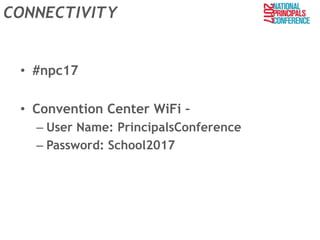
CONNECTIVITY
• #npc17
• Convention Center WiFi –
– User Name: PrincipalsConference
– Password: School2017
Objectives for Our Session
• We will learn how to use different social
media tools such Flipboard, Twitter, Instagram
and screencasts for leadership knowledge
• We will create templates for weekly school
newsletters to share information with our
stakeholders
Aspects of Session to Remember
• Take small steps and go slow
• Utilize videos and screencasts – YouTube is
your best friend
• Find your audience – Go where they are
• Focus on being an Instructional Leader
– Be a Resource for your staff and stakeholders
• Sacrifice time and make extra effort to
communicate your message
Flipboard
• App and website for reading articles, journals,
and posts in any area that interests you.
• Create magazines that are based on specific
interests (ex. Education technology, Parenting
Teens)
• Read articles/posts, share them with staff,
students and parents. (Ex. I share Parenting Teens
articles with my parents in newsletters)
• Access app any chance you get – try to go there
once every 2 days (Ex. During child practice,
relaxing at home)
How to Use Flipboard
1. Access www.Flipboard.com and create an
account
2. Cover Stories and Explore
3. What’s Your Passion?
4. Scroll through the posts/articles and read what
you may use
5. Hover over image – 3 options
1. Flip It, Share, Like
6. Share with others – copy the link, post on social
media
Facebook
• Becoming more of a place to share professional
articles/posts, quotes, stories, experiences
• Start searching for different educators and
leaders who you want to connect with to learn
more about them professionally and personally.
• Great way to comment on articles/posts and get
more ideas from different educators & leaders.
• Access at any time during the day. I use it more
after school to learn what different educators and
leaders are doing in their schools.
How to Use Facebook
1. Create a personal account and school
account
2. If you already have an account, begin to use
it more for professional purposes
3. Connect and Friend other educators
4. Share professional information and articles
5. Use “If This, Then That” to post from
Instagram, Twitter, Pinterest to Facebook
Twitter
• App/website to research professional posts.
• Utilize hashtags (#) to find out more about
specific topics (ex. #spedchat, #sschat)
• Similar to Facebook, great way to learn get
information fast and efficiently – click on what
you like, don’t click on what you don’t.
• Access Twitter anytime during the day – best
time to post is in the 5:00 PM – 6:00 PM if you
are looking for a response back
How to Use Twitter
1. Create at account
2. Search “How to use Twitter” videos on
YouTube for basic user information
3. Follow educators from your area, your region
and around the world
4. Search hashtags such as #edchat and #edtech
for resources
5. Use Twitter consistently (at least once a day)
Instagram
• Post pictures and videos from around the
school (classes, events) to share
• Allows you to connect with your Facebook and
Twitter accounts to share pictures and videos
on all platforms
• Include hashtags and promote your school
account for students to follow
How to use Instagram
1. Create an account
1. Create two accounts (personal and school)
2. Search for YouTube videos “How to use
Instagram” for basics
3. Find other educators to connect with
4. Promote your Instagram account using
Twitter and Facebook
1. Get students and parents to follow
5. Connect to your Twitter and Facebook
accounts
Blogs
• Write blogs to share with others your philosophy,
thoughts and share celebrations
• Find people and organizations to follow by using
social media tools such Twitter, Facebook,
Pinterest, and other website resources.
• Also uses different website resources (search
engines) to help find relevant blogs.
• Great way to reflect, but also get great ideas and
insights.
• Follow blogs that you enjoy so you can get the
most recent blogs sent to you.
How to Create Blogs
1. If you have a Gmail account or your district is
a Google district, you can use Blogger
2. If you don’t have Google, there are other free
blogging applications you can use as well
3. Post information and share link using social
media applications and emails to parents and
staff
Using Mass Email
• We use School Messenger for our mass email
application
• Our parents provide 2 valid email addresses
when they pay fees for class schedules
• Email addresses are uploaded into system
broken down by grade levels
• Submit links to parents, images, and general
information
• Also include link to our weekly newsletter
Weekly Newsletter
• Create weekly newsletter/blog post to
communicate your message
• Include links to articles for parents
• Share with your staff as well
• Include important dates for the next week and
week after
How to Create a Weekly Newsletter
• Here is a template for our newsletter
1) Share relevant information
2) Showcase what is going on in the classroom
and outside the classroom
3) Be creative on how you are going to share
and what you will share
4) Be consistent with you posts
Screencasts
• Record what you are doing on the screen.
• Record how to use different resources,
website, apps, tools and share them with
others.
• How does this help ME get better?
– Train your staff or students on how to create
screencasts and have them share with you.
– Share screencasts every Friday during class or
during Staff Meetings or in your weekly update.
How to Use Screencasts
1. Find a screencast application you like
1. I use screencast-o-matic
2. Create an account and find “How to
screencast” videos on YouTube for basics
3. Follow principles when creating screencasts
4. Think of creating videos for students, staff
and parents to share everything from school
highlights to professional development
Summary
• Take small steps
• Utilize your PLN and videos to make it easier
for you to learn new tools
• Get help from students, staff, and parents to
help communicate your message and brand
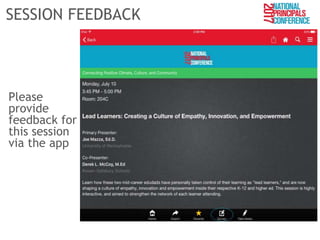
SESSION FEEDBACK
Please
provide
feedback for
this session
via the app
Continue On Connecting
Keep your conversations going after hours on
Sunday and Monday evenings at these local
off-site gathering places just steps away from
the Convention Center:
Field House:
• Increasing Professional Capacity
• Elevating Student Efficacy
Pennsylvania 6:
• Connecting Culture and Community
• Personalizing Student Learning
Orlando, FL
July 9–11, 2018
Chicago, IL
July 11–13, 2018
Contact Information
Email: doddb@gjps.org
Twitter: @bobby__dodd
Instagram: bobby__dodd
Voxer: bobby__dodd
Pinterest: @glhsprincipal
Facebook:https://www.facebook.com/people/Bobb
y-Dodd/100007881709222
Blog: http://www.glhsprincipal.blogspot.com

Communicate Your Message

  • 1.
    Bobby Dodd Principal Gahanna LincolnHigh School 2016 NASSP National Digital Principal of the Year
  • 2.
    CONNECTIVITY • #npc17 • ConventionCenter WiFi – – User Name: PrincipalsConference – Password: School2017
  • 4.
    Objectives for OurSession • We will learn how to use different social media tools such Flipboard, Twitter, Instagram and screencasts for leadership knowledge • We will create templates for weekly school newsletters to share information with our stakeholders
  • 5.
    Aspects of Sessionto Remember • Take small steps and go slow • Utilize videos and screencasts – YouTube is your best friend • Find your audience – Go where they are • Focus on being an Instructional Leader – Be a Resource for your staff and stakeholders • Sacrifice time and make extra effort to communicate your message
  • 6.
    Flipboard • App andwebsite for reading articles, journals, and posts in any area that interests you. • Create magazines that are based on specific interests (ex. Education technology, Parenting Teens) • Read articles/posts, share them with staff, students and parents. (Ex. I share Parenting Teens articles with my parents in newsletters) • Access app any chance you get – try to go there once every 2 days (Ex. During child practice, relaxing at home)
  • 7.
    How to UseFlipboard 1. Access www.Flipboard.com and create an account 2. Cover Stories and Explore 3. What’s Your Passion? 4. Scroll through the posts/articles and read what you may use 5. Hover over image – 3 options 1. Flip It, Share, Like 6. Share with others – copy the link, post on social media
  • 8.
    Facebook • Becoming moreof a place to share professional articles/posts, quotes, stories, experiences • Start searching for different educators and leaders who you want to connect with to learn more about them professionally and personally. • Great way to comment on articles/posts and get more ideas from different educators & leaders. • Access at any time during the day. I use it more after school to learn what different educators and leaders are doing in their schools.
  • 9.
    How to UseFacebook 1. Create a personal account and school account 2. If you already have an account, begin to use it more for professional purposes 3. Connect and Friend other educators 4. Share professional information and articles 5. Use “If This, Then That” to post from Instagram, Twitter, Pinterest to Facebook
  • 10.
    Twitter • App/website toresearch professional posts. • Utilize hashtags (#) to find out more about specific topics (ex. #spedchat, #sschat) • Similar to Facebook, great way to learn get information fast and efficiently – click on what you like, don’t click on what you don’t. • Access Twitter anytime during the day – best time to post is in the 5:00 PM – 6:00 PM if you are looking for a response back
  • 11.
    How to UseTwitter 1. Create at account 2. Search “How to use Twitter” videos on YouTube for basic user information 3. Follow educators from your area, your region and around the world 4. Search hashtags such as #edchat and #edtech for resources 5. Use Twitter consistently (at least once a day)
  • 12.
    Instagram • Post picturesand videos from around the school (classes, events) to share • Allows you to connect with your Facebook and Twitter accounts to share pictures and videos on all platforms • Include hashtags and promote your school account for students to follow
  • 13.
    How to useInstagram 1. Create an account 1. Create two accounts (personal and school) 2. Search for YouTube videos “How to use Instagram” for basics 3. Find other educators to connect with 4. Promote your Instagram account using Twitter and Facebook 1. Get students and parents to follow 5. Connect to your Twitter and Facebook accounts
  • 14.
    Blogs • Write blogsto share with others your philosophy, thoughts and share celebrations • Find people and organizations to follow by using social media tools such Twitter, Facebook, Pinterest, and other website resources. • Also uses different website resources (search engines) to help find relevant blogs. • Great way to reflect, but also get great ideas and insights. • Follow blogs that you enjoy so you can get the most recent blogs sent to you.
  • 15.
    How to CreateBlogs 1. If you have a Gmail account or your district is a Google district, you can use Blogger 2. If you don’t have Google, there are other free blogging applications you can use as well 3. Post information and share link using social media applications and emails to parents and staff
  • 16.
    Using Mass Email •We use School Messenger for our mass email application • Our parents provide 2 valid email addresses when they pay fees for class schedules • Email addresses are uploaded into system broken down by grade levels • Submit links to parents, images, and general information • Also include link to our weekly newsletter
  • 17.
    Weekly Newsletter • Createweekly newsletter/blog post to communicate your message • Include links to articles for parents • Share with your staff as well • Include important dates for the next week and week after
  • 18.
    How to Createa Weekly Newsletter • Here is a template for our newsletter 1) Share relevant information 2) Showcase what is going on in the classroom and outside the classroom 3) Be creative on how you are going to share and what you will share 4) Be consistent with you posts
  • 19.
    Screencasts • Record whatyou are doing on the screen. • Record how to use different resources, website, apps, tools and share them with others. • How does this help ME get better? – Train your staff or students on how to create screencasts and have them share with you. – Share screencasts every Friday during class or during Staff Meetings or in your weekly update.
  • 20.
    How to UseScreencasts 1. Find a screencast application you like 1. I use screencast-o-matic 2. Create an account and find “How to screencast” videos on YouTube for basics 3. Follow principles when creating screencasts 4. Think of creating videos for students, staff and parents to share everything from school highlights to professional development
  • 21.
    Summary • Take smallsteps • Utilize your PLN and videos to make it easier for you to learn new tools • Get help from students, staff, and parents to help communicate your message and brand
  • 22.
  • 23.
    Continue On Connecting Keepyour conversations going after hours on Sunday and Monday evenings at these local off-site gathering places just steps away from the Convention Center: Field House: • Increasing Professional Capacity • Elevating Student Efficacy Pennsylvania 6: • Connecting Culture and Community • Personalizing Student Learning
  • 24.
    Orlando, FL July 9–11,2018 Chicago, IL July 11–13, 2018
  • 25.
    Contact Information Email: doddb@gjps.org Twitter:@bobby__dodd Instagram: bobby__dodd Voxer: bobby__dodd Pinterest: @glhsprincipal Facebook:https://www.facebook.com/people/Bobb y-Dodd/100007881709222 Blog: http://www.glhsprincipal.blogspot.com