WELCOME TO
CLASSROOM AND LAB
COMPUTING
      New Employee Training
          Kevin Hough
Who are we?
• Division of ITS
• Manage Computer Labs and Classrooms
  • 3100 computers
  • 100 printers
  • 53 rooms
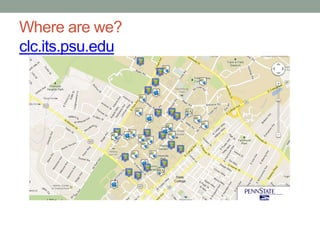
Where are we?
clc.its.psu.edu
Supported Systems
• Apple
• Dell
• HP
Computer Repairs
• In-house
   • All Dell repairs
   • Non-warranty Apple
   • Non-warranty HP
• Vendor
  • Warranty Apple
  • Warranty HP
Dell Repairs
• Warranty Parts Direct
  • Free parts
  • Pay us for our time
  • Yearly certification tested on:
     • Printers
     • Laptops
     • Desktops
     • Servers
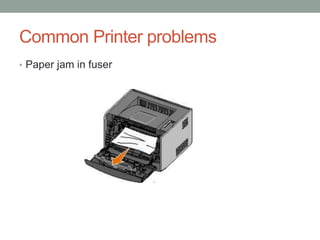
Common Printer problems
• Paper jam in fuser
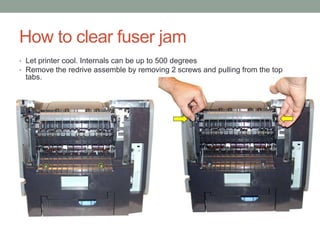
How to clear fuser jam
• Let printer cool. Internals can be up to 500 degrees
• Remove the redrive assemble by removing 2 screws and pulling from the top
 tabs.
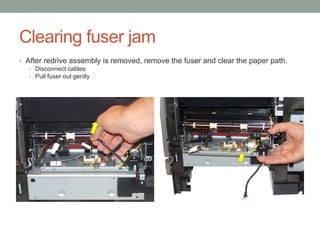
Clearing fuser jam
• After redrive assembly is removed, remove the fuser and clear the paper path.
   • Disconnect cables
   • Pull fuser out gently
Warranty Parts Direct Certification
• Dell certification
• 3 tests
• Retested yearly
  • http://www.learndell.com/
• Order parts
  • https://www.dosd.dell.com/
Sample Question #1
• When removing a fuser, which parts need to be
 removed/disconnected prior to the fuser?
   A.   Toner cartridge
   B.   A/C power cord
   C.   Redrive assembly
   D.   Fuser wiper cover
   E.   Outer Shield
Correct Answer
• B, C, D
  • Units should always be unplugged
  • Redrive covers the fuser
  • Fuser wiper cover sits on fuser (trick question)
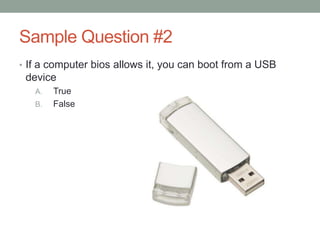
Sample Question #2
• If a computer bios allows it, you can boot from a USB
 device
   A.   True
   B.   False
Correct Answer
• True
   • Our images are now stored and dispersed through USB drives.
Sample Question #3
• An Apple iMac will not boot. You should:
   A. Check plugs
   B. Reset the System Management Controller (SMC)
   C. Replace the hard drive
   D. Re-install software image
Correct Answer
• A, B, and D
  • Most of the booting problems with Apple iMacs relate to power
    management.
    • Is it plugged in?
    • Resetting SMC, resets the internal power supply. This can become
      corrupt after power outage.
  • Re-install software image if hardware checks out.
Evaluation
• You will be evaluated on:
   • Attain Dell certification within 60 days of start date.
   • Number of closings in JIRA (issue tracking software)
   • Accuracy of troubleshooting
     • Does same problem get re-issued multiple times
     • Level of expertise involved

Edtec440pp

  • 1.
    WELCOME TO CLASSROOM ANDLAB COMPUTING New Employee Training Kevin Hough
  • 2.
    Who are we? •Division of ITS • Manage Computer Labs and Classrooms • 3100 computers • 100 printers • 53 rooms
  • 3.
  • 4.
  • 5.
    Computer Repairs • In-house • All Dell repairs • Non-warranty Apple • Non-warranty HP • Vendor • Warranty Apple • Warranty HP
  • 6.
    Dell Repairs • WarrantyParts Direct • Free parts • Pay us for our time • Yearly certification tested on: • Printers • Laptops • Desktops • Servers
  • 7.
    Common Printer problems •Paper jam in fuser
  • 8.
    How to clearfuser jam • Let printer cool. Internals can be up to 500 degrees • Remove the redrive assemble by removing 2 screws and pulling from the top tabs.
  • 9.
    Clearing fuser jam •After redrive assembly is removed, remove the fuser and clear the paper path. • Disconnect cables • Pull fuser out gently
  • 10.
    Warranty Parts DirectCertification • Dell certification • 3 tests • Retested yearly • http://www.learndell.com/ • Order parts • https://www.dosd.dell.com/
  • 11.
    Sample Question #1 •When removing a fuser, which parts need to be removed/disconnected prior to the fuser? A. Toner cartridge B. A/C power cord C. Redrive assembly D. Fuser wiper cover E. Outer Shield
  • 12.
    Correct Answer • B,C, D • Units should always be unplugged • Redrive covers the fuser • Fuser wiper cover sits on fuser (trick question)
  • 13.
    Sample Question #2 •If a computer bios allows it, you can boot from a USB device A. True B. False
  • 14.
    Correct Answer • True • Our images are now stored and dispersed through USB drives.
  • 15.
    Sample Question #3 •An Apple iMac will not boot. You should: A. Check plugs B. Reset the System Management Controller (SMC) C. Replace the hard drive D. Re-install software image
  • 16.
    Correct Answer • A,B, and D • Most of the booting problems with Apple iMacs relate to power management. • Is it plugged in? • Resetting SMC, resets the internal power supply. This can become corrupt after power outage. • Re-install software image if hardware checks out.
  • 17.
    Evaluation • You willbe evaluated on: • Attain Dell certification within 60 days of start date. • Number of closings in JIRA (issue tracking software) • Accuracy of troubleshooting • Does same problem get re-issued multiple times • Level of expertise involved