






1Social Media for the Practical Economic Development ProfessionalSara Dunnigan, CEcDGreater Richmond Partnership, Inc.sdunnigan@grpva.comhttp://linkedin.com/in/sarajdunniganhttp://twitter.com/saradunniganMark J James, CEcDED Solutions, Inc.	mark.james@solutionsED.comhttp://www.linkedin.com/in/edsolutionshttp://twitter.com/EcoDev
 2010 © ED Solutions, Inc.2
33Professional Learning Lab Affiliates
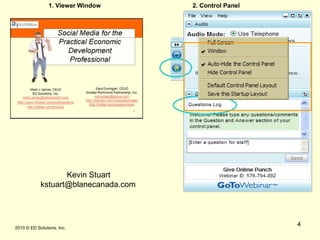
1. Viewer Window2. Control Panel 2010 © ED Solutions, Inc.4Kevin Stuartkstuart@blanecanada.com
5About ED Solutions, Inc.ED Solutions, Inc. mission is to help economic development organizations with the effective use of technology. We provide-Web site review and analysis
Web redesign strategies and advisory services
Contact management solutions
A variety of other technology solutions for the profession
Training services to the economic development profession.
Web Metrics and data subscriptions through affiliated firm- www.developmentresults.com.  ED Solutions, Inc. is among the most respected firms providing web site strategies to the economic development profession. ED Solutions, Inc. has worked on over 200 web projects in 30 US states, Canada and the UK.  2010 © ED Solutions, Inc.
6About Sara DunniganSara is an economist who has developed a deep appreciation for economic development and strategic place marketing. Experience in economic research, business retention and expansion programs, business attraction initiatives, workforce development, and entrepreneurial support activities in both public and private sector organizations.  Particularly interested in advancing the use of open networks and social media in economic development, workforce development and community capacity building activities to support economic growth. E-Mail - sarajdunnigan@yahoo.comLinkedIn - www.linkedin.com/in/sarajdunniganTwitter - www.twitter.com/saradunnigan 2010 © ED Solutions, Inc.
 2010 © ED Solutions, Inc.7
 2010 © ED Solutions, Inc.818%
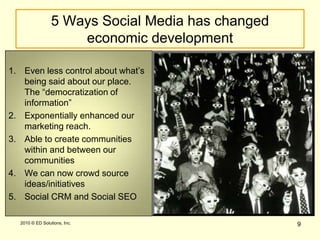
95 Ways Social Media has changed economic developmentEven less control about what’s being said about our place. The “democratization of information”Exponentially enhanced our marketing reach.Able to create communities within and between our communitiesWe can now crowd source ideas/initiativesSocial CRM and Social SEO Audiences 2010 © ED Solutions, Inc.
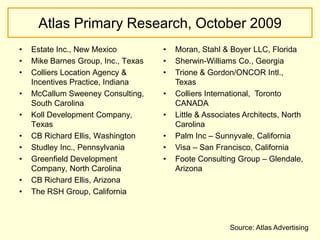
Atlas Primary Research, October 2009Estate Inc., New MexicoMike Barnes Group, Inc., TexasColliers Location Agency & Incentives Practice, IndianaMcCallum Sweeney Consulting, South CarolinaKoll Development Company, TexasCB Richard Ellis, WashingtonStudley Inc., PennsylvaniaGreenfield Development Company, North CarolinaCB Richard Ellis, ArizonaThe RSH Group, CaliforniaMoran, Stahl & Boyer LLC, Florida
Sherwin-Williams Co., Georgia
Trione & Gordon/ONCOR Intl., Texas
Colliers International,  Toronto CANADA
Little & Associates Architects, North Carolina
Palm Inc – Sunnyvale, California
Visa – San Francisco, California
Foote Consulting Group – Glendale, ArizonaSource: Atlas Advertising
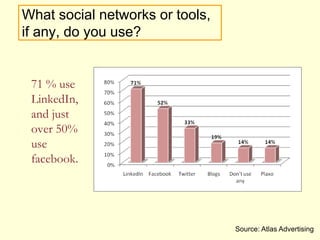
What social networks or tools, if any, do you use?71 % use LinkedIn, and just over 50% use facebook.  Source: Atlas Advertising
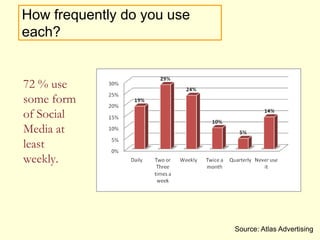
How frequently do you use each?72 % use some form of Social Media at least weekly.  Source: Atlas Advertising
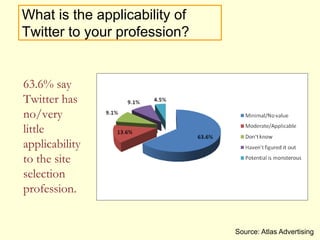
What is the applicability of Twitter to your profession?63.6% say Twitter has no/very little applicability to the site selection profession. Source: Atlas Advertising
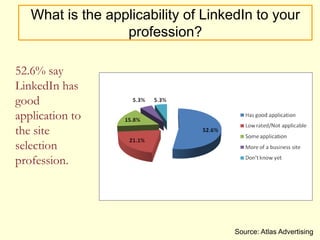
What is the applicability of LinkedIn to your profession?52.6% say LinkedIn has good application to the site selection profession. Source: Atlas Advertising
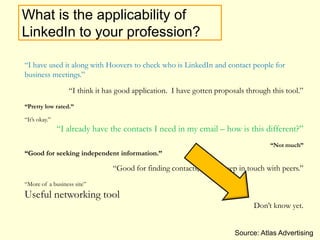
What is the applicability of LinkedIn to your profession?“I have used it along with Hoovers to check who is LinkedIn and contact people for business meetings.” “I think it has good application.  I have gotten proposals through this tool.”“Pretty low rated.”“It’s okay.”“I already have the contacts I need in my email – how is this different?”“Not much”“Good for seeking independent information.” “Good for finding contacts, and to keep in touch with peers.”“More of a business site”Useful networking toolDon’t know yet.Source: Atlas Advertising
 2010 © ED Solutions, Inc.16What does all this say to the practical economic development professional?Just say no
 2010 © ED Solutions, Inc.17What does all this say to the practical economic development professional?
 2010 © ED Solutions, Inc.18What does all this say to the practical economic development professional?Depending on organization, a reasonable inclusion of SOME social media applications
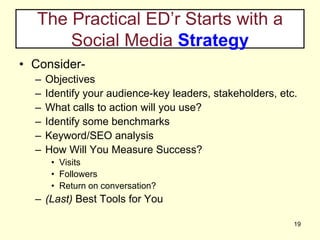
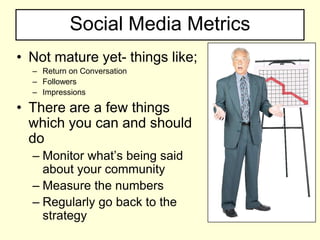
The Practical ED’r Starts with a Social Media Strategy19Consider-ObjectivesIdentify your audience-key leaders, stakeholders, etc.What calls to action will you use?Identify some benchmarksKeyword/SEO analysisHow Will You Measure Success?VisitsFollowersReturn on conversation?(Last) Best Tools for You
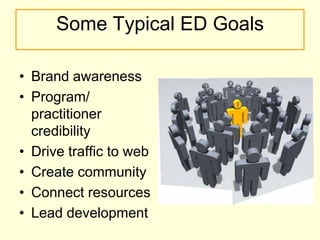
Some Typical ED GoalsBrand awarenessProgram/practitionercredibilityDrive traffic to webCreate communityConnect resourcesLead development
 2010 © ED Solutions, Inc.21What’s Yours?
 2010 © ED Solutions, Inc.22Social Media Integration
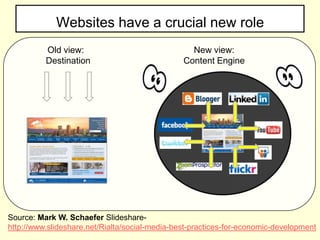
Websites have a crucial new roleOld view:  DestinationNew view:Content EngineSource: Mark W. Schaefer Slideshare- http://www.slideshare.net/Rialta/social-media-best-practices-for-economic-development
24Our web sites need to be aboutCOMMUNICATION,not marketing 2010 © ED Solutions, Inc.
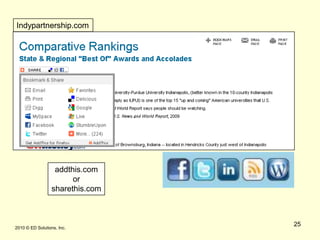
 2010 © ED Solutions, Inc.25Indypartnership.comaddthis.comorsharethis.com
26SEO & SMOSocial media optimization (SMO) is a set of methods for generating publicity through social media, online communities and community websites. Methods of SMO include adding RSS feeds, social news buttons, blogging, and incorporating third-party community functionalities like images and videos. Social media optimization is related to search engine marketing, but differs in several ways, primarily the focus on driving traffic from sources other than search engines, though improved search ranking is also a benefit of successful SMO.
276Deeper DiveFacebookLinkedInFlickrSlideshareYouTubeTwitter 2010 © ED Solutions, Inc.
Using Facebook – WHY?500 million active users50% of active users log on EVERYDAY>5 Billion Pieces of Content>1.5 Local Business Have PagesIt’s International – 70% of FB users are OUTSIDE the USINFORM-INFLUENCE-ENGAGE28
 2010 © ED Solutions, Inc.29
Using Facebook – Start SmartWho’s Your Target Audience? 	Prospects	Existing Business	InvestorsFind Your Voice	Business	Community	StakeholderPost Current Relevant Content	Use Applications to Pull Your SM together	Push traffic to your website	Engage your community	Create “Super Fans” 30
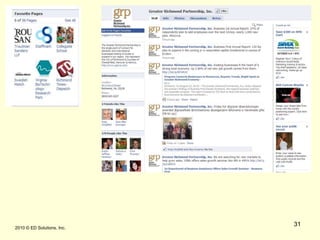
 2010 © ED Solutions, Inc.31
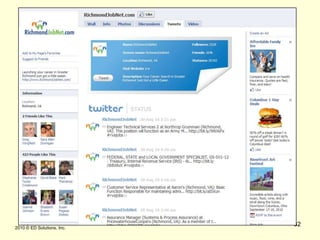
 2010 © ED Solutions, Inc.32
Using FacebookAnalytics and AdvertisingInsights – Detailed real-time demographicsAdvertising – VERY targeted pay-per-click schedulesLink other Fan Pages - Favorites33
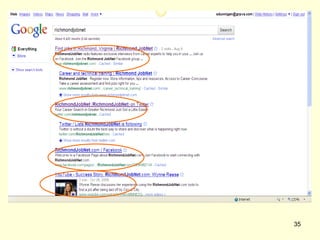
Facebook – The Good NewsBusiness and Community Use is Growing ExponentiallyYou can separate your personal from your professional personaIt matters in SEO 34
35
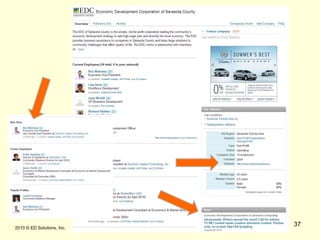
Using LinkedInFavorite SoMe tool of choice by SSC’s/BusinessesIncreasing number of toolsets for b2b and b2cIt matters in SEO 36
 2010 © ED Solutions, Inc.37
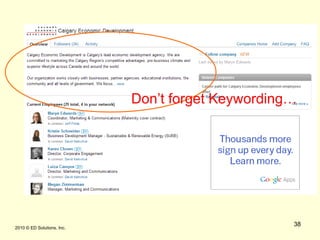
 2010 © ED Solutions, Inc.38Don’t forget Keywording…
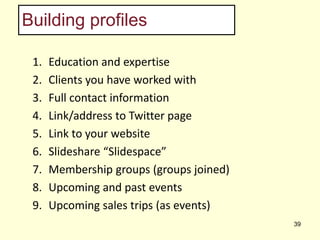
Building profilesEducation and expertiseClients you have worked withFull contact information Link/address to Twitter pageLink to your websiteSlideshare “Slidespace” Membership groups (groups joined)Upcoming and past eventsUpcoming sales trips (as events)39
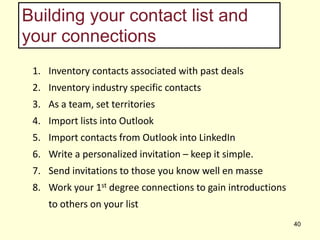
Building your contact list and your connectionsInventory contacts associated with past dealsInventory industry specific contactsAs a team, set territoriesImport lists into OutlookImport contacts from Outlook into LinkedInWrite a personalized invitation – keep it simple. Send invitations to those you know well en masseWork your 1st degree connections to gain introductions to others on your list40
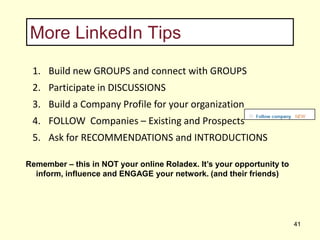
More LinkedIn TipsBuild new GROUPS and connect with GROUPSParticipate in DISCUSSIONS Build a Company Profile for your organizationFOLLOW  Companies – Existing and ProspectsAsk for RECOMMENDATIONS and INTRODUCTIONSRemember – this in NOT your online Roladex. It’s your opportunity to inform, influence and ENGAGE your network. (and their friends)41
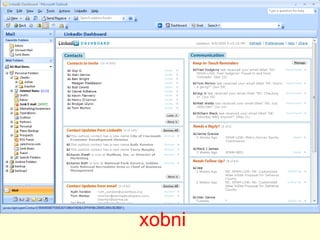
xobni
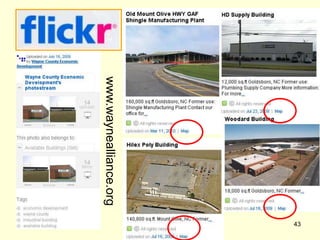
43 2010 © ED Solutions, Inc.www.waynealliance.org
 2010 © ED Solutions, Inc.44“Maps, maps, my project for a map!”Mark M. SweeneySenior PrincipalMcCallum Sweeney Consulting
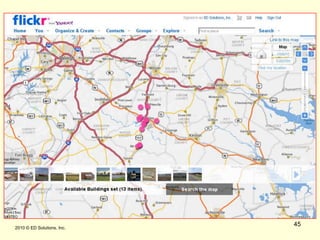
 2010 © ED Solutions, Inc.45
 2010 © ED Solutions, Inc.46
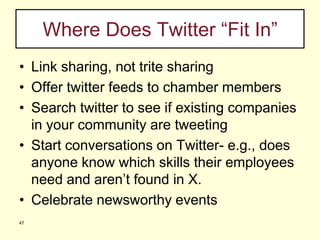
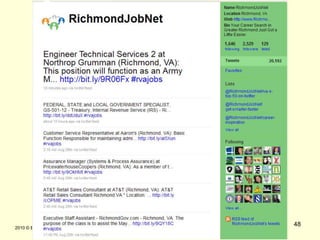
47Where Does Twitter “Fit In”Link sharing, not trite sharingOffer twitter feeds to chamber membersSearch twitter to see if existing companies in your community are tweetingStart conversations on Twitter- e.g., does anyone know which skills their employees need and aren’t found in X.Celebrate newsworthy events
 2010 © ED Solutions, Inc.48
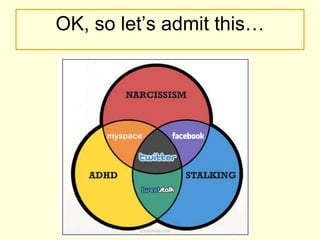
OK, so let’s admit this…
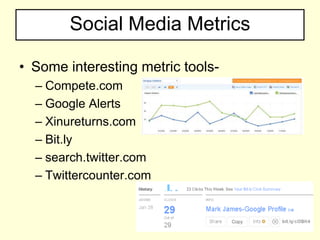
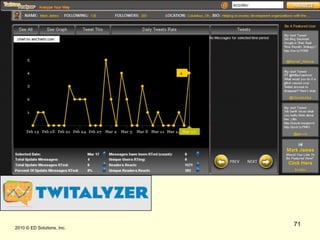
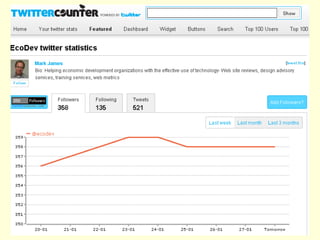
50A Word About FollowersIts not how many, its whoLook for people to follow who have more followers than they are followingBeware of ‘someone’ with very little followers and lots of people they are following.  This = spamCheck this out-http://twittercounter.com
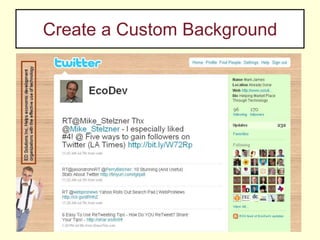
Create a Custom Background51 2009 © ED Solutions, Inc.51
52How… http://www.ehow.com/how_4613303_twitter-background.htmlStep 1Create a Twitter account. If you haven’t gotten around to signing up for Twitter yet, what are you waiting for? Go to twitter.com and sign up for an account. If you need a little more help, read How to Set Up a New Twitter Account in the resources below.Step 2Decide what type of image you want to portray. Part of the difficulty in setting the correct background is deciding what you want your Twitter page  design to say about you. Many folks take any image or graphic and upload it to their Twitter account without much thought. Take some time to come up with something that speaks of your style, taste and personality.Step 3Consider the screen real estate. The important information to be viewed on Twitter occurs in the center of the page. No matter how many images or sayings you have on your background, the center of the screen belongs to Twitter. Therefore you have to create a background that gives Twitter center stage.Step 4Go large. Larger images and/or graphics reduce the necessity for tiling an image. It gives the appearance of one large background specifically made for Twitter. Try starting with an image as large as 1600 x 1200.
53How…Step 5Remember that all screen resolutions are not the same. The smaller the screen resolution, the lower the likelihood of your image will have to repeat. In other words, if you elect to use an image that has a flower located to the extreme left of the screen, on a lower resolution screen (800 x 600 for instance), the flower displays once. A screen with a resolution of say 2048 x 1536, the flower will display tiled on the screen several times.Step 6Think about using a border. When creating an image, remember that a small portion of the top of the screen is dedicated to the Twitter logo and user navigation. It’s a little easier on the eyes if the design included a boarder over which the Twitter logo and navigation could sit without having to fight against a busy background.Step 7Upload your image to Twitter. Once you’ve played around with the image, upload it to Twitter to see how it looks. Log onto your account. Click “Design” found under the “Settings” tab. Once on the design screen click “change background image.” Once you upload your image, check it out to see if you like it. If you don’t you can change it or use one of the Twitter default images until you come up with something you like.
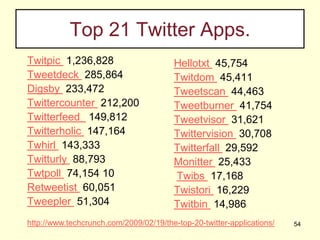
Top 21 Twitter Apps.Twitpic  1,236,828Tweetdeck  285,864Digsby  233,472 Twittercounter  212,200Twitterfeed   149,812 Twitterholic  147,164 Twhirl  143,333 Twitturly  88,793Twtpoll  74,154 10Retweetist  60,051Tweepler  51,304Hellotxt  45,754  Twitdom  45,411 Tweetscan  44,463Tweetburner  41,754Tweetvisor  31,621Twittervision  30,708Twitterfall  29,592  Monitter  25,433 Twibs  17,168 Twistori  16,229  Twitbin  14,986 http://www.techcrunch.com/2009/02/19/the-top-20-twitter-applications/54
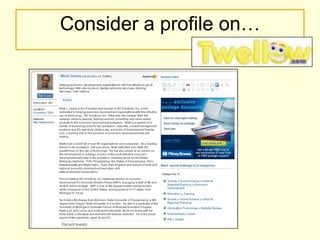
Consider a profile on…
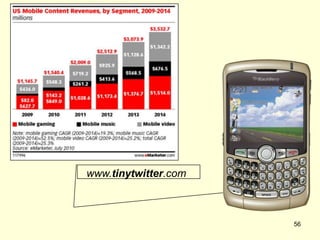
  www.tinytwitter.com56
57Why is 120 the New 140?Retweets!RT@ecodev....
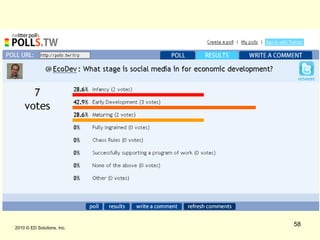
 2010 © ED Solutions, Inc.58
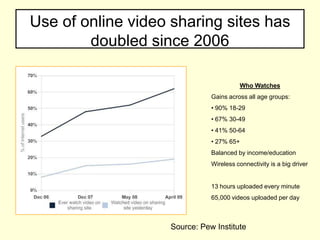
Use of online video sharing sites has doubled since 2006Who WatchesGains across all age groups: 90% 18-29
 67% 30-49
 41% 50-64
 27% 65+Balanced by income/educationWireless connectivity is a big driver13 hours uploaded every minute65,000 videos uploaded per daySource: Pew Institute
Using YouTube60
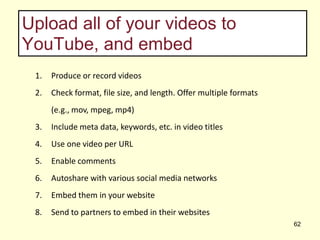
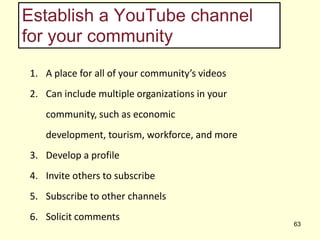
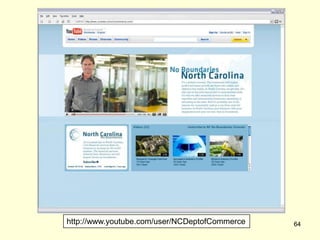
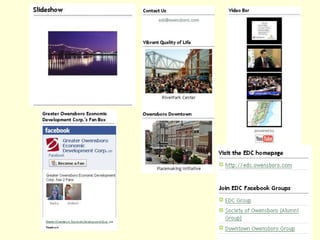
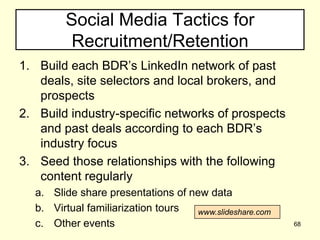
Develop a video strategyInventory the assets you have Categorize them by audienceIdentify your communications needs, and plot how video could help you tell your story:Virtual familiarization tours
Industry specific presentations
Expansion or relocation announcements

Ed solutions social media-08-10-final

  • 1.
    1Social Media forthe Practical Economic Development ProfessionalSara Dunnigan, CEcDGreater Richmond Partnership, Inc.sdunnigan@grpva.comhttp://linkedin.com/in/sarajdunniganhttp://twitter.com/saradunniganMark J James, CEcDED Solutions, Inc. mark.james@solutionsED.comhttp://www.linkedin.com/in/edsolutionshttp://twitter.com/EcoDev
  • 2.
    2010 ©ED Solutions, Inc.2
  • 3.
  • 4.
    1. Viewer Window2.Control Panel 2010 © ED Solutions, Inc.4Kevin Stuartkstuart@blanecanada.com
  • 5.
    5About ED Solutions,Inc.ED Solutions, Inc. mission is to help economic development organizations with the effective use of technology. We provide-Web site review and analysis
  • 6.
    Web redesign strategiesand advisory services
  • 7.
  • 8.
    A variety ofother technology solutions for the profession
  • 9.
    Training services tothe economic development profession.
  • 10.
    Web Metrics anddata subscriptions through affiliated firm- www.developmentresults.com. ED Solutions, Inc. is among the most respected firms providing web site strategies to the economic development profession. ED Solutions, Inc. has worked on over 200 web projects in 30 US states, Canada and the UK. 2010 © ED Solutions, Inc.
  • 11.
    6About Sara DunniganSarais an economist who has developed a deep appreciation for economic development and strategic place marketing. Experience in economic research, business retention and expansion programs, business attraction initiatives, workforce development, and entrepreneurial support activities in both public and private sector organizations. Particularly interested in advancing the use of open networks and social media in economic development, workforce development and community capacity building activities to support economic growth. E-Mail - sarajdunnigan@yahoo.comLinkedIn - www.linkedin.com/in/sarajdunniganTwitter - www.twitter.com/saradunnigan 2010 © ED Solutions, Inc.
  • 12.
    2010 ©ED Solutions, Inc.7
  • 13.
    2010 ©ED Solutions, Inc.818%
  • 14.
    95 Ways SocialMedia has changed economic developmentEven less control about what’s being said about our place. The “democratization of information”Exponentially enhanced our marketing reach.Able to create communities within and between our communitiesWe can now crowd source ideas/initiativesSocial CRM and Social SEO Audiences 2010 © ED Solutions, Inc.
  • 15.
    Atlas Primary Research,October 2009Estate Inc., New MexicoMike Barnes Group, Inc., TexasColliers Location Agency & Incentives Practice, IndianaMcCallum Sweeney Consulting, South CarolinaKoll Development Company, TexasCB Richard Ellis, WashingtonStudley Inc., PennsylvaniaGreenfield Development Company, North CarolinaCB Richard Ellis, ArizonaThe RSH Group, CaliforniaMoran, Stahl & Boyer LLC, Florida
  • 16.
  • 17.
  • 18.
  • 19.
    Little & AssociatesArchitects, North Carolina
  • 20.
    Palm Inc –Sunnyvale, California
  • 21.
    Visa – SanFrancisco, California
  • 22.
    Foote Consulting Group– Glendale, ArizonaSource: Atlas Advertising
  • 23.
    What social networksor tools, if any, do you use?71 % use LinkedIn, and just over 50% use facebook. Source: Atlas Advertising
  • 24.
    How frequently doyou use each?72 % use some form of Social Media at least weekly. Source: Atlas Advertising
  • 25.
    What is theapplicability of Twitter to your profession?63.6% say Twitter has no/very little applicability to the site selection profession. Source: Atlas Advertising
  • 26.
    What is theapplicability of LinkedIn to your profession?52.6% say LinkedIn has good application to the site selection profession. Source: Atlas Advertising
  • 27.
    What is theapplicability of LinkedIn to your profession?“I have used it along with Hoovers to check who is LinkedIn and contact people for business meetings.” “I think it has good application. I have gotten proposals through this tool.”“Pretty low rated.”“It’s okay.”“I already have the contacts I need in my email – how is this different?”“Not much”“Good for seeking independent information.” “Good for finding contacts, and to keep in touch with peers.”“More of a business site”Useful networking toolDon’t know yet.Source: Atlas Advertising
  • 28.
    2010 ©ED Solutions, Inc.16What does all this say to the practical economic development professional?Just say no
  • 29.
    2010 ©ED Solutions, Inc.17What does all this say to the practical economic development professional?
  • 30.
    2010 ©ED Solutions, Inc.18What does all this say to the practical economic development professional?Depending on organization, a reasonable inclusion of SOME social media applications
  • 31.
    The Practical ED’rStarts with a Social Media Strategy19Consider-ObjectivesIdentify your audience-key leaders, stakeholders, etc.What calls to action will you use?Identify some benchmarksKeyword/SEO analysisHow Will You Measure Success?VisitsFollowersReturn on conversation?(Last) Best Tools for You
  • 32.
    Some Typical EDGoalsBrand awarenessProgram/practitionercredibilityDrive traffic to webCreate communityConnect resourcesLead development
  • 33.
    2010 ©ED Solutions, Inc.21What’s Yours?
  • 34.
    2010 ©ED Solutions, Inc.22Social Media Integration
  • 35.
    Websites have acrucial new roleOld view: DestinationNew view:Content EngineSource: Mark W. Schaefer Slideshare- http://www.slideshare.net/Rialta/social-media-best-practices-for-economic-development
  • 36.
    24Our web sitesneed to be aboutCOMMUNICATION,not marketing 2010 © ED Solutions, Inc.
  • 37.
    2010 ©ED Solutions, Inc.25Indypartnership.comaddthis.comorsharethis.com
  • 38.
    26SEO & SMOSocialmedia optimization (SMO) is a set of methods for generating publicity through social media, online communities and community websites. Methods of SMO include adding RSS feeds, social news buttons, blogging, and incorporating third-party community functionalities like images and videos. Social media optimization is related to search engine marketing, but differs in several ways, primarily the focus on driving traffic from sources other than search engines, though improved search ranking is also a benefit of successful SMO.
  • 39.
  • 40.
    Using Facebook –WHY?500 million active users50% of active users log on EVERYDAY>5 Billion Pieces of Content>1.5 Local Business Have PagesIt’s International – 70% of FB users are OUTSIDE the USINFORM-INFLUENCE-ENGAGE28
  • 41.
    2010 ©ED Solutions, Inc.29
  • 42.
    Using Facebook –Start SmartWho’s Your Target Audience? Prospects Existing Business InvestorsFind Your Voice Business Community StakeholderPost Current Relevant Content Use Applications to Pull Your SM together Push traffic to your website Engage your community Create “Super Fans” 30
  • 43.
    2010 ©ED Solutions, Inc.31
  • 44.
    2010 ©ED Solutions, Inc.32
  • 45.
    Using FacebookAnalytics andAdvertisingInsights – Detailed real-time demographicsAdvertising – VERY targeted pay-per-click schedulesLink other Fan Pages - Favorites33
  • 46.
    Facebook – TheGood NewsBusiness and Community Use is Growing ExponentiallyYou can separate your personal from your professional personaIt matters in SEO 34
  • 47.
  • 48.
    Using LinkedInFavorite SoMetool of choice by SSC’s/BusinessesIncreasing number of toolsets for b2b and b2cIt matters in SEO 36
  • 49.
    2010 ©ED Solutions, Inc.37
  • 50.
    2010 ©ED Solutions, Inc.38Don’t forget Keywording…
  • 51.
    Building profilesEducation andexpertiseClients you have worked withFull contact information Link/address to Twitter pageLink to your websiteSlideshare “Slidespace” Membership groups (groups joined)Upcoming and past eventsUpcoming sales trips (as events)39
  • 52.
    Building your contactlist and your connectionsInventory contacts associated with past dealsInventory industry specific contactsAs a team, set territoriesImport lists into OutlookImport contacts from Outlook into LinkedInWrite a personalized invitation – keep it simple. Send invitations to those you know well en masseWork your 1st degree connections to gain introductions to others on your list40
  • 53.
    More LinkedIn TipsBuildnew GROUPS and connect with GROUPSParticipate in DISCUSSIONS Build a Company Profile for your organizationFOLLOW Companies – Existing and ProspectsAsk for RECOMMENDATIONS and INTRODUCTIONSRemember – this in NOT your online Roladex. It’s your opportunity to inform, influence and ENGAGE your network. (and their friends)41
  • 54.
  • 55.
    43 2010 ©ED Solutions, Inc.www.waynealliance.org
  • 56.
    2010 ©ED Solutions, Inc.44“Maps, maps, my project for a map!”Mark M. SweeneySenior PrincipalMcCallum Sweeney Consulting
  • 57.
    2010 ©ED Solutions, Inc.45
  • 58.
    2010 ©ED Solutions, Inc.46
  • 59.
    47Where Does Twitter“Fit In”Link sharing, not trite sharingOffer twitter feeds to chamber membersSearch twitter to see if existing companies in your community are tweetingStart conversations on Twitter- e.g., does anyone know which skills their employees need and aren’t found in X.Celebrate newsworthy events
  • 60.
    2010 ©ED Solutions, Inc.48
  • 61.
    OK, so let’sadmit this…
  • 62.
    50A Word AboutFollowersIts not how many, its whoLook for people to follow who have more followers than they are followingBeware of ‘someone’ with very little followers and lots of people they are following. This = spamCheck this out-http://twittercounter.com
  • 63.
    Create a CustomBackground51 2009 © ED Solutions, Inc.51
  • 64.
    52How… http://www.ehow.com/how_4613303_twitter-background.htmlStep 1Createa Twitter account. If you haven’t gotten around to signing up for Twitter yet, what are you waiting for? Go to twitter.com and sign up for an account. If you need a little more help, read How to Set Up a New Twitter Account in the resources below.Step 2Decide what type of image you want to portray. Part of the difficulty in setting the correct background is deciding what you want your Twitter page design to say about you. Many folks take any image or graphic and upload it to their Twitter account without much thought. Take some time to come up with something that speaks of your style, taste and personality.Step 3Consider the screen real estate. The important information to be viewed on Twitter occurs in the center of the page. No matter how many images or sayings you have on your background, the center of the screen belongs to Twitter. Therefore you have to create a background that gives Twitter center stage.Step 4Go large. Larger images and/or graphics reduce the necessity for tiling an image. It gives the appearance of one large background specifically made for Twitter. Try starting with an image as large as 1600 x 1200.
  • 65.
    53How…Step 5Remember thatall screen resolutions are not the same. The smaller the screen resolution, the lower the likelihood of your image will have to repeat. In other words, if you elect to use an image that has a flower located to the extreme left of the screen, on a lower resolution screen (800 x 600 for instance), the flower displays once. A screen with a resolution of say 2048 x 1536, the flower will display tiled on the screen several times.Step 6Think about using a border. When creating an image, remember that a small portion of the top of the screen is dedicated to the Twitter logo and user navigation. It’s a little easier on the eyes if the design included a boarder over which the Twitter logo and navigation could sit without having to fight against a busy background.Step 7Upload your image to Twitter. Once you’ve played around with the image, upload it to Twitter to see how it looks. Log onto your account. Click “Design” found under the “Settings” tab. Once on the design screen click “change background image.” Once you upload your image, check it out to see if you like it. If you don’t you can change it or use one of the Twitter default images until you come up with something you like.
  • 66.
    Top 21 TwitterApps.Twitpic 1,236,828Tweetdeck 285,864Digsby 233,472 Twittercounter 212,200Twitterfeed 149,812 Twitterholic 147,164 Twhirl 143,333 Twitturly 88,793Twtpoll 74,154 10Retweetist 60,051Tweepler 51,304Hellotxt 45,754 Twitdom 45,411 Tweetscan 44,463Tweetburner 41,754Tweetvisor 31,621Twittervision 30,708Twitterfall 29,592 Monitter 25,433 Twibs 17,168 Twistori 16,229 Twitbin 14,986 http://www.techcrunch.com/2009/02/19/the-top-20-twitter-applications/54
  • 67.
  • 68.
  • 69.
    57Why is 120the New 140?Retweets!RT@ecodev....
  • 70.
    2010 ©ED Solutions, Inc.58
  • 71.
    Use of onlinevideo sharing sites has doubled since 2006Who WatchesGains across all age groups: 90% 18-29
  • 72.
  • 73.
  • 74.
    27% 65+Balancedby income/educationWireless connectivity is a big driver13 hours uploaded every minute65,000 videos uploaded per daySource: Pew Institute
  • 75.
  • 76.
    Develop a videostrategyInventory the assets you have Categorize them by audienceIdentify your communications needs, and plot how video could help you tell your story:Virtual familiarization tours
  • 77.
  • 78.

Editor's Notes

  • #24 Website is no longer just a means to an end. Content traffic hub