EBSCOhost Basics
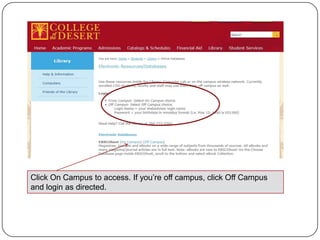
Click On Campus to access. If you’re off campus, click Off Campus
and login as directed.
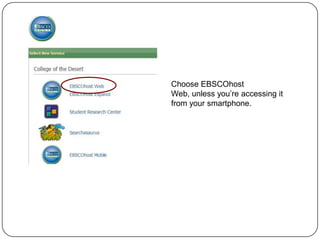
Choose EBSCOhost
Web, unless you’re accessing it
from your smartphone.
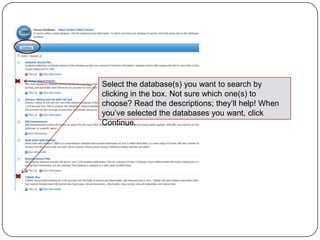
Select the database(s) you want to search by
clicking in the box. Not sure which one(s) to
choose? Read the descriptions; they’ll help! When
you’ve selected the databases you want, click
Continue.
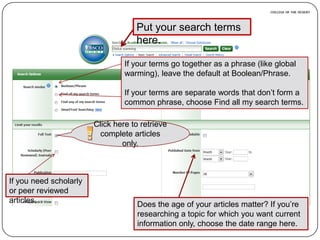
Put your search terms
                                    here.

                                 If your terms go together as a phrase (like global
                                 warming), leave the default at Boolean/Phrase.

                                 If your terms are separate words that don’t form a
                                 common phrase, choose Find all my search terms.

                        Click here to retrieve
                          complete articles
                                only.


If you need scholarly
or peer reviewed
articles.
                                     Does the age of your articles matter? If you’re
                                     researching a topic for which you want current
                                     information only, choose the date range here.
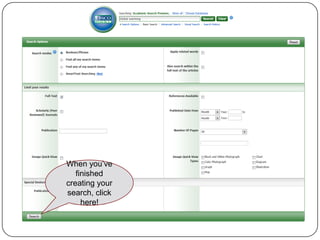
When you’ve
   finished
creating your
search, click
     here!
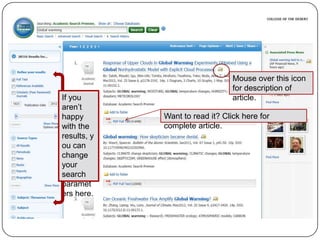
Mouse over this icon
                                 for description of
If you                           article.
aren’t
happy        Want to read it? Click here for
with the     complete article.
results, y
ou can
change
your
search
paramet
ers here.
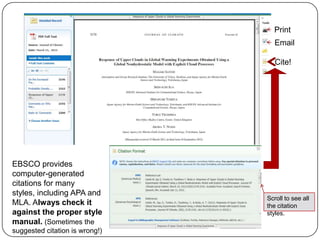
Print
                                   Email

                                   Cite!


EBSCO provides
computer-generated
citations for many
styles, including APA and
                                Scroll to see all
MLA. Always check it            the citation
against the proper style        styles.
manual. (Sometimes the
suggested citation is wrong!)

EBSCO Basics

  • 1.
  • 2.
    Click On Campusto access. If you’re off campus, click Off Campus and login as directed.
  • 3.
    Choose EBSCOhost Web, unlessyou’re accessing it from your smartphone.
  • 4.
    Select the database(s)you want to search by clicking in the box. Not sure which one(s) to choose? Read the descriptions; they’ll help! When you’ve selected the databases you want, click Continue.
  • 5.
    Put your searchterms here. If your terms go together as a phrase (like global warming), leave the default at Boolean/Phrase. If your terms are separate words that don’t form a common phrase, choose Find all my search terms. Click here to retrieve complete articles only. If you need scholarly or peer reviewed articles. Does the age of your articles matter? If you’re researching a topic for which you want current information only, choose the date range here.
  • 6.
    When you’ve finished creating your search, click here!
  • 7.
    Mouse over thisicon for description of If you article. aren’t happy Want to read it? Click here for with the complete article. results, y ou can change your search paramet ers here.
  • 8.
    Print Email Cite! EBSCO provides computer-generated citations for many styles, including APA and Scroll to see all MLA. Always check it the citation against the proper style styles. manual. (Sometimes the suggested citation is wrong!)