SoftWorks Initiative
www.softworksbd.com

EasyPrescription

SLIDE 1
SoftWorks

Background
Backgro nd
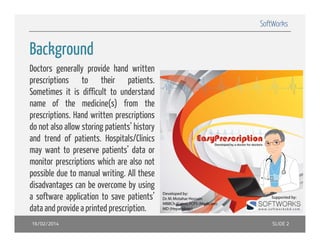
Doctors generally provide hand written
prescriptions t
i ti
to th i
their patients.
ti t
Sometimes it is difficult to understand
name of the medicine(s) from the
()
prescriptions. Hand written prescriptions
do not also allow storing patients’ history
and trend of patients Hospitals/Clinics
patients.
may want to preserve patients’ data or
monitor prescriptions which are also not
possible d t manuall writing. All th
ibl due to
iti
these
disadvantages can be overcome by using
pp
p
a software application to save patients’
data and provide a printed prescription.
16/02/2014

SLIDE 2
SoftWorks

Present State of Man al S stem
Manual System
• Patient Registration: Usually no register is maintained; rarely there may be a
manual register
• Clinical data of Patient: Kept in a hand written prescription which is handed over
to the patient. No record is usually kept with the prescribing doctor. Often,
patients loose the prescription and all data are lost with it.
• Doctors are unable to analyse Patient/Diseases Trend or have a chronological
picture of a particular patient’s condition.

16/02/2014

SLIDE 3
SoftWorks

Objective
Objecti e of the s stem
system
• Improve the efficiency of the existing p
p
y
g prescription software
p
• Improving sales to reach to more private practitioners
• C
Convert to other latest technologies (Web/Cloud/iOS/Android)
h l
h l i (W b/Cl d/iOS/A d id)
• Strengthening prescription management system by using IT enabled system
• Hardware management is a major barrier to running the automated system

16/02/2014

SLIDE 4
SoftWorks

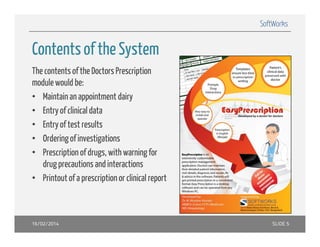
Contents of the S stem
System
The contents of the Doctors Prescription
module would be:
• Maintain an appointment dairy
• E t of clinicall d t
Entry f li i data
• Entry of test results
• Ordering of investigations
• Prescription of drugs, with warning for
drug precautions and interactions
• Printout of a prescription or clinical report

16/02/2014

SLIDE 5
SoftWorks

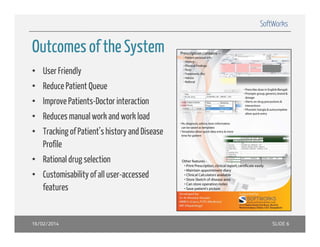
Outcomes of the System
• User Friendly
• Reduce Patient Queue
• Improve Patients-Doctor interaction
• Reduces manual work and work load
• Tracking of Patient’s history and Disease
Profile
• Rational drug selection
• Customisability of all user-accessed
features

16/02/2014

SLIDE 6
SoftWorks

Compatible Technologies
The primary target of the system is to access into the web database from any input
devices. The options would be:
• Desktop computer
• Laptop
• Handheld devices – iPad/Android

16/02/2014

SLIDE 7

EasyPrescription

  • 1.
  • 2.
    SoftWorks Background Backgro nd Doctors generallyprovide hand written prescriptions t i ti to th i their patients. ti t Sometimes it is difficult to understand name of the medicine(s) from the () prescriptions. Hand written prescriptions do not also allow storing patients’ history and trend of patients Hospitals/Clinics patients. may want to preserve patients’ data or monitor prescriptions which are also not possible d t manuall writing. All th ibl due to iti these disadvantages can be overcome by using pp p a software application to save patients’ data and provide a printed prescription. 16/02/2014 SLIDE 2
  • 3.
    SoftWorks Present State ofMan al S stem Manual System • Patient Registration: Usually no register is maintained; rarely there may be a manual register • Clinical data of Patient: Kept in a hand written prescription which is handed over to the patient. No record is usually kept with the prescribing doctor. Often, patients loose the prescription and all data are lost with it. • Doctors are unable to analyse Patient/Diseases Trend or have a chronological picture of a particular patient’s condition. 16/02/2014 SLIDE 3
  • 4.
    SoftWorks Objective Objecti e ofthe s stem system • Improve the efficiency of the existing p p y g prescription software p • Improving sales to reach to more private practitioners • C Convert to other latest technologies (Web/Cloud/iOS/Android) h l h l i (W b/Cl d/iOS/A d id) • Strengthening prescription management system by using IT enabled system • Hardware management is a major barrier to running the automated system 16/02/2014 SLIDE 4
  • 5.
    SoftWorks Contents of theS stem System The contents of the Doctors Prescription module would be: • Maintain an appointment dairy • E t of clinicall d t Entry f li i data • Entry of test results • Ordering of investigations • Prescription of drugs, with warning for drug precautions and interactions • Printout of a prescription or clinical report 16/02/2014 SLIDE 5
  • 6.
    SoftWorks Outcomes of theSystem • User Friendly • Reduce Patient Queue • Improve Patients-Doctor interaction • Reduces manual work and work load • Tracking of Patient’s history and Disease Profile • Rational drug selection • Customisability of all user-accessed features 16/02/2014 SLIDE 6
  • 7.
    SoftWorks Compatible Technologies The primarytarget of the system is to access into the web database from any input devices. The options would be: • Desktop computer • Laptop • Handheld devices – iPad/Android 16/02/2014 SLIDE 7