Easy Java Integration
Testing with
Testcontainers
Simplifying Integration Tests for Enterprise Java
Fabio Turizo
Speaking Today
Fabio Turizo
Service Manager
@fabturizo
• Strategic Members of the Eclipse Foundation
• Project Management Committee member of Jakarta EE
Payara Services Helps Shape the
Future of the Industry
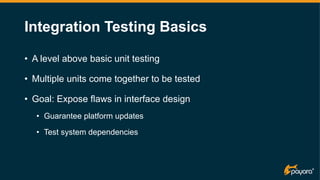
Integration Testing Basics
• A level above basic unit testing
• Multiple units come together to be tested
• Goal: Expose flaws in interface design
• Guarantee platform updates
• Test system dependencies
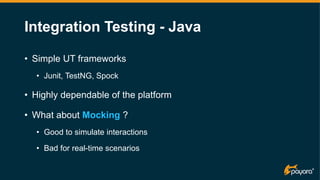
Integration Testing - Java
• Simple UT frameworks
• Junit, TestNG, Spock
• Highly dependable of the platform
• What about Mocking ?
• Good to simulate interactions
• Bad for real-time scenarios
Integration Testing - Java
• “Works in my machine” persists
• Lots of challenges for Enterprise Java
• Jakarta EE / MicroProfile lack proper tools
• Middleware size footprint has reduced a lot!
• … But complex environments have lots of dependencies 
• What about cloud-native applications?
Arquillian Framework
• Focus on testing Jakarta EE components
• Vendor-agnostic !
• Portable(*) Shrink-wrapped tests
• Container-specific adapters need to be written
• Added complexity in writing tests
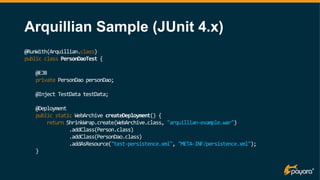
Arquillian Sample (JUnit 4.x)
@RunWith(Arquillian.class)
public class PersonDaoTest {
@EJB
private PersonDao personDao;
@Inject TestData testData;
@Deployment
public static WebArchive createDeployment() {
return ShrinkWrap.create(WebArchive.class, "arquillian-example.war")
.addClass(Person.class)
.addClass(PersonDao.class)
.addAsResource("test-persistence.xml", "META-INF/persistence.xml");
}
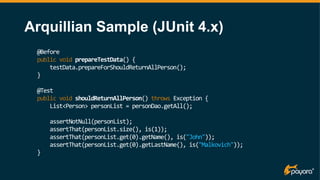
Arquillian Sample (JUnit 4.x)
@Before
public void prepareTestData() {
testData.prepareForShouldReturnAllPerson();
}
@Test
public void shouldReturnAllPerson() throws Exception {
List<Person> personList = personDao.getAll();
assertNotNull(personList);
assertThat(personList.size(), is(1));
assertThat(personList.get(0).getName(), is("John"));
assertThat(personList.get(0).getLastName(), is("Malkovich"));
}
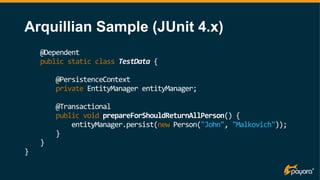
Arquillian Sample (JUnit 4.x)
@Dependent
public static class TestData {
@PersistenceContext
private EntityManager entityManager;
@Transactional
public void prepareForShouldReturnAllPerson() {
entityManager.persist(new Person("John", "Malkovich"));
}
}
}
Some Gaps to be Filled 
• Test issues:
• Assemble a *part of the application* to test it
• This includes code and resources
• The persistence layer is tested, but not the store
• No way to test different configurations
• Sadly, not a real-world test
Enter Testcontainers!
• Lightweight unit testing
• Based on Docker containers
• Ease up networking setup
• Data access layer tests support
• Fully* portable integration tests!
Testcontainers Benefits
• Effective black-box testing
• Tests are user-focused
• Run UA testing with little overhead
• Possible to audit security standards
• Identify flaws in specific technologies
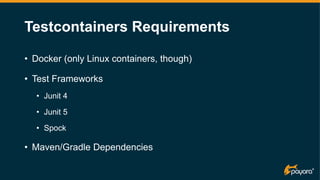
Testcontainers Requirements
• Docker (only Linux containers, though)
• Test Frameworks
• Junit 4
• Junit 5
• Spock
• Maven/Gradle Dependencies
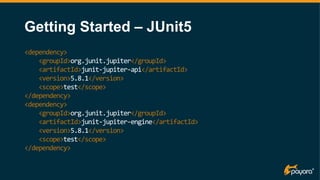
Getting Started – JUnit5
<dependency>
<groupId>org.junit.jupiter</groupId>
<artifactId>junit-jupiter-api</artifactId>
<version>5.8.1</version>
<scope>test</scope>
</dependency>
<dependency>
<groupId>org.junit.jupiter</groupId>
<artifactId>junit-jupiter-engine</artifactId>
<version>5.8.1</version>
<scope>test</scope>
</dependency>
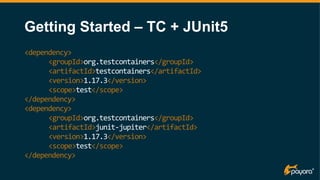
Getting Started – TC + JUnit5
<dependency>
<groupId>org.testcontainers</groupId>
<artifactId>testcontainers</artifactId>
<version>1.17.3</version>
<scope>test</scope>
</dependency>
<dependency>
<groupId>org.testcontainers</groupId>
<artifactId>junit-jupiter</artifactId>
<version>1.17.3</version>
<scope>test</scope>
</dependency>
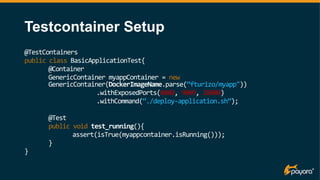
Testcontainer Setup
@TestContainers
public class BasicApplicationTest{
@Container
GenericContainer myappContainer = new
GenericContainer(DockerImageName.parse(“fturizo/myapp"))
.withExposedPorts(8080, 9009, 28080)
.withCommand(“./deploy-application.sh”);
@Test
public void test_running(){
assert(isTrue(myappcontainer.isRunning()));
}
}
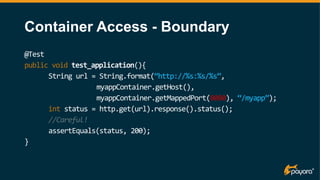
Container Access - Boundary
@Test
public void test_application(){
String url = String.format(“http://%s:%s/%s”,
myappContainer.getHost(),
myappContainer.getMappedPort(8080), “/myapp”);
int status = http.get(url).response().status();
//Careful!
assertEquals(status, 200);
}
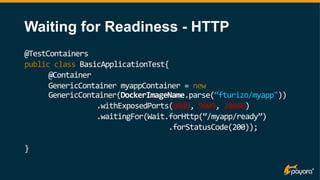
Waiting for Readiness - HTTP
@TestContainers
public class BasicApplicationTest{
@Container
GenericContainer myappContainer = new
GenericContainer(DockerImageName.parse(“fturizo/myapp"))
.withExposedPorts(8080, 9009, 28080)
.waitingFor(Wait.forHttp(“/myapp/ready”)
.forStatusCode(200));
}
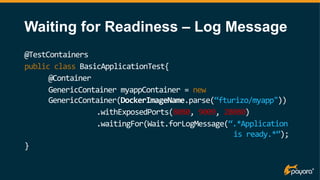
Waiting for Readiness – Log Message
@TestContainers
public class BasicApplicationTest{
@Container
GenericContainer myappContainer = new
GenericContainer(DockerImageName.parse(“fturizo/myapp"))
.withExposedPorts(8080, 9009, 28080)
.waitingFor(Wait.forLogMessage(“.*Application
is ready.*”);
}
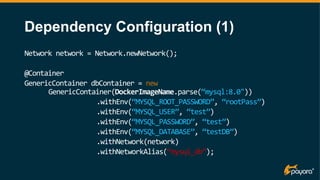
Dependency Configuration (1)
Network network = Network.newNetwork();
@Container
GenericContainer dbContainer = new
GenericContainer(DockerImageName.parse(“mysql:8.0"))
.withEnv(“MYSQL_ROOT_PASSWORD”, “rootPass”)
.withEnv(“MYSQL_USER”, “test”)
.withEnv(“MYSQL_PASSWORD”, “test”)
.withEnv(“MYSQL_DATABASE”, “testDB”)
.withNetwork(network)
.withNetworkAlias(“mysql_db”);
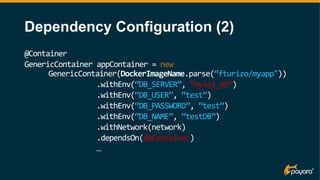
Dependency Configuration (2)
@Container
GenericContainer appContainer = new
GenericContainer(DockerImageName.parse(“fturizo/myapp"))
.withEnv(“DB_SERVER”, “mysql_db”)
.withEnv(“DB_USER”, “test”)
.withEnv(“DB_PASSWORD”, “test”)
.withEnv(“DB_NAME”, “testDB”)
.withNetwork(network)
.dependsOn(dbContainer)
…
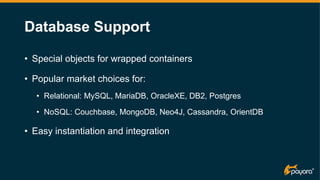
Database Support
• Special objects for wrapped containers
• Popular market choices for:
• Relational: MySQL, MariaDB, OracleXE, DB2, Postgres
• NoSQL: Couchbase, MongoDB, Neo4J, Cassandra, OrientDB
• Easy instantiation and integration
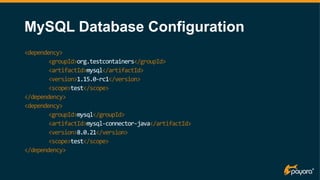
MySQL Database Configuration
<dependency>
<groupId>org.testcontainers</groupId>
<artifactId>mysql</artifactId>
<version>1.15.0-rc1</version>
<scope>test</scope>
</dependency>
<dependency>
<groupId>mysql</groupId>
<artifactId>mysql-connector-java</artifactId>
<version>8.0.21</version>
<scope>test</scope>
</dependency>
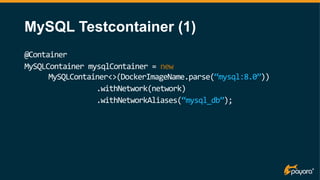
MySQL Testcontainer (1)
@Container
MySQLContainer mysqlContainer = new
MySQLContainer<>(DockerImageName.parse(“mysql:8.0”))
.withNetwork(network)
.withNetworkAliases(“mysql_db”);
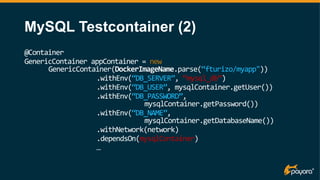
MySQL Testcontainer (2)
@Container
GenericContainer appContainer = new
GenericContainer(DockerImageName.parse(“fturizo/myapp"))
.withEnv(“DB_SERVER”, “mysql_db”)
.withEnv(“DB_USER”, mysqlContainer.getUser())
.withEnv(“DB_PASSWORD”,
mysqlContainer.getPassword())
.withEnv(“DB_NAME”,
mysqlContainer.getDatabaseName())
.withNetwork(network)
.dependsOn(mysqlContainer)
…
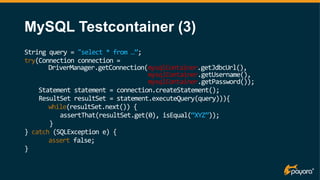
MySQL Testcontainer (3)
String query = "select * from …”;
try(Connection connection =
DriverManager.getConnection(mysqlContainer.getJdbcUrl(),
mysqlContainer.getUsername(),
mysqlContainer.getPassword());
Statement statement = connection.createStatement();
ResultSet resultSet = statement.executeQuery(query))){
while(resultSet.next()) {
assertThat(resultSet.get(0), isEqual(“XYZ”));
}
} catch (SQLException e) {
assert false;
}
More Features!
• Docker Compose is supported, too:
DockerComposeContainer environment =
new DockerComposeContainer(new
File(“src/test/compose.yaml”))
.withExposedService(“mysql_1”, 3306)
.withExposedService(“myapp_1”, 8080);
More Features !
• Container support for popular solutions:
• ElasticSearch (Distributed Search)
• Apache Kafka (Distributed Messaging)
• RabbitMQ (JMS)
• Solr (Text Search)
• Nginx (Loadbalancing)
Testcontainers Caveats
• Docker adds an extra layer of processing
• More resources needed for full coverage
• Test time will increase overall!
• Middleware must be prepared for Docker*
• And so are its dependencies!
• Black-box testing is not suited for all software
Testcontainers Cloud
• Outsource your integration tests!
• https://www.testcontainers.cloud/
Demo Time
https://github.com/fturizo/ConferenceDemo
In Summary
• Testcontainers:
• Ease up writing tests
• Simplify dependency management
• Allow real-world testing
• Make true portability a priority
• Gives Enterprise Java a vendor-agnostic testing framework
Please visit us at:
payara.fish/join-us

Easy Java Integration Testing with Testcontainers​

  • 1.
    Easy Java Integration Testingwith Testcontainers Simplifying Integration Tests for Enterprise Java Fabio Turizo
  • 2.
  • 3.
    • Strategic Membersof the Eclipse Foundation • Project Management Committee member of Jakarta EE Payara Services Helps Shape the Future of the Industry
  • 4.
    Integration Testing Basics •A level above basic unit testing • Multiple units come together to be tested • Goal: Expose flaws in interface design • Guarantee platform updates • Test system dependencies
  • 5.
    Integration Testing -Java • Simple UT frameworks • Junit, TestNG, Spock • Highly dependable of the platform • What about Mocking ? • Good to simulate interactions • Bad for real-time scenarios
  • 6.
    Integration Testing -Java • “Works in my machine” persists • Lots of challenges for Enterprise Java • Jakarta EE / MicroProfile lack proper tools • Middleware size footprint has reduced a lot! • … But complex environments have lots of dependencies  • What about cloud-native applications?
  • 7.
    Arquillian Framework • Focuson testing Jakarta EE components • Vendor-agnostic ! • Portable(*) Shrink-wrapped tests • Container-specific adapters need to be written • Added complexity in writing tests
  • 8.
    Arquillian Sample (JUnit4.x) @RunWith(Arquillian.class) public class PersonDaoTest { @EJB private PersonDao personDao; @Inject TestData testData; @Deployment public static WebArchive createDeployment() { return ShrinkWrap.create(WebArchive.class, "arquillian-example.war") .addClass(Person.class) .addClass(PersonDao.class) .addAsResource("test-persistence.xml", "META-INF/persistence.xml"); }
  • 9.
    Arquillian Sample (JUnit4.x) @Before public void prepareTestData() { testData.prepareForShouldReturnAllPerson(); } @Test public void shouldReturnAllPerson() throws Exception { List<Person> personList = personDao.getAll(); assertNotNull(personList); assertThat(personList.size(), is(1)); assertThat(personList.get(0).getName(), is("John")); assertThat(personList.get(0).getLastName(), is("Malkovich")); }
  • 10.
    Arquillian Sample (JUnit4.x) @Dependent public static class TestData { @PersistenceContext private EntityManager entityManager; @Transactional public void prepareForShouldReturnAllPerson() { entityManager.persist(new Person("John", "Malkovich")); } } }
  • 11.
    Some Gaps tobe Filled  • Test issues: • Assemble a *part of the application* to test it • This includes code and resources • The persistence layer is tested, but not the store • No way to test different configurations • Sadly, not a real-world test
  • 12.
    Enter Testcontainers! • Lightweightunit testing • Based on Docker containers • Ease up networking setup • Data access layer tests support • Fully* portable integration tests!
  • 13.
    Testcontainers Benefits • Effectiveblack-box testing • Tests are user-focused • Run UA testing with little overhead • Possible to audit security standards • Identify flaws in specific technologies
  • 14.
    Testcontainers Requirements • Docker(only Linux containers, though) • Test Frameworks • Junit 4 • Junit 5 • Spock • Maven/Gradle Dependencies
  • 15.
    Getting Started –JUnit5 <dependency> <groupId>org.junit.jupiter</groupId> <artifactId>junit-jupiter-api</artifactId> <version>5.8.1</version> <scope>test</scope> </dependency> <dependency> <groupId>org.junit.jupiter</groupId> <artifactId>junit-jupiter-engine</artifactId> <version>5.8.1</version> <scope>test</scope> </dependency>
  • 16.
    Getting Started –TC + JUnit5 <dependency> <groupId>org.testcontainers</groupId> <artifactId>testcontainers</artifactId> <version>1.17.3</version> <scope>test</scope> </dependency> <dependency> <groupId>org.testcontainers</groupId> <artifactId>junit-jupiter</artifactId> <version>1.17.3</version> <scope>test</scope> </dependency>
  • 17.
    Testcontainer Setup @TestContainers public classBasicApplicationTest{ @Container GenericContainer myappContainer = new GenericContainer(DockerImageName.parse(“fturizo/myapp")) .withExposedPorts(8080, 9009, 28080) .withCommand(“./deploy-application.sh”); @Test public void test_running(){ assert(isTrue(myappcontainer.isRunning())); } }
  • 18.
    Container Access -Boundary @Test public void test_application(){ String url = String.format(“http://%s:%s/%s”, myappContainer.getHost(), myappContainer.getMappedPort(8080), “/myapp”); int status = http.get(url).response().status(); //Careful! assertEquals(status, 200); }
  • 19.
    Waiting for Readiness- HTTP @TestContainers public class BasicApplicationTest{ @Container GenericContainer myappContainer = new GenericContainer(DockerImageName.parse(“fturizo/myapp")) .withExposedPorts(8080, 9009, 28080) .waitingFor(Wait.forHttp(“/myapp/ready”) .forStatusCode(200)); }
  • 20.
    Waiting for Readiness– Log Message @TestContainers public class BasicApplicationTest{ @Container GenericContainer myappContainer = new GenericContainer(DockerImageName.parse(“fturizo/myapp")) .withExposedPorts(8080, 9009, 28080) .waitingFor(Wait.forLogMessage(“.*Application is ready.*”); }
  • 21.
    Dependency Configuration (1) Networknetwork = Network.newNetwork(); @Container GenericContainer dbContainer = new GenericContainer(DockerImageName.parse(“mysql:8.0")) .withEnv(“MYSQL_ROOT_PASSWORD”, “rootPass”) .withEnv(“MYSQL_USER”, “test”) .withEnv(“MYSQL_PASSWORD”, “test”) .withEnv(“MYSQL_DATABASE”, “testDB”) .withNetwork(network) .withNetworkAlias(“mysql_db”);
  • 22.
    Dependency Configuration (2) @Container GenericContainerappContainer = new GenericContainer(DockerImageName.parse(“fturizo/myapp")) .withEnv(“DB_SERVER”, “mysql_db”) .withEnv(“DB_USER”, “test”) .withEnv(“DB_PASSWORD”, “test”) .withEnv(“DB_NAME”, “testDB”) .withNetwork(network) .dependsOn(dbContainer) …
  • 23.
    Database Support • Specialobjects for wrapped containers • Popular market choices for: • Relational: MySQL, MariaDB, OracleXE, DB2, Postgres • NoSQL: Couchbase, MongoDB, Neo4J, Cassandra, OrientDB • Easy instantiation and integration
  • 24.
  • 25.
    MySQL Testcontainer (1) @Container MySQLContainermysqlContainer = new MySQLContainer<>(DockerImageName.parse(“mysql:8.0”)) .withNetwork(network) .withNetworkAliases(“mysql_db”);
  • 26.
    MySQL Testcontainer (2) @Container GenericContainerappContainer = new GenericContainer(DockerImageName.parse(“fturizo/myapp")) .withEnv(“DB_SERVER”, “mysql_db”) .withEnv(“DB_USER”, mysqlContainer.getUser()) .withEnv(“DB_PASSWORD”, mysqlContainer.getPassword()) .withEnv(“DB_NAME”, mysqlContainer.getDatabaseName()) .withNetwork(network) .dependsOn(mysqlContainer) …
  • 27.
    MySQL Testcontainer (3) Stringquery = "select * from …”; try(Connection connection = DriverManager.getConnection(mysqlContainer.getJdbcUrl(), mysqlContainer.getUsername(), mysqlContainer.getPassword()); Statement statement = connection.createStatement(); ResultSet resultSet = statement.executeQuery(query))){ while(resultSet.next()) { assertThat(resultSet.get(0), isEqual(“XYZ”)); } } catch (SQLException e) { assert false; }
  • 28.
    More Features! • DockerCompose is supported, too: DockerComposeContainer environment = new DockerComposeContainer(new File(“src/test/compose.yaml”)) .withExposedService(“mysql_1”, 3306) .withExposedService(“myapp_1”, 8080);
  • 29.
    More Features ! •Container support for popular solutions: • ElasticSearch (Distributed Search) • Apache Kafka (Distributed Messaging) • RabbitMQ (JMS) • Solr (Text Search) • Nginx (Loadbalancing)
  • 30.
    Testcontainers Caveats • Dockeradds an extra layer of processing • More resources needed for full coverage • Test time will increase overall! • Middleware must be prepared for Docker* • And so are its dependencies! • Black-box testing is not suited for all software
  • 31.
    Testcontainers Cloud • Outsourceyour integration tests! • https://www.testcontainers.cloud/
  • 32.
  • 33.
    In Summary • Testcontainers: •Ease up writing tests • Simplify dependency management • Allow real-world testing • Make true portability a priority • Gives Enterprise Java a vendor-agnostic testing framework
  • 34.
    Please visit usat: payara.fish/join-us