Oracle® E-Business Suite 
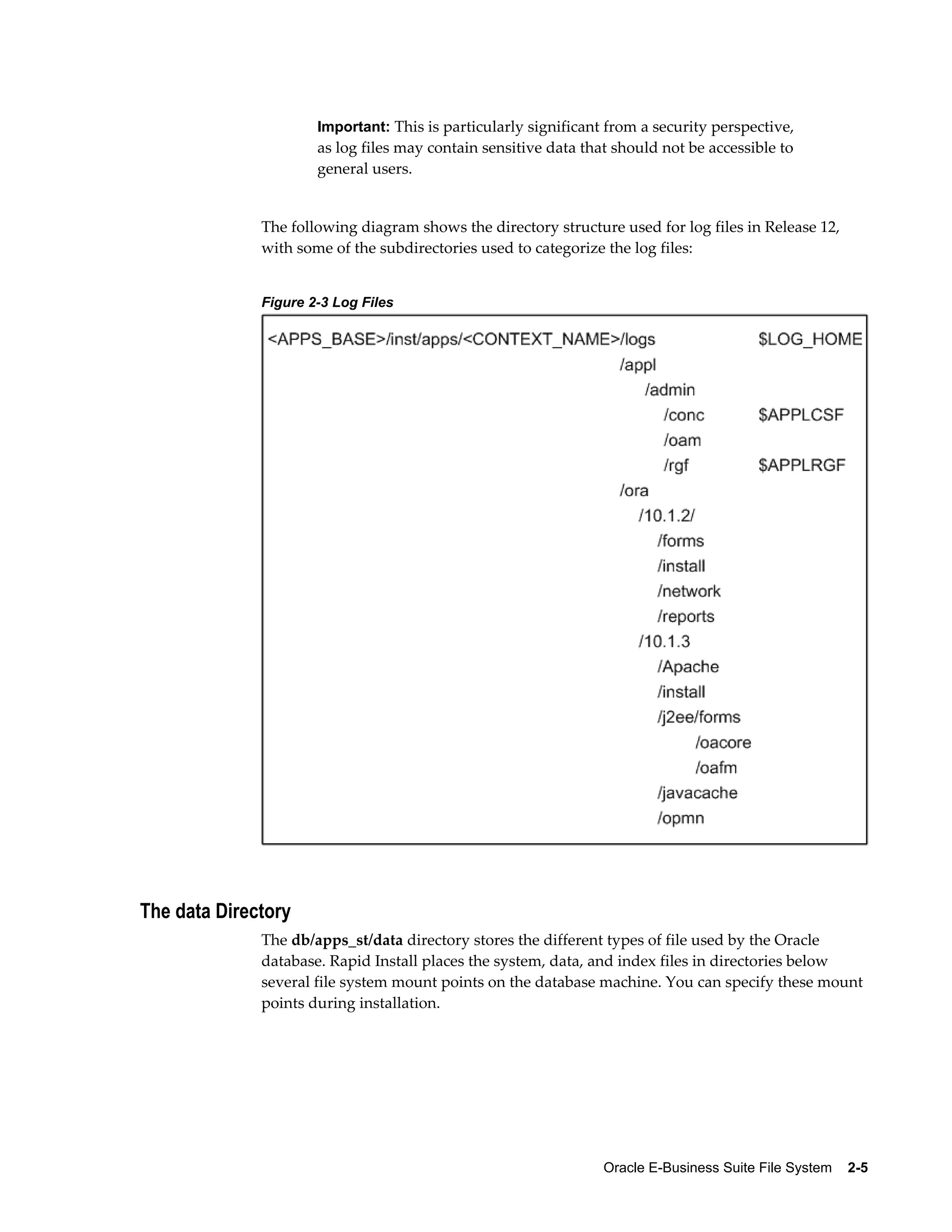
Concepts 
Release 12.1 
Part No. E12841-04 
June 2010
Oracle E-Business Suite Concepts, Release 12.1 
Part No. E12841-04 
Copyright © 2000, 2010, Oracle and/or its affiliates. All rights reserved. 
Primary Author: Robert Farrington 
Contributor: Max Arderius, Robert Azzopardi, Nadia Bendjedou, Michael Bernstein, Eric Bing, Anne 
Carlson, Subash Chadalavada, Steven Chan, Ivo Dujmovic, Carole Eubanks, Eric Fichet, Henriette Fux, Ric 
Ginsberg, Cliff Godwin, Brad Goodwin, William Greene, John Heimann, Theresa Hickman, Clara Jaeckel, Jeff 
Lunn, Ruth Mamo, Steve Mayze, Leigh Miller, K.R. Narayanan, Sarita Nori, Terri Noyes, Lisa Parekh, Gabriel 
Plumlee, Lyn Pratt, Joan Ryan, Greg Seiden, Yun Shaw, Leslie Studdard, Keith M. Swartz, Andy Tremayne, 
Sean Tuck, Mildred Wang, Chris Wolf, Melody Yang 
Oracle is a registered trademark of Oracle Corporation and/or its affiliates. Other names may be trademarks 
of their respective owners. 
This software and related documentation are provided under a license agreement containing restrictions on 
use and disclosure and are protected by intellectual property laws. Except as expressly permitted in your 
license agreement or allowed by law, you may not use, copy, reproduce, translate, broadcast, modify, license, 
transmit, distribute, exhibit, perform, publish or display any part, in any form, or by any means. Reverse 
engineering, disassembly, or decompilation of this software, unless required by law for interoperability, is 
prohibited. 
The information contained herein is subject to change without notice and is not warranted to be error-free. If 
you find any errors, please report them to us in writing. 
If this software or related documentation is delivered to the U.S. Government or anyone licensing it on behalf 
of the U.S. Government, the following notice is applicable: 
U.S. GOVERNMENT RIGHTS 
Programs, software, databases, and related documentation and technical data delivered to U.S. Government 
customers are "commercial computer software" or "commercial technical data" pursuant to the applicable 
Federal Acquisition Regulation and agency-specific supplemental regulations. As such, the use, duplication, 
disclosure, modification, and adaptation shall be subject to the restrictions and license terms set forth in the 
applicable Government contract, and, to the extent applicable by the terms of the Government contract, the 
additional rights set forth in FAR 52.227-19, Commercial Computer Software License (December 2007). Oracle 
USA, Inc., 500 Oracle Parkway, Redwood City, CA 94065. 
This software is developed for general use in a variety of information management applications. It is not 
developed or intended for use in any inherently dangerous applications, including applications which may 
create a risk of personal injury. If you use this software in dangerous applications, then you shall be 
responsible to take all appropriate fail-safe, backup, redundancy and other measures to ensure the safe use of 
this software. Oracle Corporation and its affiliates disclaim any liability for any damages caused by use of this 
software in dangerous applications. 
This software and documentation may provide access to or information on content, products and services 
from third parties. Oracle Corporation and its affiliates are not responsible for and expressly disclaim all 
warranties of any kind with respect to third party content, products and services. Oracle Corporation and its 
affiliates will not be responsible for any loss, costs, or damages incurred due to your access to or use of third 
party content, products or services.
Contents 
iii 
Send Us Your Comments 
Preface 
1 Oracle E-Business Suite Architecture 
Introduction............................................................................................................................... 1-1 
The Desktop Tier................................................................................................................ 1-3 
Forms Client Applet............................................................................................................1-5 
Desktop Java Client............................................................................................................ 1-5 
The Application Tier...........................................................................................................1-8 
Web Services..................................................................................................................... 1-10 
Forms Services.................................................................................................................. 1-14 
Concurrent Processing Server...........................................................................................1-16 
Application Tier Administration......................................................................................1-23 
The Database Tier............................................................................................................. 1-24 
The Oracle E-Business Suite Technology Layer.............................................................. 1-24 
Oracle Applications DBA (AD)................................................................................... 1-25 
Oracle Common Modules (AK)................................................................................... 1-25 
Oracle Applications Utilities (AU)...............................................................................1-25 
Oracle Application Object Library (FND)....................................................................1-26 
Oracle Workflow (WF)................................................................................................ 1-28 
Oracle Alert (ALR)...................................................................................................... 1-30 
Oracle XML Publisher (XDO)...................................................................................... 1-30 
Oracle Configuration Manager.........................................................................................1-31 
Oracle E-Business Suite Patch Nomenclature.................................................................. 1-32
2 Oracle E-Business Suite File System 
iv 
Introduction............................................................................................................................... 2-1 
Instance Home ($INST_TOP)............................................................................................. 2-3 
The data Directory.............................................................................................................. 2-5 
The db Directory................................................................................................................. 2-6 
The comn Directory............................................................................................................ 2-6 
The appl Directory.............................................................................................................. 2-8 
Product Directories........................................................................................................... 2-10 
Language Files.................................................................................................................. 2-14 
Core Technology Directories............................................................................................ 2-15 
Sharing the Application Tier File System........................................................................ 2-15 
Environment Settings....................................................................................................... 2-17 
3 Oracle E-Business Suite Database Organization 
Introduction............................................................................................................................... 3-1 
Schemas............................................................................................................................... 3-1 
Custom Schema Access....................................................................................................... 3-3 
Schemas and Data Access................................................................................................... 3-3 
Oracle User IDs................................................................................................................... 3-4 
Space Management............................................................................................................. 3-4 
4 Oracle E-Business Suite Database Features 
Introduction............................................................................................................................... 4-1 
Monitoring Features........................................................................................................... 4-1 
Performance Features.......................................................................................................... 4-2 
Scalability Features............................................................................................................. 4-3 
Business Intelligence Features........................................................................................... 4-4 
Security Features................................................................................................................. 4-5 
5 AutoConfig 
Introduction............................................................................................................................... 5-1 
The Applications Context .................................................................................................. 5-1 
AutoConfig Scripts and Directories................................................................................... 5-3 
AutoConfig Operation........................................................................................................ 5-3 
Management Tasks............................................................................................................. 5-9 
6 Cloning 
Introduction............................................................................................................................... 6-1
v 
Cloning Tools...................................................................................................................... 6-1 
Cloning Across Platforms................................................................................................... 6-2 
Cloning Options................................................................................................................. 6-2 
Rapid Clone Operation....................................................................................................... 6-3 
Rapid Clone and Oracle Universal Installer...................................................................... 6-4 
Additional Cloning Features.............................................................................................. 6-4 
Summary............................................................................................................................. 6-4 
7 Management Tools 
Introduction............................................................................................................................... 7-1 
Oracle Applications Manager Features.............................................................................. 7-1 
Extending Oracle Applications Manager Functionality.................................................... 7-7 
Generic Service Management............................................................................................. 7-8 
8 Authentication and Integration 
Introduction............................................................................................................................... 8-1 
Oracle Application Server 10g Optional Components...................................................... 8-2 
Oracle Portal........................................................................................................................ 8-2 
Oracle Discoverer................................................................................................................ 8-3 
Enterprise-Wide Single Sign-On........................................................................................ 8-3 
Application Server Integration Options............................................................................ 8-5 
Basic Single Sign-On Deployment Scenario......................................................................8-7 
Advanced Single Sign-On Deployment Scenarios.......................................................... 8-11 
Advanced Single Sign-On Options.................................................................................. 8-15 
9 High Availability 
Introduction............................................................................................................................... 9-1 
Patching Hints and Tips..................................................................................................... 9-1 
Maintenance Mode............................................................................................................. 9-2 
Shared Application Tier File System................................................................................. 9-3 
Distributed AD................................................................................................................... 9-5 
Staged Applications System............................................................................................... 9-6 
Nologging Operations........................................................................................................ 9-6 
Disaster Recovery................................................................................................................9-8 
10 Load Balancing 
Introduction............................................................................................................................. 10-1 
Load Balancing Definitions.............................................................................................. 10-2 
Categories of Load Balancer............................................................................................. 10-2
vi 
Load Balancing Options................................................................................................... 10-3 
11 Security 
Introduction............................................................................................................................. 11-1 
Security Strategies............................................................................................................ 11-1 
Authentication.................................................................................................................. 11-3 
Authorization.................................................................................................................... 11-4 
Audit Trail......................................................................................................................... 11-4 
Network Security.............................................................................................................. 11-4 
Oracle User Management................................................................................................. 11-5 
Oracle Database Vault...................................................................................................... 11-7 
Transparent Data Encryption........................................................................................... 11-8 
12 Network Topologies 
Introduction............................................................................................................................. 12-1 
Strategies........................................................................................................................... 12-1 
Latency.............................................................................................................................. 12-1 
Satellite Links................................................................................................................... 12-2 
Wireless LANs.................................................................................................................. 12-2 
13 Globalization Support 
Introduction............................................................................................................................. 13-1 
Languages and Character Sets on the Database Tier....................................................... 13-2 
Languages and Character Sets on the Application Tier...................................................13-3 
Character Sets on the Desktop Tier.................................................................................. 13-3 
User Preferences................................................................................................................ 13-3 
Date and Number Formats............................................................................................... 13-4 
Global Application Design...............................................................................................13-4 
Multiple Time Zone Support........................................................................................... 13-4 
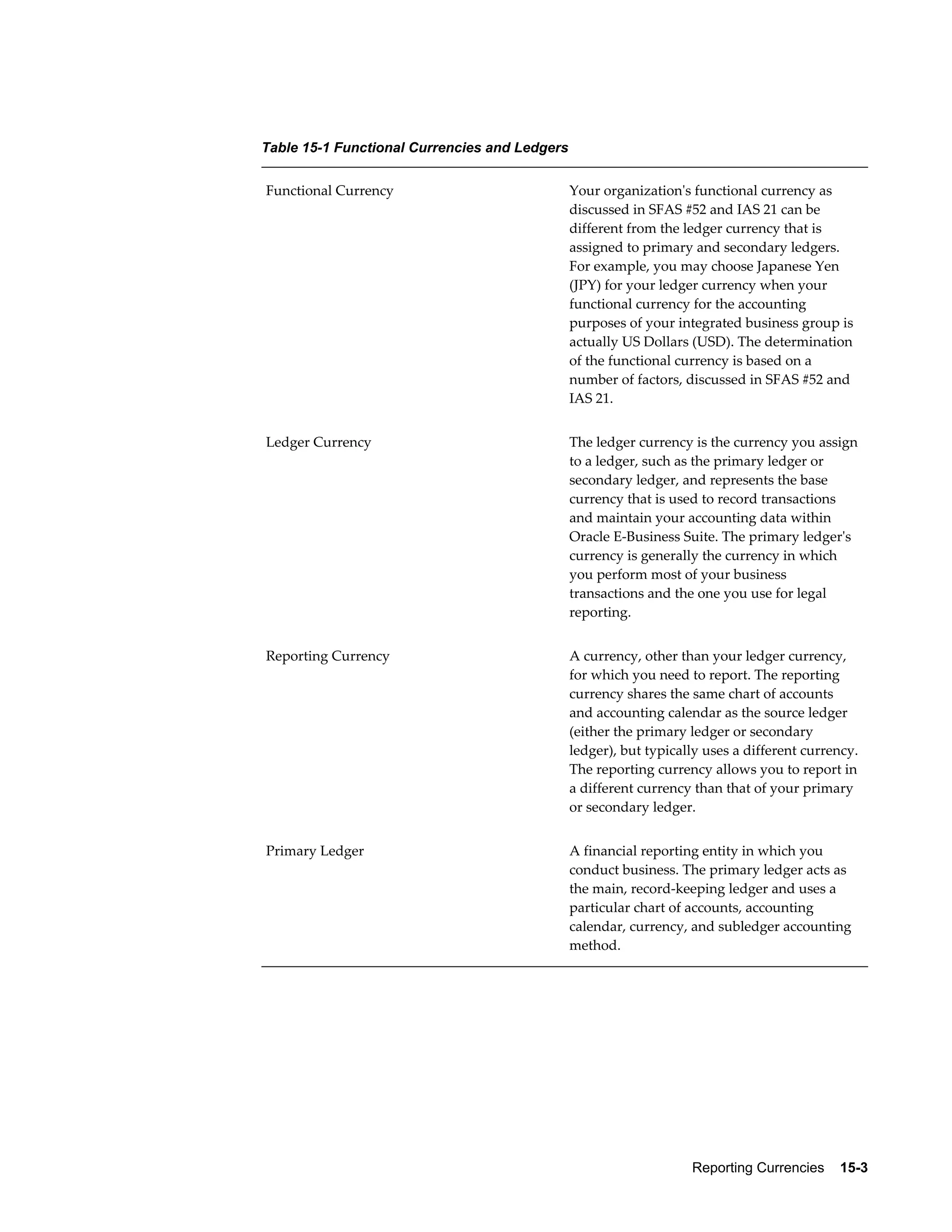
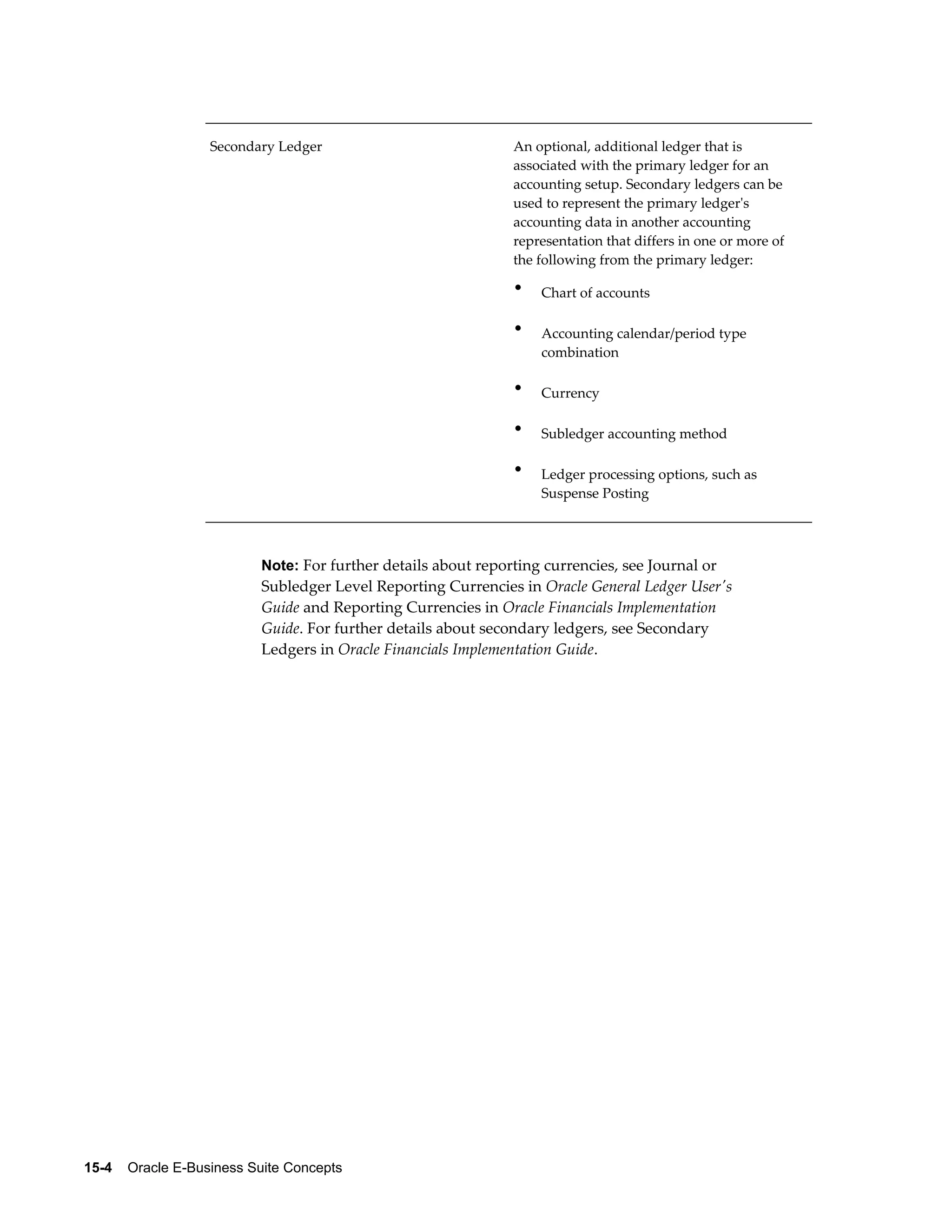
Reporting Currencies........................................................................................................ 13-5 
Country-Specific Functionalities...................................................................................... 13-6 
External Documents.......................................................................................................... 13-6 
14 Multiple Organization Architecture 
Introduction............................................................................................................................. 14-1 
Overview........................................................................................................................... 14-1 
Multiple Organizations Partitioned Objects................................................................... 14-2 
Converting to Multiple Organizations............................................................................. 14-3
vii 
15 Reporting Currencies 
Introduction............................................................................................................................. 15-1 
Functional Currencies....................................................................................................... 15-2 
Glossary 
Index
Send Us Your Comments 
ix 
Oracle E-Business Suite Concepts, Release 12.1 
Part No. E12841-04 
Oracle welcomes customers' comments and suggestions on the quality and usefulness of this document. 
Your feedback is important, and helps us to best meet your needs as a user of our products. For example: 
• Are the implementation steps correct and complete? 
• Did you understand the context of the procedures? 
• Did you find any errors in the information? 
• Does the structure of the information help you with your tasks? 
• Do you need different information or graphics? If so, where, and in what format? 
• Are the examples correct? Do you need more examples? 
If you find any errors or have any other suggestions for improvement, then please tell us your name, the 
name of the company who has licensed our products, the title and part number of the documentation and 
the chapter, section, and page number (if available). 
Note: Before sending us your comments, you might like to check that you have the latest version of the 
document and if any concerns are already addressed. To do this, access the new Oracle E-Business Suite 
Release Online Documentation CD available on My Oracle Support and www.oracle.com. It contains the 
most current Documentation Library plus all documents revised or released recently. 
Send your comments to us using the electronic mail address: appsdoc_us@oracle.com 
Please give your name, address, electronic mail address, and telephone number (optional). 
If you need assistance with Oracle software, then please contact your support representative or Oracle 
Support Services. 
If you require training or instruction in using Oracle software, then please contact your Oracle local office 
and inquire about our Oracle University offerings. A list of Oracle offices is available on our Web site at 
www.oracle.com.
Preface 
xi 
Intended Audience 
Welcome to Release 12.1 of the Oracle E-Business Suite Concepts. 
This guide assumes you have a working knowledge of the following: 
• The principles and customary practices of your business area. 
• Computer desktop application usage and terminology. 
If you have never used Oracle E-Business Suite, we suggest you attend one or more of 
the Oracle E-Business Suite training classes available through Oracle University. 
This book is intended for all those planning to deploy Oracle E-Business Suite Release 
12, or contemplating significant changes to a configuration. It focuses on high-level, 
strategic topics, to enable system administrators and others to make informed decisions 
about the various installation and configuration choices open to them. 
The book does not attempt to replace or supplant the installation, maintenance, and 
upgrade manuals. As such, it does not describe procedures in depth, but gives a broad 
outline of the actions needed to achieve a particular goal. The book is arranged such 
that it starts with topics that will apply to all installations, then examines areas which, 
while optional, will be relevant to most sites. Typically, these optional subjects are 
interrelated, so that a site will most likely be implementing more than one. Finally, 
several specialized areas are discussed; these are mainly topics that are mentioned 
primarily for reference. 
Note: This book typically uses UNIX nomenclature in specifying files 
and directories. Windows users should substitute the appropriate 
Windows terms where applicable. For example, a UNIX .env 
(environment) file will be a .cmd (command) file on Windows. 
See Related Information Sources on page xiii for more Oracle E-Business Suite product
xii 
information. 
Deaf/Hard of Hearing Access to Oracle Support Services 
To reach Oracle Support Services, use a telecommunications relay service (TRS) to call 
Oracle Support at 1.800.223.1711. An Oracle Support Services engineer will handle 
technical issues and provide customer support according to the Oracle service request 
process. Information about TRS is available at 
http://www.fcc.gov/cgb/consumerfacts/trs.html, and a list of phone numbers is 
available at http://www.fcc.gov/cgb/dro/trsphonebk.html. 
Documentation Accessibility 
Our goal is to make Oracle products, services, and supporting documentation accessible 
to all users, including users that are disabled. To that end, our documentation includes 
features that make information available to users of assistive technology. This 
documentation is available in HTML format, and contains markup to facilitate access by 
the disabled community. Accessibility standards will continue to evolve over time, and 
Oracle is actively engaged with other market-leading technology vendors to address 
technical obstacles so that our documentation can be accessible to all of our customers. 
For more information, visit the Oracle Accessibility Program Web site at 
http://www.oracle.com/accessibility/. 
Accessibility of Code Examples in Documentation 
Screen readers may not always correctly read the code examples in this document. The 
conventions for writing code require that closing braces should appear on an otherwise 
empty line; however, some screen readers may not always read a line of text that 
consists solely of a bracket or brace. 
Accessibility of Links to External Web Sites in Documentation 
This documentation may contain links to Web sites of other companies or organizations 
that Oracle does not own or control. Oracle neither evaluates nor makes any 
representations regarding the accessibility of these Web sites. 
Structure 
1 Oracle E-Business Suite Architecture 
2 Oracle E-Business Suite File System 
3 Oracle E-Business Suite Database Organization 
4 Oracle E-Business Suite Database Features 
5 AutoConfig 
6 Cloning 
7 Management Tools 
8 Authentication and Integration
xiii 
9 High Availability 
10 Load Balancing 
11 Security 
12 Network Topologies 
13 Globalization Support 
14 Multiple Organization Architecture 
15 Reporting Currencies 
Glossary 
Related Information Sources 
This book is included on the Oracle E-Business Suite Documentation Library, which is 
supplied in the Release 12.1 Media Pack. You can download soft-copy documentation 
as PDF files from the Oracle Technology Network at 
http://www.oracle.com/technology/documentation/. The Oracle E-Business Suite 
Release 12.1 Documentation Library contains the latest information, including any 
documents that have changed significantly between releases. If substantial changes to 
this book are necessary, a revised version will be made available on the "virtual" 
documentation library on My Oracle Support (formerly OracleMetaLink). 
If this guide refers you to other Oracle E-Business Suite documentation, use only the 
latest Release 12.1 versions of those guides. 
Online Documentation 
All Oracle E-Business Suite documentation is available online (HTML or PDF). 
• Online Help - Online help patches (HTML) are available on My Oracle Support. 
• PDF Documentation - See the Oracle E-Business Suite Documentation Library for 
current PDF documentation for your product with each release. The Oracle 
E-Business Suite Documentation Library is also available on My Oracle Support and 
is updated frequently. 
• Release Notes - For information about changes in this release, including new 
features, known issues, and other details, see the release notes for the relevant 
product, available on My Oracle Support. 
• Oracle Electronic Technical Reference Manual - The Oracle Electronic Technical 
Reference Manual (eTRM) contains database diagrams and a detailed description of 
database tables, forms, reports, and programs for each Oracle E-Business Suite 
product. This information helps you convert data from your existing applications 
and integrate Oracle E-Business Suite data with non-Oracle applications, and write 
custom reports for Oracle E-Business Suite products. The Oracle eTRM is available 
on My Oracle Support. 
Related Guides 
You should have the following related books on hand. Depending on the requirements 
of your particular installation, you may also need additional manuals or guides.
xiv 
Oracle E-Business Suite Installation Guide: Using Rapid Install 
This book is intended for use by anyone who is responsible for installing or upgrading 
Oracle E-Business Suite. It provides instructions for running Rapid Install either to carry 
out a fresh installation of Oracle E-Business Suite Release 12, or as part of an upgrade 
from Release 11i to Release 12. The book also describes the steps needed to install the 
technology stack components only, for the special situations where this is applicable. 
Oracle E-Business Suite System Administrator's Guide Documentation Set 
This documentation set provides planning and reference information for the Oracle 
E-Business Suite System Administrator. Oracle E-Business Suite System Administrator's 
Guide - Configuration contains information on system configuration steps, including 
defining concurrent programs and managers, enabling Oracle Applications Manager 
features, and setting up printers and online help. Oracle E-Business Suite System 
Administrator's Guide - Maintenance provides information for frequent tasks such as 
monitoring your system with Oracle Applications Manager, administering Oracle 
E-Business Suite Secure Enterprise Search, managing concurrent managers and reports, 
using diagnostic utilities including logging, managing profile options, and using alerts. 
Oracle E-Business Suite System Administrator's Guide - Security describes User 
Management, data security, function security, auditing, and security configurations. 
Maintaining Oracle E-Business Suite Documentation Set 
This documentation set provides maintenance and patching information for the Oracle 
E-Business Suite DBA. Oracle E-Business Suite Maintenance Procedures provides a 
description of the strategies, related tasks, and troubleshooting activities that will help 
ensure the continued smooth running of an Oracle E-Business Suite system. Oracle 
E-Business Suite Maintenance Utilities describes the Oracle E-Business Suite utilities that 
are supplied with Oracle E-Business Suite and used to maintain the application file 
system and database. It also provides a detailed description of the numerous options 
available to meet specific operational requirements. Oracle E-Business Suite Patching 
Procedures explains how to patch an Oracle E-Business Suite system, covering the key 
concepts and strategies. Also included are recommendations for optimizing typical 
patching operations and reducing downtime. 
Oracle E-Business Suite User's Guide 
This guide explains how to navigate, enter data, query, and run reports using the user 
interface (UI) of Oracle E-Business Suite. This guide also includes information on setting 
user profiles, as well as running and reviewing concurrent requests. 
Oracle XML Publisher Administration and Developer's Guide 
Oracle XML Publisher is a template-based reporting solution that merges XML data 
with templates in RTF or PDF format to produce a variety of outputs to meet a variety 
of business needs. Outputs include: PDF, HTML, Excel, RTF, and eText (for EDI and 
EFT transactions). Oracle XML Publisher can be used to generate reports based on 
existing Oracle E-Business Suite report data, or you can use Oracle XML Publisher's 
data extraction engine to build your own queries. Oracle XML Publisher also provides a 
robust set of APIs to manage delivery of your reports via e-mail, fax, secure FTP,
printer, WebDav, and more. This guide describes how to set up and administer Oracle 
XML Publisher as well as how to use the Application Programming Interface to build 
custom solutions. 
This guide is available through the Oracle E-Business Suite online help. 
xv 
Integration Repository 
The Oracle Integration Repository is a compilation of information about the service 
endpoints exposed by the Oracle E-Business Suite of applications. It provides a 
complete catalog of Oracle E-Business Suite's business service interfaces. The tool lets 
users easily discover and deploy the appropriate business service interface for 
integration with any system, application, or business partner. 
The Oracle Integration Repository is shipped as part of the E-Business Suite. As your 
instance is patched, the repository is automatically updated with content appropriate 
for the precise revisions of interfaces in your environment. 
Do Not Use Database Tools to Modify Oracle E-Business Suite Data 
Oracle STRONGLY RECOMMENDS that you never use SQL*Plus, Oracle Data 
Browser, database triggers, or any other tool to modify Oracle E-Business Suite data 
unless otherwise instructed. 
Oracle provides powerful tools you can use to create, store, change, retrieve, and 
maintain information in an Oracle database. But if you use Oracle tools such as 
SQL*Plus to modify Oracle E-Business Suite data, you risk destroying the integrity of 
your data and you lose the ability to audit changes to your data. 
Because Oracle E-Business Suite tables are interrelated, any change you make using an 
Oracle E-Business Suite form can update many tables at once. But when you modify 
Oracle E-Business Suite data using anything other than Oracle E-Business Suite, you 
may change a row in one table without making corresponding changes in related tables. 
If your tables get out of synchronization with each other, you risk retrieving erroneous 
information and you risk unpredictable results throughout Oracle E-Business Suite. 
When you use Oracle E-Business Suite to modify your data, Oracle E-Business Suite 
automatically checks that your changes are valid. Oracle E-Business Suite also keeps 
track of who changes information. If you enter information into database tables using 
database tools, you may store invalid information. You also lose the ability to track who 
has changed your information because SQL*Plus and other database tools do not keep a 
record of changes.
1 
Oracle E-Business Suite Architecture 
Oracle E-Business Suite Architecture 1-1 
Introduction 
This chapter describes the Oracle E-Business Suite architecture and the key features the 
architecture supports, plus some related points. Topics include: 
• Overview 
• The Desktop Tier 
• The Application Tier 
• The Database Tier 
• The Oracle E-Business Suite Technology Layer 
• Oracle Configuration Manager 
• Oracle E-Business Suite Patch Nomenclature 
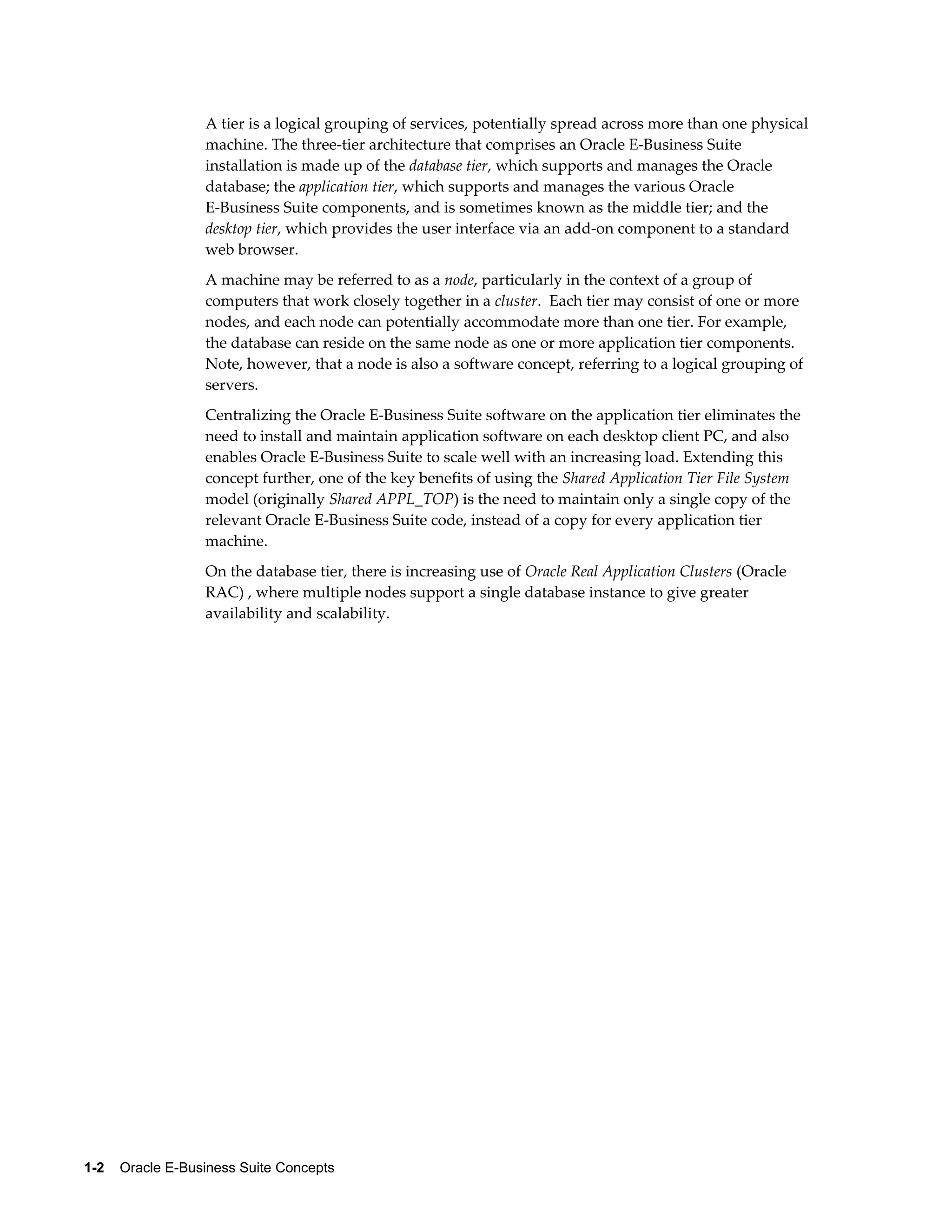
The Oracle E-Business Suite Architecture is a framework for multi-tiered, distributed 
computing that supports Oracle E-Business Suite products. In this model, various 
servers or services are distributed among three levels, or tiers. 
A server (or services) is a process or group of processes that runs on a single machine 
and provides a particular functionality. For example, Web services process HTTP 
requests, and Forms services process requests for activities related to Oracle Forms. The 
Concurrent Processing server supports data-intensive programs that run in the 
background. 
Important: The term server, in the sense of a single process, is less 
appropriate in the Release 12 architecture. Where applicable, 
replacement terms such as services are used.
A tier is a logical grouping of services, potentially spread across more than one physical 
machine. The three-tier architecture that comprises an Oracle E-Business Suite 
installation is made up of the database tier, which supports and manages the Oracle 
database; the application tier, which supports and manages the various Oracle 
E-Business Suite components, and is sometimes known as the middle tier; and the 
desktop tier, which provides the user interface via an add-on component to a standard 
web browser. 
A machine may be referred to as a node, particularly in the context of a group of 
computers that work closely together in a cluster. Each tier may consist of one or more 
nodes, and each node can potentially accommodate more than one tier. For example, 
the database can reside on the same node as one or more application tier components. 
Note, however, that a node is also a software concept, referring to a logical grouping of 
servers. 
Centralizing the Oracle E-Business Suite software on the application tier eliminates the 
need to install and maintain application software on each desktop client PC, and also 
enables Oracle E-Business Suite to scale well with an increasing load. Extending this 
concept further, one of the key benefits of using the Shared Application Tier File System 
model (originally Shared APPL_TOP) is the need to maintain only a single copy of the 
relevant Oracle E-Business Suite code, instead of a copy for every application tier 
machine. 
On the database tier, there is increasing use of Oracle Real Application Clusters (Oracle 
RAC) , where multiple nodes support a single database instance to give greater 
availability and scalability. 
1-2 Oracle E-Business Suite Concepts
Oracle E-Business Suite Architecture 1-3 
Figure 1-1 Oracle E-Business Suite Architecture 
The connection between the application tier and the desktop tier can operate 
successfully over a Wide Area Network (WAN). This is because the desktop and 
application tiers exchange a minimum amount of information, for example only field 
values that have changed. In a global operation with users at diverse locations, 
requiring less network traffic reduces telecommunications costs and improves response 
times. 
The Desktop Tier 
The client interface is provided through HTML for HTML-based applications, and via a 
Java applet in a Web browser for the traditional Forms-based applications.
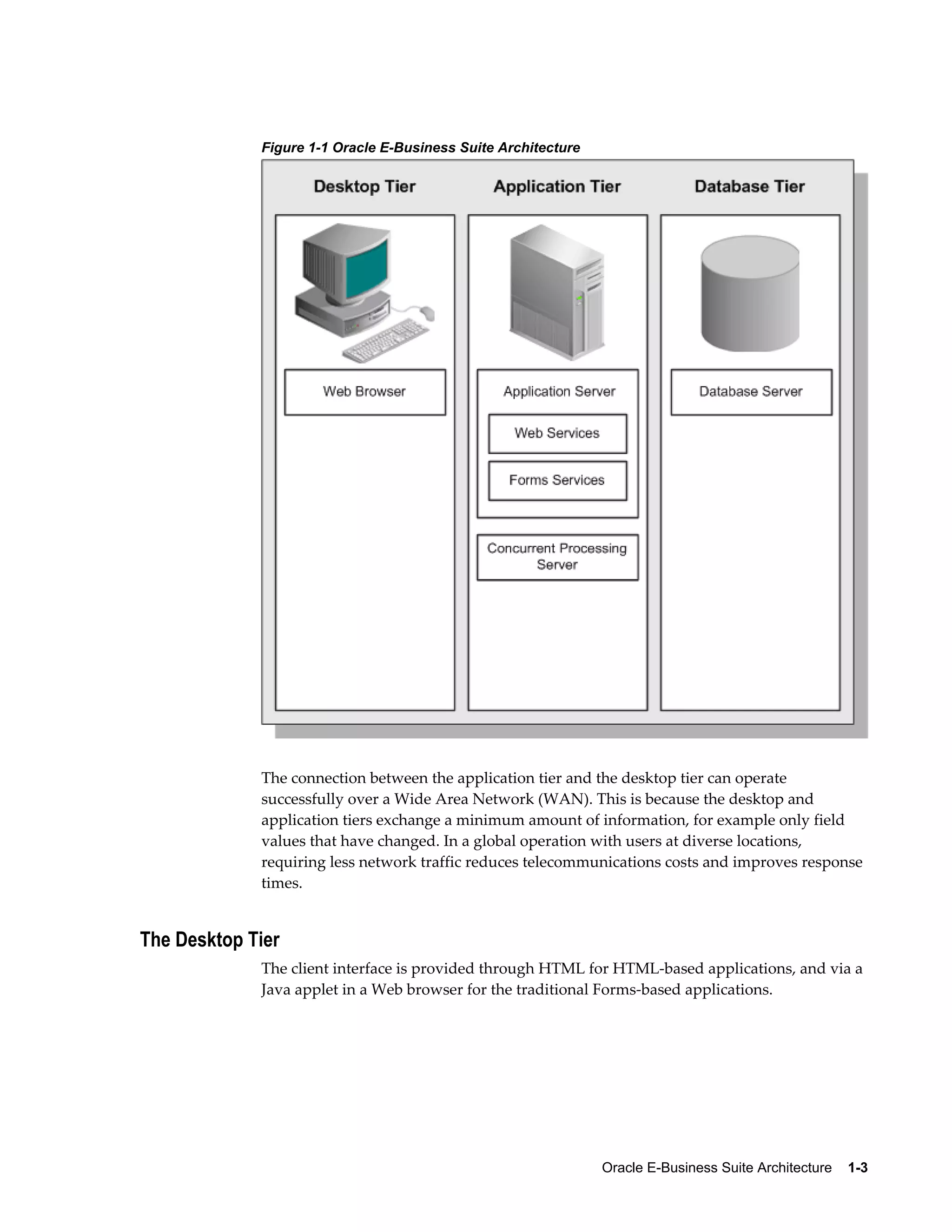
Figure 1-2 Forms-based Desktop Tier Architecture 
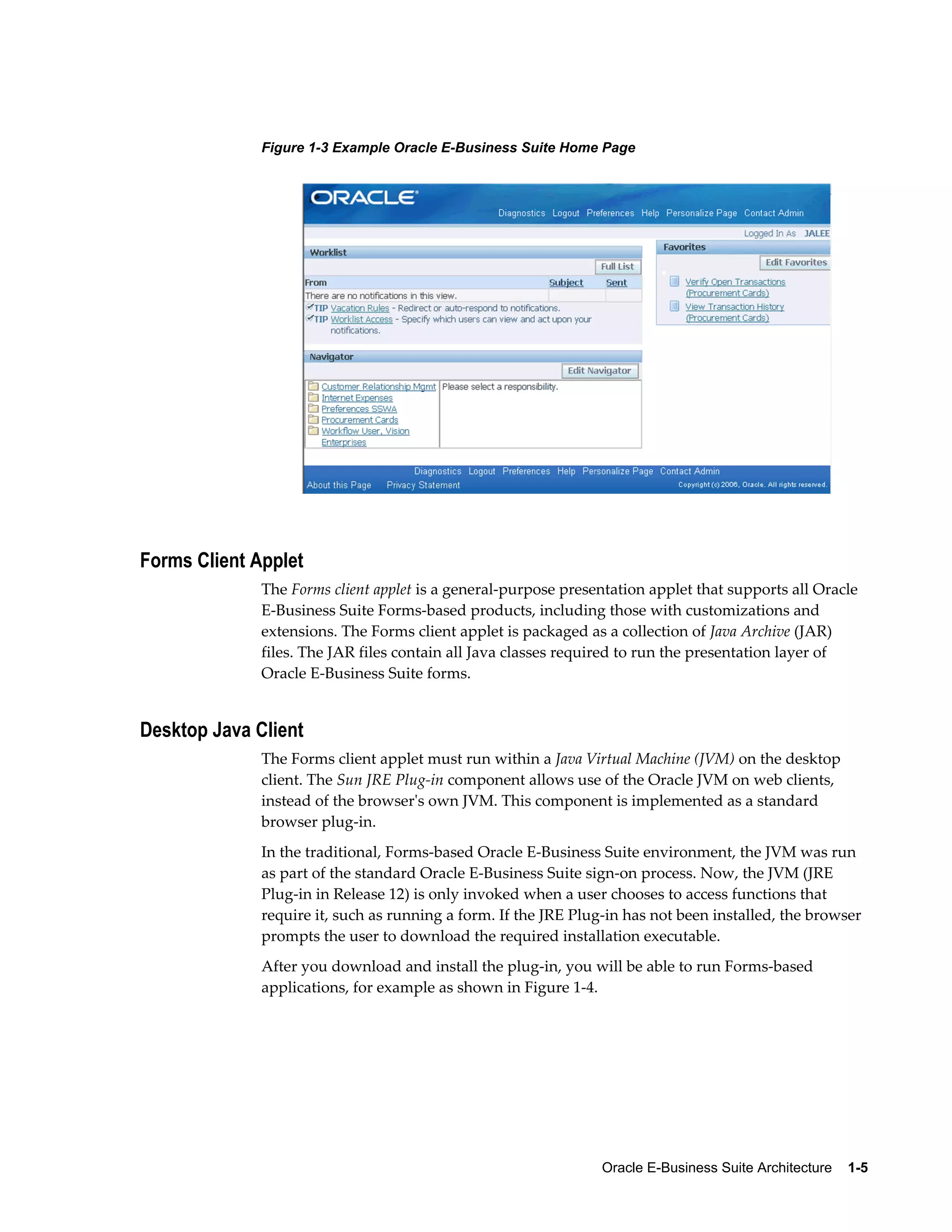
You log in via the Oracle E-Business Suite Home Page on a desktop client web browser. 
The Home Page provides a single point of access to HTML-based applications, 
Forms-based applications, and Business Intelligence applications. 
Once successfully logged in via the E-Business Suite Home Page, you are not prompted 
for your user name and password again, even if you navigate to other tools and 
products. Oracle E-Business Suite also retains preferences as you navigate through the 
system. For example, if you registered in the Home Page that German is your preferred 
language, this preference carries over whether you access Forms-based or HTML-based 
applications. 
1-4 Oracle E-Business Suite Concepts
Figure 1-3 Example Oracle E-Business Suite Home Page 
Oracle E-Business Suite Architecture 1-5 
Forms Client Applet 
The Forms client applet is a general-purpose presentation applet that supports all Oracle 
E-Business Suite Forms-based products, including those with customizations and 
extensions. The Forms client applet is packaged as a collection of Java Archive (JAR) 
files. The JAR files contain all Java classes required to run the presentation layer of 
Oracle E-Business Suite forms. 
Desktop Java Client 
The Forms client applet must run within a Java Virtual Machine (JVM) on the desktop 
client. The Sun JRE Plug-in component allows use of the Oracle JVM on web clients, 
instead of the browser's own JVM. This component is implemented as a standard 
browser plug-in. 
In the traditional, Forms-based Oracle E-Business Suite environment, the JVM was run 
as part of the standard Oracle E-Business Suite sign-on process. Now, the JVM (JRE 
Plug-in in Release 12) is only invoked when a user chooses to access functions that 
require it, such as running a form. If the JRE Plug-in has not been installed, the browser 
prompts the user to download the required installation executable. 
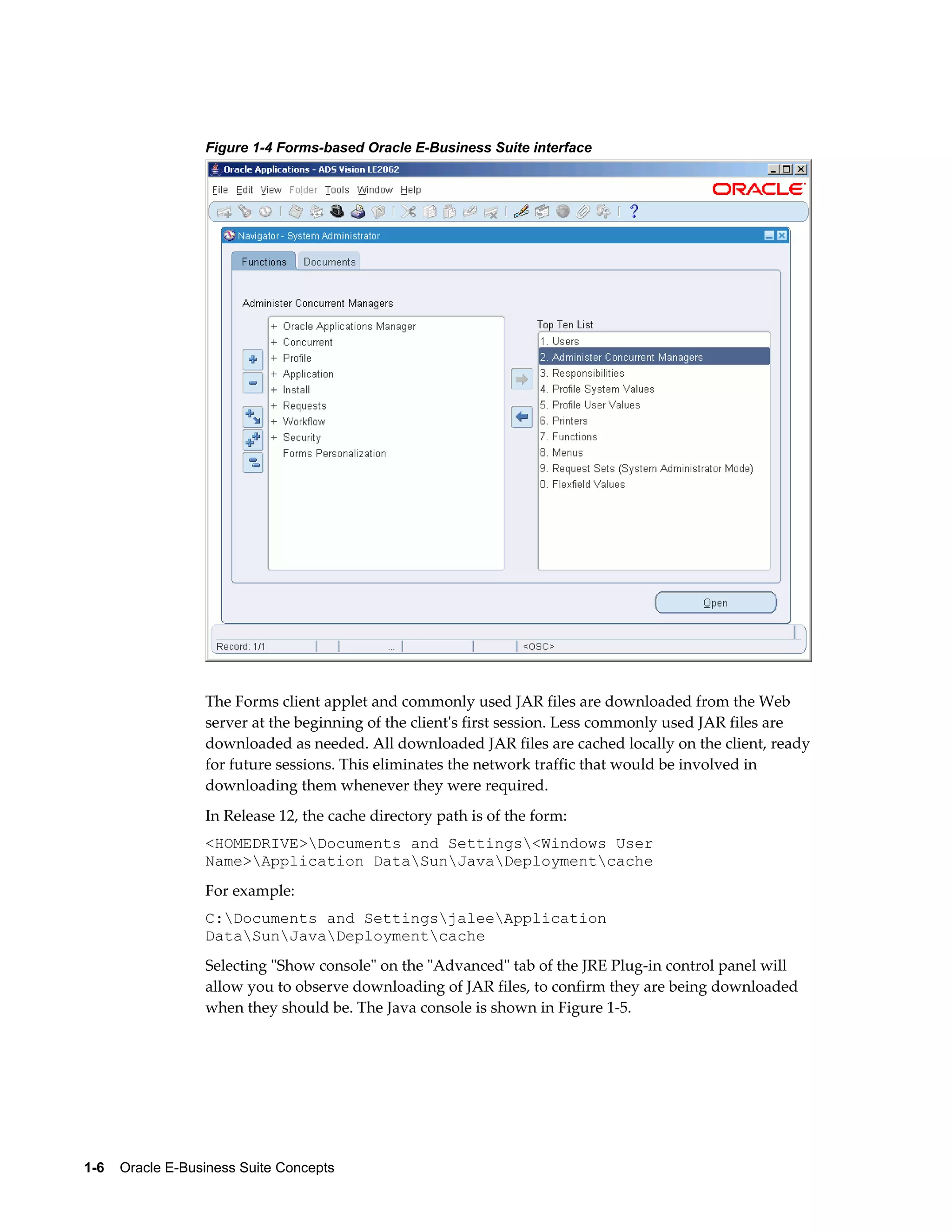
After you download and install the plug-in, you will be able to run Forms-based 
applications, for example as shown in Figure 1-4.
Figure 1-4 Forms-based Oracle E-Business Suite interface 
The Forms client applet and commonly used JAR files are downloaded from the Web 
server at the beginning of the client's first session. Less commonly used JAR files are 
downloaded as needed. All downloaded JAR files are cached locally on the client, ready 
for future sessions. This eliminates the network traffic that would be involved in 
downloading them whenever they were required. 
In Release 12, the cache directory path is of the form: 
<HOMEDRIVE>Documents and Settings<Windows User 
Name>Application DataSunJavaDeploymentcache 
For example: 
C:Documents and SettingsjaleeApplication 
DataSunJavaDeploymentcache 
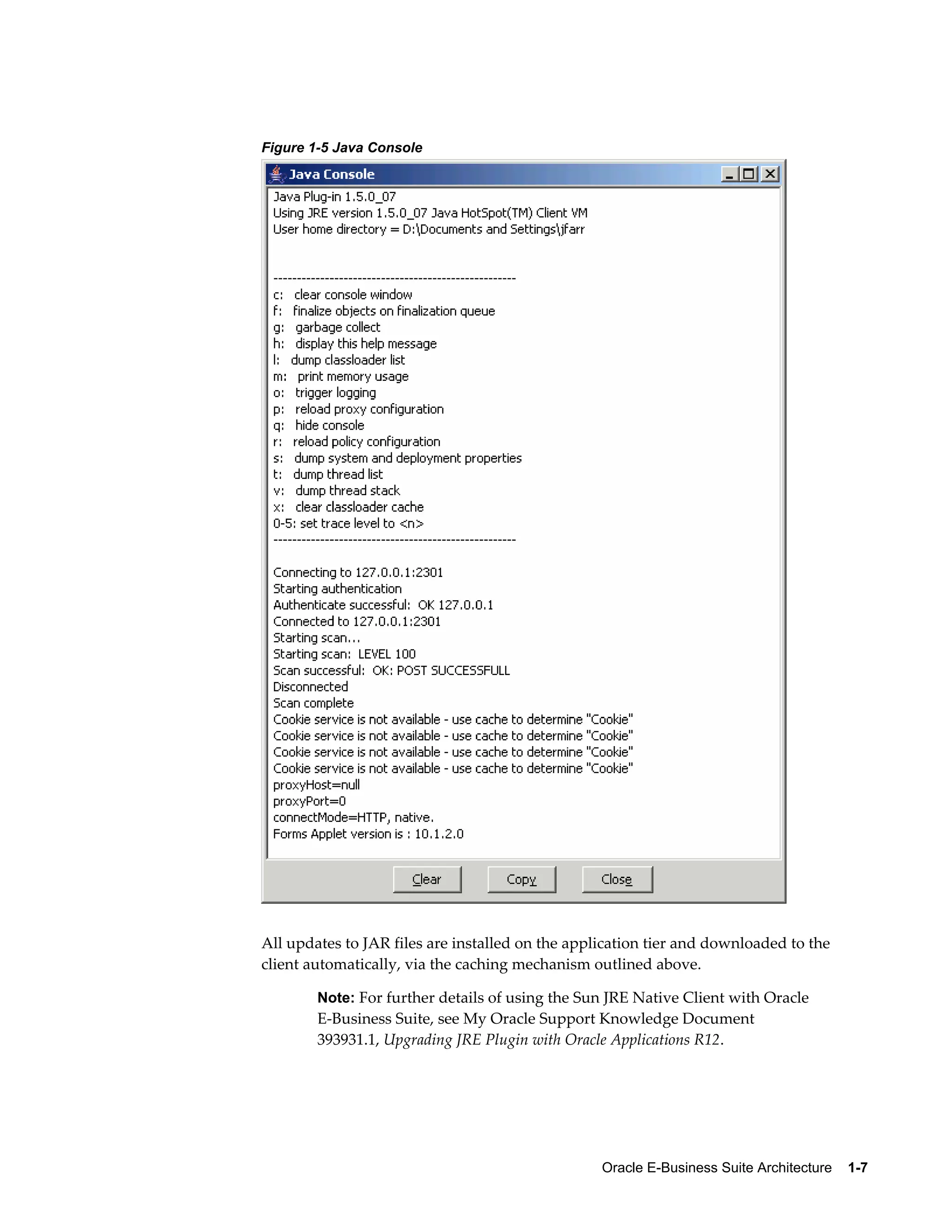
Selecting "Show console" on the "Advanced" tab of the JRE Plug-in control panel will 
allow you to observe downloading of JAR files, to confirm they are being downloaded 
when they should be. The Java console is shown in Figure 1-5. 
1-6 Oracle E-Business Suite Concepts
Oracle E-Business Suite Architecture 1-7 
Figure 1-5 Java Console 
All updates to JAR files are installed on the application tier and downloaded to the 
client automatically, via the caching mechanism outlined above. 
Note: For further details of using the Sun JRE Native Client with Oracle 
E-Business Suite, see My Oracle Support Knowledge Document 
393931.1, Upgrading JRE Plugin with Oracle Applications R12.
The Application Tier 
The application tier has a dual role: hosting the various servers and service groups that 
process the business logic, and managing communication between the desktop tier and 
the database tier. This tier is sometimes referred to as the middle tier. 
Three servers or service groups comprise the basic application tier for Oracle E-Business 
Suite: 
• Web services 
• Forms services 
• Concurrent Processing server 
In Release 12, Web and Forms services are provided by Oracle Application Server 
(OracleAS) 10g. They are no longer servers in the sense of being a single process, as was 
the case in previous Applications releases. 
Note: There is no concept of an Administration server in Release 12. By 
default, patching can be undertaken from any application tier node. 
It is advisable to avoid using a mixture of different platforms on your application tier. 
This makes maintenance easier, since only one set of patches needs to be downloaded. 
Load Balancing 
The application tier supports load balancing among many of its servers and services to 
help provide higher availability, fault tolerance, reliability, and optimal scalability. If 
you have more than one of any of the following types of server, load balancing can be 
employed: 
• Web services 
• Forms services 
• Concurrent Processing server 
Chapter 10 discusses the various types of load balancing in more detail. 
Use of Two Oracle Application Server ORACLE_HOMEs in Release 12 
Two different Oracle Application Server (OracleAS) 10g releases, in separate 
ORACLE_HOMEs, are used in Oracle E-Business Suite Release 12. This enables Oracle 
E-Business Suite to take advantage of the latest Oracle technologies. 
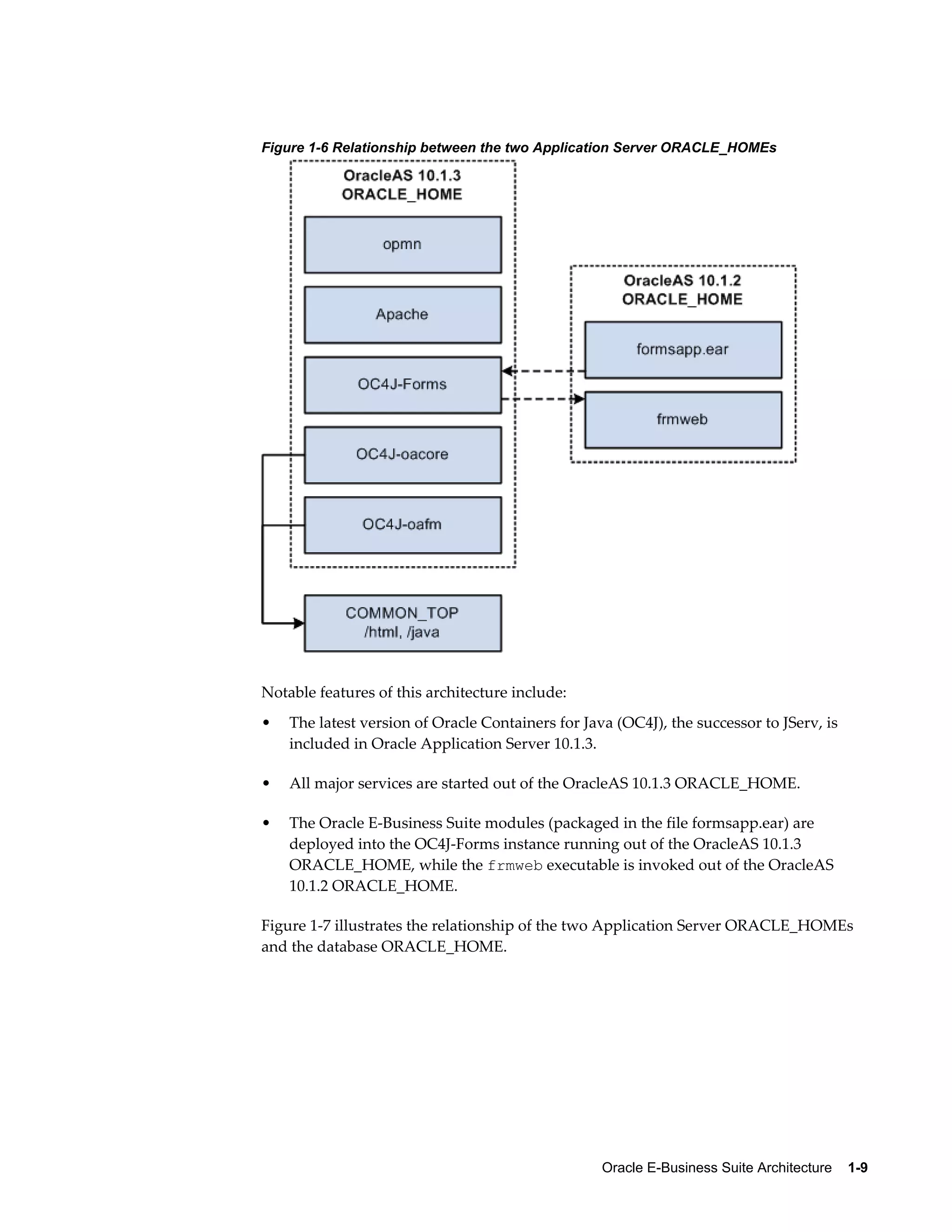
Figure 1-6 illustrates the functional usage of the two Oracle Application Server 
ORACLE_HOMEs. 
1-8 Oracle E-Business Suite Concepts
Figure 1-6 Relationship between the two Application Server ORACLE_HOMEs 
Notable features of this architecture include: 
• The latest version of Oracle Containers for Java (OC4J), the successor to JServ, is 
Oracle E-Business Suite Architecture 1-9 
included in Oracle Application Server 10.1.3. 
• All major services are started out of the OracleAS 10.1.3 ORACLE_HOME. 
• The Oracle E-Business Suite modules (packaged in the file formsapp.ear) are 
deployed into the OC4J-Forms instance running out of the OracleAS 10.1.3 
ORACLE_HOME, while the frmweb executable is invoked out of the OracleAS 
10.1.2 ORACLE_HOME. 
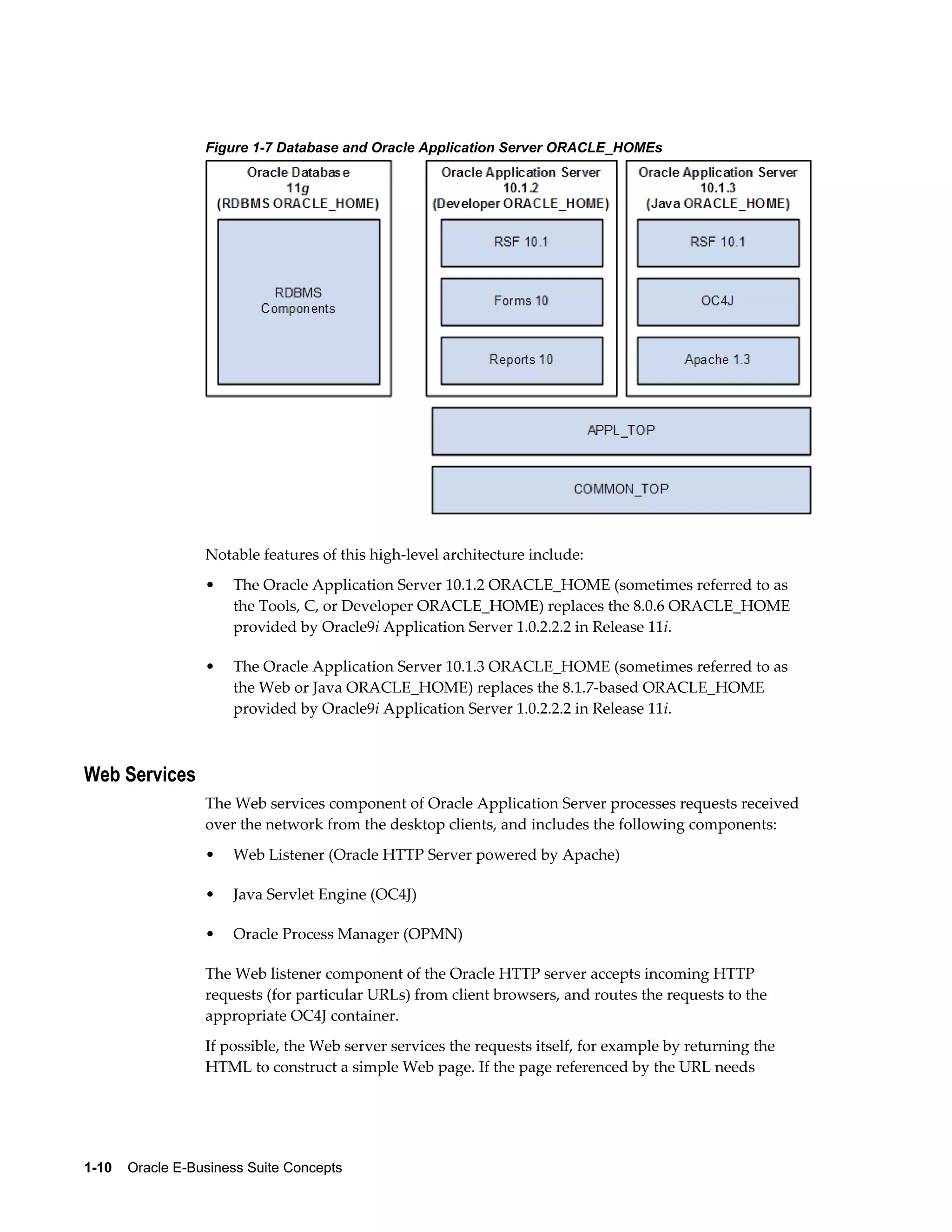
Figure 1-7 illustrates the relationship of the two Application Server ORACLE_HOMEs 
and the database ORACLE_HOME.
Figure 1-7 Database and Oracle Application Server ORACLE_HOMEs 
Notable features of this high-level architecture include: 
• The Oracle Application Server 10.1.2 ORACLE_HOME (sometimes referred to as 
the Tools, C, or Developer ORACLE_HOME) replaces the 8.0.6 ORACLE_HOME 
provided by Oracle9i Application Server 1.0.2.2.2 in Release 11i. 
• The Oracle Application Server 10.1.3 ORACLE_HOME (sometimes referred to as 
the Web or Java ORACLE_HOME) replaces the 8.1.7-based ORACLE_HOME 
provided by Oracle9i Application Server 1.0.2.2.2 in Release 11i. 
Web Services 
The Web services component of Oracle Application Server processes requests received 
over the network from the desktop clients, and includes the following components: 
• Web Listener (Oracle HTTP Server powered by Apache) 
• Java Servlet Engine (OC4J) 
• Oracle Process Manager (OPMN) 
The Web listener component of the Oracle HTTP server accepts incoming HTTP 
requests (for particular URLs) from client browsers, and routes the requests to the 
appropriate OC4J container. 
If possible, the Web server services the requests itself, for example by returning the 
HTML to construct a simple Web page. If the page referenced by the URL needs 
1-10 Oracle E-Business Suite Concepts
advanced processing, the listener passes the request on to the servlet engine, which 
contacts the database server as needed. 
Oracle E-Business Suite Architecture 1-11 
HTML-Based Applications and the Oracle Application Framework 
The Oracle HTML-based applications (originally known as Self-Service applications) 
have the following characteristics: 
• Do not use Oracle Forms for the interface 
• Are designed in pure HTML and JavaScript 
• Dynamically generate HTML pages by executing Java code 
• Use a metadata dictionary for flexible layout 
• Operate by direct connection to the Web server 
The Oracle Application Framework is the development platform for HTML-based 
applications. It consists of a Java-based application tier framework and associated 
services, designed to facilitate the rapid deployment of HTML-based applications. 
Notable Oracle Application Framework components include: 
• Business Components for Java (BC4J), included in Oracle JDeveloper, is used to create 
Java business components for representing business logic. It also provides a 
mechanism for mapping relational tables to Java objects, and allows the separation 
of the application business logic from the user interface. 
• AOL/J supplies the Oracle Application Framework with underlying security and 
applications Java services. It provides the Oracle Application Framework with its 
connection to the database, and with application-specific functionality such as 
flexfields. 
Note: An optional and recommended alternative to AOL/J is the 
Oracle Universal Connection Pool (UCP) . For further details, see My 
Oracle Support Knowledge Document 1077727.1, Using Universal 
Connection Pool (UCP) in Oracle E-Business Suite Release 12.1.3. 
The Framework-based applications logic is controlled by procedures that execute 
through the Java servlet engine, which is provided by the Apache JServ module. The 
servlet engine uses the metadata dictionary in constructing the Framework UI.
Figure 1-8 HTML-Based Applications Architecture 
Java Servlet Access with HTML-Based Applications 
An HTML-based Applications module uses the following access path: 
1. The user clicks the hyperlink of a function from a browser. 
2. The browser makes a URL request to the Web listener. 
3. The Web listener contacts the Servlet engine (OC4J), where it runs a JSP. 
4. The JSP obtains the content from the Oracle E-Business Suite tables and uses 
information from the metadata dictionary to construct the HTML page. 
5. The resulting HTML page is passed back to the browser, via the Web server. 
1-12 Oracle E-Business Suite Concepts
Figure 1-9 Oracle Application Framework Architecture 
Oracle E-Business Suite Architecture 1-13 
Oracle Application Framework Processing Details 
The following is a more detailed explanation of how the JSP obtains the content from 
the Oracle E-Business Suite tables and uses information from the metadata dictionary to 
construct the HTML page. 
1. AOL/J validates user access to the page. 
2. The page definition (metadata UI definition) is loaded from the metadata repository 
on the database tier into the application tier. 
3. The BC4J objects that contain the application logic and access the database are 
instantiated. 
4. The Java Controller programmatically manipulates the page definition as necessary, 
based on dynamic UI rules. 
5. UIX (HTML UI Generator) interprets the page definition, creates the corresponding 
HTML in accordance with UI standards, and sends the page to the browser.
Forms Services 
By default, Forms services in Oracle E-Business Suite Release 12 are provided by the 
Forms listener servlet, which, as described further below, facilitates the use of firewalls, 
load balancing, proxies, and other networking options. 
Benefits of using the Forms listener servlet include: 
• Ability to re-establish dropped network connections 
• Fewer machines and ports need to be exposed at the firewall 
• Easier firewall/proxy server configuration 
• More robust and secure deployment over the Internet 
Forms Listener Servlet Architecture 
The Forms listener servlet is a Java servlet that delivers the ability to run Oracle Forms 
applications over HTTP or HTTPS connections. It hosts the Oracle E-Business Suite 
forms and associated runtime engine, mediating the communication between the 
desktop client and the Oracle database server, displaying client screens, and initiating 
changes in the database according to user actions. 
The Forms listener servlet caches data and provides it to the client as needed, for 
example when scrolling through multiple order lines that exceed the limitations of a 
single screen. 
The Forms listener servlet can communicate with the desktop client using either a 
standard HTTP network connection or secure HTTPS network connection. In contrast, 
Forms services (formerly known as Forms server) communicates with the desktop client 
using the TCP/IP network protocol, on top of which it layers its own protocol. 
The Forms listener servlet communicates with the Oracle database server using the 
Oracle Net networking infrastructure. 
The Forms listener servlet manages the creation of a Forms runtime process for each 
client, as well as network communications between the client and its associated Forms 
runtime process. The client sends HTTP requests and receives HTTP responses from the 
Web services, which acts as the network endpoint for the client. 
Note: Although the OC4J-Forms instance runs out of the OracleAS 
10.1.3 ORACLE_HOME, the frmweb executable is invoked out of the 
OracleAS 10.1.2 ORACLE_HOME. 
Forms Socket Mode Architecture 
In the traditional Forms server socket mode architecture, when a user initiates an action 
1-14 Oracle E-Business Suite Concepts
in the Forms client applet (such as entering data into a field or clicking a button), data is 
passed to a Forms server on the application tier. The user interface logic runs in the 
Forms server, and determines the appropriate user interface effect based on the user's 
action. For example, a window may open, or another field value may be populated. If 
necessary, the database tier is contacted for any data not already cached on the 
application tier, or for data-intensive processing. 
Oracle E-Business Suite Architecture 1-15 
Figure 1-10 Forms Socket Mode 
Once a connection has been made, many operations can be performed with little or no 
further interaction with the Forms server. For example, when a few field values change 
in response to a user action, there is no need to update the entire screen. In this scenario, 
only the changed fields are updated with the new values. 
Choice of Mode 
As stated, by default Oracle E-Business Suite Release 12 utilizes Forms listener servlet 
mode. However, socket mode is still supported, and may be useful in high-latency, 
bandwidth-constrained WAN environments.
Note: For more details of utilizing Forms Socket Mode, see My Oracle 
Support Knowledge Document 384241.1, Using Forms Socket Mode with 
Oracle E-Business Suite Release 12. 
Java APIs for Forms 
Building on top of Oracle Fusion Middleware and service-oriented architecture (SOA) 
technology, Oracle E-Business Suite Integrated SOA Gateway (ISG ) provides a robust 
communication and integration infrastructure between independently managed 
components and loosely coupled applications. This promotes more effective integration 
between heterogeneous applications, and facilitates the development and execution of 
complex business processes into flexible and reusable Web services. With this 
standardized Web service platform, Oracle E-Business Suite Integrated SOA Gateway 
provides a framework that efficiently supports service integration between Web 
applications. 
Within this integration environment, Java APIs for Forms are XML document-based 
integration points wrapped in Java classes, and used to execute business logic in Oracle 
Forms. These specialized Java classes are categorized as a subtype of Java interface, and 
can be service-enabled through SOA Provider. 
Note: For further details of Java APIs and Web services, see Oracle 
E-Business Suite Integrated SOA Gateway User's Guide, Development 
Guide, and Implementation Guide in the Oracle E-Business Suite 
Documentation Library. 
A new OC4J container, forms-c4ws, enables business logic contained within Oracle 
Forms to be exposed as Web services. As this container handles registration, generation, 
deployment, security and execution of Forms services, clients see the end-point alone, 
without even having to be aware that Forms is the source. 
Note: For further details of deploying the forms-c4ws container, see 
section Configuring Oracle E-Business Suite Integrated SOA Gateway 
Release 12.1.2 of My Oracle Support Knowledge Document 556540.1, 
Installing Oracle E-Business Suite Integrated SOA Gateway, Release 12. 
Concurrent Processing Server 
As described previously, user interactions with Oracle E-Business Suite data can be 
conducted via HTML-based applications or the more traditional Forms-based 
applications. However, there are also reporting programs and data updating programs 
that need to run either periodically, or on an ad hoc basis. These programs, which run 
in the background while users continue to work on other tasks, may require a large 
number of data-intensive computations, and are run using the Concurrent Processing 
1-16 Oracle E-Business Suite Concepts
architecture. Concurrent Processing is an Oracle E-Business Suite feature that allows 
these non–interactive and potentially long-running functions to be executed efficiently 
alongside interactive operations. It uses operating system facilities to enable 
background scheduling of data- or resource-intensive jobs, via a set of programs and 
forms.To ensure that resource-intensive concurrent processing operations do not 
interfere with interactive operations, they are run on a specialized server, the Concurrent 
Processing server. 
Processes that run on the Concurrent Processing server are called concurrent requests. 
When you submit such a request, either through HTML-based or Forms-based 
applications, a row is inserted into a database table specifying the program to be run. A 
concurrent manager then reads the applicable requests in the table, and starts the 
associated concurrent program. 
Concurrent Manager Characteristics 
Concurrent managers are fundamental to concurrent processing. Acting as a job 
scheduling and execution system, a concurrent manager: 
• Is an executable that is registered as a program library within Oracle E-Business 
Suite, and which runs in its own operating system process 
• Runs operating system processes called target processes (often referred to as workers), 
each of which can start one concurrent program at a time 
• Can optionally run an immediate program that runs as part of the concurrent 
Oracle E-Business Suite Architecture 1-17 
manager's own operating system process 
• Can be allowed to run any concurrent program, or be specialized to run certain 
programs 
• Operates during the days and times defined by a work shift 
Specialist Concurrent ManagersAs well as the general-purpose concurrent managers 
described in the previous section, there are a number of specialized concurrent 
managers. 
The Internal Concurrent Manager (ICM) controls all other concurrent managers. It 
administers the startup and shutdown of managers as defined by their work shift, 
monitors for process failure, and cleans up if a failure occurs. The ICM does not process 
concurrent requests itself (except for queue control requests, such as ACTIVATE, 
DEACTIVATE, or ABORT). 
While the basic ICM definition should not be changed, you can if required modify the 
sleep time (number of seconds the ICM waits between checking for new concurrent 
requests), PMON (process monitor) cycle time (number of sleep cycles the ICM waits 
between checking for failed workers), and queue size (duration between checks for 
number of active workers, measured in PMON cycles). If Parallel Concurrent 
Processing (described below) is being used, you can also set some options for this. 
The Conflict Resolution Manager (CRM) enforces rules designed to ensure that
incompatible concurrent requests do not run in the same conflict domain (an abstract 
representation of the groupings used to partition data). As with the Internal Concurrent 
Manager, the basic CRM definition should not be changed, but you can modify the 
sleep time for each work shift, as well as some Parallel Concurrent Processing options. 
The Standard Manager as shipped with Oracle E-Business Suite will accept and run any 
concurrent requests, as it has no specialization rules that would restrict its activities. 
Consequently, the definition of the Standard Manager should not be altered without 
careful planning, otherwise some programs might not be able to run at all. Jobs should 
only be excluded from the Standard Manager after ensuring they can be run by an 
alternative manager, such as a product-specific manager or user-defined manager. 
Transaction Managers support synchronous request processing, whereby a pool of server 
processes responds to requests from client programs. Instead of polling the concurrent 
requests table to obtain instructions, a transaction manager waits to be signaled by a 
client. An example is approval of an order, where execution of the request must take 
place quickly. 
The relevant transaction manager program runs on the server, transparently to the 
client. All transaction programs for a given manager process run in the same database 
session. Communication between the client and the server is conducted synchronously 
via Advanced Queueing. At the end of program execution, the client program receives a 
completion message and a return value, for example denoting approval of the order. 
This strategy of using non-persistent connections between the client and Transaction 
Manager processes enables a small pool of server processes to service a large number of 
clients with near real-time response. 
Setting Up Concurrent Managers 
The Oracle E-Business Suite System Administrator's Guide gives full details of the steps 
and options involved in setting up and monitoring concurrent managers. Some of the 
key steps include: 
• Name and description of the manager 
• Assignment of a concurrent program library 
• Assignment of work shifts to the manager 
• Definition of the maximum number of workers (target processes) the manager can 
run concurrently 
• Optionally specializing the manager to run certain types of requests 
Tip: It is easier to identify the optimum number of workers by being 
conservative initially, and defining additional workers later if needed 
(subject to availability of system resources). 
Multiple managers can be run on multiple nodes using Parallel Concurrent Processing, as 
1-18 Oracle E-Business Suite Concepts
described below. 
Concurrent Processing Architecture 
In Concurrent Processing, programs are run as operating system background processes. 
These programs may be written using a variety of Oracle tools, programming languages 
for executables, or the host operating system scripting language. 
As noted above, a concurrent program that runs in the concurrent manager's own 
operating system process is known as an immediate program. Immediate programs run 
as a function within the concurrent manager's program library. Examples include 
PL/SQL programs. In contrast, a concurrent program that runs in a child process of the 
concurrent manager process is known as a spawned program. Examples include SQL 
programs, SQL Loader programs, Oracle Reports programs, spawned C programs, and 
host language programs such as UNIX shell scripts or Windows command files. 
All reports are run through the Concurrent Processing server manager via the rwrun 
executable, which spawns an in-process server. This is in contrast to earlier releases of 
Oracle E-Business Suite, which used the now-obsolete Reports server. 
While C programs can be run as immediate programs, it is advisable to run them as 
spawned programs. This simplifies maintenance, without introducing any 
disadvantages. 
A concurrent request has a life cycle, which consists of three or possibly four phases: 
Oracle E-Business Suite Architecture 1-19 
Table 1-1 Concurrent Request Life Cycle 
Phase Activity 
Pending The request is waiting to be run 
Running The request is running 
Completed The request has finished 
Inactive The request cannot be run 
A concurrent program library contains concurrent programs that can be called by a 
concurrent manager. An important example is the Oracle Application Object Library 
program library (FNDLIBR), which contains Oracle E-Business Suite immediate 
concurrent programs, and is assigned to the standard concurrent manager. Although 
each concurrent manager can only run immediate concurrent programs from its own 
concurrent program library, it can also run spawned or Oracle tool concurrent 
programs. 
Various database tables are employed by the concurrent processing architecture:
Table 1-2 Concurrent Processing Database Tables 
Table Content 
FND_CONCURRENT_REQUESTS Details of user requests, including status, start 
1-20 Oracle E-Business Suite Concepts 
date, and completion date 
FND_CONCURRENT_PROGRAMS Details of concurrent programs, including 
execution method, whether the program is 
constrained, and whether it must be run alone. 
FND_CONCURRENT_PROCESSES Cross-references between concurrent requests 
and queues, and a history of concurrent 
manager processes 
FND_CONCURRENT_QUEUES Information about each of the concurrent 
manager queues 
Caution: Do not update these tables manually. You can (subject to your 
organization's archiving requirements) periodically run the "Purge 
Concurrent Requests and/or manager data" program to prevent these 
tables growing too large. See the Oracle E-Business Suite System 
Administrator's Guide for details. 
Concurrent Processing Operations 
Because the Internal Concurrent Manager controls all the other managers, it must be 
running before any other manager can be activated. Once the ICM has been activated, it 
starts a Service Manager on each node that is enabled for concurrent processing. Acting 
as an agent of the ICM, the Service Manager starts the concurrent managers on its node, 
excluding any managers that have been deactivated, or that have no current work shift. 
The ICM can be activated and deactivated from the operating system prompt, or Oracle 
Applications Manager. It can also be deactivated (but not activated) from the 
Administer Concurrent Managers form. 
When the ICM is initiated on UNIX, the $FND_TOP/bin/startmgr program is invoked. 
This calls $FND_TOP/bin/batchmgr, which then: 
1. Starts a shell process 
2. Starts the ICM process using the command FNDLIBR, with startup parameters 
FND, CPMGR, and FNDCPMBR 
3. Creates log files (std.mgr and wnnn.mgr) in $APPLCSF/$APPLLOG
Normally, startmgr is run by the user account that owns the application software (for 
example, applmgr). This account must have write privileges to the log and out 
directories where the log and output files respectively are written. 
The ICM starts up a Service Manager on each node that is enabled for concurrent 
processing, by instructing the node's Applications Listener (which is dedicated to 
Concurrent Processing) to spawn a process running the Service Manager executable 
(FNDSM). The Applications Listener must be configured to source the Oracle 
E-Business Suite environment file before FNDSM is spawned. Following startup, the 
Service Manager acts as an agent of the ICM to start and stop concurrent managers on 
that node, according to their defined work shifts. 
Note: The Service Manager is a component of the Generic Service 
Management (GSM) architecture rather than Concurrent Processing, 
although GSM and Concurrent Processing are closely integrated. 
Concurrent manager processes on a specific node can be seen by running the UNIX 
commands: 
ps –ef | grep FNDLIBR 
ps –ef | grep FNDSM 
The Service Manager PID seen in the output of the second command can then, if 
desired, be used to locate all concurrent manager and service processes on the node, 
since the Service Manager is the parent process for them: 
ps –ef | grep <sm_pid> 
On Windows, the Task Manager can be used to locate concurrent manager processes. 
An FNDLIBR process runs for the Internal Concurrent Manager and each standard 
manager. The ICM can be distinguished by additional details being displayed, 
including some of the parameters it was started with. 
For every process that was successfully started at operating system level, the ICM 
inserts a row into FND_CONCURRENT_PROCESSES. It then updates the 
RUNNING_PROCESSES column to reflect the actual running processes as shown in 
FND_CONCURRENT_QUEUES. 
Viewing Concurrent Processing Output 
The output from a concurrent processing job goes through several stages before being 
displayed to the user. 
1. The Concurrent Processing server communicates with the database server via 
Oracle E-Business Suite Architecture 1-21 
Oracle Net. 
2. The log or output file associated with a concurrent request is passed back to the 
Report Review Agent, also known as the Web Review Agent. 
3. The Report Review Agent passes a file containing the entire report to the Forms 
services.
4. The Forms services pass the report back to the user's browser one page at a time. 
Figure 1-11 Viewing Concurrent Processing Output 
You can cater for your network capacity and report volume by using profile options to 
specify the maximum size of the files and pages that can be passed through the system. 
Parallel Concurrent Processing 
Parallel Concurrent Processing (PCP) allows concurrent processing activities to be 
distributed across multiple nodes in an Oracle Real Application Clusters (Oracle RAC) 
environment or similar cluster system. By distributing concurrent processing in this 
way, hardware resources can be fully utilized, maximizing throughput and providing 
resilience to node failure, while retaining a central point of control. 
Parallel Concurrent Processing enables you to: 
• Run concurrent processes on multiple nodes to improve concurrent processing 
throughput 
• Continue running concurrent processes on the remaining nodes when one or more 
nodes fail 
• Administer concurrent managers running on multiple nodes from any node in the 
cluster 
1-22 Oracle E-Business Suite Concepts
One or more concurrent managers can be specified to run on one or more nodes, to best 
suit your processing needs and fully utilize available hardware resources. 
Parallel Concurrent Processing is enabled by default, so PCP is always available for use 
in environments where one or more concurrent processing nodes exist. 
Note: PCP does not require an Oracle RAC environment. Conversely, 
you do not have to use PCP in an Oracle RAC environment, although it 
typically makes sense to do so. 
Managing Concurrent Processing 
From the command line, two commands can be entered to control the Internal 
Concurrent Manager: startmgr, which starts the ICM; and concsub, which is used to 
stop or abort the ICM, or request the ICM to check on the operating system process for 
each manager. In addition, an AutoConfig-enabled environment provides a number of 
scripts for starting and stopping application tier services from the command line. The 
script for concurrent processing startup and shutdown is 
INST_TOP/admin/scripts/adcmctl.sh. 
The various components of the concurrent processing system can be managed from 
various forms, such as Concurrent Manager: Administer, or from Concurrent Managers or 
Concurrent Requests under Oracle Applications Manager (OAM). 
Note: For details of setting up and managing concurrent processing, see 
Oracle System Administrator's Guide - Configuration, Chapter 7. 
Oracle E-Business Suite Architecture 1-23 
Application Tier Administration 
In Oracle E-Business Suite Release 12, any application tier node can be used to carry out 
the following operations: 
• Applying database patches to Oracle E-Business Suite 
In general, Oracle E-Business Suite patches consist of files and scripts that update the 
file system and database objects. In Release 12, a single unified (u) driver file 
combines the features of the older copy (c), database (d), and generate (g) driver files. 
You use the AutoPatch utility (adpatch) to perform these updates. AutoPatch may 
also be used to apply cumulative patches such as mini-packs and maintenance packs. 
• Maintaining Oracle E-Business Suite data 
Some features require updates to the tables and schemas they use. The AD 
Administration utility (adadmin) enables you to carry out this and various other file 
system and database maintenance tasks. 
The concept of an Administration server is a historical one, and does not exist in Oracle 
E-Business Suite Release 12.
The Database Tier 
The database tier contains the Oracle database server that stores and manages all the 
data maintained by Oracle E-Business Suite. This includes the various types of file in 
which the tables, indexes, and other database objects for your system physically reside, 
as well as the database executables. The database also stores the Oracle E-Business Suite 
online help information. 
The database server communicates with the services and servers on the application tier, 
which mediate the communications between the database and the clients: there is no 
direct communication between the database and clients. 
Using a Mixed Platform Architecture 
The Oracle database server is sometimes available on platforms where Oracle 
E-Business Suite is not currently certified. In such a case, it may be possible to utilize a 
mixed platform architecture, where the database is installed on one platform and the 
application tier on another. (In Release 11i, this was referred to as a split configuration.) 
This type of deployment can enable the database to utilize the specific features offered 
by a particular platform (such as a 64-bit architecture). It can also allow the application 
tier to be managed in a more cost-effective way. 
Note: For up-to-date details of Release 12 support with mixed platform 
architectures, see Certify on My Oracle Support. 
The Oracle E-Business Suite Technology Layer 
The Oracle E-Business Suite technology layer lies between the Oracle E-Business Suite 
technology stack and the Oracle E-Business Suite product-specific modules. It provides 
features common to all Oracle E-Business Suite products. 
Products in the Oracle E-Business Suite technology layer include: 
• Oracle Applications DBA (AD) 
• Oracle Application Object Library (FND) 
• Oracle Applications Utilities (AU) 
• Oracle Common Modules (AK) 
• Oracle Workflow (WF) 
• Oracle Alert (ALR) 
• Oracle Application Framework (FWK) 
1-24 Oracle E-Business Suite Concepts
Oracle E-Business Suite Architecture 1-25 
• Oracle XML Publisher (XDO) 
Oracle Applications DBA (AD) 
The Oracle Applications DBA product provides a set of tools for administration of the 
Oracle E-Business Suite file system and database. AD tools are used for installing, 
upgrading, maintaining, and patching the Oracle E-Business Suite system. 
The AD utilities include: 
• AD Administration - Performs general maintenance tasks for Oracle E-Business 
Suite. 
• AD Merge Patch - Merges multiple patches into a single, integrated patch. 
• AutoConfig - Manages configuration changes in an Oracle E-Business Suite system. 
• AutoPatch - Applies patches and adds new languages and products to an Oracle 
E-Business Suite system. 
• Rapid Clone - Used to copy (clone) an Oracle E-Business Suite system. 
• Rapid Install - Sets up a fully configured Oracle E-Business Suite system, including 
the latest certified technology stack and all patches, mini-packs, and other updates. 
Oracle Common Modules (AK) 
AK is an active data dictionary that enables you to define Oracle E-Business Suite 
components for the HTML-based applications, and generate many of the characteristics 
of Oracle E-Business Suite at runtime. 
The Oracle Common Modules can be used to develop inquiry applications for the 
HTML-based applications, without the need for any programming. They allow storage 
of language-translated labels for all the attributes on a transaction page, thus assisting 
with the provision of support for multiple languages. 
For example, the AK Runtime Dictionary may be used to define an attribute or reusable 
component such as the customer name attribute, which can be reused any time a 
customer name field is displayed on an HTML page. 
Oracle Applications Utilities (AU) 
The Applications Utilities (AU) component is used to maintain the Oracle E-Business 
Suite system. 
AU hosts a collection of files copied from other products. This allows generating on-site 
classes of files such as Forms and reports. Generating forms or reports may require 
access to shared PL/SQL libraries, so these files are copied to AU_TOP as well.
Oracle Application Object Library (FND) 
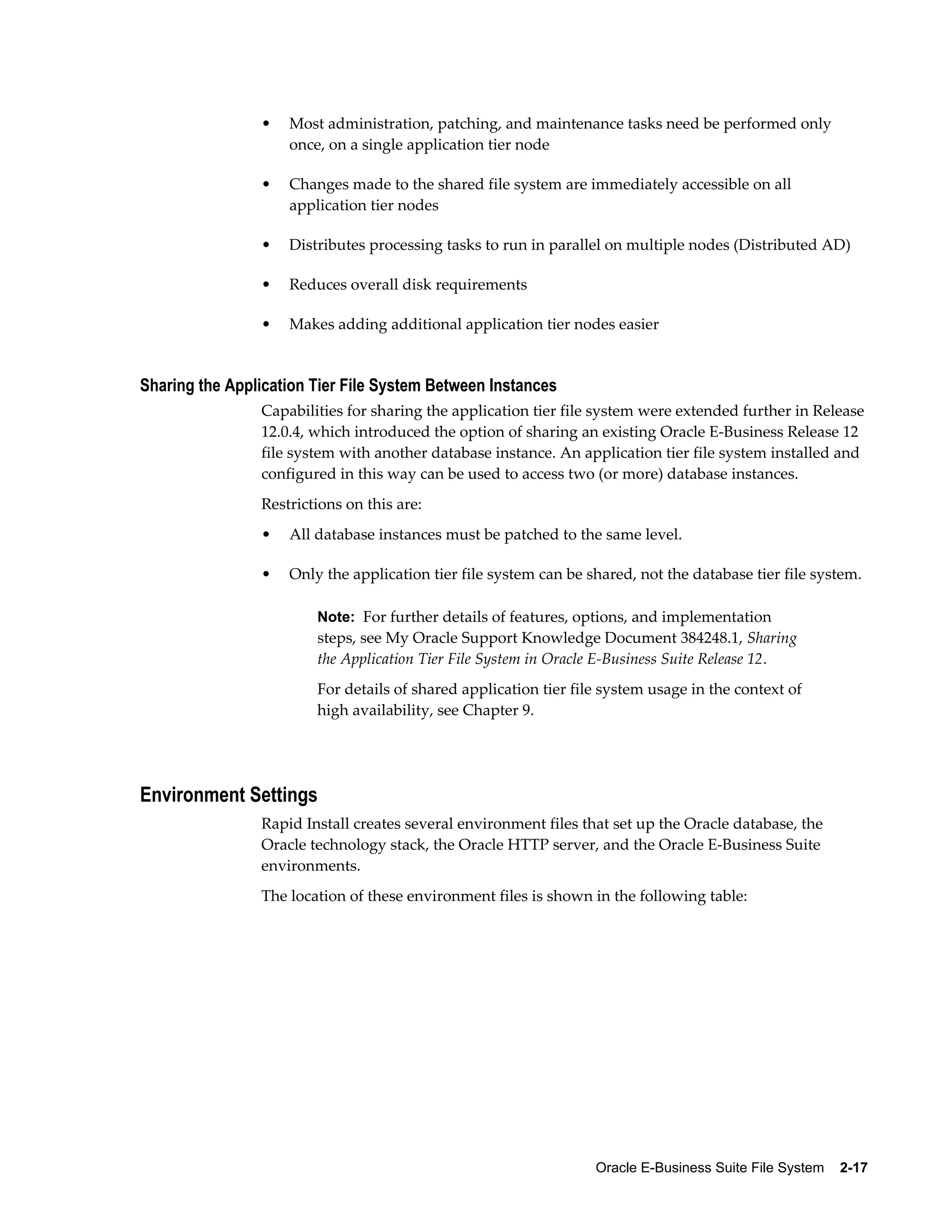
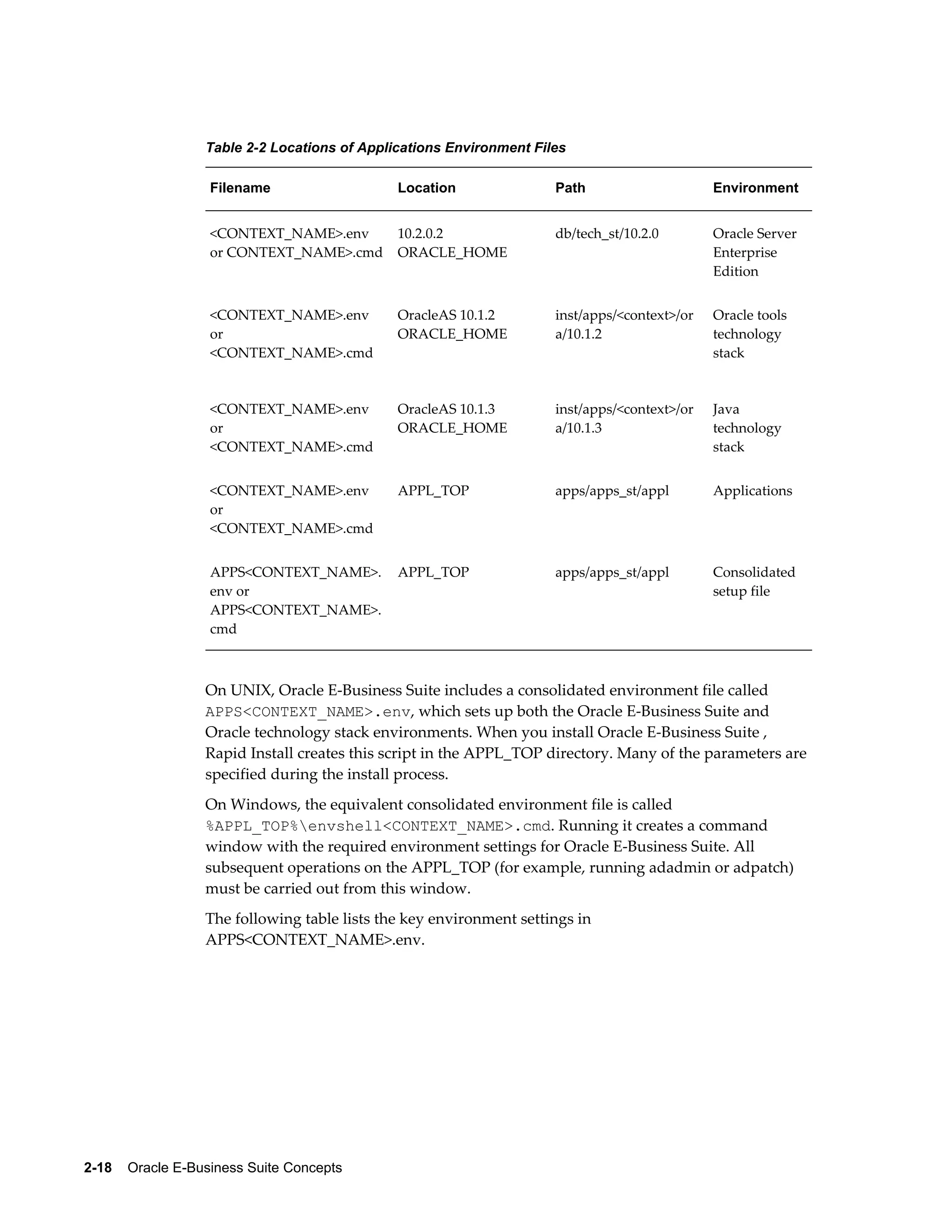
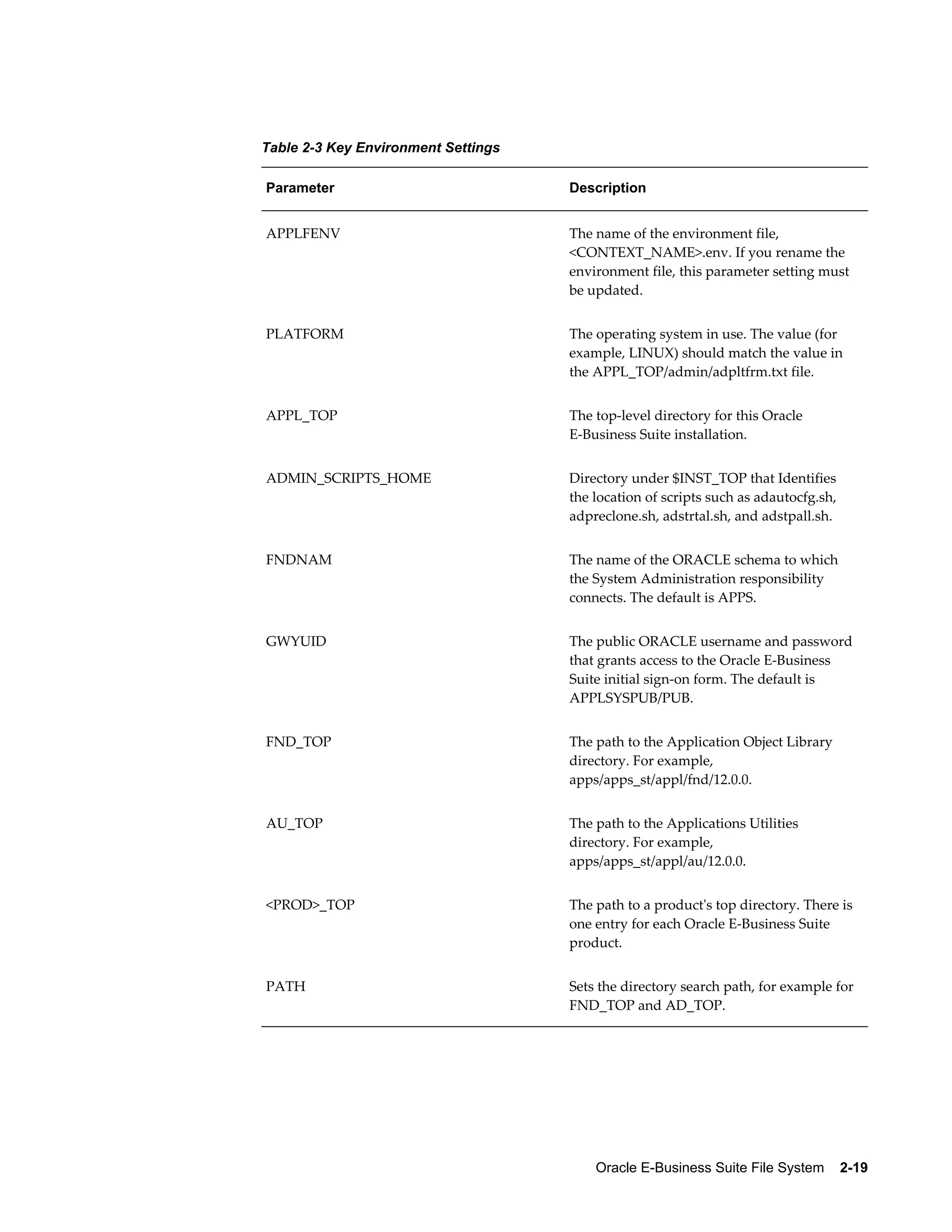
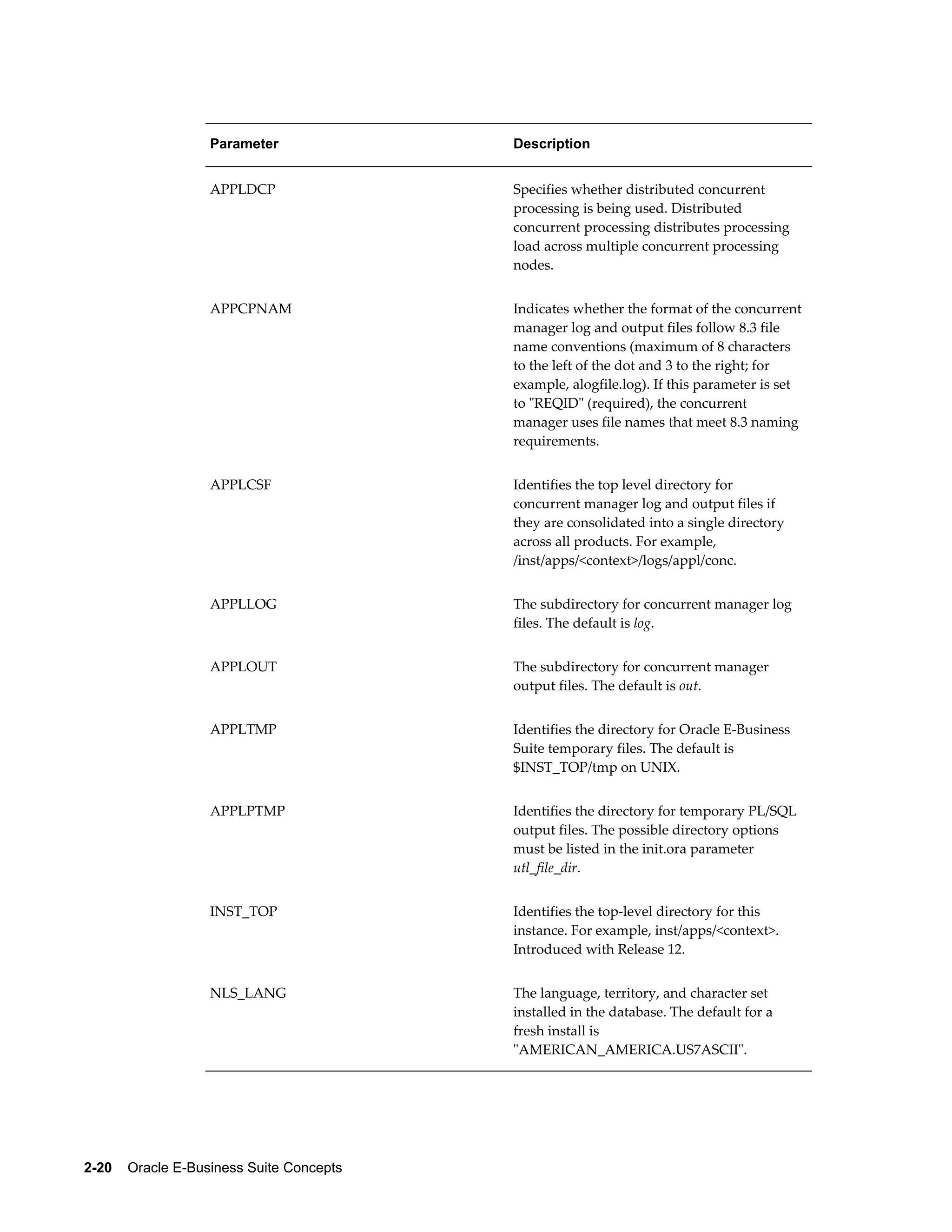
The Oracle Application Object Library is a key component of the Oracle E-Business 
Suite technology layer. It consists of a collection of reusable code, programs, and 
database objects that provides common functionality across all products. 
Oracle Application Object Library offers many features to make system administration 
easier, such as security setup and maintenance, and management of concurrent 
processing. Using Application Object Library ensures that the processing of flexfields or 
the procedure for report submission, for example, does not vary from one product to 
another. Oracle Application Object Library also provides capabilities for developers to 
extend the operation of Oracle E-Business Suite by allowing the creation of custom 
programs that interact with the base modules. 
End User Features 
Oracle Application Object Library includes several features that help provide 
uniformity of function across the various Oracle E-Business Suite products. 
Standard User Interface 
Oracle Application Object Library supports the integration of Oracle E-Business Suite 
by providing standardized functionality and capabilities across all products so that the 
look and feel remains the same from product to product. 
Shared Flexfield value sets 
Flexfields allow the entry of certain important information to be standardized across all 
products. One example is the Accounting Flexfield, which is used by Financials 
products and Manufacturing products. 
Standard Report Submission (SRS) 
The procedure to submit a background report to the concurrent manager using SRS is 
the same, regardless of the product that owns the report. SRS takes advantage of shared 
flexfield value sets. 
Online Help 
The presentation of Online Help is also standardized across all Oracle E-Business Suite 
products 
Developer Features 
Oracle Application Object Library provides many features for developers creating 
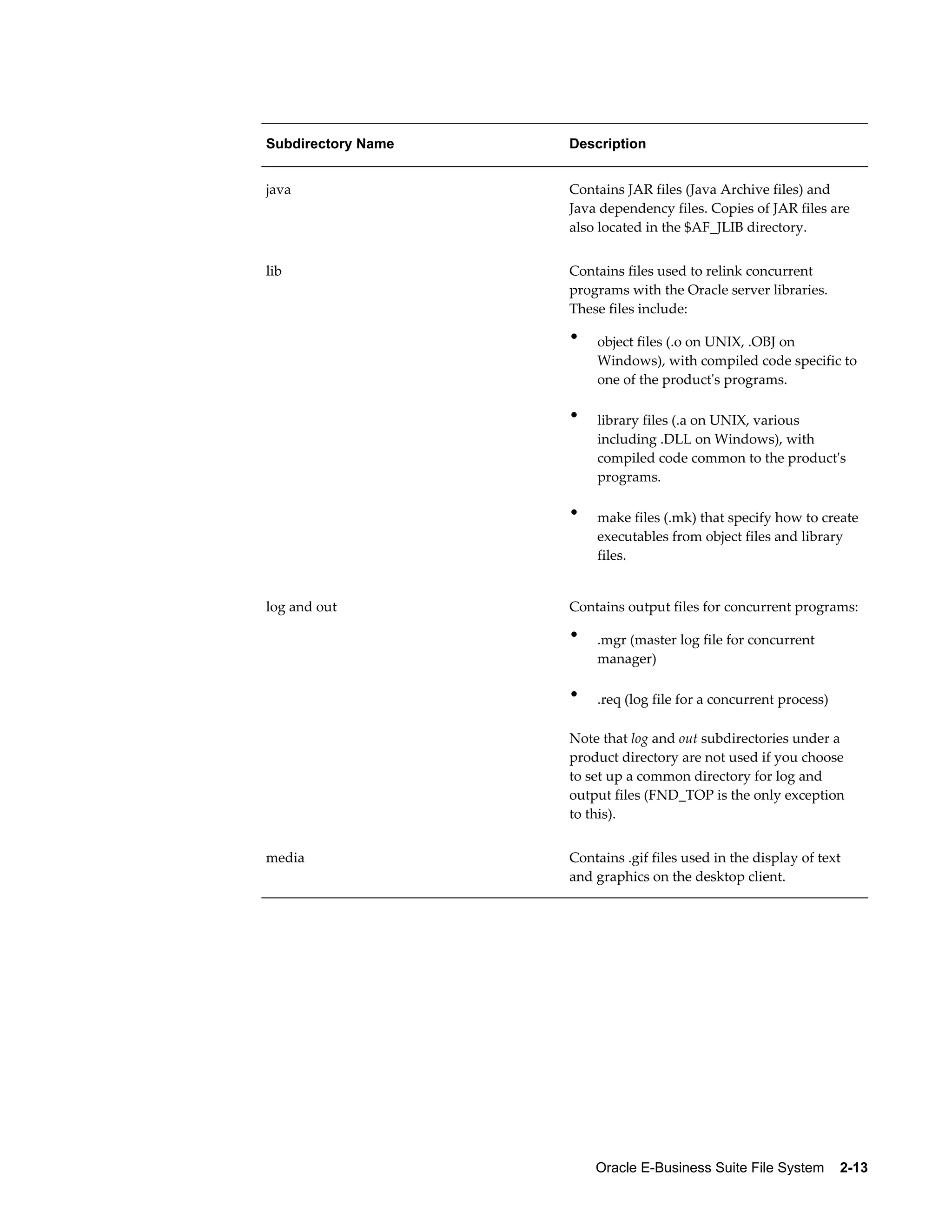
custom forms, reports, or programs that interface with Oracle E-Business Suite: 
• The same coding and Graphical User Interface (GUI) standards used by Oracle 
E-Business Suite developers are available for custom development. 
• Custom reports can be integrated into Standard Report Submission so that they can 
be submitted and monitored using the same procedures as other Oracle E-Business 
Suite reports, and developers can set up certain menus and responsibilities to access 
1-26 Oracle E-Business Suite Concepts
Oracle E-Business Suite Architecture 1-27 
custom reports or standard objects. 
• Flexfields used on custom forms can take advantage of existing flexfield capabilities 
such as value sets, validation, and security rules. 
• Custom menus and responsibilities can be seamlessly integrated with Oracle 
E-Business Suite. 
Features for System Administrators 
Oracle Application Object Library provides many features to simplify administration of 
Oracle E-Business Suite, enabling the system administrator to carry out routine tasks 
quickly and easily. These features include: 
• Registering new Oracle E-Business Suite users, and giving them access to only those 
Forms, functions, and reports they need to do their jobs. 
• Deciding which users have access to each product, and within a product, which 
Forms, functions, and reports a user can access. 
• Monitoring what users do, and when, via comprehensive auditing capabilities. 
• Setting user and system profiles to modify the look and behavior of Oracle 
E-Business Suite products; profiles can be set at site, application, responsibility, and 
user levels. 
• Monitoring and controlling concurrent processing using interfaces such as Oracle 
Applications Manager (OAM). 
Oracle Application Object Library Security 
Oracle Application Object Library controls access to the data in Oracle E-Business Suite 
via user sign-ons and responsibilities. Each user must have a valid user name and 
password to gain access to Oracle E-Business Suite. 
A responsibility is a level of authority in Oracle E-Business Suite that lets users access 
only those functions and data appropriate to their roles in the organization. For 
example, responsibilities may be used to allow access to a specific product, ledger, 
operating unit, or to a restricted list of windows, functions, reports, and groups of 
products, or data groups. 
Note that the Forms available from the navigation menus vary by responsibility. For 
example, the Purchasing User navigation menu does not include all the forms that are 
available to the Purchasing Superuser navigation menu. 
When you install Oracle E-Business Suite, a standard user called SYSADMIN is created 
for you. Several default responsibilities are also created. Since the SYSADMIN sign-on 
is automatically assigned to the System Administrator responsibility, you can use 
SYSADMIN to create new user signons and assign them to responsibilities. You can also 
create any custom responsibilities you need.
Oracle Workflow (WF) 
Oracle Workflow delivers a complete workflow management system that supports 
business process based integration. Its technology enables modeling, automation, and 
continuous improvement of business processes, routing information of any type 
according to user-defined business rules. Oracle Workflow also provides an 
infrastructure for the enterprise-wide communication of data related to defined 
business events, providing the capabilities needed to: 
• Manage enterprise business processes that may span trading partners 
• Support standard and personalized business rules 
• Streamline and automate transaction flows 
• Manage exceptions without manual intervention 
Oracle Workflow lets you model and maintain your business processes using a 
graphical workflow builder. You can model and automate sophisticated business 
processes, defining processes that can loop, branch into parallel flows and rendezvous, 
decompose into sub-flows, branch on task results, time out, and more. 
Acting as a system integration hub, Oracle Workflow can apply business rules to control 
objects and route them between applications and systems. It extends the reach of 
business process automation throughout an enterprise and beyond, to include any 
email user, web user, or system, enabling people to receive, analyze, and respond to 
notifications needing their attention. Users can respond to a notification via any standard 
email system or standard Web browser. 
Workflow Components 
Oracle Workflow Builder provides a graphical drag and drop process designer. You can 
create and evolve business processes to incorporate existing business practices between 
your organization and customers or suppliers, without modifying existing business 
processes and without changing applications code. 
The Workflow Engine, embedded in the Oracle database, implements process definitions 
at runtime. The Workflow Engine monitors workflow states and coordinates the routing 
of activities for a process. Changes in workflow state, such as the completion of 
workflow activities, are signaled to the engine via a PL/SQL or Java API. 
The Oracle Workflow Business Event System provides a workflow-enabled solution for 
your enterprise application integration requirements. The Business Event System is an 
application service delivered with Oracle Workflow that uses Oracle Advanced 
Queuing technology to communicate business events between systems. The Business 
Event System supports the following types of integration: 
• Message-based point-to-point system integration 
• System integration messaging hubs 
1-28 Oracle E-Business Suite Concepts
• Distributed applications messaging 
The Business Event System uses Oracle Advanced Queuing to propagate messages 
between communication points on systems, called agents, using a specified protocol. 
Events received from external systems are processed by an agent listener that runs on 
that agent's queue. 
The Oracle Workflow Event Manager enables registration of significant business events for 
selected applications, including functions that generate the XML event messages. Users 
of those applications can register subscriptions on events that are significant to their 
systems, to take actions such as triggering custom code. 
Oracle E-Business Suite Architecture 1-29 
Features and Usage 
A completed application transaction or event can initiate a workflow process by raising 
a business event or by calling a series of Workflow Engine APIs. The Workflow Engine 
drives through the process, performing all automated steps and calling the Notification 
System to deliver notifications for steps that involve human intervention. 
You can review and respond to your business process notifications from one central 
window, known as the worklist, using a standard Web browser. This offers the flexibility 
to prioritize tasks and to define sort criteria, giving you the flexibility to organize your 
work the way you wish. For example, you can group notifications by type or subject, to 
avoid having to jump from one context to another. Alternatively, you can focus on time 
critical tasks first, sorting by priority or due date. Oracle Workflow is fully integrated 
with the Oracle E-Business Suite, providing the ability to drill down to any Oracle 
E-Business Suite or associated URL to view or complete a transaction. 
When a business event occurs, the Workflow Event Manager executes any subscriptions 
registered on the event. For local events, the subscribing code can be executed 
synchronously, in the same database transaction as the code that raised the event, or 
asynchronously, deferring costly subscription processing to a later time, and thus 
allowing control to be returned more quickly to the calling application. Events can also 
be received asynchronously from external systems. Before producing the XML event 
message, the Event Manager minimizes processing by checking whether event 
information is required by subscriptions on the event. 
Additional Capabilities 
The flexibility of the powerful Workflow Engine event activities enable you to model 
business events within workflow processes. Event activities can be used to model 
content-based routing, transformations, error handling, and so on. A workflow process 
can be started or processed by an inbound message, and can send an outbound message 
or raise an event to the Event Manager. XML function activities give you access to event 
content data within workflow processes. Workflow processes based on business events 
give the greatest flexibility when implementing an integration solution. However, the 
Business Event System can also run independently of the Workflow Engine, to enable 
point-to-point messaging to be utilized. 
You can perform complex transformations between different formats required for your
business documents. Oracle Workflow allows you to apply a stylesheet to an XML 
event message. In addition, when queues are defined within the Business Event System, 
you specify the logic used to enqueue and dequeue messages. This logic, called a queue 
handler, can include transformations. 
Oracle Alert (ALR) 
Oracle Alert (ALR) allows you to email system notifications to users when an exception 
or event has occurred. Some products are delivered with predefined alerts, which can 
be used to notify users about specified database exceptions as they occur, and perform 
routine tasks automatically according to a schedule you define. 
For example, you can configure Oracle Alert to send an email to key database 
administrators when a tablespace in the Oracle E-Business Suite database does not have 
adequate free space. 
Oracle XML Publisher (XDO) 
Oracle XML Publisher is a Java-based product based on the World Wide Web 
Consortium (W3C) Extensible Stylesheet Language (XSL). Specifically, XML Publisher 
utilizes the XSL-FO standard to transform XML data into a formatting object (FO). A 
formatting object contains both data and formatting information, and can be further 
transformed to an output format such as Portable Document Format (PDF). 
XML Publisher uses data definitions and templates to produce output reports in the 
desired format. A data definition is a data source (or a combination of data sources) that 
either is XML or can produce XML. Examples include output from concurrent programs 
and Web services. A template is a report definition, which sets out how a report should 
look. The template layout can be user-specified. Supported templates currently include 
RTF, PDF Forms, and XSL. 
Key features of XML Publisher include: 
• Provides a template-based, easy-to-use publishing solution that enables end-users 
to develop and maintain report formats to suit specific business needs. 
• Allows users to employ familiar desktop tools such as Adobe Acrobat, Microsoft 
Excel, and Microsoft Word to create and maintain reports in their preferred format, 
and then use XML Publisher to convert these documents to the XSL-FO format. 
• Offers a variety of options for published documents, such as multiple output 
formats, multiple languages, and multiple delivery options. 
Core Components 
The core components of XML Publisher are a Java-based set of publishing tools 
accessible via Java APIs from Oracle E-Business Suite or any Java-based application. 
• FO Processor - The formatting object that results from the application of the 
XSL-FO template to the XML data is used by the FO Processor to generate the 
1-30 Oracle E-Business Suite Concepts
required output document. Currently the FO Processor only supports PDF as an 
output format; other formats such as HTML and RTF will be supported in future 
releases of XML Publisher. 
• PDF Document Merger - The PDF Document Merger accepts XML data and a PDF 
document as input, and uses a mapping between the XML and the fields in the 
document to merge the data into the PDF document. 
• PDF Form Processor - The PDF Form Processor is used to add attributes such as 
Oracle E-Business Suite Architecture 1-31 
watermarks to a merged document. 
• RTF Template Parser - Report templates can be created in the Rich Text Format(RTF) 
document format, and converted to an XSL-FO format that can be applied to XML 
data. 
Template Manager 
The Template Manager enables you to upload and maintain your templates and data 
sources. Key features include: 
• Data Source Registration - Data sources that generate XML data can be registered 
with XML Publisher. These can be concurrent programs such as Oracle Reports, or 
BC4J objects that are able to generate XML data. 
• Template Registration - Templates used to format report data must be registered 
with XML Publisher. They can then be applied to the report data to create the final 
published output. Supported template types include PDF, RTF, and XSL-FO. 
• XML Publisher APIs - XML Publisher provides APIs to allow other Oracle 
E-Business Suite products to communicate directly with the underlying processes. 
Oracle Configuration Manager 
Oracle Configuration Manager (OCM) is a component that is designed to facilitate 
support for your Oracle products. Use of Oracle Configuration Manager is optional, but 
recommended. 
A lightweight agent that consumes minimal CPU resources, OCM supports automatic 
discovery of installed components and configuration information, and provides 
continuous tracking of key Oracle and system statistics of the machine it is running on. 
Data collected is sent via HTTPS (secure HTTP) to Oracle Support, who can thereby 
maintain an up-to-date view of your Oracle installation, facilitating pro-active problem 
avoidance and helping to reduce the time needed for resolution of support issues. 
To manage Oracle Configuration Manager OCM processes running on an Oracle 
E-Business Suite Release 12 instance, refer to the documentation at 
http://www.oracle.com/technology/documentation/ocm.html. OCM processes are not 
managed by the standard service management scripts (such as adstrtal.sh and
adstpall.sh) that are described in Chapter 5. 
Oracle E-Business Suite Patch Nomenclature 
Oracle E-Business Suite Release 12 includes numerous products that are designed to 
serve a wide variety of needs in a consistent and complementary way. All have 
abbreviated names or two or more usually three letters. These short names are used in 
special patch names (see below) and other places. In general, the short names relate to 
the full product name. Common examples include Applications Technology (ATG), 
Business Intelligence (BIS), Financials (FIN), Human Resources (HR), and Supply Chain 
Management (SCM). 
You can search a list of product abbreviations and full names within Oracle 
Applications Manager, using the License Manager tool. From the License Manager home 
page, choose Reports > Licensed Products. From the List of Products, you can view 
details of licensed, shared, or not licensed products, or search for a particular product 
abbreviation or name. 
Note: For more information about the License Manager tool, see Oracle 
E-Business Suite Maintenance Procedures. 
Patch Terminology 
• A release update pack increments the third section of the release number, for example 
to 12.1.1 or 12.1.2, and consists of a cumulative aggregation of product family 
release update packs created across Oracle E-Business Suite since the initial (base) 
release. 
• A product family release update pack is an aggregation of patches created for a specific 
product family after the initial release, and designated by the release number 
followed by the product short name and a letter. For example, in 
'R12.ATG_PF.A.DELTA.6', '12' is the major release number, 'ATG_PF.A' means 
'Applications Technology Product Family pack A', and 'delta.6' means this is the 
sixth rollup patch on top of Applications Technology Product Family pack H. 
• A codelevel is essentially a rollup patch with a name that looks like a version 
number. Higher codelevels include more changes, and include all fixes from lower 
codelevels. For example, R12.AD.A was the initial release of AD in Release 12. 
R12.AD.A.1 was a higher codelevel, which included all code in R12.AD.A plus 
additional fixes; R12.AD.A.2 was a higher codelevel again, which included all code 
in R12.AD.A.1, plus further fixes. 
1-32 Oracle E-Business Suite Concepts
2 
Oracle E-Business Suite File System 
Oracle E-Business Suite File System 2-1 
Introduction 
An Oracle E-Business Suite Release 12 system utilizes components from many Oracle 
products. These product files are stored below a number of key top-level directories on 
the database and application server machines. 
Note: No Oracle E-Business Suite components are installed on desktop 
client machines, although JAR files and their supporting utilities are 
downloaded as required. 
Depending on how you chose to install Oracle E-Business Suite, these product 
directories may be located on a single machine (the simplest case) or on multiple 
machines (the most common type of deployment). Operating system environment 
settings indicate the location of the various files in the file systems of the database and 
application tier machines. This chapter discusses the association between these 
environment settings and the corresponding files and directories.
Figure 2-1 Top-Level Oracle E-Business Suite Directory Structure 
• The db/apps_st/data directory is located on the database node machine, and 
contains the system tablespaces, redo log files, data tablespaces, index tablespaces, 
and database files 
• The db/tech_st/11.1.0 directory is located on the database node machine, and 
contains the ORACLE_HOME for the Oracle 11g database 
• The apps/apps_st/appl (APPL_TOP) directory contains the product directories and 
files for Oracle E-Business Suite 
• The apps/apps_st/comn (COMMON_TOP) directory contains Java classes, HTML 
pages, and other files and directories used by multiple products 
• The apps/tech_st/10.1.2 directory contains the ORACLE_HOME used for the Oracle 
E-Business Suite technology stack tools components 
• The apps/tech_st/10.1.3 directory contains the ORACLE_HOME used for the Oracle 
E-Business Suite technology stack Java components 
Oracle E-Business Suite Environment 
Oracle E-Business Suite makes extensive use of environment settings to locate 
executable programs and other files essential to Oracle E-Business Suite operation. 
These environment settings are defined when you install Oracle E-Business Suite. Many 
of the settings are defined by information you provide when running Rapid Install, 
while others have the same values in all installations. 
The environment settings and their associated values are stored in environment files, 
2-2 Oracle E-Business Suite Concepts
which have a .env suffix on UNIX (.cmd on Windows). Environment files and settings 
are discussed in more detail later in this chapter. 
Oracle E-Business Suite File System 2-3 
Instance Home ($INST_TOP) 
Oracle E-Business Suite Release 12 introduces the concept of a top-level directory for an 
Oracle E-Business Suite instance. This directory is referred to as the Instance Home, and 
denoted by the environment variable $INST_TOP. 
Using an Instance Home provides the ability to share application and technology stack 
code among multiple instances, for example a development instance and a test instance. 
Other benefits include support for read-only file systems and centralization of log files, 
both of which are discussed further below. 
The basic structure of the instance home is: <APPS_BASE>/inst/apps/<context_name>, 
where APPS_BASE (which does not have or need a corresponding environment 
variable) is the top level of the Oracle E-Business Suite installation, and <context_name> 
is the highest level at which the applications context exists. For example, the setting of 
$INST_TOP might be <diskresource>/applmgr/inst/apps/testsys2, where testsys2 is the 
context name. 
All configuration files created by AutoConfig are stored under the Instance Home. This 
facilitates use of a shared application tier file system, as described later in this chapter.
Figure 2-2 Instance Top 
Read-Only File Systems 
A key benefit of moving to the new Instance Home model is that as AutoConfig no 
longer writes to the APPL_TOP or ORACLE_HOME directories, both of these can be 
made into read-only file systems if required. In previous Oracle E-Business Suite 
releases, the adpatch utility wrote to $APPL_TOP/admin on an administration 
(patching) node. Under the new model, $APPL_CONFIG_HOME/admin is used 
instead. $APPL_CONFIG_HOME will equate to a value such as 
/u01/oracle/VIS/apps/apps_st/appl. 
Note: In a shared file system environment, Oracle recommends that the 
INST_TOP should be located on a local disk and not on a shared 
resource such as NFS, because of possible issues storing log files on 
shared resources. 
Log Files 
Another advantage of employing the concept of an Instance Home is that log files can 
be stored centrally for an instance, and therefore managed more easily. 
2-4 Oracle E-Business Suite Concepts
Important: This is particularly significant from a security perspective, 
as log files may contain sensitive data that should not be accessible to 
general users. 
The following diagram shows the directory structure used for log files in Release 12, 
with some of the subdirectories used to categorize the log files: 
Oracle E-Business Suite File System 2-5 
Figure 2-3 Log Files 
The data Directory 
The db/apps_st/data directory stores the different types of file used by the Oracle 
database. Rapid Install places the system, data, and index files in directories below 
several file system mount points on the database machine. You can specify these mount 
points during installation.
The db Directory 
Oracle E-Business Suite supports employing an Oracle E-Business Suite database 
running out of one ORACLE_HOME, while running other Oracle E-Business Suite 
components out of additional ORACLE_HOMEs. This multiple ORACLE_HOMEs 
configuration allows Oracle E-Business Suite to utilize new features of the Oracle 
Database and associated technologies in the most flexible manner. 
Release 12 utilizes an Oracle Database 11g ORACLE_HOME, (Oracle E-Business Suite 
database home) whose files are located under the db directory. These files are needed 
for running and maintaining the Oracle E-Business Suite database. 
Note: Oracle E-Business Suite is always certified with database server 
patchsets (minor maintenance releases). 
The comn Directory 
The apps/apps_st/comn (COMMON_TOP) directory contains files used by many 
different Oracle E-Business Suite products, and which may also be used with 
third-party products. 
2-6 Oracle E-Business Suite Concepts
Oracle E-Business Suite File System 2-7 
Figure 2-4 COMMON_TOP Directory Structure 
The admin directory 
The admin directory, under the COMMON_TOP directory, is the default location for 
the concurrent manager log and output directories. When the concurrent managers run 
Oracle E-Business Suite reports, they write the log files and temporary files to the log 
subdirectory of the admin directory, and the output files to the out subdirectory of the 
admin directory. 
You can change the location the concurrent managers write these files to, so that, for 
example, the log and output files are written to directories in each <PROD>_TOP 
directory. This may be more desirable in terms of disk space management, or the need 
to avoid a possible performance bottleneck on a system that has a high concurrent 
processing throughput. 
Note: For further details, see Concurrent Processing Server in Chapter 1 
of this book, and Chapters 6, 7 and 8 of Oracle E-Business Suite System 
Administrator's Guide - Configuration. 
The install subdirectory of the admin directory contains scripts and log files used by 
Rapid Install. The scripts subdirectory of admin contains scripts used to start and stop 
services such as listeners and concurrent managers. 
The html directory
The OA_HTML environment setting points to the html directory. The Oracle E-Business 
Suite HTML-based sign-on screen and Oracle HTML-based Applications HTML files 
are installed here. The html directory also contains other files used by the HTML-based 
products, such as JavaServer Page (JSP) files, Java scripts, XML files, and style sheets. 
Typically, the path will look like: 
<diskresource>/applmgr/apps/apps_st/comn/webapps/oacore/html. 
Note: The META-INF and WEB-INF subdirectories were introduced in 
Release 12 to meet J2EE specifications. 
The java directory 
Release 12 introduces some significant changes to the locations in which the various 
types of Java files are stored. Rapid Install installs all Oracle E-Business Suite class files 
in the COMMON_TOP/classes directory, pointed to by the $JAVA_TOP environment 
variable. Zip and jar files are installed in the $COMMON_TOP/java/lib directory, 
pointed to by the $AF_JLIB environment variable (introduced with Release 12). The 
top-level Java directory, $COMMON_TOP/java, is pointed to by the $JAVA_BASE 
environment variable. 
The util directory 
The util directory contains the third-party utilities licensed to ship with Oracle 
E-Business Suite. These include, for example, the Java Runtime Environment (JRE), Java 
Development Kit (JDK), and the Zip utility. 
The appl Directory 
Oracle E-Business Suite files are stored in the <dbname>APPL directory, which is 
generally known as the APPL_TOP directory. 
2-8 Oracle E-Business Suite Concepts
Oracle E-Business Suite File System 2-9 
Figure 2-5 APPL_TOP Directory Structure 
The APPL_TOP directory contains: 
• The core technology files and directories. 
• The product files and directories (for all products). 
• The main Oracle E-Business Suite environment file, called <CONTEXT_NAME>.env 
on UNIX, and <CONTEXT_NAME>.cmdon Windows. 
• The consolidated environment file, called APPS<CONTEXT_NAME>.env on UNIX, 
and APPS<CONTEXT_NAME>.cmd on Windows. 
Note: CONTEXT_NAME is the Oracle Applications context, described 
further in Chapter 5. Its default value is <SID>_<hostname>. 
Rapid Install creates a directory tree for every Oracle E-Business Suite product in this 
APPL_TOP directory, whether licensed or not. 
Warning: Regardless of registration status, all Oracle E-Business Suite 
products are installed in the database and the file system. Do not 
attempt to remove files for any unregistered products. 
Rapid Install installs a new APPL_TOP directory when you upgrade. Rapid Install does 
not delete any existing product files from earlier releases, but unloads new product files 
into a new apps/apps_st/appl directory tree. 
Each APPL_TOP directory is associated with a single Oracle E-Business Suite database. 
If you install both a Vision Demo system and a test system, Rapid Install will lay down 
two file systems, one for each of these Oracle E-Business Suite systems.
Product Directories 
Each product has its own subdirectory under APPL_TOP. The subdirectories are named 
in accordance with the product's standard abbreviation, such as gl for Oracle General 
Ledger. Within each product directory is a subdirectory that is named using the base 
Oracle E-Business Suite release number, such as 12.0.0 for the initial Release 12. This 
directory contains the various subdirectories for the product files. 
<PROD>_TOP Directory 
The <APPL_TOP>/<prod>/<version> path is known as the product top directory 
(<PROD>_TOP), and its value is stored in the <PROD>_TOP environment variable. 
For example, if APPL_TOP=/d01/oracle/prodapps, then the value contained in the 
AD_TOP environment variable is /d01/oracle/prodapps/ad/12.0.0, and the AD_TOP 
environment variable points to the <APPL_TOP>/ad/12.0.0 directory. 
For the same APPL_TOP, the value of AU_TOP is /d01/oracle/prodapps/au/12.0.0, and 
the AU_TOP environment variable points to the <APPL_TOP>/au/12.0.0 directory. The 
same principle applies to all directories, apart for the admin directory. 
Product Files 
Each <PROD>_TOP directory, such as <APPL_TOP>/gl/12.0.0, contains subdirectories 
for product files. Product files include forms files, reports files, and files used to 
upgrade the database. To display data entry forms for Oracle General Ledger, for 
example, Oracle E-Business Suite accesses files in the forms subdirectory under the 
12.0.0 directory. 
2-10 Oracle E-Business Suite Concepts
Oracle E-Business Suite File System 2-11 
Figure 2-6 APPL_TOP Directory Structure 
Within each <PROD>_TOP directory, the product's files are grouped into subdirectories 
according to file type and function. The next figure expands the inset to show the full 
directory structure for gl. 
Figure 2-7 Detail of gl Directory Structure 
The following table summarizes product subdirectories and the types of files each one 
may contain. 
Note: Not all products use all the subdirectories listed in this table.
Table 2-1 Applications Product Subdirectories and File Types 
Subdirectory Name Description 
admin The <PROD>_TOP/admin directory contains 
2-12 Oracle E-Business Suite Concepts 
product-specific files used to upgrade each 
product. This is in distinction to the 
<APPL_TOP>/admin directory, which 
contains upgrade-related files for all products. 
driver Contains driver files (.drv files) used in 
upgrading. 
import Contains DataMerge files used to upgrade 
seed data. 
odf Contains object description files (.odf files) 
used to create tables and other database 
objects. 
sql Contains SQL*Plus scripts used to upgrade 
data, and .pkh, .pkb, and .pls scripts to create 
PL/SQL stored procedures. 
bin Contains concurrent programs, other C 
language programs and shell scripts for each 
product. 
forms Contains Oracle Forms generated runtime 
(.fmx) files (Oracle Forms form files). 
help Contains the online help source files. Within 
this directory are subdirectories for each 
language installed. 
html Contains HTML, JavaScript, and JavaServer 
Page (JSP) files, primarily for HTML-based 
Applications products. 
include Contains C language header (.h) files that my 
be linked with files in the lib directory. Not all 
products require this directory.
Subdirectory Name Description 
java Contains JAR files (Java Archive files) and 
Java dependency files. Copies of JAR files are 
also located in the $AF_JLIB directory. 
lib Contains files used to relink concurrent 
programs with the Oracle server libraries. 
These files include: 
• object files (.o on UNIX, .OBJ on 
Windows), with compiled code specific to 
one of the product's programs. 
• library files (.a on UNIX, various 
including .DLL on Windows), with 
compiled code common to the product's 
programs. 
• make files (.mk) that specify how to create 
executables from object files and library 
files. 
log and out Contains output files for concurrent programs: 
• .mgr (master log file for concurrent 
manager) 
• .req (log file for a concurrent process) 
Note that log and out subdirectories under a 
product directory are not used if you choose 
to set up a common directory for log and 
output files (FND_TOP is the only exception 
to this). 
media Contains .gif files used in the display of text 
and graphics on the desktop client. 
Oracle E-Business Suite File System 2-13
Subdirectory Name Description 
mesg Concurrent programs also print messages in 
2-14 Oracle E-Business Suite Concepts 
the log and output files. This directory 
contains the .msb files (binary message files 
used at runtime), and language-specific 
message files (such as a US.msb file for 
American English and a D.msb file for 
German). The files contain the forms messages 
that are displayed at the bottom of the screen 
or in popup windows. 
patch Updates to the data or data model utilize this 
directory to store the patch files. 
reports Contains Oracle Reports platform-specific rdf 
binary report files for each product. Reports 
for each language are stored in subdirectories 
of the reports directory. 
resource Contains .pll files (PL/SQL library files for 
Oracle Forms), which, like the plsql directory 
files, are later copied to AU_TOP. 
sql Contains .sql files (SQL*Plus scripts) for 
concurrent processing. 
Language Files 
When you install Oracle E-Business Suite in a language other than American English, 
each product tree includes directories that use the relevant NLS language code. These 
directories hold translated data, forms, and message files. For example, the language 
directory named D designates German. The data loader files in the D subdirectory of 
the admin directory contain the German translation of the product seed data. 
The US subdirectory in the forms directory contains Oracle Forms forms in American 
English. The D directory in the forms directory contains the same forms, translated into 
German. However, the mesg directory contains message files in both American English 
and German. 
Note: For further details, see the Oracle Globalization Support Guide.
Oracle E-Business Suite File System 2-15 
Core Technology Directories 
The admin, ad, au, and fnd directories are the core technology directories. 
The admin directory 
This directory and its subdirectories contain files and scripts used by the AD utilities 
during upgrade and maintenance processes. 
These files and scripts include: 
• The adovars.env environment file, which defines certain file and directory locations 
• Scripts run during the upgrade 
• <SID>/log and <SID>/out directories for upgrade, log, and output files respectively 
• A <SID>/restart directory where AD programs create restart files 
The ad (Applications DBA) directory 
This directory and its subdirectories contain installation and maintenance utilities, 
including: 
• AD Administration (adadmin) 
• AutoConfig (adconfig.sh) 
The au (Applications Utilities) directory 
This directory and its subdirectories contain product files that are consolidated in a 
single location for optimal processing. These files include: 
• PL/SQL libraries used by Oracle Forms, in the resource subdirectory 
• Oracle Forms source files, in the forms subdirectory 
• A copy of all Java files used when regenerating the desktop client JAR files, in the 
java subdirectory 
• Certain reports needed by products such as Discoverer, in the reports subdirectory 
The fnd (Application Object Library) directory 
This directory and its subdirectories contain the scripts and programs that are used as 
the foundation for all Oracle E-Business Suite products to build data dictionaries, forms 
and C object libraries. 
Sharing the Application Tier File System 
A traditional multi-node installation of Release 11i required each application tier to 
maintain its own file system, consisting of the APPL_TOP file system (APPL_TOP,
COMMON_TOP, and a few related directories) and the application tier technology 
stack file system (8.0.6 ORACLE_HOME and iAS ORACLE_HOME). Subsequently, this 
was modified to allow the APPL_TOP to be shared across machines, and later to enable 
sharing of the entire application tier file system. 
Continuing this strategy, Rapid Install for Release 12 creates a system that shares not 
only the APPL_TOP and COMMON_TOP file systems, but the application node 
technology stack file system as well. Rapid Install sets up this configuration as the 
default for nodes that are running the same operating system. These files make up the 
application tier file system, and can be shared across multiple application tier nodes 
(provided they are running the same operating system). 
Note: A shared file system configuration is currently not supported on 
application tier server nodes running Windows. 
With a shared application tier file system, all application tier files are installed on a 
single shared disk resource that is mounted from each application tier node. Any 
application tier node can then be used to provide standard services, such a serving 
forms or Web pages, or concurrent processing. 
Figure 2-8 Shared Application Tier File System 
As well as reducing disk space needed, there are several other benefits of a shared 
application tier configuration: 
2-16 Oracle E-Business Suite Concepts
• Most administration, patching, and maintenance tasks need be performed only 
Oracle E-Business Suite File System 2-17 
once, on a single application tier node 
• Changes made to the shared file system are immediately accessible on all 
application tier nodes 
• Distributes processing tasks to run in parallel on multiple nodes (Distributed AD) 
• Reduces overall disk requirements 
• Makes adding additional application tier nodes easier 
Sharing the Application Tier File System Between Instances 
Capabilities for sharing the application tier file system were extended further in Release 
12.0.4, which introduced the option of sharing an existing Oracle E-Business Release 12 
file system with another database instance. An application tier file system installed and 
configured in this way can be used to access two (or more) database instances. 
Restrictions on this are: 
• All database instances must be patched to the same level. 
• Only the application tier file system can be shared, not the database tier file system. 
Note: For further details of features, options, and implementation 
steps, see My Oracle Support Knowledge Document 384248.1, Sharing 
the Application Tier File System in Oracle E-Business Suite Release 12. 
For details of shared application tier file system usage in the context of 
high availability, see Chapter 9. 
Environment Settings 
Rapid Install creates several environment files that set up the Oracle database, the 
Oracle technology stack, the Oracle HTTP server, and the Oracle E-Business Suite 
environments. 
The location of these environment files is shown in the following table:
Table 2-2 Locations of Applications Environment Files 
Filename Location Path Environment 
<CONTEXT_NAME>.env 
or CONTEXT_NAME>.cmd 
2-18 Oracle E-Business Suite Concepts 
10.2.0.2 
ORACLE_HOME 
db/tech_st/10.2.0 Oracle Server 
Enterprise 
Edition 
<CONTEXT_NAME>.env 
or 
<CONTEXT_NAME>.cmd 
OracleAS 10.1.2 
ORACLE_HOME 
inst/apps/<context>/or 
a/10.1.2 
Oracle tools 
technology 
stack 
<CONTEXT_NAME>.env 
or 
<CONTEXT_NAME>.cmd 
OracleAS 10.1.3 
ORACLE_HOME 
inst/apps/<context>/or 
a/10.1.3 
Java 
technology 
stack 
<CONTEXT_NAME>.env 
or 
<CONTEXT_NAME>.cmd 
APPL_TOP apps/apps_st/appl Applications 
APPS<CONTEXT_NAME>. 
env or 
APPS<CONTEXT_NAME>. 
cmd 
APPL_TOP apps/apps_st/appl Consolidated 
setup file 
On UNIX, Oracle E-Business Suite includes a consolidated environment file called 
APPS<CONTEXT_NAME>.env, which sets up both the Oracle E-Business Suite and 
Oracle technology stack environments. When you install Oracle E-Business Suite , 
Rapid Install creates this script in the APPL_TOP directory. Many of the parameters are 
specified during the install process. 
On Windows, the equivalent consolidated environment file is called 
%APPL_TOP%envshell<CONTEXT_NAME>.cmd. Running it creates a command 
window with the required environment settings for Oracle E-Business Suite. All 
subsequent operations on the APPL_TOP (for example, running adadmin or adpatch) 
must be carried out from this window. 
The following table lists the key environment settings in 
APPS<CONTEXT_NAME>.env.
Oracle E-Business Suite File System 2-19 
Table 2-3 Key Environment Settings 
Parameter Description 
APPLFENV The name of the environment file, 
<CONTEXT_NAME>.env. If you rename the 
environment file, this parameter setting must 
be updated. 
PLATFORM The operating system in use. The value (for 
example, LINUX) should match the value in 
the APPL_TOP/admin/adpltfrm.txt file. 
APPL_TOP The top-level directory for this Oracle 
E-Business Suite installation. 
ADMIN_SCRIPTS_HOME Directory under $INST_TOP that Identifies 
the location of scripts such as adautocfg.sh, 
adpreclone.sh, adstrtal.sh, and adstpall.sh. 
FNDNAM The name of the ORACLE schema to which 
the System Administration responsibility 
connects. The default is APPS. 
GWYUID The public ORACLE username and password 
that grants access to the Oracle E-Business 
Suite initial sign-on form. The default is 
APPLSYSPUB/PUB. 
FND_TOP The path to the Application Object Library 
directory. For example, 
apps/apps_st/appl/fnd/12.0.0. 
AU_TOP The path to the Applications Utilities 
directory. For example, 
apps/apps_st/appl/au/12.0.0. 
<PROD>_TOP The path to a product's top directory. There is 
one entry for each Oracle E-Business Suite 
product. 
PATH Sets the directory search path, for example for 
FND_TOP and AD_TOP.
Parameter Description 
APPLDCP Specifies whether distributed concurrent 
2-20 Oracle E-Business Suite Concepts 
processing is being used. Distributed 
concurrent processing distributes processing 
load across multiple concurrent processing 
nodes. 
APPCPNAM Indicates whether the format of the concurrent 
manager log and output files follow 8.3 file 
name conventions (maximum of 8 characters 
to the left of the dot and 3 to the right; for 
example, alogfile.log). If this parameter is set 
to "REQID" (required), the concurrent 
manager uses file names that meet 8.3 naming 
requirements. 
APPLCSF Identifies the top level directory for 
concurrent manager log and output files if 
they are consolidated into a single directory 
across all products. For example, 
/inst/apps/<context>/logs/appl/conc. 
APPLLOG The subdirectory for concurrent manager log 
files. The default is log. 
APPLOUT The subdirectory for concurrent manager 
output files. The default is out. 
APPLTMP Identifies the directory for Oracle E-Business 
Suite temporary files. The default is 
$INST_TOP/tmp on UNIX. 
APPLPTMP Identifies the directory for temporary PL/SQL 
output files. The possible directory options 
must be listed in the init.ora parameter 
utl_file_dir. 
INST_TOP Identifies the top-level directory for this 
instance. For example, inst/apps/<context>. 
Introduced with Release 12. 
NLS_LANG The language, territory, and character set 
installed in the database. The default for a 
fresh install is 
"AMERICAN_AMERICA.US7ASCII".
Parameter Description 
NLS_DATE_FORMAT The National Language Support date format. 
The default is "DD-MON-RR", for example 
14-JUL-08. 
NLS_NUMERIC_CHARACTERS The National Language Support numeric 
separators. The default is ".," (period and 
comma). 
Most temporary files are written to the location specified by the APPLTMP 
environment setting, which is set by Rapid Install. 
Oracle E-Business Suite products also create temporary PL/SQL output files used in 
concurrent processing. These files are written to a location on the database server node 
specified by the APPLPTMP environment setting. The APPLPTMP directory must be 
the same directory as specified by the utl_file_dir parameter in your database 
initialization file. 
Rapid Install sets both APPLPTMP and the utl_file_dirparameter to the same default 
directory. 
Some Oracle E-Business Suite utilities use your operating system's default temporary 
directory even if you define the environment settings listed in the previous paragraph. 
You should therefore ensure there is adequate free disk space in this directory, as well 
as in those denoted by APPLTMP and APPLPTMP. On a multi-node system, the 
directory defined by APPLPTMP does not need to exist on the application tier servers. 
Note: The temporary files placed in the utl_file_dir directory can be 
secured against unauthorized access by ensuring that this directory has 
read and write access for the Oracle database account only. 
Oracle E-Business Suite File System 2-21 
Other Environment Files 
Several other key environment files are used in an Oracle E-Business Suite system. 
The adovars.env file 
The adovars.env file, located in $APPL_TOP/admin, specifies the location of various 
files such as Java files, HTML files, and JRE (Java Runtime Environment) files. It is 
called from the main applications environment file, <CONTEXT_NAME>.env. The 
adovars.env file includes comments on the purpose and recommended setting of each 
variable. In a Release 12 environment, adovars.env is maintained by AutoConfig, and 
should not be edited manually. 
The adovars.env file includes the following parameters:
Table 2-4 Parameters Specified in the adovars.env File 
Parameter Description 
AF_JLIB Indicates the directory to which all Java 
2-22 Oracle E-Business Suite Concepts 
archive files are copied. For example, 
apps/apps_st/comn/java/lib. Introduced with 
Release 12. 
JAVA_BASE Indicates the top-level Java directory . For 
example, apps/apps_st/comn/java. Introduced 
with Release 12. 
JAVA_TOP Indicates the directory to which all Java class 
files are copied. For example, 
apps/apps_st/comn/java/classes. Definition 
has changed with Release 12. 
OA_JAVA Indicates the directory to which all Java 
archive files are copied. For example, 
apps/apps_st/comn/java/classes. 
OA_JRE_TOP Indicates the location where the JRE is 
installed. For example, /local/java/jdk1.5.0_08. 
OAH_TOP Defines the location to which HTML files are 
copied. For example, 
apps/apps_st/comn/webapps/oacore. 
OAD_TOP Defines the locations to which 
context-sensitive documentation files are 
copied. For example, apps/apps_st/comn. 
LD_LIBRARY_PATH Path used on many UNIX platforms to list the 
directories that are to be scanned for dynamic 
library files needed at runtime. 
CLASSPATH Lists the directories and zip files scanned for 
Java class files needed at runtime. 
The adconfig.txt file 
AD utility programs perform a variety of database and file management tasks. These 
utilities need to know certain configuration information to run successfully. This 
configuration information is specified when Oracle E-Business Suite is installed, and 
subsequently stored in the adconfig.txt file in the <APPL_TOP>/admin directory. Once
it has been created, this file is used by other Oracle E-Business Suite utilities. 
Note: adconfig.txt is created with the APPL_TOP file system, and it 
shows the tiers that have been configured on a particular node. It is 
distinct from the config.txt file employed by Rapid Install. 
The fndenv.env file 
This file sets additional environment variables used by the Application Object Library. 
For example, it sets APPLBIN as the name of the subdirectory where product 
executable programs and shell scripts are stored (bin). This file should not be modified: 
the default values are applicable for all customers. The file is located in the FND_TOP 
directory. 
The devenv.env file 
This file sets variables that let you link third-party software and your own 
custom-developed applications with Oracle E-Business Suite. In Release 12, this script is 
located in FND_TOP/usrxit, and is automatically called by fndenv.env. This allows you 
to compile and link custom Oracle Forms user exits and concurrent programs with 
Oracle E-Business Suite. 
Oracle E-Business Suite File System 2-23
3 
Oracle E-Business Suite Database 
Organization 
Oracle E-Business Suite Database Organization 3-1 
Introduction 
This chapter describes the Oracle E-Business Suite data model, including schemas, 
Oracle user IDs, and related database server features. 
Schemas 
A given Oracle database can store the objects associated with a single installation of 
Oracle E-Business Suite. In general, product code objects are stored in the APPS schema, 
whereas product data objects are stored in the relevant base product schemas. These 
schemas are described further below. 
The APPS Schema 
The APPS schema has access to the complete Oracle E-Business Suite data model. It is 
analogous to the SYSTEM schema, which has access to the entire database. Oracle 
E-Business Suite responsibilities connect to an APPS schema, and the environment 
variable FNDNAM is set to the name of the APPS schema. The APPS schema owns all 
the code objects for the Oracle E-Business Suite, and has access to all data objects. There 
is one APPS schema for every product installation group. 
Utilizing a single schema that has access to all objects avoids cross-product 
dependencies, and creates a hub-and-spoke access model rather than the spider web 
model that would otherwise be needed. The APPS schema also improves the reliability 
of and reduces the time needed for installation, upgrading, and patching, by 
eliminating the need for cross-product grants and synonyms. 
The following code objects are installed in the APPS schema: 
• Packages
• Procedures 
• Functions 
• Triggers 
• Views 
• Materialized views 
• Java classes 
• Queues 
Base Product Schemas 
All data objects for a product are owned by a specific schema for that product, known 
as the base product schema. 
The following objects are installed in the base product schemas: 
• Tables 
• Sequences 
• Indexes 
• Constraints 
• Queues 
Relationship Between APPS Schema and Base Product Schemas 
The base product schemas also contain grants from various tables and sequences to the 
APPS schema, as well as synonyms from the APPS schema to the same objects. 
3-2 Oracle E-Business Suite Concepts
Figure 3-1 APPS Schema and Base Product Schemas 
Oracle E-Business Suite Database Organization 3-3 
Custom Schema Access 
In some circumstances, you may wish to create a schema that has limited or read-only 
access to Oracle E-Business Suite data. 
Warning: Since the APPS schema has all privileges to all Oracle 
E-Business Suite objects, you should never give users direct access to 
this schema. 
You will need to grant access on objects to the user schema from the base product 
schema. 
Note: You may need to re-grant access if the underlying object is 
dropped and recreated. 
Schemas and Data Access 
Some views access packages or functions, where the value returned by the package or 
function may depend on the environment having been set up properly. The 
environment is initialized automatically when accessing Oracle E-Business Suite 
through the Sign-On screen, or when using concurrent processing with Oracle Reports 
or SQL scripts. 
Consequently, if you connect directly to a schema, the rows returned by the view may 
be different from those returned when you are running in an Oracle E-Business Suite 
environment. For example, a view may reference a profile option: when accessed from
SQL*Plus, the site value of the profile option will be used, rather than the setting for a 
particular Oracle E-Business Suite user. 
Oracle User IDs 
Each Oracle E-Business Suite product has a default Oracle user ID, with the product 
abbreviation used as both the schema name and password. For example, the default 
Oracle user ID/password combination for Oracle General Ledger is GL/GL. 
Important: For security, you should change the default passwords 
immediately after installation. However, Oracle recommends that you 
do not change the default user IDs. 
A product's schema determines the ownership of the product's data objects, such as 
sequences, tables, and indexes. If two products are installed under the same schema, 
that schema owns the data objects for both products. 
Since a product's data objects are created in their own schema (such as the GL schema), 
but the user accesses all data objects through the APPS schema, appropriate grants and 
synonyms are required between the APPS schema and the base product schemas (see 
Figure 3-1 above). 
Space Management 
This section discusses how the Oracle database is set up to meet the space management 
needs of Oracle E-Business Suite. It provides information on tablespaces, firstly 
outlining the basic tablespaces required, then discussing the traditional tablespace 
structure used to support Oracle E-Business Suite products, and finally describing the 
tablespace model that is used as standard with Oracle E-Business Suite Release 12. 
Important: Oracle E-Business Suite Release 12 requires an Oracle 
database block size of 8K. No other block size may be used. 
Introduction to Tablespaces 
An Oracle 11g database always requires the following tablespaces to be available: 
• System Tablespace - This tablespace holds data dictionary tables owned by the SYS 
account, and is created when the database is installed. 
• Undo Tablespace - This tablespace holds undo (rollback) information that is used 
to track database changes until they are either committed or undone (rolled back). 
• Temporary Tablespace - Temporary tablespaces are used to sort data while it is 
being processed. It is possible to use a single temporary tablespace, typically called 
TEMP, for all Oracle E-Business Suite products. Alternatively, separate temporary 
3-4 Oracle E-Business Suite Concepts
tablespaces can, if desired, be created for individual products. Since users access 
Oracle E-Business Suite objects through the APPS schema, the temporary tablespace 
for that schema (initially the same as that for the Oracle Application Object Library) 
is used by all products. 
The traditional Oracle E-Business Suite tablespace model employed separate 
tablespaces for a product's tables and indexes. The resulting tablespaces were named by 
appending 'D' for data or 'X' for an index to the product's short name or Oracle schema 
name. For example, APD was the tablespace for Oracle Payables data, and APX was the 
tablespaces for Oracle Payables indexes. 
Note: For further information about tablespaces, see the Oracle Database 
Administrator's Guide 11g. 
Employing separate table and index tablespaces for each product made it easier 
maintain products, and helped to improve database performance. However, with an 
increasing number of products, this model could easily require several hundred 
product tablespaces, plus a system tablespace, undo (rollback) tablespace, and 
temporary tablespace. 
In addition, the traditional tablespace model used a database sizing factor to set the 
extent sizes for an Oracle E-Business Suite product's tables and indexes. The value of 
this factor was a percentage of the typical estimated growth rate for Oracle E-Business 
Suite database objects. The sizing factor affected only the size of subsequent extents, as 
determined by the NEXT database object creation parameter. Most objects were defined 
with small first extents and larger additional extents. 
During installation, Rapid Install provides the option of distributing tablespaces across 
different disks, to reduce disk head contention and improve overall system 
performance. In addition to this, many production systems utilize sophisticated disk 
and volume management technologies at operating system level to further enhance 
performance. 
Oracle E-Business Suite Database Organization 3-5 
Oracle Applications Tablespace Model 
Oracle E-Business Suite Release 12 utilizes as standard a modern infrastructure for 
tablespace management, the Oracle Applications Tablespace Model (OATM). The Oracle 
Applications Tablespace Model is similar to the traditional model in retaining the 
system, undo, and temporary tablespaces. The key difference is that Oracle E-Business 
Suite products in an OATM environment share a much smaller number of tablespaces, 
rather than having their own dedicated tablespaces. 
Oracle E-Business Suite schema objects are allocated to the shared tablespaces based on 
two main factors: the type of data they contain, and I/O characteristics such as size, life 
span, access methods, and locking granularity. For example, tables that contain seed data 
are allocated to a different tablespace from the tables that contain transactional data. In 
addition, while most indexes are held in the same tablespace as the base table, indexes 
on transaction tables are held in a single tablespace dedicated to such indexes.
The Oracle Applications Tablespace Model provides a variety of benefits, summarized 
in the list below and discussed in more detail later: 
• Simplifies maintenance and recovery by using far fewer tablespaces than the older 
model. 
• Makes best use of the restricted number of raw devices available in Oracle Real 
Applications Cluster (Oracle RAC) and other environments, where every tablespace 
requires its own raw device. 
• Utilizes locally managed tablespaces, enabling more precise control over unused 
space and hence reducing fragmentation. 
• Takes advantage of automatic segment space management, eliminating the need for 
manual space management tasks. 
• Increases block-packing compared to the older model, reducing the overall number 
of buffer gets and improving runtime performance. 
• Maximizes usefulness of wide disk stripe configurations. 
The Oracle Applications Tablespace Model uses locally managed tablespaces, which 
enables extent sizes either to be determined automatically (autoallocate), or for all extents 
to be made the same, user-specified size (uniform). This choice of extent management 
types means that locally managed tablespaces offer greater flexibility than the 
dictionary-managed tablespacesused in the traditional tablespace model. However, when 
using uniform extents with locally managed tablespaces, the extent size must be chosen 
with care: too small a size can have an adverse effect on space management and 
performance. 
A further benefit of locally managed tablespaces, and hence use of OATM, is the 
introduction of automatic segment space management, a simpler and more efficient way of 
managing space within a segment. It can require more space, but eliminates the need 
for traditional manual segment space management tasks such as specifying and tuning 
schema object storage parameters such as PCTUSED. This and related storage 
parameters are only used to determine space allocation for objects in 
dictionary-managed tablespaces, and have no meaning in the context of locally 
managed tablespaces. 
Automatic segment space management is self-tuning, so can take into account an 
increase in the number of users. A further benefit in Oracle Real Applications Cluster 
(Oracle RAC) environments is dynamic affinity of space to instances, which avoids the hard 
partitioning of space inherent with the traditional use of free list groups. 
3-6 Oracle E-Business Suite Concepts
Table 3-1 OATM Tablespace Types and Contents 
Tablespace Type Tablespace Contents 
Transaction Tables Tables that contain transactional data. 
Transaction Indexes Indexes on transaction tables. 
Reference Reference and setup data and indexes. 
Interface Interface and temporary data and indexes. 
Summary Summary management objects, such as 
materialized views, and other objects that 
record summary information. 
Nologging Materialized views that are not used for 
summary management and temporary objects. 
Advanced Queueing Advanced Queuing (AQ) tables and indexes. 
Media Multimedia objects, such as text, video, sound, 
graphics, and spatial data. 
Archive Tables that contain archived purge-related 
data. 
Undo Automatic Undo Management (AUM) 
tablespace. Undo segments are equivalent to 
rollback segments when AUM is enabled. See 
note below. 
Temp Temporary tablespace for global temporary 
table, sorts, and hash joins. 
System System tablespace used by the Oracle 
database. 
In Oracle database server releases prior to Oracle9i, undo space management was 
performed using rollback segments. For clarity, this method is now referred to as 
manual undo management. Its successor, automatic undo management is based on the use of 
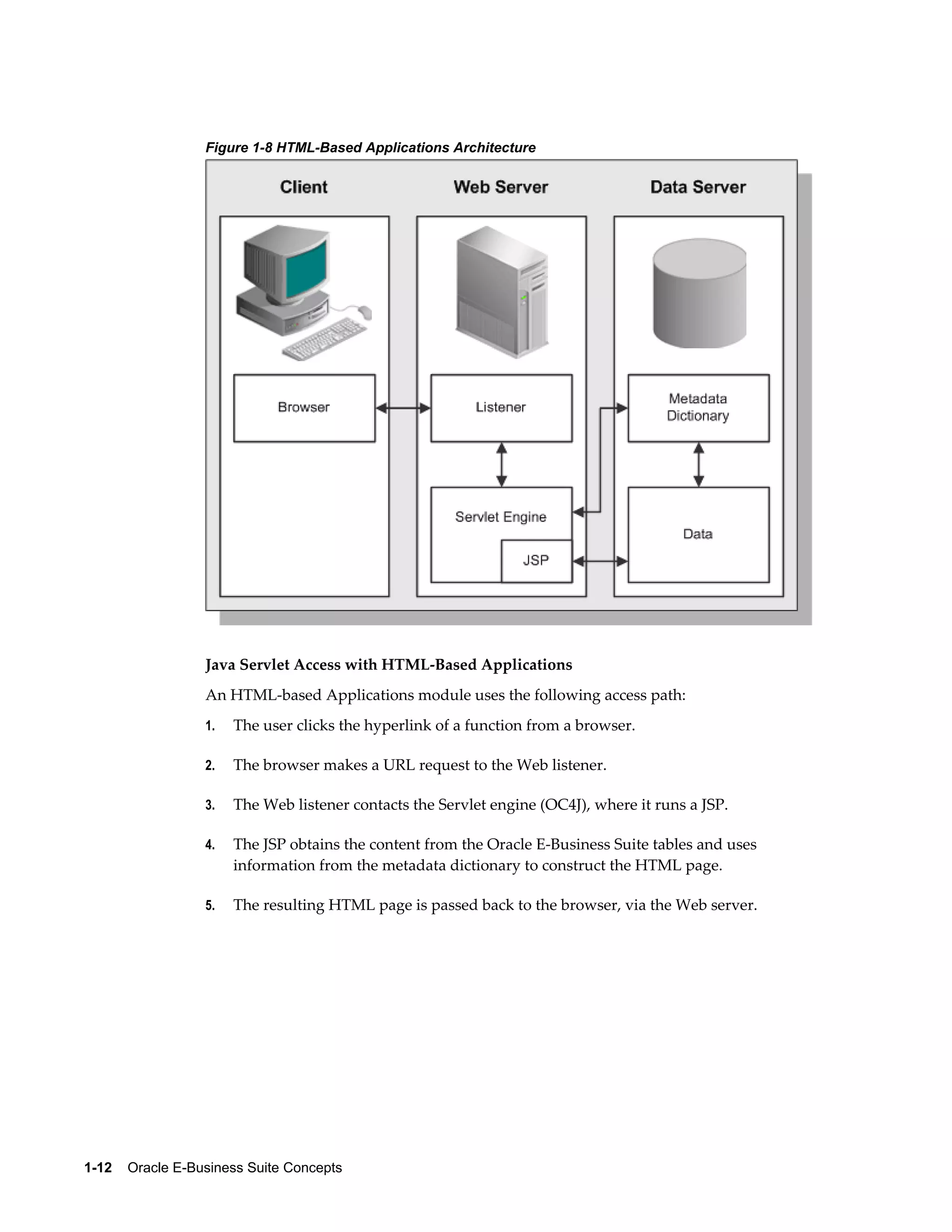
a small number of undo tablespaces, in contrast to the larger number of variously-sized 
rollback segments typically used in manual undo management. 
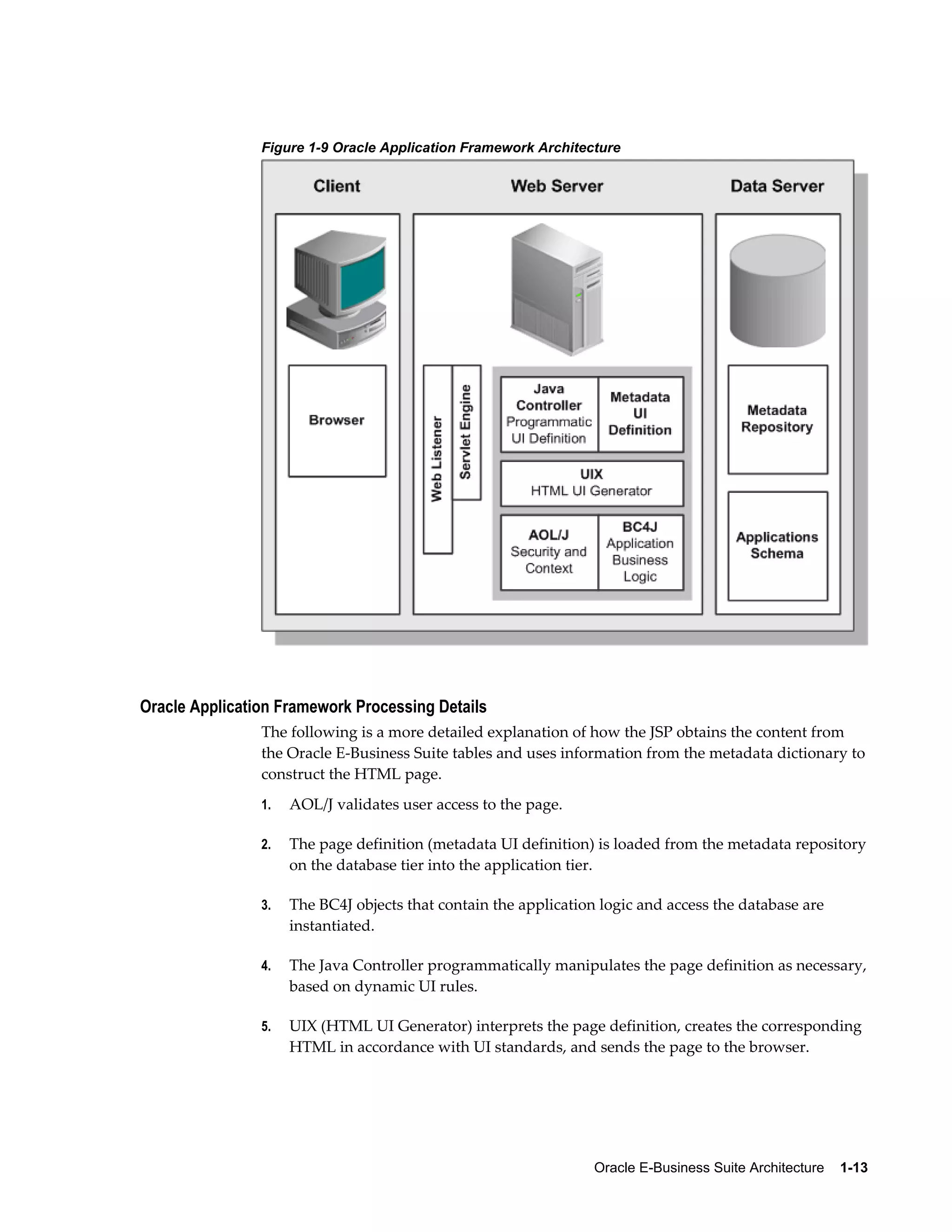
Oracle E-Business Suite Database Organization 3-7
4 
Oracle E-Business Suite Database Features 
Oracle E-Business Suite Database Features 4-1 
Introduction 
Many features in Oracle E-Business Suite Release 12 are built on the advanced 
capabilities of the underlying Oracle database technology. Release 12 utilizes various 
Oracle database features to optimize performance and scalability. 
Monitoring Features 
Oracle Database 11g, which is used by Oracle E-Business Suite Release 12.1, includes a 
number of sophisticated features that enable you to track the performance of your 
database, and if necessary take the appropriate corrective action. 
Note: For further details of the capabilities and usage of the tools 
described, see Oracle Database Performance Tuning Guide. 
Automatic Workload Repository (AWR) 
The Automatic Workload Repository is a repository of database performance statistics built 
in to every Oracle 11g database. AWR automatically generates snapshots of 
performance data at regular intervals (typically, once an hour) and collects the statistics 
for use in problem detection and tuning. The gathered data can be displayed in both 
reports and views. 
You can access AWR through Oracle Enterprise Manager Database Control, managing 
snapshots or modifying settings in order to create baselines that capture typical 
performance periods. The baselines can be used for comparisons with similar workload 
periods where performance problems have been reported. 
Automatic Database Diagnostic Monitor (ADDM) 
The Automatic Database Diagnostic Monitor is a tool that allows an Oracle database to 
diagnose its performance, and determine how identified problems could be resolved.
ADDM analyzes the AWR data on a regular basis, locating the root causes of 
performance problems and providing recommendations for correcting them. Because 
AWR is a repository of historical performance data, ADDM can be used to analyze 
performance issues after the event, saving time and resources in reproducing a problem 
(which may not even be possible). 
Automatic database diagnostic monitoring is enabled by default, and its primary 
interface is Oracle Enterprise Manager Database Control. 
Active Session History (ASH) 
Active Session History is a means by which a detailed history of database activity is 
captured and stored. Only active sessions are captured, so the amount of data recorded 
is directly related to the work being performed. The V$ACTIVE_SESSION_HISTORY 
view records current sampled session activity. 
Unlike the instance-level statistics gathered by AWR, ASH gathers data at the session 
level. You can run ASH reports to analyze transient performance problems with the 
database that may only occur during specific times. For example, ASH can often be 
used to identify short-duration problems (perhaps lasting only a couple of minutes) that 
would represent too small a proportion of an ADDM analysis period to show up. 
Performance Features 
Database performance features include optimization, resource usage, space 
management, and access rights. 
Query Optimization 
The SQL used in Release 12 has been extensively tuned for cost-based optimization. In 
calculating the lowest cost (most efficient) method of executing an SQL statement, the 
Oracle query optimizer evaluates many factors to calculate the most efficient way to 
execute a SQL statement. For example, the optimizer considers the available access 
paths, factoring in statistical information for the tables and indexes that the SQL 
statement will access. The optimizer also considers hints, which are optimization 
suggestions placed in a comment of the SQL statement. 
As part of its operation, the optimizer creates a set of potential execution plans for the 
SQL statement, based on the available access paths and any hints. It then estimates the 
cost of each execution plan, based on data dictionary statistics for the data distribution 
and storage characteristics of the tables, indexes, and partitions. Finally, the optimizer 
compares the costs of the execution plans and chooses the one with the smallest cost, 
which means optimum execution characteristics. 
For some operations, such as batch processing, Release 12 uses cost-based optimization 
to achieve the most efficient means of processing all rows that are accessed by the 
statement. For other operations, such as accessing forms or communication with the 
desktop client, Release 12 uses cost-based optimization to achieve the best response 
time for processing the first rows that are accessed by the statement. 
4-2 Oracle E-Business Suite Concepts
Several other Oracle database performance features in Release 12 also require use of the 
cost-based query optimizer. 
Note: For further details of optimization, see: Oracle Database Concepts 
and Oracle Database Performance Tuning Guide. 
Oracle E-Business Suite Database Features 4-3 
Database Resource Manager 
The gives the system administrator extensive control over processing resources on the 
database node. The administrator can distribute server CPU based on business rules, 
ensuring that the highest priority activities always have sufficient CPU resources. The 
administrator could, for example, guarantee Order Entry users 40% of CPU resources 
during business hours, regardless of the load or number of users in other groups on the 
system. 
System administrators can also use the Database Resource Manager to limit the impact 
of any inefficient ad hoc queries. For example, a limit of 5% of CPU resources could be 
placed on ad hoc queries against the database. 
Note: For further details, see Oracle Database Concepts and Oracle 
Database Administrator's Guide 
Partitioned Tables 
Partitioning helps support very large tables and indexes by dividing them into smaller, 
more manageable pieces called partitions. Once the desired partitions have been 
defined, SQL statements containing the partition key can access them instead of the 
original tables or indexes and thereby reduce the I/O needed. 
Partitioning can significantly enhance performance and manageability. For example, the 
speed of operations that involve copying or deleting data may be greatly improved by 
the use of partitioned tables. Operations that might have taken hours might now be 
completed in minutes. This can be useful in data warehouse applications. 
Important: Custom partitioning of standard Oracle E-Business Suite 
tables in Release 12 is fully supported for objects that are not already 
partitioned. 
Partitioning should always be planned and tested carefully before being implemented 
on a critical system. After implementation, you should check that the desired 
performance benefits have been achieved. 
Scalability Features 
As well as providing more computing power, multi-node systems facilitate the addition 
of machines to meet increases in demand. They also provide resilience in the event of
failures of individual components. 
Oracle Real Application Clusters 
Oracle Real Application Clusters (Oracle RAC) harness the processing power of 
multiple interconnected computers. Oracle RAC software called Oracle Clusterware and 
a collection of computers (known as a cluster) harness the processing power of each 
component to create a robust and powerful computing environment. A large task 
divided into subtasks and distributed among multiple nodes is completed more quickly 
and efficiently than if the entire task was processed on one node. Cluster processing 
also facilitates deployment of additional hardware resources for larger workloads and 
rapidly growing user populations. 
In Oracle RAC environments, all active instances can concurrently execute transactions 
against a shared database. Oracle RAC coordinates each instance's access to the shared 
data, to provide data consistency and data integrity. From a developer's point of view, 
Oracle RAC enables applications to be scaled to meet increasing data processing 
demands, without the need to change the application code. 
All Oracle E-Business Suite modules can be successfully deployed against a Oracle 
RAC-enabled database. Using Parallel Concurrent Processing (see Chapter 1), 
concurrent managers on separate application tier machines can be configured to direct 
requests to different database servers in an Oracle RAC cluster. 
Automatic Storage Management 
Automatic Storage Management (ASM) provides a file system and volume manager 
dedicated to the storage of Oracle database files. It extends the concepts of disk striping 
and mirroring, to optimize performance and remove the need for manual I/O tuning. 
Business Intelligence Features 
To meet the increasing demand for up-to-date details of business activities, Oracle 
E-Business Suite utilizes Oracle database features that help to optimize the types of 
query typically required in such environments. 
Materialized Views 
Materialized views are schema objects that can be used to summarize, precompute, 
replicate, and distribute data. They can markedly increase the speed of queries on very 
large databases when used to precompute and store aggregated data such as sums and 
averages. Materialized views can therefore improve performance of Oracle E-Business 
Suite products that perform many queries on summary data. 
Query optimization can use materialized views to improve query performance by 
automatically recognizing when one can be used to satisfy a request. The optimizer 
transparently rewrites the request to use the materialized view. Queries are then 
directed to the materialized view, and not to the underlying detail tables or views. 
4-4 Oracle E-Business Suite Concepts
In distributed environments, materialized views can be used to replicate data at remote 
sites, providing local access to data that would otherwise have to be accessed from the 
main site, with any network delays this might introduce. 
Oracle E-Business Suite Database Features 4-5 
Security Features 
The Oracle database has always included mechanisms to protect its contents from 
unauthorized access, without hindering access by legitimate users. Details of these can 
be found in the standard database documentation. 
Additional features provide application monitoring capabilities; for example, Database 
Connection Tagging enables recording in V$SESSION of the current use to which a 
database connection is being put. 
Note: For further details of Database Connection Tagging, see My 
Oracle Support Knowledge Document 1100653.1, Using Database 
Connection Tagging With Oracle E-Business Suite Release 12.1.3. 
Various strategies and optional components can be used to enhance and customize 
security to meet the specific needs of a site. Chapter 11 discusses optional database 
features that can be used to enhance and customize security further.
5 
AutoConfig 
AutoConfig 5-1 
Introduction 
Configuring a new installation of Oracle E-Business Suite includes a number of stages: 
• Collection of information required to create the desired configuration 
• Storage of configuration information in the correct locations on the relevant 
machines 
• Creation of technology stack configuration files with the appropriate details 
• Creation of Applications configuration files with the appropriate details 
• Starting of all required processes in the correct order 
AutoConfig is a tool that simplifies and standardizes configuration management tasks 
in an Oracle E-Business Suite environment. A fresh install of Release 12 includes 
AutoConfig as a standard (and required) configuration management tool. AutoConfig 
can also be used with earlier releases of Oracle E-Business Suite. 
The Applications Context 
Where the System Identifier (SID) was traditionally used to identify a file as belonging to 
a particular Oracle E-Business Suite environment, an Applications context is used in an 
AutoConfig-managed environment such as Oracle E-Business Suite Release 12. The 
default context name, also referred to in this chapter as <CONTEXT_NAME>, is 
<SID>_<hostname>. 
Using an Applications context has a number of advantages: 
• Simplifies overall management of an Oracle E-Business Suite system 
• Allows easier startup and shutdown of applications services
• Permits services to be installed or deinstalled independently of others 
• Integrates seamlessly with a shared application tier file system (see Chapter 9) 
• Enables use of Oracle Applications Manager for configuration management (see 
Chapter 7) 
• Facilitates support for Oracle Real Application Clusters (see Chapter 4) 
Before AutoConfig and the Applications context were introduced, configuration 
management tasks could be time-consuming and prone to error, in some cases 
requiring manual changes to be made to several configuration files. While individual 
configuration files are still used in an AutoConfig-enabled environment, they play a 
secondary role to an XML-based repository of Oracle E-Business Suite environment 
information, called the context file. 
By centralizing the configuration information, AutoConfig simplifies procedures for 
activities that range from upgrading a technology stack component to starting and 
stopping applications services. Another benefit is that the various files AutoConfig 
employs can be updated via standard Oracle E-Business Suite patches. 
There are separate context files for the application and database tiers of an Oracle 
E-Business Suite system. 
Applications Context File - The Applications context file, 
<INST_TOP>/appl/admin/<CONTEXT_NAME>.xml, is a repository for 
environment-specific details used by AutoConfig to configure the application tier. 
Information from this file is used to generate Oracle E-Business Suite configuration files 
and update relevant database profiles. 
Information stored includes: 
• Name and location of the database 
• Port numbers for Forms and Web services 
• Product-specific port numbers 
• Information about application tier services controlled by AutoConfig 
The values of the context variables that make up the context file are in part determined 
by the choices you make when you run Rapid Install. For example, when you specify 
that a particular application tier node is to be used as a concurrent processing server, 
the relevant variable will be set to execute the scripts that start the service. 
Database Context File - The database context file, 
<RDBMS_ORACLE_HOME>/appsutil/<CONTEXT_NAME>.xml, performs an 
equivalent role on the database tier. Information from this file is used to generate 
configuration files used on the database tier when AutoConfig is next run. 
5-2 Oracle E-Business Suite Concepts
AutoConfig 5-3 
AutoConfig Scripts and Directories 
A number of key configuration and control scripts are employed in an AutoConfig 
environment. AutoConfig creates several directories for these scripts and their 
associated files. 
AutoConfig Scripts 
Key AutoConfig configuration scripts on UNIX (command files on Windows) include: 
• adautocfg.sh - Wrapper script that passes the name of the specific environment 
context file to adconfig.sh. Located in <INST_TOP>/admin/scripts on the 
application tier, and 
<RDBMS_ORACLE_HOME>/appsutil/scripts/<CONTEXT_NAME> on the database 
tier. 
• adconfig.sh - Invoked by adautocfg.sh, this script is a wrapper for adconfig.pl. 
Located in <AD_TOP>/bin on the application tier, and 
<RDBMS_ORACLE_HOME>/appsutil/bin on the database tier. 
• adconfig.pl - Invoked by adconfig.sh, this Perl script calls the Java API to carry 
out the actual configuration tasks. Located in <AD_TOP>/bin on the application tier, 
and <RDBMS_ORACLE_HOME>/appsutil/bin on the databccase tier. 
In addition to these configuration scripts, several additional AutoConfig scripts are 
used to help manage the Oracle E-Business Suite system. These are described later in 
this chapcter, under Management Tasks. 
AutoConfig Directories 
Several directories are created by AutoConfig, as shown in the following table. 
Table 5-1 AutoConfig Directories 
Directory Name Directory Contents 
<INST_TOP>/admin/install Install scripts 
<INST_TOP>/admin/scripts Control scripts 
<INST_TOP>/admin/log Log files 
AutoConfig Operation 
As AutoConfig is used for a wide range of system configuration activities, from
installation to maintenance, the following discussion of its operations is divided into 
several sections. 
Context Value Management 
Context Value Management (CVM) is an AutoConfig component that is used to 
manage the values of variables in the context file, and automate required updates to it. 
CVM supports updates to both the application tier and database tier context files. 
CVM actions include: 
• Adding new variables to a context file 
• Updating values of variables in an existing context file 
• Applying new versions of context file templates 
• Executing scripts or configuration tools that must complete before the AutoConfig 
engine starts, for example when generating the tnsnames.ora file 
CVM is activated when the Applications context file is updated, but before the 
AutoConfig engine itself starts. This enables CVM to execute scripts or other tools to 
manipulate any required file on the file system, and allow the appropriate settings to be 
propagated as needed to both the file system and database. For example, it is possible to 
update values in the context file which will then be propagated to the file system. 
Note: AutoConfig does not undertake all aspects of configuration 
management, such as operations at operating system level that may 
have implications outside the context of Oracle E-Business Suite. 
Like the core AutoConfig components, CVM utilizes configuration files on both the 
application and database tiers, as shown in the following tables. 
Table 5-2 Application Tier CVM Files 
File Location Description 
<AD_TOP>/bin/adcvm.sh Main CVM script 
<AD_TcOP>/admin/template/adcvmat.xml Stores CVM-related data 
5-4 Oracle E-Business Suite Concepts 
for the application tier
AutoConfig 5-5 
Table 5-3 Database Tier CVM Files 
File Location Description 
<RDBMS_ORACLE_HOME>/appsutil/bin/adcvm.sh Main CVM script 
<RDBMS_ORACLE_HOME>/appsutil/template/adcvmdb.xml Stores CVM-related data 
for the database tier 
AutoConfig Files 
As well as the context files and configuration scripts that have already been described, 
AutoConfig uses several other types of file in its configuration management activities. 
These may themselves be divided into different categories. 
Template Files 
AutoConfig template files are used as the starting point for creating site-specific 
configuration files. AutoConfig evaluates the context variables in a template file, 
determines the actual values required, and creates a configuration file with these values 
substituted. This process, described in more detail later in this chapter, is called 
instantiation. There is one template file for each configuration file. Template files are 
located in the various <PROD_TOP>/admin/template directories on the application tier, 
and in the <RDBMS_ORACLE_HOME>/appsutil/template directory on the database 
tier. 
Template files used by AutoConfig can be divided into the following categories: 
Templates for APPL_TOP Configuration Files - These are either files requiring 
configuration-specific information in the APPL_TOP, or files used to load configuration 
profiles into the Oracle E-Business Suite database. 
Templates for Management Scripts - To run all the standard processes required by 
Oracle E-Business Suite, Rapid Install creates scripts to start and stop each of these 
required processes. These scripts need configuration information in order to: 
• Create the correct environments for each process 
• Start the processes with the correct parameters 
• Point the processes at the correct database instance (if applicable) 
Driver Files 
AutoConfig driver files are used to list the corresponding template files and locations, 
and specify the commands to be executed. For example, the commands might update 
profile options. 
Driver files are located in each <PROD>_TOP/admin/driver directory on the application
tier, and in the <RDBMS_ORACLE_HOME>/appsutil/template directory on the 
database tier. 
Configuration Files 
AutoConfig configuration files, such as httpd.conf, are created as a result of AutoConfig 
instantiating the corresponding template files. Configuration files contain values 
corresponding to the settings specified for a particular site. After AutoConfig has been 
run, numerous configuration files will have been created in various directories. 
Figure 5-1 illustrates the relationship between the different types of file AutoConfig 
uses. 
Figure 5-1 Relationship Between AutoConfig Files 
Instantiation 
As mentioned earlier, instantiation is the process whereby AutoConfig creates a 
configuration file with contents tailored for a specific environment. AutoConfig can be 
used to instantiate files or scripts, and then execute them for installation and 
configuration. 
Examples of instantiation include: 
• Instantiation of a configuration file to be used at runtime 
• Instantiation of an SQL script to set profile options 
• Instantiation of a shell script or Windows command file to run an SQL script in 
5-6 Oracle E-Business Suite Concepts
AutoConfig 5-7 
SQL*Plus 
• Instantiation of scripts to start up and shut down application tier services 
The adautocfg.sh script updates configuration files and profile options in the following 
way: 
1. Instantiates template files with instance-specific values derived from the relevant 
context file 
2. Copies in any customizations 
3. Overwrites existing configuration files with newly instantiated ones 
4. Runs SQL scripts to update database profile options 
Role of the template and driver files 
AutoConfig uses the various template files to determine the basic settings needed. There 
is one template file for each configuration file. Different versions of the template files 
exist for UNIX (for example httpd_ux.conf), and Windows (for example 
httpd_nt.conf). 
The driver files list the names and locations of the files that need to have context 
variables replaced. They also define the phases into which instantiation is divided, and 
specify the commands that are to be executed for specific products. When AutoConfig 
runs, it cycles through the various <PROD>_TOP/admin/driver directories looking for 
driver files such as adtmpl.drv, fndtmpl.drv, and icxtmpl.drv. 
Figure 5-2 illustrates the instantiation mechanism used by AutoConfig to create the 
various configuration files.
Figure 5-2 AutoConfig Instantiation Mechanism 
Note: For further details of AutoConfig operation, see My Oracle 
Support Knowledge Document 387859.1, Using AutoConfig to Manage 
System Configurations with Oracle E-Business Suite Release 12. 
Execution of Scripts 
As well as its instantiation activities, AutoConfig may execute other scripts, depending 
on the requirements of the specific Oracle E-Business Suite system. 
Phases of Operation 
As AutoConfig parses the driver files, it carries out a series of actions, grouped into 
several distinct phases: 
• INSTE8 - Instantiates AutoConfig template files to the AutoConfig configuration 
files specified in the relevant template driver files. 
• INSTE8_SETUP - Executes setup scripts that carry out activities not involving 
connection to the database. 
• INSTE8_PRF - Executes setup scripts that update profile options. 
5-8 Oracle E-Business Suite Concepts
• INSTE8_APPLY - Executes setup scripts that carry out activities involving updates 
AutoConfig 5-9 
to the database. 
• BINCPY - Copies the file mentioned from the source file to the configuration file, 
creating parent directories for the latter if necessary. AutoConfig will report an 
error if the source file cannot be found. 
• BINCPY_IGERR - Copies the file mentioned from the source file to the 
configuration file, creating parent directories for the latter if necessary. AutoConfig 
will not report an error if the source file cannot be found. 
AutoConfig carries out these actions in the following order: 
1. All INSTE8 and BINCPY actions - Carries out all file instantiations called for 
during INSTE8, INSTE8_SETUP, INSTE8_PRF and INSTE8_APPLY, and all 
copying from source files to target configuration files. 
2. INSTE8_SETUP actions - For the files that were instantiated in Step 1, AutoConfig 
runs all SETUP scripts. 
3. INSTE8_PRF actions - For the files that were instantiated in Step 1, AutoConfig 
runs all PRF scripts. 
4. INSTE8_APPLY actions - For the files that were instantiated in Step 1, AutoConfig 
runs all APPLY scripts. 
At the end of this process, the required configuration files and profile options have been 
created for the E-Business Suite installation. 
Management Tasks 
There are several areas in which an administrator can use AutoConfig to update, 
control, and monitor an Oracle E-Business Suite system. While many tasks will 
normally be undertaken from Oracle Applications Manager, you may on occasion need 
to run a script (command file on Windows) from the command line. 
Managing the Context 
Oracle Applications Manager (see Chapter 7) enables you to edit the Applications 
context as required. From the Administration tab, choose AutoConfig and click on Edit 
Parameters for the relevant context file. After making a change to the context, you must 
run AutoConfig to update the relevant configuration files. Before doing so, you should 
examine the proposed changes by running the adchkcfg.sh configuration check 
script (described below under Checking the System). 
Warning: Do not edit E-Business Suite configuration files manually. 
Any changes will be lost when AutoConfig is next run.
An AutoConfig-managed environment such as Release 12.1.1 will also be updated by 
applying an Oracle E-Business Suite patch that adds or modifies variables in the 
Applications context file, AutoConfig template files, or AutoConfig driver files. 
On occasion, you may need to undo configuration changes that have been made. The 
previous configuration can be restored by running the restore.sh utility, which 
enables you to roll back the changes made by an AutoConfig run. This is achieved by 
utilizing the backup copies of the configuration files that are created when AutoConfig 
is run. 
The backup files are located in <INST_TOP>/admin/out/<MMDDhhmm> on the 
application tier, and 
<RDBMS_ORACLE_HOME>/appsutil/out/<CONTEXT_NAME><MMDDhhmm> on the 
database tier, where the <MMDDhhmm> directory name indicates the month, day, hour 
and minute of the AutoConfig run. 
You can restore the configuration that existed immediately before the current one by 
navigating to the appropriate backup directory and running the restore.sh script. To 
restore an earlier configuration, you must use the Context File History feature of Oracle 
Applications Manager. 
Build Context Utility 
The adblxml utility, introduced in Release 12.1, can be used to create a new context file 
on the database tier. The new file acts as a central repository for database configuration 
information, and is essential in enabling AutoConfig on the database tier of an Oracle 
E-Business Suite instance. 
A new context file on the database tier can be created using the following command: 
perl $ORACLE_HOME/appsutil/bin/adbldxml.pl  
[template=<contextfile_template>][out=<contextfile_name> 
Where <contextfile_template> is the location of the context template (default is 
$ORACLE_HOME/appsutil/template/adxdbctx.tmp), and <contextfile_name> is the 
absolute path of the context file to be generated (the default is 
$ORACLE_HOME/appsutil/<context_name>.xml). 
Note: The adblxml utility is only supported on the database tier, not 
on the application tier. 
Controlling the System 
AutoConfig utilizes a number of application tier control scripts, located in 
<INST_TOP>/admin/scripts. 
5-10 Oracle E-Business Suite Concepts
AutoConfig 5-11 
Table 5-4 Key Application Tier Control Scripts 
Script Name Function 
adstrtal.sh Starts all application tier server processes 
adstpall.sh Stops all application tier server processes 
adautocfg.sh Runs AutoConfig 
The corresponding directory on the database tier is 
<RDBMS_ORACLE_HOME>/appsutil/scripts/<CONTEXT_NAME>, where control 
scripts allow the database and database listener processes to be started and stopped, 
and AutoConfig to be run. 
Checking the System 
Several other scripts facilitate system management in an AutoConfig-managed 
environment such as Release 12. For example, you can identify the effects of proposed 
changes before you make them. 
Configuration Check Utility 
adchkcfg.sh is located in <AD_TOP>/bin on the application tier, and in 
<RDBMS_ORACLE_HOME>/appsutil/bin on the database tier. 
This utility generates a report that highlights differences between existing configuration 
files and the new ones that AutoConfig will generate. The report is called 
cfgcheck.html. 
Running adchkcfg.sh is useful both in carrying out a test run before a planned 
environment change is made, and when investigating problems. In Release 12.1, the tool 
was enhanced to report important database updates, generate a report for database 
changes, and improve readability of reports. 
Note: For further details on managing system configuration 
parameters, see Oracle E-Business Suite Maintenance Procedures. 
AutoConfig Search Utility 
Originally known as the Context Variable Information utility, the AutoConfig Search 
Utility, GenCtxinfRep, is used to obtain detailed information about context variables 
and the templates that use them. It is run from the command line and accepts all or part 
of a context variable name, and generates an HTML or text report that includes 
descriptions, default values, and current values of matched context variables. The 
variables description contains recommended settings, range of allowed values, and 
links to documents that give detailed usage information. Additionally, GenCtxinfRep
lists the configuration templates where specific context variables are used. 
AutoConfig Profiler 
Introduced in Release 12.1, the profiling feature provides a consolidated HTML report 
of an AutoConfig run. The top level of the report displays a summarized view that lists 
all the product tops, along with the total instantiation and execution time of the 
templates within each product top. You can drill down into the report to view 
additional details, including the source and target location of each template, the time 
taken to instantiate and execute individual template scripts, and the execution report for 
each template script. 
AutoConfig can be run in profile mode on the application tier using the following 
command: 
$AD_TOP/bin/adconfig.pl contextfile=<CtxFile>  
[product=<product_top>] –profile 
Where <CtxFile> is the absolute path to the application tier context file, and 
<product_top> is the short name of the product to configure. 
AutoConfig can be run in profile mode on the database tier using the following 
command: 
perl $ORACLE_HOME/appsutil/bin/adconfig.pl  
contextfile=<CtxFile> -profile 
Where <CtxFile> is the absolute path to the database tier context file. 
Enhanced Service Dependency Management 
In addition to the above utilities, AutoConfig's service management infrastructure has 
been enhanced with dependency information between service groups and services. This 
dependency information is stored as metadata in the context file. The following XML 
attributes were added in Release 12.1: 
• services: contains a comma-separated list of the services that belong to a particular 
service group. 
• incompatible_with (optional): contains a comma-separated list of service groups 
and services that are mutually exclusive with the service group or service for which 
they are defined. For example, Forms Socket mode and Forms Servlet mode are 
mutually incompatible. 
• requires (optional): contains a comma-separated list of the required service groups 
and services. For example, to start and run successfully, all the OC4J containers 
require the TNS listener to be running. 
Running AutoConfig in Parallel 
Introduced in Release 12.1, the parallel mode feature enables AutoConfig to be run 
simultaneously across multiple nodes of an Oracle E-Business Suite system. When 
running in parallel mode, AutoConfig uses the dbms_locks PL/SQL package to ensure 
5-12 Oracle E-Business Suite Concepts
that configuration of one node does not interfere with configuration of other nodes: this 
is required because certain AutoConfig configurations of one node depend on the 
configurations of other nodes. 
Note: During the instantiation phase, locking is done at script level. 
During the execution phase, locking is done at product_top level. 
AutoConfig can be run in parallel mode on the application tier using the following 
command: 
perl $AD_TOP/bin/adconfig.pl contextfile=<CtxFile>  
[product=<product_top>] –parallel 
Where <CtxFile> is the absolute path of the application tier context file and 
<product_top> is the short name of the product to be configured. 
AutoConfig can be run in parallel mode on the database tier using the following 
command: 
perl $ORACLE_HOME/appsutil/bin/adconfig.pl  
contextfile=<CtxFile> -parallel 
Where <CtxFile> is the full path to the database tier context file. 
Note: When using parallel mode, AutoConfig must be invoked with the 
–parallel option on all nodes of the relevant tier. 
AutoConfig 5-13
6 
Cloning 
Cloning 6-1 
Introduction 
Cloning is the act of creating an identical copy of an existing Oracle E-Business Suite 
system. The system to be cloned is referred to as the source system, and the newly 
created system is referred to as the target system. 
Cloning has various uses, such as: 
• Creating a copy of a production system for patch testing 
• Creating a staging area to reduce the downtime required for patching 
• Refreshing a test system from a production system 
• Moving an existing system to a different machine or platform 
Simply copying the existing components to a new location will not provide a working 
Oracle E-Business Suite installation. For example, there are numerous configuration 
files in the file system that must be modified, depending on the physical configuration 
of the target environment. In addition, the Oracle E-Business Suite installation process 
utilizes the Oracle Universal Installer, which maintains key information about the 
installation. Copying the installation to a new location would invalidate this 
information, preventing the application of patches to components maintained by the 
Installer. 
Cloning Tools 
Cloning an Oracle E-Business Suite Release 12 system can be accomplished by running 
the Rapid Clone tool. This tool can be employed with Oracle E-Business Suite Release 12, 
or any AutoConfig-enabled earlier releases. 
Alternatively, you can license Oracle Application Management Pack for Oracle E-Business 
Suite, which extends Enterprise Manager 10g Grid Control to help monitor and manage
an Oracle E-Business Suite system. The pack integrates Oracle Applications Manager 
with Grid Control to provide a consolidated E-Business Suite management solution. 
Note: See Chapter 7 for further details of cloning features and options. 
Cloning Across Platforms 
When cloning from one machine to another, the simplest case is where the two 
machines are running the same version of the same operating system. 
A slightly more complex case occurs where the two operating systems are binary 
compatible, and the source system is running an earlier version of the same operating 
system that is being used on the target system. While Rapid Clone can often be used 
successfully in such cases, you should generally aim to clone between machines that are 
running identical versions of an operating system. This minimizes the risk of problems 
arising because of differences between the versions. 
Warning: It is not supported to clone from a later version of an 
operating system to an earlier one. 
Cloning Options 
The following list summarizes the cloning options currently available with Rapid 
Clone. 
Note: In this context, node refers to a logical collection of Oracle 
E-Business Suite processes, and not necessarily a physical machine. 
• Single node to Single node 
• Recloning (of database only)1 
• Clone existing Clone2 
• Multi-node to Multi-node 
• Single node to Multi-node3 
• Multi-node to Single node 4 
Footnotes on List 
1. Recloning of the database only can be useful if the source system has changed, and 
the target system needs to be updated with these changes. However, if any Oracle 
E-Business Suite patches have been applied to the source system, the rest of the 
6-2 Oracle E-Business Suite Concepts
components (APPL_TOP, COMMON_TOP and ORACLE_HOMEs) must also be 
cloned, in order to keep the file system and database synchronized. 
2. A cloned system created with Rapid Clone can be used as the source system for 
Cloning 6-3 
another round of cloning. 
3. If moving to a multi-node system, it is preferable to implement a shared APPL_TOP 
rather than clone from a single node to multiple nodes. See Chapter 9 for details. 
4. This procedure is often referred to as merging APPL_TOPs. 
Note: For further details of cloning options and strategies, see My 
Oracle Support Knowledge Document 406982.1, Cloning Oracle 
Applications Release 12 with Rapid Clone. 
Rapid Clone Operation 
Rapid Clone does not modify the source system. The adpreclone.pl script prepares 
the source system to be cloned by collecting information about the database, and 
creating generic templates from existing files that contain source-specific hard-coded 
values. The template files are located in <RDBMS_ORACLE_HOME>/appsutil/template 
on the database tier. 
Important: Rapid Clone requires all the expected binary files to be in 
place on the source system, and may fail to operate correctly if any are 
missing. 
After running adpreclone.pl, you copy the relevant files and directories from the 
source system files to the target system, and then run the adcfgclone.pl 
configuration script. The values for various parameters are required to create the 
context file that will be used to configure the target system. A few of these values are 
calculated from the current target system, and adcfgclone.pl will prompt for the 
others. 
For example, you will be prompted to specify a port pool, to use a particular range of 
predefined server ports. There are 100 port pools, so if, for example, you select pool port 
3, the default database port number (1521) is replaced by 1524. 
Note: If you are cloning to the same machine, you must specify a 
different port pool from the source system. 
If desired, it is possible to set a specific port to a value other than the one assigned from 
the port pool. This requires editing the context file on the target system after 
adcfgclone.pl completes, then running AutoConfig to update the system with the 
new value.
Rapid Clone and Oracle Universal Installer 
The Oracle Universal Installer's global inventory is simply a list of pointers to each local 
inventory location. There is one local inventory per ORACLE_HOME, located in 
<ORACLE_HOME>/inventory, which contains all the patch information for the 
ORACLE_HOME in question. 
Rapid Clone first ensures that the source system local inventory is in XML format, 
converting it from the older binary format if necessary. The local inventory (inside the 
ORACLE_HOME to be cloned) is then copied to the target system and reconfigured 
with the new values for the target system. Rapid Clone subsequently attaches the 
reconfigured local inventory to the target system global inventory. If the target system 
does not have a global inventory, a new global inventory is created when Rapid Clone 
goes to attach the local inventory. 
Additional Cloning Features 
Several features are designed to make cloning more straightforward, and give greater 
flexibility in response to issues such as: 
• Whether cloning is being used to add a node to an existing installation, or to create 
an entirely new installation. In the former case, there will be fewer ancillary 
changes. 
• Types of table modification that need to take place. For example, when using Rapid 
Clone to add a node, a new row is inserted into FND_NODES, whereas when 
creating a new installation, FND_NODES is purged and a completely new set of 
rows inserted. 
• Whether services should be set to start automatically after cloning is complete. 
• Whether any data alteration is needed after cloning. 
Summary 
In essence, Rapid Clone does the following on the target system. 
Database tier: 
• Creates the Database context file 
• Registers the ORACLE_HOME in the Global Inventory 
• Relinks the ORACLE_HOME 
• Configures the ORACLE_HOME 
• Recreates the database control files 
6-4 Oracle E-Business Suite Concepts
• Starts the database 
• Configures the database 
• Starts the database listener 
Application tier: 
• Creates the Applications context file 
• Registers the OracleAS 10.1.2 and OracleAS 10.1.3 ORACLE_HOMEs in the Global 
Cloning 6-5 
Inventory 
• Relinks the OracleAS ORACLE_HOMEs 
• Configures the OracleAS ORACLE_HOMEs 
• Configures the APPL_TOP 
• Creates the INST_TOP 
• Starts application tier server processes 
In addition, there are a number of associated actions relating to the database. 
Note: For further details of Rapid Clone capabilities and operation, see 
My Oracle Support Knowledge Document 406982.1, Cloning Oracle 
Applications Release 12 with Rapid Clone. For details of cloning options in 
general , see My Oracle Support Knowledge Document 783188.1, 
Certified RAC Scenarios for E-Business Suite Cloning.
7 
Management Tools 
Management Tools 7-1 
Introduction 
Oracle Applications Manager(OAM) is a powerful, easy to use tool that enables you to 
manage and monitor an Oracle E-Business Suite system from an HTML-based central 
control console. 
Among other Oracle E-Business Suite system management tasks, Oracle Applications 
Manager can help you to: 
• Configure and administer your system 
• Diagnose and correct problems 
• Manage patches 
• Monitor and tune performance 
• Monitor system security 
Oracle Applications Manager is built into Oracle E-Business Suite, and can be used in 
conjunction with a a number of optional tools and features described later in this 
chapter: these include Oracle Application Management Pack for Oracle E-Business Suite and 
Oracle Application Change Management Pack for Oracle E-Business Suite. 
Oracle Applications Manager Features 
The Applications Dashboard provides an overview of the key features of an Oracle 
E-Business Suite installation, including summaries of current status, performance, 
critical activities, diagnostics, business flows, and security. You can then view 
additional information on any of these areas.
Figure 7-1 Oracle Applications Manager Dashboard 
A more detailed view of the Oracle E-Business Suite system is offered by the Site Map, 
which provides easy access to the numerous features and options that exist in the areas 
of administration, monitoring, maintenance, and diagnostics and repair. 
Administration 
Oracle Applications Manager provides a comprehensive system configuration editor, 
for use in conjunction with the AutoConfig configuration management tool (see 
Chapter 5). Previous configuration settings can easily be compared with the current 
settings, allowing changed settings to be identified and rolled back as necessary. 
7-2 Oracle E-Business Suite Concepts
Management Tools 7-3 
Figure 7-2 Site Map - Administration 
Additionally, Oracle Applications Manager helps you track configuration changes, such 
as recently altered site-level profile option settings. It can also helps you detect potential 
configuration problems, such as database initialization parameters that do not meet 
Oracle requirements or recommendations. Oracle Applications Manager can be used to 
configure and control critical application tier services such as concurrent processing, 
Forms listeners, and Web servers. For example, you can monitor and administer 
concurrent requests, and easily analyze the concurrent request workload to make 
informed configuration changes for concurrent processing. 
Oracle Applications Manager can also be used to control Oracle Workflow system 
services, such as background engines, notification mailers, agent listeners, and queue 
propagation. You can monitor and analyze Oracle Workflow system activity, suspend 
and resume processes, retry activities that end in error, and purge obsolete Workflow 
data. 
The License Manager component of Oracle Applications Manager enables you to manage 
all aspects of licensing your products and related features. For example, you can obtain 
reports of currently licensed products, country-specific functionalities, and languages, 
as well as an overall licensing summary for your system You can also license additional 
products, country-specific functionalities, and languages. 
You can extend Oracle Applications Manager using your own custom SQL scripts. Not 
only can SQL scripts be organized and accessed from within the OAM console, but 
drilldowns can be enabled from script output to standard Oracle Applications Manager
interfaces. For example, if you obtain concurrent request IDs from an SQL script, you 
can then drill down into the standard Oracle Applications Manager interface to obtain 
details of the concurrent requests. 
Monitoring 
Oracle Applications Manager provides extensive monitoring features for Oracle 
E-Business Suite. Charts and graphs provide high-level summaries, and you can drill 
down for more detailed information as required. 
The Monitoring tab provides key performance metrics related to online, batch, and 
workflow activity. Additionally, system administrators can now subscribe to receive 
automated alerts when concurrent requests run longer or wait longer than specified 
thresholds. 
Figure 7-3 Site Map - Monitoring 
Monitoring support is provided for application tier services such as concurrent 
managers and Web services. For currently running processes such as forms or 
concurrent requests, you can examine both application tier and database session details, 
right down to the currently executing SQL. 
OAM can alert you when certain errors occur within the E-Business Suite system, and 
7-4 Oracle E-Business Suite Concepts
will provide detailed context information to help in diagnosing those errors. 
Information from system components, including performance details, availability, 
configuration, diagnostic data, and security concerns can all be presented in the context 
of affected business flows, so that you can better understand any impact on your 
business. 
Management Tools 7-5 
Maintenance 
You can easily determine which patches have been applied to a system, including the 
individual patches included in mini-packs, maintenance packs, and merged patches. 
Oracle Applications Manager also enables you to examine the patched files on a system, 
and identify all the patches that altered a given file. For each patch applied, you can see 
the actions taken by each patch driver. 
Figure 7-4 Site Map - Maintenance 
The Patch Wizard tool built into Oracle Applications Manager can recommend patches 
for your Oracle E-Business Suite system. The wizard takes patch data downloaded from 
Oracle, analyzes that data against the Oracle E-Business Suite system, and recommends 
patches based on criteria you specify. The wizard can also analyze individual patches, 
identify any prerequisites missing on the system, and show the impact that the patches 
would have on the system in terms of affected applications, files, and other areas. 
Additionally, the wizard can download multiple patches from Oracle and merge them 
into a single patch. 
Administrators can use the Manage Downtime feature to schedule downtimes. When a 
downtime is scheduled, a message on the Home Page notifies users of the period when 
the system will not be available. The user has to log in, or return to the Home Page to 
see this message. If the downtime is in progress, an appropriate warning page will 
replace the login page.
During the scheduled downtime period, administrators with suitable database 
privileges are able to log into OAM to monitor the progress of AutoPatch and other 
Applications DBA (AD) utilities: access to other parts of Oracle E-Business Suite is not 
allowed. 
Diagnostics and Repair 
Oracle Applications Manager for Oracle E-Business Suite Release 12 provides 
troubleshooting wizards that automate complex recovery steps. Tools such as 
Concurrent Manager Recovery help you diagnose problems and take corrective action 
from the same screen. The Service Infrastructure Troubleshooting Wizard ensures that 
the Generic Service Management (GSM) infrastructure is running normally, and if not, 
guides the administrator through the steps needed to bring GSM back up. 
Figure 7-5 Site Map - Diagnostics and Repair 
The Applications Dashboard provides a gateway into Oracle Diagnostics for Oracle 
E-Business Suite, offering graphical views of diagnostic test executions and failures, 
summarizing test results, and providing access to detailed test reports. Keyword 
searches can be performed on the test repository to locate relevant tests, which can then 
be grouped and executed directly from the same interface. 
Additionally, system administrators can schedule and run diagnostics tests as batch 
programs, and output from all diagnostic interfaces can be captured and packaged for 
shipment to Oracle Support quickly and easily. Other features include provision for 
customers to download the latest diagnostics pack supplied by Oracle Support, and 
create their own diagnostic tests as required. 
Finally, the system alerting infrastructure has been enhanced with a new flood control 
mechanism to prevent multiple instances of a given alert from overwhelming the alert 
system. Additionally, alerts have been enhanced to allow summary and context 
7-6 Oracle E-Business Suite Concepts
information to be retrieved in XML format via standard business event integration 
mechanisms. 
Management Tools 7-7 
Support Cart 
The OAM Support Cart automates the collection of detailed node-specific information 
that can be sent to Oracle Support to assist with problem diagnosis. 
Figure 7-6 Oracle Applications Manager Support Cart 
The information collected includes details of products installed, patches applied, 
database version, current database parameters, and system topology. Other pages from 
OAM can be added to the Support Cart if desired. 
Extending Oracle Applications Manager Functionality 
Oracle Applications Manager can be used in conjunction with Oracle Enterprise 
Manager Grid Control via the supporting Oracle Application Management Pack for 
Oracle E-Business Suite, to create a comprehensive, top-down approach to system 
monitoring and administration. 
Oracle Application Management Pack for Oracle E-Business Suite for Oracle E-Business 
Suite extends Enterprise Manager Grid Control to help monitor and manage Oracle 
E-Business Suite systems. Features include simplified administration, hot cloning 
(where the database does not need to be shut down), and management of advanced 
topologies. 
Another tool that can be used to extend Oracle Applications Manager functionality is 
Oracle Application Change Management Pack for Oracle E-Business Suite. This tool 
provides a centralized view of multiple Oracle E-Business Suite systems, helping to to 
monitor and implement functional and technical changes. Oracle Application Change 
Management Pack consists of three components: Customization Manager, Patch 
Manager, and Setup Manager.
Note: For further details of these optional tools, see My Oracle Support 
Knowledge Document 812315.1, Getting Started with Oracle Application 
Management Pack and Application Change Management Pack for Oracle 
E-Business Suite Version 3.0. 
Generic Service Management 
Traditionally, application tier processes such as Forms listeners, HTTP servers, and 
concurrent managers had to be started and monitored individually by system 
administrators, a time-consuming and potentially error-prone exercise. With the 
transition to web-based applications, the number of application tier processes required 
for Oracle E-Business Suite products has increased significantly, with many Oracle 
E-Business Suite products making use of multiple application tier services to support 
one or more processes. 
Service processes are similar to concurrent manager and transaction manager processes, 
and must be kept running on an application tier for the proper functioning of their 
associated products. Management of the services is complicated by the fact that they 
may be distributed across multiple host machines. 
The Generic Service Management (GSM) feature simplifies management of these generic 
service processes, by providing a fault-tolerant framework with a central management 
console built into Oracle Applications Manager. With Generic Service Management, the 
Internal Concurrent Manager (ICM) manages the various service processes across 
multiple hosts. On each host, a Service Manager acts on behalf of the ICM, allowing the 
ICM to monitor and control service processes on that host. 
System administrators can configure, monitor, and control services though Oracle 
Applications Manager, which communicates with the ICM. Generic Service 
Management provides a fault-tolerant system: if a service process exits unexpectedly, 
the ICM will automatically attempt to restart the process. If a host fails, the ICM may 
start the relevant service processes on a secondary host. The ICM itself is monitored and 
kept alive by Internal Monitor processes located on various hosts. 
This new application tier service management infrastructure has several benefits: 
• The service processes no longer need to be manually and individually started and 
monitored by Oracle E-Business Suite system administrators 
• Administrators can configure and control the services through Oracle Applications 
Manager 
• As with concurrent manager processes, system administrators can use work shifts 
to determine the number of processes that will be active for a service on a given 
node for a given time period 
• Services can take advantage of the process distribution and fault tolerance 
7-8 Oracle E-Business Suite Concepts
capabilities that have been developed for concurrent processing 
Generic Service Management is available out of the box with Oracle E-Business Suite 
Release 12, and can also be used with other AutoConfig-enabled releases. 
Management Tools 7-9
8 
Authentication and Integration 
Authentication and Integration 8-1 
Introduction 
The subject of authentication is a broad one, which covers a variety of technologies and 
components. This chapter provides a survey of the key architectural concepts and 
decisions involved in setting up the required level of authentication for an organization. 
Note: For a complete list of the relevant authentication and 
authorization documentation, see My Oracle Support Knowledge 
Document 380482.1, Oracle Application Server with Oracle E-Business 
Suite Release 12 Documentation Roadmap. 
Authentication of Oracle E-Business Suite users can be configured to be straightforward 
and out of the box, using the traditional FND_USER mechanism, or it can involve 
various additional features and levels of sophistication, such as single sign-on and use 
of optional products such as Oracle Portal and Oracle Discoverer. The system 
administrator can choose the optimal solution for an installation, taking into account 
factors such as simplicity of setup and maintenance, the possible need for a single point 
of access to enterprise-wide applications, and the ability to integrate with third-party 
user directories, as well as the overall security requirements of the organization. 
Advanced features that are discussed briefly include the tasks involved in keeping user 
profile information automatically synchronized across an enterprise, and the steps 
needed to link an account in Oracle Internet Directory to multiple application accounts 
in Oracle E-Business Suite Release 12. 
Important: Use of the advanced authentication features described in 
this chapter, such as Single Sign-On, are optional with Oracle 
E-Business Suite Release 12. If you wish to use them, you must carry 
out the requisite additional setup procedures as noted later. 
The solutions described here do not address the issue of authorization. After a user has
been authenticated, Oracle E-Business Suite retrieves the authorization information 
associated with the application account the user is logged into. Authorization 
information for application accounts is managed through application responsibilities. 
Oracle E-Business Suite applies authorization checks as and when required during the 
user's session. 
Oracle Application Server 10g Optional Components 
Benefits of utilizing Oracle Application Server 10g optional components with Oracle 
E-Business Suite Release 12 include: 
• Performance, scalability and high-availability via distributed architectures. 
• The ability to connect a single Enterprise Portal to web providers running on 
multiple Release 12 instances. 
• Uniform Single Sign-On support for all Oracle E-Business Suite products. 
• Bidirectional Oracle Internet Directory-to-FND_USER synchronization. 
• Link-on-the-fly support for environments where the Single Sign-On userids in 
Oracle Internet Directory differ from the Oracle E-Business Suite userids. 
• One-to-many support for environments where a Single Sign-On userid may be 
associated with one or more Release 12 userids. 
• Bookmarkable URLs, where Applications Navigator Portlet will produce links that 
authenticate users and create Oracle E-Business Suite sessions as needed. 
• Integration with third-party single sign-on services (e.g. Netegrity, Tivoli, Entrust) 
and Lightweight Directory Access Protocol (LDAP) V.3 directories such as 
SunONE/iPlanet and Microsoft Active Directory. 
Support for more advanced deployment topologies is also available, including 
multi-node load balancing configurations, Oracle Real Application Clusters (Oracle 
RAC), and other distributed architectures. 
Note: For further details of additional options, see Oracle E-Business 
Suite System Administrator's Guide - Security, Chapter 6. 
Oracle Portal 
Oracle Portal (part of Oracle Application Server 10g) is a complete, browser-based 
environment for the development, deployment, administration, and configuration of 
enterprise class portals. Oracle Portal incorporates a complete portal building 
framework, with self-service publishing features to facilitate creation and management 
of the information accessed within your portal. A wide variety of portal interfaces and 
8-2 Oracle E-Business Suite Concepts
configurations are possible, from a simple departmental-level publishing portal to an 
Internet-accessible portal that serves both customers and employees. Tight integration 
with other components of the Oracle Application Server and with the Oracle database 
ensures that the solution can scale to an enterprise class audience. 
Note: For further details of integrating Oracle Portal with E-Business 
Suite Release 12, see My Oracle Support Knowledge Document 
380484.1, Using Oracle Portal 10g with Oracle E-Business Suite Release 12. 
Authentication and Integration 8-3 
Oracle Discoverer 
Business users at all levels of an organization can use Discoverer 10.1.2 to gain 
immediate access to information from data marts, data warehouses, and online 
transaction processing (OLTP) systems. Discoverer 10.1.2 enables business analysts to 
create, modify, and execute ad hoc queries and reports. Casual users can utilize a range 
of predefined reports and graphs that enable them to obtain business views while 
hiding the complexity of the underlying data structures being reported upon. 
Discoverer 10.1.2 is tightly integrated with Oracle E-Business Suite Release 12. Release 
12 users can use Discoverer to analyze data from selected business areas in Financials, 
Operations, Human Resources, Purchasing, Process Manufacturing, Activity Based 
Management, and others. 
You can integrate Discoverer into an existing Oracle E-Business Suite Release 12 
environment by installing Discoverer 10.1.2 with Oracle Business Intelligence Server 
10g Release 2 on a standalone application tier server node, or in a separate Oracle 
Business Intelligence Server 10g Release 2 ORACLE_HOME, on an existing application 
tier server node. 
Note: For further details of using Oracle Discoverer with Oracle 
E-Business Suite Release 12, see My Oracle Support Knowledge 
Document 373634.1, Using Discoverer 10.1.2 with Oracle E-Business Suite 
Release 12. 
Enterprise-Wide Single Sign-On 
Single sign-on functionality enables users to access Oracle E-Business Suite and other 
applications through a single user ID, without having to log in to each application 
separately. Oracle E-Business Suite supports the use of single sign-on functionality via 
Oracle Single Sign-On, Oracle Internet Directory (OID), and Oracle Portal. 
Implementing an enterprise-wide single sign-on solution involves significant changes to 
the mechanism by which Oracle E-Business Suite Release 12 users are authenticated. 
Instead of authentication being performed natively, via the FND_USER table, this 
functionality is delegated to Oracle Single Sign-On, which can either:
• Perform user validation itself, against information stored in Oracle Internet 
Directory. 
• Delegate validation to a third-party single sign-on server. 
With either of these solutions, Oracle E-Business Suite Release 12 accepts identities 
vouched for by the single sign-on mechanism. Oracle Internet Directory complements 
this by acting as an integration point that enables Oracle E-Business Suite Release 12 to 
participate in enterprise level user management. 
Note: Note that where a third-party single sign-on server is in use, 
Oracle Single Sign-On and Oracle Internet Directory are still required, 
to provide a bridge between E-Business Suite Release 12 and the 
third-party single sign-on solution. 
Each E-Business Suite instance must still maintain a record of registered users, in the 
form of the traditional application accounts. However, the level of abstraction needed 
for an enterprise level user requires a mechanism that can uniquely identify a user 
across the enterprise. This is accomplished via a globally unique identifier (GUID). Oracle 
Internet Directory and Oracle E-Business Suite store GUID information for each 
enterprise level user. The GUID can be considered as an identity badge that is 
recognized by both Oracle Internet Directory and Oracle E-Business Suite. 
Another requirement in such an environment is for user enrollment to be done only 
once, at well defined places, with the user subsequently being known to the rest of the 
enterprise. Two additional features enable this: 
• Support for automatic propagation of application information across an enterprise, 
via a synchronization process between Oracle Internet Directory and a third-party 
LDAP server. 
• Support for automatic propagation of user information across an enterprise, via a 
provisioning process between Oracle Internet Directory and Oracle E-Business Suite 
Release 12. 
User information in external, third-party user directories can be synchronized with 
Oracle Internet Directory using the LDAP protocol. With Oracle Internet Directory, 
customers can manage and publish user information in a central location that various 
application systems, including the Oracle E-Business Suite, can reference. 
Much of the complexity involved with integrating Oracle E-Business Suite into a single 
sign-on environment arises because of the need to consolidate fragmented or duplicated 
user data in the single sign-on environment, as a legacy of integrating 
previously-isolated systems. 
The solution described in this chapter provides mechanisms to link the existing data 
together using the GUID. In addition, bulk migration tools can be used to move a large 
number of users between Oracle Internet Directory and E-Business Suite during the 
8-4 Oracle E-Business Suite Concepts
transition to an integrated single sign-on environment. 
Note that full synchronization of user credentials between Oracle Internet Directory and 
E-Business Suite Release 12 requires deployment of the relevant Oracle Application 
Server 10g components. 
Note: For more information on implementing single sign-on with 
Oracle Single Sign-On and Oracle Internet Directory, see Chapter 6 of 
Oracle E-Business Suite System Administrator's Guide - Security, andMy 
Oracle Support Knowledge Document Note 376811.1, Using Oracle 
Application Server 10g with Oracle E-Business Suite Release 12. 
Authentication and Integration 8-5 
Application Server Integration Options 
Application Server 10g can act as an integration hub that enables the Oracle E-Business 
Suite to work in conjunction with other enterprise software, including software from 
third-party vendors.
Figure 8-1 Application Server Integration Architecture 
By default, Release 12 continues to use the local E-Business Suite user directory, 
FND_USER, for user authentication. Optionally, Release 12 user authentication can be 
delegated to Single Sign-On 10g and Oracle Internet Directory 10g running externally. 
It is possible to integrate Release 12 with a third-party LDAP (such as Microsoft Active 
Directory or SunONE/iPlanet) or a third-party single sign-on solution (such as 
Microsoft Windows Kerberos or Netegrity SiteMinder). This requires integration of the 
chosen third-party solutions via an external Oracle Application Server 10g instance, as 
shown in the diagram above. Release 12 delegates user authentication to Oracle Single 
Sign-On, and Oracle Single Sign-On delegates authentication to the third-party single 
sign-on solution. 
Conversely, user information from the third-party LDAP must be synchronized with 
Oracle Internet Directory 10g, which synchronizes its users with E-Business Suite's 
FND_USER directory. Synchronization is handled by the Oracle Directory Integration 
Platform. 
8-6 Oracle E-Business Suite Concepts
Authentication and Integration 8-7 
Basic Single Sign-On Deployment Scenario 
This section outlines a simple deployment scenario where an existing Oracle E-Business 
Suite instance is integrated with a new Oracle Single Sign-On and Oracle Internet 
Directory infrastructure. A subsequent discussion considers additional factors, such as 
the existence of a third-party single sign-on solution, or the presence of multiple user 
repositories. 
Note: This section provides a high-level overview of the common tasks 
that will apply to all installations. The exact steps needed for the 
requirements of a particular site will be more detailed. 
The starting point of this scenario is an existing Oracle E-Business Suite Release 12 
installation, plus a new Oracle Application Server 10g installation (including Oracle 
Single Sign-On and Oracle Internet Directory) on a different machine. 
Oracle Internet Directory has no currently existing users apart from pre-seeded users, 
and Oracle Portal is not implemented. The requirement is to integrate Oracle E-Business 
Suite Release 12 with Oracle Single Sign-On and Oracle Internet Directory. 
Key Goals 
• Oracle E-Business Suite Release 12 will delegate user sign-on and authentication to 
Oracle Single Sign-On 
• Oracle Single Sign-On will authenticate user credentials against user entries in 
Oracle Internet Directory 
• Oracle Internet Directory will store every user's single sign-on account id and 
password 
Figure 8-2 Deploying E-Business Suite with Oracle Single Sign-On and Oracle Internet 
Directory 
User Management Options 
Existing Oracle E-Business Suite Release 12 application accounts are migrated to single 
sign-on accounts in Oracle Internet Directory using the Bulk Migration Tool. After the 
migration, a system administrator has a number of user management options, related to 
the location(s) where user information is created, and where it is provisioned (sent) to.
Option 1 
All user information is created in Oracle E-Business Suite Release 12, then provisioned 
into Oracle Internet Directory. 
• Oracle E-Business Suite Release 12 is configured as a provisioning integrated 
application with Oracle Internet Directory 
• System administrators configure the provisioning integration via provisioning 
profiles 
Figure 8-3 Provisioning User Information from E-Business Suite to Oracle Internet 
Directory 
The creation of a new application account in Oracle E-Business Suite Release 12 will 
automatically trigger the creation of a new single sign-on account in Oracle Internet 
Directory. Some of the user attributes from the application account may be provisioned 
in the single sign-on account in Oracle Internet Directory during account creation. 
Option 2 
All user information is created in Oracle Internet Directory, then provisioned into 
Oracle E-Business Suite Release 12: 
• Oracle E-Business Suite Release 12 is configured as a provisioning integrated 
application with Oracle Internet Directory 
• System administrators configure the provisioning integration via provisioning 
profiles 
8-8 Oracle E-Business Suite Concepts
Figure 8-4 Provisioning User Information from Oracle Internet Directory to E-Business 
Suite 
The creation of a new single sign-on account in Oracle Internet Directory will 
automatically trigger the creation of a new application account in Oracle E-Business 
Suite Release 12. Some of the user attributes from the single sign-on account may be 
provisioned in the application account in Oracle Internet Directory during account 
creation. 
Option 3 
All user information is created in either Oracle Internet Directory or Oracle E-Business 
Suite Release 12, then provisioned into the other system: 
• Oracle E-Business Suite Release 12 is configured as a provisioning integrated 
Authentication and Integration 8-9 
application with Oracle Internet Directory 
• System administrators configure the provisioning integration via provisioning 
profiles 
Figure 8-5 Provisioning User Information Between E-Business Suite and Oracle Internet 
Directory 
The creation of a new application account in Release 12 will automatically trigger the
creation of a new single sign-on account in Oracle Internet Directory, and the creation of 
a new single sign-on account in Oracle Internet Directory will automatically trigger the 
creation of a new application account in Release 12. 
During account creation, some of the user attributes from the application account may 
be provisioned in the single sign-on account in Oracle Internet Directory during account 
creation, and some of the user attributes from the single sign-on account may be 
provisioned in the application account in Oracle Internet Directory. 
Synchronizing User Attributes 
For all three of the above options, a set of user attributes can, on being updated from 
either system, optionally be synchronized between Oracle E-Business Suite Release 12 
and Oracle Internet Directory. This is accomplished by configuring the provisioning 
profile. 
Signing On 
Attempting to gain access to an Oracle E-Business Suite Release 12 environment, a user 
who has not yet been authenticated with Oracle Single Sign-On is directed to a Single 
Sign-On login page, which can be customized to suit an individual site. 
After authentication via Oracle Single Sign-On (or if authentication has previously been 
carried out) the user is redirected to the requested page or the user's home page in the 
Oracle E-Business Suite Release 12. 
Signing Out 
When a user logs out of an Oracle E-Business Suite instance, the user is also logged out 
of Oracle Single Sign-On, as well as any partner applications that have been integrated 
with Oracle Single Sign-On. The user will see a logout page that lists all the applications 
the user has been successfully logged out of. 
Session Timeout 
It is important to understand the timeout behavior of the different sessions in a single 
sign-on environment, to ensure the appropriate level of security is maintained. 
• If a user's application session has timed out, but not his single sign-on session, he 
will be directed to Oracle Single Sign-On, and then back to Oracle E-Business Suite, 
without being prompted to re-authenticate. 
• If a user's application session and single sign-on session have both timed out, he 
will be directed to the single sign-on login page to re-authenticate, and then 
redirected back to Oracle E-Business Suite. 
Until a user's application session times out (or he explicitly logs out), he can continue to 
access the partner application even if his Oracle Single Sign-On security cookie has 
expired. Since the application session timeout value takes precedence over the Single 
Sign-On timeout setting, Oracle recommends setting the application session timeout 
value to be equal to or less than that of Oracle Single Sign-On. 
8-10 Oracle E-Business Suite Concepts
Authentication and Integration 8-11 
Advanced Single Sign-On Deployment Scenarios 
This section outlines four more deployment scenarios. The guidelines given should be 
regarded as providing a high-level strategy rather than definitive instructions, as all real 
world deployments will be unique, and require detailed planning. The outline solutions 
build upon the basic scenario discussed above. 
Scenario 1 
Requirement - Need to enable Oracle Single Sign-On with Oracle E-Business Suite Release 12 
Starting Environment 
• Multiple new Oracle E-Business Suite Release 12 environments have been installed 
• Other than the default administrative accounts, no user accounts have been 
registered yet 
• Oracle Portal is not implemented 
• No Single Sign-On infrastructure in place 
Solution 
• Oracle Application Server 10g with Oracle Single Sign-On and Oracle Internet 
Directory are needed for the integration required 
• Oracle E-Business Suite Release 12 will delegate user sign-on and authentication to 
Oracle Single Sign-On 
• Oracle Single Sign-On authenticates user credentials against user entries in Oracle 
Internet Directory 
• Oracle Internet Directory contains every user's single sign-on account ID and 
password 
Either Oracle Internet Directory or one Oracle E-Business Suite Release 12 instance can 
be designated as the source of user enrollment, with the following implications: 
• If Oracle Internet Directory is the source, details of user accounts can be propagated 
to each Oracle E-Business Suite instance via the provisioning process. 
• If an Oracle E-Business Suite instance is the source, the provisioning process will 
propagate user accounts from that instance to Oracle Internet Directory, and then to 
the other Oracle E-Business Suite instances. 
Optionally, user profile information in an Oracle E-Business Suite Release 12 instance 
can be kept synchronized with the information in Oracle Internet Directory. 
Scenario 2
Requirement - Need to integrate new installation of Oracle E-Business Suite Release 12 with 
existing third-party single sign-on and user directory infrastructure 
Starting Environment 
• Oracle E-Business Suite Release 12 has been newly installed using the Rapid Install 
Wizard. 
• Other than the default administrative accounts, no user accounts have been 
registered yet. 
• Oracle Portal is not implemented. 
• A third-party single sign-on solution such as Netegrity SiteMinder is in use as a 
corporate single sign-on solution. 
• A third-party LDAP directory such as SunONE/iPlanet is in use as a corporate user 
directory. 
Solution 
• Oracle Application Server 10g (including Oracle Single Sign-On and Oracle Internet 
Directory) is needed for the integration. 
• Oracle E-Business Suite and Oracle Single Sign-On must be set up so that Oracle 
E-Business Suite delegates authentication to Oracle Single Sign-On, which in turn 
delegates the functionality to the third-party single sign-on server in use. 
• Oracle Internet Directory needs to be set up to synchronize a minimal set of 
information from the third-party LDAP directory for all users who will access 
Oracle E-Business Suite via single sign-on. 
• Oracle Internet Directory also needs to be set up to provision users in Oracle 
Internet Directory to Oracle E-Business Suite. 
8-12 Oracle E-Business Suite Concepts
Figure 8-6 Integrating E-Business Suite with Third-Party Single Sign-On and User Directory 
Existing users in the third-party LDAP directory can be bulk migrated into Oracle 
Internet Directory, and then bulk migrated into Oracle E-Business Suite. 
Optionally, user profile information in Oracle E-Business Suite can be kept 
synchronized with the information in the third-party LDAP directory. 
Scenario 3 
Requirement - Need to integrate existing Oracle E-Business Suite Release 12 with existing 
third-party single sign-on and user directory infrastructure 
Starting Environment 
• Oracle E-Business Suite Release 12 is in use, and has an up to date user repository. 
• Oracle Portal is not implemented. 
• A third-party corporate single sign-on solution such as Netegrity SiteMinder is in 
Authentication and Integration 8-13 
use and is to be retained. 
• A third-party LDAP directory such as SunONE/iPlanet is in place as a corporate 
user directory and is to be retained. 
• At the start of the implementation, a given user may exist in both Oracle E-Business 
Suite Release 12 and the third-party LDAP directory, with either the same user 
name in both or a different user name in each. 
Solution 
• Oracle Application Server 10g (including Oracle Single Sign-On and Oracle Internet 
Directory) is needed for the integration. 
• Oracle E-Business Suite and Oracle Single Sign-On need to be set up so that Oracle 
E-Business Suite delegates authentication to Oracle Single Sign-On, which in turn 
delegates the functionality to the third-party single sign-on server.
• Oracle Internet Directory must be configured to synchronize a minimal set of 
information from the third-party LDAP directory for users who will access Oracle 
E-Business suite via single sign-on. 
• Existing users in the third-party LDAP directory can be bulk migrated into Oracle 
Internet Directory. 
• Existing accounts in both Oracle E-Business Suite and the third-party LDAP 
directory can be linked. 
• With proper planning, new users can be synchronized from the third-party LDAP 
directory into Oracle Internet Directory, and then into Oracle E-Business Suite. 
• Optionally, user profile information in Oracle E-Business Suite can be kept 
synchronized with the information in the third-party LDAP directory. 
A simpler variant of this scenario arises when no third-party single sign-on/LDAP 
directory is involved. There is only an existing Oracle E-Business Suite Release 12 
installation plus an Oracle Single Sign-On and Oracle Internet Directory infrastructure. 
In such a case, all steps relating to third-party (non-Oracle) software can be ignored. 
Scenario 4 
Requirement - Need to enable Oracle Single Sign-On with multiple Oracle E-Business Suite 
Release 12 installations where no Oracle Single Sign-On infrastructure is currently in place 
Starting Environment 
• Multiple Oracle E-Business Suite Release 12 instances are implemented, and each 
has an existing user population. 
• Oracle Portal is not implemented. 
• No existing Oracle Single Sign-On infrastructure is in place. 
Solution 
• Oracle Application Server 10g (including Oracle Single Sign-On and Oracle Internet 
Directory) is needed for the integration. 
• Each Oracle E-Business Suite instance delegates user sign-on and authentication to 
Oracle Single Sign-On. 
• Oracle Single Sign-On authenticates user credentials against user entries in Oracle 
Internet Directory. 
• Oracle Internet Directory contains every user's single sign-on account id and 
password. 
• A single sign-on account needs to be created for every user in Oracle Internet 
8-14 Oracle E-Business Suite Concepts
Authentication and Integration 8-15 
Directory. 
• Existing applications accounts in Oracle E-Business Suite instances need to be 
linked to the single sign-on account. 
• Optionally, user profile information in Oracle E-Business Suite can be kept 
synchronized with the information in Oracle Internet Directory. 
Advanced Single Sign-On Options 
There are a number of advanced options that may be employed in specialized 
circumstances; one example is described here. 
Linking Multiple Application Accounts to a Single Oracle Single Sign-On Account 
Normally, a single sign-on account in Oracle Internet Directory will correspond to a 
single application account in Oracle E-Business Suite Release 12. However, in special 
cases a user may need to have a single sign-on account in Oracle Internet Directory and 
multiple application accounts in Oracle E-Business Suite Release 12. 
Figure 8-7 Single Sign-On Account with Multiple Application Accounts 
If required, this feature can be enabled by system administrators via the profile option 
'Applications SSO Allow Multiple Accounts'.
9 
High Availability 
High Availability 9-1 
Introduction 
The subject of High Availability covers a range of features and options that can help to 
minimize planned and unplanned downtime, or facilitate recovery after a period of 
downtime. They include: 
• Patching Hints and Tips 
• Maintenance Mode 
• Shared Application Tier File System 
• Distributed AD 
• Staged Applications System 
• Nologging Operations 
• Disaster Recovery 
This section will provide a high-level guide to the key features that can help make an 
Oracle E-Business Suite highly available, with the emphasis on guidelines for making 
the correct decisions when planning a new installation or upgrade. 
Patching Hints and Tips 
Patch application is a key activity undertaken by Oracle E-Business Suite DBAs. If you 
need to apply a large number of patches, the required downtime can be significant. 
However, there are several simple ways of minimizing this downtime. These strategies 
include: 
• Keep AD up-to-date - Running at the latest AD mini-pack level allows you to take 
full advantage of new features designed to reduce downtime and simplify
maintenance. 
• Use a shared application tier file system - By default, Release 12 will configure 
multiple application tier nodes to use a shared application tier file system. 
• Consolidate multiple patches with AD Merge Patch - Merging multiple Oracle 
E-Business Suite patches into a single patch not only reduces overall downtime by 
eliminating duplicate tasks, but minimizes the scope for error that would arise in 
applying a number of separate patches. 
• Use Distributed AD - The Distributed AD feature allows workers of the same AD 
session to be started across multiple application tier nodes, making full use of 
available hardware resources and thereby minimizing patching downtime. 
• Employ a staged Applications system - A staged Applications system is an exact 
copy of a production system, and is used as a patching intermediary. Patches are 
applied to the staged system while the production system remains in use, reducing 
the time the production system is unavailable. 
• Keep your test system current with your production system - When you test the 
application of a patch, the test must be realistic in terms of current patch level and 
transaction data: you can employ either Oracle Applications Manager or the Rapid 
Clone tool to create a copy of your production system for tests. 
• Perform maintenance during normal operation where possible - For example, you 
can gather schema statistics or patch online help while the system is in use. 
• Schedule periodic downtime for application of the latest software updates - The 
more up-to-date your system, the less likely you are to experience known problems, 
and the easier it will be to resolve any new issues that may arise. 
Where applicable, these strategies are described further below. 
Note: For full details of carrying out patching and maintenance 
operations, see Oracle E-Business Suite Maintenance Procedures, Oracle 
E-Business Suite Maintenance Utilities, and Oracle E-Business Suite 
Patching Procedures. 
Maintenance Mode 
Maintenance Mode is a mode of operation in which the Oracle E-Business Suite system 
is made accessible only for patching activities. This provides optimal performance for 
AutoPatch sessions, and minimizes downtime needed. 
Note: Maintenance Mode is only needed for AutoPatch sessions. Other 
9-2 Oracle E-Business Suite Concepts
AD utilities do not require Maintenance mode to be enabled. 
Administrators can schedule system downtime using Oracle Applications Manager, 
and send alert messages to users about the impending downtime. When Maintenance 
Mode is entered, users attempting to log on to Oracle E-Business Suite are redirected to 
a system downtime URL. 
There are several practical points relating to the use of Maintenance Mode: 
• You can toggle Maintenance Mode between Enabled and Disabled using the new 
Change Maintenance Mode menu in AD Administration, or the equivalent function in 
Oracle Applications Manager. 
• Although you can run AutoPatch with Maintenance Mode disabled, there will be a 
High Availability 9-3 
significant degradation in performance. 
• There is a separate logon page for Restricted Mode access while the system is in 
Maintenance Mode. Restricted Mode allows administrators access to specific 
privileged functionality, for example to view the timing report that shows the 
progress of a patching session. 
Shared Application Tier File System 
A traditional multi-node installation of Oracle E-Business Suite required each 
application tier node to maintain its own file system. Installation and migration options 
were subsequently introduced to enable a single APPL_TOP to be shared between all 
the application tier nodes of a multi-node system. This was referred to as a Shared 
APPL_TOP File System, usually abbreviated to Shared APPL_TOP. 
A further capability that was introduced was the option to merge the APPL_TOPs of 
multiple nodes, each with its own set of application tier services, to give a single 
APPL_TOP that could then be shared between them all. 
These concepts were subsequently extended to enable sharing of the application tier 
technology stack file system as well, the result being known as a Shared Application Tier 
File System. 
This section describes the benefits of using a shared application tier file system in an 
Oracle E-Business Suite Release 12 environment. Current restrictions are also noted 
where applicable. 
Shared Application Tier File System Features 
In a shared application tier file system, all application tier files are installed on a single 
shared disk resource that is mounted on each application tier node. Any application tier 
node can be configured to perform any of the standard application tier services, such as 
serving forms or web pages, and all changes made to the shared file system are 
immediately visible on all the application tier nodes.
Benefits of using a shared application tier file system include: 
• Overall disk space requirements are greatly reduced, as there is only a single copy 
of the relevant Oracle E-Business Suite code. 
• Since there is only one physical application tier file system, administrative tasks 
need only be carried out once, on any node, and take effect immediately on all 
nodes. 
Current restrictions on using a shared application tier file system include: 
• An application tier file system can only be shared across machines running either 
identical or binary compatible operating systems. 
• Sharing file systems between internal and external application tiers is not 
supported. This is true even for external application tiers that have reverse proxies 
in the DMZ. 
• Shared application tier file system functionality is not currently available on 
Windows. 
Shared Disk Resources 
A shared application tier file system can reside on any standard type of shared disk 
resource, such as a remote NFS-mounted disk or part of a RAID array. However, you 
should ensure that performance of the chosen disk resource is adequate to meet peak 
demand. For example, NFS-mounted disks may give inadequate read or write 
performance when there is a large amount of network traffic, and RAID arrays must be 
implemented carefully to strike the appropriate balance between high availability, 
performance and cost. 
Creating a Shared Application Tier File System 
By default, the Release 12 Rapid Install will configure a multi-node application tier 
environment to use a shared application tier file system. 
Note: For further details of using a shared application tier file system, 
see My Oracle Support Knowledge Document 384248.1, Sharing the 
Application Tier File System in Oracle E-Business Suite Release 12. 
High Availability Features of Shared Application Tier File System 
Utilizing a shared application tier file system improves high availability in the 
following ways: 
• It is straightforward to add nodes to an existing installation, to provide greater 
resilience to node failure or to cater for additional users. This is particularly 
cost-effective with inexpensive Linux nodes. 
• A patch only needs to be applied to one application tier node for its effects to be 
9-4 Oracle E-Business Suite Concepts
visible on all other nodes that share the file system. Such a single installation also 
helps to minimize the duration of planned maintenance downtimes, and reduces 
the scope for errors during installation. 
High Availability 9-5 
Distributed AD 
Many deployments utilize large database servers and multiple, smaller application 
(middle) tier systems. With the increasing deployment of low cost Linux-based systems, 
this configuration is becoming more common. 
AD has always utilized a job system, where multiple workers are assigned jobs. 
Information for the job system is stored in the database, and workers receive their 
assignments based on the contents of the relevant tables. The Distributed AD feature 
offers improved scalability, performance, and resource utilization, by allowing workers 
of the same AD session to be started on multiple application tier nodes, utilizing 
available resources to complete their assigned jobs more efficiently. 
Requirements for Distributed AD 
Because the AD workers create and update file system objects as well as database 
objects, a shared application tier file system (shared APPL_TOP in earlier releases) must 
be employed to ensure the files are created in a single, centralized location. 
Using Distributed AD 
On one of your shared application tier nodes, you start your AutoPatch or AD 
Administration session, specifying the number of local workers and the total number of 
workers. 
While using AutoPatch or AD Administration, you can start a normal AD Controller 
session from any of the nodes in the shared APPL_TOP environment to perform any 
standard AD Controller operations, using both local and non-local workers. This is 
possible because the job system can be invoked multiple times during AutoPatch and 
AD Administration runs. Each time an individual invocation of the job system 
completes, distributed AD Controller sessions will wait until either the job system is 
invoked again (at which point it will once again start the local workers) or until the AD 
utility session ends (at which point distributed AD Controller will exit). 
Note: See Oracle E-Business Suite Maintenance Utilities for further 
details of Distributed AD and AD Controller. 
AD Controller Log Files 
The log file created by AD Controller is created wherever the AD Controller session is 
started. This is to prevent file locking issues on certain platforms. It is therefore 
recommended that the AD Controller log file should include the node name from which 
the AD Controller session is invoked.
Staged Applications System 
A staged Applications system represents an exact copy (clone) of your production system, 
including all APPL_TOPs as well as a copy of the production database. You can apply 
patches to a staged system while the production system remains in operation. Then you 
connect the staged system to the production system, update the database, and 
synchronize the APPL_TOPs. The downtime for the production system begins only 
after all patches have been successfully applied to the staged system, and you have 
tested the newly patched environment. 
Important: A staged Applications system must duplicate the topology 
of your production system. For example, each physical APPL_TOP of 
your production system must exist in the staged system. 
After the patches are applied to the staged system, and the production system is 
updated, you must export applied patches information from the staged system and 
import it to the production system. This ensures that the OAM patch history database in 
the production system is up-to-date and that you can continue to use patch-related 
features. 
Note: For more information, see My Oracle Support Knowledge 
Document 734025.1, Using a Staged Applications System to Reduce 
Patching Downtime in Oracle Applications Release 12. 
Nologging Operations 
The nologging Oracle database feature is used to enhance performance in certain areas of 
Oracle E-Business Suite. For example, it may be used during patch installation, and 
when building summary data for Business Intelligence. 
Use of nologging in an operation means that the database redo logs will contain 
incomplete information about the changes made, with any data blocks that have been 
updated during the nologging operation being marked as invalid. As a result, a database 
restoration to a point in time (whether from a hot backup or a cold backup) may require 
additional steps in order to bring the affected data blocks up-to-date, and make the 
restored database usable. These additional steps may involve taking new backups of the 
associated datafiles, or by dropping and rebuilding the affected objects. The same 
applies to activation of a standby database. 
Note: Oracle Database 11g also allows logging to be forced to take 
place, ensuring all data changes are written to the database redo logs in 
a way that can be recreated in a restored backup, or propagated to a 
standby database. See Oracle Data Guard Concepts and Administration 11g 
for details of the force logging clause for database and tablespace 
9-6 Oracle E-Business Suite Concepts
High Availability 9-7 
commands. 
Nologging Principles 
At certain times, Oracle E-Business Suite uses the database nologging feature to 
perform resource-intensive work more efficiently. When an operation uses nologging, 
blocks of data are written directly to their data file, rather than going through the buffer 
cache in the System Global Area (SGA). 
Instance recovery uses the online redo logs to reconstruct the SGA after a crash, rolling 
forward through any committed changes in order to ensure the data blocks are valid. 
Use of nologging does not affect instance recovery. 
Database recovery requires rolling forward through the redo logs to recreate the requisite 
changes, and hence restore the database to the desired point in time. Since nologging 
operations write directly to the data files, bypassing the redo logs, the redo logs will not 
contain enough data to roll forward to perform media recovery. Instead, they will only 
contain enough information to mark the new blocks as invalid. Rolling forward through 
a nologging operation would therefore result in invalid blocks in the restored database. 
The same problems will potentially occur upon activating a standby database. 
To make the restored backup or activated standby database usable after a nologging 
operation is carried out, a mechanism other than database recovery must be used to get 
or create current copies of the affected blocks. 
There are two options, either of which may be appropriate depending on the specific 
circumstances: 
• Create a new copy of the data files after the nologging operation is complete, either 
by backing up the tablespace again, or by refreshing the specific data files in the 
standby database. 
• Drop and recreate the object with the invalidated blocks, using the program that 
maintains the object. 
Nologging Usage 
Nologging is used in the following situations in the Oracle E-Business Suite: 
• Building new objects during patch application, where use of nologging makes the 
initial build faster, and the downtime required for patching shorter. 
• Changing the physical structure of existing objects during patch application (such 
as partitioning a table), where use of nologging reduces the time needed for the 
operation itself, and consequently the overall downtime. 
• Certain specialized tasks where logging is not required, such as manipulating data 
for data warehousing applications, or maintaining summary data for business 
intelligence queries.
• Certain concurrent manager jobs. In most such cases, the object affected by 
nologging will be dropped at the end of the job, and the invalidated blocks cleaned 
up. If a recovery is needed while concurrent jobs are in progress, re-running the 
affected jobs will clean up any invalidated blocks that may exist. 
Actions Needed 
To monitor nologging activity in your environment, you should periodically query your 
production database to identify any datafiles that have experienced nologging 
operations. You should also run the query before and after applying an Oracle 
E-Business Suite patch, to determine whether any nologging activity was carried out. 
A suitable query can be run via monitoring software such as Oracle Enterprise 
Manager. Alternatively, you can construct a query based on the unrecoverable_change# 
and unrecoverable_time columns of the data dictionary view v$datafile. These are updated 
every time an unrecoverable or nologging operation marks blocks as invalid in the 
datafile. 
The results of a query can be saved as a snapshot and compared to the last snapshot. 
You can then identify each occasion when nologging operations have been carried out 
in the database, and hence when you need to refresh backup datafiles with new copies 
that will be usable in the event of restoration being needed. 
Disaster Recovery 
A significant problem that strikes an Oracle E-Business Suite installation could put the 
viability of the organization at risk. Such a problem could be: 
• An external disaster, such as a fire at a company's data center, resulting in a loss of 
service that severely hampers the organization's ability to do business. 
• An internal disaster, such as a serious error by a privileged user, resulting in major 
loss or corruption of data. 
• A hardware or system failure or malfunction, such as a media failure, or operating 
system problem that corrupts the actual data in the database 
This section gives an overview of the area of disaster recovery, which can be considered 
as the final component of a high availability strategy. Disaster recovery involves taking 
steps to protect the database and its environment to ensure that they can still operate in 
the face of major problems. Oracle provides features such as Oracle Data Guard and 
Flashback Database. 
• Data Guard is used to set up and maintain a secondary copy of a database, typically 
referred to as a standby database. Such a standby database is brought into use after a 
failover from the primary database when the primary becomes unavailable 
following a significant problem, or via a switchover operation that is executed to 
allow service to continue during planned maintenance of the environment's 
platform or building services. 
9-8 Oracle E-Business Suite Concepts
• Flashback Database is used to "rewind" a database to a prior point in time, making 
it possible to recover from major logical corruptions of a database without requiring 
a complete restore. 
You must also install any other hardware and software required to run your standby 
environment as a production environment after a failover, ensuring that any changes on 
the primary are matched on the standby. Examples include tape backup equipment and 
software, system management and monitoring software, and other applications. 
Data Guard and Release 12 
Oracle Data Guard provides mechanisms for propagating changes from one database to 
another, to avoid possible loss of data if one site fails. The two main variants of a Data 
Guard configuration are Redo Apply (often referred to as Physical Standby) and SQL 
Apply (often referred to as Logical Standby). . Both of these use the primary database's 
redo information to propagate changes to the standby database. 
• Physical standby uses the normal database recovery mechanism to apply the 
primary database's redo to the standby database, resulting in an identical copy of 
the production database. 
• Logical standby employs the Oracle LogMiner utility to build SQL statements that 
recreate changes made to the data. The logical standby mechanism is not currently 
utilized with Oracle E-Business Suite. 
The secondary environment should be physically separate from the primary 
environment, to protect against disasters that affect the entire primary site. This 
necessitates having a reliable network connection between the two data centers, with 
sufficient bandwidth (capacity) for peak redo traffic. The other requirement is that the 
servers at the secondary site are the same type as at the primary site, in sufficient 
numbers to provide the required level of service; depending on your organization's 
needs, this could either be a minimal level of service (supporting fewer users), or 
exactly the same level of service as you normally provide. 
Data Guard's reliance on redo generated from the production database has significant 
implications for operations in which Oracle E-Business Suite uses the nologging feature 
(described previously) to perform some resource-intensive tasks with faster throughput. 
Oracle recommends turning on the force logging feature at the database level to simplify 
your backup and recovery, and standby database maintenance procedures. In cases 
where the nologging feature is used in Release 12, and you have chosen not to use force 
logging, insufficient redo information will be generated to make the corresponding 
changes on the standby database. You may then be required to take manual steps to 
refresh the standby (or recreate the relevant objects) to ensure it will remain usable. 
Finally, based on your organization's business requirements, choose one of the 
following protection modes: 
• Maximum protection: This protection mode ensures that no data loss will occur if 
the primary database fails. To provide this level of protection, the redo data needed 
High Availability 9-9
to recover each transaction must be written to both the local online redo log and to 
the standby redo log on at least one standby database before the transaction 
commits. To ensure data loss cannot occur, the primary database shuts down if a 
fault prevents it from writing its redo stream to the standby redo log of at least one 
transactionally-consistent standby database. 
• Maximum availability: This protection mode provides the highest level of data 
protection that is possible without compromising the availability of the primary 
database. Like maximum protection mode, a transaction will not commit until the 
redo needed to recover that transaction is written to the local online redo log, and to 
the standby redo log of at least one transactionally-consistent standby database. 
However, unlike maximum protection mode, the primary database does not shut 
down if a fault prevents it from writing its redo stream to a remote standby redo 
log. Instead, the primary database switches to maximum performance mode until 
the fault is corrected, and all gaps in redo log files are resolved. When all gaps have 
been resolved, the primary database automatically resumes operating in maximum 
availability mode. This strategy ensures that no data loss will occur if the primary 
database fails, unless a second fault prevents a complete set of redo data from being 
sent from the primary database to at least one standby database. 
• Maximum performance: This protection mode (the default) provides the highest 
level of data protection that is possible without affecting the performance of the 
primary database. This is accomplished by allowing a transaction to commit as soon 
as the redo data needed to recover that transaction is written to the local online redo 
log. The primary database's redo data stream is also written to at least one standby 
database, but that redo stream is written asynchronously with respect to the 
transactions that create the redo data. When network links with sufficient 
bandwidth are employed, this mode provides a level of data protection that 
approaches that of maximum availability mode, with minimal impact on primary 
database performance. 
Flashback Database 
Oracle recommends you enable the Flashback Database feature, to: 
• Help protect against logical data corruption 
• Allow you to reinstantiate the production database as a standby after a failover to 
your secondary site 
• Create database restore points to which you can flash back in case an upgrade or 
major application change encounters a serious problem 
Flashback Database enables you to rewind the database to a previous point in time 
without restoring backup copies of the data files. This is accomplished during normal 
operation by Flashback Database buffering and writing before images of data blocks 
into the flashback logs, which reside in the flash recovery area. 
Flashback Database can also flashback a primary or standby database to a point in time 
9-10 Oracle E-Business Suite Concepts
prior to a Data Guard role transition. In addition, a Flashback Database operation can 
be performed to a point in time prior to a resetlogs operation, which allows 
administrators more flexibility to detect and correct human errors. 
High Availability 9-11
10 
Load Balancing 
Load Balancing 10-1 
Introduction 
Oracle E-Business Suite provides numerous options for building and tailoring an 
installation to meet specific business and technical requirements. At a simple level, this 
includes the capability to utilize varying numbers of machines to distribute the various 
Oracle E-Business Suite technology layers according to desired expenditure and 
required performance. There are also more specific factors, such as physical site 
organization and expected growth rate. Other aspects are the possible need to provide 
extra capability to cope with fluctuations in demand, and the possible need for 
resilience in the event of problems affecting some of the hardware components. A final 
(and very important) consideration in planning a system is the need for the appropriate 
level of security to be put in place. 
Many of these subjects are described in other chapters of this book. This section 
concentrates on how to make the decisions needed to balance the load on various 
components or layers, which is of particular importance for two reasons: 
• Load balancing can involve the entire infrastructure of an Oracle E-Business Suite 
installation, with a change in one area potentially having significant effects 
elsewhere. 
• Making informed decisions about load balancing can often enable a higher level of 
performance to be obtained without expenditure on additional hardware. 
Load balancing areas include: 
• Domain Name Server (DNS) 
• Web (HTTP) Services 
• Forms Services 
• OC4J Layer
• Concurrent Processing Layer 
• Database Layer 
The emphasis here is on describing load balancing strategies and their key features, to 
allow an informed decision to be made regarding the applicability and usefulness of a 
particular area of load balancing in achieving the desired technical and business 
requirements. 
Load Balancing Definitions 
Load balancing is the means by which network traffic directed to a particular Web site 
is divided between one or more machines in a cluster of servers. Typically, the servers 
will all be running the same application, and use of load balancing presents the outside 
world with the appearance of a single server rather than a cluster. The relevant 
hardware device, often called a server load balancer, receives the relevant network traffic 
for the site, and distributes it to the various servers in the cluster based on the load 
balancing methodology that it supports. By sending requests to different nodes within 
the server cluster, system performance is optimized, scalability is simplified, and 
application availability (a key requirement of Web-based applications) is greatly 
enhanced. 
Additional features of load balancing include monitoring server availability and 
context-based load distribution. 
Monitoring server availability maintains a watch on the server pool, and periodically 
checking that all machines are responding to the traffic; if one is not (perhaps because of 
a network problem) it is taken out of the pool of servers, so that traffic can be routed to 
the servers that remain available. 
Context-based load distribution is required for applications such as Oracle E-Business 
Suite that need to maintain session persistent-connections, whereby cookies are created 
when the session is initially established. To support this requirement, the load balancer 
reads and updates the network packet header information sent with each request made 
by the client, and routes the request to the node in the cluster with which the 
corresponding session was originally established and is subsequently being maintained. 
Categories of Load Balancer 
Load balancers are not installed as part of Oracle E-Business Suite. However, Oracle 
E-Business Suite can be configured for use with them as required. 
The main categories of load balancer are: 
Session Persistent Load Balancers - After a client's HTTP connection is established 
with a particular server, subsequent HTTP requests from that client are directed to the 
same server, for the duration of the session. This persistency is also referred to as 
stickiness. 
Non-Session Persistent Load Balancers - These load balancers use a round-robin 
10-2 Oracle E-Business Suite Concepts
strategy for balancing incoming HTTP requests, and do not maintain session persistent 
client connections. After a client's initial HTTP connection is directed to a given server, 
subsequent HTTP requests from that client will be not necessarily be directed to the 
same server. 
Secure Sockets Layer (SSL) Accelerators - Secure Sockets Layer (SSL) accelerators can 
be used to reduce the SSL traffic and workload of the Web servers. 
Usually, an SSL accelerator is the target for HTTPS browser requests, and thus the 
target for all client communication. It is responsible for converting HTTPS SSL requests 
to non-SSL HTTP requests, directing the subsequent request to the HTTP server 
(running in non-SSL mode). Before sending the response back to the client browser, the 
SSL accelerator converts the non-SSL requests back to SSL requests, in a reverse of the 
initial process. 
Load Balancing 10-3 
Load Balancing Options 
Different types of load balancing can be employed with Oracle E-Business Suite. The 
most suitable choice will depend on the specific needs and existing infrastructure of the 
site where deployment is to take place. 
Domain Name Server (DNS) Round Robin Load Balancing 
This load balancing strategy distributes end-user requests across multiple server nodes, 
based on dynamic assignments of IP addresses to a given hostname and associated 
domain name. Utilizing a feature known as DNS round robin allows the association of 
more than one IP address with a given hostname, thereby facilitating distribution of the 
traffic across the list of IP addresses associated with that hostname. 
Figure 10-1 shows an example of a configuration that uses DNS layer load balancing.
Figure 10-1 DNS Layer Load Balancing 
Although DNS round robin load-balancing is a simple and effective way to distribute 
traffic among several servers, it has several limitations. These include unpredictable 
load distribution across servers (depending on user activities) and DNS caching issues 
with browsers. 
HTTP Layer Hardware Load Balancing 
This type of load balancing can be used if you have a hardware load balancer that 
accepts HTTP communication and forwards it to a group of server nodes, sometimes 
referred to as a farm. 
Figure 10-2 shows an example of a configuration where an HTTP load balancer 
distributes the load across a farm consisting of two Web server nodes. 
10-4 Oracle E-Business Suite Concepts
Load Balancing 10-5 
Figure 10-2 HTTP Layer Load Balancing 
Hardware-based HTTP load balancers must be configured for persistent session 
connections for all traffic through all ports for Oracle E-Business Suite Release 12 
environments. This is required as various modules shipped with Oracle E-Business 
Suite need to maintain session state. If this is not set, users may experience transaction 
state loss errors while using E-Business Suite. 
OC4J Load Balancing 
OC4J load balancing (clustering) utilizes Oracle Application Server 10g's built-in 
load-balancing capability at the JVM level to balance OC4J requests among multiple 
application tier nodes, thereby providing fault tolerance. A prerequisite for this strategy 
is a hardware load balancer that implements single or multiple entry points. 
Note: For additional information on load balancing configurations, see 
My Oracle Support Knowledge Document 380489.1, Using 
Load-Balancers with Oracle E-Business Suite Release 12.
11 
Security 
Security 11-1 
Introduction 
The foundation of security is access control, which refers to how the system is being 
accessed and by whom. User security consists of three principal components: 
authentication, authorization and an audit trail. Authentication validates the user's 
identity, authorization controls the user's access based on responsibilities assigned, and 
the audit trail keeps track of the user's transactions to ensure that the user's privileges 
are not being misused. 
Security Strategies 
The Oracle E-Business Suite tables are no different from any other Oracle database 
tables, as far as a DBA is concerned, and the same security issues that apply to Oracle 
database installations also apply to Oracle E-Business Suite installations. While the 
Oracle database provides multiple mechanisms to ensure security, recovery, and high 
availability of databases, no amount of technology can completely protect against 
human problems (error or sabotage), or poor disaster recovery and corporate security 
policies. This section describes a number of factors that should be taken into account 
when designing and implementing a security policy. 
Note: For further details of recommended security practices and 
strategies, see My Oracle Support Knowledge Document 403537.1, Best 
Practices For Securing Oracle E-Business Suite Release 12. 
Basic Strategies 
There are several basic steps that can be taken to enhance the security of an Oracle 
E-Business Suite database, as outlined below. 
Simply restricting the availability of the passwords for accounts with DBA privileges is 
an important first step in implementing security-oriented DBA access policies. This can 
then be extended by setting up procedures for auditing DBA actions, as described later
in this section. 
DBAs should generally use named accounts at the OS level, and the use of privileged 
operating system accounts such as root, oracle, applmgr should be tightly regulated. 
Where named accounts are not feasible, limited access accounts should be used. 
Common tasks that require elevated privileges should wherever possible be performed 
via delegation mechanisms such as Oracle Enterprise Manager or sudo. Where this is 
not feasible, auditing should be used to track performance of privileged tasks. 
For example, Oracle E-Business Suite requires the APPS password and access to the 
applmgr operating system account to start and stop application tier services such as the 
Concurrent Processing server. An Oracle Enterprise Manager script or sudo script can 
be used to start and stop the Concurrent Processing server without requiring the user to 
know the APPS password or have direct access to the applmgr account. 
Note: For further details, see My Oracle Support Knowledge Document 
950018.1, Using Database Vault with Oracle E-Business Suite. 
Patching 
Applying patches to Oracle E-Business Suite requires the person performing the 
patching (normally, the DBA) to provide the passwords for both the SYSTEM and the 
APPS accounts. Both of these accounts are highly privileged. It is possible to keep the 
passwords to these accounts secret until just before the patching process begins, at 
which point the passwords are changed to temporary values that are communicated to 
the DBA. When patching is complete, the passwords are set back to their previous, 
secret values. This procedure adds only a few minutes to the patching process, and can 
help improve security in cases where the DBA is, for example, located in a different 
country, but it should not be relied on for complete protection of data: the DBA could 
still carry out unauthorized actions, immediately before or after the patching operation. 
Therefore, additional safeguards such as auditing and keystroke logging may be 
advisable during patching operations. 
Auditing DBA Activity 
Oracle Database 11g includes features that can be used to track DBA actions. The audit 
trail, mentioned earlier, should not be used in place of procedures for hiring 
trustworthy DBAs, but can be a useful adjunct to them. 
Oracle recommends that you strongly protect your audit trail records wherever they are 
stored. The most secure location for the audit trail, in terms of keeping the content from 
DBAs, is the operating system's own audit trail or operating system files. Oracle 
recommends that the database server should write audit records to the operating 
system, and the file to which Oracle writes audit records should have suitable operating 
system file protection. 
Using an operating system audit trail requires a simple change of the AUDIT_TRAIL 
database initialization parameter from "DB" to "OS", and prevents privileged database 
users from reading, modifying or deleting audit records. However, this strategy is 
11-2 Oracle E-Business Suite Concepts
ineffective for users who have extensive operating system privileges. Also, the query 
advantage that SQL brings to audit analysis is lost, unless you have an operating system 
audit analysis tool that can read Oracle-generated operating system audit records. 
The Human Aspect 
While technical measures such as those already mentioned can and should be used to 
restrict DBA actions and selectively audit DBA activity, it is important to remember that 
DBAs serve in positions of trust. Organizations must therefore take appropriate steps to 
ensure that persons assigned to such positions are worthy of trust. A company's data is 
just as sensitive and valuable as trade secrets; indeed, data should often be treated as 
the most closely-guarded secret. Therefore, the same checks should be made on DBAs 
as are made on staff given access to corporate secrets. 
DBAs need to have extensive privileges to do their jobs; this also means that they can 
carry out destructive actions on a database, either by accident or intentionally. Such 
actions can directly and seriously impair an organization's ability to carry on with its 
business. For example, if your customer database is accidentally corrupted, and no 
backups have been made, you may lose vital customer information and not be able to 
fulfil orders. 
If regulatory compliance or other reasons require DBA access to be restricted, optional 
features such as Oracle Database Vault and Transparent Data Encryption (both 
described elsewhere in this chapter) may be employed as part of a comprehensive 
approach to security that includes policies and practices to meet auditing, segregation 
of duties, and other business requirements. 
Security 11-3 
Authentication 
Identifying and verifying who is allowed to access the system is the first line of defense. 
The most common approach is password-based authentication: if the legitimate user is the 
only one who knows the password, then whoever just entered the correct password is 
very likely to be the person authorized to use the account. 
A number of practical problems can arise with passwords. These include: 
• Passwords that are allowed to be too short, and thus vulnerable to being observed 
on entry 
• Passwords that are forced to be too long, and which the user might decide to write 
down 
• Easy-to-guess passwords, chosen as being easy to remember 
• Rarely changed passwords 
• Passwords that are used for multiple accounts 
In a single-sign on environment (see Chapter 8), a single password allows access to 
more than one application, so the consequences of it being discovered or divulged are
proportionately much more serious. 
An attacker will generally focus on identifying the password of a powerful user such as 
a system administrator. Such users are generally more aware of security risks, and can 
be persuaded to take more care in their choice of password and to change it regularly. 
The Oracle E-Business Suite features various password management policies that can be 
enabled to secure key user accounts. 
Authorization 
On entering the system, the user should only be granted access to the features and 
specific data needed to perform his job. Routine access to highly sensitive data should 
only be given to trusted users who need that level of access. The Function Security 
feature allows the System Administrator to manage the access privileges of individual 
users. By enforcing tighter security policies for more sensitive accounts, Function 
Security can mitigate the risk of unauthorized users' access to highly sensitive 
information. 
Audit Trail 
Even the most carefully planned user authentication and authorization policies cannot 
eliminate the risk of exploitation when the attacker is an authorized user. An audit trail 
can be used to keep track of a user's transactions to verify that the user is not misusing 
his access privileges. Oracle E-Business Suite can record details of every user's login, 
including time stamp, session ID, and information about the Function Security rules 
applying to that session. Information about the identity of the user is also attached to all 
transactions. This provides a method for detecting the party responsible for any 
transaction, or determining which users viewed sensitive data in a given time period. 
If a valid user password has been compromised, and becomes known to an 
unauthorized person, it can be difficult to trace the intrusion back to the attacker. 
However, knowing the particular account that was used can help to identify other 
people who may have learned that user's password. 
Note: For further details of Audit Trail, see Oracle E-Business Suite 
System Administrator's Guide - Security. 
Network Security 
An organization may or may not have physical control over the network infrastructure 
in use. The Internet is the best example of a network where it will not have control, and 
where extra steps must be taken to ensure security is not compromised. 
A common concern regarding use of a public network such as the Internet is the 
possibility of someone eavesdropping on password transmissions by using a network 
sniffer. In such a case, though, the concern should be wider, and reflect the possibility of 
someone eavesdropping on sensitive information in general. In such cases, HTTPS 
11-4 Oracle E-Business Suite Concepts
(Secure HTTP) connection to Oracle E-Business Suite is recommended. All current 
browser-based password login screens send the password as a parameter in the HTTP 
form submission. Using an HTTPS connection will encrypt this information. The best 
practice is therefore to use HTTPS for all web-based access. On the other hand, if you 
have control over your network to the point where you can rule out eavesdropping, 
then password interception should not be an issue. 
Security 11-5 
Network Traffic Encryption 
The following Oracle E-Business Suite communication channels between Oracle HTTP 
Server (OHS), Oracle Process Manager (OPMN), and OC4J instances (oacore) can 
optionally be secured using SSL: 
• OHS => OC4J instance (oacore) 
• OHS => OC4J instance (forms) 
• OHS => OC4J instance (oafm) 
• OPMN => OC4J instance (oacore) 
• OPMN => OC4J instance (forms) 
• OPMN => OC4J instance (oafm) 
• OPMN => OHS 
• OPMN => OPMN (in a multi-node environment) 
The following communication channels between Oracle E-Business Suite application 
tiers and database tiers can optionally be secured using Oracle Net encryption: 
• OC4J instances => Database (JDBC connections) 
• Forms runtime => Database 
• Concurrent processes => Database 
Securing these paths can be enabled or disabled by following the instructions in My 
Oracle Support Knowledge Document 376700.1, Enabling SSL in Oracle Applications 
Release 12. 
Oracle User Management 
Oracle User Management (UMX) is a secure and scalable system that enables 
organizations to define administrative functions and manage users based on specific 
requirements such as job role or geographic location. 
With Oracle User Management, instead of exclusively relying on a centralized
administrator to manage all its users, an organization can, if desired, create functional 
administrators and grant them sufficient privileges to manage a specific subset of the 
organization's users. This provides the organization with a more granular level of 
security, and the ability to make the most effective use of its administrative capabilities. 
A new feature in Release 12 provides a login assistance mechanism that is easily 
accessed from the Oracle E-Business Suite Login Page. A user simply clicks on the 
"Login Assistance" link located below the Login and Cancel buttons, and can then go to 
a Forgot Password section or Forgot User Name section to have the necessary action 
taken automatically, without the need for an administrator to become involved. 
Another new feature in Release 12 allows users with the relevant privileges to enable 
other users to act on their behalf, as delegates, without having to share the account 
password. For example, managers may need to grant peers or subordinates limited 
authority to act on their behalf while they are out of the office. This Proxy User feature 
allows control over the pages, functions, and data security policies that can be granted, 
and includes an on-screen display that indicates when a user is acting on behalf of 
another user. 
Role Based Access Control 
Oracle User Management implements several different layers of security, requiring 
organizations to specify: 
• The set of users that will be granted access to specific areas of Oracle E-Business 
Suite 
• The information these users will require to do their jobs 
• The extent to which the users can use this information 
Oracle's function and data security models constitute the base layers of this system, and 
contain the traditional system administrative capabilities. 
Organizations can optionally add more layers to the system depending on the degree of 
flexibility they require. Role Based Access Control (RBAC) enables organizations to create 
roles based on specific job functions, and to assign these roles the appropriate 
permissions. With RBAC, administrative privileges and user access are determined by 
assigning individuals the appropriate roles. 
Key features of RBAC include: 
• Delegated Administration - Enables system administrators to delegate some of 
their administrative privileges to individuals that manage a subset of the 
organization's users. 
• Registration Processes - Enable organizations to provide end-users with a method 
for requesting various levels of access to the system, based on their eligibility. 
• Self-Service Requests and Approvals - Enable end users to request initial access or 
11-6 Oracle E-Business Suite Concepts
additional access to the system by clicking on links embedded in a Web application. 
Security 11-7 
Oracle Database Vault 
Oracle E-Business Suite Release 12.0.4 and higher support Oracle Database Vault, a 
feature that can be used to help address security issues such as insider threats, 
regulatory compliance requirements, and enforced separation of duties. A number of 
flexible options enable you to apply fine-grained access control to sensitive data. In 
particular, Oracle Database Vault can be employed to protect sensitive data from 
unauthorized access by privileged users, while still allowing them to maintain your 
Oracle databases. 
Oracle Database Vault uses realms (groupings of Oracle objects) to provide an internal 
firewall that prevents unauthorized access to specific application data. These realms can 
be supplemented with command rules - for example, classes of commands (such as 
INSERT, UPDATE, DELETE, DROP) can be prohibited. The command rules can, in the 
form of rule sets, help ensure that DBAs do not perform DML within the realm. 
Effective use of Oracle Database Vault requires an initial evaluation of the privileges 
required for the various roles involved in administering the database and applications. 
These roles should be chosen to minimize the requirement to use generic database users 
(APPS, APPLSYS, SYSTEM, and the product schema accounts). Use of Oracle Database 
Vault should be combined with organization-specific processes to provide a more 
complete security solution. For example, DBAs should use specific named accounts 
wherever possible, which assists with the provison of realms and simplifies the ability 
to audit activities. 
Some DBAs will require little or no access to applications data.These include roles that 
focus on administration of third-party software, or database administration and tuning. 
The default realms shipped with Oracle E-Business Suite prevent DBAs from viewing 
any applications objects. 
Oracle E-Business Suite DBAs who need access to a defined subset of applications data 
(for example, the FND tables) can be given access to a realm that provides access to this 
subset of tables. The are two strategies for accomplishing this. The most controlled way 
to do this is by defining specific objects in the Oracle E-Business Suite application to 
which DBAs are allowed access so they can perform particular roles. The named DBA 
accounts should be granted access to a realm that provides access to that data 
specifically. 
An alternative approach, which is easier to maintain if the DBAs need access to a large 
number of applications tables, involves modification of the shipped realms to create a 
list of tables that contain sensitive information to which DBAs are not permitted to have 
access. However, this strategy is less rigorous as by default it allows rather than denies 
access to objects. 
Note: For further details, see My Oracle Support knowledge documents 
950018.1, Using Database Vault with Oracle E-Business Suite; 859397.1,
Integrating Oracle E-Business Suite Release 12 with Oracle Database Vault 
11.1.0.7; and 566841.1, Integrating Oracle E-Business Suite Release 12 with 
Oracle Database Vault 10.2.0.4. 
Transparent Data Encryption 
For fields containing sensitive information (such as credit card numbers), it may be 
desirable to encrypt the data stored. 
Currently, Oracle E-Business Suite does not automatically encrypt data. Optionally, 
Transparent Data Encryption (TDE) functionality can be used to encrypt selected areas of 
the database. As the encryption is transparent to the application, code does not have to 
be rewritten to provide the encryption, and existing SQL statements should work 
without modification. 
Two encryption strategies are available: 
• TDE Tablespace Encryption is used to encrypt all content stored in a particular 
tablespace. 
• TDE Column Encryption is used to encrypt only specific database columns, 
typically those that contain sensitive data. 
Note: For further details, see My Oracle Support Knowledge 
Documents 828229.1, Using TDE Tablespace Encryption with Oracle 
E-Business Suite Release 12, and 732764.1, Using TDE Column Encryption 
with Oracle E-Business Suite Release 12. 
11-8 Oracle E-Business Suite Concepts
12 
Network Topologies 
Network Topologies 12-1 
Introduction 
As large companies move to implement a global IT infrastructure, the choice of network 
topology becomes of increasing importance. This section describes the most significant 
strategic factors that can affect performance. 
Strategies 
A large, worldwide organization will typically benefit from the use of a "hub and 
spoke" network topology, with high-capacity links to regional hubs, and 
medium-capacity connections from the regional hubs to local offices. The locations of 
the regional hubs should be based on organizational need, carrier availability, pricing, 
and network latency. The routes and hops need to be as short and efficient as 
practicable. Network design for the Oracle E-Business Suite should be based around the 
needs of the majority of users; satellite users, for example, will normally be a small 
minority. 
Note: For a discussion of the effects of different network layers on load 
balancing, see My Oracle Support Knowledge Document 380489.1, 
Using Load-Balancers with Oracle E-Business Suite Release 12. 
Latency 
Latency is the time for a packet to travel from its source to its destination, and is a key 
determinant of network efficiency. In general, Oracle E-Business Suite works very well 
with average latencies up to 300ms, and is usually found to give acceptable 
performance with latencies up to 500ms. Note that periods when forms are being 
loaded (for example, on startup) may be an issue in cases where latency is marginal. A 
consequence of this is that the newer HTML-based Applications (which do not use 
Forms) may give better performance than the traditional Forms-based Applications.
Satellite Links 
Satellite links can be used with the Oracle E-Business Suite. They are considered to be 
just another network type, and may be the only choice for users in remote locations. In 
general, however, they should be employed only where use of terrestrial services is not 
feasible. 
If satellite links are to be used, the network stack should be examined and tuned by a 
network specialist, to ensure device timeout settings, for example, are configured 
optimally. The goal is to achieve reliable operation, while maintaining an acceptable 
response time. 
Wireless LANs 
Wireless technology is becoming of increasing interest and use to some organizations. 
However, its deployment must be planned carefully. As well as the security aspects of 
wireless use, there are several technical considerations. For the Oracle E-Business Suite, 
the most important issue is the stability of the connection. It is not uncommon to 
experience dropouts (momentary loss of service) while using a wireless LAN. These 
may occur as a result of not having the latest firmware revision, or interference from 
devices that use a similar wavelength, such as cordless phones. 
As far as supportability of wireless LANs goes, they are simply considered to be 
another network topology, and as such are neither supported nor unsupported. Hence 
it is feasible to run E-Business Suite client PCs over a wireless LAN. However, in the 
event of problems, it would be desirable to be able to determine whether the problem 
also occurs via a normal network link, i.e. whether the cause lies in the E-Business Suite 
or the network. Use of the Forms Listener Servlet architecture may be of benefit in a 
wireless LAN environment, as it is designed to attempt reconnection (via a 
configuration parameter) in the event of a network interruption. 
12-2 Oracle E-Business Suite Concepts
13 
Globalization Support 
Globalization Support 13-1 
Introduction 
Oracle E-Business Suite Release 12 is designed for ease of deployment in a single global 
instance that meets the complex requirements of a worldwide enterprise. Globalization is 
the process of designing and deploying software that supports a global enterprise. Key 
globalization features provided by Release 12 include support for a wide variety of 
languages and territories, flexible date and number formats to suit local custom, 
reporting currencies, and other country-specific functionality to provide compliance 
with local statutory requirements. 
The majority of Release 12 Oracle E-Business Suite products provided multilingual 
support at the product data level, utilizing the Unicode character set. As Unicode 
supports all characters in common use in all of the world's modern languages, this 
means there is no inherent limitation on the number of supported languages that can be 
run in a single database. 
Note: To learn more about about character sets, see Oracle Database 
Globalization Support Guide. For more detailed information about 
globalization, see My Oracle Support Knowledge Document 393861.1, 
Globalization Guide for Oracle Applications Release 12. 
National Language Support (NLS) refers to the ability to run an Oracle E-Business Suite 
instance in a supported language, including specific regional number and date formats. 
Multiple Language Support (MLS) refers to the ability to support multiple languages in 
the same Oracle E-Business Suite instance. Most products in Oracle E-Business Suite 
Release 12 are MLS-enabled. Using a Unicode character set with the MLS architecture 
allows Oracle E-Business Suite to use any combination of supported languages from 
one database instance. Because it covers the widest range of characters, a Unicode 
character set such as AL32UTF8 is recommended as the character set for installations 
that support, or plan to support, multiple languages. Oracle supports over thirty 
languages in Release 12, which are installed via NLS patches.
Note: For a full list of supported languages, see Oracle E-Business Suite 
Installation Guide: Using Rapid Install. 
Languages and Character Sets on the Database Tier 
By default, Rapid Install creates a production database with the US7ASCII character set, 
and a Vision demo database with a Unicode character set such as AL32UTF8. However, 
you can if desired choose any other supported character set during the installation. 
Rapid Install recommends a character set based on the languages you license. 
Before installing Oracle E-Business Suite, you should carefully consider the future 
language requirements of your installation. The character set you choose during 
installation determines which languages the instance can support. Review the Oracle 
Globalization Support Guide before choosing a character set. Changing character sets after 
installation is an involved process, and can be avoided by choosing a character set that 
will meet your long-term needs. 
The US7ASCII character set only supports American English. All other character sets 
vary in the number of languages they support. For example, if you need to support the 
French language and also want to use the euro symbol, WE8ISO8859P15 is a superset of 
US7ASCII, supports both English and French, and contains the euro symbol. If, for 
example, you need to support English, French, Japanese, and Arabic, you must choose a 
Unicode character set (such as AL32UTF8) to be able to support all these languages. 
The extended multilingual support present in the Oracle E-Business Suite Release 12 
data model may increase database storage requirements. For a new installation, 
consider the database space required for a single language, and multiply this by the 
number of languages you will license. In the case of an upgrade, some of the data 
currently in a single language structure will be converted to a multilingual structure, 
which will require additional storage. 
Note: For further details of installing character sets, see Oracle 
E-Business Suite Installation Guide: Using Rapid Install. 
Using a multibyte character set such as Unicode AL32UTF8 or Japanese JA16EUC (as 
opposed to a single-byte character set such as WE8ISO8859P15) may also affect the 
overall space required for language setup and transaction data, because some characters 
used may require more than one byte of storage space. 
Note: For further details of supported character sets, tips on choosing a 
database character set, and storage requirements, see My Oracle 
Support Knowledge Document 393861.1, Globalization Guide for Oracle 
Applications Release 12. 
13-2 Oracle E-Business Suite Concepts
Globalization Support 13-3 
Languages and Character Sets on the Application Tier 
By default, Rapid Install creates the application tier file system for a production instance 
with the US7ASCII character set, and the file system for a Vision demo instance with the 
AL32UTF8 character set. However, you can if desired choose any other supported 
character set during the installation. Rapid Install recommends the application tier 
character set based on the languages licensed. 
To prevent data loss, character sets on all tiers must be compatible with each other. If 
one character set does not contain all characters in the other, replacement characters will 
be used and data lost as a result. 
Note: As AL32UTF8 is a superset of all other supported character sets, 
there are no other fully compatible character sets. If you use AL32UTF8 
on the database tier, you must use AL32UTF8 on all other tiers. 
Rapid Install installs American English on all servers in the application tier. Additional 
languages may also need be installed, so that all application tier servers have the same 
set of languages installed. 
Character Sets on the Desktop Tier 
Language support, which includes support for data input methods, character sets, and 
fonts, must be available on the desktop client. The character set of the browser is set by 
Oracle E-Business Suite for each session. 
The desktop browser must support character set and language-specific capabilities. For 
instance, Hebrew and Arabic require bidirectional support for right-to-left display, and 
Arabic also requires a browser capable of special character shaping. 
User Preferences 
In Release 12, user runtime NLS settings are stored as profile options in the database. 
The profile options for language and territory are configured at site level when running 
Rapid Install. The base language is used for the default language setting. The default 
user territory you choose is used for the territory profile option. 
The site level profile option values provide the default NLS settings for all end users. 
Users inherit these values the first time they log on to Oracle E-Business Suite using the 
Oracle E-Business Suite home page. A user can continue to use the default values, or 
change any of the NLS settings to alternative values. The updated values are stored in 
the database at user level, and all future sessions are started with them. 
A user's NLS preferences (such as language, territory, date format, and number format) 
are passed with each user request to the application tier servers, where a session is 
started with the corresponding NLS settings. Application tier processes must be started 
with the character set of the server, as determined when Rapid Install was run.
Date and Number Formats 
You can enter and view dates in any valid format, such as 11-30-09, 30/11/09, or 
2009-11-30. The only exception is with Oracle Reports, which always uses the format 
DD-MON-RRRR, for example 30-NOV-2009. 
You can also enter and view numbers with either the period (full stop) character or 
comma as the decimal separator. For example, 1.02 or 100,000.02 (using the period), or 
alternatively 1,02 or 100.000,02 (using the comma). 
Note: For further details of date and number formats, see My Oracle 
Support Knowledge Document 393861.1, Globalization Guide for Oracle 
Applications Release 12. 
Regardless of the various formats that may be used to enter dates and numbers, the 
actual values are stored in the database in uniform canonical formats. This allows date 
and number values to be entered in one format, and viewed in an alternative format by 
another user. 
Global Application Design 
This section describes the key criteria involved in designing and implementing 
applications that will be used in multiple countries, perhaps all over the world. 
Multiple Time Zone Support 
Release 12 of Oracle E-Business Suite includes as standard a feature called User-Preferred 
Time Zone Support. In most existing E-Business Suite implementations, all users interact 
with the system in the "corporate" time zone, which will normally be the time zone of 
the headquarters of the implementing company, and the time zone in which the 
database runs. This means that remote users have to be aware of the time difference 
between their location and that of the corporate headquarters. 
Employing the user-preferred time zone feature enables users to specify their local time 
zone for both display and entry of date-with-time fields. Key consequences of this are: 
• Users see date-with-time fields in their preferred (local) time zone, and can enter 
dates with time in this time zone 
• Date fields without a time component are not affected by this feature 
• The data in the database continues to be stored in the standard corporate time zone 
Time Zone Concepts 
Conceptually, there are two types of date fields: 
13-4 Oracle E-Business Suite Concepts
• Dates with a time component – used to indicate a specific point in time within a 
Globalization Support 13-5 
particular day 
• Dates without a time component – used to denote a particular day, but not a specific 
point in time within that day 
Date fields with a time component can be represented in any time zone, and thus 
displayed in whichever time zone is most meaningful to the end user. Generally, users 
prefer to view dates in their own (local) time zone. With the user-preferred time zone 
feature enabled, date with time fields will be converted to the user's preferred time zone 
for display. 
Date fields without a time component cannot be represented in different time zones, 
because no meaningful conversion is possible for a date that does not include a specific 
time. Such a date is entered with respect to one time zone, and in general must be 
viewed as a day in that time zone, regardless of the location (and possibly different time 
zone) in which it is being viewed. Oracle E-Business Suite typically uses the corporate 
time zone for these day definitions: dates without a time component represent the day 
with respect to the corporate headquarters (corporate days). 
There are some exceptions to the above rule. For example, dates without a time 
component may be held as ANSI dates, to represent dates independently of the time 
zone in which they are being viewed. In such a case, a benefit that starts on 1st January 
will start on that date wherever in the world it is made available; that is, it will apply to 
anyone who is in a time zone where it is 1st January. 
Many dates without a time component represent pointers to a financial period. These 
dates are not meant to indicate the exact hour and minute that a transaction occurred, 
but rather the financial period into which the transaction is accounted. This is a 
financial bucketing from the perspective of the implementing company. For example, 
the invoice dates on Payables or Receivables invoices never change based on who is 
looking at them: they are classified as invoices for that day (and thus that period), 
regardless of the viewer's local time zone. 
Note: For details of setting up Oracle E-Business Suite to use multiple 
time zones, see Oracle E-Business Suite System Administrator's Guide - 
Configuration. Also see My Oracle Support Knowledge Document 
402650.1, User Preferred Time Zone Support in Oracle E-Business Suite 
Release 12. 
Reporting Currencies 
The Reporting Currencies feature, described in more detail in Chapter 15, allows you to 
report on and maintain accounting records in more than one functional currency. This 
can be done at the subledger journal level, General Ledger journal level, or balance 
level. You define one or more reporting currencies, and assigning them to a primary ledger 
or secondary ledger using General Ledger's Accounting Setup Manager.
A secondary ledger is an optional, additional ledger that is associated with the primary 
ledger for an accounting setup. Secondary ledgers can be used to represent the primary 
ledger's accounting data in another accounting representation that differs in one or 
more of the following from the primary ledger: chart of accounts, accounting 
calendar/period type combination, currency, or subledger accounting method. 
A reporting currency is a currency, other than your ledger currency, for which you need 
to report. The reporting currency shares the same chart of accounts and accounting 
calendar as the source ledger (either the primary ledger or secondary ledger), but 
typically uses a different currency. The reporting currency allows you to report in a 
different currency than that of your primary or secondary ledger. 
Each ledger is defined with a ledger currency that is the primary record-keeping 
currency to record your business transactions and accounting data within subledgers 
and General Ledger. In the primary ledger, the ledger currency is always the primary 
ledger currency. Usually, the primary ledger currency is the currency in which you 
perform most of your business transactions, and the one you use for legal reporting. 
You must define a separate reporting currency for each additional currency 
representation you need. You assign reporting currencies to primary and/or secondary 
ledgers using General Ledger's Accounting Setup Manager. 
Note: For further details about reporting currencies, see Journal or 
Subledger Level Reporting Currencies in Oracle General Ledger User's Guide, 
and Reporting Currencies inOracle Financials Implementation Guide.. 
For further details about secondary ledgers, see Secondary Ledgers in 
Oracle Financials Implementation Guide. 
Country-Specific Functionalities 
One requirement for successful globalization is to meet the statutory, legal, and cultural 
practices of a given locality. In Oracle E-Business Suite Release 12, this is achieved is 
through national and regional extensions called country-specific functionalities. Because 
country-specific functionalities are all compatible with each other, installation of all 
required country-specific functionalities results in a globalized implementation. 
All country-specific functionalities are installed when you run the Rapid Install. You 
simply need to license those you wish to use. The functionality of each country-specific 
functionality is described in a special User's Guide for each country. 
External Documents 
External documents are those documents intended for customers and trading partners, 
such as bills of lading, commercial invoices, and packing slips. Oracle E-Business Suite 
Release 12 is capable of producing external documents in any of the active languages, 
simultaneously and with a single request. A company's customer in Italy, for example, 
could receive invoices printed in Italian, and a customer in Poland could receive 
13-6 Oracle E-Business Suite Concepts
invoices printed in Polish. 
You can send external documents to different printers based on language, and route 
completion notifications to different people according to the requested language. For 
example, you could route all French documents to one printer, and all other documents 
to another printer. You could send completion notifications for Spanish documents to 
one user, and all notifications, including Spanish, to another. 
Note: See Oracle E-Business Suite System Administrator's Guide - 
Configuration for a list of external documents provided in Release 12. 
Globalization Support 13-7
14 
Multiple Organization Architecture 
Multiple Organization Architecture 14-1 
Introduction 
The Oracle E-Business Suite Multiple Organizations Architecture (hereafter referred to as 
Multiple Organizations), provides support for multiple organizations in a single 
installation of Oracle E-Business Suite, with relationships you define. Multiple 
Organizations specifies how the different organizations interact, and how transactions 
flow between them. These organizations can be ledgers, business groups, legal entities, 
operating units, or inventory organizations. 
Overview 
When you run any Oracle E-Business Suite product in a Multiple Organizations 
environment, you first choose an organization, either implicitly (by choosing a 
responsibility), or explicitly (by selecting an operating unit when entering data in 
transaction entry pages, or by running reports). Inventory organizations can be selected 
in the Choose Organization window; each subsequent window and report displays 
information for the chosen organization only. 
The following terms are fundamental to the Multiple Organizations architecture:
Table 14-1 Multiple Organizations Terminology 
Ledger (Set of Books in previous releases) A financial reporting entity that uses a 
14-2 Oracle E-Business Suite Concepts 
particular chart of accounts, ledger currency, 
accounting calendar, and subledger 
accounting method. Oracle General Ledger 
secures transaction information (such as 
journal entries and balances) by ledger. A 
single Oracle General Ledger responsibility 
can access, process, and report on data for one 
or more ledgers that is assigned to its Data 
Access Set. 
Operating Unit An organization used by Oracle subledgers, 
such as Oracle Cash Management, Oracle 
Order Management and Shipping Execution, 
Oracle Payables, Oracle Purchasing, or Oracle 
Receivables. In this context, the organization 
may be a sales office, a division, a business 
unit, or a department. An operating unit is 
associated with a legal entity and primary 
ledger. 
Information is secured by operating unit. A 
single application responsibility can access, 
process, and report on data for one or more 
operating units that is assigned to its security 
profile. 
Note: For further details, see: Oracle E-Business Suite Multiple 
Organizations Implementation Guide, Oracle General Ledger Implementation 
Guide, and Oracle Financials Implementation Guide. 
Multiple Organizations Partitioned Objects 
Tables that contain Multiple Organizations data can be identified by the suffix "_ALL" 
in the table name. These tables include a column called ORG_ID, which partitions 
Multiple Organizations data by organization.. 
Every Multiple Organizations table has a corresponding view that partitions the table's 
data by operating unit. Multiple Organizations views partition data by including a 
DECODE on the internal variable CLIENT_INFO. This variable is set by the security 
system to the operating unit designated for the responsibility. It operates is a similar 
way to the LANGUAGE variable, which returns the language of the current session.
Note: If accessing data from a Multiple Organizations partitioned object 
when CLIENT.INFO has not been set (for example, from SQL*Plus), 
you must use the _ALL table, not the view. 
SO_HEADERS_ALL, with its corresponding view SO_HEADERS, is an example of a 
Multiple Organizations partitioned object. 
Multiple Organization Architecture 14-3 
Converting to Multiple Organizations 
When you install a production Oracle E-Business Suite system, the data model is 
identical whether you implement Multiple Organizations or not. The Multiple 
Organizations views used to partition data are incorporated into the normal install, and 
use predefined text. When you convert to Multiple Organizations, tables are renamed to 
use the "_ALL" suffix to denote that they now contain Multiple Organizations 
partitioned data. 
In Release 12, the AD Administration utility is used for the initial conversion of seed 
data and transaction data to Multiple Organizations format. Note that the underlying 
data model is not changed. When you create a new operating unit, a concurrent 
program adds the appropriate seed data. 
Note: For further details, see AD Administration, Oracle E-Business Suite 
Maintenance Utilities.
15 
Reporting Currencies 
Reporting Currencies 15-1 
Introduction 
The Reporting Currencies feature allows you to report and maintain accounting records 
in more than one functional currency. You do this by assigning one or more reporting 
currencies to your primary ledger or secondary ledger using General Ledger's 
Accounting Setup Manager. A secondary ledger is an optional, additional ledger that is 
associated with the primary ledger for an accounting setup. Secondary ledgers can be 
used to represent the primary ledger's accounting data in another accounting 
representation that differs in one or more of the following from the primary ledger: 
• Chart of accounts 
• Accounting calendar/period type combination 
• Currency 
• Subledger accounting method 
• Ledger processing options, such as Suspense Posting 
Unlike secondary ledgers, reporting currencies must share the same chart of accounts, 
accounting calendar/period type combination, subledger accounting method, and 
ledger processing options as their source ledger. 
As a general rule, always use reporting currencies instead of secondary ledgers if you 
only need to maintain an accounting representation that differs in currency alone. You 
can assign reporting currencies to both primary and secondary ledgers. Reporting 
currencies are maintained at one of the following currency conversion levels: 
• Subledger: Maintains a currency representation of your subledger journals, General 
Ledger journal entries, and balances. When using the subledger level reporting 
currency, you must define subledger accounting rules using Subledger Accounting. 
These rules provide instructions on how to convert subledger data entered into the
source ledger to one or more subledger level reporting currencies. You must also 
define journal conversion rules that General Ledger Posting uses to automatically 
convert specific journals, such as manual journal entries, to one or more subledger 
level reporting currencies. 
Note: Subledger level reporting currencies can only be assigned to 
primary ledgers, not secondary ledgers. 
• Journal: Maintains General Ledger journal entries and balances in another currency 
representation. Journal level reporting currencies are maintained using the General 
Ledger Posting Program. Every time a journal is posted in the source ledger, such 
as the primary ledger or secondary ledger, the journal is automatically converted to 
the respective journal level reporting currency based on the journal conversion 
rules defined. 
• Balance: Maintains balances in another currency. The General Ledger Translation 
program is used to convert balances from the source ledger to the balance level 
reporting currency. When you run Translation in your primary or secondary ledger 
and specify a target currency, the translated balances are reflected in the balance 
level reporting currency. 
Note: If a balance level reporting currency is not assigned to the 
ledgers in the accounting setup, a balance level reporting currency 
is automatically created the first time Translation is run. The name 
of the balance-level reporting currency is the same as its source 
ledger, except that its currency code, such as GBP, is appended to 
its name. 
The subledger level and journal level reporting currencies act similarly to ledgers. You 
must open and close the periods for these reporting currencies before you can enter 
transaction and journal entries. You can also enable journal approval for these reporting 
currencies if planning to enter manual journal entries directly to these reporting 
currencies. 
Functional Currencies 
The following terms are fundamental to using Reporting Currencies: 
15-2 Oracle E-Business Suite Concepts
Reporting Currencies 15-3 
Table 15-1 Functional Currencies and Ledgers 
Functional Currency Your organization's functional currency as 
discussed in SFAS #52 and IAS 21 can be 
different from the ledger currency that is 
assigned to primary and secondary ledgers. 
For example, you may choose Japanese Yen 
(JPY) for your ledger currency when your 
functional currency for the accounting 
purposes of your integrated business group is 
actually US Dollars (USD). The determination 
of the functional currency is based on a 
number of factors, discussed in SFAS #52 and 
IAS 21. 
Ledger Currency The ledger currency is the currency you assign 
to a ledger, such as the primary ledger or 
secondary ledger, and represents the base 
currency that is used to record transactions 
and maintain your accounting data within 
Oracle E-Business Suite. The primary ledger's 
currency is generally the currency in which 
you perform most of your business 
transactions and the one you use for legal 
reporting. 
Reporting Currency A currency, other than your ledger currency, 
for which you need to report. The reporting 
currency shares the same chart of accounts 
and accounting calendar as the source ledger 
(either the primary ledger or secondary 
ledger), but typically uses a different currency. 
The reporting currency allows you to report in 
a different currency than that of your primary 
or secondary ledger. 
Primary Ledger A financial reporting entity in which you 
conduct business. The primary ledger acts as 
the main, record-keeping ledger and uses a 
particular chart of accounts, accounting 
calendar, currency, and subledger accounting 
method.
Secondary Ledger An optional, additional ledger that is 
15-4 Oracle E-Business Suite Concepts 
associated with the primary ledger for an 
accounting setup. Secondary ledgers can be 
used to represent the primary ledger's 
accounting data in another accounting 
representation that differs in one or more of 
the following from the primary ledger: 
• Chart of accounts 
• Accounting calendar/period type 
combination 
• Currency 
• Subledger accounting method 
• Ledger processing options, such as 
Suspense Posting 
Note: For further details about reporting currencies, see Journal or 
Subledger Level Reporting Currencies in Oracle General Ledger User's 
Guide and Reporting Currencies in Oracle Financials Implementation 
Guide. For further details about secondary ledgers, see Secondary 
Ledgers in Oracle Financials Implementation Guide.
Glossary 
applet 
A Java program that is downloaded to a desktop client from an HTTP server, and runs 
within a Java-enabled web browser. Applets are restricted in their capabilities 
compared to servlets. 
See also: servlet 
application server 
Server that resides in an application (middle) tier, between the desktop clients and 
database tier. Desktop clients send their requests to an application server, which 
processes the request or send it to another server, such as the database server. The 
desktop clients never connect directly to the database server. 
See also: tier 
applmgr 
The account used to install and upgrade Oracle E-Business Suite. This account owns the 
Oracle E-Business Suite product files. 
APPS schema 
An ORACLE schema that has access to the complete Oracle E-Business Suite data 
model. 
audit trail 
A record of every user's login, including time stamp, session ID, and transactions 
carried out in the session. Can be used to identify unauthorized access and activities. 
AutoConfig 
A configuration management tool for an Oracle E-Business Suite Release 12 
environment, AutoConfig includes a number of scripts and other files that simplify the 
process of making updates to a system. A key file is the Applications context file. 
Automatic Undo Management (AUM) 
A database feature, automatic undo management is based on the use of undo tablespaces 
rather than rollback tablespaces and rollback segments. 
Glossary-1
Glossary-2 
See also: rollback tablespace, rollback segment, undo tablespace 
background process 
A noninteractive process that runs in an operating system environment and performs a 
specific task. 
bandwidth 
The amount of data that can be sent through a network connection in a fixed period of 
time, usually measured in bits per second (bps). The speed and capacity of a network 
depend on both bandwidth and latency. 
See also: latency 
base language 
The language used for seed data and setup data for tables that are not structured for 
mulitlingual support. 
BC4J 
An acronym for Oracle Business Components for Java, BC4J is a 100% Java-compatible, 
XML-based framework designed to facilitate the development and portable deployment 
of multi-tier database applications. 
browser 
See: Web browser 
CBO 
See: cost-based optimizer 
certificate file 
Contains the identity of a trusted source that the desktop client uses to guarantee the 
authenticity of a JAR file. Information within the certificate file allows the desktop client 
to decrypt the digital signature of the JAR file. The identity must be validated 
successfully before the desktop client downloads and executes the JAR file. 
See also: digital signature, JAR file 
CGI 
Acronym for Common Gateway Interface, a specification for transferring information 
between a Web server and a program designed to process data that conforms to the CGI 
specification. Such CGI programs are a very common way to enable a Web server to 
interact dynamically with users. 
See also: Perl 
character set 
A set of encoded binary values that represents the letters, numerals, and punctuation
marks of a language, or of a group of languages that use similar written symbols. For 
example, the WE8ISO8859P1 character set can be used by English and many other 
languages that use a Latin-based alphabet and Arabic numerals. Terminals and printers 
handle text data by converting these encoded values to characters. A character set may 
also be called a codeset. 
client/server architecture 
A configuration in which one or several servers perform database processing or other 
functions for applications that are run on clients. Software must be installed on each 
client before the client can interact with the servers. The client/server architecture is not 
used by Oracle E-Business Suite Release 12. 
clone 
A copy of an Oracle E-Business Suite system, typically used for testing purposes. A 
clone can be created by using the Rapid Clone tool, or from Oracle Applications 
Manager. 
codelevel 
A rollup patch with a name that looks like a version number. Higher codelevels include 
more changes, and include all fixes from lower codelevels. 
codeset 
See: character set 
command 
An instruction or request for the system to perform a particular action. An entire 
command may consist of the command name, plus one or more parameters and 
qualifiers. 
command file 
A file containing a predefined sequence of commands to be executed by the operating 
system. 
Glossary-3 
Common Gateway Interface 
See: CGI 
concurrency 
Simultaneous access of the same data by multiple users. 
concurrent manager 
A process manager that coordinates the processes generated by users' requests to run 
various data-intensive programs. An Oracle E-Business Suite product group can have 
several concurrent managers. 
See also: internal concurrent manager
Glossary-4 
concurrent process 
A task run by a concurrent manager. A concurrent process runs simultaneously with 
interactive functions and other concurrent processes. 
Concurrent Processing server 
An Oracle E-Business Suite server that runs time-consuming, non-interactive tasks in 
the background. 
concurrent queue 
A list of concurrent requests awaiting completion. Each concurrent manager has its own 
queue of pending requests. 
concurrent request 
A request issued to the Concurrent Processing server to process a noninteractive task, 
such as running a report. 
consolidated update 
A collection of recommended patches and rollups for a particular maintenance release, 
consolidated into a single patch that is installed immediately following use of Rapid 
Install or application of a maintenance pack. 
See also: maintenance pack, Rapid Install 
cost-based optimizer 
Oracle database server component that determines the optimum execution path for an 
SQL statement by considering statistical information for the tables and indexes that the 
SQL statement will access. The cost-based optimizer (CBO) also considers hints, which 
can be employed to suggest a particular access path. Oracle E-Business Suite Release 12 
uses cost-based optimization exclusively. 
See also: hint 
customization 
Enhancements to an Oracle E-Business Suite system made to fit the needs of a specific 
user community. 
data dictionary 
A set of Oracle database tables and views that contains administrative information 
about users, data storage, and privileges. It is created and maintained automatically. 
database 
A collection of data, stored in tables, and objects, such as stored procedures and 
triggers. The term can also refer to the software used to create, store, and manage this 
data, such as the Oracle database server.
See also: Database server, Oracle database 
database administrator (DBA) 
The person who prepares the Oracle database server and Oracle tools for an installation 
or upgrade of Oracle E-Business Suite, and performs maintenance on them after the 
installation. The DBA has highly privileged access to the database via the SYSTEM and 
SYS accounts. 
database connection tagging 
A mechanism by which Oracle E-Business Suite utilizes Oracle Database session 
attributes to record the current use to which a database connection is being put. 
database instance 
The combination of background processes and memory used by an Oracle database. 
Often simply called an instance, and used to refer to a running Oracle database system. 
There is always a one-to-one correspondence between an Oracle instance and a system 
global area (SGA). 
See also: SGA 
database object 
A logical entity created and stored in a database. Tables, views, synonyms, indexes, 
sequences, stored procedures, materialized views, and triggers are all examples of 
database objects. 
Database server 
[1] The Oracle database that constitutes the database tier of an Oracle E-Business Suite 
system. The database server stores the data maintained by Oracle E-Business Suite, and 
processes SQL and Java requests from Concurrent Processing servers, Forms services, 
and Web services. 
[2] The machine on which an Oracle database resides. 
See also: Oracle database 
database space 
The amount of disk space used by a set of database objects. 
dbc file 
A configuration file that contains information required to connect to the database. 
demonstration product group 
A product group that includes predefined transaction data for Oracle E-Business Suite 
products. It is used primarily for system testing and user training. 
See also: product group 
Glossary-5
Glossary-6 
dependent product 
An Oracle E-Business Suite product that is not licensed, but whose files are shared in 
part by a fully installed Oracle E-Business Suite product. A dependent product is also 
known as a shared product. 
desktop client 
A computer that sends user requests to the Web server and handles responses such as 
screen updates, popup lists, graphical widgets, and cursor movements. 
diagnostic patch 
A special patch used to gather additional information needed by Oracle to resolve a 
problem. 
digital signature 
A means of guaranteeing the authenticity of a program or collection of data, such as a 
JAR file. It is typically an encrypted message that contains the identity of the code's 
author. 
See also: certificate file, SSL 
distributed concurrent processing 
See: parallel concurrent processing 
distributed directory structure 
Oracle E-Business Suite product files installed in more than one file system, as when 
there is insufficient disk space in a single file system for all Oracle E-Business Suite 
product files. 
DMZ 
The demilitarized zone (DMZ) is the area between outer and inner firewalls, used to 
protect servers from attempts at unauthorized access to a network or intranet. 
See also: firewall 
environment file 
A command file that sets environment variables. Only servers running UNIX use 
environment files; Windows servers use the Windows registry instead. 
See also: registry 
environment setting 
An operating system parameter that help specify the behavior of Oracle E-Business 
Suite and other programs installed on your system. Environment settings are stored as 
environment variables on UNIX and as registry keys or environment variables on 
Windows.
environment variable 
A variable maintained by the UNIX shell that can be referenced by any program 
running within the shell. Environment variables hold values used by many Oracle 
programs and utilities. 
On Windows, a string consisting of environment information, such as a drive, path, or 
filename, associated with a symbolic name. You can define environment variables using 
the System applet in the Control Panel or from the Windows command prompt. 
export utility 
An Oracle database server utility used to write database data to operating system files 
external to the database. The corresponding import utility can subsequently be used to 
read the data back into the same database, or a different one. 
See also: import utility 
extension 
The part of a filename (suffix) after the dot, used to indicate the type or purpose of the 
file. For example, the extension .sql denotes a SQL*Plus script. 
extent 
A specific number of contiguous data blocks that store a specific type of information. A 
segment is made up of a number of extents. 
See also: segment 
failover 
The utilization of an alternative component in a computer system to allow processing to 
continue after a similar component fails. 
firewall 
A computer that acts as an intermediary to protect a network from unauthorized access, 
by examining requests and countering suspicious access attempts. A firewall is often 
used in conjunction with a proxy server. 
See also: proxy server 
form 
A related collection of fields, regions, and graphical components that appears in a single 
window. Data can be entered by typing information into the relevant fields. 
Forms client 
A Java applet that runs on a desktop client and provides the user interface and 
interaction with Forms. 
Glossary-7
Glossary-8 
Forms server 
See: forms services 
Forms services 
An application component that hosts the Oracle Forms engine. Traditionally referred to 
as Forms server, a term that does not accurately reflect the architecture used in Release 
12. Forms services mediate between the desktop client and the database, providing 
input screens for the Forms-based products on the desktop client and creating or 
changing database records based on user actions. Release 12 uses the Forms Listener 
Servlet by default. 
Generic Service Management (GSM) 
A fault-tolerant framework for generic service processes. GSM utilizes a central 
management console built into Oracle Applications Manager. 
See also: Oracle Applications Manager 
Gigabyte (GB) 
A unit of memory or disk space equal to 1,073,741,824 bytes. One Gigabyte is equal to 
1,024 Megabytes. Often rounded to 1,000,000,000 bytes, i.e. a billion bytes. 
GSM 
See: Generic Service Management 
GUI (Graphical User Interface) 
An interface used with personal computers and workstations that allows the user to 
access fields and regions of the screen with a pointing device, typically a mouse. 
hint 
An optimization suggestion placed in a Comment of an SQL statement. 
See also: cost-based optimizer 
HTML 
An acronym for HyperText Markup Language, a simple predefined markup language 
used to format documents for viewing with a Web browser. 
See also: XML 
HTTP 
An acronym for HyperText Transfer Protocol, the network protocol used for 
communication between an HTTP server and a Web browser, to determine the actions 
Web servers and browsers take in response to various commands. 
See also: HTTPS
HTTPS 
A version of HTTP that provides additional features needed for secure data 
transmission. 
See also: HTTP 
HTTP server 
An server that sends out Web page content in response to HTTP requests from remote 
browsers. Often referred to as a Web server. 
See also: Web browser 
import utility 
An Oracle database server utility used to read operating system files written by the 
export utility. Can be used to restore data into a database or transfer data to another 
database. 
See also: export utility 
index 
A database object associated with a table, used by the Oracle database server to locate 
rows of that table quickly. 
initialization parameters 
Parameters defined in an initialization file that configure an Oracle database. The 
parameters affect many aspects of database activity, including performance, and should 
in general only have their values modified under expert supervision. 
instance 
See: database instance 
internal concurrent manager 
A special concurrent manager process that monitors, controls, and dispenses requests to 
all other concurrent manager processes. 
See also: concurrent manager 
interoperability patch 
A patch needed to enable use of Oracle E-Business Suite products with a newer version 
of the technology stack, for example to enable integration with Oracle Single Sign-On. 
intranet 
A network of computers that are internal to an organization. An organization's intranet 
can be set up to communicate with the globally-distributed Internet, using appropriate 
security measures such as firewalls and demilitarized zones (DMZs). 
See also: DMZ, firewall 
Glossary-9
Glossary-10 
J2EE 
An acronym for Java 2 Platform, Enterprise Edition, J2EE is a development environment 
that facilitates development, deployment, and management of multi-tier enterprise 
level applications. 
JRE 
A Sun plug-in component, JRE enables use of the Oracle JVM on a desktop client, 
instead of the browser's own JVM. The JRE Plug-in is installed when first required, the 
browser prompting the user to download the installation executable. 
Java 
A computer language used to produce programs that can be downloaded and run on a 
desktop client using a Web browser. It is also used to produce platform-independent 
programs that run on a server, either interactively or when invoked through a request 
from a Web browser. 
See also: applet, servlet 
JavaServer Page 
See: JSP 
JAR (Java ARchive) file 
A collection of Java classes compressed into a file for faster download to a desktop client. 
There are several specialized types of JAR file. 
See also: Java class 
Java class 
Components of a Java program that define objects and operations performed on objects. 
Also identifies an operating system file that contains a program or part of a program 
written in Java. 
JDBC (Java Database Connectivity) 
A Java programming interface that enables Java programs to access the Oracle database 
server. 
JServ 
A specialized type of servlet that was used for communication with the Oracle HTTP 
Server in earlier releases of Oracle E-Business Suite. Replaced by OC4J in Release 12. 
See also: OC4J, Oracle HTTP Server, servlet 
JSP 
Acronym for JavaServer Page, an extension to Java servlet technology. JSPs are compiled 
into servlets when first requested, and can receive input from a servlet or send output 
to a servlet. Their dynamic scripting capability allows page logic to be separated from
page display, giving greater flexibility in processing HTTP requests. 
See also: servlet 
JVM (Java Virtual Machine) 
A runtime environment that interprets (translates) a compiled Java program, supplied 
in the form of bytecode, to machine code. Each operating system's JVM translates 
bytecode to instructions that can be executed by the CPU. Java bytecode is therefore 
executable by any JVM running on any machine. A Java-enabled Web browser has an 
internal JVM that allows it to execute applets or applications written in Java. 
LAN (Local Area Network) 
A limited-distance, high-speed, data communications network that allows various data 
processing resources to be connected and shared. A LAN is a network contained within 
a single physical site (one or more buildings), as opposed to a Wide Area Network 
(WAN). 
See also: WAN 
latency 
In networking, the time a packet of data takes to travel from its source to destination. A 
measure of the speed of a network. 
See also: bandwidth 
LDAP 
An acronym for Lightweight Directory Access Protocol, LDAP allows clients to access 
information from a directory server in which corporate directory entries are arranged in 
a hierarchical structure that can be used to reflect geographical or other organizational 
boundaries. 
See also: Oracle Internet Directory 
ledger currency 
The currency used to record transactions and maintain Oracle E-Business Suite 
accounting data using primary and secondary ledgers. 
See also: reporting currency 
load balancing 
The mechanism for distributing tasks to the least-busy server of the servers that are 
handling a particular workload. 
LOCAL 
A Windows-specific environment setting that identifies the network alias of an 
ORACLE instance running on the local machine or on a networked machine. This 
variable overrides any setting for ORACLE_SID and causes the Oracle Net software to 
manage the connection request. 
Glossary-11
Glossary-12 
See also: ORACLE_SID, TWO_TASK 
locally managed tablespaces 
Tablespaces that are not managed from the data dictionary. They offer a choice of extent 
management, allowing extent sizes either to be determined automatically by the system, 
or for all extents to be made the same size. This provides greater flexibility than the 
traditional dictionary-managed tablespaces. 
See also: Oracle Applications Tablespace Model 
log in 
Perform a sequence of actions that authenticates a user and establishes communication 
with an operating system or application such as the Oracle database server or Oracle 
E-Business Suite. Logging in also sets up appropriate characteristics for the session, 
based on the user's particular privileges. 
MAC address 
A hardware address that uniquely identifies a node on a network, specifically in the 
Media Access Control (MAC) sub-layer of the Data Link layer of the OSI Reference 
Model. The other sub-layer of the Data Link layer is the Logical Link Control (LLC) 
layer. 
materialized view 
Schema objects that store the results of a specific query, enabling data to be 
summarized, precomputed, replicated, or distributed. 
Megabyte (MB) 
A unit of memory or disk space equal to 1,048,576 bytes (1024 x 1024). Often rounded 
down to 1,000,000 bytes for estimates of space needed. 
Multi-Org 
See: Multiple Organization Architecture 
Multiple Organization Architecture 
A single installation of any Oracle E-Business Suite product that can support any 
number of organizations and different ledgers. The data contained in product schemas 
is for all organizations, and is partitioned by the ORG_ID column in tables. 
Maintenance Mode 
A mode of operation in which the Oracle E-Business Suite system is accessible only for 
patching activities. Maintenance Mode status is controlled from within Oracle 
Applications Manager. 
See also: Restricted Mode
NLS (National Language Support) 
Oracle's National Language Support (NLS) allows you to store, process, and retrieve 
data in the language native to your users. It ensures that database utilities and error 
messages, sort order, date, time, monetary, numeric, and calendar conventions 
automatically adapt to the native language and locale. 
node 
[1] A networked machine with its own MAC address. 
[2] In the context of Oracle E-Business Suite, a logical set of processes running on one 
hardware machine. Sometimes used as a synonym for server. Multiple nodes can be 
created on one machine, or nodes can be allocated their own dedicated machines. There 
is an increasing trend towards deploying multiple nodes on multiple machines, to 
increase fault tolerance and lower the cost of ownership. This is particularly true for the 
application tier. 
See also: MAC address, server 
OC4J 
Oracle Containers for Java (OC4J) is an Oracle Application Server component that 
replaces the JServ component used in earlier releases of E-Business Suite. Based on J2EE 
standards, OC4J allows execution of Servlets, Java Server Pages (JSP), and Enterprise 
Java Beans (EJB). 
See also: JServ 
OID 
See: Oracle Internet Directory 
one-off patch 
A patch that addresses a single fix or enhancement. Such standalone patches are 
released only to meet an immediate need for a fix or enhancement that cannot wait until 
an aggregate bundling is available. 
operating system 
The computer software that performs basic tasks such as scheduling CPU time, 
allocating memory, and supervising communications between different computers. 
ORACLE_HOME 
An environment setting that specifies the top-level directory for Oracle database server 
program files. 
ORACLE_SID 
An environment setting that specifies the SID of an ORACLE instance. See also 
TWO_TASK and LOCAL. 
Glossary-13
Glossary-14 
See also: SID 
Oracle Applications Manager 
A sophisticated tool that enables system administrators to monitor and manage an 
Oracle E-Business Suite system from an HTML-based central control console. 
Oracle Business Components for Java 
See: BC4J 
Oracle HTTP Server 
Provides the foundation for the Oracle Application Server Web services. Built on 
Apache Web server technology, Oracle HTTP Server supports Java servlets, JavaServer 
Pages (JSPs), perl, PL/SQL, and CGI applications. 
See also: JSP, servlet 
Oracle Applications Tablespace Model (OATM) 
A storage model used as standard in Oracle E-Business Suite Release 12, OATM uses 
locally managed tablespaces to provide more flexible storage options then the 
dictionary-managed tablespaces used in the traditional tablespace model. 
See also: locally managed tablespaces 
Oracle Database 
The database management system used by Oracle E-Business Suite. An Oracle database 
is made up of various different types of file. 
See also: instance 
Oracle Database Vault 
An optional Oracle database feature that can be used to help address security issues 
such as insider threats, regulatory compliance requirements, and enforced separation of 
duties. 
Oracle Discoverer 
A component of Oracle Application Server that enables Oracle E-Business Suite end 
users to perform ad hoc queries and analyze the resulting query results, without 
knowing how the data is structured. Discoverer can also be used in a more 
sophisticated way by specialized users such as business analysts. 
Oracle Internet Directory 
Oracle Internet Directory (OID) is a general purpose directory service for retrieval of 
information about users and resources, which utilizes LDAP in conjunction with the 
high performance, scalability, robustness, and availability of the Oracle database. 
See also: LDAP
Oracle Net 
The Oracle software that enables network connectivity between a client machine and 
the Oracle database server. Oracle Net manages communication sessions between these 
machines by opening and closing sessions, and by packaging and sending SQL 
statements and the corresponding database responses. 
Oracle Portal 
Part of the Oracle Application Server product, Oracle Portal is a tool for building 
customized corporate pages to provide a personalized view of selected applications and 
data (called a portal). Oracle Portal provides a customizable, easy to use HTML-based 
interface. Support tools for performance monitoring and security management are also 
included. 
ORACLE schema 
See: schema 
Oracle Single Sign-On 
An Oracle product that authenticates the username and password of a user attempting 
to access an application, and passes the users's identity to various applications as 
required. 
See also: single sign-on 
ORACLE user ID 
A user name employed to access an ORACLE instance. Used in conjunction with a 
password. 
Oracle Workflow 
A product that facilitates automation of business processes, internally or externally 
routing information of any type according to easily-changed business rules. 
Oracle XML Publisher 
An Oracle E-Business Suite product that uses standard technologies and tools to 
facilitate the rapid and easy development of reports in the end-user's preferred format. 
See also: XML 
parallel concurrent processing 
Distribution of concurrent processes amongst multiple Concurrent Processing servers. 
Also called distributed concurrent processing. 
password 
An identification word, associated with a username, that must be supplied to access an 
ORACLE instance or an Oracle E-Business Suite system. 
Glossary-15
Glossary-16 
Perl 
An acronym for Practical Extraction and Report Language, Perl is an interpretive 
programming language that is particularly useful for processing text. As such, it has 
become one of the most popular languages for writing CGI scripts. 
See also: CGI 
platform 
The type of computer system (hardware and operating system), on which application 
programs run. Some Oracle E-Business Suite functionality is platform-specific, meaning 
its availability and behavior may vary between different platforms. 
PL/SQL 
A procedural extension of the SQL programming language that provides programming 
constructs such as blocks, conditionals, and functions. 
portal 
See: Oracle Portal 
portlet 
A reusable component that provides access to an information source, possibly 
summarizing the content. Portlets are the fundamental building blocks of an Oracle 
Portal page. 
See also: Oracle Portal 
primary ledger 
A financial reporting entity in which business is conducted. The primary ledger acts as 
the main record-keeping ledger, and uses a specific chart of accounts, accounting 
calendar, currency, and subledger accounting method. 
See also: reporting currency 
Pro*C/C++ 
An Oracle precompiler product that allows developers to embed standard database 
calls to an ORACLE database in C and C++ programs. 
product group 
A set of Oracle E-Business Suite product schemas linked together by a single Oracle 
Application Object Library schema. 
product family release update pack 
An aggregation of patches created for a specific product family after the initial release, 
and designated by the release number followed by the product short name and a letter. 
See also: release update pack
provisioning 
The transfer of user attributes from one repository (such as Oracle E-Business Suite) to 
another (such as Oracle Internet Directory). Provisioning is controlled by provisioning 
profiles. 
proxy server 
A secure means of allowing users behind a firewall to access external Internet resources. 
All requests from intranet users go via the proxy server rather than directly to the 
destination server. The proxy server then passes the returned information on to the 
client. All Internet traffic for a site thereby passes through a single, secure point. 
Oracle RAC 
See: Oracle Real Application Clusters 
Rapid Install 
The installer for Oracle E-Business Suite. Normally, a new version is released to 
accompany a maintenance pack. Using Rapid Install provides the same Oracle 
E-Business Suite code as could be obtained by applying the associated maintenance 
pack to an earlier release level. It also provides the latest certified technology stack. In 
contrast, applying a maintenance pack provides Oracle E-Business Suite code only. 
See also: maintenance pack 
Oracle Real Application Clusters 
Oracle Real Application Clusters (Oracle RAC) is a database clustering technology 
whose shared storage capabilities allow multiple machines to work in parallel on the 
same data, reducing processing time significantly. Oracle RAC also offers resilience, 
allowing processing to continue in the event of one or more machines being unavailable 
because of planned or unplanned downtime. 
registry 
On a Windows machine, a central repository that holds configuration information. 
During installation, Oracle E-Business Suite writes data to the registry. You can also edit 
the registry directly with the Registry editor (regedt32.exe or regedit.exe), though this 
should only be undertaken by an expert user. 
See also: registry key, registry subkey 
registry key 
A folder that appears in the left pane of the Registry editor window. A key can contain 
registry subkeys and value entries. 
See also: registry, registry subkey 
registry subkey 
A key within a registry key; analogous to a subdirectory in a file system. Subkeys are 
Glossary-17
Glossary-18 
provided to carry out product-specific functions. Oracle E-Business Suite stores 
information about a product group in a registry subkey. 
See also: registry, registry key 
release update pack 
A cumulative aggregation of product family release update packs created across Oracle 
E-Business Suite since the initial (base) release. 
See also: product family release update pack 
remote procedure call 
A remote procedure call (RPC) is a protocol that enables a client to execute a program 
on a server. The client sends a message to the server with appropriate arguments, and 
the server returns a message containing the program's results. 
report 
A user-organized display of Oracle E-Business Suite information. A report can be 
viewed online or sent to a printer. The content of a report can range from a summary to 
a complete listing of values. 
Report Review Agent 
A tool used by Oracle E-Business Suite to view concurrent processing files online. 
Reporting Currencies 
An Oracle E-Business Suite feature that allows you to create, maintain, and report on 
accounting data in multiple currencies at one of the following levels: Subledger, Journal, 
and Balance. 
reporting currency 
A currency, other than your ledger currency, for which you need to report. The 
reporting currency shares the same chart of accounts and accounting calendar as the 
source ledger (either the primary ledger or secondary ledger), but typically uses a 
different currency. The reporting currency allows you to report in a different currency 
than that of your primary or secondary ledger. 
See also: ledger currency 
reserved word 
A word that has a special meaning to a computer program, for example END. 
Custom-built programs that integrate with Oracle E-Business Suite must not use 
reserved words. 
responsibility 
A collection of functions within Oracle E-Business Suite. Each user is assigned one or 
more responsibilities to allow access to the appropriate functions and data.
Restricted Mode 
A mode of operation that allows Oracle E-Business Suite administrators to carry out 
privileged tasks such as viewing the progress of a patching session. 
See also: Maintenance Mode 
rollback segment 
Historically, an Oracle database object used to undo (roll back) changes to the database 
in the event of media recovery or request for transaction rollback. Superseded by undo 
segment in Oracle9i and later database server releases. 
See also: undo tablespace 
rollback tablespace 
Historically, a tablespace created for rollback segments. Superseded by undo tablespace 
in Oracle9i and later database server releases. 
See also: undo tablespace 
rollup patch 
An aggregation of patches at either a functional level (such as flexfields), or at a specific 
product or family release level (such as Oracle Marketing). 
Glossary-19 
RPC 
See: Remote procedure call 
schema 
An ORACLE account or ORACLE ID. 
secondary ledger 
An optional, additional ledger that is associated with the primary ledger. A secondary 
ledger can be used to represent the primary ledger's data in another accounting 
representation, which differs from the primary in one or more of the following: chart of 
accounts, accounting calendar/period type combination, currency, and subledger 
accounting method. 
segment 
A set of extents that contains all the data for a specific logical storage structure in a 
tablespace. Examples include the data segment for a table and index segment for an 
index. 
See also: extent 
server 
[1} A process that provides a particular functionality. For example, the HTTP server 
responds to HTTP requests. In Release 12, server is, where applicable, being replaced by
Glossary-20 
services, to reflect the architectural trend away from implementation via a single 
process. 
[2} A computer dedicated to a particular role. For example, a database server. 
service 
[2] On Windows, a process that provides a particular operating system or application 
functionality, such as the telnet remote logon service. Used by Oracle E-Business Suite 
to support concurrent processing, for example. 
servlet 
A small Java program that runs on an HTTP server, rather than being downloaded to a 
desktop client and run as an applet in a Web browser environment. Servlets have 
greater capabilities and fewer restrictions than applets. 
See also: applet, JSP 
setup data 
Company-specific configuration data, such as locations, freight terms, and payment 
terms. You create this data when initially configuring an Oracle E-Business Suite 
product. 
SGA (System Global Area) 
An Oracle-reserved section of memory that provides communication between database 
users and the ORACLE background processes. 
shared product 
See: dependent product 
short name 
An abbreviation for an Oracle E-Business Suite product (such as po for Purchasing). 
SID 
An acronym for System Identifier. The SID is used to distinguish between different 
Oracle instances that may be running on a system. 
See also: ORACLE_SID 
single sign-on 
The infrastructure whereby a user need only be authenticated explicitly once, with 
subsequent connections to other applications being authenticated transparently to the 
user. SSO allows a user to access multiple accounts and applications with a single 
username and password. 
See also: Oracle Single Sign-On
sizing factor 
An integer that determines the growth rate, as a percentage of their defaults, for the 
database objects of an Oracle E-Business Suite product. 
SQL (Structured Query Language) 
An internationally standardized language that is used to access data in a relational 
database. 
SQL script 
A file containing SQL statements that you can run with a tool such as SQL*Plus to 
query or update ORACLE data. 
SSL 
An acronym for Secure Sockets Layer, SSL is a standard for the secure transmission of 
documents over the Internet using HTTPS. SSL uses digital signatures to check that 
transmitted data has not been tampered with. 
See also: digital signature, HTTPS 
subdirectory 
A directory that is contained within another directory. 
Support Cart 
A component of Oracle Applications Manager. Support Cart is used to gather 
diagnostic information for use by Oracle Support. 
See also: Oracle Applications Manager 
synonym 
An alias for a table, view, sequence, or program unit that masks the real name and 
owner of the object, provides public access to the object, and simplifies the writing of 
SQL access statements for the object. 
syntax 
The rules by which commands, qualifiers, and parameters are organized to form valid 
instructions to an operating system or application program. 
SYS username 
One of two standard DBA usernames automatically created with each database (the 
other is SYSTEM). SYS owns the base data dictionary tables and views. 
See also: SYSTEM username 
SYS.DUAL table 
Owned by the SYS user, the DUAL table contains exactly one row. It is used as a 
Glossary-21
Glossary-22 
"dummy" table in a SQL statement to return values that are not stored in tables, 
including constant values, evaluations of arithmetic expressions, or system values such 
as the current date. 
system administrator 
The person who manages administrative tasks in Oracle E-Business Suite, such as 
registering new users and defining system printers, using the System Administrator 
responsibility. 
System Identifier 
See: SID, ORACLE_SID 
SYSTEM schema 
See: SYSTEM username 
SYSTEM tablespace 
Holds data dictionary tables owned by the SYS account. It is created when you install 
the database. 
SYSTEM username 
One of two standard usernames automatically created with each database (the other is 
SYS). The SYSTEM username is the preferred username to use when performing 
database maintenance. 
See also: SYS username 
table 
The basic unit of storage in a relational database management system. A table 
represents entities and relationships, and consists of one or more units of information 
(rows), each of which contains the same types of values (columns). 
tablespace 
An Oracle database storage unit that groups related logical structures together. 
Traditionally, one tablespace was needed for each Oracle E-Business Suite product's 
database tables, and another for its indexes. Release 12 uses the Oracle Applications 
Tablespace Model, which uses far fewer tablespaces. 
See also: Oracle Applications Tablespace Model 
TCP/IP 
Acronym for Transmission Control Protocol/Internet Protocol, an industry-standard 
networking protocol used for communication between computers and related devices. 
temporary tablespace 
A tablespace used when a SQL statement requires the creation of temporary segments
Glossary-23 
(for example, creation of an index). 
three-tier architecture 
A computing architecture where the components are separated into three layers, or 
tiers: the desktop (or client) tier, the application tier, and the database tier. 
Transparent Data Encryption 
An optional Oracle database feature that can be used to encrypt selected columns of 
database files. 
TWO_TASK 
Under UNIX, an environment setting that identifies the network alias of an ORACLE 
instance running on the local machine or on a networked machine. This variable 
overrides any setting for ORACLE_SID and invokes the Oracle Net software to manage 
the connection request. 
See also: LOCAL, ORACLE_SID 
undo tablespace 
Tablespace used to store undo records, which maintain read-consistency in the database 
during normal operation, and also play a key role in database recovery. 
See also: rollback tablespace 
URL 
An acronym for Uniform Resource Locator, a URL is a text representation of the location 
of a resource available via an intranet or the Internet. 
user ID 
See: username 
username 
A name that identifies a user requesting access to a secure environment or program, 
such as an Oracle database or Oracle E-Business Suite system. Every username is 
associated with a password. In Oracle E-Business Suite, a username is normally 
associated with a responsibility. 
See also: responsibility 
view 
A tailored presentation of data in one or more tables. A view can be thought of as a 
stored query. 
WAN (Wide Area Network) 
A communications network that connects geographically separated areas.
Glossary-24 
See also: LAN 
Web browser 
A program that runs on a desktop client, sending HTTP requests to a Web server to 
retrieve HTML pages and Java applets. 
See also: HTML, HTTP, HTTP server 
Web server 
See: HTTP server 
XML 
eXtensible Markup Language, a metalanguage that allows specialized markup 
languages to be designed to suit different types of document. XML differs from HTML 
in not being based on a predefined format. 
See also: HTML, Oracle XML Publisher
Index 
Index-1 
Symbols 
$INST_TOP 
environment variable, 2-3 
<CONTEXT_NAME>.env, 2-9 
AutoConfig profiler, 5-12 
A 
Accounting Setup Manager 
General Ledger, 13-5 
Active Session History, 4-2 
adadmin, 1-23 
AD Administration, 1-23, 1-25 
adadmin, 2-15 
Change Maintenance Mode menu, 9-3 
adautocfg.sh, 5-3 
adcfgclone.pl, 6-3 
adchkcfg.sh, 5-11 
adconfig.pl, 5-3 
adconfig.sh, 5-3 
adconfig.txt file, 2-22 
AD Merge Patch, 1-25 
ADMIN_SCRIPTS_HOME environment setting, 
2-19 
Administration server 
obsolete, 1-23 
adovars.env file, 2-15 
adpatch, 1-23 
adpreclone.pl, 6-3 
adstpall.sh, 5-11 
adstrtal.sh, 5-11 
agents 
Workflow Business Event System, 1-29 
AK 
definition of, 1-25 
AL32UTF8 
Unicode character set, 13-1 
ALR, 1-30 
ANSI dates 
in time zones, 13-5 
AOL/J, 1-11 
APPCPNAM environment setting, 2-20 
APPL_TOP, 2-8 
directory and upgrades, 2-9 
environment setting in .env, 2-19 
APPLCSF environment setting, 2-20 
APPLDCP environment setting, 2-20 
APPLFENV environment setting, 2-19 
Application Object Library directory (fnd), 2-15 
Applications context, 2-9, 5-1 
Applications context file, 5-2 
Applications Dashboard 
Oracle Applications Manager, 7-1 
Applications Listener 
use in concurrent processing, 1-21 
Applications Utilities 
see AU, 1-25 
Applications Utilities directory, 2-15 
application tier 
components, 1-8 
definition, 1-2 
load balancing, 1-8 
APPLLOG environment setting, 2-20 
APPLOUT environment setting, 2-20 
APPLPTMP environment setting, 2-20, 2-21 
APPLTMP environment setting, 2-20, 2-21
APPS<CONTEXT_NAME>.env, 2-18 
APPS schema 
and base product schemas, 3-2 
benefits of using, 3-1 
custom schema access, 3-3 
data access, 3-3 
overview, 3-1 
AU, 1-25 
AU_TOP environment setting, 2-19 
auditing, 11-1 
audit trail, 11-4 
AutoConfig, 1-25 
adconfig.sh, 2-15 
AutoConfig configuration file, 5-6 
AutoConfig driver file, 5-6 
AutoConfig Search Utility 
GenCtxinfRep, 5-11 
AutoConfig template file, 5-5 
Automatic Database Diagnostic Monitor, 4-1 
automatic segment space management, 3-6 
automatic undo management, 3-7 
Automatic Undo Management, 3-7 
Automatic Workload Repository, 4-1 
AutoPatch, 1-23, 1-25 
and Maintenance Mode, 9-2 
B 
BC4J, 1-11 
Bookmarkable URLs, 8-2 
Business Event System 
definition, 1-28 
C 
cfgcheck.html, 5-11 
character sets 
difficult to change, 13-2 
multibyte, 13-2 
on database tier, 13-2 
on desktop tier, 13-3 
CLIENT_INFO, 14-2 
cluster, 1-2, 4-4 
codelevel, 1-32 
COMMON_TOP directory, 2-6 
contents, 2-6 
concurrent manager, 1-17 
log and output directories, 2-7 
Index-2 
concurrent processing 
controlling the size of files, 1-22 
description, 1-17 
display of output, 1-21 
Concurrent processing server 
description, 1-16 
concurrent program library, 1-19 
concurrent requests 
definition, 1-17 
conflict domain 
Concurrent Processing, 1-18 
Conflict Resolution Manager 
Concurrent Processing, 1-17 
consolidated environment file, 2-9 
context file 
AutoConfig, 5-2 
context name, 5-1 
Context Value Management, 5-4 
core technology directories, 2-15 
cost-based optimization, 4-2 
country-specific functionality, 13-6 
customizations 
custom schema access, 3-3 
data access, 3-3 
CVM 
See Context Value Management 
D 
Database Connection Tagging, 4-5 
database context file, 5-2 
database home, 2-6 
database recovery, 9-7 
Database Resource Manager, 4-3 
database tier, 1-2 
Database tier 
description, 1-24 
data definition 
in XML Publisher, 1-30 
date formats, 13-4 
desktop tier, 1-3 
definition, 1-2 
devenv.env file, 2-23 
dictionary-managed tablespaces, 3-6 
Distributed AD, 9-5 
E
Index-3 
encrypting, 11-8 
Entrust 
third-party single sign-on service 
integration with Oracle Application 
Server, 8-2 
environment files, 2-2, 2-17 
devenv.env, 2-23 
fndenv.env, 2-23 
environment settings, 2-17 
operating system, 2-1 
environment setup files, 2-18 
external documents, 13-6 
F 
failover, 9-8 
farm, 10-4 
file types, 2-12 
Flashback Database, 9-8 
FND_TOP environment setting, 2-19 
fndenv.env file, 2-23 
FNDNAM environment setting, 2-19 
FO 
See formatting object 
force logging 
and Data Guard, 9-9 
formatting object, 1-30 
forms-c4ws 
OC4J container, 1-16 
Forms client applet 
description, 1-5 
Forms listener servlet, 1-14 
Forms server socket mode, 1-14 
Forms service, 1-1 
Forms services 
description, 1-14 
Forms socket mode architecture, 1-14 
functional administrators 
Oracle User Management, 11-6 
functional currency 
definition of, 15-3 
function security, 11-4 
G 
Generic Service Management, 7-8 
global inventory 
Oracle Universal Installer, 6-4 
globalization 
definition, 13-1 
grants 
between user IDs, 3-4 
GWYUID environment setting, 2-19 
H 
hints, 4-2 
httpd.conf, 5-6 
HTTP Hardware Load Balancing, 10-4 
HTTPS, 11-5 
I 
immediate program 
Concurrent Processing, 1-17 
INST_TOP environment setting, 2-20 
instance home 
definition, 2-3 
instance recovery, 9-7 
instantiation, 5-5 
integration hub 
Oracle Application Server 10g role as, 8-5 
Internal Concurrent Manager 
definition, 1-17 
ISG 
See Oracle E-Business Suite Integrated SOA 
Gateway 
J 
JAR files, 1-5 
JAVA_TOP environment setting, 2-8 
Java APIs for Forms, 1-16 
Java Archive files 
see JAR files, 1-5 
JavaServer Page (JSP), 1-12 
Java servlet, 1-12 
Java servlet engine, 1-11 
JSP files, 2-8 
L 
language support, 13-1 
LDAP, 8-2 
ledger 
definition of, 14-2 
ledger currency
definition of, 15-3 
License Manager, 7-3 
Using to list product names, 1-32 
Lightweight Directory Access Protocol, 8-2 
Link-on-the-fly support, 8-2 
load balancer 
categories, 10-2 
load balancing, 1-8 
DNS round robin, 10-3 
local inventory 
Oracle Universal Installer, 6-4 
locally managed tablespaces, 3-6 
log files, 2-7 
Logical Standby 
See SQL Apply 
login assistance 
in Oracle User Management, 11-6 
M 
Maintenance Mode, 9-2 
maintenance packs, 1-23 
Manage Downtime, 7-5 
materialized views, 4-4 
merged APPL_TOP, 9-3 
Microsoft Active Directory 
LDAP V.3 directory 
Index-4 
integration with Oracle Application 
Server, 8-2 
mini-packs, 1-23 
mixed platform architecture, 1-24 
MLS 
See Multiple Language Support 
Monitoring tab 
in Oracle Applications Manager, 7-4 
MRC, 13-5 
multilingual support, 13-2 
Multiple Language Support 
definition, 13-1 
multiple ORACLE_HOMEs, 2-6 
Multiple Organization Architecture, 14-2, 14-3 
CLIENT_INFO, 14-2 
ORG_ID, 14-2 
partitioned objects, 14-2 
patching, 14-3 
SO_HEADERS_ALL, 14-3 
Multiple Organizations Architecture 
overview, 14-1 
N 
National Language Support 
definition, 13-1 
see NLS, 13-3 
Netegrity 
third-party single sign-on service 
integration with Oracle Application 
Server, 8-2 
NLS 
See National Language Support 
default date and number formats, 13-3 
language profile option, 13-3 
profile options, 13-3 
territory profile option, 13-3 
NLS_DATE_FORMAT environment setting, 2-21 
NLS_LANG environment setting, 2-20 
NLS_NUMERIC_CHARACTERS, 2-21 
NLS settings, 13-3 
NLS settings and the Personal Home Page, 13-3 
node, 1-2 
nologging, 9-6 
notifications, 1-28 
number formats, 13-4 
O 
OA_HTML environment setting, 2-8 
OAM, 7-1 
OAM Support Cart, 7-7 
OATM 
See Oracle Applications Tablespace Model 
OC4J Load Balancing, 10-5 
OCM 
See Oracle Configuration Manager 
OID, 8-3 
one-to-many-support, 8-2 
operating unit 
definition of, 14-2 
ORACLE_HOME, 2-6 
database, 2-6 
Oracle Alert, 1-30 
Oracle Application Change Management Pack 
for Oracle E-Business Suite, 7-1, 7-7 
Oracle Application Framework, 1-11 
Oracle Application Management Pack for Oracle
Index-5 
E-Business Suite, 7-1 
and Oracle Applications Manager, 7-7 
Oracle Application Object Library, 1-26 
Oracle Application Server, 1-8 
See also OracleAS 
Oracle Applications Manager, 7-1 
and Maintenance Mode, 9-3 
Oracle Applications Tablespace Model, 3-5 
OracleAS 10.1.2 ORACLE_HOME, 1-9, 2-18 
OracleAS 10.1.3 ORACLE_HOME, 1-9, 2-18 
Oracle Clusterware 
and Oracle RAC, 4-4 
Oracle Common Modules, 1-25 
Oracle Configuration Manager, 1-31 
Oracle Database 11g ORACLE_HOME, 2-6 
Oracle Database Vault 
Uses, 11-7 
Oracle Data Guard, 9-8 
Oracle E-Business Suite Architecture, 1-1 
Oracle E-Business Suite Home Page, 1-4 
Oracle E-Business Suite Integrated SOA 
Gateway, 1-16 
Oracle E-Business Suite patches, 1-23 
Oracle E-Business Suite technology layer, 1-24 
Oracle Enterprise Manager Grid Control 
and Oracle Applications Manager, 7-7 
Oracle General Ledger 
directory structure, 2-10 
Oracle HTML-based Applications 
files, 2-8 
Oracle HTML-Based Applications 
Java servlet access, 1-12 
Oracle HTTP server 
components of, 1-10 
Oracle Internet Directory, 8-3 
Oracle Net, 1-14 
Oracle Portal, 8-3 
Oracle Process Manager, 1-10 
Oracle RAC 
See Oracle Real Application Clusters 
Oracle Real Application Clusters, 1-2 
Oracle Single Sign-On, 8-3 
Oracle Universal Connection Pool, 1-11 
Oracle Universal Installer, 6-1, 6-4 
ORACLE user ID 
overview, 3-4 
Oracle User Management, 11-5 
Oracle Workflow Builder 
definition, 1-28 
Oracle Workflow Event Manager, 1-29 
Oracle XML Publisher, 1-30 
ORG_ID, 14-2 
output files, 2-7 
P 
Parallel Concurrent Processing, 1-22 
Parallel Mode 
AutoConfig, 5-12 
partitioned objects 
in Multiple Organizations, 14-2 
partitioned tables, 4-3 
partitions 
database table, 4-3 
partner applications, 8-10 
password-based authentication, 11-3 
Patch Nomenclature 
Description, 1-32 
Patch Wizard, 7-5 
PATH 
environment setting, 2-19 
PDF, 1-30 
Personal Home Page and NLS settings, 13-3 
phases 
of AutoConfig operation, 5-8 
physical standby 
See Redo Apply 
PL/SQL output files 
location, 2-21 
PLATFORM environment setting, 2-19 
Portable Document Format, 1-30 
port pool 
choice when cloning, 6-3 
primary ledger 
definition of, 15-3 
product family release update pack, 1-32 
product top directory 
see <PROD>_TOP, 2-10 
profile, 1-27 
provisioning, 8-4 
provisioning integrated application, 8-8 
provisioning profiles, 8-8, 8-8 
Proxy User 
in Oracle User Management, 11-6
Q 
query optimization 
use of materialized views, 4-4 
queue handler, 1-30 
R 
Rapid Clone, 1-25 
Rapid Install, 1-25 
RBAC 
See Role Based Access Control 
Real Application Clusters, 4-4 
Redo Apply 
Data Guard option, 9-9 
release update pack, 1-32 
Reporting Currencies, 13-5, 15-1 
reporting currency, 13-6 
Reporting Currency 
definition of, 15-3 
Report Review Agent, 1-21 
responsibility, 1-27 
restore.sh, 5-10 
Restricted Mode 
and Maintenance Mode, 9-3 
Rich Text Format 
document format, 1-31 
Role Based Access Control, 11-6 
RTF, 1-31 
S 
secondary ledger, 13-6 
definition of, 15-4 
seed data 
tablespace management and, 3-5 
server, 1-1 
services, 7-8 
definition, 1-1 
servlet engine, 1-11 
in Oracle HTML-based Applications, 1-11 
Set of Books 
See ledger 
Shared APPL_TOP, 9-3 
Shared Application Tier File System, 1-2, 9-3 
SID, 5-1 
single sign-on, 8-1 
Index-6 
Site Map, 7-2 
SO_HEADERS_ALL, 14-3 
source system 
cloning, 6-2 
spawned program 
Concurrent Processing, 1-19 
SQL Apply 
Data Guard option, 9-9 
staged Applications system 
in patching, 9-6 
Standard Manager 
Concurrent Processing, 1-18 
standby database, 9-8 
subscriptions, 1-29 
Sun JRE Plug-in, 1-5 
SunONE/iPlanet 
LDAP V.3 directory 
integration with Oracle Application 
Server, 8-2 
synchronization, 8-4 
System Identifier, 5-1 
system integration hub 
Oracle Workflow role as, 1-28 
T 
tablespaces, 3-4 
target process 
Concurrent Processing server, 1-17 
target system 
cloning, 6-2 
TDE 
See Transparent Data Encryption 
template 
in XML Publisher, 1-30 
third-party utilities 
location, 2-8 
three-tier architecture, 1-2 
tier, 1-1 
Tivoli 
third-party single sign-on service 
integration with Oracle Application 
Server, 8-2 
transactional data 
tablespace management and, 3-5 
Transaction Manager 
Concurrent Processing, 1-18
Index-7 
Transparent Data Encryption, 11-8 
U 
UCP 
See Oracle Universal Connection Pool 
undo tablespaces, 3-7 
Unicode, 13-1 
unified driver 
patch, 1-23 
US7ASCII 
character set, 13-2 
User-Preferred Time Zone Support 
definition, 13-4 
UTF8, 13-1 
utl_file_dir, 2-21 
utl_file_dir parameter, 2-21 
W 
W3C, 1-30 
Web Review Agent, 1-21 
Web services, 1-1 
description, 1-10 
worker 
Concurrent Processing server 
See target process 
Workflow Engine 
definition, 1-28 
worklist 
Workflow, 1-29 
work shift 
Concurrent Processing, 1-17 
World Wide Web Consortium, 1-30 
X 
XSL-FO, 1-30
E business suite concepts

E business suite concepts

  • 1.
    Oracle® E-Business Suite Concepts Release 12.1 Part No. E12841-04 June 2010
  • 2.
    Oracle E-Business SuiteConcepts, Release 12.1 Part No. E12841-04 Copyright © 2000, 2010, Oracle and/or its affiliates. All rights reserved. Primary Author: Robert Farrington Contributor: Max Arderius, Robert Azzopardi, Nadia Bendjedou, Michael Bernstein, Eric Bing, Anne Carlson, Subash Chadalavada, Steven Chan, Ivo Dujmovic, Carole Eubanks, Eric Fichet, Henriette Fux, Ric Ginsberg, Cliff Godwin, Brad Goodwin, William Greene, John Heimann, Theresa Hickman, Clara Jaeckel, Jeff Lunn, Ruth Mamo, Steve Mayze, Leigh Miller, K.R. Narayanan, Sarita Nori, Terri Noyes, Lisa Parekh, Gabriel Plumlee, Lyn Pratt, Joan Ryan, Greg Seiden, Yun Shaw, Leslie Studdard, Keith M. Swartz, Andy Tremayne, Sean Tuck, Mildred Wang, Chris Wolf, Melody Yang Oracle is a registered trademark of Oracle Corporation and/or its affiliates. Other names may be trademarks of their respective owners. This software and related documentation are provided under a license agreement containing restrictions on use and disclosure and are protected by intellectual property laws. Except as expressly permitted in your license agreement or allowed by law, you may not use, copy, reproduce, translate, broadcast, modify, license, transmit, distribute, exhibit, perform, publish or display any part, in any form, or by any means. Reverse engineering, disassembly, or decompilation of this software, unless required by law for interoperability, is prohibited. The information contained herein is subject to change without notice and is not warranted to be error-free. If you find any errors, please report them to us in writing. If this software or related documentation is delivered to the U.S. Government or anyone licensing it on behalf of the U.S. Government, the following notice is applicable: U.S. GOVERNMENT RIGHTS Programs, software, databases, and related documentation and technical data delivered to U.S. Government customers are "commercial computer software" or "commercial technical data" pursuant to the applicable Federal Acquisition Regulation and agency-specific supplemental regulations. As such, the use, duplication, disclosure, modification, and adaptation shall be subject to the restrictions and license terms set forth in the applicable Government contract, and, to the extent applicable by the terms of the Government contract, the additional rights set forth in FAR 52.227-19, Commercial Computer Software License (December 2007). Oracle USA, Inc., 500 Oracle Parkway, Redwood City, CA 94065. This software is developed for general use in a variety of information management applications. It is not developed or intended for use in any inherently dangerous applications, including applications which may create a risk of personal injury. If you use this software in dangerous applications, then you shall be responsible to take all appropriate fail-safe, backup, redundancy and other measures to ensure the safe use of this software. Oracle Corporation and its affiliates disclaim any liability for any damages caused by use of this software in dangerous applications. This software and documentation may provide access to or information on content, products and services from third parties. Oracle Corporation and its affiliates are not responsible for and expressly disclaim all warranties of any kind with respect to third party content, products and services. Oracle Corporation and its affiliates will not be responsible for any loss, costs, or damages incurred due to your access to or use of third party content, products or services.
  • 3.
    Contents iii SendUs Your Comments Preface 1 Oracle E-Business Suite Architecture Introduction............................................................................................................................... 1-1 The Desktop Tier................................................................................................................ 1-3 Forms Client Applet............................................................................................................1-5 Desktop Java Client............................................................................................................ 1-5 The Application Tier...........................................................................................................1-8 Web Services..................................................................................................................... 1-10 Forms Services.................................................................................................................. 1-14 Concurrent Processing Server...........................................................................................1-16 Application Tier Administration......................................................................................1-23 The Database Tier............................................................................................................. 1-24 The Oracle E-Business Suite Technology Layer.............................................................. 1-24 Oracle Applications DBA (AD)................................................................................... 1-25 Oracle Common Modules (AK)................................................................................... 1-25 Oracle Applications Utilities (AU)...............................................................................1-25 Oracle Application Object Library (FND)....................................................................1-26 Oracle Workflow (WF)................................................................................................ 1-28 Oracle Alert (ALR)...................................................................................................... 1-30 Oracle XML Publisher (XDO)...................................................................................... 1-30 Oracle Configuration Manager.........................................................................................1-31 Oracle E-Business Suite Patch Nomenclature.................................................................. 1-32
  • 4.
    2 Oracle E-BusinessSuite File System iv Introduction............................................................................................................................... 2-1 Instance Home ($INST_TOP)............................................................................................. 2-3 The data Directory.............................................................................................................. 2-5 The db Directory................................................................................................................. 2-6 The comn Directory............................................................................................................ 2-6 The appl Directory.............................................................................................................. 2-8 Product Directories........................................................................................................... 2-10 Language Files.................................................................................................................. 2-14 Core Technology Directories............................................................................................ 2-15 Sharing the Application Tier File System........................................................................ 2-15 Environment Settings....................................................................................................... 2-17 3 Oracle E-Business Suite Database Organization Introduction............................................................................................................................... 3-1 Schemas............................................................................................................................... 3-1 Custom Schema Access....................................................................................................... 3-3 Schemas and Data Access................................................................................................... 3-3 Oracle User IDs................................................................................................................... 3-4 Space Management............................................................................................................. 3-4 4 Oracle E-Business Suite Database Features Introduction............................................................................................................................... 4-1 Monitoring Features........................................................................................................... 4-1 Performance Features.......................................................................................................... 4-2 Scalability Features............................................................................................................. 4-3 Business Intelligence Features........................................................................................... 4-4 Security Features................................................................................................................. 4-5 5 AutoConfig Introduction............................................................................................................................... 5-1 The Applications Context .................................................................................................. 5-1 AutoConfig Scripts and Directories................................................................................... 5-3 AutoConfig Operation........................................................................................................ 5-3 Management Tasks............................................................................................................. 5-9 6 Cloning Introduction............................................................................................................................... 6-1
  • 5.
    v Cloning Tools......................................................................................................................6-1 Cloning Across Platforms................................................................................................... 6-2 Cloning Options................................................................................................................. 6-2 Rapid Clone Operation....................................................................................................... 6-3 Rapid Clone and Oracle Universal Installer...................................................................... 6-4 Additional Cloning Features.............................................................................................. 6-4 Summary............................................................................................................................. 6-4 7 Management Tools Introduction............................................................................................................................... 7-1 Oracle Applications Manager Features.............................................................................. 7-1 Extending Oracle Applications Manager Functionality.................................................... 7-7 Generic Service Management............................................................................................. 7-8 8 Authentication and Integration Introduction............................................................................................................................... 8-1 Oracle Application Server 10g Optional Components...................................................... 8-2 Oracle Portal........................................................................................................................ 8-2 Oracle Discoverer................................................................................................................ 8-3 Enterprise-Wide Single Sign-On........................................................................................ 8-3 Application Server Integration Options............................................................................ 8-5 Basic Single Sign-On Deployment Scenario......................................................................8-7 Advanced Single Sign-On Deployment Scenarios.......................................................... 8-11 Advanced Single Sign-On Options.................................................................................. 8-15 9 High Availability Introduction............................................................................................................................... 9-1 Patching Hints and Tips..................................................................................................... 9-1 Maintenance Mode............................................................................................................. 9-2 Shared Application Tier File System................................................................................. 9-3 Distributed AD................................................................................................................... 9-5 Staged Applications System............................................................................................... 9-6 Nologging Operations........................................................................................................ 9-6 Disaster Recovery................................................................................................................9-8 10 Load Balancing Introduction............................................................................................................................. 10-1 Load Balancing Definitions.............................................................................................. 10-2 Categories of Load Balancer............................................................................................. 10-2
  • 6.
    vi Load BalancingOptions................................................................................................... 10-3 11 Security Introduction............................................................................................................................. 11-1 Security Strategies............................................................................................................ 11-1 Authentication.................................................................................................................. 11-3 Authorization.................................................................................................................... 11-4 Audit Trail......................................................................................................................... 11-4 Network Security.............................................................................................................. 11-4 Oracle User Management................................................................................................. 11-5 Oracle Database Vault...................................................................................................... 11-7 Transparent Data Encryption........................................................................................... 11-8 12 Network Topologies Introduction............................................................................................................................. 12-1 Strategies........................................................................................................................... 12-1 Latency.............................................................................................................................. 12-1 Satellite Links................................................................................................................... 12-2 Wireless LANs.................................................................................................................. 12-2 13 Globalization Support Introduction............................................................................................................................. 13-1 Languages and Character Sets on the Database Tier....................................................... 13-2 Languages and Character Sets on the Application Tier...................................................13-3 Character Sets on the Desktop Tier.................................................................................. 13-3 User Preferences................................................................................................................ 13-3 Date and Number Formats............................................................................................... 13-4 Global Application Design...............................................................................................13-4 Multiple Time Zone Support........................................................................................... 13-4 Reporting Currencies........................................................................................................ 13-5 Country-Specific Functionalities...................................................................................... 13-6 External Documents.......................................................................................................... 13-6 14 Multiple Organization Architecture Introduction............................................................................................................................. 14-1 Overview........................................................................................................................... 14-1 Multiple Organizations Partitioned Objects................................................................... 14-2 Converting to Multiple Organizations............................................................................. 14-3
  • 7.
    vii 15 ReportingCurrencies Introduction............................................................................................................................. 15-1 Functional Currencies....................................................................................................... 15-2 Glossary Index
  • 9.
    Send Us YourComments ix Oracle E-Business Suite Concepts, Release 12.1 Part No. E12841-04 Oracle welcomes customers' comments and suggestions on the quality and usefulness of this document. Your feedback is important, and helps us to best meet your needs as a user of our products. For example: • Are the implementation steps correct and complete? • Did you understand the context of the procedures? • Did you find any errors in the information? • Does the structure of the information help you with your tasks? • Do you need different information or graphics? If so, where, and in what format? • Are the examples correct? Do you need more examples? If you find any errors or have any other suggestions for improvement, then please tell us your name, the name of the company who has licensed our products, the title and part number of the documentation and the chapter, section, and page number (if available). Note: Before sending us your comments, you might like to check that you have the latest version of the document and if any concerns are already addressed. To do this, access the new Oracle E-Business Suite Release Online Documentation CD available on My Oracle Support and www.oracle.com. It contains the most current Documentation Library plus all documents revised or released recently. Send your comments to us using the electronic mail address: appsdoc_us@oracle.com Please give your name, address, electronic mail address, and telephone number (optional). If you need assistance with Oracle software, then please contact your support representative or Oracle Support Services. If you require training or instruction in using Oracle software, then please contact your Oracle local office and inquire about our Oracle University offerings. A list of Oracle offices is available on our Web site at www.oracle.com.
  • 11.
    Preface xi IntendedAudience Welcome to Release 12.1 of the Oracle E-Business Suite Concepts. This guide assumes you have a working knowledge of the following: • The principles and customary practices of your business area. • Computer desktop application usage and terminology. If you have never used Oracle E-Business Suite, we suggest you attend one or more of the Oracle E-Business Suite training classes available through Oracle University. This book is intended for all those planning to deploy Oracle E-Business Suite Release 12, or contemplating significant changes to a configuration. It focuses on high-level, strategic topics, to enable system administrators and others to make informed decisions about the various installation and configuration choices open to them. The book does not attempt to replace or supplant the installation, maintenance, and upgrade manuals. As such, it does not describe procedures in depth, but gives a broad outline of the actions needed to achieve a particular goal. The book is arranged such that it starts with topics that will apply to all installations, then examines areas which, while optional, will be relevant to most sites. Typically, these optional subjects are interrelated, so that a site will most likely be implementing more than one. Finally, several specialized areas are discussed; these are mainly topics that are mentioned primarily for reference. Note: This book typically uses UNIX nomenclature in specifying files and directories. Windows users should substitute the appropriate Windows terms where applicable. For example, a UNIX .env (environment) file will be a .cmd (command) file on Windows. See Related Information Sources on page xiii for more Oracle E-Business Suite product
  • 12.
    xii information. Deaf/Hardof Hearing Access to Oracle Support Services To reach Oracle Support Services, use a telecommunications relay service (TRS) to call Oracle Support at 1.800.223.1711. An Oracle Support Services engineer will handle technical issues and provide customer support according to the Oracle service request process. Information about TRS is available at http://www.fcc.gov/cgb/consumerfacts/trs.html, and a list of phone numbers is available at http://www.fcc.gov/cgb/dro/trsphonebk.html. Documentation Accessibility Our goal is to make Oracle products, services, and supporting documentation accessible to all users, including users that are disabled. To that end, our documentation includes features that make information available to users of assistive technology. This documentation is available in HTML format, and contains markup to facilitate access by the disabled community. Accessibility standards will continue to evolve over time, and Oracle is actively engaged with other market-leading technology vendors to address technical obstacles so that our documentation can be accessible to all of our customers. For more information, visit the Oracle Accessibility Program Web site at http://www.oracle.com/accessibility/. Accessibility of Code Examples in Documentation Screen readers may not always correctly read the code examples in this document. The conventions for writing code require that closing braces should appear on an otherwise empty line; however, some screen readers may not always read a line of text that consists solely of a bracket or brace. Accessibility of Links to External Web Sites in Documentation This documentation may contain links to Web sites of other companies or organizations that Oracle does not own or control. Oracle neither evaluates nor makes any representations regarding the accessibility of these Web sites. Structure 1 Oracle E-Business Suite Architecture 2 Oracle E-Business Suite File System 3 Oracle E-Business Suite Database Organization 4 Oracle E-Business Suite Database Features 5 AutoConfig 6 Cloning 7 Management Tools 8 Authentication and Integration
  • 13.
    xiii 9 HighAvailability 10 Load Balancing 11 Security 12 Network Topologies 13 Globalization Support 14 Multiple Organization Architecture 15 Reporting Currencies Glossary Related Information Sources This book is included on the Oracle E-Business Suite Documentation Library, which is supplied in the Release 12.1 Media Pack. You can download soft-copy documentation as PDF files from the Oracle Technology Network at http://www.oracle.com/technology/documentation/. The Oracle E-Business Suite Release 12.1 Documentation Library contains the latest information, including any documents that have changed significantly between releases. If substantial changes to this book are necessary, a revised version will be made available on the "virtual" documentation library on My Oracle Support (formerly OracleMetaLink). If this guide refers you to other Oracle E-Business Suite documentation, use only the latest Release 12.1 versions of those guides. Online Documentation All Oracle E-Business Suite documentation is available online (HTML or PDF). • Online Help - Online help patches (HTML) are available on My Oracle Support. • PDF Documentation - See the Oracle E-Business Suite Documentation Library for current PDF documentation for your product with each release. The Oracle E-Business Suite Documentation Library is also available on My Oracle Support and is updated frequently. • Release Notes - For information about changes in this release, including new features, known issues, and other details, see the release notes for the relevant product, available on My Oracle Support. • Oracle Electronic Technical Reference Manual - The Oracle Electronic Technical Reference Manual (eTRM) contains database diagrams and a detailed description of database tables, forms, reports, and programs for each Oracle E-Business Suite product. This information helps you convert data from your existing applications and integrate Oracle E-Business Suite data with non-Oracle applications, and write custom reports for Oracle E-Business Suite products. The Oracle eTRM is available on My Oracle Support. Related Guides You should have the following related books on hand. Depending on the requirements of your particular installation, you may also need additional manuals or guides.
  • 14.
    xiv Oracle E-BusinessSuite Installation Guide: Using Rapid Install This book is intended for use by anyone who is responsible for installing or upgrading Oracle E-Business Suite. It provides instructions for running Rapid Install either to carry out a fresh installation of Oracle E-Business Suite Release 12, or as part of an upgrade from Release 11i to Release 12. The book also describes the steps needed to install the technology stack components only, for the special situations where this is applicable. Oracle E-Business Suite System Administrator's Guide Documentation Set This documentation set provides planning and reference information for the Oracle E-Business Suite System Administrator. Oracle E-Business Suite System Administrator's Guide - Configuration contains information on system configuration steps, including defining concurrent programs and managers, enabling Oracle Applications Manager features, and setting up printers and online help. Oracle E-Business Suite System Administrator's Guide - Maintenance provides information for frequent tasks such as monitoring your system with Oracle Applications Manager, administering Oracle E-Business Suite Secure Enterprise Search, managing concurrent managers and reports, using diagnostic utilities including logging, managing profile options, and using alerts. Oracle E-Business Suite System Administrator's Guide - Security describes User Management, data security, function security, auditing, and security configurations. Maintaining Oracle E-Business Suite Documentation Set This documentation set provides maintenance and patching information for the Oracle E-Business Suite DBA. Oracle E-Business Suite Maintenance Procedures provides a description of the strategies, related tasks, and troubleshooting activities that will help ensure the continued smooth running of an Oracle E-Business Suite system. Oracle E-Business Suite Maintenance Utilities describes the Oracle E-Business Suite utilities that are supplied with Oracle E-Business Suite and used to maintain the application file system and database. It also provides a detailed description of the numerous options available to meet specific operational requirements. Oracle E-Business Suite Patching Procedures explains how to patch an Oracle E-Business Suite system, covering the key concepts and strategies. Also included are recommendations for optimizing typical patching operations and reducing downtime. Oracle E-Business Suite User's Guide This guide explains how to navigate, enter data, query, and run reports using the user interface (UI) of Oracle E-Business Suite. This guide also includes information on setting user profiles, as well as running and reviewing concurrent requests. Oracle XML Publisher Administration and Developer's Guide Oracle XML Publisher is a template-based reporting solution that merges XML data with templates in RTF or PDF format to produce a variety of outputs to meet a variety of business needs. Outputs include: PDF, HTML, Excel, RTF, and eText (for EDI and EFT transactions). Oracle XML Publisher can be used to generate reports based on existing Oracle E-Business Suite report data, or you can use Oracle XML Publisher's data extraction engine to build your own queries. Oracle XML Publisher also provides a robust set of APIs to manage delivery of your reports via e-mail, fax, secure FTP,
  • 15.
    printer, WebDav, andmore. This guide describes how to set up and administer Oracle XML Publisher as well as how to use the Application Programming Interface to build custom solutions. This guide is available through the Oracle E-Business Suite online help. xv Integration Repository The Oracle Integration Repository is a compilation of information about the service endpoints exposed by the Oracle E-Business Suite of applications. It provides a complete catalog of Oracle E-Business Suite's business service interfaces. The tool lets users easily discover and deploy the appropriate business service interface for integration with any system, application, or business partner. The Oracle Integration Repository is shipped as part of the E-Business Suite. As your instance is patched, the repository is automatically updated with content appropriate for the precise revisions of interfaces in your environment. Do Not Use Database Tools to Modify Oracle E-Business Suite Data Oracle STRONGLY RECOMMENDS that you never use SQL*Plus, Oracle Data Browser, database triggers, or any other tool to modify Oracle E-Business Suite data unless otherwise instructed. Oracle provides powerful tools you can use to create, store, change, retrieve, and maintain information in an Oracle database. But if you use Oracle tools such as SQL*Plus to modify Oracle E-Business Suite data, you risk destroying the integrity of your data and you lose the ability to audit changes to your data. Because Oracle E-Business Suite tables are interrelated, any change you make using an Oracle E-Business Suite form can update many tables at once. But when you modify Oracle E-Business Suite data using anything other than Oracle E-Business Suite, you may change a row in one table without making corresponding changes in related tables. If your tables get out of synchronization with each other, you risk retrieving erroneous information and you risk unpredictable results throughout Oracle E-Business Suite. When you use Oracle E-Business Suite to modify your data, Oracle E-Business Suite automatically checks that your changes are valid. Oracle E-Business Suite also keeps track of who changes information. If you enter information into database tables using database tools, you may store invalid information. You also lose the ability to track who has changed your information because SQL*Plus and other database tools do not keep a record of changes.
  • 17.
    1 Oracle E-BusinessSuite Architecture Oracle E-Business Suite Architecture 1-1 Introduction This chapter describes the Oracle E-Business Suite architecture and the key features the architecture supports, plus some related points. Topics include: • Overview • The Desktop Tier • The Application Tier • The Database Tier • The Oracle E-Business Suite Technology Layer • Oracle Configuration Manager • Oracle E-Business Suite Patch Nomenclature The Oracle E-Business Suite Architecture is a framework for multi-tiered, distributed computing that supports Oracle E-Business Suite products. In this model, various servers or services are distributed among three levels, or tiers. A server (or services) is a process or group of processes that runs on a single machine and provides a particular functionality. For example, Web services process HTTP requests, and Forms services process requests for activities related to Oracle Forms. The Concurrent Processing server supports data-intensive programs that run in the background. Important: The term server, in the sense of a single process, is less appropriate in the Release 12 architecture. Where applicable, replacement terms such as services are used.
  • 18.
    A tier isa logical grouping of services, potentially spread across more than one physical machine. The three-tier architecture that comprises an Oracle E-Business Suite installation is made up of the database tier, which supports and manages the Oracle database; the application tier, which supports and manages the various Oracle E-Business Suite components, and is sometimes known as the middle tier; and the desktop tier, which provides the user interface via an add-on component to a standard web browser. A machine may be referred to as a node, particularly in the context of a group of computers that work closely together in a cluster. Each tier may consist of one or more nodes, and each node can potentially accommodate more than one tier. For example, the database can reside on the same node as one or more application tier components. Note, however, that a node is also a software concept, referring to a logical grouping of servers. Centralizing the Oracle E-Business Suite software on the application tier eliminates the need to install and maintain application software on each desktop client PC, and also enables Oracle E-Business Suite to scale well with an increasing load. Extending this concept further, one of the key benefits of using the Shared Application Tier File System model (originally Shared APPL_TOP) is the need to maintain only a single copy of the relevant Oracle E-Business Suite code, instead of a copy for every application tier machine. On the database tier, there is increasing use of Oracle Real Application Clusters (Oracle RAC) , where multiple nodes support a single database instance to give greater availability and scalability. 1-2 Oracle E-Business Suite Concepts
  • 19.
    Oracle E-Business SuiteArchitecture 1-3 Figure 1-1 Oracle E-Business Suite Architecture The connection between the application tier and the desktop tier can operate successfully over a Wide Area Network (WAN). This is because the desktop and application tiers exchange a minimum amount of information, for example only field values that have changed. In a global operation with users at diverse locations, requiring less network traffic reduces telecommunications costs and improves response times. The Desktop Tier The client interface is provided through HTML for HTML-based applications, and via a Java applet in a Web browser for the traditional Forms-based applications.
  • 20.
    Figure 1-2 Forms-basedDesktop Tier Architecture You log in via the Oracle E-Business Suite Home Page on a desktop client web browser. The Home Page provides a single point of access to HTML-based applications, Forms-based applications, and Business Intelligence applications. Once successfully logged in via the E-Business Suite Home Page, you are not prompted for your user name and password again, even if you navigate to other tools and products. Oracle E-Business Suite also retains preferences as you navigate through the system. For example, if you registered in the Home Page that German is your preferred language, this preference carries over whether you access Forms-based or HTML-based applications. 1-4 Oracle E-Business Suite Concepts
  • 21.
    Figure 1-3 ExampleOracle E-Business Suite Home Page Oracle E-Business Suite Architecture 1-5 Forms Client Applet The Forms client applet is a general-purpose presentation applet that supports all Oracle E-Business Suite Forms-based products, including those with customizations and extensions. The Forms client applet is packaged as a collection of Java Archive (JAR) files. The JAR files contain all Java classes required to run the presentation layer of Oracle E-Business Suite forms. Desktop Java Client The Forms client applet must run within a Java Virtual Machine (JVM) on the desktop client. The Sun JRE Plug-in component allows use of the Oracle JVM on web clients, instead of the browser's own JVM. This component is implemented as a standard browser plug-in. In the traditional, Forms-based Oracle E-Business Suite environment, the JVM was run as part of the standard Oracle E-Business Suite sign-on process. Now, the JVM (JRE Plug-in in Release 12) is only invoked when a user chooses to access functions that require it, such as running a form. If the JRE Plug-in has not been installed, the browser prompts the user to download the required installation executable. After you download and install the plug-in, you will be able to run Forms-based applications, for example as shown in Figure 1-4.
  • 22.
    Figure 1-4 Forms-basedOracle E-Business Suite interface The Forms client applet and commonly used JAR files are downloaded from the Web server at the beginning of the client's first session. Less commonly used JAR files are downloaded as needed. All downloaded JAR files are cached locally on the client, ready for future sessions. This eliminates the network traffic that would be involved in downloading them whenever they were required. In Release 12, the cache directory path is of the form: <HOMEDRIVE>Documents and Settings<Windows User Name>Application DataSunJavaDeploymentcache For example: C:Documents and SettingsjaleeApplication DataSunJavaDeploymentcache Selecting "Show console" on the "Advanced" tab of the JRE Plug-in control panel will allow you to observe downloading of JAR files, to confirm they are being downloaded when they should be. The Java console is shown in Figure 1-5. 1-6 Oracle E-Business Suite Concepts
  • 23.
    Oracle E-Business SuiteArchitecture 1-7 Figure 1-5 Java Console All updates to JAR files are installed on the application tier and downloaded to the client automatically, via the caching mechanism outlined above. Note: For further details of using the Sun JRE Native Client with Oracle E-Business Suite, see My Oracle Support Knowledge Document 393931.1, Upgrading JRE Plugin with Oracle Applications R12.
  • 24.
    The Application Tier The application tier has a dual role: hosting the various servers and service groups that process the business logic, and managing communication between the desktop tier and the database tier. This tier is sometimes referred to as the middle tier. Three servers or service groups comprise the basic application tier for Oracle E-Business Suite: • Web services • Forms services • Concurrent Processing server In Release 12, Web and Forms services are provided by Oracle Application Server (OracleAS) 10g. They are no longer servers in the sense of being a single process, as was the case in previous Applications releases. Note: There is no concept of an Administration server in Release 12. By default, patching can be undertaken from any application tier node. It is advisable to avoid using a mixture of different platforms on your application tier. This makes maintenance easier, since only one set of patches needs to be downloaded. Load Balancing The application tier supports load balancing among many of its servers and services to help provide higher availability, fault tolerance, reliability, and optimal scalability. If you have more than one of any of the following types of server, load balancing can be employed: • Web services • Forms services • Concurrent Processing server Chapter 10 discusses the various types of load balancing in more detail. Use of Two Oracle Application Server ORACLE_HOMEs in Release 12 Two different Oracle Application Server (OracleAS) 10g releases, in separate ORACLE_HOMEs, are used in Oracle E-Business Suite Release 12. This enables Oracle E-Business Suite to take advantage of the latest Oracle technologies. Figure 1-6 illustrates the functional usage of the two Oracle Application Server ORACLE_HOMEs. 1-8 Oracle E-Business Suite Concepts
  • 25.
    Figure 1-6 Relationshipbetween the two Application Server ORACLE_HOMEs Notable features of this architecture include: • The latest version of Oracle Containers for Java (OC4J), the successor to JServ, is Oracle E-Business Suite Architecture 1-9 included in Oracle Application Server 10.1.3. • All major services are started out of the OracleAS 10.1.3 ORACLE_HOME. • The Oracle E-Business Suite modules (packaged in the file formsapp.ear) are deployed into the OC4J-Forms instance running out of the OracleAS 10.1.3 ORACLE_HOME, while the frmweb executable is invoked out of the OracleAS 10.1.2 ORACLE_HOME. Figure 1-7 illustrates the relationship of the two Application Server ORACLE_HOMEs and the database ORACLE_HOME.
  • 26.
    Figure 1-7 Databaseand Oracle Application Server ORACLE_HOMEs Notable features of this high-level architecture include: • The Oracle Application Server 10.1.2 ORACLE_HOME (sometimes referred to as the Tools, C, or Developer ORACLE_HOME) replaces the 8.0.6 ORACLE_HOME provided by Oracle9i Application Server 1.0.2.2.2 in Release 11i. • The Oracle Application Server 10.1.3 ORACLE_HOME (sometimes referred to as the Web or Java ORACLE_HOME) replaces the 8.1.7-based ORACLE_HOME provided by Oracle9i Application Server 1.0.2.2.2 in Release 11i. Web Services The Web services component of Oracle Application Server processes requests received over the network from the desktop clients, and includes the following components: • Web Listener (Oracle HTTP Server powered by Apache) • Java Servlet Engine (OC4J) • Oracle Process Manager (OPMN) The Web listener component of the Oracle HTTP server accepts incoming HTTP requests (for particular URLs) from client browsers, and routes the requests to the appropriate OC4J container. If possible, the Web server services the requests itself, for example by returning the HTML to construct a simple Web page. If the page referenced by the URL needs 1-10 Oracle E-Business Suite Concepts
  • 27.
    advanced processing, thelistener passes the request on to the servlet engine, which contacts the database server as needed. Oracle E-Business Suite Architecture 1-11 HTML-Based Applications and the Oracle Application Framework The Oracle HTML-based applications (originally known as Self-Service applications) have the following characteristics: • Do not use Oracle Forms for the interface • Are designed in pure HTML and JavaScript • Dynamically generate HTML pages by executing Java code • Use a metadata dictionary for flexible layout • Operate by direct connection to the Web server The Oracle Application Framework is the development platform for HTML-based applications. It consists of a Java-based application tier framework and associated services, designed to facilitate the rapid deployment of HTML-based applications. Notable Oracle Application Framework components include: • Business Components for Java (BC4J), included in Oracle JDeveloper, is used to create Java business components for representing business logic. It also provides a mechanism for mapping relational tables to Java objects, and allows the separation of the application business logic from the user interface. • AOL/J supplies the Oracle Application Framework with underlying security and applications Java services. It provides the Oracle Application Framework with its connection to the database, and with application-specific functionality such as flexfields. Note: An optional and recommended alternative to AOL/J is the Oracle Universal Connection Pool (UCP) . For further details, see My Oracle Support Knowledge Document 1077727.1, Using Universal Connection Pool (UCP) in Oracle E-Business Suite Release 12.1.3. The Framework-based applications logic is controlled by procedures that execute through the Java servlet engine, which is provided by the Apache JServ module. The servlet engine uses the metadata dictionary in constructing the Framework UI.
  • 28.
    Figure 1-8 HTML-BasedApplications Architecture Java Servlet Access with HTML-Based Applications An HTML-based Applications module uses the following access path: 1. The user clicks the hyperlink of a function from a browser. 2. The browser makes a URL request to the Web listener. 3. The Web listener contacts the Servlet engine (OC4J), where it runs a JSP. 4. The JSP obtains the content from the Oracle E-Business Suite tables and uses information from the metadata dictionary to construct the HTML page. 5. The resulting HTML page is passed back to the browser, via the Web server. 1-12 Oracle E-Business Suite Concepts
  • 29.
    Figure 1-9 OracleApplication Framework Architecture Oracle E-Business Suite Architecture 1-13 Oracle Application Framework Processing Details The following is a more detailed explanation of how the JSP obtains the content from the Oracle E-Business Suite tables and uses information from the metadata dictionary to construct the HTML page. 1. AOL/J validates user access to the page. 2. The page definition (metadata UI definition) is loaded from the metadata repository on the database tier into the application tier. 3. The BC4J objects that contain the application logic and access the database are instantiated. 4. The Java Controller programmatically manipulates the page definition as necessary, based on dynamic UI rules. 5. UIX (HTML UI Generator) interprets the page definition, creates the corresponding HTML in accordance with UI standards, and sends the page to the browser.
  • 30.
    Forms Services Bydefault, Forms services in Oracle E-Business Suite Release 12 are provided by the Forms listener servlet, which, as described further below, facilitates the use of firewalls, load balancing, proxies, and other networking options. Benefits of using the Forms listener servlet include: • Ability to re-establish dropped network connections • Fewer machines and ports need to be exposed at the firewall • Easier firewall/proxy server configuration • More robust and secure deployment over the Internet Forms Listener Servlet Architecture The Forms listener servlet is a Java servlet that delivers the ability to run Oracle Forms applications over HTTP or HTTPS connections. It hosts the Oracle E-Business Suite forms and associated runtime engine, mediating the communication between the desktop client and the Oracle database server, displaying client screens, and initiating changes in the database according to user actions. The Forms listener servlet caches data and provides it to the client as needed, for example when scrolling through multiple order lines that exceed the limitations of a single screen. The Forms listener servlet can communicate with the desktop client using either a standard HTTP network connection or secure HTTPS network connection. In contrast, Forms services (formerly known as Forms server) communicates with the desktop client using the TCP/IP network protocol, on top of which it layers its own protocol. The Forms listener servlet communicates with the Oracle database server using the Oracle Net networking infrastructure. The Forms listener servlet manages the creation of a Forms runtime process for each client, as well as network communications between the client and its associated Forms runtime process. The client sends HTTP requests and receives HTTP responses from the Web services, which acts as the network endpoint for the client. Note: Although the OC4J-Forms instance runs out of the OracleAS 10.1.3 ORACLE_HOME, the frmweb executable is invoked out of the OracleAS 10.1.2 ORACLE_HOME. Forms Socket Mode Architecture In the traditional Forms server socket mode architecture, when a user initiates an action 1-14 Oracle E-Business Suite Concepts
  • 31.
    in the Formsclient applet (such as entering data into a field or clicking a button), data is passed to a Forms server on the application tier. The user interface logic runs in the Forms server, and determines the appropriate user interface effect based on the user's action. For example, a window may open, or another field value may be populated. If necessary, the database tier is contacted for any data not already cached on the application tier, or for data-intensive processing. Oracle E-Business Suite Architecture 1-15 Figure 1-10 Forms Socket Mode Once a connection has been made, many operations can be performed with little or no further interaction with the Forms server. For example, when a few field values change in response to a user action, there is no need to update the entire screen. In this scenario, only the changed fields are updated with the new values. Choice of Mode As stated, by default Oracle E-Business Suite Release 12 utilizes Forms listener servlet mode. However, socket mode is still supported, and may be useful in high-latency, bandwidth-constrained WAN environments.
  • 32.
    Note: For moredetails of utilizing Forms Socket Mode, see My Oracle Support Knowledge Document 384241.1, Using Forms Socket Mode with Oracle E-Business Suite Release 12. Java APIs for Forms Building on top of Oracle Fusion Middleware and service-oriented architecture (SOA) technology, Oracle E-Business Suite Integrated SOA Gateway (ISG ) provides a robust communication and integration infrastructure between independently managed components and loosely coupled applications. This promotes more effective integration between heterogeneous applications, and facilitates the development and execution of complex business processes into flexible and reusable Web services. With this standardized Web service platform, Oracle E-Business Suite Integrated SOA Gateway provides a framework that efficiently supports service integration between Web applications. Within this integration environment, Java APIs for Forms are XML document-based integration points wrapped in Java classes, and used to execute business logic in Oracle Forms. These specialized Java classes are categorized as a subtype of Java interface, and can be service-enabled through SOA Provider. Note: For further details of Java APIs and Web services, see Oracle E-Business Suite Integrated SOA Gateway User's Guide, Development Guide, and Implementation Guide in the Oracle E-Business Suite Documentation Library. A new OC4J container, forms-c4ws, enables business logic contained within Oracle Forms to be exposed as Web services. As this container handles registration, generation, deployment, security and execution of Forms services, clients see the end-point alone, without even having to be aware that Forms is the source. Note: For further details of deploying the forms-c4ws container, see section Configuring Oracle E-Business Suite Integrated SOA Gateway Release 12.1.2 of My Oracle Support Knowledge Document 556540.1, Installing Oracle E-Business Suite Integrated SOA Gateway, Release 12. Concurrent Processing Server As described previously, user interactions with Oracle E-Business Suite data can be conducted via HTML-based applications or the more traditional Forms-based applications. However, there are also reporting programs and data updating programs that need to run either periodically, or on an ad hoc basis. These programs, which run in the background while users continue to work on other tasks, may require a large number of data-intensive computations, and are run using the Concurrent Processing 1-16 Oracle E-Business Suite Concepts
  • 33.
    architecture. Concurrent Processingis an Oracle E-Business Suite feature that allows these non–interactive and potentially long-running functions to be executed efficiently alongside interactive operations. It uses operating system facilities to enable background scheduling of data- or resource-intensive jobs, via a set of programs and forms.To ensure that resource-intensive concurrent processing operations do not interfere with interactive operations, they are run on a specialized server, the Concurrent Processing server. Processes that run on the Concurrent Processing server are called concurrent requests. When you submit such a request, either through HTML-based or Forms-based applications, a row is inserted into a database table specifying the program to be run. A concurrent manager then reads the applicable requests in the table, and starts the associated concurrent program. Concurrent Manager Characteristics Concurrent managers are fundamental to concurrent processing. Acting as a job scheduling and execution system, a concurrent manager: • Is an executable that is registered as a program library within Oracle E-Business Suite, and which runs in its own operating system process • Runs operating system processes called target processes (often referred to as workers), each of which can start one concurrent program at a time • Can optionally run an immediate program that runs as part of the concurrent Oracle E-Business Suite Architecture 1-17 manager's own operating system process • Can be allowed to run any concurrent program, or be specialized to run certain programs • Operates during the days and times defined by a work shift Specialist Concurrent ManagersAs well as the general-purpose concurrent managers described in the previous section, there are a number of specialized concurrent managers. The Internal Concurrent Manager (ICM) controls all other concurrent managers. It administers the startup and shutdown of managers as defined by their work shift, monitors for process failure, and cleans up if a failure occurs. The ICM does not process concurrent requests itself (except for queue control requests, such as ACTIVATE, DEACTIVATE, or ABORT). While the basic ICM definition should not be changed, you can if required modify the sleep time (number of seconds the ICM waits between checking for new concurrent requests), PMON (process monitor) cycle time (number of sleep cycles the ICM waits between checking for failed workers), and queue size (duration between checks for number of active workers, measured in PMON cycles). If Parallel Concurrent Processing (described below) is being used, you can also set some options for this. The Conflict Resolution Manager (CRM) enforces rules designed to ensure that
  • 34.
    incompatible concurrent requestsdo not run in the same conflict domain (an abstract representation of the groupings used to partition data). As with the Internal Concurrent Manager, the basic CRM definition should not be changed, but you can modify the sleep time for each work shift, as well as some Parallel Concurrent Processing options. The Standard Manager as shipped with Oracle E-Business Suite will accept and run any concurrent requests, as it has no specialization rules that would restrict its activities. Consequently, the definition of the Standard Manager should not be altered without careful planning, otherwise some programs might not be able to run at all. Jobs should only be excluded from the Standard Manager after ensuring they can be run by an alternative manager, such as a product-specific manager or user-defined manager. Transaction Managers support synchronous request processing, whereby a pool of server processes responds to requests from client programs. Instead of polling the concurrent requests table to obtain instructions, a transaction manager waits to be signaled by a client. An example is approval of an order, where execution of the request must take place quickly. The relevant transaction manager program runs on the server, transparently to the client. All transaction programs for a given manager process run in the same database session. Communication between the client and the server is conducted synchronously via Advanced Queueing. At the end of program execution, the client program receives a completion message and a return value, for example denoting approval of the order. This strategy of using non-persistent connections between the client and Transaction Manager processes enables a small pool of server processes to service a large number of clients with near real-time response. Setting Up Concurrent Managers The Oracle E-Business Suite System Administrator's Guide gives full details of the steps and options involved in setting up and monitoring concurrent managers. Some of the key steps include: • Name and description of the manager • Assignment of a concurrent program library • Assignment of work shifts to the manager • Definition of the maximum number of workers (target processes) the manager can run concurrently • Optionally specializing the manager to run certain types of requests Tip: It is easier to identify the optimum number of workers by being conservative initially, and defining additional workers later if needed (subject to availability of system resources). Multiple managers can be run on multiple nodes using Parallel Concurrent Processing, as 1-18 Oracle E-Business Suite Concepts
  • 35.
    described below. ConcurrentProcessing Architecture In Concurrent Processing, programs are run as operating system background processes. These programs may be written using a variety of Oracle tools, programming languages for executables, or the host operating system scripting language. As noted above, a concurrent program that runs in the concurrent manager's own operating system process is known as an immediate program. Immediate programs run as a function within the concurrent manager's program library. Examples include PL/SQL programs. In contrast, a concurrent program that runs in a child process of the concurrent manager process is known as a spawned program. Examples include SQL programs, SQL Loader programs, Oracle Reports programs, spawned C programs, and host language programs such as UNIX shell scripts or Windows command files. All reports are run through the Concurrent Processing server manager via the rwrun executable, which spawns an in-process server. This is in contrast to earlier releases of Oracle E-Business Suite, which used the now-obsolete Reports server. While C programs can be run as immediate programs, it is advisable to run them as spawned programs. This simplifies maintenance, without introducing any disadvantages. A concurrent request has a life cycle, which consists of three or possibly four phases: Oracle E-Business Suite Architecture 1-19 Table 1-1 Concurrent Request Life Cycle Phase Activity Pending The request is waiting to be run Running The request is running Completed The request has finished Inactive The request cannot be run A concurrent program library contains concurrent programs that can be called by a concurrent manager. An important example is the Oracle Application Object Library program library (FNDLIBR), which contains Oracle E-Business Suite immediate concurrent programs, and is assigned to the standard concurrent manager. Although each concurrent manager can only run immediate concurrent programs from its own concurrent program library, it can also run spawned or Oracle tool concurrent programs. Various database tables are employed by the concurrent processing architecture:
  • 36.
    Table 1-2 ConcurrentProcessing Database Tables Table Content FND_CONCURRENT_REQUESTS Details of user requests, including status, start 1-20 Oracle E-Business Suite Concepts date, and completion date FND_CONCURRENT_PROGRAMS Details of concurrent programs, including execution method, whether the program is constrained, and whether it must be run alone. FND_CONCURRENT_PROCESSES Cross-references between concurrent requests and queues, and a history of concurrent manager processes FND_CONCURRENT_QUEUES Information about each of the concurrent manager queues Caution: Do not update these tables manually. You can (subject to your organization's archiving requirements) periodically run the "Purge Concurrent Requests and/or manager data" program to prevent these tables growing too large. See the Oracle E-Business Suite System Administrator's Guide for details. Concurrent Processing Operations Because the Internal Concurrent Manager controls all the other managers, it must be running before any other manager can be activated. Once the ICM has been activated, it starts a Service Manager on each node that is enabled for concurrent processing. Acting as an agent of the ICM, the Service Manager starts the concurrent managers on its node, excluding any managers that have been deactivated, or that have no current work shift. The ICM can be activated and deactivated from the operating system prompt, or Oracle Applications Manager. It can also be deactivated (but not activated) from the Administer Concurrent Managers form. When the ICM is initiated on UNIX, the $FND_TOP/bin/startmgr program is invoked. This calls $FND_TOP/bin/batchmgr, which then: 1. Starts a shell process 2. Starts the ICM process using the command FNDLIBR, with startup parameters FND, CPMGR, and FNDCPMBR 3. Creates log files (std.mgr and wnnn.mgr) in $APPLCSF/$APPLLOG
  • 37.
    Normally, startmgr isrun by the user account that owns the application software (for example, applmgr). This account must have write privileges to the log and out directories where the log and output files respectively are written. The ICM starts up a Service Manager on each node that is enabled for concurrent processing, by instructing the node's Applications Listener (which is dedicated to Concurrent Processing) to spawn a process running the Service Manager executable (FNDSM). The Applications Listener must be configured to source the Oracle E-Business Suite environment file before FNDSM is spawned. Following startup, the Service Manager acts as an agent of the ICM to start and stop concurrent managers on that node, according to their defined work shifts. Note: The Service Manager is a component of the Generic Service Management (GSM) architecture rather than Concurrent Processing, although GSM and Concurrent Processing are closely integrated. Concurrent manager processes on a specific node can be seen by running the UNIX commands: ps –ef | grep FNDLIBR ps –ef | grep FNDSM The Service Manager PID seen in the output of the second command can then, if desired, be used to locate all concurrent manager and service processes on the node, since the Service Manager is the parent process for them: ps –ef | grep <sm_pid> On Windows, the Task Manager can be used to locate concurrent manager processes. An FNDLIBR process runs for the Internal Concurrent Manager and each standard manager. The ICM can be distinguished by additional details being displayed, including some of the parameters it was started with. For every process that was successfully started at operating system level, the ICM inserts a row into FND_CONCURRENT_PROCESSES. It then updates the RUNNING_PROCESSES column to reflect the actual running processes as shown in FND_CONCURRENT_QUEUES. Viewing Concurrent Processing Output The output from a concurrent processing job goes through several stages before being displayed to the user. 1. The Concurrent Processing server communicates with the database server via Oracle E-Business Suite Architecture 1-21 Oracle Net. 2. The log or output file associated with a concurrent request is passed back to the Report Review Agent, also known as the Web Review Agent. 3. The Report Review Agent passes a file containing the entire report to the Forms services.
  • 38.
    4. The Formsservices pass the report back to the user's browser one page at a time. Figure 1-11 Viewing Concurrent Processing Output You can cater for your network capacity and report volume by using profile options to specify the maximum size of the files and pages that can be passed through the system. Parallel Concurrent Processing Parallel Concurrent Processing (PCP) allows concurrent processing activities to be distributed across multiple nodes in an Oracle Real Application Clusters (Oracle RAC) environment or similar cluster system. By distributing concurrent processing in this way, hardware resources can be fully utilized, maximizing throughput and providing resilience to node failure, while retaining a central point of control. Parallel Concurrent Processing enables you to: • Run concurrent processes on multiple nodes to improve concurrent processing throughput • Continue running concurrent processes on the remaining nodes when one or more nodes fail • Administer concurrent managers running on multiple nodes from any node in the cluster 1-22 Oracle E-Business Suite Concepts
  • 39.
    One or moreconcurrent managers can be specified to run on one or more nodes, to best suit your processing needs and fully utilize available hardware resources. Parallel Concurrent Processing is enabled by default, so PCP is always available for use in environments where one or more concurrent processing nodes exist. Note: PCP does not require an Oracle RAC environment. Conversely, you do not have to use PCP in an Oracle RAC environment, although it typically makes sense to do so. Managing Concurrent Processing From the command line, two commands can be entered to control the Internal Concurrent Manager: startmgr, which starts the ICM; and concsub, which is used to stop or abort the ICM, or request the ICM to check on the operating system process for each manager. In addition, an AutoConfig-enabled environment provides a number of scripts for starting and stopping application tier services from the command line. The script for concurrent processing startup and shutdown is INST_TOP/admin/scripts/adcmctl.sh. The various components of the concurrent processing system can be managed from various forms, such as Concurrent Manager: Administer, or from Concurrent Managers or Concurrent Requests under Oracle Applications Manager (OAM). Note: For details of setting up and managing concurrent processing, see Oracle System Administrator's Guide - Configuration, Chapter 7. Oracle E-Business Suite Architecture 1-23 Application Tier Administration In Oracle E-Business Suite Release 12, any application tier node can be used to carry out the following operations: • Applying database patches to Oracle E-Business Suite In general, Oracle E-Business Suite patches consist of files and scripts that update the file system and database objects. In Release 12, a single unified (u) driver file combines the features of the older copy (c), database (d), and generate (g) driver files. You use the AutoPatch utility (adpatch) to perform these updates. AutoPatch may also be used to apply cumulative patches such as mini-packs and maintenance packs. • Maintaining Oracle E-Business Suite data Some features require updates to the tables and schemas they use. The AD Administration utility (adadmin) enables you to carry out this and various other file system and database maintenance tasks. The concept of an Administration server is a historical one, and does not exist in Oracle E-Business Suite Release 12.
  • 40.
    The Database Tier The database tier contains the Oracle database server that stores and manages all the data maintained by Oracle E-Business Suite. This includes the various types of file in which the tables, indexes, and other database objects for your system physically reside, as well as the database executables. The database also stores the Oracle E-Business Suite online help information. The database server communicates with the services and servers on the application tier, which mediate the communications between the database and the clients: there is no direct communication between the database and clients. Using a Mixed Platform Architecture The Oracle database server is sometimes available on platforms where Oracle E-Business Suite is not currently certified. In such a case, it may be possible to utilize a mixed platform architecture, where the database is installed on one platform and the application tier on another. (In Release 11i, this was referred to as a split configuration.) This type of deployment can enable the database to utilize the specific features offered by a particular platform (such as a 64-bit architecture). It can also allow the application tier to be managed in a more cost-effective way. Note: For up-to-date details of Release 12 support with mixed platform architectures, see Certify on My Oracle Support. The Oracle E-Business Suite Technology Layer The Oracle E-Business Suite technology layer lies between the Oracle E-Business Suite technology stack and the Oracle E-Business Suite product-specific modules. It provides features common to all Oracle E-Business Suite products. Products in the Oracle E-Business Suite technology layer include: • Oracle Applications DBA (AD) • Oracle Application Object Library (FND) • Oracle Applications Utilities (AU) • Oracle Common Modules (AK) • Oracle Workflow (WF) • Oracle Alert (ALR) • Oracle Application Framework (FWK) 1-24 Oracle E-Business Suite Concepts
  • 41.
    Oracle E-Business SuiteArchitecture 1-25 • Oracle XML Publisher (XDO) Oracle Applications DBA (AD) The Oracle Applications DBA product provides a set of tools for administration of the Oracle E-Business Suite file system and database. AD tools are used for installing, upgrading, maintaining, and patching the Oracle E-Business Suite system. The AD utilities include: • AD Administration - Performs general maintenance tasks for Oracle E-Business Suite. • AD Merge Patch - Merges multiple patches into a single, integrated patch. • AutoConfig - Manages configuration changes in an Oracle E-Business Suite system. • AutoPatch - Applies patches and adds new languages and products to an Oracle E-Business Suite system. • Rapid Clone - Used to copy (clone) an Oracle E-Business Suite system. • Rapid Install - Sets up a fully configured Oracle E-Business Suite system, including the latest certified technology stack and all patches, mini-packs, and other updates. Oracle Common Modules (AK) AK is an active data dictionary that enables you to define Oracle E-Business Suite components for the HTML-based applications, and generate many of the characteristics of Oracle E-Business Suite at runtime. The Oracle Common Modules can be used to develop inquiry applications for the HTML-based applications, without the need for any programming. They allow storage of language-translated labels for all the attributes on a transaction page, thus assisting with the provision of support for multiple languages. For example, the AK Runtime Dictionary may be used to define an attribute or reusable component such as the customer name attribute, which can be reused any time a customer name field is displayed on an HTML page. Oracle Applications Utilities (AU) The Applications Utilities (AU) component is used to maintain the Oracle E-Business Suite system. AU hosts a collection of files copied from other products. This allows generating on-site classes of files such as Forms and reports. Generating forms or reports may require access to shared PL/SQL libraries, so these files are copied to AU_TOP as well.
  • 42.
    Oracle Application ObjectLibrary (FND) The Oracle Application Object Library is a key component of the Oracle E-Business Suite technology layer. It consists of a collection of reusable code, programs, and database objects that provides common functionality across all products. Oracle Application Object Library offers many features to make system administration easier, such as security setup and maintenance, and management of concurrent processing. Using Application Object Library ensures that the processing of flexfields or the procedure for report submission, for example, does not vary from one product to another. Oracle Application Object Library also provides capabilities for developers to extend the operation of Oracle E-Business Suite by allowing the creation of custom programs that interact with the base modules. End User Features Oracle Application Object Library includes several features that help provide uniformity of function across the various Oracle E-Business Suite products. Standard User Interface Oracle Application Object Library supports the integration of Oracle E-Business Suite by providing standardized functionality and capabilities across all products so that the look and feel remains the same from product to product. Shared Flexfield value sets Flexfields allow the entry of certain important information to be standardized across all products. One example is the Accounting Flexfield, which is used by Financials products and Manufacturing products. Standard Report Submission (SRS) The procedure to submit a background report to the concurrent manager using SRS is the same, regardless of the product that owns the report. SRS takes advantage of shared flexfield value sets. Online Help The presentation of Online Help is also standardized across all Oracle E-Business Suite products Developer Features Oracle Application Object Library provides many features for developers creating custom forms, reports, or programs that interface with Oracle E-Business Suite: • The same coding and Graphical User Interface (GUI) standards used by Oracle E-Business Suite developers are available for custom development. • Custom reports can be integrated into Standard Report Submission so that they can be submitted and monitored using the same procedures as other Oracle E-Business Suite reports, and developers can set up certain menus and responsibilities to access 1-26 Oracle E-Business Suite Concepts
  • 43.
    Oracle E-Business SuiteArchitecture 1-27 custom reports or standard objects. • Flexfields used on custom forms can take advantage of existing flexfield capabilities such as value sets, validation, and security rules. • Custom menus and responsibilities can be seamlessly integrated with Oracle E-Business Suite. Features for System Administrators Oracle Application Object Library provides many features to simplify administration of Oracle E-Business Suite, enabling the system administrator to carry out routine tasks quickly and easily. These features include: • Registering new Oracle E-Business Suite users, and giving them access to only those Forms, functions, and reports they need to do their jobs. • Deciding which users have access to each product, and within a product, which Forms, functions, and reports a user can access. • Monitoring what users do, and when, via comprehensive auditing capabilities. • Setting user and system profiles to modify the look and behavior of Oracle E-Business Suite products; profiles can be set at site, application, responsibility, and user levels. • Monitoring and controlling concurrent processing using interfaces such as Oracle Applications Manager (OAM). Oracle Application Object Library Security Oracle Application Object Library controls access to the data in Oracle E-Business Suite via user sign-ons and responsibilities. Each user must have a valid user name and password to gain access to Oracle E-Business Suite. A responsibility is a level of authority in Oracle E-Business Suite that lets users access only those functions and data appropriate to their roles in the organization. For example, responsibilities may be used to allow access to a specific product, ledger, operating unit, or to a restricted list of windows, functions, reports, and groups of products, or data groups. Note that the Forms available from the navigation menus vary by responsibility. For example, the Purchasing User navigation menu does not include all the forms that are available to the Purchasing Superuser navigation menu. When you install Oracle E-Business Suite, a standard user called SYSADMIN is created for you. Several default responsibilities are also created. Since the SYSADMIN sign-on is automatically assigned to the System Administrator responsibility, you can use SYSADMIN to create new user signons and assign them to responsibilities. You can also create any custom responsibilities you need.
  • 44.
    Oracle Workflow (WF) Oracle Workflow delivers a complete workflow management system that supports business process based integration. Its technology enables modeling, automation, and continuous improvement of business processes, routing information of any type according to user-defined business rules. Oracle Workflow also provides an infrastructure for the enterprise-wide communication of data related to defined business events, providing the capabilities needed to: • Manage enterprise business processes that may span trading partners • Support standard and personalized business rules • Streamline and automate transaction flows • Manage exceptions without manual intervention Oracle Workflow lets you model and maintain your business processes using a graphical workflow builder. You can model and automate sophisticated business processes, defining processes that can loop, branch into parallel flows and rendezvous, decompose into sub-flows, branch on task results, time out, and more. Acting as a system integration hub, Oracle Workflow can apply business rules to control objects and route them between applications and systems. It extends the reach of business process automation throughout an enterprise and beyond, to include any email user, web user, or system, enabling people to receive, analyze, and respond to notifications needing their attention. Users can respond to a notification via any standard email system or standard Web browser. Workflow Components Oracle Workflow Builder provides a graphical drag and drop process designer. You can create and evolve business processes to incorporate existing business practices between your organization and customers or suppliers, without modifying existing business processes and without changing applications code. The Workflow Engine, embedded in the Oracle database, implements process definitions at runtime. The Workflow Engine monitors workflow states and coordinates the routing of activities for a process. Changes in workflow state, such as the completion of workflow activities, are signaled to the engine via a PL/SQL or Java API. The Oracle Workflow Business Event System provides a workflow-enabled solution for your enterprise application integration requirements. The Business Event System is an application service delivered with Oracle Workflow that uses Oracle Advanced Queuing technology to communicate business events between systems. The Business Event System supports the following types of integration: • Message-based point-to-point system integration • System integration messaging hubs 1-28 Oracle E-Business Suite Concepts
  • 45.
    • Distributed applicationsmessaging The Business Event System uses Oracle Advanced Queuing to propagate messages between communication points on systems, called agents, using a specified protocol. Events received from external systems are processed by an agent listener that runs on that agent's queue. The Oracle Workflow Event Manager enables registration of significant business events for selected applications, including functions that generate the XML event messages. Users of those applications can register subscriptions on events that are significant to their systems, to take actions such as triggering custom code. Oracle E-Business Suite Architecture 1-29 Features and Usage A completed application transaction or event can initiate a workflow process by raising a business event or by calling a series of Workflow Engine APIs. The Workflow Engine drives through the process, performing all automated steps and calling the Notification System to deliver notifications for steps that involve human intervention. You can review and respond to your business process notifications from one central window, known as the worklist, using a standard Web browser. This offers the flexibility to prioritize tasks and to define sort criteria, giving you the flexibility to organize your work the way you wish. For example, you can group notifications by type or subject, to avoid having to jump from one context to another. Alternatively, you can focus on time critical tasks first, sorting by priority or due date. Oracle Workflow is fully integrated with the Oracle E-Business Suite, providing the ability to drill down to any Oracle E-Business Suite or associated URL to view or complete a transaction. When a business event occurs, the Workflow Event Manager executes any subscriptions registered on the event. For local events, the subscribing code can be executed synchronously, in the same database transaction as the code that raised the event, or asynchronously, deferring costly subscription processing to a later time, and thus allowing control to be returned more quickly to the calling application. Events can also be received asynchronously from external systems. Before producing the XML event message, the Event Manager minimizes processing by checking whether event information is required by subscriptions on the event. Additional Capabilities The flexibility of the powerful Workflow Engine event activities enable you to model business events within workflow processes. Event activities can be used to model content-based routing, transformations, error handling, and so on. A workflow process can be started or processed by an inbound message, and can send an outbound message or raise an event to the Event Manager. XML function activities give you access to event content data within workflow processes. Workflow processes based on business events give the greatest flexibility when implementing an integration solution. However, the Business Event System can also run independently of the Workflow Engine, to enable point-to-point messaging to be utilized. You can perform complex transformations between different formats required for your
  • 46.
    business documents. OracleWorkflow allows you to apply a stylesheet to an XML event message. In addition, when queues are defined within the Business Event System, you specify the logic used to enqueue and dequeue messages. This logic, called a queue handler, can include transformations. Oracle Alert (ALR) Oracle Alert (ALR) allows you to email system notifications to users when an exception or event has occurred. Some products are delivered with predefined alerts, which can be used to notify users about specified database exceptions as they occur, and perform routine tasks automatically according to a schedule you define. For example, you can configure Oracle Alert to send an email to key database administrators when a tablespace in the Oracle E-Business Suite database does not have adequate free space. Oracle XML Publisher (XDO) Oracle XML Publisher is a Java-based product based on the World Wide Web Consortium (W3C) Extensible Stylesheet Language (XSL). Specifically, XML Publisher utilizes the XSL-FO standard to transform XML data into a formatting object (FO). A formatting object contains both data and formatting information, and can be further transformed to an output format such as Portable Document Format (PDF). XML Publisher uses data definitions and templates to produce output reports in the desired format. A data definition is a data source (or a combination of data sources) that either is XML or can produce XML. Examples include output from concurrent programs and Web services. A template is a report definition, which sets out how a report should look. The template layout can be user-specified. Supported templates currently include RTF, PDF Forms, and XSL. Key features of XML Publisher include: • Provides a template-based, easy-to-use publishing solution that enables end-users to develop and maintain report formats to suit specific business needs. • Allows users to employ familiar desktop tools such as Adobe Acrobat, Microsoft Excel, and Microsoft Word to create and maintain reports in their preferred format, and then use XML Publisher to convert these documents to the XSL-FO format. • Offers a variety of options for published documents, such as multiple output formats, multiple languages, and multiple delivery options. Core Components The core components of XML Publisher are a Java-based set of publishing tools accessible via Java APIs from Oracle E-Business Suite or any Java-based application. • FO Processor - The formatting object that results from the application of the XSL-FO template to the XML data is used by the FO Processor to generate the 1-30 Oracle E-Business Suite Concepts
  • 47.
    required output document.Currently the FO Processor only supports PDF as an output format; other formats such as HTML and RTF will be supported in future releases of XML Publisher. • PDF Document Merger - The PDF Document Merger accepts XML data and a PDF document as input, and uses a mapping between the XML and the fields in the document to merge the data into the PDF document. • PDF Form Processor - The PDF Form Processor is used to add attributes such as Oracle E-Business Suite Architecture 1-31 watermarks to a merged document. • RTF Template Parser - Report templates can be created in the Rich Text Format(RTF) document format, and converted to an XSL-FO format that can be applied to XML data. Template Manager The Template Manager enables you to upload and maintain your templates and data sources. Key features include: • Data Source Registration - Data sources that generate XML data can be registered with XML Publisher. These can be concurrent programs such as Oracle Reports, or BC4J objects that are able to generate XML data. • Template Registration - Templates used to format report data must be registered with XML Publisher. They can then be applied to the report data to create the final published output. Supported template types include PDF, RTF, and XSL-FO. • XML Publisher APIs - XML Publisher provides APIs to allow other Oracle E-Business Suite products to communicate directly with the underlying processes. Oracle Configuration Manager Oracle Configuration Manager (OCM) is a component that is designed to facilitate support for your Oracle products. Use of Oracle Configuration Manager is optional, but recommended. A lightweight agent that consumes minimal CPU resources, OCM supports automatic discovery of installed components and configuration information, and provides continuous tracking of key Oracle and system statistics of the machine it is running on. Data collected is sent via HTTPS (secure HTTP) to Oracle Support, who can thereby maintain an up-to-date view of your Oracle installation, facilitating pro-active problem avoidance and helping to reduce the time needed for resolution of support issues. To manage Oracle Configuration Manager OCM processes running on an Oracle E-Business Suite Release 12 instance, refer to the documentation at http://www.oracle.com/technology/documentation/ocm.html. OCM processes are not managed by the standard service management scripts (such as adstrtal.sh and
  • 48.
    adstpall.sh) that aredescribed in Chapter 5. Oracle E-Business Suite Patch Nomenclature Oracle E-Business Suite Release 12 includes numerous products that are designed to serve a wide variety of needs in a consistent and complementary way. All have abbreviated names or two or more usually three letters. These short names are used in special patch names (see below) and other places. In general, the short names relate to the full product name. Common examples include Applications Technology (ATG), Business Intelligence (BIS), Financials (FIN), Human Resources (HR), and Supply Chain Management (SCM). You can search a list of product abbreviations and full names within Oracle Applications Manager, using the License Manager tool. From the License Manager home page, choose Reports > Licensed Products. From the List of Products, you can view details of licensed, shared, or not licensed products, or search for a particular product abbreviation or name. Note: For more information about the License Manager tool, see Oracle E-Business Suite Maintenance Procedures. Patch Terminology • A release update pack increments the third section of the release number, for example to 12.1.1 or 12.1.2, and consists of a cumulative aggregation of product family release update packs created across Oracle E-Business Suite since the initial (base) release. • A product family release update pack is an aggregation of patches created for a specific product family after the initial release, and designated by the release number followed by the product short name and a letter. For example, in 'R12.ATG_PF.A.DELTA.6', '12' is the major release number, 'ATG_PF.A' means 'Applications Technology Product Family pack A', and 'delta.6' means this is the sixth rollup patch on top of Applications Technology Product Family pack H. • A codelevel is essentially a rollup patch with a name that looks like a version number. Higher codelevels include more changes, and include all fixes from lower codelevels. For example, R12.AD.A was the initial release of AD in Release 12. R12.AD.A.1 was a higher codelevel, which included all code in R12.AD.A plus additional fixes; R12.AD.A.2 was a higher codelevel again, which included all code in R12.AD.A.1, plus further fixes. 1-32 Oracle E-Business Suite Concepts
  • 49.
    2 Oracle E-BusinessSuite File System Oracle E-Business Suite File System 2-1 Introduction An Oracle E-Business Suite Release 12 system utilizes components from many Oracle products. These product files are stored below a number of key top-level directories on the database and application server machines. Note: No Oracle E-Business Suite components are installed on desktop client machines, although JAR files and their supporting utilities are downloaded as required. Depending on how you chose to install Oracle E-Business Suite, these product directories may be located on a single machine (the simplest case) or on multiple machines (the most common type of deployment). Operating system environment settings indicate the location of the various files in the file systems of the database and application tier machines. This chapter discusses the association between these environment settings and the corresponding files and directories.
  • 50.
    Figure 2-1 Top-LevelOracle E-Business Suite Directory Structure • The db/apps_st/data directory is located on the database node machine, and contains the system tablespaces, redo log files, data tablespaces, index tablespaces, and database files • The db/tech_st/11.1.0 directory is located on the database node machine, and contains the ORACLE_HOME for the Oracle 11g database • The apps/apps_st/appl (APPL_TOP) directory contains the product directories and files for Oracle E-Business Suite • The apps/apps_st/comn (COMMON_TOP) directory contains Java classes, HTML pages, and other files and directories used by multiple products • The apps/tech_st/10.1.2 directory contains the ORACLE_HOME used for the Oracle E-Business Suite technology stack tools components • The apps/tech_st/10.1.3 directory contains the ORACLE_HOME used for the Oracle E-Business Suite technology stack Java components Oracle E-Business Suite Environment Oracle E-Business Suite makes extensive use of environment settings to locate executable programs and other files essential to Oracle E-Business Suite operation. These environment settings are defined when you install Oracle E-Business Suite. Many of the settings are defined by information you provide when running Rapid Install, while others have the same values in all installations. The environment settings and their associated values are stored in environment files, 2-2 Oracle E-Business Suite Concepts
  • 51.
    which have a.env suffix on UNIX (.cmd on Windows). Environment files and settings are discussed in more detail later in this chapter. Oracle E-Business Suite File System 2-3 Instance Home ($INST_TOP) Oracle E-Business Suite Release 12 introduces the concept of a top-level directory for an Oracle E-Business Suite instance. This directory is referred to as the Instance Home, and denoted by the environment variable $INST_TOP. Using an Instance Home provides the ability to share application and technology stack code among multiple instances, for example a development instance and a test instance. Other benefits include support for read-only file systems and centralization of log files, both of which are discussed further below. The basic structure of the instance home is: <APPS_BASE>/inst/apps/<context_name>, where APPS_BASE (which does not have or need a corresponding environment variable) is the top level of the Oracle E-Business Suite installation, and <context_name> is the highest level at which the applications context exists. For example, the setting of $INST_TOP might be <diskresource>/applmgr/inst/apps/testsys2, where testsys2 is the context name. All configuration files created by AutoConfig are stored under the Instance Home. This facilitates use of a shared application tier file system, as described later in this chapter.
  • 52.
    Figure 2-2 InstanceTop Read-Only File Systems A key benefit of moving to the new Instance Home model is that as AutoConfig no longer writes to the APPL_TOP or ORACLE_HOME directories, both of these can be made into read-only file systems if required. In previous Oracle E-Business Suite releases, the adpatch utility wrote to $APPL_TOP/admin on an administration (patching) node. Under the new model, $APPL_CONFIG_HOME/admin is used instead. $APPL_CONFIG_HOME will equate to a value such as /u01/oracle/VIS/apps/apps_st/appl. Note: In a shared file system environment, Oracle recommends that the INST_TOP should be located on a local disk and not on a shared resource such as NFS, because of possible issues storing log files on shared resources. Log Files Another advantage of employing the concept of an Instance Home is that log files can be stored centrally for an instance, and therefore managed more easily. 2-4 Oracle E-Business Suite Concepts
  • 53.
    Important: This isparticularly significant from a security perspective, as log files may contain sensitive data that should not be accessible to general users. The following diagram shows the directory structure used for log files in Release 12, with some of the subdirectories used to categorize the log files: Oracle E-Business Suite File System 2-5 Figure 2-3 Log Files The data Directory The db/apps_st/data directory stores the different types of file used by the Oracle database. Rapid Install places the system, data, and index files in directories below several file system mount points on the database machine. You can specify these mount points during installation.
  • 54.
    The db Directory Oracle E-Business Suite supports employing an Oracle E-Business Suite database running out of one ORACLE_HOME, while running other Oracle E-Business Suite components out of additional ORACLE_HOMEs. This multiple ORACLE_HOMEs configuration allows Oracle E-Business Suite to utilize new features of the Oracle Database and associated technologies in the most flexible manner. Release 12 utilizes an Oracle Database 11g ORACLE_HOME, (Oracle E-Business Suite database home) whose files are located under the db directory. These files are needed for running and maintaining the Oracle E-Business Suite database. Note: Oracle E-Business Suite is always certified with database server patchsets (minor maintenance releases). The comn Directory The apps/apps_st/comn (COMMON_TOP) directory contains files used by many different Oracle E-Business Suite products, and which may also be used with third-party products. 2-6 Oracle E-Business Suite Concepts
  • 55.
    Oracle E-Business SuiteFile System 2-7 Figure 2-4 COMMON_TOP Directory Structure The admin directory The admin directory, under the COMMON_TOP directory, is the default location for the concurrent manager log and output directories. When the concurrent managers run Oracle E-Business Suite reports, they write the log files and temporary files to the log subdirectory of the admin directory, and the output files to the out subdirectory of the admin directory. You can change the location the concurrent managers write these files to, so that, for example, the log and output files are written to directories in each <PROD>_TOP directory. This may be more desirable in terms of disk space management, or the need to avoid a possible performance bottleneck on a system that has a high concurrent processing throughput. Note: For further details, see Concurrent Processing Server in Chapter 1 of this book, and Chapters 6, 7 and 8 of Oracle E-Business Suite System Administrator's Guide - Configuration. The install subdirectory of the admin directory contains scripts and log files used by Rapid Install. The scripts subdirectory of admin contains scripts used to start and stop services such as listeners and concurrent managers. The html directory
  • 56.
    The OA_HTML environmentsetting points to the html directory. The Oracle E-Business Suite HTML-based sign-on screen and Oracle HTML-based Applications HTML files are installed here. The html directory also contains other files used by the HTML-based products, such as JavaServer Page (JSP) files, Java scripts, XML files, and style sheets. Typically, the path will look like: <diskresource>/applmgr/apps/apps_st/comn/webapps/oacore/html. Note: The META-INF and WEB-INF subdirectories were introduced in Release 12 to meet J2EE specifications. The java directory Release 12 introduces some significant changes to the locations in which the various types of Java files are stored. Rapid Install installs all Oracle E-Business Suite class files in the COMMON_TOP/classes directory, pointed to by the $JAVA_TOP environment variable. Zip and jar files are installed in the $COMMON_TOP/java/lib directory, pointed to by the $AF_JLIB environment variable (introduced with Release 12). The top-level Java directory, $COMMON_TOP/java, is pointed to by the $JAVA_BASE environment variable. The util directory The util directory contains the third-party utilities licensed to ship with Oracle E-Business Suite. These include, for example, the Java Runtime Environment (JRE), Java Development Kit (JDK), and the Zip utility. The appl Directory Oracle E-Business Suite files are stored in the <dbname>APPL directory, which is generally known as the APPL_TOP directory. 2-8 Oracle E-Business Suite Concepts
  • 57.
    Oracle E-Business SuiteFile System 2-9 Figure 2-5 APPL_TOP Directory Structure The APPL_TOP directory contains: • The core technology files and directories. • The product files and directories (for all products). • The main Oracle E-Business Suite environment file, called <CONTEXT_NAME>.env on UNIX, and <CONTEXT_NAME>.cmdon Windows. • The consolidated environment file, called APPS<CONTEXT_NAME>.env on UNIX, and APPS<CONTEXT_NAME>.cmd on Windows. Note: CONTEXT_NAME is the Oracle Applications context, described further in Chapter 5. Its default value is <SID>_<hostname>. Rapid Install creates a directory tree for every Oracle E-Business Suite product in this APPL_TOP directory, whether licensed or not. Warning: Regardless of registration status, all Oracle E-Business Suite products are installed in the database and the file system. Do not attempt to remove files for any unregistered products. Rapid Install installs a new APPL_TOP directory when you upgrade. Rapid Install does not delete any existing product files from earlier releases, but unloads new product files into a new apps/apps_st/appl directory tree. Each APPL_TOP directory is associated with a single Oracle E-Business Suite database. If you install both a Vision Demo system and a test system, Rapid Install will lay down two file systems, one for each of these Oracle E-Business Suite systems.
  • 58.
    Product Directories Eachproduct has its own subdirectory under APPL_TOP. The subdirectories are named in accordance with the product's standard abbreviation, such as gl for Oracle General Ledger. Within each product directory is a subdirectory that is named using the base Oracle E-Business Suite release number, such as 12.0.0 for the initial Release 12. This directory contains the various subdirectories for the product files. <PROD>_TOP Directory The <APPL_TOP>/<prod>/<version> path is known as the product top directory (<PROD>_TOP), and its value is stored in the <PROD>_TOP environment variable. For example, if APPL_TOP=/d01/oracle/prodapps, then the value contained in the AD_TOP environment variable is /d01/oracle/prodapps/ad/12.0.0, and the AD_TOP environment variable points to the <APPL_TOP>/ad/12.0.0 directory. For the same APPL_TOP, the value of AU_TOP is /d01/oracle/prodapps/au/12.0.0, and the AU_TOP environment variable points to the <APPL_TOP>/au/12.0.0 directory. The same principle applies to all directories, apart for the admin directory. Product Files Each <PROD>_TOP directory, such as <APPL_TOP>/gl/12.0.0, contains subdirectories for product files. Product files include forms files, reports files, and files used to upgrade the database. To display data entry forms for Oracle General Ledger, for example, Oracle E-Business Suite accesses files in the forms subdirectory under the 12.0.0 directory. 2-10 Oracle E-Business Suite Concepts
  • 59.
    Oracle E-Business SuiteFile System 2-11 Figure 2-6 APPL_TOP Directory Structure Within each <PROD>_TOP directory, the product's files are grouped into subdirectories according to file type and function. The next figure expands the inset to show the full directory structure for gl. Figure 2-7 Detail of gl Directory Structure The following table summarizes product subdirectories and the types of files each one may contain. Note: Not all products use all the subdirectories listed in this table.
  • 60.
    Table 2-1 ApplicationsProduct Subdirectories and File Types Subdirectory Name Description admin The <PROD>_TOP/admin directory contains 2-12 Oracle E-Business Suite Concepts product-specific files used to upgrade each product. This is in distinction to the <APPL_TOP>/admin directory, which contains upgrade-related files for all products. driver Contains driver files (.drv files) used in upgrading. import Contains DataMerge files used to upgrade seed data. odf Contains object description files (.odf files) used to create tables and other database objects. sql Contains SQL*Plus scripts used to upgrade data, and .pkh, .pkb, and .pls scripts to create PL/SQL stored procedures. bin Contains concurrent programs, other C language programs and shell scripts for each product. forms Contains Oracle Forms generated runtime (.fmx) files (Oracle Forms form files). help Contains the online help source files. Within this directory are subdirectories for each language installed. html Contains HTML, JavaScript, and JavaServer Page (JSP) files, primarily for HTML-based Applications products. include Contains C language header (.h) files that my be linked with files in the lib directory. Not all products require this directory.
  • 61.
    Subdirectory Name Description java Contains JAR files (Java Archive files) and Java dependency files. Copies of JAR files are also located in the $AF_JLIB directory. lib Contains files used to relink concurrent programs with the Oracle server libraries. These files include: • object files (.o on UNIX, .OBJ on Windows), with compiled code specific to one of the product's programs. • library files (.a on UNIX, various including .DLL on Windows), with compiled code common to the product's programs. • make files (.mk) that specify how to create executables from object files and library files. log and out Contains output files for concurrent programs: • .mgr (master log file for concurrent manager) • .req (log file for a concurrent process) Note that log and out subdirectories under a product directory are not used if you choose to set up a common directory for log and output files (FND_TOP is the only exception to this). media Contains .gif files used in the display of text and graphics on the desktop client. Oracle E-Business Suite File System 2-13
  • 62.
    Subdirectory Name Description mesg Concurrent programs also print messages in 2-14 Oracle E-Business Suite Concepts the log and output files. This directory contains the .msb files (binary message files used at runtime), and language-specific message files (such as a US.msb file for American English and a D.msb file for German). The files contain the forms messages that are displayed at the bottom of the screen or in popup windows. patch Updates to the data or data model utilize this directory to store the patch files. reports Contains Oracle Reports platform-specific rdf binary report files for each product. Reports for each language are stored in subdirectories of the reports directory. resource Contains .pll files (PL/SQL library files for Oracle Forms), which, like the plsql directory files, are later copied to AU_TOP. sql Contains .sql files (SQL*Plus scripts) for concurrent processing. Language Files When you install Oracle E-Business Suite in a language other than American English, each product tree includes directories that use the relevant NLS language code. These directories hold translated data, forms, and message files. For example, the language directory named D designates German. The data loader files in the D subdirectory of the admin directory contain the German translation of the product seed data. The US subdirectory in the forms directory contains Oracle Forms forms in American English. The D directory in the forms directory contains the same forms, translated into German. However, the mesg directory contains message files in both American English and German. Note: For further details, see the Oracle Globalization Support Guide.
  • 63.
    Oracle E-Business SuiteFile System 2-15 Core Technology Directories The admin, ad, au, and fnd directories are the core technology directories. The admin directory This directory and its subdirectories contain files and scripts used by the AD utilities during upgrade and maintenance processes. These files and scripts include: • The adovars.env environment file, which defines certain file and directory locations • Scripts run during the upgrade • <SID>/log and <SID>/out directories for upgrade, log, and output files respectively • A <SID>/restart directory where AD programs create restart files The ad (Applications DBA) directory This directory and its subdirectories contain installation and maintenance utilities, including: • AD Administration (adadmin) • AutoConfig (adconfig.sh) The au (Applications Utilities) directory This directory and its subdirectories contain product files that are consolidated in a single location for optimal processing. These files include: • PL/SQL libraries used by Oracle Forms, in the resource subdirectory • Oracle Forms source files, in the forms subdirectory • A copy of all Java files used when regenerating the desktop client JAR files, in the java subdirectory • Certain reports needed by products such as Discoverer, in the reports subdirectory The fnd (Application Object Library) directory This directory and its subdirectories contain the scripts and programs that are used as the foundation for all Oracle E-Business Suite products to build data dictionaries, forms and C object libraries. Sharing the Application Tier File System A traditional multi-node installation of Release 11i required each application tier to maintain its own file system, consisting of the APPL_TOP file system (APPL_TOP,
  • 64.
    COMMON_TOP, and afew related directories) and the application tier technology stack file system (8.0.6 ORACLE_HOME and iAS ORACLE_HOME). Subsequently, this was modified to allow the APPL_TOP to be shared across machines, and later to enable sharing of the entire application tier file system. Continuing this strategy, Rapid Install for Release 12 creates a system that shares not only the APPL_TOP and COMMON_TOP file systems, but the application node technology stack file system as well. Rapid Install sets up this configuration as the default for nodes that are running the same operating system. These files make up the application tier file system, and can be shared across multiple application tier nodes (provided they are running the same operating system). Note: A shared file system configuration is currently not supported on application tier server nodes running Windows. With a shared application tier file system, all application tier files are installed on a single shared disk resource that is mounted from each application tier node. Any application tier node can then be used to provide standard services, such a serving forms or Web pages, or concurrent processing. Figure 2-8 Shared Application Tier File System As well as reducing disk space needed, there are several other benefits of a shared application tier configuration: 2-16 Oracle E-Business Suite Concepts
  • 65.
    • Most administration,patching, and maintenance tasks need be performed only Oracle E-Business Suite File System 2-17 once, on a single application tier node • Changes made to the shared file system are immediately accessible on all application tier nodes • Distributes processing tasks to run in parallel on multiple nodes (Distributed AD) • Reduces overall disk requirements • Makes adding additional application tier nodes easier Sharing the Application Tier File System Between Instances Capabilities for sharing the application tier file system were extended further in Release 12.0.4, which introduced the option of sharing an existing Oracle E-Business Release 12 file system with another database instance. An application tier file system installed and configured in this way can be used to access two (or more) database instances. Restrictions on this are: • All database instances must be patched to the same level. • Only the application tier file system can be shared, not the database tier file system. Note: For further details of features, options, and implementation steps, see My Oracle Support Knowledge Document 384248.1, Sharing the Application Tier File System in Oracle E-Business Suite Release 12. For details of shared application tier file system usage in the context of high availability, see Chapter 9. Environment Settings Rapid Install creates several environment files that set up the Oracle database, the Oracle technology stack, the Oracle HTTP server, and the Oracle E-Business Suite environments. The location of these environment files is shown in the following table:
  • 66.
    Table 2-2 Locationsof Applications Environment Files Filename Location Path Environment <CONTEXT_NAME>.env or CONTEXT_NAME>.cmd 2-18 Oracle E-Business Suite Concepts 10.2.0.2 ORACLE_HOME db/tech_st/10.2.0 Oracle Server Enterprise Edition <CONTEXT_NAME>.env or <CONTEXT_NAME>.cmd OracleAS 10.1.2 ORACLE_HOME inst/apps/<context>/or a/10.1.2 Oracle tools technology stack <CONTEXT_NAME>.env or <CONTEXT_NAME>.cmd OracleAS 10.1.3 ORACLE_HOME inst/apps/<context>/or a/10.1.3 Java technology stack <CONTEXT_NAME>.env or <CONTEXT_NAME>.cmd APPL_TOP apps/apps_st/appl Applications APPS<CONTEXT_NAME>. env or APPS<CONTEXT_NAME>. cmd APPL_TOP apps/apps_st/appl Consolidated setup file On UNIX, Oracle E-Business Suite includes a consolidated environment file called APPS<CONTEXT_NAME>.env, which sets up both the Oracle E-Business Suite and Oracle technology stack environments. When you install Oracle E-Business Suite , Rapid Install creates this script in the APPL_TOP directory. Many of the parameters are specified during the install process. On Windows, the equivalent consolidated environment file is called %APPL_TOP%envshell<CONTEXT_NAME>.cmd. Running it creates a command window with the required environment settings for Oracle E-Business Suite. All subsequent operations on the APPL_TOP (for example, running adadmin or adpatch) must be carried out from this window. The following table lists the key environment settings in APPS<CONTEXT_NAME>.env.
  • 67.
    Oracle E-Business SuiteFile System 2-19 Table 2-3 Key Environment Settings Parameter Description APPLFENV The name of the environment file, <CONTEXT_NAME>.env. If you rename the environment file, this parameter setting must be updated. PLATFORM The operating system in use. The value (for example, LINUX) should match the value in the APPL_TOP/admin/adpltfrm.txt file. APPL_TOP The top-level directory for this Oracle E-Business Suite installation. ADMIN_SCRIPTS_HOME Directory under $INST_TOP that Identifies the location of scripts such as adautocfg.sh, adpreclone.sh, adstrtal.sh, and adstpall.sh. FNDNAM The name of the ORACLE schema to which the System Administration responsibility connects. The default is APPS. GWYUID The public ORACLE username and password that grants access to the Oracle E-Business Suite initial sign-on form. The default is APPLSYSPUB/PUB. FND_TOP The path to the Application Object Library directory. For example, apps/apps_st/appl/fnd/12.0.0. AU_TOP The path to the Applications Utilities directory. For example, apps/apps_st/appl/au/12.0.0. <PROD>_TOP The path to a product's top directory. There is one entry for each Oracle E-Business Suite product. PATH Sets the directory search path, for example for FND_TOP and AD_TOP.
  • 68.
    Parameter Description APPLDCPSpecifies whether distributed concurrent 2-20 Oracle E-Business Suite Concepts processing is being used. Distributed concurrent processing distributes processing load across multiple concurrent processing nodes. APPCPNAM Indicates whether the format of the concurrent manager log and output files follow 8.3 file name conventions (maximum of 8 characters to the left of the dot and 3 to the right; for example, alogfile.log). If this parameter is set to "REQID" (required), the concurrent manager uses file names that meet 8.3 naming requirements. APPLCSF Identifies the top level directory for concurrent manager log and output files if they are consolidated into a single directory across all products. For example, /inst/apps/<context>/logs/appl/conc. APPLLOG The subdirectory for concurrent manager log files. The default is log. APPLOUT The subdirectory for concurrent manager output files. The default is out. APPLTMP Identifies the directory for Oracle E-Business Suite temporary files. The default is $INST_TOP/tmp on UNIX. APPLPTMP Identifies the directory for temporary PL/SQL output files. The possible directory options must be listed in the init.ora parameter utl_file_dir. INST_TOP Identifies the top-level directory for this instance. For example, inst/apps/<context>. Introduced with Release 12. NLS_LANG The language, territory, and character set installed in the database. The default for a fresh install is "AMERICAN_AMERICA.US7ASCII".
  • 69.
    Parameter Description NLS_DATE_FORMATThe National Language Support date format. The default is "DD-MON-RR", for example 14-JUL-08. NLS_NUMERIC_CHARACTERS The National Language Support numeric separators. The default is ".," (period and comma). Most temporary files are written to the location specified by the APPLTMP environment setting, which is set by Rapid Install. Oracle E-Business Suite products also create temporary PL/SQL output files used in concurrent processing. These files are written to a location on the database server node specified by the APPLPTMP environment setting. The APPLPTMP directory must be the same directory as specified by the utl_file_dir parameter in your database initialization file. Rapid Install sets both APPLPTMP and the utl_file_dirparameter to the same default directory. Some Oracle E-Business Suite utilities use your operating system's default temporary directory even if you define the environment settings listed in the previous paragraph. You should therefore ensure there is adequate free disk space in this directory, as well as in those denoted by APPLTMP and APPLPTMP. On a multi-node system, the directory defined by APPLPTMP does not need to exist on the application tier servers. Note: The temporary files placed in the utl_file_dir directory can be secured against unauthorized access by ensuring that this directory has read and write access for the Oracle database account only. Oracle E-Business Suite File System 2-21 Other Environment Files Several other key environment files are used in an Oracle E-Business Suite system. The adovars.env file The adovars.env file, located in $APPL_TOP/admin, specifies the location of various files such as Java files, HTML files, and JRE (Java Runtime Environment) files. It is called from the main applications environment file, <CONTEXT_NAME>.env. The adovars.env file includes comments on the purpose and recommended setting of each variable. In a Release 12 environment, adovars.env is maintained by AutoConfig, and should not be edited manually. The adovars.env file includes the following parameters:
  • 70.
    Table 2-4 ParametersSpecified in the adovars.env File Parameter Description AF_JLIB Indicates the directory to which all Java 2-22 Oracle E-Business Suite Concepts archive files are copied. For example, apps/apps_st/comn/java/lib. Introduced with Release 12. JAVA_BASE Indicates the top-level Java directory . For example, apps/apps_st/comn/java. Introduced with Release 12. JAVA_TOP Indicates the directory to which all Java class files are copied. For example, apps/apps_st/comn/java/classes. Definition has changed with Release 12. OA_JAVA Indicates the directory to which all Java archive files are copied. For example, apps/apps_st/comn/java/classes. OA_JRE_TOP Indicates the location where the JRE is installed. For example, /local/java/jdk1.5.0_08. OAH_TOP Defines the location to which HTML files are copied. For example, apps/apps_st/comn/webapps/oacore. OAD_TOP Defines the locations to which context-sensitive documentation files are copied. For example, apps/apps_st/comn. LD_LIBRARY_PATH Path used on many UNIX platforms to list the directories that are to be scanned for dynamic library files needed at runtime. CLASSPATH Lists the directories and zip files scanned for Java class files needed at runtime. The adconfig.txt file AD utility programs perform a variety of database and file management tasks. These utilities need to know certain configuration information to run successfully. This configuration information is specified when Oracle E-Business Suite is installed, and subsequently stored in the adconfig.txt file in the <APPL_TOP>/admin directory. Once
  • 71.
    it has beencreated, this file is used by other Oracle E-Business Suite utilities. Note: adconfig.txt is created with the APPL_TOP file system, and it shows the tiers that have been configured on a particular node. It is distinct from the config.txt file employed by Rapid Install. The fndenv.env file This file sets additional environment variables used by the Application Object Library. For example, it sets APPLBIN as the name of the subdirectory where product executable programs and shell scripts are stored (bin). This file should not be modified: the default values are applicable for all customers. The file is located in the FND_TOP directory. The devenv.env file This file sets variables that let you link third-party software and your own custom-developed applications with Oracle E-Business Suite. In Release 12, this script is located in FND_TOP/usrxit, and is automatically called by fndenv.env. This allows you to compile and link custom Oracle Forms user exits and concurrent programs with Oracle E-Business Suite. Oracle E-Business Suite File System 2-23
  • 73.
    3 Oracle E-BusinessSuite Database Organization Oracle E-Business Suite Database Organization 3-1 Introduction This chapter describes the Oracle E-Business Suite data model, including schemas, Oracle user IDs, and related database server features. Schemas A given Oracle database can store the objects associated with a single installation of Oracle E-Business Suite. In general, product code objects are stored in the APPS schema, whereas product data objects are stored in the relevant base product schemas. These schemas are described further below. The APPS Schema The APPS schema has access to the complete Oracle E-Business Suite data model. It is analogous to the SYSTEM schema, which has access to the entire database. Oracle E-Business Suite responsibilities connect to an APPS schema, and the environment variable FNDNAM is set to the name of the APPS schema. The APPS schema owns all the code objects for the Oracle E-Business Suite, and has access to all data objects. There is one APPS schema for every product installation group. Utilizing a single schema that has access to all objects avoids cross-product dependencies, and creates a hub-and-spoke access model rather than the spider web model that would otherwise be needed. The APPS schema also improves the reliability of and reduces the time needed for installation, upgrading, and patching, by eliminating the need for cross-product grants and synonyms. The following code objects are installed in the APPS schema: • Packages
  • 74.
    • Procedures •Functions • Triggers • Views • Materialized views • Java classes • Queues Base Product Schemas All data objects for a product are owned by a specific schema for that product, known as the base product schema. The following objects are installed in the base product schemas: • Tables • Sequences • Indexes • Constraints • Queues Relationship Between APPS Schema and Base Product Schemas The base product schemas also contain grants from various tables and sequences to the APPS schema, as well as synonyms from the APPS schema to the same objects. 3-2 Oracle E-Business Suite Concepts
  • 75.
    Figure 3-1 APPSSchema and Base Product Schemas Oracle E-Business Suite Database Organization 3-3 Custom Schema Access In some circumstances, you may wish to create a schema that has limited or read-only access to Oracle E-Business Suite data. Warning: Since the APPS schema has all privileges to all Oracle E-Business Suite objects, you should never give users direct access to this schema. You will need to grant access on objects to the user schema from the base product schema. Note: You may need to re-grant access if the underlying object is dropped and recreated. Schemas and Data Access Some views access packages or functions, where the value returned by the package or function may depend on the environment having been set up properly. The environment is initialized automatically when accessing Oracle E-Business Suite through the Sign-On screen, or when using concurrent processing with Oracle Reports or SQL scripts. Consequently, if you connect directly to a schema, the rows returned by the view may be different from those returned when you are running in an Oracle E-Business Suite environment. For example, a view may reference a profile option: when accessed from
  • 76.
    SQL*Plus, the sitevalue of the profile option will be used, rather than the setting for a particular Oracle E-Business Suite user. Oracle User IDs Each Oracle E-Business Suite product has a default Oracle user ID, with the product abbreviation used as both the schema name and password. For example, the default Oracle user ID/password combination for Oracle General Ledger is GL/GL. Important: For security, you should change the default passwords immediately after installation. However, Oracle recommends that you do not change the default user IDs. A product's schema determines the ownership of the product's data objects, such as sequences, tables, and indexes. If two products are installed under the same schema, that schema owns the data objects for both products. Since a product's data objects are created in their own schema (such as the GL schema), but the user accesses all data objects through the APPS schema, appropriate grants and synonyms are required between the APPS schema and the base product schemas (see Figure 3-1 above). Space Management This section discusses how the Oracle database is set up to meet the space management needs of Oracle E-Business Suite. It provides information on tablespaces, firstly outlining the basic tablespaces required, then discussing the traditional tablespace structure used to support Oracle E-Business Suite products, and finally describing the tablespace model that is used as standard with Oracle E-Business Suite Release 12. Important: Oracle E-Business Suite Release 12 requires an Oracle database block size of 8K. No other block size may be used. Introduction to Tablespaces An Oracle 11g database always requires the following tablespaces to be available: • System Tablespace - This tablespace holds data dictionary tables owned by the SYS account, and is created when the database is installed. • Undo Tablespace - This tablespace holds undo (rollback) information that is used to track database changes until they are either committed or undone (rolled back). • Temporary Tablespace - Temporary tablespaces are used to sort data while it is being processed. It is possible to use a single temporary tablespace, typically called TEMP, for all Oracle E-Business Suite products. Alternatively, separate temporary 3-4 Oracle E-Business Suite Concepts
  • 77.
    tablespaces can, ifdesired, be created for individual products. Since users access Oracle E-Business Suite objects through the APPS schema, the temporary tablespace for that schema (initially the same as that for the Oracle Application Object Library) is used by all products. The traditional Oracle E-Business Suite tablespace model employed separate tablespaces for a product's tables and indexes. The resulting tablespaces were named by appending 'D' for data or 'X' for an index to the product's short name or Oracle schema name. For example, APD was the tablespace for Oracle Payables data, and APX was the tablespaces for Oracle Payables indexes. Note: For further information about tablespaces, see the Oracle Database Administrator's Guide 11g. Employing separate table and index tablespaces for each product made it easier maintain products, and helped to improve database performance. However, with an increasing number of products, this model could easily require several hundred product tablespaces, plus a system tablespace, undo (rollback) tablespace, and temporary tablespace. In addition, the traditional tablespace model used a database sizing factor to set the extent sizes for an Oracle E-Business Suite product's tables and indexes. The value of this factor was a percentage of the typical estimated growth rate for Oracle E-Business Suite database objects. The sizing factor affected only the size of subsequent extents, as determined by the NEXT database object creation parameter. Most objects were defined with small first extents and larger additional extents. During installation, Rapid Install provides the option of distributing tablespaces across different disks, to reduce disk head contention and improve overall system performance. In addition to this, many production systems utilize sophisticated disk and volume management technologies at operating system level to further enhance performance. Oracle E-Business Suite Database Organization 3-5 Oracle Applications Tablespace Model Oracle E-Business Suite Release 12 utilizes as standard a modern infrastructure for tablespace management, the Oracle Applications Tablespace Model (OATM). The Oracle Applications Tablespace Model is similar to the traditional model in retaining the system, undo, and temporary tablespaces. The key difference is that Oracle E-Business Suite products in an OATM environment share a much smaller number of tablespaces, rather than having their own dedicated tablespaces. Oracle E-Business Suite schema objects are allocated to the shared tablespaces based on two main factors: the type of data they contain, and I/O characteristics such as size, life span, access methods, and locking granularity. For example, tables that contain seed data are allocated to a different tablespace from the tables that contain transactional data. In addition, while most indexes are held in the same tablespace as the base table, indexes on transaction tables are held in a single tablespace dedicated to such indexes.
  • 78.
    The Oracle ApplicationsTablespace Model provides a variety of benefits, summarized in the list below and discussed in more detail later: • Simplifies maintenance and recovery by using far fewer tablespaces than the older model. • Makes best use of the restricted number of raw devices available in Oracle Real Applications Cluster (Oracle RAC) and other environments, where every tablespace requires its own raw device. • Utilizes locally managed tablespaces, enabling more precise control over unused space and hence reducing fragmentation. • Takes advantage of automatic segment space management, eliminating the need for manual space management tasks. • Increases block-packing compared to the older model, reducing the overall number of buffer gets and improving runtime performance. • Maximizes usefulness of wide disk stripe configurations. The Oracle Applications Tablespace Model uses locally managed tablespaces, which enables extent sizes either to be determined automatically (autoallocate), or for all extents to be made the same, user-specified size (uniform). This choice of extent management types means that locally managed tablespaces offer greater flexibility than the dictionary-managed tablespacesused in the traditional tablespace model. However, when using uniform extents with locally managed tablespaces, the extent size must be chosen with care: too small a size can have an adverse effect on space management and performance. A further benefit of locally managed tablespaces, and hence use of OATM, is the introduction of automatic segment space management, a simpler and more efficient way of managing space within a segment. It can require more space, but eliminates the need for traditional manual segment space management tasks such as specifying and tuning schema object storage parameters such as PCTUSED. This and related storage parameters are only used to determine space allocation for objects in dictionary-managed tablespaces, and have no meaning in the context of locally managed tablespaces. Automatic segment space management is self-tuning, so can take into account an increase in the number of users. A further benefit in Oracle Real Applications Cluster (Oracle RAC) environments is dynamic affinity of space to instances, which avoids the hard partitioning of space inherent with the traditional use of free list groups. 3-6 Oracle E-Business Suite Concepts
  • 79.
    Table 3-1 OATMTablespace Types and Contents Tablespace Type Tablespace Contents Transaction Tables Tables that contain transactional data. Transaction Indexes Indexes on transaction tables. Reference Reference and setup data and indexes. Interface Interface and temporary data and indexes. Summary Summary management objects, such as materialized views, and other objects that record summary information. Nologging Materialized views that are not used for summary management and temporary objects. Advanced Queueing Advanced Queuing (AQ) tables and indexes. Media Multimedia objects, such as text, video, sound, graphics, and spatial data. Archive Tables that contain archived purge-related data. Undo Automatic Undo Management (AUM) tablespace. Undo segments are equivalent to rollback segments when AUM is enabled. See note below. Temp Temporary tablespace for global temporary table, sorts, and hash joins. System System tablespace used by the Oracle database. In Oracle database server releases prior to Oracle9i, undo space management was performed using rollback segments. For clarity, this method is now referred to as manual undo management. Its successor, automatic undo management is based on the use of a small number of undo tablespaces, in contrast to the larger number of variously-sized rollback segments typically used in manual undo management. Oracle E-Business Suite Database Organization 3-7
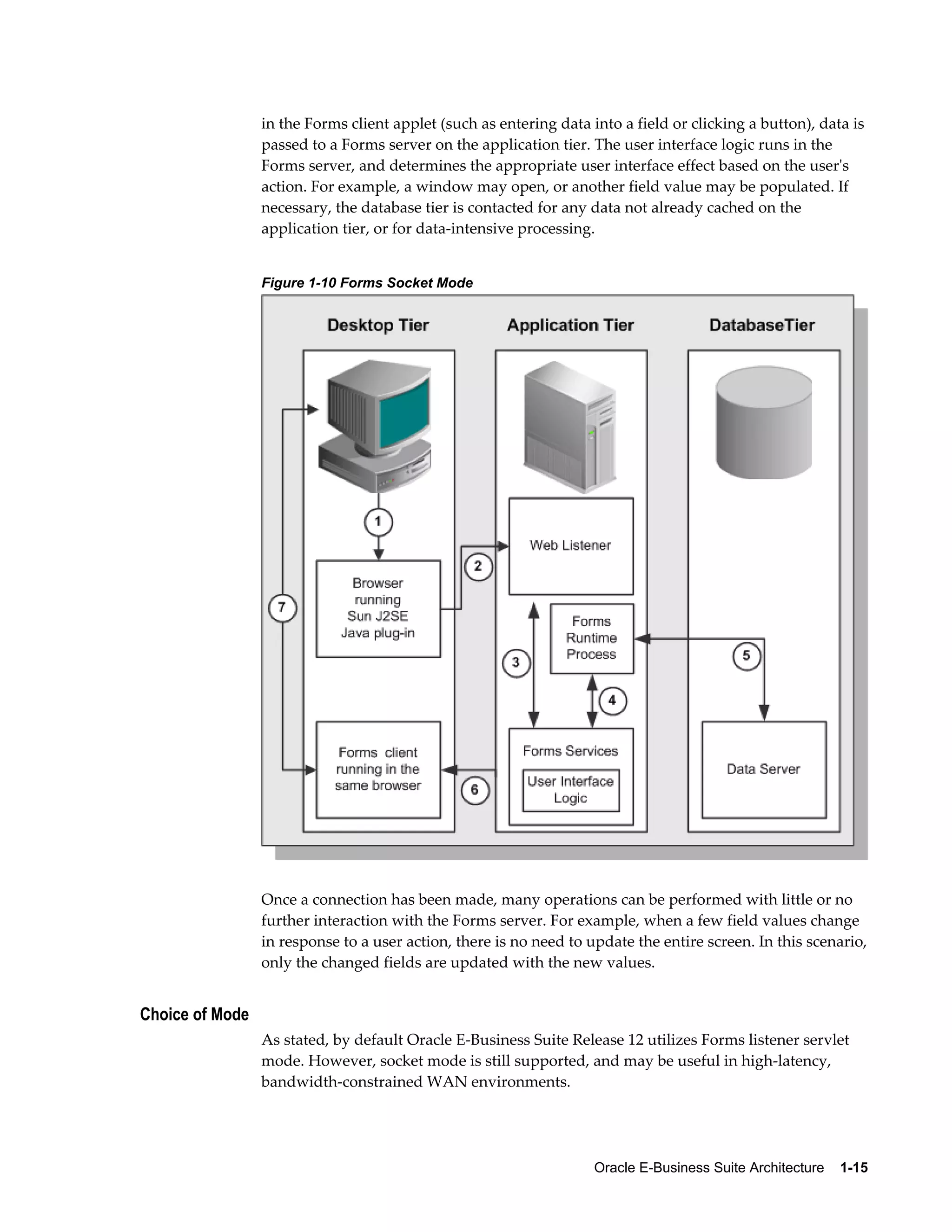
  • 81.
    4 Oracle E-BusinessSuite Database Features Oracle E-Business Suite Database Features 4-1 Introduction Many features in Oracle E-Business Suite Release 12 are built on the advanced capabilities of the underlying Oracle database technology. Release 12 utilizes various Oracle database features to optimize performance and scalability. Monitoring Features Oracle Database 11g, which is used by Oracle E-Business Suite Release 12.1, includes a number of sophisticated features that enable you to track the performance of your database, and if necessary take the appropriate corrective action. Note: For further details of the capabilities and usage of the tools described, see Oracle Database Performance Tuning Guide. Automatic Workload Repository (AWR) The Automatic Workload Repository is a repository of database performance statistics built in to every Oracle 11g database. AWR automatically generates snapshots of performance data at regular intervals (typically, once an hour) and collects the statistics for use in problem detection and tuning. The gathered data can be displayed in both reports and views. You can access AWR through Oracle Enterprise Manager Database Control, managing snapshots or modifying settings in order to create baselines that capture typical performance periods. The baselines can be used for comparisons with similar workload periods where performance problems have been reported. Automatic Database Diagnostic Monitor (ADDM) The Automatic Database Diagnostic Monitor is a tool that allows an Oracle database to diagnose its performance, and determine how identified problems could be resolved.
  • 82.
    ADDM analyzes theAWR data on a regular basis, locating the root causes of performance problems and providing recommendations for correcting them. Because AWR is a repository of historical performance data, ADDM can be used to analyze performance issues after the event, saving time and resources in reproducing a problem (which may not even be possible). Automatic database diagnostic monitoring is enabled by default, and its primary interface is Oracle Enterprise Manager Database Control. Active Session History (ASH) Active Session History is a means by which a detailed history of database activity is captured and stored. Only active sessions are captured, so the amount of data recorded is directly related to the work being performed. The V$ACTIVE_SESSION_HISTORY view records current sampled session activity. Unlike the instance-level statistics gathered by AWR, ASH gathers data at the session level. You can run ASH reports to analyze transient performance problems with the database that may only occur during specific times. For example, ASH can often be used to identify short-duration problems (perhaps lasting only a couple of minutes) that would represent too small a proportion of an ADDM analysis period to show up. Performance Features Database performance features include optimization, resource usage, space management, and access rights. Query Optimization The SQL used in Release 12 has been extensively tuned for cost-based optimization. In calculating the lowest cost (most efficient) method of executing an SQL statement, the Oracle query optimizer evaluates many factors to calculate the most efficient way to execute a SQL statement. For example, the optimizer considers the available access paths, factoring in statistical information for the tables and indexes that the SQL statement will access. The optimizer also considers hints, which are optimization suggestions placed in a comment of the SQL statement. As part of its operation, the optimizer creates a set of potential execution plans for the SQL statement, based on the available access paths and any hints. It then estimates the cost of each execution plan, based on data dictionary statistics for the data distribution and storage characteristics of the tables, indexes, and partitions. Finally, the optimizer compares the costs of the execution plans and chooses the one with the smallest cost, which means optimum execution characteristics. For some operations, such as batch processing, Release 12 uses cost-based optimization to achieve the most efficient means of processing all rows that are accessed by the statement. For other operations, such as accessing forms or communication with the desktop client, Release 12 uses cost-based optimization to achieve the best response time for processing the first rows that are accessed by the statement. 4-2 Oracle E-Business Suite Concepts
  • 83.
    Several other Oracledatabase performance features in Release 12 also require use of the cost-based query optimizer. Note: For further details of optimization, see: Oracle Database Concepts and Oracle Database Performance Tuning Guide. Oracle E-Business Suite Database Features 4-3 Database Resource Manager The gives the system administrator extensive control over processing resources on the database node. The administrator can distribute server CPU based on business rules, ensuring that the highest priority activities always have sufficient CPU resources. The administrator could, for example, guarantee Order Entry users 40% of CPU resources during business hours, regardless of the load or number of users in other groups on the system. System administrators can also use the Database Resource Manager to limit the impact of any inefficient ad hoc queries. For example, a limit of 5% of CPU resources could be placed on ad hoc queries against the database. Note: For further details, see Oracle Database Concepts and Oracle Database Administrator's Guide Partitioned Tables Partitioning helps support very large tables and indexes by dividing them into smaller, more manageable pieces called partitions. Once the desired partitions have been defined, SQL statements containing the partition key can access them instead of the original tables or indexes and thereby reduce the I/O needed. Partitioning can significantly enhance performance and manageability. For example, the speed of operations that involve copying or deleting data may be greatly improved by the use of partitioned tables. Operations that might have taken hours might now be completed in minutes. This can be useful in data warehouse applications. Important: Custom partitioning of standard Oracle E-Business Suite tables in Release 12 is fully supported for objects that are not already partitioned. Partitioning should always be planned and tested carefully before being implemented on a critical system. After implementation, you should check that the desired performance benefits have been achieved. Scalability Features As well as providing more computing power, multi-node systems facilitate the addition of machines to meet increases in demand. They also provide resilience in the event of
  • 84.
    failures of individualcomponents. Oracle Real Application Clusters Oracle Real Application Clusters (Oracle RAC) harness the processing power of multiple interconnected computers. Oracle RAC software called Oracle Clusterware and a collection of computers (known as a cluster) harness the processing power of each component to create a robust and powerful computing environment. A large task divided into subtasks and distributed among multiple nodes is completed more quickly and efficiently than if the entire task was processed on one node. Cluster processing also facilitates deployment of additional hardware resources for larger workloads and rapidly growing user populations. In Oracle RAC environments, all active instances can concurrently execute transactions against a shared database. Oracle RAC coordinates each instance's access to the shared data, to provide data consistency and data integrity. From a developer's point of view, Oracle RAC enables applications to be scaled to meet increasing data processing demands, without the need to change the application code. All Oracle E-Business Suite modules can be successfully deployed against a Oracle RAC-enabled database. Using Parallel Concurrent Processing (see Chapter 1), concurrent managers on separate application tier machines can be configured to direct requests to different database servers in an Oracle RAC cluster. Automatic Storage Management Automatic Storage Management (ASM) provides a file system and volume manager dedicated to the storage of Oracle database files. It extends the concepts of disk striping and mirroring, to optimize performance and remove the need for manual I/O tuning. Business Intelligence Features To meet the increasing demand for up-to-date details of business activities, Oracle E-Business Suite utilizes Oracle database features that help to optimize the types of query typically required in such environments. Materialized Views Materialized views are schema objects that can be used to summarize, precompute, replicate, and distribute data. They can markedly increase the speed of queries on very large databases when used to precompute and store aggregated data such as sums and averages. Materialized views can therefore improve performance of Oracle E-Business Suite products that perform many queries on summary data. Query optimization can use materialized views to improve query performance by automatically recognizing when one can be used to satisfy a request. The optimizer transparently rewrites the request to use the materialized view. Queries are then directed to the materialized view, and not to the underlying detail tables or views. 4-4 Oracle E-Business Suite Concepts
  • 85.
    In distributed environments,materialized views can be used to replicate data at remote sites, providing local access to data that would otherwise have to be accessed from the main site, with any network delays this might introduce. Oracle E-Business Suite Database Features 4-5 Security Features The Oracle database has always included mechanisms to protect its contents from unauthorized access, without hindering access by legitimate users. Details of these can be found in the standard database documentation. Additional features provide application monitoring capabilities; for example, Database Connection Tagging enables recording in V$SESSION of the current use to which a database connection is being put. Note: For further details of Database Connection Tagging, see My Oracle Support Knowledge Document 1100653.1, Using Database Connection Tagging With Oracle E-Business Suite Release 12.1.3. Various strategies and optional components can be used to enhance and customize security to meet the specific needs of a site. Chapter 11 discusses optional database features that can be used to enhance and customize security further.
  • 87.
    5 AutoConfig AutoConfig5-1 Introduction Configuring a new installation of Oracle E-Business Suite includes a number of stages: • Collection of information required to create the desired configuration • Storage of configuration information in the correct locations on the relevant machines • Creation of technology stack configuration files with the appropriate details • Creation of Applications configuration files with the appropriate details • Starting of all required processes in the correct order AutoConfig is a tool that simplifies and standardizes configuration management tasks in an Oracle E-Business Suite environment. A fresh install of Release 12 includes AutoConfig as a standard (and required) configuration management tool. AutoConfig can also be used with earlier releases of Oracle E-Business Suite. The Applications Context Where the System Identifier (SID) was traditionally used to identify a file as belonging to a particular Oracle E-Business Suite environment, an Applications context is used in an AutoConfig-managed environment such as Oracle E-Business Suite Release 12. The default context name, also referred to in this chapter as <CONTEXT_NAME>, is <SID>_<hostname>. Using an Applications context has a number of advantages: • Simplifies overall management of an Oracle E-Business Suite system • Allows easier startup and shutdown of applications services
  • 88.
    • Permits servicesto be installed or deinstalled independently of others • Integrates seamlessly with a shared application tier file system (see Chapter 9) • Enables use of Oracle Applications Manager for configuration management (see Chapter 7) • Facilitates support for Oracle Real Application Clusters (see Chapter 4) Before AutoConfig and the Applications context were introduced, configuration management tasks could be time-consuming and prone to error, in some cases requiring manual changes to be made to several configuration files. While individual configuration files are still used in an AutoConfig-enabled environment, they play a secondary role to an XML-based repository of Oracle E-Business Suite environment information, called the context file. By centralizing the configuration information, AutoConfig simplifies procedures for activities that range from upgrading a technology stack component to starting and stopping applications services. Another benefit is that the various files AutoConfig employs can be updated via standard Oracle E-Business Suite patches. There are separate context files for the application and database tiers of an Oracle E-Business Suite system. Applications Context File - The Applications context file, <INST_TOP>/appl/admin/<CONTEXT_NAME>.xml, is a repository for environment-specific details used by AutoConfig to configure the application tier. Information from this file is used to generate Oracle E-Business Suite configuration files and update relevant database profiles. Information stored includes: • Name and location of the database • Port numbers for Forms and Web services • Product-specific port numbers • Information about application tier services controlled by AutoConfig The values of the context variables that make up the context file are in part determined by the choices you make when you run Rapid Install. For example, when you specify that a particular application tier node is to be used as a concurrent processing server, the relevant variable will be set to execute the scripts that start the service. Database Context File - The database context file, <RDBMS_ORACLE_HOME>/appsutil/<CONTEXT_NAME>.xml, performs an equivalent role on the database tier. Information from this file is used to generate configuration files used on the database tier when AutoConfig is next run. 5-2 Oracle E-Business Suite Concepts
  • 89.
    AutoConfig 5-3 AutoConfigScripts and Directories A number of key configuration and control scripts are employed in an AutoConfig environment. AutoConfig creates several directories for these scripts and their associated files. AutoConfig Scripts Key AutoConfig configuration scripts on UNIX (command files on Windows) include: • adautocfg.sh - Wrapper script that passes the name of the specific environment context file to adconfig.sh. Located in <INST_TOP>/admin/scripts on the application tier, and <RDBMS_ORACLE_HOME>/appsutil/scripts/<CONTEXT_NAME> on the database tier. • adconfig.sh - Invoked by adautocfg.sh, this script is a wrapper for adconfig.pl. Located in <AD_TOP>/bin on the application tier, and <RDBMS_ORACLE_HOME>/appsutil/bin on the database tier. • adconfig.pl - Invoked by adconfig.sh, this Perl script calls the Java API to carry out the actual configuration tasks. Located in <AD_TOP>/bin on the application tier, and <RDBMS_ORACLE_HOME>/appsutil/bin on the databccase tier. In addition to these configuration scripts, several additional AutoConfig scripts are used to help manage the Oracle E-Business Suite system. These are described later in this chapcter, under Management Tasks. AutoConfig Directories Several directories are created by AutoConfig, as shown in the following table. Table 5-1 AutoConfig Directories Directory Name Directory Contents <INST_TOP>/admin/install Install scripts <INST_TOP>/admin/scripts Control scripts <INST_TOP>/admin/log Log files AutoConfig Operation As AutoConfig is used for a wide range of system configuration activities, from
  • 90.
    installation to maintenance,the following discussion of its operations is divided into several sections. Context Value Management Context Value Management (CVM) is an AutoConfig component that is used to manage the values of variables in the context file, and automate required updates to it. CVM supports updates to both the application tier and database tier context files. CVM actions include: • Adding new variables to a context file • Updating values of variables in an existing context file • Applying new versions of context file templates • Executing scripts or configuration tools that must complete before the AutoConfig engine starts, for example when generating the tnsnames.ora file CVM is activated when the Applications context file is updated, but before the AutoConfig engine itself starts. This enables CVM to execute scripts or other tools to manipulate any required file on the file system, and allow the appropriate settings to be propagated as needed to both the file system and database. For example, it is possible to update values in the context file which will then be propagated to the file system. Note: AutoConfig does not undertake all aspects of configuration management, such as operations at operating system level that may have implications outside the context of Oracle E-Business Suite. Like the core AutoConfig components, CVM utilizes configuration files on both the application and database tiers, as shown in the following tables. Table 5-2 Application Tier CVM Files File Location Description <AD_TOP>/bin/adcvm.sh Main CVM script <AD_TcOP>/admin/template/adcvmat.xml Stores CVM-related data 5-4 Oracle E-Business Suite Concepts for the application tier
  • 91.
    AutoConfig 5-5 Table5-3 Database Tier CVM Files File Location Description <RDBMS_ORACLE_HOME>/appsutil/bin/adcvm.sh Main CVM script <RDBMS_ORACLE_HOME>/appsutil/template/adcvmdb.xml Stores CVM-related data for the database tier AutoConfig Files As well as the context files and configuration scripts that have already been described, AutoConfig uses several other types of file in its configuration management activities. These may themselves be divided into different categories. Template Files AutoConfig template files are used as the starting point for creating site-specific configuration files. AutoConfig evaluates the context variables in a template file, determines the actual values required, and creates a configuration file with these values substituted. This process, described in more detail later in this chapter, is called instantiation. There is one template file for each configuration file. Template files are located in the various <PROD_TOP>/admin/template directories on the application tier, and in the <RDBMS_ORACLE_HOME>/appsutil/template directory on the database tier. Template files used by AutoConfig can be divided into the following categories: Templates for APPL_TOP Configuration Files - These are either files requiring configuration-specific information in the APPL_TOP, or files used to load configuration profiles into the Oracle E-Business Suite database. Templates for Management Scripts - To run all the standard processes required by Oracle E-Business Suite, Rapid Install creates scripts to start and stop each of these required processes. These scripts need configuration information in order to: • Create the correct environments for each process • Start the processes with the correct parameters • Point the processes at the correct database instance (if applicable) Driver Files AutoConfig driver files are used to list the corresponding template files and locations, and specify the commands to be executed. For example, the commands might update profile options. Driver files are located in each <PROD>_TOP/admin/driver directory on the application
  • 92.
    tier, and inthe <RDBMS_ORACLE_HOME>/appsutil/template directory on the database tier. Configuration Files AutoConfig configuration files, such as httpd.conf, are created as a result of AutoConfig instantiating the corresponding template files. Configuration files contain values corresponding to the settings specified for a particular site. After AutoConfig has been run, numerous configuration files will have been created in various directories. Figure 5-1 illustrates the relationship between the different types of file AutoConfig uses. Figure 5-1 Relationship Between AutoConfig Files Instantiation As mentioned earlier, instantiation is the process whereby AutoConfig creates a configuration file with contents tailored for a specific environment. AutoConfig can be used to instantiate files or scripts, and then execute them for installation and configuration. Examples of instantiation include: • Instantiation of a configuration file to be used at runtime • Instantiation of an SQL script to set profile options • Instantiation of a shell script or Windows command file to run an SQL script in 5-6 Oracle E-Business Suite Concepts
  • 93.
    AutoConfig 5-7 SQL*Plus • Instantiation of scripts to start up and shut down application tier services The adautocfg.sh script updates configuration files and profile options in the following way: 1. Instantiates template files with instance-specific values derived from the relevant context file 2. Copies in any customizations 3. Overwrites existing configuration files with newly instantiated ones 4. Runs SQL scripts to update database profile options Role of the template and driver files AutoConfig uses the various template files to determine the basic settings needed. There is one template file for each configuration file. Different versions of the template files exist for UNIX (for example httpd_ux.conf), and Windows (for example httpd_nt.conf). The driver files list the names and locations of the files that need to have context variables replaced. They also define the phases into which instantiation is divided, and specify the commands that are to be executed for specific products. When AutoConfig runs, it cycles through the various <PROD>_TOP/admin/driver directories looking for driver files such as adtmpl.drv, fndtmpl.drv, and icxtmpl.drv. Figure 5-2 illustrates the instantiation mechanism used by AutoConfig to create the various configuration files.
  • 94.
    Figure 5-2 AutoConfigInstantiation Mechanism Note: For further details of AutoConfig operation, see My Oracle Support Knowledge Document 387859.1, Using AutoConfig to Manage System Configurations with Oracle E-Business Suite Release 12. Execution of Scripts As well as its instantiation activities, AutoConfig may execute other scripts, depending on the requirements of the specific Oracle E-Business Suite system. Phases of Operation As AutoConfig parses the driver files, it carries out a series of actions, grouped into several distinct phases: • INSTE8 - Instantiates AutoConfig template files to the AutoConfig configuration files specified in the relevant template driver files. • INSTE8_SETUP - Executes setup scripts that carry out activities not involving connection to the database. • INSTE8_PRF - Executes setup scripts that update profile options. 5-8 Oracle E-Business Suite Concepts
  • 95.
    • INSTE8_APPLY -Executes setup scripts that carry out activities involving updates AutoConfig 5-9 to the database. • BINCPY - Copies the file mentioned from the source file to the configuration file, creating parent directories for the latter if necessary. AutoConfig will report an error if the source file cannot be found. • BINCPY_IGERR - Copies the file mentioned from the source file to the configuration file, creating parent directories for the latter if necessary. AutoConfig will not report an error if the source file cannot be found. AutoConfig carries out these actions in the following order: 1. All INSTE8 and BINCPY actions - Carries out all file instantiations called for during INSTE8, INSTE8_SETUP, INSTE8_PRF and INSTE8_APPLY, and all copying from source files to target configuration files. 2. INSTE8_SETUP actions - For the files that were instantiated in Step 1, AutoConfig runs all SETUP scripts. 3. INSTE8_PRF actions - For the files that were instantiated in Step 1, AutoConfig runs all PRF scripts. 4. INSTE8_APPLY actions - For the files that were instantiated in Step 1, AutoConfig runs all APPLY scripts. At the end of this process, the required configuration files and profile options have been created for the E-Business Suite installation. Management Tasks There are several areas in which an administrator can use AutoConfig to update, control, and monitor an Oracle E-Business Suite system. While many tasks will normally be undertaken from Oracle Applications Manager, you may on occasion need to run a script (command file on Windows) from the command line. Managing the Context Oracle Applications Manager (see Chapter 7) enables you to edit the Applications context as required. From the Administration tab, choose AutoConfig and click on Edit Parameters for the relevant context file. After making a change to the context, you must run AutoConfig to update the relevant configuration files. Before doing so, you should examine the proposed changes by running the adchkcfg.sh configuration check script (described below under Checking the System). Warning: Do not edit E-Business Suite configuration files manually. Any changes will be lost when AutoConfig is next run.
  • 96.
    An AutoConfig-managed environmentsuch as Release 12.1.1 will also be updated by applying an Oracle E-Business Suite patch that adds or modifies variables in the Applications context file, AutoConfig template files, or AutoConfig driver files. On occasion, you may need to undo configuration changes that have been made. The previous configuration can be restored by running the restore.sh utility, which enables you to roll back the changes made by an AutoConfig run. This is achieved by utilizing the backup copies of the configuration files that are created when AutoConfig is run. The backup files are located in <INST_TOP>/admin/out/<MMDDhhmm> on the application tier, and <RDBMS_ORACLE_HOME>/appsutil/out/<CONTEXT_NAME><MMDDhhmm> on the database tier, where the <MMDDhhmm> directory name indicates the month, day, hour and minute of the AutoConfig run. You can restore the configuration that existed immediately before the current one by navigating to the appropriate backup directory and running the restore.sh script. To restore an earlier configuration, you must use the Context File History feature of Oracle Applications Manager. Build Context Utility The adblxml utility, introduced in Release 12.1, can be used to create a new context file on the database tier. The new file acts as a central repository for database configuration information, and is essential in enabling AutoConfig on the database tier of an Oracle E-Business Suite instance. A new context file on the database tier can be created using the following command: perl $ORACLE_HOME/appsutil/bin/adbldxml.pl [template=<contextfile_template>][out=<contextfile_name> Where <contextfile_template> is the location of the context template (default is $ORACLE_HOME/appsutil/template/adxdbctx.tmp), and <contextfile_name> is the absolute path of the context file to be generated (the default is $ORACLE_HOME/appsutil/<context_name>.xml). Note: The adblxml utility is only supported on the database tier, not on the application tier. Controlling the System AutoConfig utilizes a number of application tier control scripts, located in <INST_TOP>/admin/scripts. 5-10 Oracle E-Business Suite Concepts
  • 97.
    AutoConfig 5-11 Table5-4 Key Application Tier Control Scripts Script Name Function adstrtal.sh Starts all application tier server processes adstpall.sh Stops all application tier server processes adautocfg.sh Runs AutoConfig The corresponding directory on the database tier is <RDBMS_ORACLE_HOME>/appsutil/scripts/<CONTEXT_NAME>, where control scripts allow the database and database listener processes to be started and stopped, and AutoConfig to be run. Checking the System Several other scripts facilitate system management in an AutoConfig-managed environment such as Release 12. For example, you can identify the effects of proposed changes before you make them. Configuration Check Utility adchkcfg.sh is located in <AD_TOP>/bin on the application tier, and in <RDBMS_ORACLE_HOME>/appsutil/bin on the database tier. This utility generates a report that highlights differences between existing configuration files and the new ones that AutoConfig will generate. The report is called cfgcheck.html. Running adchkcfg.sh is useful both in carrying out a test run before a planned environment change is made, and when investigating problems. In Release 12.1, the tool was enhanced to report important database updates, generate a report for database changes, and improve readability of reports. Note: For further details on managing system configuration parameters, see Oracle E-Business Suite Maintenance Procedures. AutoConfig Search Utility Originally known as the Context Variable Information utility, the AutoConfig Search Utility, GenCtxinfRep, is used to obtain detailed information about context variables and the templates that use them. It is run from the command line and accepts all or part of a context variable name, and generates an HTML or text report that includes descriptions, default values, and current values of matched context variables. The variables description contains recommended settings, range of allowed values, and links to documents that give detailed usage information. Additionally, GenCtxinfRep
  • 98.
    lists the configurationtemplates where specific context variables are used. AutoConfig Profiler Introduced in Release 12.1, the profiling feature provides a consolidated HTML report of an AutoConfig run. The top level of the report displays a summarized view that lists all the product tops, along with the total instantiation and execution time of the templates within each product top. You can drill down into the report to view additional details, including the source and target location of each template, the time taken to instantiate and execute individual template scripts, and the execution report for each template script. AutoConfig can be run in profile mode on the application tier using the following command: $AD_TOP/bin/adconfig.pl contextfile=<CtxFile> [product=<product_top>] –profile Where <CtxFile> is the absolute path to the application tier context file, and <product_top> is the short name of the product to configure. AutoConfig can be run in profile mode on the database tier using the following command: perl $ORACLE_HOME/appsutil/bin/adconfig.pl contextfile=<CtxFile> -profile Where <CtxFile> is the absolute path to the database tier context file. Enhanced Service Dependency Management In addition to the above utilities, AutoConfig's service management infrastructure has been enhanced with dependency information between service groups and services. This dependency information is stored as metadata in the context file. The following XML attributes were added in Release 12.1: • services: contains a comma-separated list of the services that belong to a particular service group. • incompatible_with (optional): contains a comma-separated list of service groups and services that are mutually exclusive with the service group or service for which they are defined. For example, Forms Socket mode and Forms Servlet mode are mutually incompatible. • requires (optional): contains a comma-separated list of the required service groups and services. For example, to start and run successfully, all the OC4J containers require the TNS listener to be running. Running AutoConfig in Parallel Introduced in Release 12.1, the parallel mode feature enables AutoConfig to be run simultaneously across multiple nodes of an Oracle E-Business Suite system. When running in parallel mode, AutoConfig uses the dbms_locks PL/SQL package to ensure 5-12 Oracle E-Business Suite Concepts
  • 99.
    that configuration ofone node does not interfere with configuration of other nodes: this is required because certain AutoConfig configurations of one node depend on the configurations of other nodes. Note: During the instantiation phase, locking is done at script level. During the execution phase, locking is done at product_top level. AutoConfig can be run in parallel mode on the application tier using the following command: perl $AD_TOP/bin/adconfig.pl contextfile=<CtxFile> [product=<product_top>] –parallel Where <CtxFile> is the absolute path of the application tier context file and <product_top> is the short name of the product to be configured. AutoConfig can be run in parallel mode on the database tier using the following command: perl $ORACLE_HOME/appsutil/bin/adconfig.pl contextfile=<CtxFile> -parallel Where <CtxFile> is the full path to the database tier context file. Note: When using parallel mode, AutoConfig must be invoked with the –parallel option on all nodes of the relevant tier. AutoConfig 5-13
  • 101.
    6 Cloning Cloning6-1 Introduction Cloning is the act of creating an identical copy of an existing Oracle E-Business Suite system. The system to be cloned is referred to as the source system, and the newly created system is referred to as the target system. Cloning has various uses, such as: • Creating a copy of a production system for patch testing • Creating a staging area to reduce the downtime required for patching • Refreshing a test system from a production system • Moving an existing system to a different machine or platform Simply copying the existing components to a new location will not provide a working Oracle E-Business Suite installation. For example, there are numerous configuration files in the file system that must be modified, depending on the physical configuration of the target environment. In addition, the Oracle E-Business Suite installation process utilizes the Oracle Universal Installer, which maintains key information about the installation. Copying the installation to a new location would invalidate this information, preventing the application of patches to components maintained by the Installer. Cloning Tools Cloning an Oracle E-Business Suite Release 12 system can be accomplished by running the Rapid Clone tool. This tool can be employed with Oracle E-Business Suite Release 12, or any AutoConfig-enabled earlier releases. Alternatively, you can license Oracle Application Management Pack for Oracle E-Business Suite, which extends Enterprise Manager 10g Grid Control to help monitor and manage
  • 102.
    an Oracle E-BusinessSuite system. The pack integrates Oracle Applications Manager with Grid Control to provide a consolidated E-Business Suite management solution. Note: See Chapter 7 for further details of cloning features and options. Cloning Across Platforms When cloning from one machine to another, the simplest case is where the two machines are running the same version of the same operating system. A slightly more complex case occurs where the two operating systems are binary compatible, and the source system is running an earlier version of the same operating system that is being used on the target system. While Rapid Clone can often be used successfully in such cases, you should generally aim to clone between machines that are running identical versions of an operating system. This minimizes the risk of problems arising because of differences between the versions. Warning: It is not supported to clone from a later version of an operating system to an earlier one. Cloning Options The following list summarizes the cloning options currently available with Rapid Clone. Note: In this context, node refers to a logical collection of Oracle E-Business Suite processes, and not necessarily a physical machine. • Single node to Single node • Recloning (of database only)1 • Clone existing Clone2 • Multi-node to Multi-node • Single node to Multi-node3 • Multi-node to Single node 4 Footnotes on List 1. Recloning of the database only can be useful if the source system has changed, and the target system needs to be updated with these changes. However, if any Oracle E-Business Suite patches have been applied to the source system, the rest of the 6-2 Oracle E-Business Suite Concepts
  • 103.
    components (APPL_TOP, COMMON_TOPand ORACLE_HOMEs) must also be cloned, in order to keep the file system and database synchronized. 2. A cloned system created with Rapid Clone can be used as the source system for Cloning 6-3 another round of cloning. 3. If moving to a multi-node system, it is preferable to implement a shared APPL_TOP rather than clone from a single node to multiple nodes. See Chapter 9 for details. 4. This procedure is often referred to as merging APPL_TOPs. Note: For further details of cloning options and strategies, see My Oracle Support Knowledge Document 406982.1, Cloning Oracle Applications Release 12 with Rapid Clone. Rapid Clone Operation Rapid Clone does not modify the source system. The adpreclone.pl script prepares the source system to be cloned by collecting information about the database, and creating generic templates from existing files that contain source-specific hard-coded values. The template files are located in <RDBMS_ORACLE_HOME>/appsutil/template on the database tier. Important: Rapid Clone requires all the expected binary files to be in place on the source system, and may fail to operate correctly if any are missing. After running adpreclone.pl, you copy the relevant files and directories from the source system files to the target system, and then run the adcfgclone.pl configuration script. The values for various parameters are required to create the context file that will be used to configure the target system. A few of these values are calculated from the current target system, and adcfgclone.pl will prompt for the others. For example, you will be prompted to specify a port pool, to use a particular range of predefined server ports. There are 100 port pools, so if, for example, you select pool port 3, the default database port number (1521) is replaced by 1524. Note: If you are cloning to the same machine, you must specify a different port pool from the source system. If desired, it is possible to set a specific port to a value other than the one assigned from the port pool. This requires editing the context file on the target system after adcfgclone.pl completes, then running AutoConfig to update the system with the new value.
  • 104.
    Rapid Clone andOracle Universal Installer The Oracle Universal Installer's global inventory is simply a list of pointers to each local inventory location. There is one local inventory per ORACLE_HOME, located in <ORACLE_HOME>/inventory, which contains all the patch information for the ORACLE_HOME in question. Rapid Clone first ensures that the source system local inventory is in XML format, converting it from the older binary format if necessary. The local inventory (inside the ORACLE_HOME to be cloned) is then copied to the target system and reconfigured with the new values for the target system. Rapid Clone subsequently attaches the reconfigured local inventory to the target system global inventory. If the target system does not have a global inventory, a new global inventory is created when Rapid Clone goes to attach the local inventory. Additional Cloning Features Several features are designed to make cloning more straightforward, and give greater flexibility in response to issues such as: • Whether cloning is being used to add a node to an existing installation, or to create an entirely new installation. In the former case, there will be fewer ancillary changes. • Types of table modification that need to take place. For example, when using Rapid Clone to add a node, a new row is inserted into FND_NODES, whereas when creating a new installation, FND_NODES is purged and a completely new set of rows inserted. • Whether services should be set to start automatically after cloning is complete. • Whether any data alteration is needed after cloning. Summary In essence, Rapid Clone does the following on the target system. Database tier: • Creates the Database context file • Registers the ORACLE_HOME in the Global Inventory • Relinks the ORACLE_HOME • Configures the ORACLE_HOME • Recreates the database control files 6-4 Oracle E-Business Suite Concepts
  • 105.
    • Starts thedatabase • Configures the database • Starts the database listener Application tier: • Creates the Applications context file • Registers the OracleAS 10.1.2 and OracleAS 10.1.3 ORACLE_HOMEs in the Global Cloning 6-5 Inventory • Relinks the OracleAS ORACLE_HOMEs • Configures the OracleAS ORACLE_HOMEs • Configures the APPL_TOP • Creates the INST_TOP • Starts application tier server processes In addition, there are a number of associated actions relating to the database. Note: For further details of Rapid Clone capabilities and operation, see My Oracle Support Knowledge Document 406982.1, Cloning Oracle Applications Release 12 with Rapid Clone. For details of cloning options in general , see My Oracle Support Knowledge Document 783188.1, Certified RAC Scenarios for E-Business Suite Cloning.
  • 107.
    7 Management Tools Management Tools 7-1 Introduction Oracle Applications Manager(OAM) is a powerful, easy to use tool that enables you to manage and monitor an Oracle E-Business Suite system from an HTML-based central control console. Among other Oracle E-Business Suite system management tasks, Oracle Applications Manager can help you to: • Configure and administer your system • Diagnose and correct problems • Manage patches • Monitor and tune performance • Monitor system security Oracle Applications Manager is built into Oracle E-Business Suite, and can be used in conjunction with a a number of optional tools and features described later in this chapter: these include Oracle Application Management Pack for Oracle E-Business Suite and Oracle Application Change Management Pack for Oracle E-Business Suite. Oracle Applications Manager Features The Applications Dashboard provides an overview of the key features of an Oracle E-Business Suite installation, including summaries of current status, performance, critical activities, diagnostics, business flows, and security. You can then view additional information on any of these areas.
  • 108.
    Figure 7-1 OracleApplications Manager Dashboard A more detailed view of the Oracle E-Business Suite system is offered by the Site Map, which provides easy access to the numerous features and options that exist in the areas of administration, monitoring, maintenance, and diagnostics and repair. Administration Oracle Applications Manager provides a comprehensive system configuration editor, for use in conjunction with the AutoConfig configuration management tool (see Chapter 5). Previous configuration settings can easily be compared with the current settings, allowing changed settings to be identified and rolled back as necessary. 7-2 Oracle E-Business Suite Concepts
  • 109.
    Management Tools 7-3 Figure 7-2 Site Map - Administration Additionally, Oracle Applications Manager helps you track configuration changes, such as recently altered site-level profile option settings. It can also helps you detect potential configuration problems, such as database initialization parameters that do not meet Oracle requirements or recommendations. Oracle Applications Manager can be used to configure and control critical application tier services such as concurrent processing, Forms listeners, and Web servers. For example, you can monitor and administer concurrent requests, and easily analyze the concurrent request workload to make informed configuration changes for concurrent processing. Oracle Applications Manager can also be used to control Oracle Workflow system services, such as background engines, notification mailers, agent listeners, and queue propagation. You can monitor and analyze Oracle Workflow system activity, suspend and resume processes, retry activities that end in error, and purge obsolete Workflow data. The License Manager component of Oracle Applications Manager enables you to manage all aspects of licensing your products and related features. For example, you can obtain reports of currently licensed products, country-specific functionalities, and languages, as well as an overall licensing summary for your system You can also license additional products, country-specific functionalities, and languages. You can extend Oracle Applications Manager using your own custom SQL scripts. Not only can SQL scripts be organized and accessed from within the OAM console, but drilldowns can be enabled from script output to standard Oracle Applications Manager
  • 110.
    interfaces. For example,if you obtain concurrent request IDs from an SQL script, you can then drill down into the standard Oracle Applications Manager interface to obtain details of the concurrent requests. Monitoring Oracle Applications Manager provides extensive monitoring features for Oracle E-Business Suite. Charts and graphs provide high-level summaries, and you can drill down for more detailed information as required. The Monitoring tab provides key performance metrics related to online, batch, and workflow activity. Additionally, system administrators can now subscribe to receive automated alerts when concurrent requests run longer or wait longer than specified thresholds. Figure 7-3 Site Map - Monitoring Monitoring support is provided for application tier services such as concurrent managers and Web services. For currently running processes such as forms or concurrent requests, you can examine both application tier and database session details, right down to the currently executing SQL. OAM can alert you when certain errors occur within the E-Business Suite system, and 7-4 Oracle E-Business Suite Concepts
  • 111.
    will provide detailedcontext information to help in diagnosing those errors. Information from system components, including performance details, availability, configuration, diagnostic data, and security concerns can all be presented in the context of affected business flows, so that you can better understand any impact on your business. Management Tools 7-5 Maintenance You can easily determine which patches have been applied to a system, including the individual patches included in mini-packs, maintenance packs, and merged patches. Oracle Applications Manager also enables you to examine the patched files on a system, and identify all the patches that altered a given file. For each patch applied, you can see the actions taken by each patch driver. Figure 7-4 Site Map - Maintenance The Patch Wizard tool built into Oracle Applications Manager can recommend patches for your Oracle E-Business Suite system. The wizard takes patch data downloaded from Oracle, analyzes that data against the Oracle E-Business Suite system, and recommends patches based on criteria you specify. The wizard can also analyze individual patches, identify any prerequisites missing on the system, and show the impact that the patches would have on the system in terms of affected applications, files, and other areas. Additionally, the wizard can download multiple patches from Oracle and merge them into a single patch. Administrators can use the Manage Downtime feature to schedule downtimes. When a downtime is scheduled, a message on the Home Page notifies users of the period when the system will not be available. The user has to log in, or return to the Home Page to see this message. If the downtime is in progress, an appropriate warning page will replace the login page.
  • 112.
    During the scheduleddowntime period, administrators with suitable database privileges are able to log into OAM to monitor the progress of AutoPatch and other Applications DBA (AD) utilities: access to other parts of Oracle E-Business Suite is not allowed. Diagnostics and Repair Oracle Applications Manager for Oracle E-Business Suite Release 12 provides troubleshooting wizards that automate complex recovery steps. Tools such as Concurrent Manager Recovery help you diagnose problems and take corrective action from the same screen. The Service Infrastructure Troubleshooting Wizard ensures that the Generic Service Management (GSM) infrastructure is running normally, and if not, guides the administrator through the steps needed to bring GSM back up. Figure 7-5 Site Map - Diagnostics and Repair The Applications Dashboard provides a gateway into Oracle Diagnostics for Oracle E-Business Suite, offering graphical views of diagnostic test executions and failures, summarizing test results, and providing access to detailed test reports. Keyword searches can be performed on the test repository to locate relevant tests, which can then be grouped and executed directly from the same interface. Additionally, system administrators can schedule and run diagnostics tests as batch programs, and output from all diagnostic interfaces can be captured and packaged for shipment to Oracle Support quickly and easily. Other features include provision for customers to download the latest diagnostics pack supplied by Oracle Support, and create their own diagnostic tests as required. Finally, the system alerting infrastructure has been enhanced with a new flood control mechanism to prevent multiple instances of a given alert from overwhelming the alert system. Additionally, alerts have been enhanced to allow summary and context 7-6 Oracle E-Business Suite Concepts
  • 113.
    information to beretrieved in XML format via standard business event integration mechanisms. Management Tools 7-7 Support Cart The OAM Support Cart automates the collection of detailed node-specific information that can be sent to Oracle Support to assist with problem diagnosis. Figure 7-6 Oracle Applications Manager Support Cart The information collected includes details of products installed, patches applied, database version, current database parameters, and system topology. Other pages from OAM can be added to the Support Cart if desired. Extending Oracle Applications Manager Functionality Oracle Applications Manager can be used in conjunction with Oracle Enterprise Manager Grid Control via the supporting Oracle Application Management Pack for Oracle E-Business Suite, to create a comprehensive, top-down approach to system monitoring and administration. Oracle Application Management Pack for Oracle E-Business Suite for Oracle E-Business Suite extends Enterprise Manager Grid Control to help monitor and manage Oracle E-Business Suite systems. Features include simplified administration, hot cloning (where the database does not need to be shut down), and management of advanced topologies. Another tool that can be used to extend Oracle Applications Manager functionality is Oracle Application Change Management Pack for Oracle E-Business Suite. This tool provides a centralized view of multiple Oracle E-Business Suite systems, helping to to monitor and implement functional and technical changes. Oracle Application Change Management Pack consists of three components: Customization Manager, Patch Manager, and Setup Manager.
  • 114.
    Note: For furtherdetails of these optional tools, see My Oracle Support Knowledge Document 812315.1, Getting Started with Oracle Application Management Pack and Application Change Management Pack for Oracle E-Business Suite Version 3.0. Generic Service Management Traditionally, application tier processes such as Forms listeners, HTTP servers, and concurrent managers had to be started and monitored individually by system administrators, a time-consuming and potentially error-prone exercise. With the transition to web-based applications, the number of application tier processes required for Oracle E-Business Suite products has increased significantly, with many Oracle E-Business Suite products making use of multiple application tier services to support one or more processes. Service processes are similar to concurrent manager and transaction manager processes, and must be kept running on an application tier for the proper functioning of their associated products. Management of the services is complicated by the fact that they may be distributed across multiple host machines. The Generic Service Management (GSM) feature simplifies management of these generic service processes, by providing a fault-tolerant framework with a central management console built into Oracle Applications Manager. With Generic Service Management, the Internal Concurrent Manager (ICM) manages the various service processes across multiple hosts. On each host, a Service Manager acts on behalf of the ICM, allowing the ICM to monitor and control service processes on that host. System administrators can configure, monitor, and control services though Oracle Applications Manager, which communicates with the ICM. Generic Service Management provides a fault-tolerant system: if a service process exits unexpectedly, the ICM will automatically attempt to restart the process. If a host fails, the ICM may start the relevant service processes on a secondary host. The ICM itself is monitored and kept alive by Internal Monitor processes located on various hosts. This new application tier service management infrastructure has several benefits: • The service processes no longer need to be manually and individually started and monitored by Oracle E-Business Suite system administrators • Administrators can configure and control the services through Oracle Applications Manager • As with concurrent manager processes, system administrators can use work shifts to determine the number of processes that will be active for a service on a given node for a given time period • Services can take advantage of the process distribution and fault tolerance 7-8 Oracle E-Business Suite Concepts
  • 115.
    capabilities that havebeen developed for concurrent processing Generic Service Management is available out of the box with Oracle E-Business Suite Release 12, and can also be used with other AutoConfig-enabled releases. Management Tools 7-9
  • 117.
    8 Authentication andIntegration Authentication and Integration 8-1 Introduction The subject of authentication is a broad one, which covers a variety of technologies and components. This chapter provides a survey of the key architectural concepts and decisions involved in setting up the required level of authentication for an organization. Note: For a complete list of the relevant authentication and authorization documentation, see My Oracle Support Knowledge Document 380482.1, Oracle Application Server with Oracle E-Business Suite Release 12 Documentation Roadmap. Authentication of Oracle E-Business Suite users can be configured to be straightforward and out of the box, using the traditional FND_USER mechanism, or it can involve various additional features and levels of sophistication, such as single sign-on and use of optional products such as Oracle Portal and Oracle Discoverer. The system administrator can choose the optimal solution for an installation, taking into account factors such as simplicity of setup and maintenance, the possible need for a single point of access to enterprise-wide applications, and the ability to integrate with third-party user directories, as well as the overall security requirements of the organization. Advanced features that are discussed briefly include the tasks involved in keeping user profile information automatically synchronized across an enterprise, and the steps needed to link an account in Oracle Internet Directory to multiple application accounts in Oracle E-Business Suite Release 12. Important: Use of the advanced authentication features described in this chapter, such as Single Sign-On, are optional with Oracle E-Business Suite Release 12. If you wish to use them, you must carry out the requisite additional setup procedures as noted later. The solutions described here do not address the issue of authorization. After a user has
  • 118.
    been authenticated, OracleE-Business Suite retrieves the authorization information associated with the application account the user is logged into. Authorization information for application accounts is managed through application responsibilities. Oracle E-Business Suite applies authorization checks as and when required during the user's session. Oracle Application Server 10g Optional Components Benefits of utilizing Oracle Application Server 10g optional components with Oracle E-Business Suite Release 12 include: • Performance, scalability and high-availability via distributed architectures. • The ability to connect a single Enterprise Portal to web providers running on multiple Release 12 instances. • Uniform Single Sign-On support for all Oracle E-Business Suite products. • Bidirectional Oracle Internet Directory-to-FND_USER synchronization. • Link-on-the-fly support for environments where the Single Sign-On userids in Oracle Internet Directory differ from the Oracle E-Business Suite userids. • One-to-many support for environments where a Single Sign-On userid may be associated with one or more Release 12 userids. • Bookmarkable URLs, where Applications Navigator Portlet will produce links that authenticate users and create Oracle E-Business Suite sessions as needed. • Integration with third-party single sign-on services (e.g. Netegrity, Tivoli, Entrust) and Lightweight Directory Access Protocol (LDAP) V.3 directories such as SunONE/iPlanet and Microsoft Active Directory. Support for more advanced deployment topologies is also available, including multi-node load balancing configurations, Oracle Real Application Clusters (Oracle RAC), and other distributed architectures. Note: For further details of additional options, see Oracle E-Business Suite System Administrator's Guide - Security, Chapter 6. Oracle Portal Oracle Portal (part of Oracle Application Server 10g) is a complete, browser-based environment for the development, deployment, administration, and configuration of enterprise class portals. Oracle Portal incorporates a complete portal building framework, with self-service publishing features to facilitate creation and management of the information accessed within your portal. A wide variety of portal interfaces and 8-2 Oracle E-Business Suite Concepts
  • 119.
    configurations are possible,from a simple departmental-level publishing portal to an Internet-accessible portal that serves both customers and employees. Tight integration with other components of the Oracle Application Server and with the Oracle database ensures that the solution can scale to an enterprise class audience. Note: For further details of integrating Oracle Portal with E-Business Suite Release 12, see My Oracle Support Knowledge Document 380484.1, Using Oracle Portal 10g with Oracle E-Business Suite Release 12. Authentication and Integration 8-3 Oracle Discoverer Business users at all levels of an organization can use Discoverer 10.1.2 to gain immediate access to information from data marts, data warehouses, and online transaction processing (OLTP) systems. Discoverer 10.1.2 enables business analysts to create, modify, and execute ad hoc queries and reports. Casual users can utilize a range of predefined reports and graphs that enable them to obtain business views while hiding the complexity of the underlying data structures being reported upon. Discoverer 10.1.2 is tightly integrated with Oracle E-Business Suite Release 12. Release 12 users can use Discoverer to analyze data from selected business areas in Financials, Operations, Human Resources, Purchasing, Process Manufacturing, Activity Based Management, and others. You can integrate Discoverer into an existing Oracle E-Business Suite Release 12 environment by installing Discoverer 10.1.2 with Oracle Business Intelligence Server 10g Release 2 on a standalone application tier server node, or in a separate Oracle Business Intelligence Server 10g Release 2 ORACLE_HOME, on an existing application tier server node. Note: For further details of using Oracle Discoverer with Oracle E-Business Suite Release 12, see My Oracle Support Knowledge Document 373634.1, Using Discoverer 10.1.2 with Oracle E-Business Suite Release 12. Enterprise-Wide Single Sign-On Single sign-on functionality enables users to access Oracle E-Business Suite and other applications through a single user ID, without having to log in to each application separately. Oracle E-Business Suite supports the use of single sign-on functionality via Oracle Single Sign-On, Oracle Internet Directory (OID), and Oracle Portal. Implementing an enterprise-wide single sign-on solution involves significant changes to the mechanism by which Oracle E-Business Suite Release 12 users are authenticated. Instead of authentication being performed natively, via the FND_USER table, this functionality is delegated to Oracle Single Sign-On, which can either:
  • 120.
    • Perform uservalidation itself, against information stored in Oracle Internet Directory. • Delegate validation to a third-party single sign-on server. With either of these solutions, Oracle E-Business Suite Release 12 accepts identities vouched for by the single sign-on mechanism. Oracle Internet Directory complements this by acting as an integration point that enables Oracle E-Business Suite Release 12 to participate in enterprise level user management. Note: Note that where a third-party single sign-on server is in use, Oracle Single Sign-On and Oracle Internet Directory are still required, to provide a bridge between E-Business Suite Release 12 and the third-party single sign-on solution. Each E-Business Suite instance must still maintain a record of registered users, in the form of the traditional application accounts. However, the level of abstraction needed for an enterprise level user requires a mechanism that can uniquely identify a user across the enterprise. This is accomplished via a globally unique identifier (GUID). Oracle Internet Directory and Oracle E-Business Suite store GUID information for each enterprise level user. The GUID can be considered as an identity badge that is recognized by both Oracle Internet Directory and Oracle E-Business Suite. Another requirement in such an environment is for user enrollment to be done only once, at well defined places, with the user subsequently being known to the rest of the enterprise. Two additional features enable this: • Support for automatic propagation of application information across an enterprise, via a synchronization process between Oracle Internet Directory and a third-party LDAP server. • Support for automatic propagation of user information across an enterprise, via a provisioning process between Oracle Internet Directory and Oracle E-Business Suite Release 12. User information in external, third-party user directories can be synchronized with Oracle Internet Directory using the LDAP protocol. With Oracle Internet Directory, customers can manage and publish user information in a central location that various application systems, including the Oracle E-Business Suite, can reference. Much of the complexity involved with integrating Oracle E-Business Suite into a single sign-on environment arises because of the need to consolidate fragmented or duplicated user data in the single sign-on environment, as a legacy of integrating previously-isolated systems. The solution described in this chapter provides mechanisms to link the existing data together using the GUID. In addition, bulk migration tools can be used to move a large number of users between Oracle Internet Directory and E-Business Suite during the 8-4 Oracle E-Business Suite Concepts
  • 121.
    transition to anintegrated single sign-on environment. Note that full synchronization of user credentials between Oracle Internet Directory and E-Business Suite Release 12 requires deployment of the relevant Oracle Application Server 10g components. Note: For more information on implementing single sign-on with Oracle Single Sign-On and Oracle Internet Directory, see Chapter 6 of Oracle E-Business Suite System Administrator's Guide - Security, andMy Oracle Support Knowledge Document Note 376811.1, Using Oracle Application Server 10g with Oracle E-Business Suite Release 12. Authentication and Integration 8-5 Application Server Integration Options Application Server 10g can act as an integration hub that enables the Oracle E-Business Suite to work in conjunction with other enterprise software, including software from third-party vendors.
  • 122.
    Figure 8-1 ApplicationServer Integration Architecture By default, Release 12 continues to use the local E-Business Suite user directory, FND_USER, for user authentication. Optionally, Release 12 user authentication can be delegated to Single Sign-On 10g and Oracle Internet Directory 10g running externally. It is possible to integrate Release 12 with a third-party LDAP (such as Microsoft Active Directory or SunONE/iPlanet) or a third-party single sign-on solution (such as Microsoft Windows Kerberos or Netegrity SiteMinder). This requires integration of the chosen third-party solutions via an external Oracle Application Server 10g instance, as shown in the diagram above. Release 12 delegates user authentication to Oracle Single Sign-On, and Oracle Single Sign-On delegates authentication to the third-party single sign-on solution. Conversely, user information from the third-party LDAP must be synchronized with Oracle Internet Directory 10g, which synchronizes its users with E-Business Suite's FND_USER directory. Synchronization is handled by the Oracle Directory Integration Platform. 8-6 Oracle E-Business Suite Concepts
  • 123.
    Authentication and Integration8-7 Basic Single Sign-On Deployment Scenario This section outlines a simple deployment scenario where an existing Oracle E-Business Suite instance is integrated with a new Oracle Single Sign-On and Oracle Internet Directory infrastructure. A subsequent discussion considers additional factors, such as the existence of a third-party single sign-on solution, or the presence of multiple user repositories. Note: This section provides a high-level overview of the common tasks that will apply to all installations. The exact steps needed for the requirements of a particular site will be more detailed. The starting point of this scenario is an existing Oracle E-Business Suite Release 12 installation, plus a new Oracle Application Server 10g installation (including Oracle Single Sign-On and Oracle Internet Directory) on a different machine. Oracle Internet Directory has no currently existing users apart from pre-seeded users, and Oracle Portal is not implemented. The requirement is to integrate Oracle E-Business Suite Release 12 with Oracle Single Sign-On and Oracle Internet Directory. Key Goals • Oracle E-Business Suite Release 12 will delegate user sign-on and authentication to Oracle Single Sign-On • Oracle Single Sign-On will authenticate user credentials against user entries in Oracle Internet Directory • Oracle Internet Directory will store every user's single sign-on account id and password Figure 8-2 Deploying E-Business Suite with Oracle Single Sign-On and Oracle Internet Directory User Management Options Existing Oracle E-Business Suite Release 12 application accounts are migrated to single sign-on accounts in Oracle Internet Directory using the Bulk Migration Tool. After the migration, a system administrator has a number of user management options, related to the location(s) where user information is created, and where it is provisioned (sent) to.
  • 124.
    Option 1 Alluser information is created in Oracle E-Business Suite Release 12, then provisioned into Oracle Internet Directory. • Oracle E-Business Suite Release 12 is configured as a provisioning integrated application with Oracle Internet Directory • System administrators configure the provisioning integration via provisioning profiles Figure 8-3 Provisioning User Information from E-Business Suite to Oracle Internet Directory The creation of a new application account in Oracle E-Business Suite Release 12 will automatically trigger the creation of a new single sign-on account in Oracle Internet Directory. Some of the user attributes from the application account may be provisioned in the single sign-on account in Oracle Internet Directory during account creation. Option 2 All user information is created in Oracle Internet Directory, then provisioned into Oracle E-Business Suite Release 12: • Oracle E-Business Suite Release 12 is configured as a provisioning integrated application with Oracle Internet Directory • System administrators configure the provisioning integration via provisioning profiles 8-8 Oracle E-Business Suite Concepts
  • 125.
    Figure 8-4 ProvisioningUser Information from Oracle Internet Directory to E-Business Suite The creation of a new single sign-on account in Oracle Internet Directory will automatically trigger the creation of a new application account in Oracle E-Business Suite Release 12. Some of the user attributes from the single sign-on account may be provisioned in the application account in Oracle Internet Directory during account creation. Option 3 All user information is created in either Oracle Internet Directory or Oracle E-Business Suite Release 12, then provisioned into the other system: • Oracle E-Business Suite Release 12 is configured as a provisioning integrated Authentication and Integration 8-9 application with Oracle Internet Directory • System administrators configure the provisioning integration via provisioning profiles Figure 8-5 Provisioning User Information Between E-Business Suite and Oracle Internet Directory The creation of a new application account in Release 12 will automatically trigger the
  • 126.
    creation of anew single sign-on account in Oracle Internet Directory, and the creation of a new single sign-on account in Oracle Internet Directory will automatically trigger the creation of a new application account in Release 12. During account creation, some of the user attributes from the application account may be provisioned in the single sign-on account in Oracle Internet Directory during account creation, and some of the user attributes from the single sign-on account may be provisioned in the application account in Oracle Internet Directory. Synchronizing User Attributes For all three of the above options, a set of user attributes can, on being updated from either system, optionally be synchronized between Oracle E-Business Suite Release 12 and Oracle Internet Directory. This is accomplished by configuring the provisioning profile. Signing On Attempting to gain access to an Oracle E-Business Suite Release 12 environment, a user who has not yet been authenticated with Oracle Single Sign-On is directed to a Single Sign-On login page, which can be customized to suit an individual site. After authentication via Oracle Single Sign-On (or if authentication has previously been carried out) the user is redirected to the requested page or the user's home page in the Oracle E-Business Suite Release 12. Signing Out When a user logs out of an Oracle E-Business Suite instance, the user is also logged out of Oracle Single Sign-On, as well as any partner applications that have been integrated with Oracle Single Sign-On. The user will see a logout page that lists all the applications the user has been successfully logged out of. Session Timeout It is important to understand the timeout behavior of the different sessions in a single sign-on environment, to ensure the appropriate level of security is maintained. • If a user's application session has timed out, but not his single sign-on session, he will be directed to Oracle Single Sign-On, and then back to Oracle E-Business Suite, without being prompted to re-authenticate. • If a user's application session and single sign-on session have both timed out, he will be directed to the single sign-on login page to re-authenticate, and then redirected back to Oracle E-Business Suite. Until a user's application session times out (or he explicitly logs out), he can continue to access the partner application even if his Oracle Single Sign-On security cookie has expired. Since the application session timeout value takes precedence over the Single Sign-On timeout setting, Oracle recommends setting the application session timeout value to be equal to or less than that of Oracle Single Sign-On. 8-10 Oracle E-Business Suite Concepts
  • 127.
    Authentication and Integration8-11 Advanced Single Sign-On Deployment Scenarios This section outlines four more deployment scenarios. The guidelines given should be regarded as providing a high-level strategy rather than definitive instructions, as all real world deployments will be unique, and require detailed planning. The outline solutions build upon the basic scenario discussed above. Scenario 1 Requirement - Need to enable Oracle Single Sign-On with Oracle E-Business Suite Release 12 Starting Environment • Multiple new Oracle E-Business Suite Release 12 environments have been installed • Other than the default administrative accounts, no user accounts have been registered yet • Oracle Portal is not implemented • No Single Sign-On infrastructure in place Solution • Oracle Application Server 10g with Oracle Single Sign-On and Oracle Internet Directory are needed for the integration required • Oracle E-Business Suite Release 12 will delegate user sign-on and authentication to Oracle Single Sign-On • Oracle Single Sign-On authenticates user credentials against user entries in Oracle Internet Directory • Oracle Internet Directory contains every user's single sign-on account ID and password Either Oracle Internet Directory or one Oracle E-Business Suite Release 12 instance can be designated as the source of user enrollment, with the following implications: • If Oracle Internet Directory is the source, details of user accounts can be propagated to each Oracle E-Business Suite instance via the provisioning process. • If an Oracle E-Business Suite instance is the source, the provisioning process will propagate user accounts from that instance to Oracle Internet Directory, and then to the other Oracle E-Business Suite instances. Optionally, user profile information in an Oracle E-Business Suite Release 12 instance can be kept synchronized with the information in Oracle Internet Directory. Scenario 2
  • 128.
    Requirement - Needto integrate new installation of Oracle E-Business Suite Release 12 with existing third-party single sign-on and user directory infrastructure Starting Environment • Oracle E-Business Suite Release 12 has been newly installed using the Rapid Install Wizard. • Other than the default administrative accounts, no user accounts have been registered yet. • Oracle Portal is not implemented. • A third-party single sign-on solution such as Netegrity SiteMinder is in use as a corporate single sign-on solution. • A third-party LDAP directory such as SunONE/iPlanet is in use as a corporate user directory. Solution • Oracle Application Server 10g (including Oracle Single Sign-On and Oracle Internet Directory) is needed for the integration. • Oracle E-Business Suite and Oracle Single Sign-On must be set up so that Oracle E-Business Suite delegates authentication to Oracle Single Sign-On, which in turn delegates the functionality to the third-party single sign-on server in use. • Oracle Internet Directory needs to be set up to synchronize a minimal set of information from the third-party LDAP directory for all users who will access Oracle E-Business Suite via single sign-on. • Oracle Internet Directory also needs to be set up to provision users in Oracle Internet Directory to Oracle E-Business Suite. 8-12 Oracle E-Business Suite Concepts
  • 129.
    Figure 8-6 IntegratingE-Business Suite with Third-Party Single Sign-On and User Directory Existing users in the third-party LDAP directory can be bulk migrated into Oracle Internet Directory, and then bulk migrated into Oracle E-Business Suite. Optionally, user profile information in Oracle E-Business Suite can be kept synchronized with the information in the third-party LDAP directory. Scenario 3 Requirement - Need to integrate existing Oracle E-Business Suite Release 12 with existing third-party single sign-on and user directory infrastructure Starting Environment • Oracle E-Business Suite Release 12 is in use, and has an up to date user repository. • Oracle Portal is not implemented. • A third-party corporate single sign-on solution such as Netegrity SiteMinder is in Authentication and Integration 8-13 use and is to be retained. • A third-party LDAP directory such as SunONE/iPlanet is in place as a corporate user directory and is to be retained. • At the start of the implementation, a given user may exist in both Oracle E-Business Suite Release 12 and the third-party LDAP directory, with either the same user name in both or a different user name in each. Solution • Oracle Application Server 10g (including Oracle Single Sign-On and Oracle Internet Directory) is needed for the integration. • Oracle E-Business Suite and Oracle Single Sign-On need to be set up so that Oracle E-Business Suite delegates authentication to Oracle Single Sign-On, which in turn delegates the functionality to the third-party single sign-on server.
  • 130.
    • Oracle InternetDirectory must be configured to synchronize a minimal set of information from the third-party LDAP directory for users who will access Oracle E-Business suite via single sign-on. • Existing users in the third-party LDAP directory can be bulk migrated into Oracle Internet Directory. • Existing accounts in both Oracle E-Business Suite and the third-party LDAP directory can be linked. • With proper planning, new users can be synchronized from the third-party LDAP directory into Oracle Internet Directory, and then into Oracle E-Business Suite. • Optionally, user profile information in Oracle E-Business Suite can be kept synchronized with the information in the third-party LDAP directory. A simpler variant of this scenario arises when no third-party single sign-on/LDAP directory is involved. There is only an existing Oracle E-Business Suite Release 12 installation plus an Oracle Single Sign-On and Oracle Internet Directory infrastructure. In such a case, all steps relating to third-party (non-Oracle) software can be ignored. Scenario 4 Requirement - Need to enable Oracle Single Sign-On with multiple Oracle E-Business Suite Release 12 installations where no Oracle Single Sign-On infrastructure is currently in place Starting Environment • Multiple Oracle E-Business Suite Release 12 instances are implemented, and each has an existing user population. • Oracle Portal is not implemented. • No existing Oracle Single Sign-On infrastructure is in place. Solution • Oracle Application Server 10g (including Oracle Single Sign-On and Oracle Internet Directory) is needed for the integration. • Each Oracle E-Business Suite instance delegates user sign-on and authentication to Oracle Single Sign-On. • Oracle Single Sign-On authenticates user credentials against user entries in Oracle Internet Directory. • Oracle Internet Directory contains every user's single sign-on account id and password. • A single sign-on account needs to be created for every user in Oracle Internet 8-14 Oracle E-Business Suite Concepts
  • 131.
    Authentication and Integration8-15 Directory. • Existing applications accounts in Oracle E-Business Suite instances need to be linked to the single sign-on account. • Optionally, user profile information in Oracle E-Business Suite can be kept synchronized with the information in Oracle Internet Directory. Advanced Single Sign-On Options There are a number of advanced options that may be employed in specialized circumstances; one example is described here. Linking Multiple Application Accounts to a Single Oracle Single Sign-On Account Normally, a single sign-on account in Oracle Internet Directory will correspond to a single application account in Oracle E-Business Suite Release 12. However, in special cases a user may need to have a single sign-on account in Oracle Internet Directory and multiple application accounts in Oracle E-Business Suite Release 12. Figure 8-7 Single Sign-On Account with Multiple Application Accounts If required, this feature can be enabled by system administrators via the profile option 'Applications SSO Allow Multiple Accounts'.
  • 133.
    9 High Availability High Availability 9-1 Introduction The subject of High Availability covers a range of features and options that can help to minimize planned and unplanned downtime, or facilitate recovery after a period of downtime. They include: • Patching Hints and Tips • Maintenance Mode • Shared Application Tier File System • Distributed AD • Staged Applications System • Nologging Operations • Disaster Recovery This section will provide a high-level guide to the key features that can help make an Oracle E-Business Suite highly available, with the emphasis on guidelines for making the correct decisions when planning a new installation or upgrade. Patching Hints and Tips Patch application is a key activity undertaken by Oracle E-Business Suite DBAs. If you need to apply a large number of patches, the required downtime can be significant. However, there are several simple ways of minimizing this downtime. These strategies include: • Keep AD up-to-date - Running at the latest AD mini-pack level allows you to take full advantage of new features designed to reduce downtime and simplify
  • 134.
    maintenance. • Usea shared application tier file system - By default, Release 12 will configure multiple application tier nodes to use a shared application tier file system. • Consolidate multiple patches with AD Merge Patch - Merging multiple Oracle E-Business Suite patches into a single patch not only reduces overall downtime by eliminating duplicate tasks, but minimizes the scope for error that would arise in applying a number of separate patches. • Use Distributed AD - The Distributed AD feature allows workers of the same AD session to be started across multiple application tier nodes, making full use of available hardware resources and thereby minimizing patching downtime. • Employ a staged Applications system - A staged Applications system is an exact copy of a production system, and is used as a patching intermediary. Patches are applied to the staged system while the production system remains in use, reducing the time the production system is unavailable. • Keep your test system current with your production system - When you test the application of a patch, the test must be realistic in terms of current patch level and transaction data: you can employ either Oracle Applications Manager or the Rapid Clone tool to create a copy of your production system for tests. • Perform maintenance during normal operation where possible - For example, you can gather schema statistics or patch online help while the system is in use. • Schedule periodic downtime for application of the latest software updates - The more up-to-date your system, the less likely you are to experience known problems, and the easier it will be to resolve any new issues that may arise. Where applicable, these strategies are described further below. Note: For full details of carrying out patching and maintenance operations, see Oracle E-Business Suite Maintenance Procedures, Oracle E-Business Suite Maintenance Utilities, and Oracle E-Business Suite Patching Procedures. Maintenance Mode Maintenance Mode is a mode of operation in which the Oracle E-Business Suite system is made accessible only for patching activities. This provides optimal performance for AutoPatch sessions, and minimizes downtime needed. Note: Maintenance Mode is only needed for AutoPatch sessions. Other 9-2 Oracle E-Business Suite Concepts
  • 135.
    AD utilities donot require Maintenance mode to be enabled. Administrators can schedule system downtime using Oracle Applications Manager, and send alert messages to users about the impending downtime. When Maintenance Mode is entered, users attempting to log on to Oracle E-Business Suite are redirected to a system downtime URL. There are several practical points relating to the use of Maintenance Mode: • You can toggle Maintenance Mode between Enabled and Disabled using the new Change Maintenance Mode menu in AD Administration, or the equivalent function in Oracle Applications Manager. • Although you can run AutoPatch with Maintenance Mode disabled, there will be a High Availability 9-3 significant degradation in performance. • There is a separate logon page for Restricted Mode access while the system is in Maintenance Mode. Restricted Mode allows administrators access to specific privileged functionality, for example to view the timing report that shows the progress of a patching session. Shared Application Tier File System A traditional multi-node installation of Oracle E-Business Suite required each application tier node to maintain its own file system. Installation and migration options were subsequently introduced to enable a single APPL_TOP to be shared between all the application tier nodes of a multi-node system. This was referred to as a Shared APPL_TOP File System, usually abbreviated to Shared APPL_TOP. A further capability that was introduced was the option to merge the APPL_TOPs of multiple nodes, each with its own set of application tier services, to give a single APPL_TOP that could then be shared between them all. These concepts were subsequently extended to enable sharing of the application tier technology stack file system as well, the result being known as a Shared Application Tier File System. This section describes the benefits of using a shared application tier file system in an Oracle E-Business Suite Release 12 environment. Current restrictions are also noted where applicable. Shared Application Tier File System Features In a shared application tier file system, all application tier files are installed on a single shared disk resource that is mounted on each application tier node. Any application tier node can be configured to perform any of the standard application tier services, such as serving forms or web pages, and all changes made to the shared file system are immediately visible on all the application tier nodes.
  • 136.
    Benefits of usinga shared application tier file system include: • Overall disk space requirements are greatly reduced, as there is only a single copy of the relevant Oracle E-Business Suite code. • Since there is only one physical application tier file system, administrative tasks need only be carried out once, on any node, and take effect immediately on all nodes. Current restrictions on using a shared application tier file system include: • An application tier file system can only be shared across machines running either identical or binary compatible operating systems. • Sharing file systems between internal and external application tiers is not supported. This is true even for external application tiers that have reverse proxies in the DMZ. • Shared application tier file system functionality is not currently available on Windows. Shared Disk Resources A shared application tier file system can reside on any standard type of shared disk resource, such as a remote NFS-mounted disk or part of a RAID array. However, you should ensure that performance of the chosen disk resource is adequate to meet peak demand. For example, NFS-mounted disks may give inadequate read or write performance when there is a large amount of network traffic, and RAID arrays must be implemented carefully to strike the appropriate balance between high availability, performance and cost. Creating a Shared Application Tier File System By default, the Release 12 Rapid Install will configure a multi-node application tier environment to use a shared application tier file system. Note: For further details of using a shared application tier file system, see My Oracle Support Knowledge Document 384248.1, Sharing the Application Tier File System in Oracle E-Business Suite Release 12. High Availability Features of Shared Application Tier File System Utilizing a shared application tier file system improves high availability in the following ways: • It is straightforward to add nodes to an existing installation, to provide greater resilience to node failure or to cater for additional users. This is particularly cost-effective with inexpensive Linux nodes. • A patch only needs to be applied to one application tier node for its effects to be 9-4 Oracle E-Business Suite Concepts
  • 137.
    visible on allother nodes that share the file system. Such a single installation also helps to minimize the duration of planned maintenance downtimes, and reduces the scope for errors during installation. High Availability 9-5 Distributed AD Many deployments utilize large database servers and multiple, smaller application (middle) tier systems. With the increasing deployment of low cost Linux-based systems, this configuration is becoming more common. AD has always utilized a job system, where multiple workers are assigned jobs. Information for the job system is stored in the database, and workers receive their assignments based on the contents of the relevant tables. The Distributed AD feature offers improved scalability, performance, and resource utilization, by allowing workers of the same AD session to be started on multiple application tier nodes, utilizing available resources to complete their assigned jobs more efficiently. Requirements for Distributed AD Because the AD workers create and update file system objects as well as database objects, a shared application tier file system (shared APPL_TOP in earlier releases) must be employed to ensure the files are created in a single, centralized location. Using Distributed AD On one of your shared application tier nodes, you start your AutoPatch or AD Administration session, specifying the number of local workers and the total number of workers. While using AutoPatch or AD Administration, you can start a normal AD Controller session from any of the nodes in the shared APPL_TOP environment to perform any standard AD Controller operations, using both local and non-local workers. This is possible because the job system can be invoked multiple times during AutoPatch and AD Administration runs. Each time an individual invocation of the job system completes, distributed AD Controller sessions will wait until either the job system is invoked again (at which point it will once again start the local workers) or until the AD utility session ends (at which point distributed AD Controller will exit). Note: See Oracle E-Business Suite Maintenance Utilities for further details of Distributed AD and AD Controller. AD Controller Log Files The log file created by AD Controller is created wherever the AD Controller session is started. This is to prevent file locking issues on certain platforms. It is therefore recommended that the AD Controller log file should include the node name from which the AD Controller session is invoked.
  • 138.
    Staged Applications System A staged Applications system represents an exact copy (clone) of your production system, including all APPL_TOPs as well as a copy of the production database. You can apply patches to a staged system while the production system remains in operation. Then you connect the staged system to the production system, update the database, and synchronize the APPL_TOPs. The downtime for the production system begins only after all patches have been successfully applied to the staged system, and you have tested the newly patched environment. Important: A staged Applications system must duplicate the topology of your production system. For example, each physical APPL_TOP of your production system must exist in the staged system. After the patches are applied to the staged system, and the production system is updated, you must export applied patches information from the staged system and import it to the production system. This ensures that the OAM patch history database in the production system is up-to-date and that you can continue to use patch-related features. Note: For more information, see My Oracle Support Knowledge Document 734025.1, Using a Staged Applications System to Reduce Patching Downtime in Oracle Applications Release 12. Nologging Operations The nologging Oracle database feature is used to enhance performance in certain areas of Oracle E-Business Suite. For example, it may be used during patch installation, and when building summary data for Business Intelligence. Use of nologging in an operation means that the database redo logs will contain incomplete information about the changes made, with any data blocks that have been updated during the nologging operation being marked as invalid. As a result, a database restoration to a point in time (whether from a hot backup or a cold backup) may require additional steps in order to bring the affected data blocks up-to-date, and make the restored database usable. These additional steps may involve taking new backups of the associated datafiles, or by dropping and rebuilding the affected objects. The same applies to activation of a standby database. Note: Oracle Database 11g also allows logging to be forced to take place, ensuring all data changes are written to the database redo logs in a way that can be recreated in a restored backup, or propagated to a standby database. See Oracle Data Guard Concepts and Administration 11g for details of the force logging clause for database and tablespace 9-6 Oracle E-Business Suite Concepts
  • 139.
    High Availability 9-7 commands. Nologging Principles At certain times, Oracle E-Business Suite uses the database nologging feature to perform resource-intensive work more efficiently. When an operation uses nologging, blocks of data are written directly to their data file, rather than going through the buffer cache in the System Global Area (SGA). Instance recovery uses the online redo logs to reconstruct the SGA after a crash, rolling forward through any committed changes in order to ensure the data blocks are valid. Use of nologging does not affect instance recovery. Database recovery requires rolling forward through the redo logs to recreate the requisite changes, and hence restore the database to the desired point in time. Since nologging operations write directly to the data files, bypassing the redo logs, the redo logs will not contain enough data to roll forward to perform media recovery. Instead, they will only contain enough information to mark the new blocks as invalid. Rolling forward through a nologging operation would therefore result in invalid blocks in the restored database. The same problems will potentially occur upon activating a standby database. To make the restored backup or activated standby database usable after a nologging operation is carried out, a mechanism other than database recovery must be used to get or create current copies of the affected blocks. There are two options, either of which may be appropriate depending on the specific circumstances: • Create a new copy of the data files after the nologging operation is complete, either by backing up the tablespace again, or by refreshing the specific data files in the standby database. • Drop and recreate the object with the invalidated blocks, using the program that maintains the object. Nologging Usage Nologging is used in the following situations in the Oracle E-Business Suite: • Building new objects during patch application, where use of nologging makes the initial build faster, and the downtime required for patching shorter. • Changing the physical structure of existing objects during patch application (such as partitioning a table), where use of nologging reduces the time needed for the operation itself, and consequently the overall downtime. • Certain specialized tasks where logging is not required, such as manipulating data for data warehousing applications, or maintaining summary data for business intelligence queries.
  • 140.
    • Certain concurrentmanager jobs. In most such cases, the object affected by nologging will be dropped at the end of the job, and the invalidated blocks cleaned up. If a recovery is needed while concurrent jobs are in progress, re-running the affected jobs will clean up any invalidated blocks that may exist. Actions Needed To monitor nologging activity in your environment, you should periodically query your production database to identify any datafiles that have experienced nologging operations. You should also run the query before and after applying an Oracle E-Business Suite patch, to determine whether any nologging activity was carried out. A suitable query can be run via monitoring software such as Oracle Enterprise Manager. Alternatively, you can construct a query based on the unrecoverable_change# and unrecoverable_time columns of the data dictionary view v$datafile. These are updated every time an unrecoverable or nologging operation marks blocks as invalid in the datafile. The results of a query can be saved as a snapshot and compared to the last snapshot. You can then identify each occasion when nologging operations have been carried out in the database, and hence when you need to refresh backup datafiles with new copies that will be usable in the event of restoration being needed. Disaster Recovery A significant problem that strikes an Oracle E-Business Suite installation could put the viability of the organization at risk. Such a problem could be: • An external disaster, such as a fire at a company's data center, resulting in a loss of service that severely hampers the organization's ability to do business. • An internal disaster, such as a serious error by a privileged user, resulting in major loss or corruption of data. • A hardware or system failure or malfunction, such as a media failure, or operating system problem that corrupts the actual data in the database This section gives an overview of the area of disaster recovery, which can be considered as the final component of a high availability strategy. Disaster recovery involves taking steps to protect the database and its environment to ensure that they can still operate in the face of major problems. Oracle provides features such as Oracle Data Guard and Flashback Database. • Data Guard is used to set up and maintain a secondary copy of a database, typically referred to as a standby database. Such a standby database is brought into use after a failover from the primary database when the primary becomes unavailable following a significant problem, or via a switchover operation that is executed to allow service to continue during planned maintenance of the environment's platform or building services. 9-8 Oracle E-Business Suite Concepts
  • 141.
    • Flashback Databaseis used to "rewind" a database to a prior point in time, making it possible to recover from major logical corruptions of a database without requiring a complete restore. You must also install any other hardware and software required to run your standby environment as a production environment after a failover, ensuring that any changes on the primary are matched on the standby. Examples include tape backup equipment and software, system management and monitoring software, and other applications. Data Guard and Release 12 Oracle Data Guard provides mechanisms for propagating changes from one database to another, to avoid possible loss of data if one site fails. The two main variants of a Data Guard configuration are Redo Apply (often referred to as Physical Standby) and SQL Apply (often referred to as Logical Standby). . Both of these use the primary database's redo information to propagate changes to the standby database. • Physical standby uses the normal database recovery mechanism to apply the primary database's redo to the standby database, resulting in an identical copy of the production database. • Logical standby employs the Oracle LogMiner utility to build SQL statements that recreate changes made to the data. The logical standby mechanism is not currently utilized with Oracle E-Business Suite. The secondary environment should be physically separate from the primary environment, to protect against disasters that affect the entire primary site. This necessitates having a reliable network connection between the two data centers, with sufficient bandwidth (capacity) for peak redo traffic. The other requirement is that the servers at the secondary site are the same type as at the primary site, in sufficient numbers to provide the required level of service; depending on your organization's needs, this could either be a minimal level of service (supporting fewer users), or exactly the same level of service as you normally provide. Data Guard's reliance on redo generated from the production database has significant implications for operations in which Oracle E-Business Suite uses the nologging feature (described previously) to perform some resource-intensive tasks with faster throughput. Oracle recommends turning on the force logging feature at the database level to simplify your backup and recovery, and standby database maintenance procedures. In cases where the nologging feature is used in Release 12, and you have chosen not to use force logging, insufficient redo information will be generated to make the corresponding changes on the standby database. You may then be required to take manual steps to refresh the standby (or recreate the relevant objects) to ensure it will remain usable. Finally, based on your organization's business requirements, choose one of the following protection modes: • Maximum protection: This protection mode ensures that no data loss will occur if the primary database fails. To provide this level of protection, the redo data needed High Availability 9-9
  • 142.
    to recover eachtransaction must be written to both the local online redo log and to the standby redo log on at least one standby database before the transaction commits. To ensure data loss cannot occur, the primary database shuts down if a fault prevents it from writing its redo stream to the standby redo log of at least one transactionally-consistent standby database. • Maximum availability: This protection mode provides the highest level of data protection that is possible without compromising the availability of the primary database. Like maximum protection mode, a transaction will not commit until the redo needed to recover that transaction is written to the local online redo log, and to the standby redo log of at least one transactionally-consistent standby database. However, unlike maximum protection mode, the primary database does not shut down if a fault prevents it from writing its redo stream to a remote standby redo log. Instead, the primary database switches to maximum performance mode until the fault is corrected, and all gaps in redo log files are resolved. When all gaps have been resolved, the primary database automatically resumes operating in maximum availability mode. This strategy ensures that no data loss will occur if the primary database fails, unless a second fault prevents a complete set of redo data from being sent from the primary database to at least one standby database. • Maximum performance: This protection mode (the default) provides the highest level of data protection that is possible without affecting the performance of the primary database. This is accomplished by allowing a transaction to commit as soon as the redo data needed to recover that transaction is written to the local online redo log. The primary database's redo data stream is also written to at least one standby database, but that redo stream is written asynchronously with respect to the transactions that create the redo data. When network links with sufficient bandwidth are employed, this mode provides a level of data protection that approaches that of maximum availability mode, with minimal impact on primary database performance. Flashback Database Oracle recommends you enable the Flashback Database feature, to: • Help protect against logical data corruption • Allow you to reinstantiate the production database as a standby after a failover to your secondary site • Create database restore points to which you can flash back in case an upgrade or major application change encounters a serious problem Flashback Database enables you to rewind the database to a previous point in time without restoring backup copies of the data files. This is accomplished during normal operation by Flashback Database buffering and writing before images of data blocks into the flashback logs, which reside in the flash recovery area. Flashback Database can also flashback a primary or standby database to a point in time 9-10 Oracle E-Business Suite Concepts
  • 143.
    prior to aData Guard role transition. In addition, a Flashback Database operation can be performed to a point in time prior to a resetlogs operation, which allows administrators more flexibility to detect and correct human errors. High Availability 9-11
  • 145.
    10 Load Balancing Load Balancing 10-1 Introduction Oracle E-Business Suite provides numerous options for building and tailoring an installation to meet specific business and technical requirements. At a simple level, this includes the capability to utilize varying numbers of machines to distribute the various Oracle E-Business Suite technology layers according to desired expenditure and required performance. There are also more specific factors, such as physical site organization and expected growth rate. Other aspects are the possible need to provide extra capability to cope with fluctuations in demand, and the possible need for resilience in the event of problems affecting some of the hardware components. A final (and very important) consideration in planning a system is the need for the appropriate level of security to be put in place. Many of these subjects are described in other chapters of this book. This section concentrates on how to make the decisions needed to balance the load on various components or layers, which is of particular importance for two reasons: • Load balancing can involve the entire infrastructure of an Oracle E-Business Suite installation, with a change in one area potentially having significant effects elsewhere. • Making informed decisions about load balancing can often enable a higher level of performance to be obtained without expenditure on additional hardware. Load balancing areas include: • Domain Name Server (DNS) • Web (HTTP) Services • Forms Services • OC4J Layer
  • 146.
    • Concurrent ProcessingLayer • Database Layer The emphasis here is on describing load balancing strategies and their key features, to allow an informed decision to be made regarding the applicability and usefulness of a particular area of load balancing in achieving the desired technical and business requirements. Load Balancing Definitions Load balancing is the means by which network traffic directed to a particular Web site is divided between one or more machines in a cluster of servers. Typically, the servers will all be running the same application, and use of load balancing presents the outside world with the appearance of a single server rather than a cluster. The relevant hardware device, often called a server load balancer, receives the relevant network traffic for the site, and distributes it to the various servers in the cluster based on the load balancing methodology that it supports. By sending requests to different nodes within the server cluster, system performance is optimized, scalability is simplified, and application availability (a key requirement of Web-based applications) is greatly enhanced. Additional features of load balancing include monitoring server availability and context-based load distribution. Monitoring server availability maintains a watch on the server pool, and periodically checking that all machines are responding to the traffic; if one is not (perhaps because of a network problem) it is taken out of the pool of servers, so that traffic can be routed to the servers that remain available. Context-based load distribution is required for applications such as Oracle E-Business Suite that need to maintain session persistent-connections, whereby cookies are created when the session is initially established. To support this requirement, the load balancer reads and updates the network packet header information sent with each request made by the client, and routes the request to the node in the cluster with which the corresponding session was originally established and is subsequently being maintained. Categories of Load Balancer Load balancers are not installed as part of Oracle E-Business Suite. However, Oracle E-Business Suite can be configured for use with them as required. The main categories of load balancer are: Session Persistent Load Balancers - After a client's HTTP connection is established with a particular server, subsequent HTTP requests from that client are directed to the same server, for the duration of the session. This persistency is also referred to as stickiness. Non-Session Persistent Load Balancers - These load balancers use a round-robin 10-2 Oracle E-Business Suite Concepts
  • 147.
    strategy for balancingincoming HTTP requests, and do not maintain session persistent client connections. After a client's initial HTTP connection is directed to a given server, subsequent HTTP requests from that client will be not necessarily be directed to the same server. Secure Sockets Layer (SSL) Accelerators - Secure Sockets Layer (SSL) accelerators can be used to reduce the SSL traffic and workload of the Web servers. Usually, an SSL accelerator is the target for HTTPS browser requests, and thus the target for all client communication. It is responsible for converting HTTPS SSL requests to non-SSL HTTP requests, directing the subsequent request to the HTTP server (running in non-SSL mode). Before sending the response back to the client browser, the SSL accelerator converts the non-SSL requests back to SSL requests, in a reverse of the initial process. Load Balancing 10-3 Load Balancing Options Different types of load balancing can be employed with Oracle E-Business Suite. The most suitable choice will depend on the specific needs and existing infrastructure of the site where deployment is to take place. Domain Name Server (DNS) Round Robin Load Balancing This load balancing strategy distributes end-user requests across multiple server nodes, based on dynamic assignments of IP addresses to a given hostname and associated domain name. Utilizing a feature known as DNS round robin allows the association of more than one IP address with a given hostname, thereby facilitating distribution of the traffic across the list of IP addresses associated with that hostname. Figure 10-1 shows an example of a configuration that uses DNS layer load balancing.
  • 148.
    Figure 10-1 DNSLayer Load Balancing Although DNS round robin load-balancing is a simple and effective way to distribute traffic among several servers, it has several limitations. These include unpredictable load distribution across servers (depending on user activities) and DNS caching issues with browsers. HTTP Layer Hardware Load Balancing This type of load balancing can be used if you have a hardware load balancer that accepts HTTP communication and forwards it to a group of server nodes, sometimes referred to as a farm. Figure 10-2 shows an example of a configuration where an HTTP load balancer distributes the load across a farm consisting of two Web server nodes. 10-4 Oracle E-Business Suite Concepts
  • 149.
    Load Balancing 10-5 Figure 10-2 HTTP Layer Load Balancing Hardware-based HTTP load balancers must be configured for persistent session connections for all traffic through all ports for Oracle E-Business Suite Release 12 environments. This is required as various modules shipped with Oracle E-Business Suite need to maintain session state. If this is not set, users may experience transaction state loss errors while using E-Business Suite. OC4J Load Balancing OC4J load balancing (clustering) utilizes Oracle Application Server 10g's built-in load-balancing capability at the JVM level to balance OC4J requests among multiple application tier nodes, thereby providing fault tolerance. A prerequisite for this strategy is a hardware load balancer that implements single or multiple entry points. Note: For additional information on load balancing configurations, see My Oracle Support Knowledge Document 380489.1, Using Load-Balancers with Oracle E-Business Suite Release 12.
  • 151.
    11 Security Security11-1 Introduction The foundation of security is access control, which refers to how the system is being accessed and by whom. User security consists of three principal components: authentication, authorization and an audit trail. Authentication validates the user's identity, authorization controls the user's access based on responsibilities assigned, and the audit trail keeps track of the user's transactions to ensure that the user's privileges are not being misused. Security Strategies The Oracle E-Business Suite tables are no different from any other Oracle database tables, as far as a DBA is concerned, and the same security issues that apply to Oracle database installations also apply to Oracle E-Business Suite installations. While the Oracle database provides multiple mechanisms to ensure security, recovery, and high availability of databases, no amount of technology can completely protect against human problems (error or sabotage), or poor disaster recovery and corporate security policies. This section describes a number of factors that should be taken into account when designing and implementing a security policy. Note: For further details of recommended security practices and strategies, see My Oracle Support Knowledge Document 403537.1, Best Practices For Securing Oracle E-Business Suite Release 12. Basic Strategies There are several basic steps that can be taken to enhance the security of an Oracle E-Business Suite database, as outlined below. Simply restricting the availability of the passwords for accounts with DBA privileges is an important first step in implementing security-oriented DBA access policies. This can then be extended by setting up procedures for auditing DBA actions, as described later
  • 152.
    in this section. DBAs should generally use named accounts at the OS level, and the use of privileged operating system accounts such as root, oracle, applmgr should be tightly regulated. Where named accounts are not feasible, limited access accounts should be used. Common tasks that require elevated privileges should wherever possible be performed via delegation mechanisms such as Oracle Enterprise Manager or sudo. Where this is not feasible, auditing should be used to track performance of privileged tasks. For example, Oracle E-Business Suite requires the APPS password and access to the applmgr operating system account to start and stop application tier services such as the Concurrent Processing server. An Oracle Enterprise Manager script or sudo script can be used to start and stop the Concurrent Processing server without requiring the user to know the APPS password or have direct access to the applmgr account. Note: For further details, see My Oracle Support Knowledge Document 950018.1, Using Database Vault with Oracle E-Business Suite. Patching Applying patches to Oracle E-Business Suite requires the person performing the patching (normally, the DBA) to provide the passwords for both the SYSTEM and the APPS accounts. Both of these accounts are highly privileged. It is possible to keep the passwords to these accounts secret until just before the patching process begins, at which point the passwords are changed to temporary values that are communicated to the DBA. When patching is complete, the passwords are set back to their previous, secret values. This procedure adds only a few minutes to the patching process, and can help improve security in cases where the DBA is, for example, located in a different country, but it should not be relied on for complete protection of data: the DBA could still carry out unauthorized actions, immediately before or after the patching operation. Therefore, additional safeguards such as auditing and keystroke logging may be advisable during patching operations. Auditing DBA Activity Oracle Database 11g includes features that can be used to track DBA actions. The audit trail, mentioned earlier, should not be used in place of procedures for hiring trustworthy DBAs, but can be a useful adjunct to them. Oracle recommends that you strongly protect your audit trail records wherever they are stored. The most secure location for the audit trail, in terms of keeping the content from DBAs, is the operating system's own audit trail or operating system files. Oracle recommends that the database server should write audit records to the operating system, and the file to which Oracle writes audit records should have suitable operating system file protection. Using an operating system audit trail requires a simple change of the AUDIT_TRAIL database initialization parameter from "DB" to "OS", and prevents privileged database users from reading, modifying or deleting audit records. However, this strategy is 11-2 Oracle E-Business Suite Concepts
  • 153.
    ineffective for userswho have extensive operating system privileges. Also, the query advantage that SQL brings to audit analysis is lost, unless you have an operating system audit analysis tool that can read Oracle-generated operating system audit records. The Human Aspect While technical measures such as those already mentioned can and should be used to restrict DBA actions and selectively audit DBA activity, it is important to remember that DBAs serve in positions of trust. Organizations must therefore take appropriate steps to ensure that persons assigned to such positions are worthy of trust. A company's data is just as sensitive and valuable as trade secrets; indeed, data should often be treated as the most closely-guarded secret. Therefore, the same checks should be made on DBAs as are made on staff given access to corporate secrets. DBAs need to have extensive privileges to do their jobs; this also means that they can carry out destructive actions on a database, either by accident or intentionally. Such actions can directly and seriously impair an organization's ability to carry on with its business. For example, if your customer database is accidentally corrupted, and no backups have been made, you may lose vital customer information and not be able to fulfil orders. If regulatory compliance or other reasons require DBA access to be restricted, optional features such as Oracle Database Vault and Transparent Data Encryption (both described elsewhere in this chapter) may be employed as part of a comprehensive approach to security that includes policies and practices to meet auditing, segregation of duties, and other business requirements. Security 11-3 Authentication Identifying and verifying who is allowed to access the system is the first line of defense. The most common approach is password-based authentication: if the legitimate user is the only one who knows the password, then whoever just entered the correct password is very likely to be the person authorized to use the account. A number of practical problems can arise with passwords. These include: • Passwords that are allowed to be too short, and thus vulnerable to being observed on entry • Passwords that are forced to be too long, and which the user might decide to write down • Easy-to-guess passwords, chosen as being easy to remember • Rarely changed passwords • Passwords that are used for multiple accounts In a single-sign on environment (see Chapter 8), a single password allows access to more than one application, so the consequences of it being discovered or divulged are
  • 154.
    proportionately much moreserious. An attacker will generally focus on identifying the password of a powerful user such as a system administrator. Such users are generally more aware of security risks, and can be persuaded to take more care in their choice of password and to change it regularly. The Oracle E-Business Suite features various password management policies that can be enabled to secure key user accounts. Authorization On entering the system, the user should only be granted access to the features and specific data needed to perform his job. Routine access to highly sensitive data should only be given to trusted users who need that level of access. The Function Security feature allows the System Administrator to manage the access privileges of individual users. By enforcing tighter security policies for more sensitive accounts, Function Security can mitigate the risk of unauthorized users' access to highly sensitive information. Audit Trail Even the most carefully planned user authentication and authorization policies cannot eliminate the risk of exploitation when the attacker is an authorized user. An audit trail can be used to keep track of a user's transactions to verify that the user is not misusing his access privileges. Oracle E-Business Suite can record details of every user's login, including time stamp, session ID, and information about the Function Security rules applying to that session. Information about the identity of the user is also attached to all transactions. This provides a method for detecting the party responsible for any transaction, or determining which users viewed sensitive data in a given time period. If a valid user password has been compromised, and becomes known to an unauthorized person, it can be difficult to trace the intrusion back to the attacker. However, knowing the particular account that was used can help to identify other people who may have learned that user's password. Note: For further details of Audit Trail, see Oracle E-Business Suite System Administrator's Guide - Security. Network Security An organization may or may not have physical control over the network infrastructure in use. The Internet is the best example of a network where it will not have control, and where extra steps must be taken to ensure security is not compromised. A common concern regarding use of a public network such as the Internet is the possibility of someone eavesdropping on password transmissions by using a network sniffer. In such a case, though, the concern should be wider, and reflect the possibility of someone eavesdropping on sensitive information in general. In such cases, HTTPS 11-4 Oracle E-Business Suite Concepts
  • 155.
    (Secure HTTP) connectionto Oracle E-Business Suite is recommended. All current browser-based password login screens send the password as a parameter in the HTTP form submission. Using an HTTPS connection will encrypt this information. The best practice is therefore to use HTTPS for all web-based access. On the other hand, if you have control over your network to the point where you can rule out eavesdropping, then password interception should not be an issue. Security 11-5 Network Traffic Encryption The following Oracle E-Business Suite communication channels between Oracle HTTP Server (OHS), Oracle Process Manager (OPMN), and OC4J instances (oacore) can optionally be secured using SSL: • OHS => OC4J instance (oacore) • OHS => OC4J instance (forms) • OHS => OC4J instance (oafm) • OPMN => OC4J instance (oacore) • OPMN => OC4J instance (forms) • OPMN => OC4J instance (oafm) • OPMN => OHS • OPMN => OPMN (in a multi-node environment) The following communication channels between Oracle E-Business Suite application tiers and database tiers can optionally be secured using Oracle Net encryption: • OC4J instances => Database (JDBC connections) • Forms runtime => Database • Concurrent processes => Database Securing these paths can be enabled or disabled by following the instructions in My Oracle Support Knowledge Document 376700.1, Enabling SSL in Oracle Applications Release 12. Oracle User Management Oracle User Management (UMX) is a secure and scalable system that enables organizations to define administrative functions and manage users based on specific requirements such as job role or geographic location. With Oracle User Management, instead of exclusively relying on a centralized
  • 156.
    administrator to manageall its users, an organization can, if desired, create functional administrators and grant them sufficient privileges to manage a specific subset of the organization's users. This provides the organization with a more granular level of security, and the ability to make the most effective use of its administrative capabilities. A new feature in Release 12 provides a login assistance mechanism that is easily accessed from the Oracle E-Business Suite Login Page. A user simply clicks on the "Login Assistance" link located below the Login and Cancel buttons, and can then go to a Forgot Password section or Forgot User Name section to have the necessary action taken automatically, without the need for an administrator to become involved. Another new feature in Release 12 allows users with the relevant privileges to enable other users to act on their behalf, as delegates, without having to share the account password. For example, managers may need to grant peers or subordinates limited authority to act on their behalf while they are out of the office. This Proxy User feature allows control over the pages, functions, and data security policies that can be granted, and includes an on-screen display that indicates when a user is acting on behalf of another user. Role Based Access Control Oracle User Management implements several different layers of security, requiring organizations to specify: • The set of users that will be granted access to specific areas of Oracle E-Business Suite • The information these users will require to do their jobs • The extent to which the users can use this information Oracle's function and data security models constitute the base layers of this system, and contain the traditional system administrative capabilities. Organizations can optionally add more layers to the system depending on the degree of flexibility they require. Role Based Access Control (RBAC) enables organizations to create roles based on specific job functions, and to assign these roles the appropriate permissions. With RBAC, administrative privileges and user access are determined by assigning individuals the appropriate roles. Key features of RBAC include: • Delegated Administration - Enables system administrators to delegate some of their administrative privileges to individuals that manage a subset of the organization's users. • Registration Processes - Enable organizations to provide end-users with a method for requesting various levels of access to the system, based on their eligibility. • Self-Service Requests and Approvals - Enable end users to request initial access or 11-6 Oracle E-Business Suite Concepts
  • 157.
    additional access tothe system by clicking on links embedded in a Web application. Security 11-7 Oracle Database Vault Oracle E-Business Suite Release 12.0.4 and higher support Oracle Database Vault, a feature that can be used to help address security issues such as insider threats, regulatory compliance requirements, and enforced separation of duties. A number of flexible options enable you to apply fine-grained access control to sensitive data. In particular, Oracle Database Vault can be employed to protect sensitive data from unauthorized access by privileged users, while still allowing them to maintain your Oracle databases. Oracle Database Vault uses realms (groupings of Oracle objects) to provide an internal firewall that prevents unauthorized access to specific application data. These realms can be supplemented with command rules - for example, classes of commands (such as INSERT, UPDATE, DELETE, DROP) can be prohibited. The command rules can, in the form of rule sets, help ensure that DBAs do not perform DML within the realm. Effective use of Oracle Database Vault requires an initial evaluation of the privileges required for the various roles involved in administering the database and applications. These roles should be chosen to minimize the requirement to use generic database users (APPS, APPLSYS, SYSTEM, and the product schema accounts). Use of Oracle Database Vault should be combined with organization-specific processes to provide a more complete security solution. For example, DBAs should use specific named accounts wherever possible, which assists with the provison of realms and simplifies the ability to audit activities. Some DBAs will require little or no access to applications data.These include roles that focus on administration of third-party software, or database administration and tuning. The default realms shipped with Oracle E-Business Suite prevent DBAs from viewing any applications objects. Oracle E-Business Suite DBAs who need access to a defined subset of applications data (for example, the FND tables) can be given access to a realm that provides access to this subset of tables. The are two strategies for accomplishing this. The most controlled way to do this is by defining specific objects in the Oracle E-Business Suite application to which DBAs are allowed access so they can perform particular roles. The named DBA accounts should be granted access to a realm that provides access to that data specifically. An alternative approach, which is easier to maintain if the DBAs need access to a large number of applications tables, involves modification of the shipped realms to create a list of tables that contain sensitive information to which DBAs are not permitted to have access. However, this strategy is less rigorous as by default it allows rather than denies access to objects. Note: For further details, see My Oracle Support knowledge documents 950018.1, Using Database Vault with Oracle E-Business Suite; 859397.1,
  • 158.
    Integrating Oracle E-BusinessSuite Release 12 with Oracle Database Vault 11.1.0.7; and 566841.1, Integrating Oracle E-Business Suite Release 12 with Oracle Database Vault 10.2.0.4. Transparent Data Encryption For fields containing sensitive information (such as credit card numbers), it may be desirable to encrypt the data stored. Currently, Oracle E-Business Suite does not automatically encrypt data. Optionally, Transparent Data Encryption (TDE) functionality can be used to encrypt selected areas of the database. As the encryption is transparent to the application, code does not have to be rewritten to provide the encryption, and existing SQL statements should work without modification. Two encryption strategies are available: • TDE Tablespace Encryption is used to encrypt all content stored in a particular tablespace. • TDE Column Encryption is used to encrypt only specific database columns, typically those that contain sensitive data. Note: For further details, see My Oracle Support Knowledge Documents 828229.1, Using TDE Tablespace Encryption with Oracle E-Business Suite Release 12, and 732764.1, Using TDE Column Encryption with Oracle E-Business Suite Release 12. 11-8 Oracle E-Business Suite Concepts
  • 159.
    12 Network Topologies Network Topologies 12-1 Introduction As large companies move to implement a global IT infrastructure, the choice of network topology becomes of increasing importance. This section describes the most significant strategic factors that can affect performance. Strategies A large, worldwide organization will typically benefit from the use of a "hub and spoke" network topology, with high-capacity links to regional hubs, and medium-capacity connections from the regional hubs to local offices. The locations of the regional hubs should be based on organizational need, carrier availability, pricing, and network latency. The routes and hops need to be as short and efficient as practicable. Network design for the Oracle E-Business Suite should be based around the needs of the majority of users; satellite users, for example, will normally be a small minority. Note: For a discussion of the effects of different network layers on load balancing, see My Oracle Support Knowledge Document 380489.1, Using Load-Balancers with Oracle E-Business Suite Release 12. Latency Latency is the time for a packet to travel from its source to its destination, and is a key determinant of network efficiency. In general, Oracle E-Business Suite works very well with average latencies up to 300ms, and is usually found to give acceptable performance with latencies up to 500ms. Note that periods when forms are being loaded (for example, on startup) may be an issue in cases where latency is marginal. A consequence of this is that the newer HTML-based Applications (which do not use Forms) may give better performance than the traditional Forms-based Applications.
  • 160.
    Satellite Links Satellitelinks can be used with the Oracle E-Business Suite. They are considered to be just another network type, and may be the only choice for users in remote locations. In general, however, they should be employed only where use of terrestrial services is not feasible. If satellite links are to be used, the network stack should be examined and tuned by a network specialist, to ensure device timeout settings, for example, are configured optimally. The goal is to achieve reliable operation, while maintaining an acceptable response time. Wireless LANs Wireless technology is becoming of increasing interest and use to some organizations. However, its deployment must be planned carefully. As well as the security aspects of wireless use, there are several technical considerations. For the Oracle E-Business Suite, the most important issue is the stability of the connection. It is not uncommon to experience dropouts (momentary loss of service) while using a wireless LAN. These may occur as a result of not having the latest firmware revision, or interference from devices that use a similar wavelength, such as cordless phones. As far as supportability of wireless LANs goes, they are simply considered to be another network topology, and as such are neither supported nor unsupported. Hence it is feasible to run E-Business Suite client PCs over a wireless LAN. However, in the event of problems, it would be desirable to be able to determine whether the problem also occurs via a normal network link, i.e. whether the cause lies in the E-Business Suite or the network. Use of the Forms Listener Servlet architecture may be of benefit in a wireless LAN environment, as it is designed to attempt reconnection (via a configuration parameter) in the event of a network interruption. 12-2 Oracle E-Business Suite Concepts
  • 161.
    13 Globalization Support Globalization Support 13-1 Introduction Oracle E-Business Suite Release 12 is designed for ease of deployment in a single global instance that meets the complex requirements of a worldwide enterprise. Globalization is the process of designing and deploying software that supports a global enterprise. Key globalization features provided by Release 12 include support for a wide variety of languages and territories, flexible date and number formats to suit local custom, reporting currencies, and other country-specific functionality to provide compliance with local statutory requirements. The majority of Release 12 Oracle E-Business Suite products provided multilingual support at the product data level, utilizing the Unicode character set. As Unicode supports all characters in common use in all of the world's modern languages, this means there is no inherent limitation on the number of supported languages that can be run in a single database. Note: To learn more about about character sets, see Oracle Database Globalization Support Guide. For more detailed information about globalization, see My Oracle Support Knowledge Document 393861.1, Globalization Guide for Oracle Applications Release 12. National Language Support (NLS) refers to the ability to run an Oracle E-Business Suite instance in a supported language, including specific regional number and date formats. Multiple Language Support (MLS) refers to the ability to support multiple languages in the same Oracle E-Business Suite instance. Most products in Oracle E-Business Suite Release 12 are MLS-enabled. Using a Unicode character set with the MLS architecture allows Oracle E-Business Suite to use any combination of supported languages from one database instance. Because it covers the widest range of characters, a Unicode character set such as AL32UTF8 is recommended as the character set for installations that support, or plan to support, multiple languages. Oracle supports over thirty languages in Release 12, which are installed via NLS patches.
  • 162.
    Note: For afull list of supported languages, see Oracle E-Business Suite Installation Guide: Using Rapid Install. Languages and Character Sets on the Database Tier By default, Rapid Install creates a production database with the US7ASCII character set, and a Vision demo database with a Unicode character set such as AL32UTF8. However, you can if desired choose any other supported character set during the installation. Rapid Install recommends a character set based on the languages you license. Before installing Oracle E-Business Suite, you should carefully consider the future language requirements of your installation. The character set you choose during installation determines which languages the instance can support. Review the Oracle Globalization Support Guide before choosing a character set. Changing character sets after installation is an involved process, and can be avoided by choosing a character set that will meet your long-term needs. The US7ASCII character set only supports American English. All other character sets vary in the number of languages they support. For example, if you need to support the French language and also want to use the euro symbol, WE8ISO8859P15 is a superset of US7ASCII, supports both English and French, and contains the euro symbol. If, for example, you need to support English, French, Japanese, and Arabic, you must choose a Unicode character set (such as AL32UTF8) to be able to support all these languages. The extended multilingual support present in the Oracle E-Business Suite Release 12 data model may increase database storage requirements. For a new installation, consider the database space required for a single language, and multiply this by the number of languages you will license. In the case of an upgrade, some of the data currently in a single language structure will be converted to a multilingual structure, which will require additional storage. Note: For further details of installing character sets, see Oracle E-Business Suite Installation Guide: Using Rapid Install. Using a multibyte character set such as Unicode AL32UTF8 or Japanese JA16EUC (as opposed to a single-byte character set such as WE8ISO8859P15) may also affect the overall space required for language setup and transaction data, because some characters used may require more than one byte of storage space. Note: For further details of supported character sets, tips on choosing a database character set, and storage requirements, see My Oracle Support Knowledge Document 393861.1, Globalization Guide for Oracle Applications Release 12. 13-2 Oracle E-Business Suite Concepts
  • 163.
    Globalization Support 13-3 Languages and Character Sets on the Application Tier By default, Rapid Install creates the application tier file system for a production instance with the US7ASCII character set, and the file system for a Vision demo instance with the AL32UTF8 character set. However, you can if desired choose any other supported character set during the installation. Rapid Install recommends the application tier character set based on the languages licensed. To prevent data loss, character sets on all tiers must be compatible with each other. If one character set does not contain all characters in the other, replacement characters will be used and data lost as a result. Note: As AL32UTF8 is a superset of all other supported character sets, there are no other fully compatible character sets. If you use AL32UTF8 on the database tier, you must use AL32UTF8 on all other tiers. Rapid Install installs American English on all servers in the application tier. Additional languages may also need be installed, so that all application tier servers have the same set of languages installed. Character Sets on the Desktop Tier Language support, which includes support for data input methods, character sets, and fonts, must be available on the desktop client. The character set of the browser is set by Oracle E-Business Suite for each session. The desktop browser must support character set and language-specific capabilities. For instance, Hebrew and Arabic require bidirectional support for right-to-left display, and Arabic also requires a browser capable of special character shaping. User Preferences In Release 12, user runtime NLS settings are stored as profile options in the database. The profile options for language and territory are configured at site level when running Rapid Install. The base language is used for the default language setting. The default user territory you choose is used for the territory profile option. The site level profile option values provide the default NLS settings for all end users. Users inherit these values the first time they log on to Oracle E-Business Suite using the Oracle E-Business Suite home page. A user can continue to use the default values, or change any of the NLS settings to alternative values. The updated values are stored in the database at user level, and all future sessions are started with them. A user's NLS preferences (such as language, territory, date format, and number format) are passed with each user request to the application tier servers, where a session is started with the corresponding NLS settings. Application tier processes must be started with the character set of the server, as determined when Rapid Install was run.
  • 164.
    Date and NumberFormats You can enter and view dates in any valid format, such as 11-30-09, 30/11/09, or 2009-11-30. The only exception is with Oracle Reports, which always uses the format DD-MON-RRRR, for example 30-NOV-2009. You can also enter and view numbers with either the period (full stop) character or comma as the decimal separator. For example, 1.02 or 100,000.02 (using the period), or alternatively 1,02 or 100.000,02 (using the comma). Note: For further details of date and number formats, see My Oracle Support Knowledge Document 393861.1, Globalization Guide for Oracle Applications Release 12. Regardless of the various formats that may be used to enter dates and numbers, the actual values are stored in the database in uniform canonical formats. This allows date and number values to be entered in one format, and viewed in an alternative format by another user. Global Application Design This section describes the key criteria involved in designing and implementing applications that will be used in multiple countries, perhaps all over the world. Multiple Time Zone Support Release 12 of Oracle E-Business Suite includes as standard a feature called User-Preferred Time Zone Support. In most existing E-Business Suite implementations, all users interact with the system in the "corporate" time zone, which will normally be the time zone of the headquarters of the implementing company, and the time zone in which the database runs. This means that remote users have to be aware of the time difference between their location and that of the corporate headquarters. Employing the user-preferred time zone feature enables users to specify their local time zone for both display and entry of date-with-time fields. Key consequences of this are: • Users see date-with-time fields in their preferred (local) time zone, and can enter dates with time in this time zone • Date fields without a time component are not affected by this feature • The data in the database continues to be stored in the standard corporate time zone Time Zone Concepts Conceptually, there are two types of date fields: 13-4 Oracle E-Business Suite Concepts
  • 165.
    • Dates witha time component – used to indicate a specific point in time within a Globalization Support 13-5 particular day • Dates without a time component – used to denote a particular day, but not a specific point in time within that day Date fields with a time component can be represented in any time zone, and thus displayed in whichever time zone is most meaningful to the end user. Generally, users prefer to view dates in their own (local) time zone. With the user-preferred time zone feature enabled, date with time fields will be converted to the user's preferred time zone for display. Date fields without a time component cannot be represented in different time zones, because no meaningful conversion is possible for a date that does not include a specific time. Such a date is entered with respect to one time zone, and in general must be viewed as a day in that time zone, regardless of the location (and possibly different time zone) in which it is being viewed. Oracle E-Business Suite typically uses the corporate time zone for these day definitions: dates without a time component represent the day with respect to the corporate headquarters (corporate days). There are some exceptions to the above rule. For example, dates without a time component may be held as ANSI dates, to represent dates independently of the time zone in which they are being viewed. In such a case, a benefit that starts on 1st January will start on that date wherever in the world it is made available; that is, it will apply to anyone who is in a time zone where it is 1st January. Many dates without a time component represent pointers to a financial period. These dates are not meant to indicate the exact hour and minute that a transaction occurred, but rather the financial period into which the transaction is accounted. This is a financial bucketing from the perspective of the implementing company. For example, the invoice dates on Payables or Receivables invoices never change based on who is looking at them: they are classified as invoices for that day (and thus that period), regardless of the viewer's local time zone. Note: For details of setting up Oracle E-Business Suite to use multiple time zones, see Oracle E-Business Suite System Administrator's Guide - Configuration. Also see My Oracle Support Knowledge Document 402650.1, User Preferred Time Zone Support in Oracle E-Business Suite Release 12. Reporting Currencies The Reporting Currencies feature, described in more detail in Chapter 15, allows you to report on and maintain accounting records in more than one functional currency. This can be done at the subledger journal level, General Ledger journal level, or balance level. You define one or more reporting currencies, and assigning them to a primary ledger or secondary ledger using General Ledger's Accounting Setup Manager.
  • 166.
    A secondary ledgeris an optional, additional ledger that is associated with the primary ledger for an accounting setup. Secondary ledgers can be used to represent the primary ledger's accounting data in another accounting representation that differs in one or more of the following from the primary ledger: chart of accounts, accounting calendar/period type combination, currency, or subledger accounting method. A reporting currency is a currency, other than your ledger currency, for which you need to report. The reporting currency shares the same chart of accounts and accounting calendar as the source ledger (either the primary ledger or secondary ledger), but typically uses a different currency. The reporting currency allows you to report in a different currency than that of your primary or secondary ledger. Each ledger is defined with a ledger currency that is the primary record-keeping currency to record your business transactions and accounting data within subledgers and General Ledger. In the primary ledger, the ledger currency is always the primary ledger currency. Usually, the primary ledger currency is the currency in which you perform most of your business transactions, and the one you use for legal reporting. You must define a separate reporting currency for each additional currency representation you need. You assign reporting currencies to primary and/or secondary ledgers using General Ledger's Accounting Setup Manager. Note: For further details about reporting currencies, see Journal or Subledger Level Reporting Currencies in Oracle General Ledger User's Guide, and Reporting Currencies inOracle Financials Implementation Guide.. For further details about secondary ledgers, see Secondary Ledgers in Oracle Financials Implementation Guide. Country-Specific Functionalities One requirement for successful globalization is to meet the statutory, legal, and cultural practices of a given locality. In Oracle E-Business Suite Release 12, this is achieved is through national and regional extensions called country-specific functionalities. Because country-specific functionalities are all compatible with each other, installation of all required country-specific functionalities results in a globalized implementation. All country-specific functionalities are installed when you run the Rapid Install. You simply need to license those you wish to use. The functionality of each country-specific functionality is described in a special User's Guide for each country. External Documents External documents are those documents intended for customers and trading partners, such as bills of lading, commercial invoices, and packing slips. Oracle E-Business Suite Release 12 is capable of producing external documents in any of the active languages, simultaneously and with a single request. A company's customer in Italy, for example, could receive invoices printed in Italian, and a customer in Poland could receive 13-6 Oracle E-Business Suite Concepts
  • 167.
    invoices printed inPolish. You can send external documents to different printers based on language, and route completion notifications to different people according to the requested language. For example, you could route all French documents to one printer, and all other documents to another printer. You could send completion notifications for Spanish documents to one user, and all notifications, including Spanish, to another. Note: See Oracle E-Business Suite System Administrator's Guide - Configuration for a list of external documents provided in Release 12. Globalization Support 13-7
  • 169.
    14 Multiple OrganizationArchitecture Multiple Organization Architecture 14-1 Introduction The Oracle E-Business Suite Multiple Organizations Architecture (hereafter referred to as Multiple Organizations), provides support for multiple organizations in a single installation of Oracle E-Business Suite, with relationships you define. Multiple Organizations specifies how the different organizations interact, and how transactions flow between them. These organizations can be ledgers, business groups, legal entities, operating units, or inventory organizations. Overview When you run any Oracle E-Business Suite product in a Multiple Organizations environment, you first choose an organization, either implicitly (by choosing a responsibility), or explicitly (by selecting an operating unit when entering data in transaction entry pages, or by running reports). Inventory organizations can be selected in the Choose Organization window; each subsequent window and report displays information for the chosen organization only. The following terms are fundamental to the Multiple Organizations architecture:
  • 170.
    Table 14-1 MultipleOrganizations Terminology Ledger (Set of Books in previous releases) A financial reporting entity that uses a 14-2 Oracle E-Business Suite Concepts particular chart of accounts, ledger currency, accounting calendar, and subledger accounting method. Oracle General Ledger secures transaction information (such as journal entries and balances) by ledger. A single Oracle General Ledger responsibility can access, process, and report on data for one or more ledgers that is assigned to its Data Access Set. Operating Unit An organization used by Oracle subledgers, such as Oracle Cash Management, Oracle Order Management and Shipping Execution, Oracle Payables, Oracle Purchasing, or Oracle Receivables. In this context, the organization may be a sales office, a division, a business unit, or a department. An operating unit is associated with a legal entity and primary ledger. Information is secured by operating unit. A single application responsibility can access, process, and report on data for one or more operating units that is assigned to its security profile. Note: For further details, see: Oracle E-Business Suite Multiple Organizations Implementation Guide, Oracle General Ledger Implementation Guide, and Oracle Financials Implementation Guide. Multiple Organizations Partitioned Objects Tables that contain Multiple Organizations data can be identified by the suffix "_ALL" in the table name. These tables include a column called ORG_ID, which partitions Multiple Organizations data by organization.. Every Multiple Organizations table has a corresponding view that partitions the table's data by operating unit. Multiple Organizations views partition data by including a DECODE on the internal variable CLIENT_INFO. This variable is set by the security system to the operating unit designated for the responsibility. It operates is a similar way to the LANGUAGE variable, which returns the language of the current session.
  • 171.
    Note: If accessingdata from a Multiple Organizations partitioned object when CLIENT.INFO has not been set (for example, from SQL*Plus), you must use the _ALL table, not the view. SO_HEADERS_ALL, with its corresponding view SO_HEADERS, is an example of a Multiple Organizations partitioned object. Multiple Organization Architecture 14-3 Converting to Multiple Organizations When you install a production Oracle E-Business Suite system, the data model is identical whether you implement Multiple Organizations or not. The Multiple Organizations views used to partition data are incorporated into the normal install, and use predefined text. When you convert to Multiple Organizations, tables are renamed to use the "_ALL" suffix to denote that they now contain Multiple Organizations partitioned data. In Release 12, the AD Administration utility is used for the initial conversion of seed data and transaction data to Multiple Organizations format. Note that the underlying data model is not changed. When you create a new operating unit, a concurrent program adds the appropriate seed data. Note: For further details, see AD Administration, Oracle E-Business Suite Maintenance Utilities.
  • 173.
    15 Reporting Currencies Reporting Currencies 15-1 Introduction The Reporting Currencies feature allows you to report and maintain accounting records in more than one functional currency. You do this by assigning one or more reporting currencies to your primary ledger or secondary ledger using General Ledger's Accounting Setup Manager. A secondary ledger is an optional, additional ledger that is associated with the primary ledger for an accounting setup. Secondary ledgers can be used to represent the primary ledger's accounting data in another accounting representation that differs in one or more of the following from the primary ledger: • Chart of accounts • Accounting calendar/period type combination • Currency • Subledger accounting method • Ledger processing options, such as Suspense Posting Unlike secondary ledgers, reporting currencies must share the same chart of accounts, accounting calendar/period type combination, subledger accounting method, and ledger processing options as their source ledger. As a general rule, always use reporting currencies instead of secondary ledgers if you only need to maintain an accounting representation that differs in currency alone. You can assign reporting currencies to both primary and secondary ledgers. Reporting currencies are maintained at one of the following currency conversion levels: • Subledger: Maintains a currency representation of your subledger journals, General Ledger journal entries, and balances. When using the subledger level reporting currency, you must define subledger accounting rules using Subledger Accounting. These rules provide instructions on how to convert subledger data entered into the
  • 174.
    source ledger toone or more subledger level reporting currencies. You must also define journal conversion rules that General Ledger Posting uses to automatically convert specific journals, such as manual journal entries, to one or more subledger level reporting currencies. Note: Subledger level reporting currencies can only be assigned to primary ledgers, not secondary ledgers. • Journal: Maintains General Ledger journal entries and balances in another currency representation. Journal level reporting currencies are maintained using the General Ledger Posting Program. Every time a journal is posted in the source ledger, such as the primary ledger or secondary ledger, the journal is automatically converted to the respective journal level reporting currency based on the journal conversion rules defined. • Balance: Maintains balances in another currency. The General Ledger Translation program is used to convert balances from the source ledger to the balance level reporting currency. When you run Translation in your primary or secondary ledger and specify a target currency, the translated balances are reflected in the balance level reporting currency. Note: If a balance level reporting currency is not assigned to the ledgers in the accounting setup, a balance level reporting currency is automatically created the first time Translation is run. The name of the balance-level reporting currency is the same as its source ledger, except that its currency code, such as GBP, is appended to its name. The subledger level and journal level reporting currencies act similarly to ledgers. You must open and close the periods for these reporting currencies before you can enter transaction and journal entries. You can also enable journal approval for these reporting currencies if planning to enter manual journal entries directly to these reporting currencies. Functional Currencies The following terms are fundamental to using Reporting Currencies: 15-2 Oracle E-Business Suite Concepts
  • 175.
    Reporting Currencies 15-3 Table 15-1 Functional Currencies and Ledgers Functional Currency Your organization's functional currency as discussed in SFAS #52 and IAS 21 can be different from the ledger currency that is assigned to primary and secondary ledgers. For example, you may choose Japanese Yen (JPY) for your ledger currency when your functional currency for the accounting purposes of your integrated business group is actually US Dollars (USD). The determination of the functional currency is based on a number of factors, discussed in SFAS #52 and IAS 21. Ledger Currency The ledger currency is the currency you assign to a ledger, such as the primary ledger or secondary ledger, and represents the base currency that is used to record transactions and maintain your accounting data within Oracle E-Business Suite. The primary ledger's currency is generally the currency in which you perform most of your business transactions and the one you use for legal reporting. Reporting Currency A currency, other than your ledger currency, for which you need to report. The reporting currency shares the same chart of accounts and accounting calendar as the source ledger (either the primary ledger or secondary ledger), but typically uses a different currency. The reporting currency allows you to report in a different currency than that of your primary or secondary ledger. Primary Ledger A financial reporting entity in which you conduct business. The primary ledger acts as the main, record-keeping ledger and uses a particular chart of accounts, accounting calendar, currency, and subledger accounting method.
  • 176.
    Secondary Ledger Anoptional, additional ledger that is 15-4 Oracle E-Business Suite Concepts associated with the primary ledger for an accounting setup. Secondary ledgers can be used to represent the primary ledger's accounting data in another accounting representation that differs in one or more of the following from the primary ledger: • Chart of accounts • Accounting calendar/period type combination • Currency • Subledger accounting method • Ledger processing options, such as Suspense Posting Note: For further details about reporting currencies, see Journal or Subledger Level Reporting Currencies in Oracle General Ledger User's Guide and Reporting Currencies in Oracle Financials Implementation Guide. For further details about secondary ledgers, see Secondary Ledgers in Oracle Financials Implementation Guide.
  • 177.
    Glossary applet AJava program that is downloaded to a desktop client from an HTTP server, and runs within a Java-enabled web browser. Applets are restricted in their capabilities compared to servlets. See also: servlet application server Server that resides in an application (middle) tier, between the desktop clients and database tier. Desktop clients send their requests to an application server, which processes the request or send it to another server, such as the database server. The desktop clients never connect directly to the database server. See also: tier applmgr The account used to install and upgrade Oracle E-Business Suite. This account owns the Oracle E-Business Suite product files. APPS schema An ORACLE schema that has access to the complete Oracle E-Business Suite data model. audit trail A record of every user's login, including time stamp, session ID, and transactions carried out in the session. Can be used to identify unauthorized access and activities. AutoConfig A configuration management tool for an Oracle E-Business Suite Release 12 environment, AutoConfig includes a number of scripts and other files that simplify the process of making updates to a system. A key file is the Applications context file. Automatic Undo Management (AUM) A database feature, automatic undo management is based on the use of undo tablespaces rather than rollback tablespaces and rollback segments. Glossary-1
  • 178.
    Glossary-2 See also:rollback tablespace, rollback segment, undo tablespace background process A noninteractive process that runs in an operating system environment and performs a specific task. bandwidth The amount of data that can be sent through a network connection in a fixed period of time, usually measured in bits per second (bps). The speed and capacity of a network depend on both bandwidth and latency. See also: latency base language The language used for seed data and setup data for tables that are not structured for mulitlingual support. BC4J An acronym for Oracle Business Components for Java, BC4J is a 100% Java-compatible, XML-based framework designed to facilitate the development and portable deployment of multi-tier database applications. browser See: Web browser CBO See: cost-based optimizer certificate file Contains the identity of a trusted source that the desktop client uses to guarantee the authenticity of a JAR file. Information within the certificate file allows the desktop client to decrypt the digital signature of the JAR file. The identity must be validated successfully before the desktop client downloads and executes the JAR file. See also: digital signature, JAR file CGI Acronym for Common Gateway Interface, a specification for transferring information between a Web server and a program designed to process data that conforms to the CGI specification. Such CGI programs are a very common way to enable a Web server to interact dynamically with users. See also: Perl character set A set of encoded binary values that represents the letters, numerals, and punctuation
  • 179.
    marks of alanguage, or of a group of languages that use similar written symbols. For example, the WE8ISO8859P1 character set can be used by English and many other languages that use a Latin-based alphabet and Arabic numerals. Terminals and printers handle text data by converting these encoded values to characters. A character set may also be called a codeset. client/server architecture A configuration in which one or several servers perform database processing or other functions for applications that are run on clients. Software must be installed on each client before the client can interact with the servers. The client/server architecture is not used by Oracle E-Business Suite Release 12. clone A copy of an Oracle E-Business Suite system, typically used for testing purposes. A clone can be created by using the Rapid Clone tool, or from Oracle Applications Manager. codelevel A rollup patch with a name that looks like a version number. Higher codelevels include more changes, and include all fixes from lower codelevels. codeset See: character set command An instruction or request for the system to perform a particular action. An entire command may consist of the command name, plus one or more parameters and qualifiers. command file A file containing a predefined sequence of commands to be executed by the operating system. Glossary-3 Common Gateway Interface See: CGI concurrency Simultaneous access of the same data by multiple users. concurrent manager A process manager that coordinates the processes generated by users' requests to run various data-intensive programs. An Oracle E-Business Suite product group can have several concurrent managers. See also: internal concurrent manager
  • 180.
    Glossary-4 concurrent process A task run by a concurrent manager. A concurrent process runs simultaneously with interactive functions and other concurrent processes. Concurrent Processing server An Oracle E-Business Suite server that runs time-consuming, non-interactive tasks in the background. concurrent queue A list of concurrent requests awaiting completion. Each concurrent manager has its own queue of pending requests. concurrent request A request issued to the Concurrent Processing server to process a noninteractive task, such as running a report. consolidated update A collection of recommended patches and rollups for a particular maintenance release, consolidated into a single patch that is installed immediately following use of Rapid Install or application of a maintenance pack. See also: maintenance pack, Rapid Install cost-based optimizer Oracle database server component that determines the optimum execution path for an SQL statement by considering statistical information for the tables and indexes that the SQL statement will access. The cost-based optimizer (CBO) also considers hints, which can be employed to suggest a particular access path. Oracle E-Business Suite Release 12 uses cost-based optimization exclusively. See also: hint customization Enhancements to an Oracle E-Business Suite system made to fit the needs of a specific user community. data dictionary A set of Oracle database tables and views that contains administrative information about users, data storage, and privileges. It is created and maintained automatically. database A collection of data, stored in tables, and objects, such as stored procedures and triggers. The term can also refer to the software used to create, store, and manage this data, such as the Oracle database server.
  • 181.
    See also: Databaseserver, Oracle database database administrator (DBA) The person who prepares the Oracle database server and Oracle tools for an installation or upgrade of Oracle E-Business Suite, and performs maintenance on them after the installation. The DBA has highly privileged access to the database via the SYSTEM and SYS accounts. database connection tagging A mechanism by which Oracle E-Business Suite utilizes Oracle Database session attributes to record the current use to which a database connection is being put. database instance The combination of background processes and memory used by an Oracle database. Often simply called an instance, and used to refer to a running Oracle database system. There is always a one-to-one correspondence between an Oracle instance and a system global area (SGA). See also: SGA database object A logical entity created and stored in a database. Tables, views, synonyms, indexes, sequences, stored procedures, materialized views, and triggers are all examples of database objects. Database server [1] The Oracle database that constitutes the database tier of an Oracle E-Business Suite system. The database server stores the data maintained by Oracle E-Business Suite, and processes SQL and Java requests from Concurrent Processing servers, Forms services, and Web services. [2] The machine on which an Oracle database resides. See also: Oracle database database space The amount of disk space used by a set of database objects. dbc file A configuration file that contains information required to connect to the database. demonstration product group A product group that includes predefined transaction data for Oracle E-Business Suite products. It is used primarily for system testing and user training. See also: product group Glossary-5
  • 182.
    Glossary-6 dependent product An Oracle E-Business Suite product that is not licensed, but whose files are shared in part by a fully installed Oracle E-Business Suite product. A dependent product is also known as a shared product. desktop client A computer that sends user requests to the Web server and handles responses such as screen updates, popup lists, graphical widgets, and cursor movements. diagnostic patch A special patch used to gather additional information needed by Oracle to resolve a problem. digital signature A means of guaranteeing the authenticity of a program or collection of data, such as a JAR file. It is typically an encrypted message that contains the identity of the code's author. See also: certificate file, SSL distributed concurrent processing See: parallel concurrent processing distributed directory structure Oracle E-Business Suite product files installed in more than one file system, as when there is insufficient disk space in a single file system for all Oracle E-Business Suite product files. DMZ The demilitarized zone (DMZ) is the area between outer and inner firewalls, used to protect servers from attempts at unauthorized access to a network or intranet. See also: firewall environment file A command file that sets environment variables. Only servers running UNIX use environment files; Windows servers use the Windows registry instead. See also: registry environment setting An operating system parameter that help specify the behavior of Oracle E-Business Suite and other programs installed on your system. Environment settings are stored as environment variables on UNIX and as registry keys or environment variables on Windows.
  • 183.
    environment variable Avariable maintained by the UNIX shell that can be referenced by any program running within the shell. Environment variables hold values used by many Oracle programs and utilities. On Windows, a string consisting of environment information, such as a drive, path, or filename, associated with a symbolic name. You can define environment variables using the System applet in the Control Panel or from the Windows command prompt. export utility An Oracle database server utility used to write database data to operating system files external to the database. The corresponding import utility can subsequently be used to read the data back into the same database, or a different one. See also: import utility extension The part of a filename (suffix) after the dot, used to indicate the type or purpose of the file. For example, the extension .sql denotes a SQL*Plus script. extent A specific number of contiguous data blocks that store a specific type of information. A segment is made up of a number of extents. See also: segment failover The utilization of an alternative component in a computer system to allow processing to continue after a similar component fails. firewall A computer that acts as an intermediary to protect a network from unauthorized access, by examining requests and countering suspicious access attempts. A firewall is often used in conjunction with a proxy server. See also: proxy server form A related collection of fields, regions, and graphical components that appears in a single window. Data can be entered by typing information into the relevant fields. Forms client A Java applet that runs on a desktop client and provides the user interface and interaction with Forms. Glossary-7
  • 184.
    Glossary-8 Forms server See: forms services Forms services An application component that hosts the Oracle Forms engine. Traditionally referred to as Forms server, a term that does not accurately reflect the architecture used in Release 12. Forms services mediate between the desktop client and the database, providing input screens for the Forms-based products on the desktop client and creating or changing database records based on user actions. Release 12 uses the Forms Listener Servlet by default. Generic Service Management (GSM) A fault-tolerant framework for generic service processes. GSM utilizes a central management console built into Oracle Applications Manager. See also: Oracle Applications Manager Gigabyte (GB) A unit of memory or disk space equal to 1,073,741,824 bytes. One Gigabyte is equal to 1,024 Megabytes. Often rounded to 1,000,000,000 bytes, i.e. a billion bytes. GSM See: Generic Service Management GUI (Graphical User Interface) An interface used with personal computers and workstations that allows the user to access fields and regions of the screen with a pointing device, typically a mouse. hint An optimization suggestion placed in a Comment of an SQL statement. See also: cost-based optimizer HTML An acronym for HyperText Markup Language, a simple predefined markup language used to format documents for viewing with a Web browser. See also: XML HTTP An acronym for HyperText Transfer Protocol, the network protocol used for communication between an HTTP server and a Web browser, to determine the actions Web servers and browsers take in response to various commands. See also: HTTPS
  • 185.
    HTTPS A versionof HTTP that provides additional features needed for secure data transmission. See also: HTTP HTTP server An server that sends out Web page content in response to HTTP requests from remote browsers. Often referred to as a Web server. See also: Web browser import utility An Oracle database server utility used to read operating system files written by the export utility. Can be used to restore data into a database or transfer data to another database. See also: export utility index A database object associated with a table, used by the Oracle database server to locate rows of that table quickly. initialization parameters Parameters defined in an initialization file that configure an Oracle database. The parameters affect many aspects of database activity, including performance, and should in general only have their values modified under expert supervision. instance See: database instance internal concurrent manager A special concurrent manager process that monitors, controls, and dispenses requests to all other concurrent manager processes. See also: concurrent manager interoperability patch A patch needed to enable use of Oracle E-Business Suite products with a newer version of the technology stack, for example to enable integration with Oracle Single Sign-On. intranet A network of computers that are internal to an organization. An organization's intranet can be set up to communicate with the globally-distributed Internet, using appropriate security measures such as firewalls and demilitarized zones (DMZs). See also: DMZ, firewall Glossary-9
  • 186.
    Glossary-10 J2EE Anacronym for Java 2 Platform, Enterprise Edition, J2EE is a development environment that facilitates development, deployment, and management of multi-tier enterprise level applications. JRE A Sun plug-in component, JRE enables use of the Oracle JVM on a desktop client, instead of the browser's own JVM. The JRE Plug-in is installed when first required, the browser prompting the user to download the installation executable. Java A computer language used to produce programs that can be downloaded and run on a desktop client using a Web browser. It is also used to produce platform-independent programs that run on a server, either interactively or when invoked through a request from a Web browser. See also: applet, servlet JavaServer Page See: JSP JAR (Java ARchive) file A collection of Java classes compressed into a file for faster download to a desktop client. There are several specialized types of JAR file. See also: Java class Java class Components of a Java program that define objects and operations performed on objects. Also identifies an operating system file that contains a program or part of a program written in Java. JDBC (Java Database Connectivity) A Java programming interface that enables Java programs to access the Oracle database server. JServ A specialized type of servlet that was used for communication with the Oracle HTTP Server in earlier releases of Oracle E-Business Suite. Replaced by OC4J in Release 12. See also: OC4J, Oracle HTTP Server, servlet JSP Acronym for JavaServer Page, an extension to Java servlet technology. JSPs are compiled into servlets when first requested, and can receive input from a servlet or send output to a servlet. Their dynamic scripting capability allows page logic to be separated from
  • 187.
    page display, givinggreater flexibility in processing HTTP requests. See also: servlet JVM (Java Virtual Machine) A runtime environment that interprets (translates) a compiled Java program, supplied in the form of bytecode, to machine code. Each operating system's JVM translates bytecode to instructions that can be executed by the CPU. Java bytecode is therefore executable by any JVM running on any machine. A Java-enabled Web browser has an internal JVM that allows it to execute applets or applications written in Java. LAN (Local Area Network) A limited-distance, high-speed, data communications network that allows various data processing resources to be connected and shared. A LAN is a network contained within a single physical site (one or more buildings), as opposed to a Wide Area Network (WAN). See also: WAN latency In networking, the time a packet of data takes to travel from its source to destination. A measure of the speed of a network. See also: bandwidth LDAP An acronym for Lightweight Directory Access Protocol, LDAP allows clients to access information from a directory server in which corporate directory entries are arranged in a hierarchical structure that can be used to reflect geographical or other organizational boundaries. See also: Oracle Internet Directory ledger currency The currency used to record transactions and maintain Oracle E-Business Suite accounting data using primary and secondary ledgers. See also: reporting currency load balancing The mechanism for distributing tasks to the least-busy server of the servers that are handling a particular workload. LOCAL A Windows-specific environment setting that identifies the network alias of an ORACLE instance running on the local machine or on a networked machine. This variable overrides any setting for ORACLE_SID and causes the Oracle Net software to manage the connection request. Glossary-11
  • 188.
    Glossary-12 See also:ORACLE_SID, TWO_TASK locally managed tablespaces Tablespaces that are not managed from the data dictionary. They offer a choice of extent management, allowing extent sizes either to be determined automatically by the system, or for all extents to be made the same size. This provides greater flexibility than the traditional dictionary-managed tablespaces. See also: Oracle Applications Tablespace Model log in Perform a sequence of actions that authenticates a user and establishes communication with an operating system or application such as the Oracle database server or Oracle E-Business Suite. Logging in also sets up appropriate characteristics for the session, based on the user's particular privileges. MAC address A hardware address that uniquely identifies a node on a network, specifically in the Media Access Control (MAC) sub-layer of the Data Link layer of the OSI Reference Model. The other sub-layer of the Data Link layer is the Logical Link Control (LLC) layer. materialized view Schema objects that store the results of a specific query, enabling data to be summarized, precomputed, replicated, or distributed. Megabyte (MB) A unit of memory or disk space equal to 1,048,576 bytes (1024 x 1024). Often rounded down to 1,000,000 bytes for estimates of space needed. Multi-Org See: Multiple Organization Architecture Multiple Organization Architecture A single installation of any Oracle E-Business Suite product that can support any number of organizations and different ledgers. The data contained in product schemas is for all organizations, and is partitioned by the ORG_ID column in tables. Maintenance Mode A mode of operation in which the Oracle E-Business Suite system is accessible only for patching activities. Maintenance Mode status is controlled from within Oracle Applications Manager. See also: Restricted Mode
  • 189.
    NLS (National LanguageSupport) Oracle's National Language Support (NLS) allows you to store, process, and retrieve data in the language native to your users. It ensures that database utilities and error messages, sort order, date, time, monetary, numeric, and calendar conventions automatically adapt to the native language and locale. node [1] A networked machine with its own MAC address. [2] In the context of Oracle E-Business Suite, a logical set of processes running on one hardware machine. Sometimes used as a synonym for server. Multiple nodes can be created on one machine, or nodes can be allocated their own dedicated machines. There is an increasing trend towards deploying multiple nodes on multiple machines, to increase fault tolerance and lower the cost of ownership. This is particularly true for the application tier. See also: MAC address, server OC4J Oracle Containers for Java (OC4J) is an Oracle Application Server component that replaces the JServ component used in earlier releases of E-Business Suite. Based on J2EE standards, OC4J allows execution of Servlets, Java Server Pages (JSP), and Enterprise Java Beans (EJB). See also: JServ OID See: Oracle Internet Directory one-off patch A patch that addresses a single fix or enhancement. Such standalone patches are released only to meet an immediate need for a fix or enhancement that cannot wait until an aggregate bundling is available. operating system The computer software that performs basic tasks such as scheduling CPU time, allocating memory, and supervising communications between different computers. ORACLE_HOME An environment setting that specifies the top-level directory for Oracle database server program files. ORACLE_SID An environment setting that specifies the SID of an ORACLE instance. See also TWO_TASK and LOCAL. Glossary-13
  • 190.
    Glossary-14 See also:SID Oracle Applications Manager A sophisticated tool that enables system administrators to monitor and manage an Oracle E-Business Suite system from an HTML-based central control console. Oracle Business Components for Java See: BC4J Oracle HTTP Server Provides the foundation for the Oracle Application Server Web services. Built on Apache Web server technology, Oracle HTTP Server supports Java servlets, JavaServer Pages (JSPs), perl, PL/SQL, and CGI applications. See also: JSP, servlet Oracle Applications Tablespace Model (OATM) A storage model used as standard in Oracle E-Business Suite Release 12, OATM uses locally managed tablespaces to provide more flexible storage options then the dictionary-managed tablespaces used in the traditional tablespace model. See also: locally managed tablespaces Oracle Database The database management system used by Oracle E-Business Suite. An Oracle database is made up of various different types of file. See also: instance Oracle Database Vault An optional Oracle database feature that can be used to help address security issues such as insider threats, regulatory compliance requirements, and enforced separation of duties. Oracle Discoverer A component of Oracle Application Server that enables Oracle E-Business Suite end users to perform ad hoc queries and analyze the resulting query results, without knowing how the data is structured. Discoverer can also be used in a more sophisticated way by specialized users such as business analysts. Oracle Internet Directory Oracle Internet Directory (OID) is a general purpose directory service for retrieval of information about users and resources, which utilizes LDAP in conjunction with the high performance, scalability, robustness, and availability of the Oracle database. See also: LDAP
  • 191.
    Oracle Net TheOracle software that enables network connectivity between a client machine and the Oracle database server. Oracle Net manages communication sessions between these machines by opening and closing sessions, and by packaging and sending SQL statements and the corresponding database responses. Oracle Portal Part of the Oracle Application Server product, Oracle Portal is a tool for building customized corporate pages to provide a personalized view of selected applications and data (called a portal). Oracle Portal provides a customizable, easy to use HTML-based interface. Support tools for performance monitoring and security management are also included. ORACLE schema See: schema Oracle Single Sign-On An Oracle product that authenticates the username and password of a user attempting to access an application, and passes the users's identity to various applications as required. See also: single sign-on ORACLE user ID A user name employed to access an ORACLE instance. Used in conjunction with a password. Oracle Workflow A product that facilitates automation of business processes, internally or externally routing information of any type according to easily-changed business rules. Oracle XML Publisher An Oracle E-Business Suite product that uses standard technologies and tools to facilitate the rapid and easy development of reports in the end-user's preferred format. See also: XML parallel concurrent processing Distribution of concurrent processes amongst multiple Concurrent Processing servers. Also called distributed concurrent processing. password An identification word, associated with a username, that must be supplied to access an ORACLE instance or an Oracle E-Business Suite system. Glossary-15
  • 192.
    Glossary-16 Perl Anacronym for Practical Extraction and Report Language, Perl is an interpretive programming language that is particularly useful for processing text. As such, it has become one of the most popular languages for writing CGI scripts. See also: CGI platform The type of computer system (hardware and operating system), on which application programs run. Some Oracle E-Business Suite functionality is platform-specific, meaning its availability and behavior may vary between different platforms. PL/SQL A procedural extension of the SQL programming language that provides programming constructs such as blocks, conditionals, and functions. portal See: Oracle Portal portlet A reusable component that provides access to an information source, possibly summarizing the content. Portlets are the fundamental building blocks of an Oracle Portal page. See also: Oracle Portal primary ledger A financial reporting entity in which business is conducted. The primary ledger acts as the main record-keeping ledger, and uses a specific chart of accounts, accounting calendar, currency, and subledger accounting method. See also: reporting currency Pro*C/C++ An Oracle precompiler product that allows developers to embed standard database calls to an ORACLE database in C and C++ programs. product group A set of Oracle E-Business Suite product schemas linked together by a single Oracle Application Object Library schema. product family release update pack An aggregation of patches created for a specific product family after the initial release, and designated by the release number followed by the product short name and a letter. See also: release update pack
  • 193.
    provisioning The transferof user attributes from one repository (such as Oracle E-Business Suite) to another (such as Oracle Internet Directory). Provisioning is controlled by provisioning profiles. proxy server A secure means of allowing users behind a firewall to access external Internet resources. All requests from intranet users go via the proxy server rather than directly to the destination server. The proxy server then passes the returned information on to the client. All Internet traffic for a site thereby passes through a single, secure point. Oracle RAC See: Oracle Real Application Clusters Rapid Install The installer for Oracle E-Business Suite. Normally, a new version is released to accompany a maintenance pack. Using Rapid Install provides the same Oracle E-Business Suite code as could be obtained by applying the associated maintenance pack to an earlier release level. It also provides the latest certified technology stack. In contrast, applying a maintenance pack provides Oracle E-Business Suite code only. See also: maintenance pack Oracle Real Application Clusters Oracle Real Application Clusters (Oracle RAC) is a database clustering technology whose shared storage capabilities allow multiple machines to work in parallel on the same data, reducing processing time significantly. Oracle RAC also offers resilience, allowing processing to continue in the event of one or more machines being unavailable because of planned or unplanned downtime. registry On a Windows machine, a central repository that holds configuration information. During installation, Oracle E-Business Suite writes data to the registry. You can also edit the registry directly with the Registry editor (regedt32.exe or regedit.exe), though this should only be undertaken by an expert user. See also: registry key, registry subkey registry key A folder that appears in the left pane of the Registry editor window. A key can contain registry subkeys and value entries. See also: registry, registry subkey registry subkey A key within a registry key; analogous to a subdirectory in a file system. Subkeys are Glossary-17
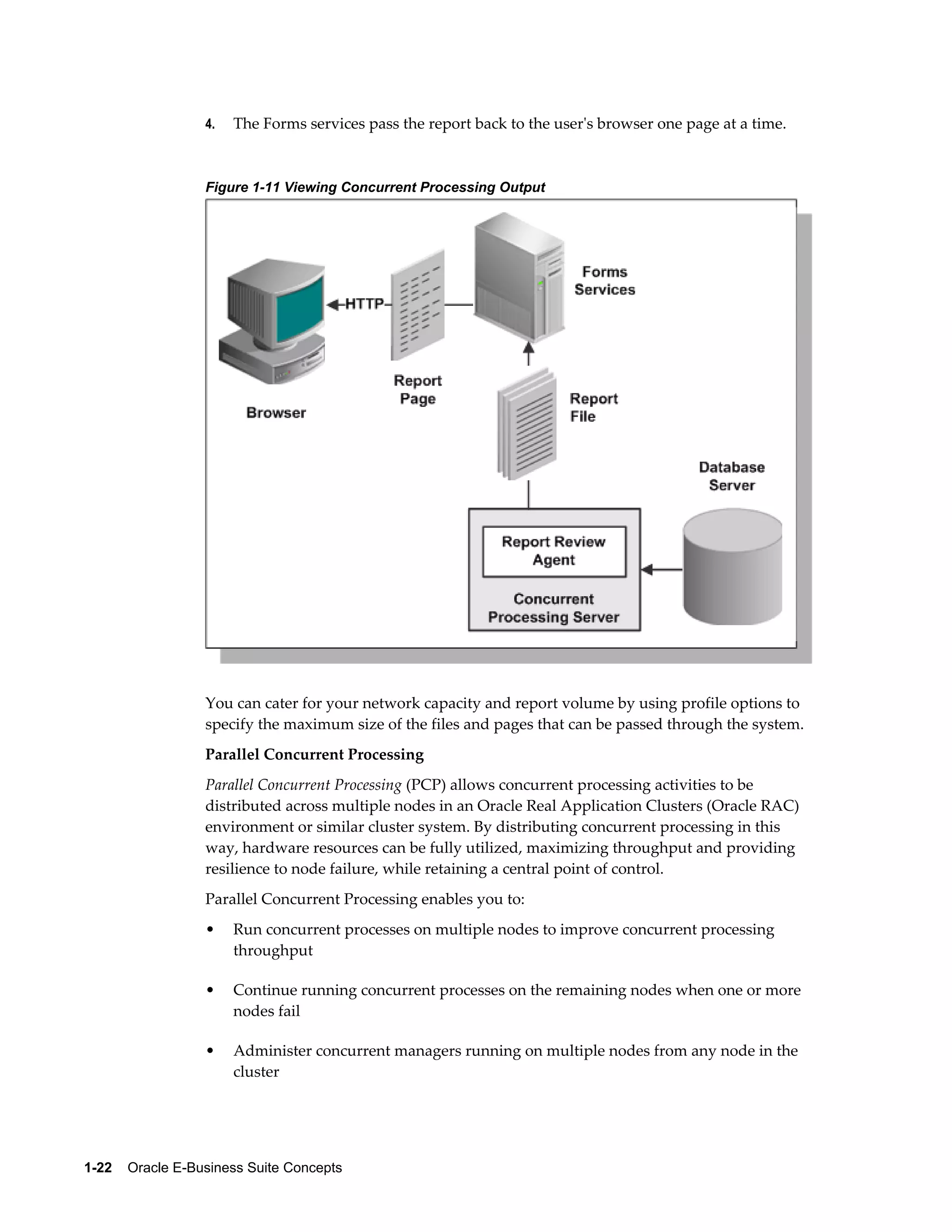
  • 194.
    Glossary-18 provided tocarry out product-specific functions. Oracle E-Business Suite stores information about a product group in a registry subkey. See also: registry, registry key release update pack A cumulative aggregation of product family release update packs created across Oracle E-Business Suite since the initial (base) release. See also: product family release update pack remote procedure call A remote procedure call (RPC) is a protocol that enables a client to execute a program on a server. The client sends a message to the server with appropriate arguments, and the server returns a message containing the program's results. report A user-organized display of Oracle E-Business Suite information. A report can be viewed online or sent to a printer. The content of a report can range from a summary to a complete listing of values. Report Review Agent A tool used by Oracle E-Business Suite to view concurrent processing files online. Reporting Currencies An Oracle E-Business Suite feature that allows you to create, maintain, and report on accounting data in multiple currencies at one of the following levels: Subledger, Journal, and Balance. reporting currency A currency, other than your ledger currency, for which you need to report. The reporting currency shares the same chart of accounts and accounting calendar as the source ledger (either the primary ledger or secondary ledger), but typically uses a different currency. The reporting currency allows you to report in a different currency than that of your primary or secondary ledger. See also: ledger currency reserved word A word that has a special meaning to a computer program, for example END. Custom-built programs that integrate with Oracle E-Business Suite must not use reserved words. responsibility A collection of functions within Oracle E-Business Suite. Each user is assigned one or more responsibilities to allow access to the appropriate functions and data.
  • 195.
    Restricted Mode Amode of operation that allows Oracle E-Business Suite administrators to carry out privileged tasks such as viewing the progress of a patching session. See also: Maintenance Mode rollback segment Historically, an Oracle database object used to undo (roll back) changes to the database in the event of media recovery or request for transaction rollback. Superseded by undo segment in Oracle9i and later database server releases. See also: undo tablespace rollback tablespace Historically, a tablespace created for rollback segments. Superseded by undo tablespace in Oracle9i and later database server releases. See also: undo tablespace rollup patch An aggregation of patches at either a functional level (such as flexfields), or at a specific product or family release level (such as Oracle Marketing). Glossary-19 RPC See: Remote procedure call schema An ORACLE account or ORACLE ID. secondary ledger An optional, additional ledger that is associated with the primary ledger. A secondary ledger can be used to represent the primary ledger's data in another accounting representation, which differs from the primary in one or more of the following: chart of accounts, accounting calendar/period type combination, currency, and subledger accounting method. segment A set of extents that contains all the data for a specific logical storage structure in a tablespace. Examples include the data segment for a table and index segment for an index. See also: extent server [1} A process that provides a particular functionality. For example, the HTTP server responds to HTTP requests. In Release 12, server is, where applicable, being replaced by
  • 196.
    Glossary-20 services, toreflect the architectural trend away from implementation via a single process. [2} A computer dedicated to a particular role. For example, a database server. service [2] On Windows, a process that provides a particular operating system or application functionality, such as the telnet remote logon service. Used by Oracle E-Business Suite to support concurrent processing, for example. servlet A small Java program that runs on an HTTP server, rather than being downloaded to a desktop client and run as an applet in a Web browser environment. Servlets have greater capabilities and fewer restrictions than applets. See also: applet, JSP setup data Company-specific configuration data, such as locations, freight terms, and payment terms. You create this data when initially configuring an Oracle E-Business Suite product. SGA (System Global Area) An Oracle-reserved section of memory that provides communication between database users and the ORACLE background processes. shared product See: dependent product short name An abbreviation for an Oracle E-Business Suite product (such as po for Purchasing). SID An acronym for System Identifier. The SID is used to distinguish between different Oracle instances that may be running on a system. See also: ORACLE_SID single sign-on The infrastructure whereby a user need only be authenticated explicitly once, with subsequent connections to other applications being authenticated transparently to the user. SSO allows a user to access multiple accounts and applications with a single username and password. See also: Oracle Single Sign-On
  • 197.
    sizing factor Aninteger that determines the growth rate, as a percentage of their defaults, for the database objects of an Oracle E-Business Suite product. SQL (Structured Query Language) An internationally standardized language that is used to access data in a relational database. SQL script A file containing SQL statements that you can run with a tool such as SQL*Plus to query or update ORACLE data. SSL An acronym for Secure Sockets Layer, SSL is a standard for the secure transmission of documents over the Internet using HTTPS. SSL uses digital signatures to check that transmitted data has not been tampered with. See also: digital signature, HTTPS subdirectory A directory that is contained within another directory. Support Cart A component of Oracle Applications Manager. Support Cart is used to gather diagnostic information for use by Oracle Support. See also: Oracle Applications Manager synonym An alias for a table, view, sequence, or program unit that masks the real name and owner of the object, provides public access to the object, and simplifies the writing of SQL access statements for the object. syntax The rules by which commands, qualifiers, and parameters are organized to form valid instructions to an operating system or application program. SYS username One of two standard DBA usernames automatically created with each database (the other is SYSTEM). SYS owns the base data dictionary tables and views. See also: SYSTEM username SYS.DUAL table Owned by the SYS user, the DUAL table contains exactly one row. It is used as a Glossary-21
  • 198.
    Glossary-22 "dummy" tablein a SQL statement to return values that are not stored in tables, including constant values, evaluations of arithmetic expressions, or system values such as the current date. system administrator The person who manages administrative tasks in Oracle E-Business Suite, such as registering new users and defining system printers, using the System Administrator responsibility. System Identifier See: SID, ORACLE_SID SYSTEM schema See: SYSTEM username SYSTEM tablespace Holds data dictionary tables owned by the SYS account. It is created when you install the database. SYSTEM username One of two standard usernames automatically created with each database (the other is SYS). The SYSTEM username is the preferred username to use when performing database maintenance. See also: SYS username table The basic unit of storage in a relational database management system. A table represents entities and relationships, and consists of one or more units of information (rows), each of which contains the same types of values (columns). tablespace An Oracle database storage unit that groups related logical structures together. Traditionally, one tablespace was needed for each Oracle E-Business Suite product's database tables, and another for its indexes. Release 12 uses the Oracle Applications Tablespace Model, which uses far fewer tablespaces. See also: Oracle Applications Tablespace Model TCP/IP Acronym for Transmission Control Protocol/Internet Protocol, an industry-standard networking protocol used for communication between computers and related devices. temporary tablespace A tablespace used when a SQL statement requires the creation of temporary segments
  • 199.
    Glossary-23 (for example,creation of an index). three-tier architecture A computing architecture where the components are separated into three layers, or tiers: the desktop (or client) tier, the application tier, and the database tier. Transparent Data Encryption An optional Oracle database feature that can be used to encrypt selected columns of database files. TWO_TASK Under UNIX, an environment setting that identifies the network alias of an ORACLE instance running on the local machine or on a networked machine. This variable overrides any setting for ORACLE_SID and invokes the Oracle Net software to manage the connection request. See also: LOCAL, ORACLE_SID undo tablespace Tablespace used to store undo records, which maintain read-consistency in the database during normal operation, and also play a key role in database recovery. See also: rollback tablespace URL An acronym for Uniform Resource Locator, a URL is a text representation of the location of a resource available via an intranet or the Internet. user ID See: username username A name that identifies a user requesting access to a secure environment or program, such as an Oracle database or Oracle E-Business Suite system. Every username is associated with a password. In Oracle E-Business Suite, a username is normally associated with a responsibility. See also: responsibility view A tailored presentation of data in one or more tables. A view can be thought of as a stored query. WAN (Wide Area Network) A communications network that connects geographically separated areas.
  • 200.
    Glossary-24 See also:LAN Web browser A program that runs on a desktop client, sending HTTP requests to a Web server to retrieve HTML pages and Java applets. See also: HTML, HTTP, HTTP server Web server See: HTTP server XML eXtensible Markup Language, a metalanguage that allows specialized markup languages to be designed to suit different types of document. XML differs from HTML in not being based on a predefined format. See also: HTML, Oracle XML Publisher
  • 201.
    Index Index-1 Symbols $INST_TOP environment variable, 2-3 <CONTEXT_NAME>.env, 2-9 AutoConfig profiler, 5-12 A Accounting Setup Manager General Ledger, 13-5 Active Session History, 4-2 adadmin, 1-23 AD Administration, 1-23, 1-25 adadmin, 2-15 Change Maintenance Mode menu, 9-3 adautocfg.sh, 5-3 adcfgclone.pl, 6-3 adchkcfg.sh, 5-11 adconfig.pl, 5-3 adconfig.sh, 5-3 adconfig.txt file, 2-22 AD Merge Patch, 1-25 ADMIN_SCRIPTS_HOME environment setting, 2-19 Administration server obsolete, 1-23 adovars.env file, 2-15 adpatch, 1-23 adpreclone.pl, 6-3 adstpall.sh, 5-11 adstrtal.sh, 5-11 agents Workflow Business Event System, 1-29 AK definition of, 1-25 AL32UTF8 Unicode character set, 13-1 ALR, 1-30 ANSI dates in time zones, 13-5 AOL/J, 1-11 APPCPNAM environment setting, 2-20 APPL_TOP, 2-8 directory and upgrades, 2-9 environment setting in .env, 2-19 APPLCSF environment setting, 2-20 APPLDCP environment setting, 2-20 APPLFENV environment setting, 2-19 Application Object Library directory (fnd), 2-15 Applications context, 2-9, 5-1 Applications context file, 5-2 Applications Dashboard Oracle Applications Manager, 7-1 Applications Listener use in concurrent processing, 1-21 Applications Utilities see AU, 1-25 Applications Utilities directory, 2-15 application tier components, 1-8 definition, 1-2 load balancing, 1-8 APPLLOG environment setting, 2-20 APPLOUT environment setting, 2-20 APPLPTMP environment setting, 2-20, 2-21 APPLTMP environment setting, 2-20, 2-21
  • 202.
    APPS<CONTEXT_NAME>.env, 2-18 APPSschema and base product schemas, 3-2 benefits of using, 3-1 custom schema access, 3-3 data access, 3-3 overview, 3-1 AU, 1-25 AU_TOP environment setting, 2-19 auditing, 11-1 audit trail, 11-4 AutoConfig, 1-25 adconfig.sh, 2-15 AutoConfig configuration file, 5-6 AutoConfig driver file, 5-6 AutoConfig Search Utility GenCtxinfRep, 5-11 AutoConfig template file, 5-5 Automatic Database Diagnostic Monitor, 4-1 automatic segment space management, 3-6 automatic undo management, 3-7 Automatic Undo Management, 3-7 Automatic Workload Repository, 4-1 AutoPatch, 1-23, 1-25 and Maintenance Mode, 9-2 B BC4J, 1-11 Bookmarkable URLs, 8-2 Business Event System definition, 1-28 C cfgcheck.html, 5-11 character sets difficult to change, 13-2 multibyte, 13-2 on database tier, 13-2 on desktop tier, 13-3 CLIENT_INFO, 14-2 cluster, 1-2, 4-4 codelevel, 1-32 COMMON_TOP directory, 2-6 contents, 2-6 concurrent manager, 1-17 log and output directories, 2-7 Index-2 concurrent processing controlling the size of files, 1-22 description, 1-17 display of output, 1-21 Concurrent processing server description, 1-16 concurrent program library, 1-19 concurrent requests definition, 1-17 conflict domain Concurrent Processing, 1-18 Conflict Resolution Manager Concurrent Processing, 1-17 consolidated environment file, 2-9 context file AutoConfig, 5-2 context name, 5-1 Context Value Management, 5-4 core technology directories, 2-15 cost-based optimization, 4-2 country-specific functionality, 13-6 customizations custom schema access, 3-3 data access, 3-3 CVM See Context Value Management D Database Connection Tagging, 4-5 database context file, 5-2 database home, 2-6 database recovery, 9-7 Database Resource Manager, 4-3 database tier, 1-2 Database tier description, 1-24 data definition in XML Publisher, 1-30 date formats, 13-4 desktop tier, 1-3 definition, 1-2 devenv.env file, 2-23 dictionary-managed tablespaces, 3-6 Distributed AD, 9-5 E
  • 203.
    Index-3 encrypting, 11-8 Entrust third-party single sign-on service integration with Oracle Application Server, 8-2 environment files, 2-2, 2-17 devenv.env, 2-23 fndenv.env, 2-23 environment settings, 2-17 operating system, 2-1 environment setup files, 2-18 external documents, 13-6 F failover, 9-8 farm, 10-4 file types, 2-12 Flashback Database, 9-8 FND_TOP environment setting, 2-19 fndenv.env file, 2-23 FNDNAM environment setting, 2-19 FO See formatting object force logging and Data Guard, 9-9 formatting object, 1-30 forms-c4ws OC4J container, 1-16 Forms client applet description, 1-5 Forms listener servlet, 1-14 Forms server socket mode, 1-14 Forms service, 1-1 Forms services description, 1-14 Forms socket mode architecture, 1-14 functional administrators Oracle User Management, 11-6 functional currency definition of, 15-3 function security, 11-4 G Generic Service Management, 7-8 global inventory Oracle Universal Installer, 6-4 globalization definition, 13-1 grants between user IDs, 3-4 GWYUID environment setting, 2-19 H hints, 4-2 httpd.conf, 5-6 HTTP Hardware Load Balancing, 10-4 HTTPS, 11-5 I immediate program Concurrent Processing, 1-17 INST_TOP environment setting, 2-20 instance home definition, 2-3 instance recovery, 9-7 instantiation, 5-5 integration hub Oracle Application Server 10g role as, 8-5 Internal Concurrent Manager definition, 1-17 ISG See Oracle E-Business Suite Integrated SOA Gateway J JAR files, 1-5 JAVA_TOP environment setting, 2-8 Java APIs for Forms, 1-16 Java Archive files see JAR files, 1-5 JavaServer Page (JSP), 1-12 Java servlet, 1-12 Java servlet engine, 1-11 JSP files, 2-8 L language support, 13-1 LDAP, 8-2 ledger definition of, 14-2 ledger currency
  • 204.
    definition of, 15-3 License Manager, 7-3 Using to list product names, 1-32 Lightweight Directory Access Protocol, 8-2 Link-on-the-fly support, 8-2 load balancer categories, 10-2 load balancing, 1-8 DNS round robin, 10-3 local inventory Oracle Universal Installer, 6-4 locally managed tablespaces, 3-6 log files, 2-7 Logical Standby See SQL Apply login assistance in Oracle User Management, 11-6 M Maintenance Mode, 9-2 maintenance packs, 1-23 Manage Downtime, 7-5 materialized views, 4-4 merged APPL_TOP, 9-3 Microsoft Active Directory LDAP V.3 directory Index-4 integration with Oracle Application Server, 8-2 mini-packs, 1-23 mixed platform architecture, 1-24 MLS See Multiple Language Support Monitoring tab in Oracle Applications Manager, 7-4 MRC, 13-5 multilingual support, 13-2 Multiple Language Support definition, 13-1 multiple ORACLE_HOMEs, 2-6 Multiple Organization Architecture, 14-2, 14-3 CLIENT_INFO, 14-2 ORG_ID, 14-2 partitioned objects, 14-2 patching, 14-3 SO_HEADERS_ALL, 14-3 Multiple Organizations Architecture overview, 14-1 N National Language Support definition, 13-1 see NLS, 13-3 Netegrity third-party single sign-on service integration with Oracle Application Server, 8-2 NLS See National Language Support default date and number formats, 13-3 language profile option, 13-3 profile options, 13-3 territory profile option, 13-3 NLS_DATE_FORMAT environment setting, 2-21 NLS_LANG environment setting, 2-20 NLS_NUMERIC_CHARACTERS, 2-21 NLS settings, 13-3 NLS settings and the Personal Home Page, 13-3 node, 1-2 nologging, 9-6 notifications, 1-28 number formats, 13-4 O OA_HTML environment setting, 2-8 OAM, 7-1 OAM Support Cart, 7-7 OATM See Oracle Applications Tablespace Model OC4J Load Balancing, 10-5 OCM See Oracle Configuration Manager OID, 8-3 one-to-many-support, 8-2 operating unit definition of, 14-2 ORACLE_HOME, 2-6 database, 2-6 Oracle Alert, 1-30 Oracle Application Change Management Pack for Oracle E-Business Suite, 7-1, 7-7 Oracle Application Framework, 1-11 Oracle Application Management Pack for Oracle
  • 205.
    Index-5 E-Business Suite,7-1 and Oracle Applications Manager, 7-7 Oracle Application Object Library, 1-26 Oracle Application Server, 1-8 See also OracleAS Oracle Applications Manager, 7-1 and Maintenance Mode, 9-3 Oracle Applications Tablespace Model, 3-5 OracleAS 10.1.2 ORACLE_HOME, 1-9, 2-18 OracleAS 10.1.3 ORACLE_HOME, 1-9, 2-18 Oracle Clusterware and Oracle RAC, 4-4 Oracle Common Modules, 1-25 Oracle Configuration Manager, 1-31 Oracle Database 11g ORACLE_HOME, 2-6 Oracle Database Vault Uses, 11-7 Oracle Data Guard, 9-8 Oracle E-Business Suite Architecture, 1-1 Oracle E-Business Suite Home Page, 1-4 Oracle E-Business Suite Integrated SOA Gateway, 1-16 Oracle E-Business Suite patches, 1-23 Oracle E-Business Suite technology layer, 1-24 Oracle Enterprise Manager Grid Control and Oracle Applications Manager, 7-7 Oracle General Ledger directory structure, 2-10 Oracle HTML-based Applications files, 2-8 Oracle HTML-Based Applications Java servlet access, 1-12 Oracle HTTP server components of, 1-10 Oracle Internet Directory, 8-3 Oracle Net, 1-14 Oracle Portal, 8-3 Oracle Process Manager, 1-10 Oracle RAC See Oracle Real Application Clusters Oracle Real Application Clusters, 1-2 Oracle Single Sign-On, 8-3 Oracle Universal Connection Pool, 1-11 Oracle Universal Installer, 6-1, 6-4 ORACLE user ID overview, 3-4 Oracle User Management, 11-5 Oracle Workflow Builder definition, 1-28 Oracle Workflow Event Manager, 1-29 Oracle XML Publisher, 1-30 ORG_ID, 14-2 output files, 2-7 P Parallel Concurrent Processing, 1-22 Parallel Mode AutoConfig, 5-12 partitioned objects in Multiple Organizations, 14-2 partitioned tables, 4-3 partitions database table, 4-3 partner applications, 8-10 password-based authentication, 11-3 Patch Nomenclature Description, 1-32 Patch Wizard, 7-5 PATH environment setting, 2-19 PDF, 1-30 Personal Home Page and NLS settings, 13-3 phases of AutoConfig operation, 5-8 physical standby See Redo Apply PL/SQL output files location, 2-21 PLATFORM environment setting, 2-19 Portable Document Format, 1-30 port pool choice when cloning, 6-3 primary ledger definition of, 15-3 product family release update pack, 1-32 product top directory see <PROD>_TOP, 2-10 profile, 1-27 provisioning, 8-4 provisioning integrated application, 8-8 provisioning profiles, 8-8, 8-8 Proxy User in Oracle User Management, 11-6
  • 206.
    Q query optimization use of materialized views, 4-4 queue handler, 1-30 R Rapid Clone, 1-25 Rapid Install, 1-25 RBAC See Role Based Access Control Real Application Clusters, 4-4 Redo Apply Data Guard option, 9-9 release update pack, 1-32 Reporting Currencies, 13-5, 15-1 reporting currency, 13-6 Reporting Currency definition of, 15-3 Report Review Agent, 1-21 responsibility, 1-27 restore.sh, 5-10 Restricted Mode and Maintenance Mode, 9-3 Rich Text Format document format, 1-31 Role Based Access Control, 11-6 RTF, 1-31 S secondary ledger, 13-6 definition of, 15-4 seed data tablespace management and, 3-5 server, 1-1 services, 7-8 definition, 1-1 servlet engine, 1-11 in Oracle HTML-based Applications, 1-11 Set of Books See ledger Shared APPL_TOP, 9-3 Shared Application Tier File System, 1-2, 9-3 SID, 5-1 single sign-on, 8-1 Index-6 Site Map, 7-2 SO_HEADERS_ALL, 14-3 source system cloning, 6-2 spawned program Concurrent Processing, 1-19 SQL Apply Data Guard option, 9-9 staged Applications system in patching, 9-6 Standard Manager Concurrent Processing, 1-18 standby database, 9-8 subscriptions, 1-29 Sun JRE Plug-in, 1-5 SunONE/iPlanet LDAP V.3 directory integration with Oracle Application Server, 8-2 synchronization, 8-4 System Identifier, 5-1 system integration hub Oracle Workflow role as, 1-28 T tablespaces, 3-4 target process Concurrent Processing server, 1-17 target system cloning, 6-2 TDE See Transparent Data Encryption template in XML Publisher, 1-30 third-party utilities location, 2-8 three-tier architecture, 1-2 tier, 1-1 Tivoli third-party single sign-on service integration with Oracle Application Server, 8-2 transactional data tablespace management and, 3-5 Transaction Manager Concurrent Processing, 1-18
  • 207.
    Index-7 Transparent DataEncryption, 11-8 U UCP See Oracle Universal Connection Pool undo tablespaces, 3-7 Unicode, 13-1 unified driver patch, 1-23 US7ASCII character set, 13-2 User-Preferred Time Zone Support definition, 13-4 UTF8, 13-1 utl_file_dir, 2-21 utl_file_dir parameter, 2-21 W W3C, 1-30 Web Review Agent, 1-21 Web services, 1-1 description, 1-10 worker Concurrent Processing server See target process Workflow Engine definition, 1-28 worklist Workflow, 1-29 work shift Concurrent Processing, 1-17 World Wide Web Consortium, 1-30 X XSL-FO, 1-30