1
Distributed Systems
Introduction
Chapter 1
2
Course/Slides Credits
Note: all course presentations are based on those
developed by Andrew S. Tanenbaum and
Maarten van Steen. They accompany their
"Distributed Systems: Principles and
Paradigms" textbook (1st & 2nd editions).
http://www.prenhall.com/divisions/esm/app/aut
hor_tanenbaum/custom/dist_sys_1e/index.html
And additions made by Paul Barry in course
CW046-4: Distributed Systems
http://glasnost.itcarlow.ie/~barryp/net4.html
3
Definition of a Distributed System (1)
A distributed system is:
A collection of independent computers
that appears to its users
as a single coherent system
4
Definition of a Distributed System (2)
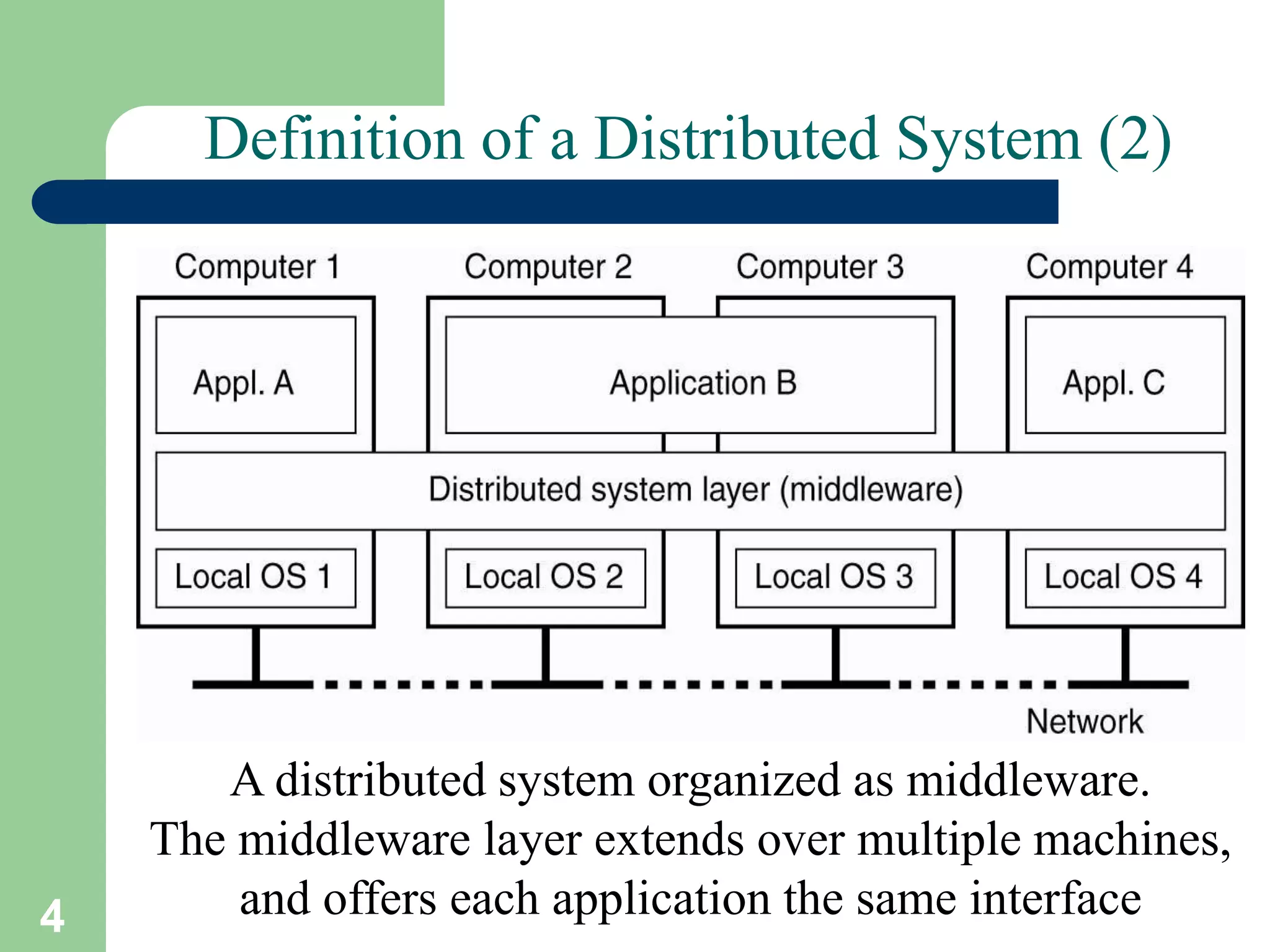
A distributed system organized as middleware.
The middleware layer extends over multiple machines,
and offers each application the same interface
5
Goals of Distributed Systems
• Easily Connect Users/Resources
• Exhibit Distribution Transparency
• Support Openness
• Be Scalable:
– in size
– geographically
– administratively
Looking at these goals helps use answer the
question: “Is building a distributed system
worth the effort?”
6
Transparency in a Distributed System
Different forms of transparency in a distributed system (ISO, 1995)
7
Scalability Limitations
Examples of scalability limitations
Concept Example
Centralized services A single server for all users
Centralized data A single on-line telephone book
Centralized algorithms Doing routing based on complete information
8
Scaling Techniques (1)
1.4
The difference between letting (a) a server
or (b) a client check forms as they are being filled
9
Scaling Techniques (2)
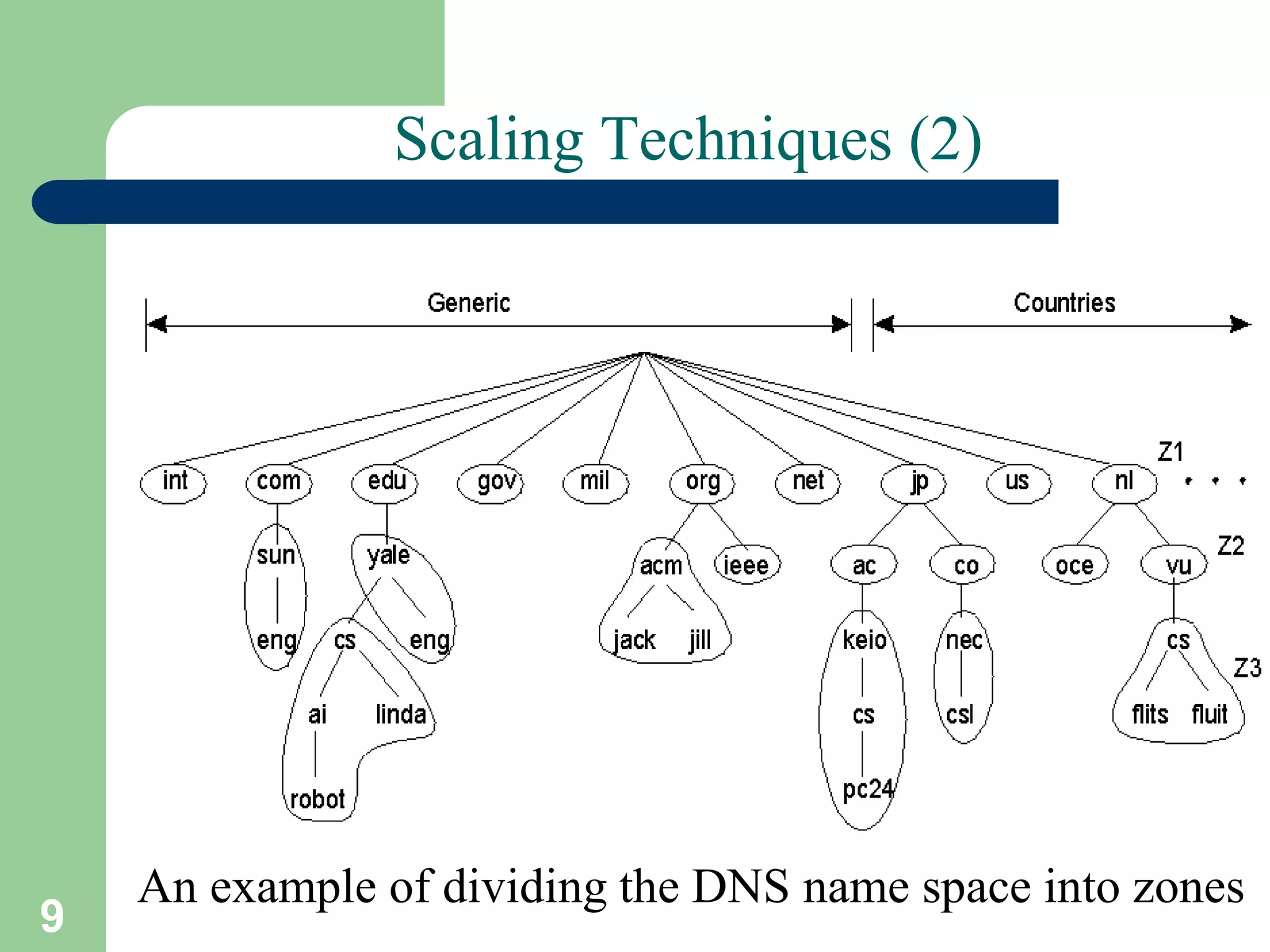
1.5
An example of dividing the DNS name space into zones
10
Characteristics of decentralized algorithms:
• No machine has complete information
about the system state.
• Machines make decisions based only
on local information.
• Failure of one machine does not ruin
the algorithm.
• There is no implicit assumption that a
global clock exists.
11
Pitfalls when Developing
Distributed Systems
• The network is reliable
• The network is secure
• The network is homogeneous
• The topology does not change
• Latency is zero
• Bandwidth is infinite
• Transport cost is zero
• There is one administrator
12
Types of Distributed Systems
• Distributed Computing Systems
– High Performance Computing (HPC)
• Distributed Information Systems
– Transaction Processing Systems (TPS)
– Enterprise Application Integration (EAI)
• Distributed Pervasive Systems
– Ubiquitous Systems
13 A. Frank - P. Weisberg
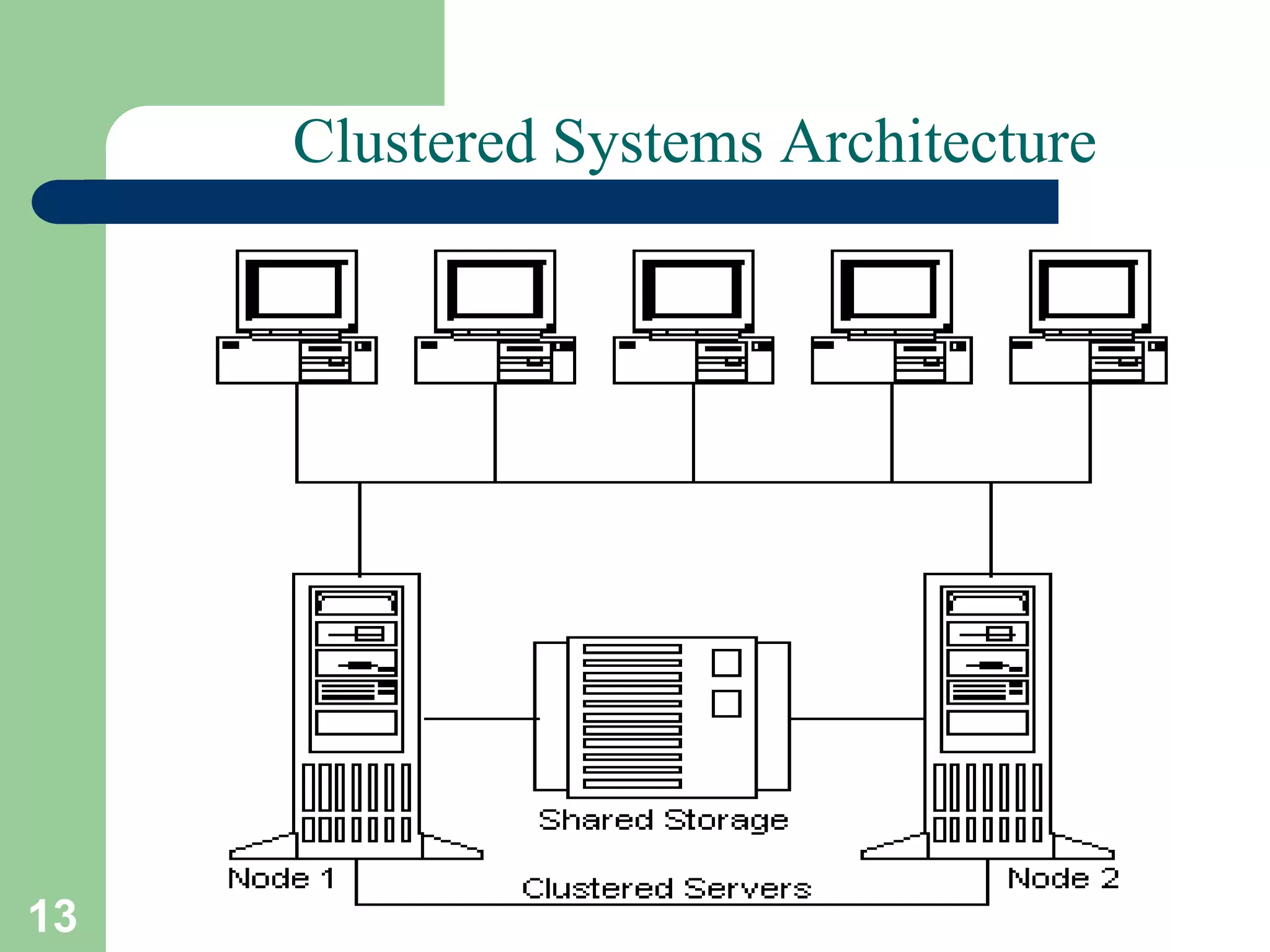
Clustered Systems Architecture
14
Cluster Computing Systems
• Collection of similar workstations/PCs, closely
connected by means of a high-speed LAN:
– Each node runs the same OS.
– Homogeneous environment
– Can serve as a supercomputer
– Excellent for parallel programming
• Examples: Linux-based Beowulf clusters,
MOSIX (from Hebrew University).
15
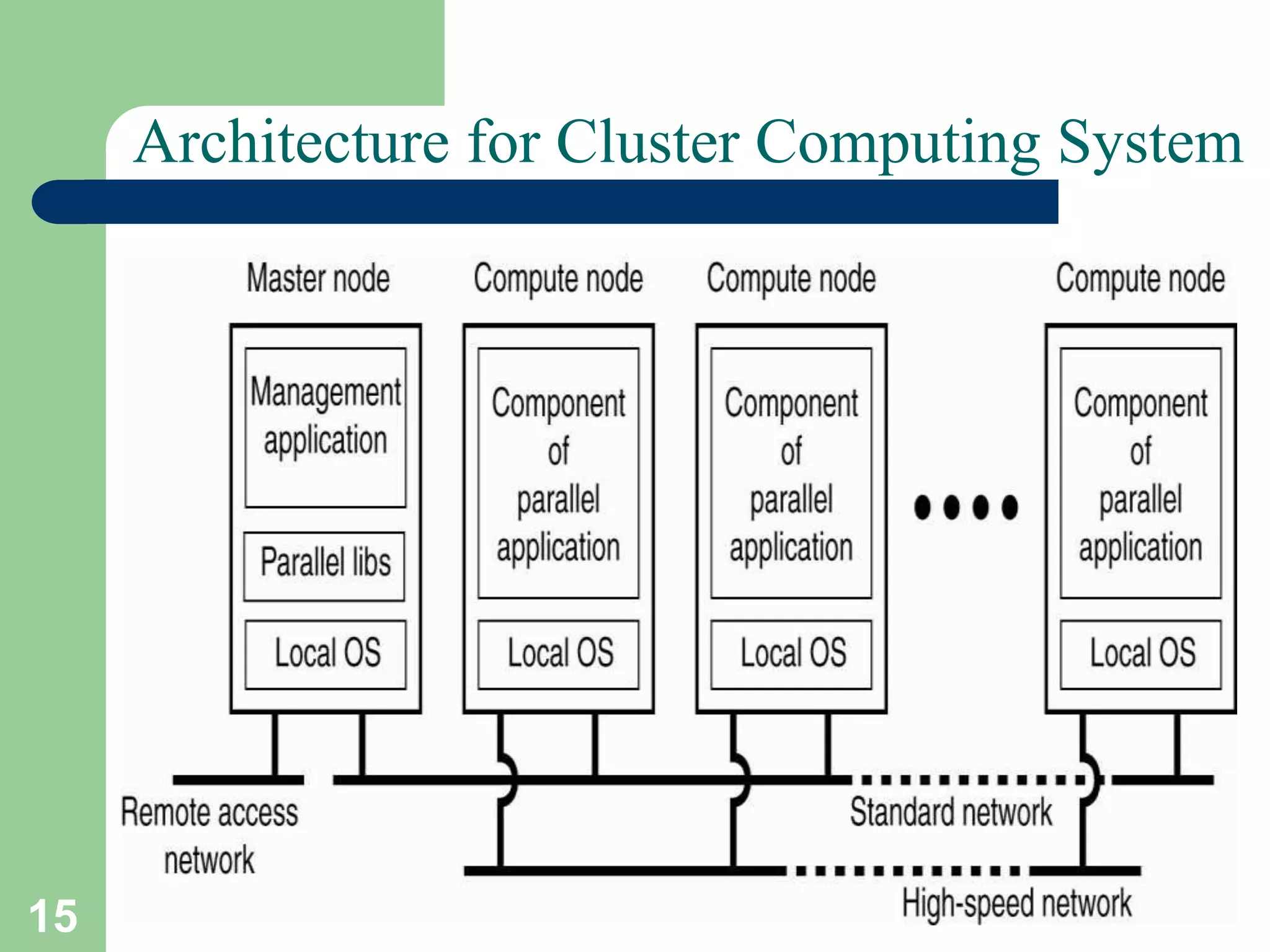
Architecture for Cluster Computing System
16
Cluster Configurations
17
Grid Computing Systems
• Collection of computer resources, usually owned by
multiple parties and in multiple locations, connected
together such that users can share access to their
combined power:
– Can easily span a wide-area network
– Heterogeneous environment
– Crosses administrative/geographic boundaries
– Supports Virtual Organizations (VOs)
– Examples: EGEE - Enabling Grids for E-SciencE
(Europe), Open Science Grid (USA).
18
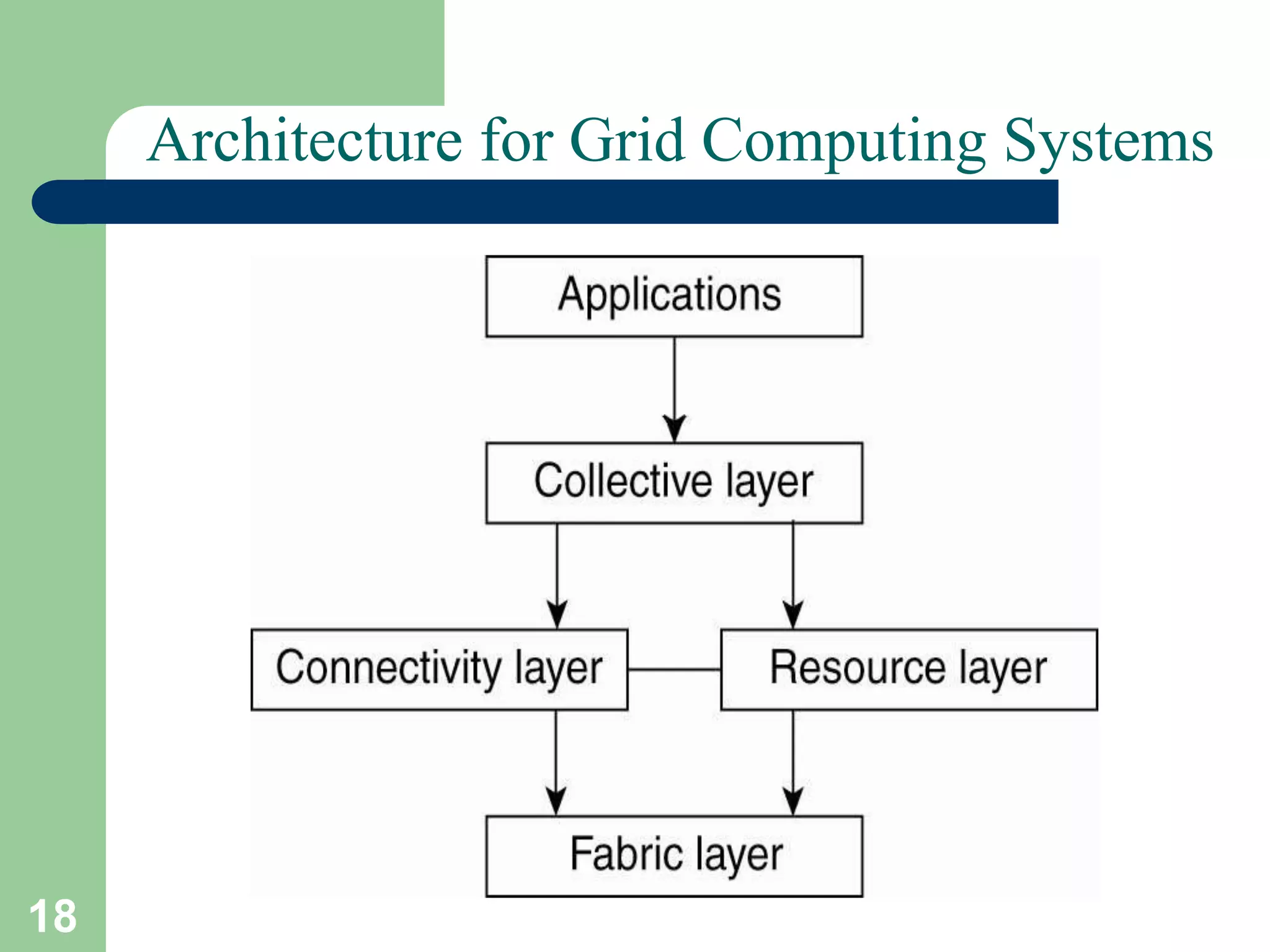
Architecture for Grid Computing Systems
19
Cloud Computing Systems (1)
• Collection of computer resources, usually owned by a
single entity, connected together such that users can
lease access to a share of their combined power:
– Location independence: the user can access the
desired service from anywhere in the world, using
any device with any (supported) system.
– Cost-effectiveness: the whole infrastructure is
owned by the provider and requires no capital
outlay by the user.
– Reliability: enhanced by way of multiple redundant
sites, though outages can occur, leaving users
unable to remedy the situation.
20
Cloud Computing Systems (2)
– Scalability: user needs can be tailored to available
resources as demand dictates – cost benefit is
obvious.
– Security: low risk of data loss thanks to
centralization, though problems with control over
sensitive data need to be solved.
– Readily consumable: the user usually does not
need to do much deployment or customization,
as the provided services are easy to adopt and
ready-to-use.
• Examples: Amazon EC2 (Elastic Compute Cloud),
Google App Engine, IBM Enterprise Data Center,
MS Windows Azure, SUN Cloud Computing.
21
Transaction Processing Systems (TPS)
The role of a TP monitor in distributed systems
22
Enterprise Application Integration
23
Communication Middleware Models/Paradigm
• Distributed File Systems
• Remote Procedure Call (RPC)
• Distributed Objects (RMI)
• Distributed Documents
24
Distributed Pervasive Systems
• Requirements for pervasive systems:
– Embrace contextual changes
– Encourage ad hoc composition
– Recognize sharing as the default
– Support distribution transparency
25
Electronic Health Care Systems (1)
• Questions to be addressed for health care
systems:
– Where and how should monitored data be stored?
– How can we prevent loss of crucial data?
– What infrastructure is needed to generate and
propagate alerts?
– How can physicians provide online feedback?
– How can extreme robustness of the monitoring
system be realized?
– What are the security issues and how can the
proper policies be enforced?
26
Electronic Health Care Systems (2)
Monitoring a person in a pervasive electronic
health care system, using (a) a local hub
or (b) a continuous wireless connection
27
Sensor Networks (1)
• The nodes to which sensors are attached are:
– Many (10s-1000s).
– Simple (i.e., hardly any memory, CPU power,
or communication facilities).
– Often battery-powered (or even battery-less).
• Questions concerning sensor networks:
– How do we (dynamically) set up an efficient tree
in a sensor network?
– How does aggregation of results take place?
Can it be controlled?
– What happens when network links fail?
28
Sensor Networks (2)
Organizing a sensor network database, while
storing and processing data (a) only at the
operator’s site or …
29
Sensor Networks (3)
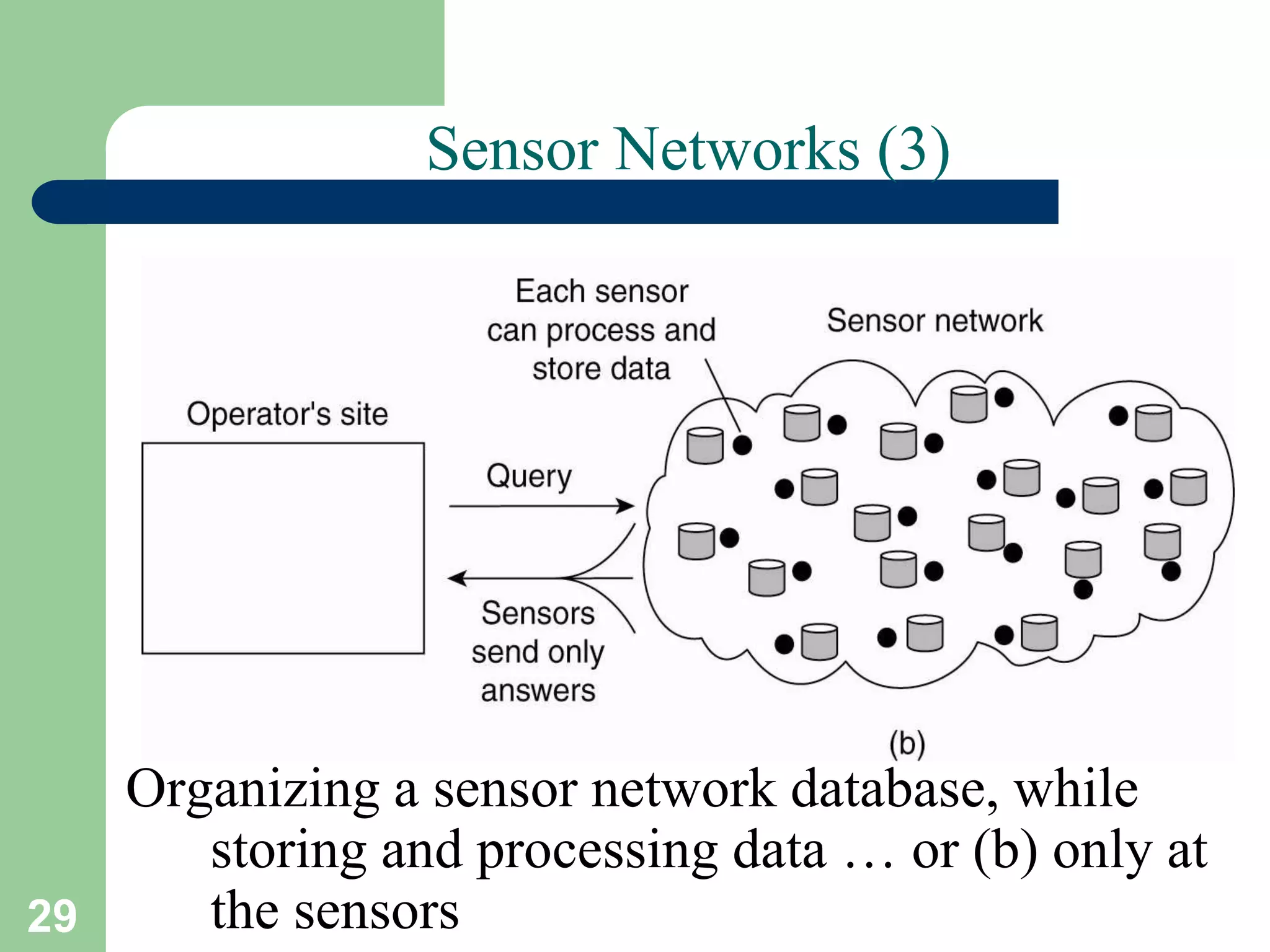
Organizing a sensor network database, while
storing and processing data … or (b) only at
the sensors

Ds1 int (1)

  • 1.
  • 2.
    2 Course/Slides Credits Note: allcourse presentations are based on those developed by Andrew S. Tanenbaum and Maarten van Steen. They accompany their "Distributed Systems: Principles and Paradigms" textbook (1st & 2nd editions). http://www.prenhall.com/divisions/esm/app/aut hor_tanenbaum/custom/dist_sys_1e/index.html And additions made by Paul Barry in course CW046-4: Distributed Systems http://glasnost.itcarlow.ie/~barryp/net4.html
  • 3.
    3 Definition of aDistributed System (1) A distributed system is: A collection of independent computers that appears to its users as a single coherent system
  • 4.
    4 Definition of aDistributed System (2) A distributed system organized as middleware. The middleware layer extends over multiple machines, and offers each application the same interface
  • 5.
    5 Goals of DistributedSystems • Easily Connect Users/Resources • Exhibit Distribution Transparency • Support Openness • Be Scalable: – in size – geographically – administratively Looking at these goals helps use answer the question: “Is building a distributed system worth the effort?”
  • 6.
    6 Transparency in aDistributed System Different forms of transparency in a distributed system (ISO, 1995)
  • 7.
    7 Scalability Limitations Examples ofscalability limitations Concept Example Centralized services A single server for all users Centralized data A single on-line telephone book Centralized algorithms Doing routing based on complete information
  • 8.
    8 Scaling Techniques (1) 1.4 Thedifference between letting (a) a server or (b) a client check forms as they are being filled
  • 9.
    9 Scaling Techniques (2) 1.5 Anexample of dividing the DNS name space into zones
  • 10.
    10 Characteristics of decentralizedalgorithms: • No machine has complete information about the system state. • Machines make decisions based only on local information. • Failure of one machine does not ruin the algorithm. • There is no implicit assumption that a global clock exists.
  • 11.
    11 Pitfalls when Developing DistributedSystems • The network is reliable • The network is secure • The network is homogeneous • The topology does not change • Latency is zero • Bandwidth is infinite • Transport cost is zero • There is one administrator
  • 12.
    12 Types of DistributedSystems • Distributed Computing Systems – High Performance Computing (HPC) • Distributed Information Systems – Transaction Processing Systems (TPS) – Enterprise Application Integration (EAI) • Distributed Pervasive Systems – Ubiquitous Systems
  • 13.
    13 A. Frank- P. Weisberg Clustered Systems Architecture
  • 14.
    14 Cluster Computing Systems •Collection of similar workstations/PCs, closely connected by means of a high-speed LAN: – Each node runs the same OS. – Homogeneous environment – Can serve as a supercomputer – Excellent for parallel programming • Examples: Linux-based Beowulf clusters, MOSIX (from Hebrew University).
  • 15.
  • 16.
  • 17.
    17 Grid Computing Systems •Collection of computer resources, usually owned by multiple parties and in multiple locations, connected together such that users can share access to their combined power: – Can easily span a wide-area network – Heterogeneous environment – Crosses administrative/geographic boundaries – Supports Virtual Organizations (VOs) – Examples: EGEE - Enabling Grids for E-SciencE (Europe), Open Science Grid (USA).
  • 18.
    18 Architecture for GridComputing Systems
  • 19.
    19 Cloud Computing Systems(1) • Collection of computer resources, usually owned by a single entity, connected together such that users can lease access to a share of their combined power: – Location independence: the user can access the desired service from anywhere in the world, using any device with any (supported) system. – Cost-effectiveness: the whole infrastructure is owned by the provider and requires no capital outlay by the user. – Reliability: enhanced by way of multiple redundant sites, though outages can occur, leaving users unable to remedy the situation.
  • 20.
    20 Cloud Computing Systems(2) – Scalability: user needs can be tailored to available resources as demand dictates – cost benefit is obvious. – Security: low risk of data loss thanks to centralization, though problems with control over sensitive data need to be solved. – Readily consumable: the user usually does not need to do much deployment or customization, as the provided services are easy to adopt and ready-to-use. • Examples: Amazon EC2 (Elastic Compute Cloud), Google App Engine, IBM Enterprise Data Center, MS Windows Azure, SUN Cloud Computing.
  • 21.
    21 Transaction Processing Systems(TPS) The role of a TP monitor in distributed systems
  • 22.
  • 23.
    23 Communication Middleware Models/Paradigm •Distributed File Systems • Remote Procedure Call (RPC) • Distributed Objects (RMI) • Distributed Documents
  • 24.
    24 Distributed Pervasive Systems •Requirements for pervasive systems: – Embrace contextual changes – Encourage ad hoc composition – Recognize sharing as the default – Support distribution transparency
  • 25.
    25 Electronic Health CareSystems (1) • Questions to be addressed for health care systems: – Where and how should monitored data be stored? – How can we prevent loss of crucial data? – What infrastructure is needed to generate and propagate alerts? – How can physicians provide online feedback? – How can extreme robustness of the monitoring system be realized? – What are the security issues and how can the proper policies be enforced?
  • 26.
    26 Electronic Health CareSystems (2) Monitoring a person in a pervasive electronic health care system, using (a) a local hub or (b) a continuous wireless connection
  • 27.
    27 Sensor Networks (1) •The nodes to which sensors are attached are: – Many (10s-1000s). – Simple (i.e., hardly any memory, CPU power, or communication facilities). – Often battery-powered (or even battery-less). • Questions concerning sensor networks: – How do we (dynamically) set up an efficient tree in a sensor network? – How does aggregation of results take place? Can it be controlled? – What happens when network links fail?
  • 28.
    28 Sensor Networks (2) Organizinga sensor network database, while storing and processing data (a) only at the operator’s site or …
  • 29.
    29 Sensor Networks (3) Organizinga sensor network database, while storing and processing data … or (b) only at the sensors