Intro into
Drupal Security

      @CashWilliams
 http://CashWilliams.com
What is Security
What is Security

• Protecting website data
What is Security

• Protecting website data
 • Protecting from unauthorized access
What is Security

• Protecting website data
 • Protecting from unauthorized access
 • Protecting from modification
What is Security

• Protecting website data
 • Protecting from unauthorized access
 • Protecting from modification
 • Protecting from destruction
What is Security

• Protecting website data
 • Protecting from unauthorized access
 • Protecting from modification
 • Protecting from destruction
• Maintaining access to the data
Attack Vectors
Attack Vectors

• Drupal Vulnerabilities
Attack Vectors

• Drupal Vulnerabilities
 • XSS
Attack Vectors

• Drupal Vulnerabilities
 • XSS
 • Access Bypass
Attack Vectors

• Drupal Vulnerabilities
 • XSS
 • Access Bypass
 • CSRF
Attack Vectors

• Drupal Vulnerabilities
 • XSS
 • Access Bypass
 • CSRF
 • SQL Injection
Other Attack Vectors
• General Vulnerabilities (a.k.a. What we’re
 not going to cover)
Other Attack Vectors
• General Vulnerabilities (a.k.a. What we’re
 not going to cover)

 • Operating System
Other Attack Vectors
• General Vulnerabilities (a.k.a. What we’re
 not going to cover)

 • Operating System
 • Web Server
Other Attack Vectors
• General Vulnerabilities (a.k.a. What we’re
 not going to cover)

 • Operating System
 • Web Server
 • PHP
Other Attack Vectors
• General Vulnerabilities (a.k.a. What we’re
 not going to cover)

 • Operating System
 • Web Server
 • PHP
 • MySQL
Other Attack Vectors
• General Vulnerabilities (a.k.a. What we’re
 not going to cover)

 • Operating System
 • Web Server
 • PHP
 • MySQL
 • Javascript (Theme, WYSIWYG, etc...)
Other Attack Vectors
• General Vulnerabilities (a.k.a. What we’re
 not going to cover)

 • Operating System
 • Web Server
 • PHP
 • MySQL
 • Javascript (Theme, WYSIWYG, etc...)
 • Authentication (Facebook, OpenID...)
Keep Up to Date

• How to stay informed (Drupal)
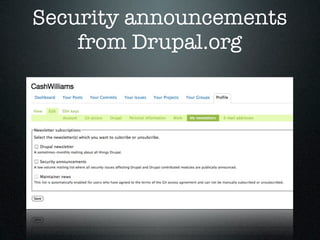
 • Signup for emails from Security Team
 • RSS Feed
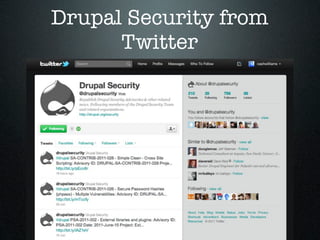
 • Twitter
 • Update Status module - with email
   setting
Security announcements
    from Drupal.org
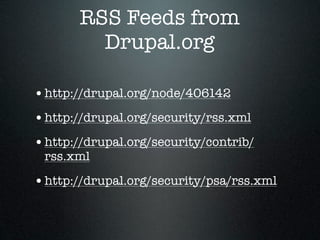
RSS Feeds from
         Drupal.org

• http://drupal.org/node/406142
• http://drupal.org/security/rss.xml
• http://drupal.org/security/contrib/
 rss.xml

• http://drupal.org/security/psa/rss.xml
Drupal Security from
      Twitter
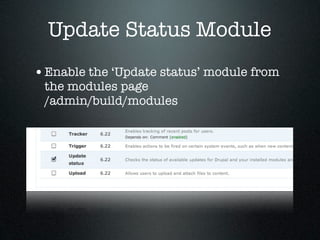
Update Status Module
• Enable the ‘Update status’ module from
 the modules page
 /admin/build/modules
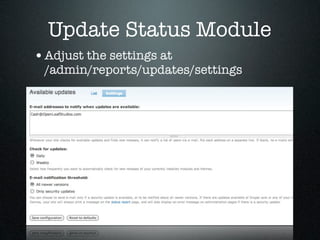
Update Status Module
• Adjust the settings at
 /admin/reports/updates/settings
Database Users
Database Users

• Use different database users for each site
 you run
Database Users

• Use different database users for each site
 you run

• Only give needed permissions on proper
 database
Database Users

• Use different database users for each site
 you run

• Only give needed permissions on proper
 database

• Limit hosts a user can connect from
 (‘username’@‘localhost’)
Database Users

• Use different database users for each site
 you run

• Only give needed permissions on proper
 database

• Limit hosts a user can connect from
 (‘username’@‘localhost’)

• Don’t use root!
HTTPS
HTTPS
• Use HTTPS if at all possible
 • Session hijacking
 • Packet sniffing on open networks
HTTPS
• Use HTTPS if at all possible
 • Session hijacking
 • Packet sniffing on open networks
• Secure Pages module
HTTPS
• Use HTTPS if at all possible
 • Session hijacking
 • Packet sniffing on open networks
• Secure Pages module
• OR .htaccess rule to redirect all traffic
HTTPS
 • Use HTTPS if at all possible
   • Session hijacking
   • Packet sniffing on open networks
 • Secure Pages module
 • OR .htaccess rule to redirect all traffic
RewriteCond %{SERVER_PORT} 80
RewriteRule ^(.*)$ https://%{HTTP_HOST}/$1 [R,L]
php_value session.cookie_secure 1
Security Modules
Security Modules
• securepages &
 securepages_prevent_hijack
Security Modules
• securepages &
 securepages_prevent_hijack

• password_policy
Security Modules
• securepages &
 securepages_prevent_hijack

• password_policy
• security_review
Security Modules
• securepages &
 securepages_prevent_hijack

• password_policy
• security_review
• salt (Drupal 6 only)
Security Modules
• securepages &
 securepages_prevent_hijack

• password_policy
• security_review
• salt (Drupal 6 only)
• login_security (Drupal 6 only)
Security Modules
• securepages &
 securepages_prevent_hijack

• password_policy
• security_review
• salt (Drupal 6 only)
• login_security (Drupal 6 only)
• paranoia
Secure Pages & Secure
  Pages Prevent Hijack
• http://drupal.org/project/securepages
• http://drupal.org/project/
 securepages_prevent_hijack (Drupal 6
 only)

• Redirects selected pages to use SSL
• Protects a few common pages by default
• Drupal 6 needs session hijack prevention
Password Policy

• http://drupal.org/project/
 password_policy

• Allows site builders to define a password
 complexity level for users

• Also implements a password expiration
 feature
Security Review


• http://drupal.org/project/
 security_review

• Checklist for site security integrated into
 your site

• Still relies on you to do the manual work
Salt

• http://drupal.org/project/salt
• Adds ‘salt’ to passwords stored in the
 database

• Helps fight against dictionary attacks on
 password dump

• Not needed for Drupal 7
Paranoia

• http://drupal.org/project/paranoia
• Disables granting of the "use PHP for
 block visibility" permission

• Disables creation of input formats that
 use the PHP filter

• Disables editing the user #1 account
• Disables disabling itself
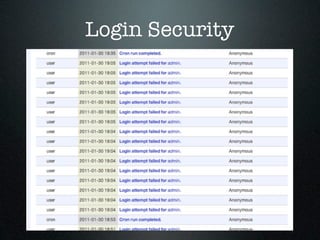
Login Security
Login Security

• http://drupal.org/project/login_security
• Drupal 6 only (Built in to Drupal 7 core)
• Limit the number of invalid login
 attempts

• Can lock user accounts based on login
 failures
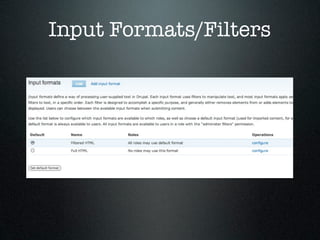
Input Formats/Filters

• Default Input filter = EVERYONE has
 access

• Better Formats module (Only needed for
 Drupal 6)

• Some type of filtered input should be
 default
Input Formats/Filters

• Use HTML filter
 • Configure allowed tags
   • Dangerous - SCRIPT, IMG, IFRAME, EMBED,
     OBJECT, INPUT, LINK, STYLE, META, FRAMESET,
     DIV, BASE, TABLE, TR, TD

 • WYSIWYG editors - Don’t allow all tags
Input Formats/Filters

• PHP Filter module (comes in core)
• Don’t use it!
• Some recommend removing the module
 from the code base

• If you do use it, make sure you know who
 has access
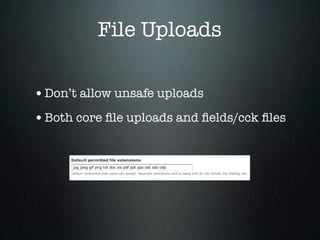
File Uploads

• Don’t allow unsafe uploads
• Both core file uploads and fields/cck files
Protect Drupal from
      Outside
Protect Drupal from
         Outside
• Use a firewall to deny access
Protect Drupal from
         Outside
• Use a firewall to deny access
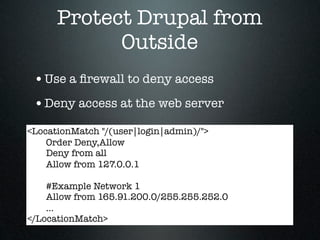
• Deny access at the web server
Protect Drupal from
            Outside
 • Use a firewall to deny access
 • Deny access at the web server
<LocationMatch "/(user|login|admin)/">
    Order Deny,Allow
    Deny from all
    Allow from 127.0.0.1

    #Example Network 1
    Allow from 165.91.200.0/255.255.252.0
    ...
</LocationMatch>
Other Gotchas
Other Gotchas

• Settings.php
 • ONLY web server needs read access to this
   file

 • Should not be writable
Other Gotchas

• Settings.php
 • ONLY web server needs read access to this
   file

 • Should not be writable
• Leaving a sql dump in a web accessible folder
Other Gotchas

• Settings.php
 • ONLY web server needs read access to this
   file

 • Should not be writable
• Leaving a sql dump in a web accessible folder
• Don’t e-mail passwords
 • !password token
Security Reviews
Security Reviews


• Custom Security Review
 • https://www.acquia.com/products-
   services/acquia-professional-services/
   service-offerings

Drupal Security Intro