Twig & Drupal
Frontend United Amsterdam 2012
About me
René Bakx (@renebakx http://renebakx.nl)

PHP Developer since 2000

user 590180 on drupal.org

Loves open source development

Hates the default HTML output of drupal
About Twig
Originally created by Armin Ronacher (Also
known for Jinja, a Python template engine)

Since 2009 part of Fabien Potencier’s world
domination plan aka Symfony2

Available as standalone package under a BSD
License
About Twig
Twig is a very modern PHP 5 based template
engine.

It is fast! Templates are compiled into PHP

It is secure! Templates can be sandboxed, output can
be escaped.

It is extensible! You override everything if you want.
About Twig
Object Oriented Templates!

It is for HTML, what LESS/SASS is for CSS.

Integrates seamless into many IDEs like :
Textmate, Sublime Text, Vim, Netbeans, PHP-
Storm, Eclipse, Coda and many others.
Twig for Drupal
Started about 2 years ago as a spare time proof of concept
project for @zichtonline.

Because we did not like PHPTemplate and the way
output is handled in Drupal

Despite being a d.o. sandbox project, it is very much
production ready!

Twig for Drupal (TFD), enforces separation of display
and pre/post-processing logic.
Twig 101
Template Logic
Template logic
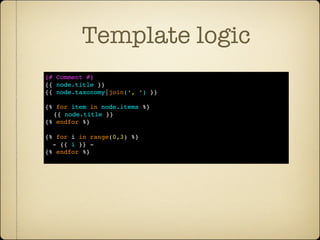
{# Comment #}
{{ node.title }}
{{ node.taxonomy|join(‘, ‘) }}

{% for item in node.items %}
  {{ node.title }}
{% endfor %}

{% for i in range(0,3) %}
  - {{ i }} -
{% endfor %}
Template logic
{# twig template #}
{{ node.title }}


<?php
/* Array */
$node[‘title’]
/* Object */
$node->title
$node->title()
/* Render array of doom (tm) */
$node = array(‘#theme’ => ‘theme_title’,
                          ‘value => ‘My Title’))

Output that value of any of the following
PHP or Drupal types. Twig figures it out for
you :)
Template logic
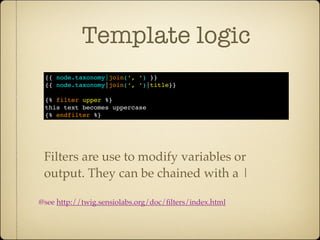
 {{ node.taxonomy|join(‘, ‘) }}
 {{ node.taxonomy|join(‘, ‘)|title}}

 {% filter upper %}
 this text becomes uppercase
 {% endfilter %}


 Filters are use to modify variables or
 output. They can be chained with a |

@see http://twig.sensiolabs.org/doc/filters/index.html
Template logic
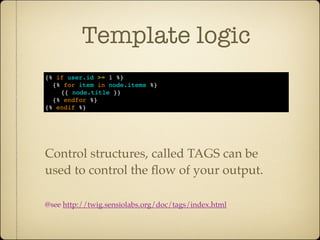
{% if user.id >= 1 %}
  {% for item in node.items %}
    {{ node.title }}
  {% endfor %}
{% endif %}


Control structures, called TAGS can be
used to control the flow of your output.

@see http://twig.sensiolabs.org/doc/tags/index.html
Template logic
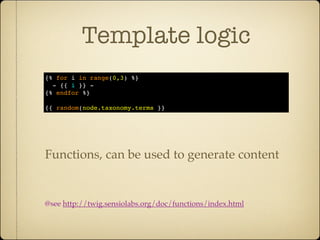
{% for i in range(0,3) %}
  - {{ i }} -
{% endfor %}

{{ random(node.taxonomy.terms }}


Functions, can be used to generate content


@see http://twig.sensiolabs.org/doc/functions/index.html
Twig 102
Advanced logic
(aka the good stuff )
Nested loops
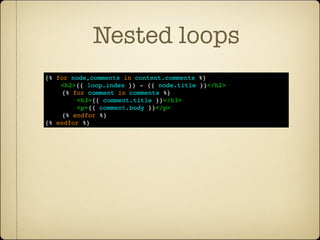
{% for node,comments in content.comments %}
    <h2>{{ loop.index }} - {{ node.title }}</h2>
    {% for comment in comments %}
        <h3>{{ comment.title }}</h3>
        <p>{{ comment.body }}</p>
    {% endfor %}
{% endfor %}
Template inheritance
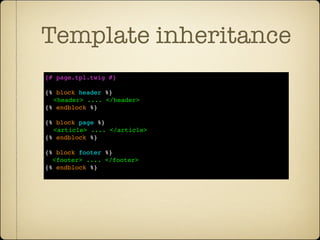
{# page.tpl.twig #}

{% block header %}
  <header> .... </header>
{% endblock %}

{% block page %}
  <article> .... </article>
{% endblock %}

{% block footer %}
  <footer> .... </footer>
{% endblock %}
Template inheritance
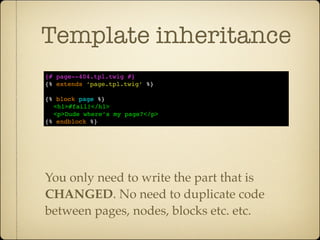
{# page--404.tpl.twig #}
{% extends ‘page.tpl.twig’ %}

{% block page %}
  <h1>#fail!</h1>
  <p>Dude where’s my page?</p>
{% endblock %}


You only need to write the part that is
CHANGED. No need to duplicate code
between pages, nodes, blocks etc. etc.
Selective inheritance
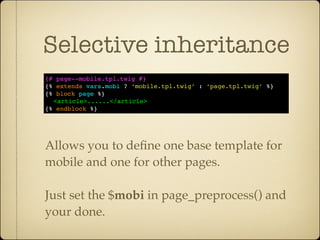
{# page--mobile.tpl.twig #}
{% extends vars.mobi ? ‘mobile.tpl.twig’ : ‘page.tpl.twig’ %}
{% block page %}
  <article>......</article>
{% endblock %}


Allows you to define one base template for
mobile and one for other pages.

Just set the $mobi in page_preprocess() and
your done.
Dynamic includes
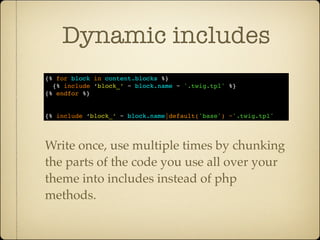
{% for block in content.blocks %}
  {% include ‘block_’ ~ block.name ~ '.twig.tpl' %}
{% endfor %}


{% include ‘block_’ ~ block.name|default('base') ~'.twig.tpl'


Write once, use multiple times by chunking
the parts of the code you use all over your
theme into includes instead of php
methods.
Dynamic includes
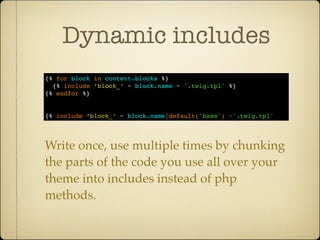
{% for block in content.blocks %}
  {% include ‘block_’ ~ block.name ~ '.twig.tpl' %}
{% endfor %}


{% include ‘block_’ ~ block.name|default('base') ~'.twig.tpl'


Write once, use multiple times by chunking
the parts of the code you use all over your
theme into includes instead of php
methods.
Macros
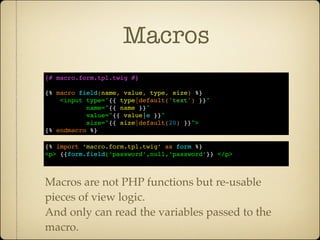
{# macro.form.tpl.twig #}

{% macro field(name, value, type, size) %}
    <input type="{{ type|default('text') }}"
           name="{{ name }}"
           value="{{ value|e }}"
           size="{{ size|default(20) }}">
{% endmacro %}

{% import ‘macro.form.tpl.twig’ as form %}
<p> {{form.field(‘password’,null,‘password’}} </p>


Macros are not PHP functions but re-usable
pieces of view logic.
And only can read the variables passed to the
macro.
Twig for Drupal7
(Drupal 6 is so 2008)
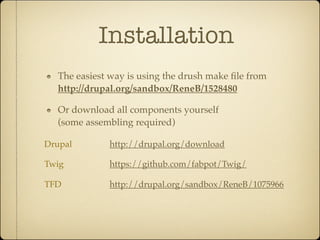
Installation
  The easiest way is using the drush make file from
  http://drupal.org/sandbox/ReneB/1528480

  Or download all components yourself
  (some assembling required)

Drupal       http://drupal.org/download

Twig         https://github.com/fabpot/Twig/

TFD          http://drupal.org/sandbox/ReneB/1075966
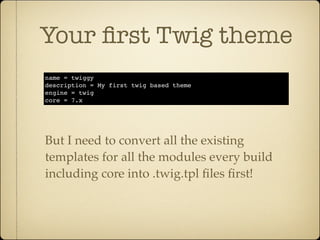
Your first Twig theme
name = twiggy
description = My first twig based theme
engine = twig
core = 7.x


But I need to convert all the existing
templates for all the modules every build
including core into .twig.tpl files first!
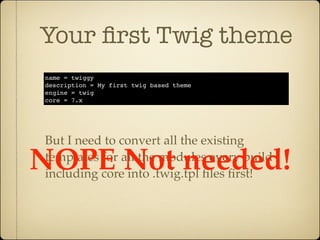
Your first Twig theme
name = twiggy
description = My first twig based theme
engine = twig
core = 7.x


But I need to convert all the existing

NOPE Not needed!
templates for all the modules every build
including core into .twig.tpl files first!
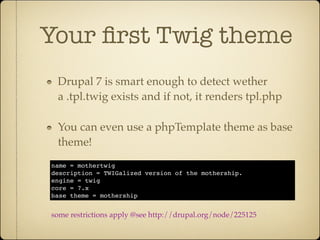
Your first Twig theme
 Drupal 7 is smart enough to detect wether
 a .tpl.twig exists and if not, it renders tpl.php

 You can even use a phpTemplate theme as base
 theme!
name = mothertwig
description = TWIGalized version of the mothership.
engine = twig
core = 7.x
base theme = mothership


some restrictions apply @see http://drupal.org/node/225125
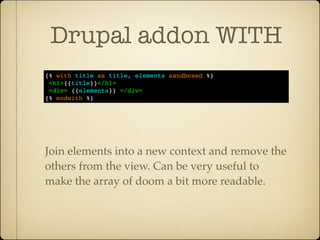
Drupal addon WITH
{% with title as title, elements sandboxed %}
 <h1>{{title}}</h1>
 <div> {{elements}} </div>
{% endwith %}


Join elements into a new context and remove the
others from the view. Can be very useful to
make the array of doom a bit more readable.
Live Demo
(*crosses fingers*)

Twig for Drupal @ Frontendunited Amsterdam 2012

  • 1.
    Twig & Drupal FrontendUnited Amsterdam 2012
  • 2.
    About me René Bakx(@renebakx http://renebakx.nl) PHP Developer since 2000 user 590180 on drupal.org Loves open source development Hates the default HTML output of drupal
  • 3.
    About Twig Originally createdby Armin Ronacher (Also known for Jinja, a Python template engine) Since 2009 part of Fabien Potencier’s world domination plan aka Symfony2 Available as standalone package under a BSD License
  • 4.
    About Twig Twig isa very modern PHP 5 based template engine. It is fast! Templates are compiled into PHP It is secure! Templates can be sandboxed, output can be escaped. It is extensible! You override everything if you want.
  • 5.
    About Twig Object OrientedTemplates! It is for HTML, what LESS/SASS is for CSS. Integrates seamless into many IDEs like : Textmate, Sublime Text, Vim, Netbeans, PHP- Storm, Eclipse, Coda and many others.
  • 6.
    Twig for Drupal Startedabout 2 years ago as a spare time proof of concept project for @zichtonline. Because we did not like PHPTemplate and the way output is handled in Drupal Despite being a d.o. sandbox project, it is very much production ready! Twig for Drupal (TFD), enforces separation of display and pre/post-processing logic.
  • 7.
  • 8.
    Template logic {# Comment#} {{ node.title }} {{ node.taxonomy|join(‘, ‘) }} {% for item in node.items %} {{ node.title }} {% endfor %} {% for i in range(0,3) %} - {{ i }} - {% endfor %}
  • 9.
    Template logic {# twigtemplate #} {{ node.title }} <?php /* Array */ $node[‘title’] /* Object */ $node->title $node->title() /* Render array of doom (tm) */ $node = array(‘#theme’ => ‘theme_title’, ‘value => ‘My Title’)) Output that value of any of the following PHP or Drupal types. Twig figures it out for you :)
  • 10.
    Template logic {{node.taxonomy|join(‘, ‘) }} {{ node.taxonomy|join(‘, ‘)|title}} {% filter upper %} this text becomes uppercase {% endfilter %} Filters are use to modify variables or output. They can be chained with a | @see http://twig.sensiolabs.org/doc/filters/index.html
  • 11.
    Template logic {% ifuser.id >= 1 %} {% for item in node.items %} {{ node.title }} {% endfor %} {% endif %} Control structures, called TAGS can be used to control the flow of your output. @see http://twig.sensiolabs.org/doc/tags/index.html
  • 12.
    Template logic {% fori in range(0,3) %} - {{ i }} - {% endfor %} {{ random(node.taxonomy.terms }} Functions, can be used to generate content @see http://twig.sensiolabs.org/doc/functions/index.html
  • 13.
  • 14.
    Nested loops {% fornode,comments in content.comments %} <h2>{{ loop.index }} - {{ node.title }}</h2> {% for comment in comments %} <h3>{{ comment.title }}</h3> <p>{{ comment.body }}</p> {% endfor %} {% endfor %}
  • 15.
    Template inheritance {# page.tpl.twig#} {% block header %} <header> .... </header> {% endblock %} {% block page %} <article> .... </article> {% endblock %} {% block footer %} <footer> .... </footer> {% endblock %}
  • 16.
    Template inheritance {# page--404.tpl.twig#} {% extends ‘page.tpl.twig’ %} {% block page %} <h1>#fail!</h1> <p>Dude where’s my page?</p> {% endblock %} You only need to write the part that is CHANGED. No need to duplicate code between pages, nodes, blocks etc. etc.
  • 17.
    Selective inheritance {# page--mobile.tpl.twig#} {% extends vars.mobi ? ‘mobile.tpl.twig’ : ‘page.tpl.twig’ %} {% block page %} <article>......</article> {% endblock %} Allows you to define one base template for mobile and one for other pages. Just set the $mobi in page_preprocess() and your done.
  • 18.
    Dynamic includes {% forblock in content.blocks %} {% include ‘block_’ ~ block.name ~ '.twig.tpl' %} {% endfor %} {% include ‘block_’ ~ block.name|default('base') ~'.twig.tpl' Write once, use multiple times by chunking the parts of the code you use all over your theme into includes instead of php methods.
  • 19.
    Dynamic includes {% forblock in content.blocks %} {% include ‘block_’ ~ block.name ~ '.twig.tpl' %} {% endfor %} {% include ‘block_’ ~ block.name|default('base') ~'.twig.tpl' Write once, use multiple times by chunking the parts of the code you use all over your theme into includes instead of php methods.
  • 20.
    Macros {# macro.form.tpl.twig #} {%macro field(name, value, type, size) %} <input type="{{ type|default('text') }}" name="{{ name }}" value="{{ value|e }}" size="{{ size|default(20) }}"> {% endmacro %} {% import ‘macro.form.tpl.twig’ as form %} <p> {{form.field(‘password’,null,‘password’}} </p> Macros are not PHP functions but re-usable pieces of view logic. And only can read the variables passed to the macro.
  • 21.
  • 22.
    Installation Theeasiest way is using the drush make file from http://drupal.org/sandbox/ReneB/1528480 Or download all components yourself (some assembling required) Drupal http://drupal.org/download Twig https://github.com/fabpot/Twig/ TFD http://drupal.org/sandbox/ReneB/1075966
  • 23.
    Your first Twigtheme name = twiggy description = My first twig based theme engine = twig core = 7.x But I need to convert all the existing templates for all the modules every build including core into .twig.tpl files first!
  • 24.
    Your first Twigtheme name = twiggy description = My first twig based theme engine = twig core = 7.x But I need to convert all the existing NOPE Not needed! templates for all the modules every build including core into .twig.tpl files first!
  • 25.
    Your first Twigtheme Drupal 7 is smart enough to detect wether a .tpl.twig exists and if not, it renders tpl.php You can even use a phpTemplate theme as base theme! name = mothertwig description = TWIGalized version of the mothership. engine = twig core = 7.x base theme = mothership some restrictions apply @see http://drupal.org/node/225125
  • 26.
    Drupal addon WITH {%with title as title, elements sandboxed %} <h1>{{title}}</h1> <div> {{elements}} </div> {% endwith %} Join elements into a new context and remove the others from the view. Can be very useful to make the array of doom a bit more readable.
  • 27.