Content Editing &
Admin in Drupal 7
Drupal Essentials
acquia.com
1Wednesday, June 26, 2013
HELLO!
Heather James
@learningdrupal
Manager of Training
at Acquia
2Wednesday, June 26, 2013
COMPARING
DRUPAL
3Wednesday, June 26, 2013
Content first!
4Wednesday, June 26, 2013
5Wednesday, June 26, 2013
Drupal can be...
• Main web
prescence
• News hub
• Central event info
and media
• A community
• Petition collector
6Wednesday, June 26, 2013
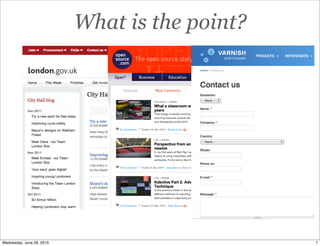
What is the point?
7Wednesday, June 26, 2013
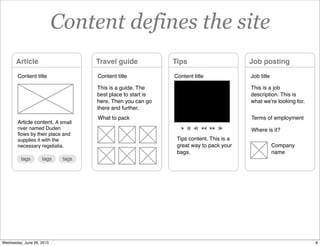
Content defines the site
Article
Content title
Travel guide
Content title
Tips
Content title
Article content. A small
river named Duden
flows by their place and
supplies it with the
necessary regelialia.
tags tags tags
Tips content. This is a
great way to pack your
bags.
This is a guide. The
best place to start is
here. Then you can go
there and further.
What to pack
Job posting
Job title
Where is it?
This is a job
description. This is
what we're looking for.
Terms of employment
Company
name
8Wednesday, June 26, 2013
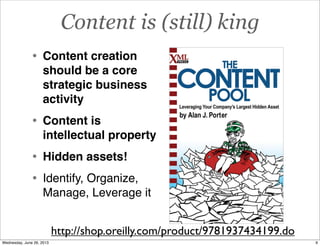
Content is (still) king
http://shop.oreilly.com/product/9781937434199.do
• Content creation
should be a core
strategic business
activity
• Content is
intellectual property
• Hidden assets!
• Identify, Organize,
Manage, Leverage it
9Wednesday, June 26, 2013
Content drives sales
• Sales begins before
you contact clients
• Videos
• Infographics
• Quizzes
• Trend reports
• Case studies... etc
http://jess3.com/eloqua-content-grid-v2/
10Wednesday, June 26, 2013
Other systems are
structure first
11Wednesday, June 26, 2013
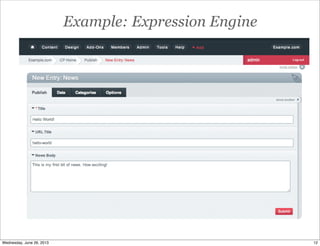
Example: Expression Engine
12Wednesday, June 26, 2013
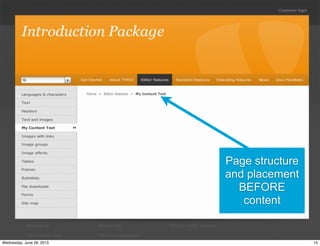
Example: Typo3
Page added “into”
site structure
13Wednesday, June 26, 2013
Structure first
(Possible in Drupal, just not the default!)
Page layout
templates
14Wednesday, June 26, 2013
Page structure
and placement
BEFORE
content
15Wednesday, June 26, 2013
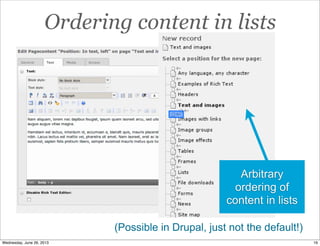
Ordering content in lists
Arbitrary
ordering of
content in lists
(Possible in Drupal, just not the default!)
16Wednesday, June 26, 2013
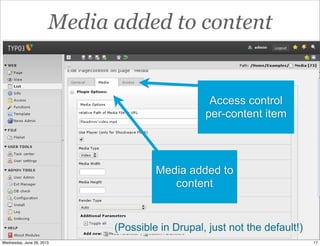
Media added to content
Media added to
content
Access control
per-content item
(Possible in Drupal, just not the default!)
17Wednesday, June 26, 2013
“Page” level permission
(Possible in Drupal, just not the default!)
18Wednesday, June 26, 2013
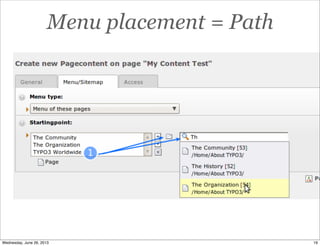
Menu placement = Path
19Wednesday, June 26, 2013
Appearance v display
http://webstyleguide.com/wsg3/5-site-structure/3-site-file-structure.html
20Wednesday, June 26, 2013
Drupal is content first
21Wednesday, June 26, 2013
What you may be thinking
example.com news
about
masthead
politicssports
contact
Your mental
site map
22Wednesday, June 26, 2013
Drupal holds data
Articles Users
Pages Comments
“
“
Terms
23Wednesday, June 26, 2013
Googlehttp://domain.com
Web Page Title
Structure first approach?
Googlehttp://domain.com
Web Page Title
Front page Full page
?
24Wednesday, June 26, 2013
Different conditions
Googlehttp://domain.com
Web Page Title
Googlehttp://domain.com
Web Page Title
Full pageFront page
25Wednesday, June 26, 2013
Two different conditions
Googlehttp://domain.com
Web Page Title
Googlehttp://domain.com
Web Page Title
26Wednesday, June 26, 2013
Structured content
In HTML:
Body text
Tags
Location
Media (video,
images)
Title
Image upload
Title
Location
Tags
Body text
Compare
27Wednesday, June 26, 2013
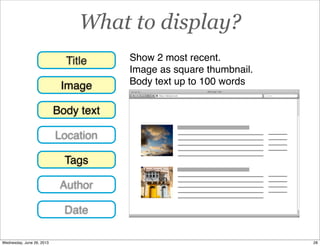
What to display?
Image
Title
Location
Tags
Body text
Author
Date
Googlehttp://domain.com
Web Page Title
Show 2 most recent.
Image as square thumbnail.
Body text up to 100 words
28Wednesday, June 26, 2013
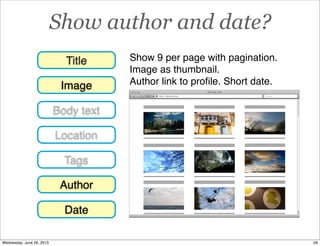
Show author and date?
Googlehttp://domain.com
Web Page Title
Image
Title
Location
Tags
Body text
Author
Date
Show 9 per page with pagination.
Image as thumbnail.
Author link to profile. Short date.
29Wednesday, June 26, 2013
Uniquely positioned
• Karen McGrane, at
DrupalCon Portland
pointed out Drupal is
uniquely positioned.
• A strength.
• Also... can be
confusing!
https://portland2013.drupal.org/keynote/karen-mcgrane
30Wednesday, June 26, 2013
UNDERSTANDING
DRUPAL
From a content admin’s perspective
31Wednesday, June 26, 2013
Drupal 7
administration tour
32Wednesday, June 26, 2013
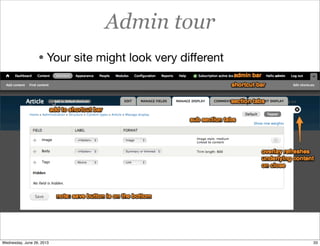
Admin tour
• Your site might look very different
33Wednesday, June 26, 2013
Content editing
34Wednesday, June 26, 2013
Customized client UX
Workbench
Admin with Rubik theme
35Wednesday, June 26, 2013
Demo: Login different role
• Login as “user/1” - Sometimes called
superuser, or admin.
• Login as another user role.
• Compare!
36Wednesday, June 26, 2013
Trick: Logging in!
• Go to /user on your site
• Such as http://opensource.com/user
• Here you will find the login
37Wednesday, June 26, 2013
Simple changes
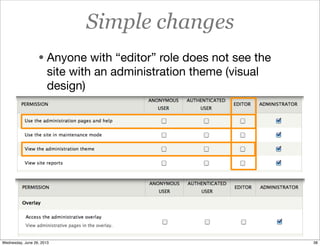
• Anyone with “editor” role does not see the
site with an administration theme (visual
design)
38Wednesday, June 26, 2013
Demo: Edit a block
Try this...
39Wednesday, June 26, 2013
Content types
40Wednesday, June 26, 2013
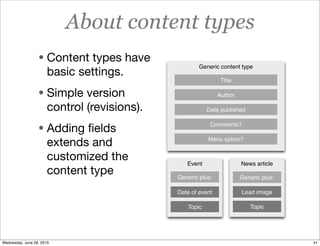
About content types
• Content types have
basic settings.
• Simple version
control (revisions).
• Adding fields
extends and
customized the
content type
News article
Lead image
Topic
Event
Generic plus:
Topic
Date of event
Generic content type
Title
Author
Date published
Comments?
Menu option?
Generic plus:
41Wednesday, June 26, 2013
Demo: Add content
• Add an article.
• Compare the two content type forms.
• What defaults were set?
• How will these display under different
conditions?
42Wednesday, June 26, 2013
Trick! node/add
• Not sure how to add content to your site or
what is available? Try /node/add at the end
of your address
• Example at opensource.com - Allows
anonymous users to add content
43Wednesday, June 26, 2013
Permission to add content
• Only if enabled for a user “role”
44Wednesday, June 26, 2013
Adding to menus
• May not be
available to all
users
• Is configured
per-content type
45Wednesday, June 26, 2013
Demo: Add more content
• Add a Basic page.
• Add Page to a menu.
• Compare the two content type forms.
• What defaults were set?
• How will these display under different
conditions?
46Wednesday, June 26, 2013
Define content
47Wednesday, June 26, 2013
Your site content
• Moderated
interaction?
• User generated
content?
• Managed publishing
workflow?
• Editor only
content?
Seiichi Kusunoki - Visual Maintenance (cc) By Attribution via Flickr
http://www.flickr.com/photos/67975747@N02/8480910015/
48Wednesday, June 26, 2013
Why content types
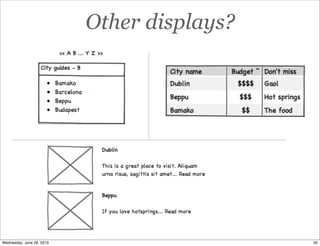
Unstructured text field Full page display is ok...
but...
49Wednesday, June 26, 2013
Other displays?
50Wednesday, June 26, 2013
Fields
• Datatype:
Numerical? Date?
Text?
• Input widget:
Radio button, text
field? Validators.
• Display:
Full text? Image
resize?
51Wednesday, June 26, 2013
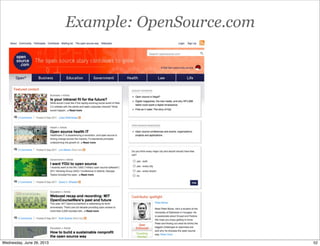
Example: OpenSource.com
52Wednesday, June 26, 2013
Content display
Teaser Full post
53Wednesday, June 26, 2013
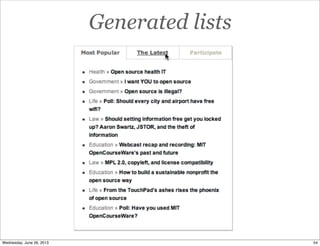
Generated lists
54Wednesday, June 26, 2013
Demo: Add more content
• Add a Basic page.
• Add Page to a menu.
• Compare the two content type forms.
• What defaults were set? What fields?
• How will these display under different
conditions?
55Wednesday, June 26, 2013
Content type defaults
1
2
3
56Wednesday, June 26, 2013
WYSIWYG and rich
text editors
57Wednesday, June 26, 2013
Default Drupal
• Highly secure. Yay!
• Not user friendly. Boo.
58Wednesday, June 26, 2013
WYSIWYG
59Wednesday, June 26, 2013
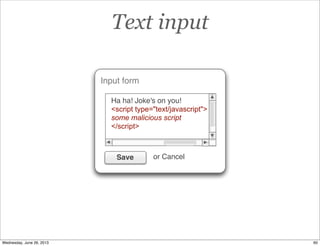
Text input
Input form
Ha ha! Joke's on you!
<script type="text/javascript">
some malicious script
</script>
Save or Cancel
60Wednesday, June 26, 2013
Text formats
Text format
Filter text input.
Remove all scripts.
Clean HTML output.
Input form
Ha ha! Joke's on you!
<script type="text/javascript">
some malicious script
</script>
Save or Cancel
anonymous
user/0 administrator
61Wednesday, June 26, 2013
Output
Output
Ha ha! Joke's on you!
Text format
Filter text input.
Remove all scripts.
Clean HTML output.
Input form
Ha ha! Joke's on you!
<script type="text/javascript">
some malicious script
</script>
Save or Cancel
62Wednesday, June 26, 2013
Media handling
• Added as “fields”
• Inline media
• Embed videos
• Embed images
63Wednesday, June 26, 2013
Image handling
Example a. Example b. Example c.
64Wednesday, June 26, 2013
Managing content
65Wednesday, June 26, 2013
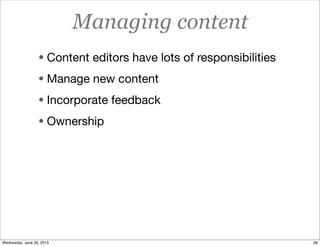
Managing content
• Content editors have lots of responsibilities
• Manage new content
• Incorporate feedback
• Ownership
66Wednesday, June 26, 2013
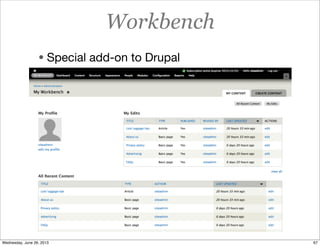
Workbench
• Special add-on to Drupal
67Wednesday, June 26, 2013
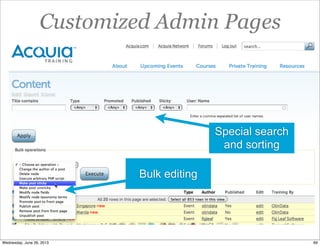
Customized Admin Pages
• Likely your site will have a customized
adminstration pages.
• Content, comments, users, etc.
68Wednesday, June 26, 2013
Customized Admin Pages
Bulk editing
Special search
and sorting
69Wednesday, June 26, 2013
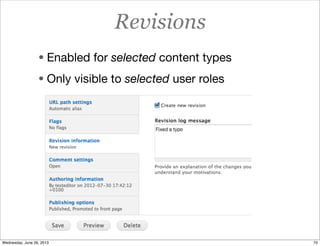
Revisions
• Enabled for selected content types
• Only visible to selected user roles
70Wednesday, June 26, 2013
Revisions
• Depends on whether it’s configured or not.
71Wednesday, June 26, 2013
Demo: Compare
• Compare administration pages
• Content
• Users
• Comments
• ... depends on what you have access to
control
72Wednesday, June 26, 2013
SITE STRUCTURE
73Wednesday, June 26, 2013
Anatomy of a Drupal
page
74Wednesday, June 26, 2013
Page model in Drupal
Page
75Wednesday, June 26, 2013
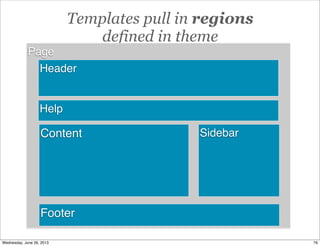
Templates pull in regions
defined in theme
Page
Sidebar
Footer
Header
Content
Help
76Wednesday, June 26, 2013
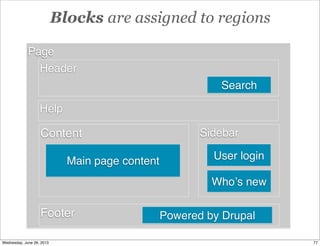
Blocks are assigned to regions
Page
Sidebar
Footer
Header
Content
User login
Powered by Drupal
Main page content
Search
Help
Whoʼs new
77Wednesday, June 26, 2013
Menus can also be arranged as blocks
Page
Sidebar
Footer
Header
Content
User login
Main menu
Powered by Drupal
Main page content
Search
Help
Whoʼs new
78Wednesday, June 26, 2013
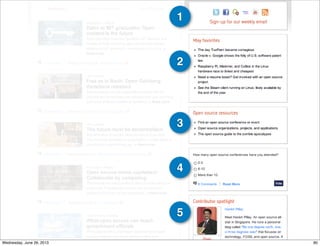
Pages are assembled
79Wednesday, June 26, 2013
1
3
5
2
4
80Wednesday, June 26, 2013
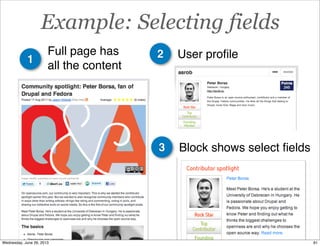
Example: Selecting fields
21
Full page has
all the content
User profile
3 Block shows select fields
81Wednesday, June 26, 2013
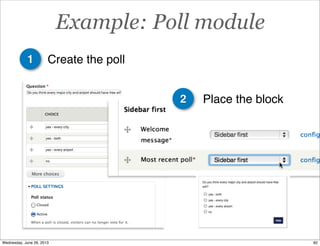
Example: Poll module
1
2
Create the poll
Place the block
82Wednesday, June 26, 2013
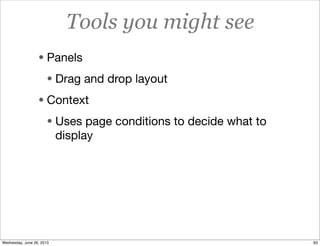
Tools you might see
• Panels
• Drag and drop layout
• Context
• Uses page conditions to decide what to
display
83Wednesday, June 26, 2013
Organizing content
84Wednesday, June 26, 2013
Example paths
• Paths can be set
automatically..
• node/7
• user/3
• Totally custom
• path/to/something
• Or use patterns
• news/europe/title
• chef/jamie-oliver
Decided at time
of development
85Wednesday, June 26, 2013
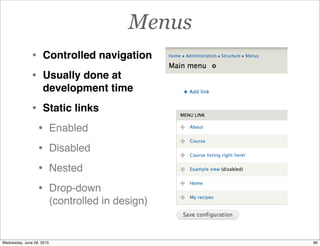
Menus
• Controlled navigation
• Usually done at
development time
• Static links
• Enabled
• Disabled
• Nested
• Drop-down
(controlled in design)
86Wednesday, June 26, 2013
Taxonomy fields
Taxonomy
TermVocabulary
Term
Term
Vocabulary
Terms
Child term
Child term
Vanilla
Flavor
Chocolate
Vocabulary
Terms
87Wednesday, June 26, 2013
88Wednesday, June 26, 2013
Demo: Site structure
• Add a taxonomy term to content
• Change path of existing content
• Add item to the menu
• Show: Acquia “Primary channel” dropdown.
89Wednesday, June 26, 2013
MAKING IT BETTER!
90Wednesday, June 26, 2013
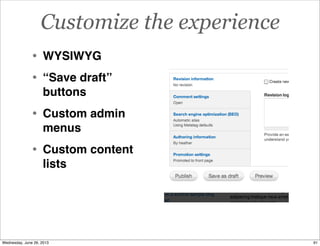
Customize the experience
• WYSIWYG
• “Save draft”
buttons
• Custom admin
menus
• Custom content
lists
91Wednesday, June 26, 2013
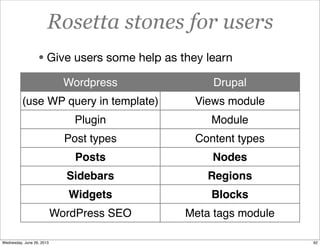
Rosetta stones for users
• Give users some help as they learn
Wordpress Drupal
(use WP query in template) Views module
Plugin Module
Post types Content types
Posts Nodes
Sidebars Regions
Widgets Blocks
WordPress SEO Meta tags module
92Wednesday, June 26, 2013
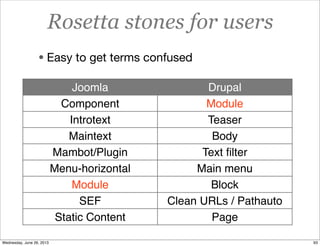
Rosetta stones for users
• Easy to get terms confused
Joomla Drupal
Component Module
Introtext Teaser
Maintext Body
Mambot/Plugin Text filter
Menu-horizontal Main menu
Module Block
SEF Clean URLs / Pathauto
Static Content Page
93Wednesday, June 26, 2013
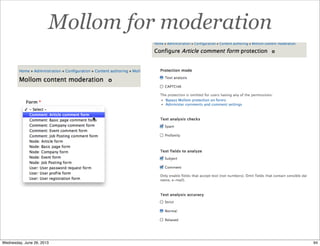
Mollom for moderation
94Wednesday, June 26, 2013
Moderating content
Flag module
95Wednesday, June 26, 2013
Build in training
• Demo functionality to stakeholders
• Record demos at key milestone meetings.
• Get content editors involved at the earliest
stages so they learn incrementally.
• Testing and learning at the same time.
96Wednesday, June 26, 2013
Documentation
• Create a central repository for project
documentation, gather as you go along.
• Improve inline documentation.
• Content entry screen “help text”.
97Wednesday, June 26, 2013
Customize content admin training
acquia.com/training/contact
98Wednesday, June 26, 2013

Content Editing & Admin in Drupal 7