Theming on Drupal 7
Working with Omega’s Responsive Framework
Eric Sembrat
Advanced Computing Services
Kennesaw State University
April 2012
Introduction
Drupal 7
• With Drupal 7, we have chosen the Omega
theming framework for developing new and
custom themes.
• Omega operates differently compared to
Zen (our framework for D6 and early D7
sites).
• Project Site
What’s the Big Change
in Drupal 7?
• Theming has always been a combination of
CSS and HTML/PHP.
• Working with Omega is similar to
Moodle theming, Drupal 6 theming.
• The main difference is that you’re theming
to an adaptive site, which means that your
approach to theming should be altered
slightly.
Adaptive?
• What adaptive means is that the page
rendering is dependent on the browser
size.
• Mobile versions.
• Small screen-sizes.
• Large screen-sizes.
• See Google Mail and DrupalCon 2012.
Adaptive!
• With Omega, your theme building should
be primarily concerned with CSS and
styling.
• Site layouts are integrated into Omega (1
sidebar, 2 sidebar, no sidebar).
• Footers and headers (even prefaces and
post-scripts) are aplenty.
Just CSS? Great!
• What this means is that your themes will
be primarily composed of CSS files and
images, with little (if any) tinkering
of .tpl.php files.
• .tpl.php Files - the “templates” to pages
(such as headers, content).
• Elements should be hidden with CSS.
Getting Started with
Omega
Your First Theme
• Building your first theme with Omega is
going to be like going out on a first date.
• You’re going to be nervous to make
changes, and jittery about making big
moves.
• You’re going to be careful in what you do.
• But you shouldn’t worry. Why?
Saving the Day
• Omega is built so that if you run into
issues, you can leave to go “answer an
emergency call”.
• Omega provides you a framework so that
the core of the styling is never adjusted.
• That way, you can’t break the underlying
magic that makes the adaptive theming
work.
Hierarchy
• Omega (core)
• Alpha (core base-theme)
• Your Theme!
• These are included in the Omega project
download, so stop worrying and jump right
in.
Getting Started
Precursors
• Before we begin, download Acquia Dev
Desktop.
• It’s a package that builds a web-server for
your local machine (also known as an
‘AMP’).
• Install Drupal, set up your local user
account.
Lemme Download
• Download the Omega Project from
Drupal.org.
• Grab the stable recommended releases.
• Development releases may change
between commits, and future
functionality may not be present in
milestones.
Theming 101
• Within the Omega package, there is a
folder called starterkits.
• Rename the omega-html5 folder to the
name of your theme.
• Do the same for the .info file and each of
the .css files in the /css folder.
• You’ve created a theme!
Theming 102
• Making these changes will allow your
subtheme to show up on your Drupal site
if you place the theme in the themes/
folder.
• Your subtheme requires Omega and
Alpha to be in themes/ as well, so add
them.
Omega Tools?
• Omega Tools is a fantastic module for local
development that allows you to:
• Custom Setup of Omega Sub-Themes
rather than the process outlined.
• Exporting Theme Settings to .info.
• Reverting Theme Settings, if you make a
colossal mistake.
Aside
It’s all about the CSS.
CSS
• I suggest working with a CSS compiler such
as LESS or SASS.
• This allows you to use custom variables
for colors and commonly-used attributes.
• It simplifies CSS3 elements so that the
styling is optimized for all browsers.
CSS Compilers
• One word of caution for using compilers.
• Changes to CSS will take longer to make
due to having to recompile and place in
your theme.
• SASS requires Ruby.
• Using Compass as your CSS editor may
save you a lot of headache.
CSS Compilers
• There are also plugins for Drupal that
take .sass or .less uncompiled styling and
compiles the styling on the server.
• Requires Ruby to be installed on the
server.
The Meat of the Matter
Theming within Omega
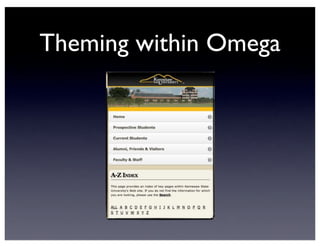
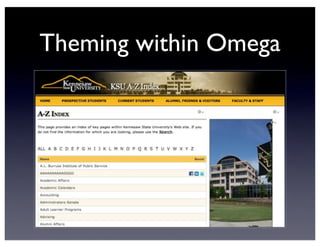
• Theming (CSS work) in Omega is
mobile-first.
• Your mobile CSS will be inherited
throughout the other layout sizes unless
you specify otherwise through
declaration.
• Since mobile theming may be styled
differently, this can be a headache.
Theming within Omega
CSS Hierarchy
• Theming is determined by:
• Global.CSS
• [themename]-default.CSS
• [themename]-narrow.CSS
• [themename]-normal.CSS
• [themename]-wide.CSS
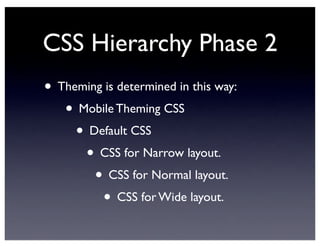
CSS Hierarchy Phase 2
• Theming is determined in this way:
• Mobile Theming CSS
• Default CSS
• CSS for Narrow layout.
• CSS for Normal layout.
• CSS for Wide layout.
What do I theme?
• Enable your Drupal Omega subtheme.
• Now, enable the Debugging Blocks for
Omega.
• This will display all the available blocks
Omega provides you, which are disabled if
the block area is empty.
How do I find
information?
• Chrome + Inspector =Your best friend.
• From any page on Drupal with the
debugging elements exposed, right click on
the element and select Inspect Element.
• Theming just became 1000% easier.
What’s Next?
• With this information, you can theme.
• Find out which element you want to
theme, open up the CSS file you want to
work with, and go to work!
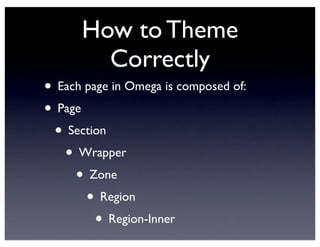
How to Theme
Correctly
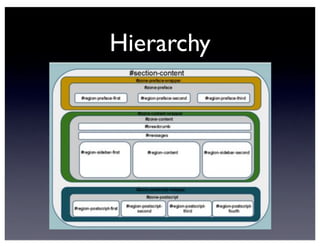
• Each page in Omega is composed of:
• Page
• Section
• Wrapper
• Zone
• Region
• Region-Inner
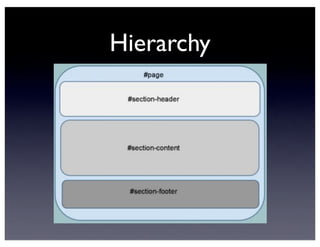
Hierarchy
Hierarchy
Theming
• Which aspect you select depends on what
parts of the page you want the CSS to
apply to.
• Wrappers are the binding glue of each
sections.
• Zones encompass only where text and
content can go.
Theming - Sizing
• What this means is that wrappers should
not be touched for width adjustment. Ever.
• Wrappers are controlled by the Omega
and Alpha themes for sizing and
adaptability.
• You should not be overwriting width: and
height: for these.
• Do it for Zones instead.
Hierarchy is Good!
• The hierarchy in Omega construction is
great news, since you likely will not have to
edit .tpl.php files to identify zones or
regions for styling.
• Omega has you covered!
• I will not be going over the basics of how
to do CSS styling in this presentation
Looking for more
information?
Where to Find Help
• Omega Documentation
• Omega Micro-Site
• W3Schools’ CSS Documentation
Eric Sembrat
Advanced Computing Services
Kennesaw State University
April 2012

Drupal 7: Theming with Omega

  • 1.
    Theming on Drupal7 Working with Omega’s Responsive Framework Eric Sembrat Advanced Computing Services Kennesaw State University April 2012
  • 2.
  • 3.
    Drupal 7 • WithDrupal 7, we have chosen the Omega theming framework for developing new and custom themes. • Omega operates differently compared to Zen (our framework for D6 and early D7 sites). • Project Site
  • 4.
    What’s the BigChange in Drupal 7? • Theming has always been a combination of CSS and HTML/PHP. • Working with Omega is similar to Moodle theming, Drupal 6 theming. • The main difference is that you’re theming to an adaptive site, which means that your approach to theming should be altered slightly.
  • 5.
    Adaptive? • What adaptivemeans is that the page rendering is dependent on the browser size. • Mobile versions. • Small screen-sizes. • Large screen-sizes. • See Google Mail and DrupalCon 2012.
  • 6.
    Adaptive! • With Omega,your theme building should be primarily concerned with CSS and styling. • Site layouts are integrated into Omega (1 sidebar, 2 sidebar, no sidebar). • Footers and headers (even prefaces and post-scripts) are aplenty.
  • 7.
    Just CSS? Great! •What this means is that your themes will be primarily composed of CSS files and images, with little (if any) tinkering of .tpl.php files. • .tpl.php Files - the “templates” to pages (such as headers, content). • Elements should be hidden with CSS.
  • 8.
  • 9.
    Your First Theme •Building your first theme with Omega is going to be like going out on a first date. • You’re going to be nervous to make changes, and jittery about making big moves. • You’re going to be careful in what you do. • But you shouldn’t worry. Why?
  • 10.
    Saving the Day •Omega is built so that if you run into issues, you can leave to go “answer an emergency call”. • Omega provides you a framework so that the core of the styling is never adjusted. • That way, you can’t break the underlying magic that makes the adaptive theming work.
  • 11.
    Hierarchy • Omega (core) •Alpha (core base-theme) • Your Theme! • These are included in the Omega project download, so stop worrying and jump right in.
  • 12.
  • 13.
    Precursors • Before webegin, download Acquia Dev Desktop. • It’s a package that builds a web-server for your local machine (also known as an ‘AMP’). • Install Drupal, set up your local user account.
  • 14.
    Lemme Download • Downloadthe Omega Project from Drupal.org. • Grab the stable recommended releases. • Development releases may change between commits, and future functionality may not be present in milestones.
  • 15.
    Theming 101 • Withinthe Omega package, there is a folder called starterkits. • Rename the omega-html5 folder to the name of your theme. • Do the same for the .info file and each of the .css files in the /css folder. • You’ve created a theme!
  • 16.
    Theming 102 • Makingthese changes will allow your subtheme to show up on your Drupal site if you place the theme in the themes/ folder. • Your subtheme requires Omega and Alpha to be in themes/ as well, so add them.
  • 17.
    Omega Tools? • OmegaTools is a fantastic module for local development that allows you to: • Custom Setup of Omega Sub-Themes rather than the process outlined. • Exporting Theme Settings to .info. • Reverting Theme Settings, if you make a colossal mistake.
  • 18.
  • 19.
    CSS • I suggestworking with a CSS compiler such as LESS or SASS. • This allows you to use custom variables for colors and commonly-used attributes. • It simplifies CSS3 elements so that the styling is optimized for all browsers.
  • 20.
    CSS Compilers • Oneword of caution for using compilers. • Changes to CSS will take longer to make due to having to recompile and place in your theme. • SASS requires Ruby. • Using Compass as your CSS editor may save you a lot of headache.
  • 21.
    CSS Compilers • Thereare also plugins for Drupal that take .sass or .less uncompiled styling and compiles the styling on the server. • Requires Ruby to be installed on the server.
  • 22.
    The Meat ofthe Matter
  • 23.
    Theming within Omega •Theming (CSS work) in Omega is mobile-first. • Your mobile CSS will be inherited throughout the other layout sizes unless you specify otherwise through declaration. • Since mobile theming may be styled differently, this can be a headache.
  • 24.
  • 25.
  • 26.
    CSS Hierarchy • Themingis determined by: • Global.CSS • [themename]-default.CSS • [themename]-narrow.CSS • [themename]-normal.CSS • [themename]-wide.CSS
  • 27.
    CSS Hierarchy Phase2 • Theming is determined in this way: • Mobile Theming CSS • Default CSS • CSS for Narrow layout. • CSS for Normal layout. • CSS for Wide layout.
  • 28.
    What do Itheme? • Enable your Drupal Omega subtheme. • Now, enable the Debugging Blocks for Omega. • This will display all the available blocks Omega provides you, which are disabled if the block area is empty.
  • 29.
    How do Ifind information? • Chrome + Inspector =Your best friend. • From any page on Drupal with the debugging elements exposed, right click on the element and select Inspect Element. • Theming just became 1000% easier.
  • 30.
    What’s Next? • Withthis information, you can theme. • Find out which element you want to theme, open up the CSS file you want to work with, and go to work!
  • 31.
    How to Theme Correctly •Each page in Omega is composed of: • Page • Section • Wrapper • Zone • Region • Region-Inner
  • 32.
  • 33.
  • 34.
    Theming • Which aspectyou select depends on what parts of the page you want the CSS to apply to. • Wrappers are the binding glue of each sections. • Zones encompass only where text and content can go.
  • 35.
    Theming - Sizing •What this means is that wrappers should not be touched for width adjustment. Ever. • Wrappers are controlled by the Omega and Alpha themes for sizing and adaptability. • You should not be overwriting width: and height: for these. • Do it for Zones instead.
  • 36.
    Hierarchy is Good! •The hierarchy in Omega construction is great news, since you likely will not have to edit .tpl.php files to identify zones or regions for styling. • Omega has you covered! • I will not be going over the basics of how to do CSS styling in this presentation
  • 37.
  • 38.
    Where to FindHelp • Omega Documentation • Omega Micro-Site • W3Schools’ CSS Documentation
  • 39.
    Eric Sembrat Advanced ComputingServices Kennesaw State University April 2012