Computers Principles
2 Lecture/ Introduction of Computers
Dr. Qasim Adnan Aljanabi
Civil Engineering Department
College of Engineering / Diyala University/ 2016-2017.
Computer Hardware
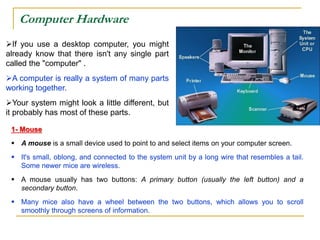
If you use a desktop computer, you might
already know that there isn't any single part
called the "computer" .
A computer is really a system of many parts
working together.
Your system might look a little different, but
it probably has most of these parts.
1- Mouse
 A mouse is a small device used to point to and select items on your computer screen.
 It's small, oblong, and connected to the system unit by a long wire that resembles a tail.
Some newer mice are wireless.
 A mouse usually has two buttons: A primary button (usually the left button) and a
secondary button.
 Many mice also have a wheel between the two buttons, which allows you to scroll
smoothly through screens of information.
2- Keyboard
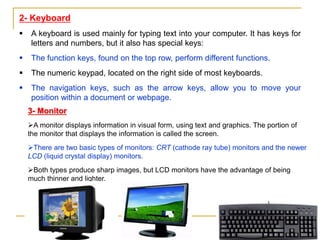
 A keyboard is used mainly for typing text into your computer. It has keys for
letters and numbers, but it also has special keys:
 The function keys, found on the top row, perform different functions.
 The numeric keypad, located on the right side of most keyboards.
 The navigation keys, such as the arrow keys, allow you to move your
position within a document or webpage.
3- Monitor
A monitor displays information in visual form, using text and graphics. The portion of
the monitor that displays the information is called the screen.
There are two basic types of monitors: CRT (cathode ray tube) monitors and the newer
LCD (liquid crystal display) monitors.
Both types produce sharp images, but LCD monitors have the advantage of being
much thinner and lighter.
4- Printer
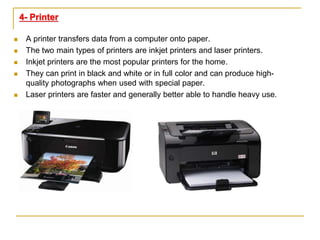
 A printer transfers data from a computer onto paper.
 The two main types of printers are inkjet printers and laser printers.
 Inkjet printers are the most popular printers for the home.
 They can print in black and white or in full color and can produce high-
quality photographs when used with special paper.
 Laser printers are faster and generally better able to handle heavy use.
SYSTEM UNITS
The system unit is the core of a computer system.
Usually it's a rectangular box, inside this box are
many electronic components that process
information.
The most important of these components is the
Central Processing Unit (CPU), or
Microprocessor.
Another component is Random Access Memory
(RAM), which temporarily stores information that the
CPU uses while the computer is on.
CENTRAL PROCESSING UNIT - CPU
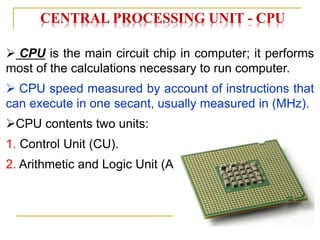
 CPU is the main circuit chip in computer; it performs
most of the calculations necessary to run computer.
 CPU speed measured by account of instructions that
can execute in one secant, usually measured in (MHz).
CPU contents two units:
1. Control Unit (CU).
2. Arithmetic and Logic Unit (ALU).
CENTRAL PROCESSING UNIT - CPU
1. Control Unit (CU).
This unit control or supervised to all parts of
computers such as:
 Control operation of transfers data and instruction
from input unit to memory and from memory to output
unit.
 Control operation of account executable
instructions on ALU.
 Basic work of CU is interpreter the instructions that
is mean data oriented to specific location on ALU.
for example: if the instruction is (B+C) the B,C
values transfers to (Adder) part, if the instruction is
(BxC) the B,C values transfers to (Multiplier) part.
CENTRAL PROCESSING UNIT - CPU
2. Arithmetic and Logic Unit (ALU).
This unit executes the following operations:
 Mathematical operations such as: add (+), abstract
(-), multiplier (×), divide (÷).
 Logical operations: this is basic to account
comparisons to choose true or false specific case,
such as >,< ,>=,<=,<>,= as a result of these
comparisons specific instructions may be executable.
 Merge number of simple comparisons by specific
tools such as: AND, OR, NOT.
MAIN MEMORY
 Random Access Memory (RAM) the temporary storage
area the computer uses to run programs and store data.
Information store in RAM is temporary and is designed to be
erased when computer turn off.
RAM is a general indication of performance that is measured
either in megabytes (MB) or gigabytes (GB): the larger the
number, the faster some programs will run.
Memory is set of electronic circuit named (Cells), each cell
store 0 or 1, like (on or off),the single cell content named (BIT)
which represent basic unit in process data, because all data
transfer to set of bits in digital computers.(BYTE) term for eight
Bit: 1 Byte = 8 Bit
 Memory capacity units measured in kilo Byte which
abstract by (KB) where: KB = 210
Bytes = 1024 Bytes
 In memories has large capacity measured in Mega
Byte which abstract by (MB) where: 1 MB = 220
Bytes = 1048576 Bytes
 In larger memories capacity measured in Giga Byte
which abstract by (GB) where: 1 GB = 230
Bytes = 1073741824 Bytes
 In largest memories capacity measured in Tiara
Byte which abstract by (TB) where: 1 TB =
240 Bytes = 1099511627776 Bytes
MEMORY CAPACITY
MEMORY SPEED
 Memory speed measured in WRITE speed where
write mean translate data operations from CPU to
main memory.
 Also measured in READ speed where read mean
translate data operations from main memory to CPU.
Read and write operations in memory named by
Access.
Because read and write operations generated by
CPU therefore memory speed equal almost CPU
speed.
TYPES OF MEMORY
1- Random Access Memory (RAM):
 in this kind of memory can read and write on it
generated by CPU.
This kind of memory used by user to store his
programs on it.
This memory is temporary storage ends when the
process is end or when split electric power.
2- Read Only Memory (ROM):
 in this kind of memory can read only from it
generated by CPU,
but cannot write on it from this unit because store
specific computer system software on this kinds of
memories, such as: BIOS, Start up Routine, Input/
output routine, Interpreter.
QUESTIONS - ?

DrQasim_Lecture -prog 2 Computer Pr.pptx

  • 1.
    Computers Principles 2 Lecture/Introduction of Computers Dr. Qasim Adnan Aljanabi Civil Engineering Department College of Engineering / Diyala University/ 2016-2017.
  • 2.
    Computer Hardware If youuse a desktop computer, you might already know that there isn't any single part called the "computer" . A computer is really a system of many parts working together. Your system might look a little different, but it probably has most of these parts. 1- Mouse  A mouse is a small device used to point to and select items on your computer screen.  It's small, oblong, and connected to the system unit by a long wire that resembles a tail. Some newer mice are wireless.  A mouse usually has two buttons: A primary button (usually the left button) and a secondary button.  Many mice also have a wheel between the two buttons, which allows you to scroll smoothly through screens of information.
  • 3.
    2- Keyboard  Akeyboard is used mainly for typing text into your computer. It has keys for letters and numbers, but it also has special keys:  The function keys, found on the top row, perform different functions.  The numeric keypad, located on the right side of most keyboards.  The navigation keys, such as the arrow keys, allow you to move your position within a document or webpage. 3- Monitor A monitor displays information in visual form, using text and graphics. The portion of the monitor that displays the information is called the screen. There are two basic types of monitors: CRT (cathode ray tube) monitors and the newer LCD (liquid crystal display) monitors. Both types produce sharp images, but LCD monitors have the advantage of being much thinner and lighter.
  • 4.
    4- Printer  Aprinter transfers data from a computer onto paper.  The two main types of printers are inkjet printers and laser printers.  Inkjet printers are the most popular printers for the home.  They can print in black and white or in full color and can produce high- quality photographs when used with special paper.  Laser printers are faster and generally better able to handle heavy use.
  • 5.
    SYSTEM UNITS The systemunit is the core of a computer system. Usually it's a rectangular box, inside this box are many electronic components that process information. The most important of these components is the Central Processing Unit (CPU), or Microprocessor. Another component is Random Access Memory (RAM), which temporarily stores information that the CPU uses while the computer is on.
  • 6.
    CENTRAL PROCESSING UNIT- CPU  CPU is the main circuit chip in computer; it performs most of the calculations necessary to run computer.  CPU speed measured by account of instructions that can execute in one secant, usually measured in (MHz). CPU contents two units: 1. Control Unit (CU). 2. Arithmetic and Logic Unit (ALU).
  • 7.
    CENTRAL PROCESSING UNIT- CPU 1. Control Unit (CU). This unit control or supervised to all parts of computers such as:  Control operation of transfers data and instruction from input unit to memory and from memory to output unit.  Control operation of account executable instructions on ALU.  Basic work of CU is interpreter the instructions that is mean data oriented to specific location on ALU. for example: if the instruction is (B+C) the B,C values transfers to (Adder) part, if the instruction is (BxC) the B,C values transfers to (Multiplier) part.
  • 8.
    CENTRAL PROCESSING UNIT- CPU 2. Arithmetic and Logic Unit (ALU). This unit executes the following operations:  Mathematical operations such as: add (+), abstract (-), multiplier (×), divide (÷).  Logical operations: this is basic to account comparisons to choose true or false specific case, such as >,< ,>=,<=,<>,= as a result of these comparisons specific instructions may be executable.  Merge number of simple comparisons by specific tools such as: AND, OR, NOT.
  • 9.
    MAIN MEMORY  RandomAccess Memory (RAM) the temporary storage area the computer uses to run programs and store data. Information store in RAM is temporary and is designed to be erased when computer turn off. RAM is a general indication of performance that is measured either in megabytes (MB) or gigabytes (GB): the larger the number, the faster some programs will run. Memory is set of electronic circuit named (Cells), each cell store 0 or 1, like (on or off),the single cell content named (BIT) which represent basic unit in process data, because all data transfer to set of bits in digital computers.(BYTE) term for eight Bit: 1 Byte = 8 Bit
  • 10.
     Memory capacityunits measured in kilo Byte which abstract by (KB) where: KB = 210 Bytes = 1024 Bytes  In memories has large capacity measured in Mega Byte which abstract by (MB) where: 1 MB = 220 Bytes = 1048576 Bytes  In larger memories capacity measured in Giga Byte which abstract by (GB) where: 1 GB = 230 Bytes = 1073741824 Bytes  In largest memories capacity measured in Tiara Byte which abstract by (TB) where: 1 TB = 240 Bytes = 1099511627776 Bytes MEMORY CAPACITY
  • 11.
    MEMORY SPEED  Memoryspeed measured in WRITE speed where write mean translate data operations from CPU to main memory.  Also measured in READ speed where read mean translate data operations from main memory to CPU. Read and write operations in memory named by Access. Because read and write operations generated by CPU therefore memory speed equal almost CPU speed.
  • 12.
    TYPES OF MEMORY 1-Random Access Memory (RAM):  in this kind of memory can read and write on it generated by CPU. This kind of memory used by user to store his programs on it. This memory is temporary storage ends when the process is end or when split electric power. 2- Read Only Memory (ROM):  in this kind of memory can read only from it generated by CPU, but cannot write on it from this unit because store specific computer system software on this kinds of memories, such as: BIOS, Start up Routine, Input/ output routine, Interpreter.
  • 13.