<Insert Picture Here>
Intercompany Transaction Accounting
Part2- Drop Shipment Accounting
Christopher David
<Insert Picture Here>
• Overview of Drop Shipment
What is Drop Shipment
Drop Shipment types
Setups involved in Drop Shipment
• Accounting entries for Various Drop Shipment
Scenarios
External Drop Shipment with Advanced Accounting
Internal Drop Shipment with Advanced Accounting
External Drop Shipment without Advanced Accounting
Internal Drop Shipment without Advanced Accounting
© 2007 Oracle Corporation – Proprietary and Confidential
Agenda
What is Drop Shipment
• Drop Shipment is a business process where the sales
order is placed in one operating unit and goods are directly
shipped from a supplier or an internal organization
belonging to another unit.
• Refer Drop Ship Sales Order Cycle In Order Management
(Doc ID 749139.1) for the steps to perform the Drop Ship
Sales Order Cycle
• When Drop Shipment is implemented using Intercompany
relations (which was discussed during last session):
 Start OU is Supplier facing
 End OU is Customer facing
 Intermediate OU’s are Accounting OU’s only
Drop Shipment types
Drop Shipment flow is of two types
• External Drop Shipment flow (where supplier is external)
 Source type is External in the Sales Order
• Internal Drop Shipment flow (where supplier is internal)
 Source type is Internal in the Sales Order
Intercompany Transactions Flows
Intercompany Relations
• By enabling advanced accounting for an
intercompany transaction flow, you would be able to
define multiple nodes with Intercompany relations for
each nodes and generate multiple intercompany
invoices for these intermediate OU’s
• Logical intercompany receipt and issue transactions
are created to facilitate accounting in intermediate
OU’s
• Similarly, logical receipt and logical sales order issue
transactions are created for those receipts and issues
that are not accompanied with physical receipt and
issue of goods
Case 1: External Drop Shipment
(Advanced Accounting checked)
Case 1: External Drop Shipment
(Advanced Accounting checked)
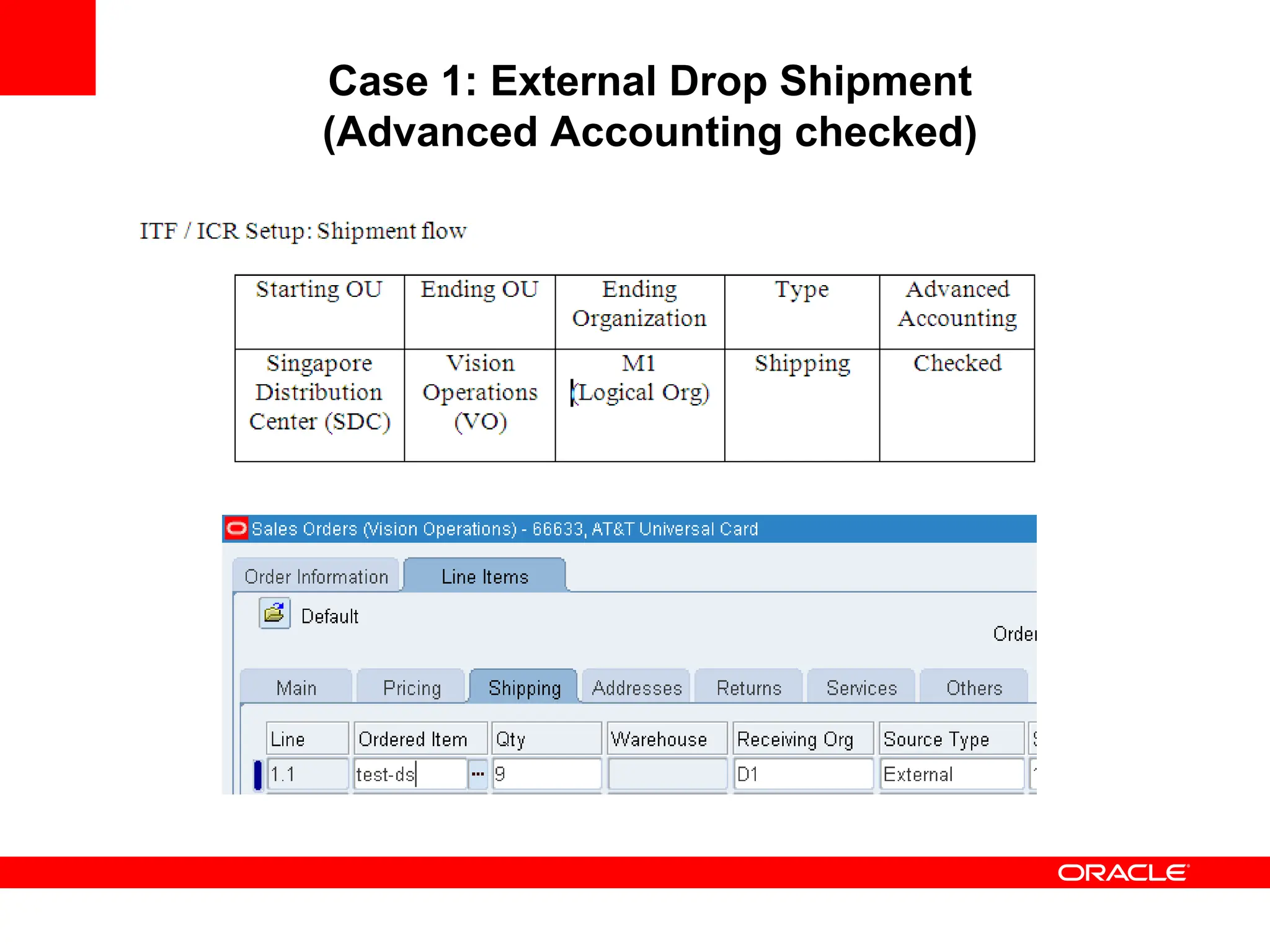
• In OU Vision Operations, Create a SO with Source as
‘External’ and Receiving Org as ‘D1’ and book it
• Run Workflow Background Engine
• In OU Singapore Distribution Center, run Requisition
Import program to generate the Purchase Requisition
• Auto Create a PO and receive the PO in D1 org
Item ‘test-ds’ has a list price of 10 in organization items form
Item ‘test-ds’ has a price of 15 in Price List form
Item ‘test-ds’ has a unit cost of 7 in ‘D1’ org
Transactions/ Accounting
Generated when PO is Received
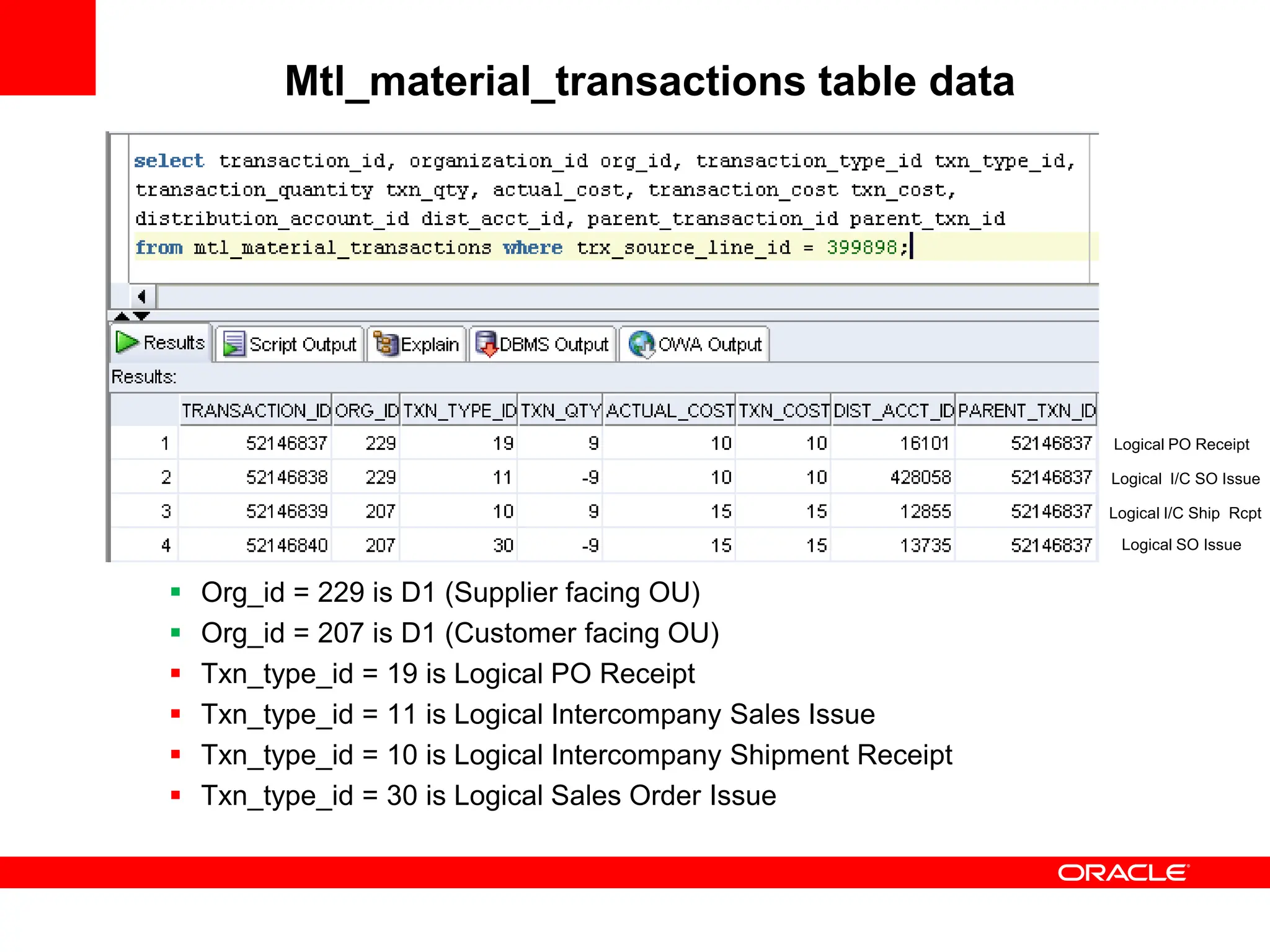
Mtl_material_transactions table data
 Org_id = 229 is D1 (Supplier facing OU)
 Org_id = 207 is D1 (Customer facing OU)
 Txn_type_id = 19 is Logical PO Receipt
 Txn_type_id = 11 is Logical Intercompany Sales Issue
 Txn_type_id = 10 is Logical Intercompany Shipment Receipt
 Txn_type_id = 30 is Logical Sales Order Issue
Logical PO Receipt
Logical I/C SO Issue
Logical I/C Ship Rcpt
Logical SO Issue
Mtl_transaction_accounts table data
 Acct_line_type = 31 (Clearing Account)
 Acct_line_type = 2 (I/C COGS Account)
 Acct_line_type = 16 (I/C Accrual Account)
 Acct_line_type = 36 (DCOGS Account)
 Acct_line_type = 1 (Inventory Valuation Account)
Various Accounting_Line_Types
• 1 = Inventory Valuation (Subinv Account)
• 2 = I/C COGS (Intercompany Relations)
• 16 = I/C Accrual Account (Intercompany Relations)
• 31 = Clearing Account (Receiving Options)
• 36 = Deferred COGS (Organization Parameters)
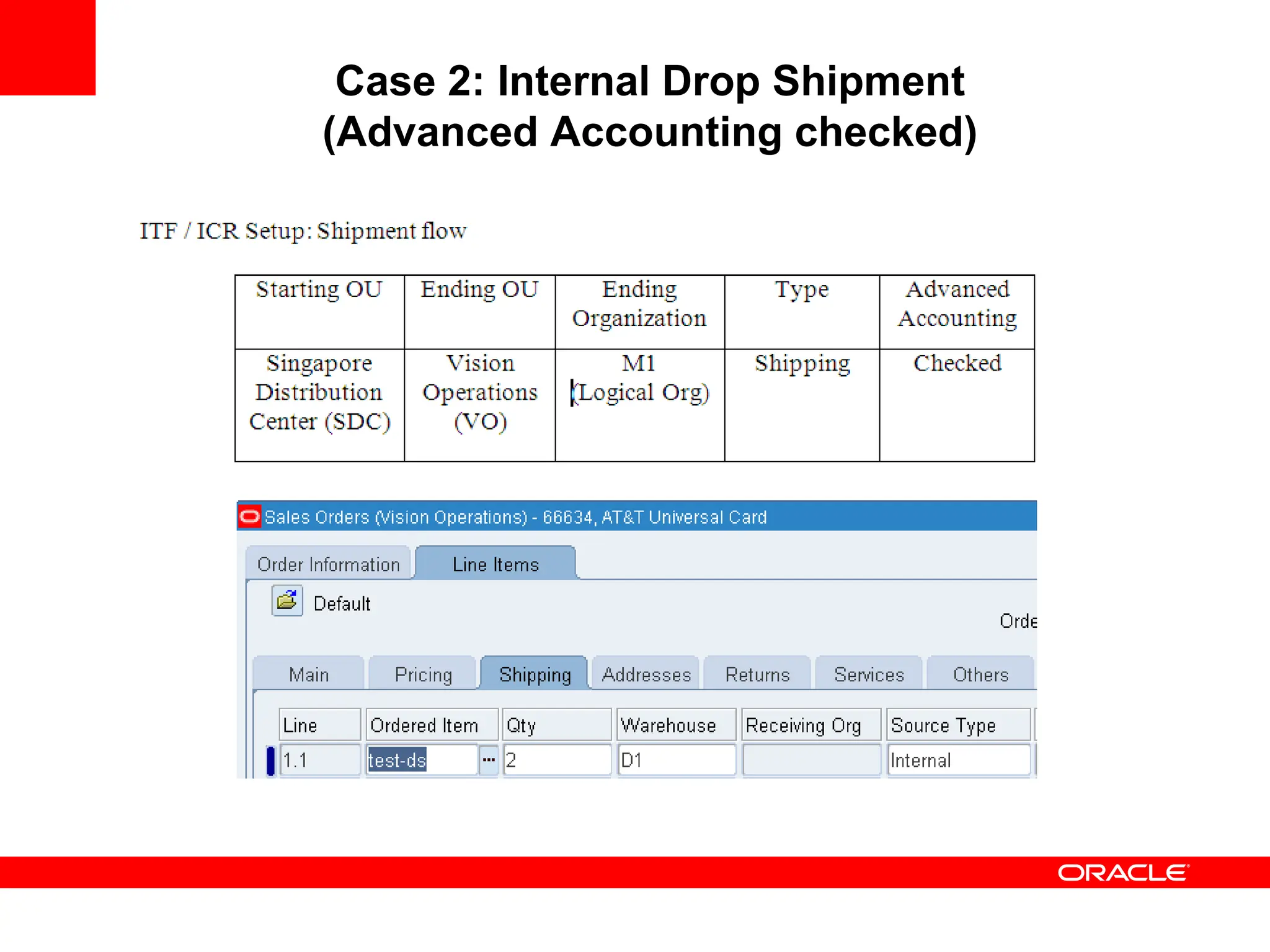
Case 2: Internal Drop Shipment
(Advanced Accounting checked)
Case 2: Internal Drop Shipment
(Advanced Accounting checked)
• In OU Vision Operations, Create a SO with Source as
‘Internal’ and Warehouse as ‘D1’
• Book the Order
• Launch Pick Release, Auto Create Delivery
• Ship confirm the line
Item ‘test-ds’ has a list price of 10 in organization items form
Item ‘test-ds’ has a price of 15 in Price List form
Item ‘test-ds’ has a unit cost of 7 in ‘D1’ org
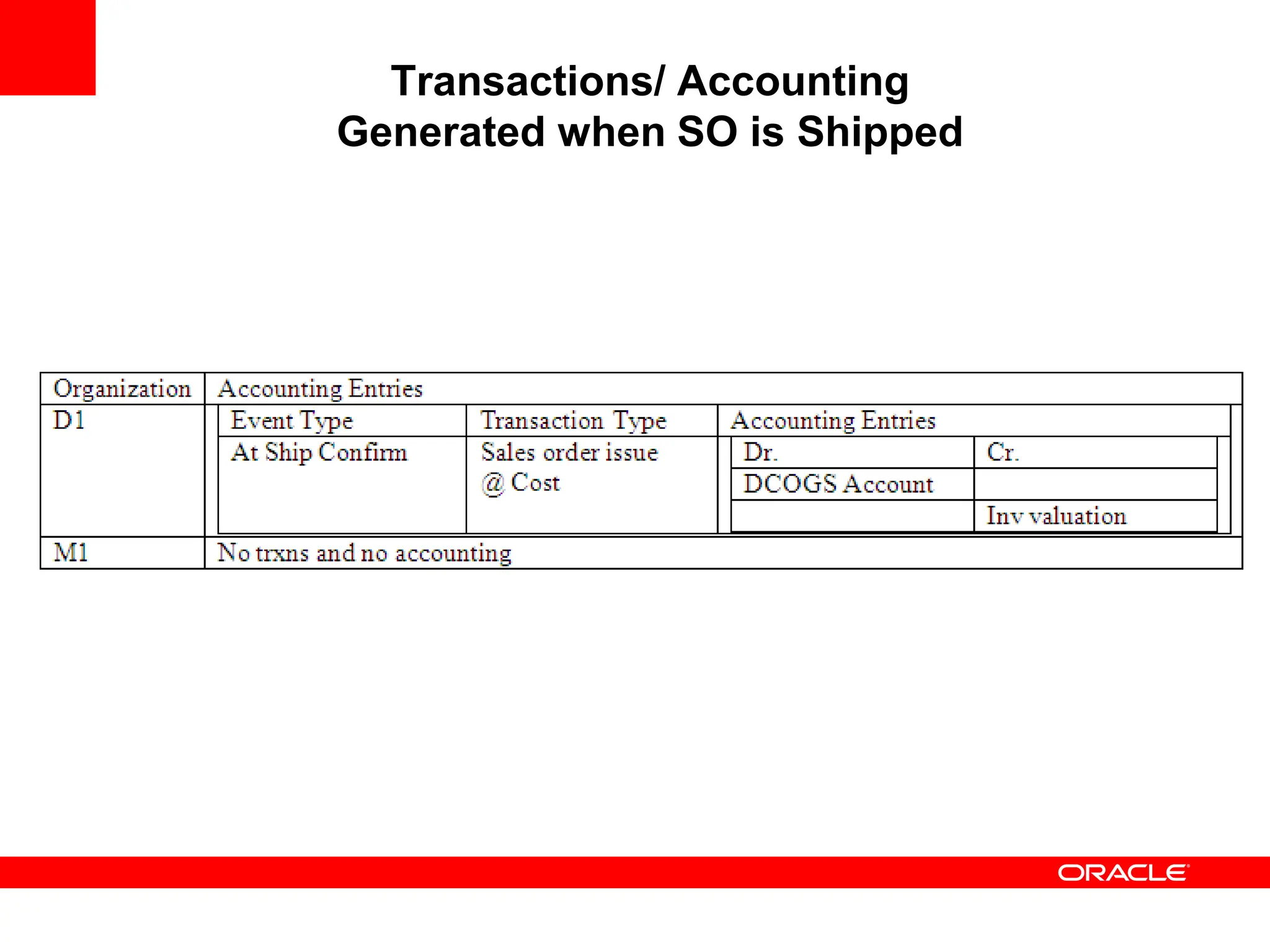
Transactions/ Accounting
Generated when SO is Shipped
• A Physical Sales Order Issue is also generated in the
shipping org ‘D1’
• However, there will be no accounting entries for it
Mtl_material_transactions table data
 Org_id = 229 is D1 (Supplier facing OU)
 Org_id = 207 is D1 (Customer facing OU)
 Txn_type_id = 33 is Sales Order Issue
 Txn_type_id = 11 is Logical Intercompany Sales Issue
 Txn_type_id = 10 is Logical Intercompany Shipment Receipt
 Txn_type_id = 30 is Logical Sales Order Issue
Logical I/C Ship Rcpt
Logical I/C SO Issue
Logical SO Issue
Mtl_transaction_accounts table data
 Acct_line_type = 2 (I/C COGS Account)
 Acct_line_type = 16 (I/C Accrual Account)
 Acct_line_type = 36 (DCOGS Account)
 Acct_line_type = 1 (Inventory Valuation Account)
Intercompany Transaction Flows
(without Advanced Accounting)
• When advanced accounting is unchecked,
Organization need not be defined for the End OU
since no logical transactions are generated
Case 3: External Drop Shipment
(without Advanced Accounting)
• In OU Vision Operations, Create a SO with Source as
‘External’ and Receiving Org as ‘D1’.
• Book the order
• Run Workflow Background Engine
• In OU Singapore Distribution Center, run the
Requisition Import program to generate the Purchase
Requisition
• Auto Create a PO and retain Ship To org as D1
• Receive the PO in D1 org
Transactions/ Accounting
Generated when PO is Received
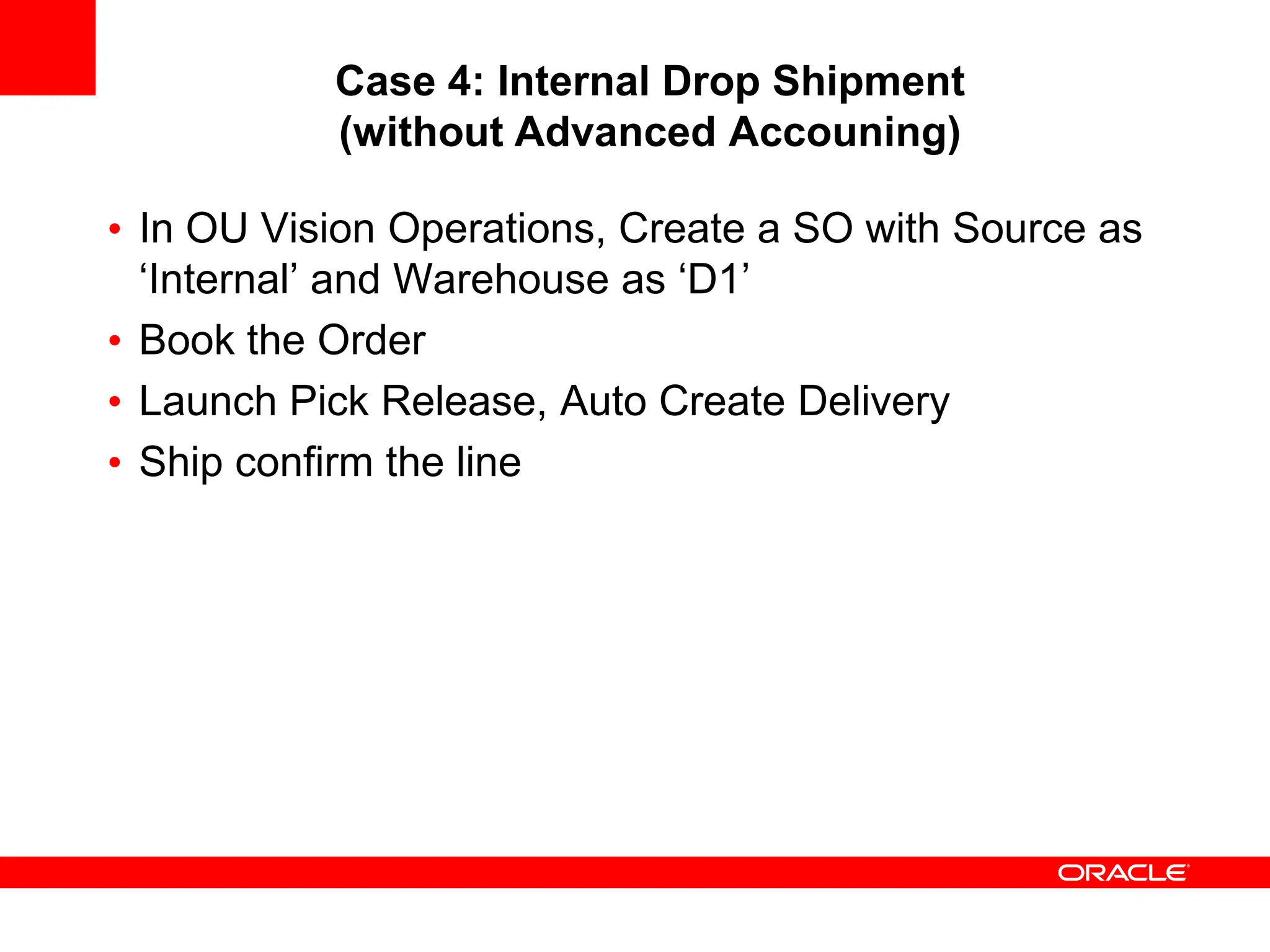
Case 4: Internal Drop Shipment
(without Advanced Accouning)
• In OU Vision Operations, Create a SO with Source as
‘Internal’ and Warehouse as ‘D1’
• Book the Order
• Launch Pick Release, Auto Create Delivery
• Ship confirm the line
Transactions/ Accounting
Generated when SO is Shipped
Advanced Accounting
(Advanced Accounting checked)
• In this case material has not hit the Inventory. This
implies the following:
Logical trxns are created
Inventory is not re-averaged.
Even if IPV is there (at supplier end), it cannot be transferred
to inventory as material never hit the inventory
No impact on item cost
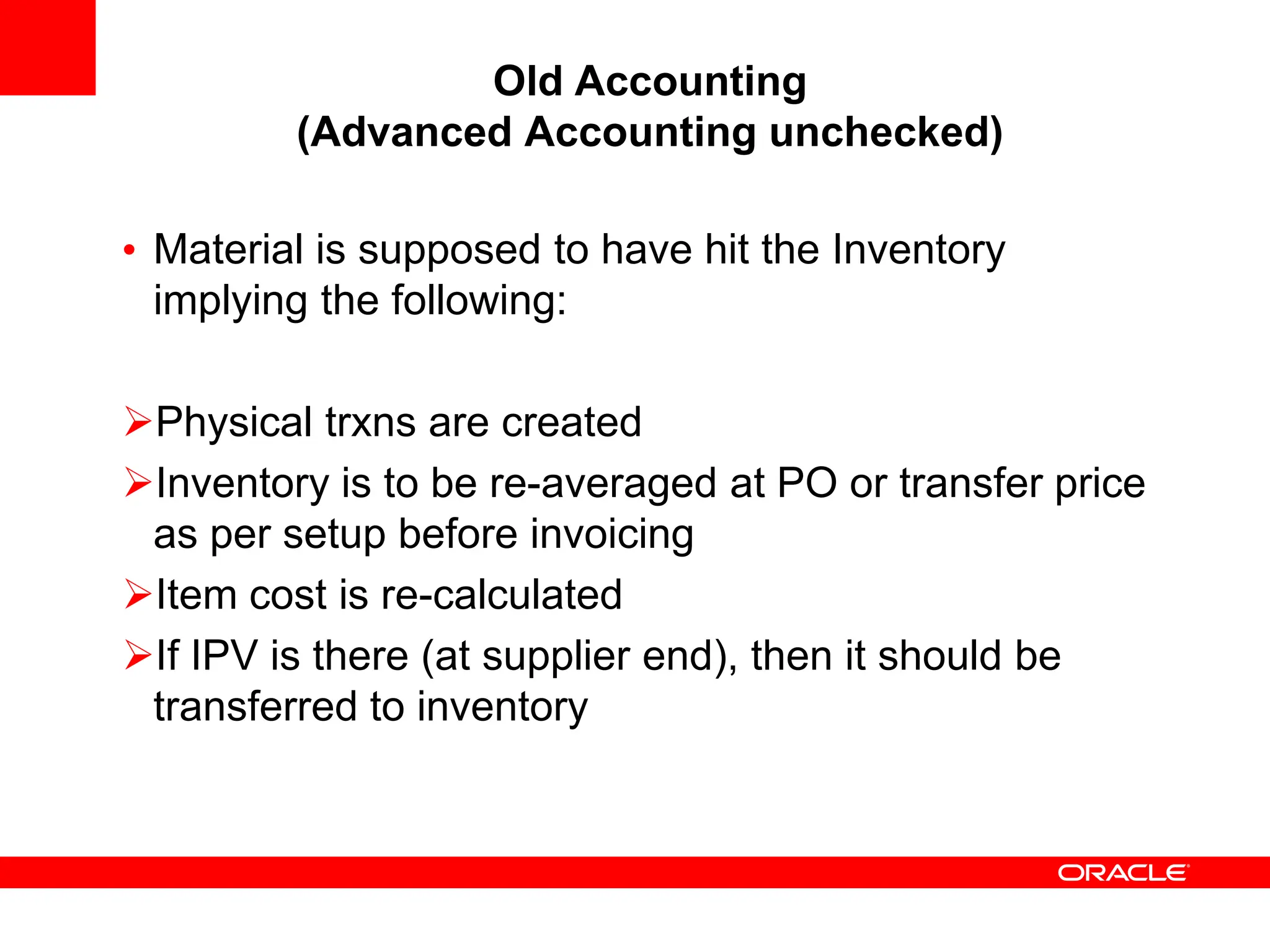
Old Accounting
(Advanced Accounting unchecked)
• Material is supposed to have hit the Inventory
implying the following:
Physical trxns are created
Inventory is to be re-averaged at PO or transfer price
as per setup before invoicing
Item cost is re-calculated
If IPV is there (at supplier end), then it should be
transferred to inventory
Some Additional Notes
• There are certain scenarios that are not supported
• Note: 336129.1 gives the list of the scenarios that are
not supported
References
• White Paper: Transfer Price Accounting in Oracle
SCM, Feb 2006 (Note: 360106.1)
• White Paper: Overview of Intercompany Invoicing,
July 2005 (Note: 336129.1)
• R12 Inventory and Costing User Guides
• A guide to understanding and setting up different GP
and DS scenarios,

Dropship accounting_OPM Financials Oracl

  • 2.
    <Insert Picture Here> IntercompanyTransaction Accounting Part2- Drop Shipment Accounting Christopher David
  • 3.
    <Insert Picture Here> •Overview of Drop Shipment What is Drop Shipment Drop Shipment types Setups involved in Drop Shipment • Accounting entries for Various Drop Shipment Scenarios External Drop Shipment with Advanced Accounting Internal Drop Shipment with Advanced Accounting External Drop Shipment without Advanced Accounting Internal Drop Shipment without Advanced Accounting © 2007 Oracle Corporation – Proprietary and Confidential Agenda
  • 4.
    What is DropShipment • Drop Shipment is a business process where the sales order is placed in one operating unit and goods are directly shipped from a supplier or an internal organization belonging to another unit. • Refer Drop Ship Sales Order Cycle In Order Management (Doc ID 749139.1) for the steps to perform the Drop Ship Sales Order Cycle • When Drop Shipment is implemented using Intercompany relations (which was discussed during last session):  Start OU is Supplier facing  End OU is Customer facing  Intermediate OU’s are Accounting OU’s only
  • 5.
    Drop Shipment types DropShipment flow is of two types • External Drop Shipment flow (where supplier is external)  Source type is External in the Sales Order • Internal Drop Shipment flow (where supplier is internal)  Source type is Internal in the Sales Order
  • 6.
  • 7.
  • 8.
    • By enablingadvanced accounting for an intercompany transaction flow, you would be able to define multiple nodes with Intercompany relations for each nodes and generate multiple intercompany invoices for these intermediate OU’s • Logical intercompany receipt and issue transactions are created to facilitate accounting in intermediate OU’s • Similarly, logical receipt and logical sales order issue transactions are created for those receipts and issues that are not accompanied with physical receipt and issue of goods
  • 9.
    Case 1: ExternalDrop Shipment (Advanced Accounting checked)
  • 10.
    Case 1: ExternalDrop Shipment (Advanced Accounting checked) • In OU Vision Operations, Create a SO with Source as ‘External’ and Receiving Org as ‘D1’ and book it • Run Workflow Background Engine • In OU Singapore Distribution Center, run Requisition Import program to generate the Purchase Requisition • Auto Create a PO and receive the PO in D1 org Item ‘test-ds’ has a list price of 10 in organization items form Item ‘test-ds’ has a price of 15 in Price List form Item ‘test-ds’ has a unit cost of 7 in ‘D1’ org
  • 11.
  • 12.
    Mtl_material_transactions table data Org_id = 229 is D1 (Supplier facing OU)  Org_id = 207 is D1 (Customer facing OU)  Txn_type_id = 19 is Logical PO Receipt  Txn_type_id = 11 is Logical Intercompany Sales Issue  Txn_type_id = 10 is Logical Intercompany Shipment Receipt  Txn_type_id = 30 is Logical Sales Order Issue Logical PO Receipt Logical I/C SO Issue Logical I/C Ship Rcpt Logical SO Issue
  • 13.
    Mtl_transaction_accounts table data Acct_line_type = 31 (Clearing Account)  Acct_line_type = 2 (I/C COGS Account)  Acct_line_type = 16 (I/C Accrual Account)  Acct_line_type = 36 (DCOGS Account)  Acct_line_type = 1 (Inventory Valuation Account)
  • 14.
    Various Accounting_Line_Types • 1= Inventory Valuation (Subinv Account) • 2 = I/C COGS (Intercompany Relations) • 16 = I/C Accrual Account (Intercompany Relations) • 31 = Clearing Account (Receiving Options) • 36 = Deferred COGS (Organization Parameters)
  • 15.
    Case 2: InternalDrop Shipment (Advanced Accounting checked)
  • 16.
    Case 2: InternalDrop Shipment (Advanced Accounting checked) • In OU Vision Operations, Create a SO with Source as ‘Internal’ and Warehouse as ‘D1’ • Book the Order • Launch Pick Release, Auto Create Delivery • Ship confirm the line Item ‘test-ds’ has a list price of 10 in organization items form Item ‘test-ds’ has a price of 15 in Price List form Item ‘test-ds’ has a unit cost of 7 in ‘D1’ org
  • 17.
    Transactions/ Accounting Generated whenSO is Shipped • A Physical Sales Order Issue is also generated in the shipping org ‘D1’ • However, there will be no accounting entries for it
  • 18.
    Mtl_material_transactions table data Org_id = 229 is D1 (Supplier facing OU)  Org_id = 207 is D1 (Customer facing OU)  Txn_type_id = 33 is Sales Order Issue  Txn_type_id = 11 is Logical Intercompany Sales Issue  Txn_type_id = 10 is Logical Intercompany Shipment Receipt  Txn_type_id = 30 is Logical Sales Order Issue Logical I/C Ship Rcpt Logical I/C SO Issue Logical SO Issue
  • 19.
    Mtl_transaction_accounts table data Acct_line_type = 2 (I/C COGS Account)  Acct_line_type = 16 (I/C Accrual Account)  Acct_line_type = 36 (DCOGS Account)  Acct_line_type = 1 (Inventory Valuation Account)
  • 20.
    Intercompany Transaction Flows (withoutAdvanced Accounting) • When advanced accounting is unchecked, Organization need not be defined for the End OU since no logical transactions are generated
  • 21.
    Case 3: ExternalDrop Shipment (without Advanced Accounting) • In OU Vision Operations, Create a SO with Source as ‘External’ and Receiving Org as ‘D1’. • Book the order • Run Workflow Background Engine • In OU Singapore Distribution Center, run the Requisition Import program to generate the Purchase Requisition • Auto Create a PO and retain Ship To org as D1 • Receive the PO in D1 org
  • 22.
  • 23.
    Case 4: InternalDrop Shipment (without Advanced Accouning) • In OU Vision Operations, Create a SO with Source as ‘Internal’ and Warehouse as ‘D1’ • Book the Order • Launch Pick Release, Auto Create Delivery • Ship confirm the line
  • 24.
  • 25.
    Advanced Accounting (Advanced Accountingchecked) • In this case material has not hit the Inventory. This implies the following: Logical trxns are created Inventory is not re-averaged. Even if IPV is there (at supplier end), it cannot be transferred to inventory as material never hit the inventory No impact on item cost
  • 26.
    Old Accounting (Advanced Accountingunchecked) • Material is supposed to have hit the Inventory implying the following: Physical trxns are created Inventory is to be re-averaged at PO or transfer price as per setup before invoicing Item cost is re-calculated If IPV is there (at supplier end), then it should be transferred to inventory
  • 27.
    Some Additional Notes •There are certain scenarios that are not supported • Note: 336129.1 gives the list of the scenarios that are not supported
  • 28.
    References • White Paper:Transfer Price Accounting in Oracle SCM, Feb 2006 (Note: 360106.1) • White Paper: Overview of Intercompany Invoicing, July 2005 (Note: 336129.1) • R12 Inventory and Costing User Guides • A guide to understanding and setting up different GP and DS scenarios,