01/11/25 1
Drop Ship cycle in Order Management
Introduction
This presentation is about Drop Ship cycle in R12
01/11/25 2
Agenda
 General Overview of Drop Shipments
 Basic Setups
 Demo For Drop Shipment Process
Order Management Drop Ship Sales Order
Purchase Requisition
PO Creation (Auto Create)
Receiving
Invoicing (AR/AP)
01/11/25 3
Drop Ship Cycle in Order Management
Drop shipping functionality enables you to take an order from your customer and fulfill it directly from
your supplier's site. Order Management enables you to enter drop ship sales orders and lines for
standard, model and kit, and configured items, although you currently cannot perform a drop shipment
for Ship Model Complete (SMC) PTO's.
You can receive orders for items that you do not stock or for which you lack sufficient inventory, and
have a supplier provide the items directly to your customer.
The benefits of drop shipping include:
• No inventory is required
• Reduced order fulfillment processing costs
• Reduced flow times
• Elimination of losses on non-sellable goods
• Elimination of packing and shipping costs
• Reduced inventory space requirements
• Reduced shipping time to your customer
• Enables you to offer a variety of products to your customers
When processing drop shipments for orders, you can:
• Optionally receive and electronically process Advanced Shipping Notices (ASN).
• Automatically perform logical receipts upon notification of shipment
• Perform Drop Ship for both make and buy items, and automatically default the source type of
External for order lines which need to be drop shipped
01/11/25 4
Drop Ship Cycle in Order Management
The supply and demand details for drop ship orders are not visible to Oracle Planning applications.
Therefore, it is recommended that you associate separate logical (dummy) organization for shipping
drop ship orders; the logical organization should not be Included in your planning processes.
Reservations
• Once an order line has been specified as an External order, Order Management does not allow
reservations to be placed against the order line.
• Both standard and expense items may be drop shipped, although drop shipments currently support a
Destination Type (item attribute) of Expense and Inventory only.
Change Management
If the buyer makes changes to the requisition or purchase order in Oracle Purchasing after Purchase
Release has been run, or modifies the sales order after the PO has been created, use the Order
Management Sales Order and Purchase Order Discrepancy Report to note differences between the
original sales order and its associated purchase order.
With new R12i Change management – Now Changes made to OM will reflect in PO.
01/11/25 5
Setups
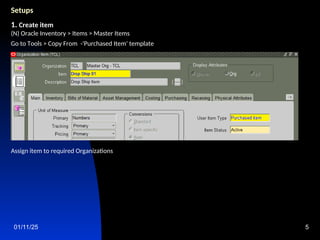
1. Create item
(N) Oracle Inventory > Items > Master Items
Go to Tools > Copy From -'Purchased Item' template
Assign item to required Organizations
01/11/25 6
Setups
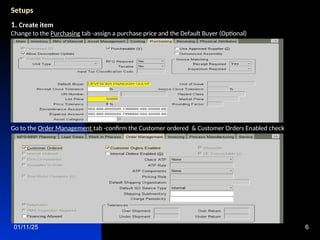
1. Create item
Change to the Purchasing tab -assign a purchase price and the Default Buyer (Optional)
Go to the Order Management tab -confirm the Customer ordered & Customer Orders Enabled check
01/11/25 7
Setups
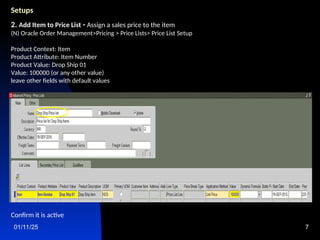
2. Add Item to Price List - Assign a sales price to the item
(N) Oracle Order Management>Pricing > Price Lists> Price List Setup
Product Context: Item
Product Attribute: Item Number
Product Value: Drop Ship 01
Value: 100000 (or any other value)
leave other fields with default values
Confirm it is active
01/11/25 8
Setups
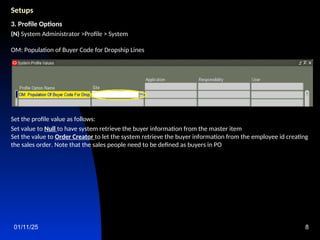
3. Profile Options
(N) System Administrator >Profile > System
OM: Population of Buyer Code for Dropship Lines
Set the profile value as follows:
Set value to Null to have system retrieve the buyer information from the master item
Set the value to Order Creator to let the system retrieve the buyer information from the employee id creating
the sales order. Note that the sales people need to be defined as buyers in PO
01/11/25 9
Setups
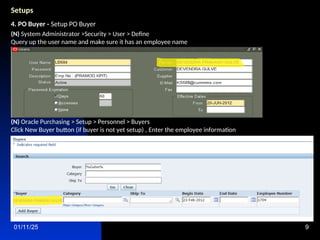
4. PO Buyer - Setup PO Buyer
(N) System Administrator >Security > User > Define
Query up the user name and make sure it has an employee name
(N) Oracle Purchasing > Setup > Personnel > Buyers
Click New Buyer button (if buyer is not yet setup) , Enter the employee information
01/11/25 10
Setups
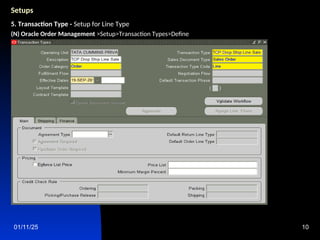
5. Transaction Type - Setup for Line Type
(N) Oracle Order Management >Setup>Transaction Types>Define
01/11/25 11
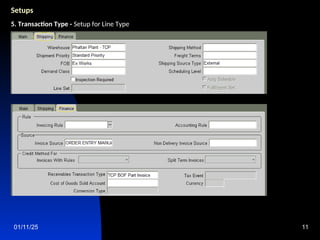
Setups
5. Transaction Type - Setup for Line Type
01/11/25 12
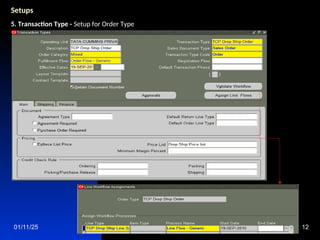
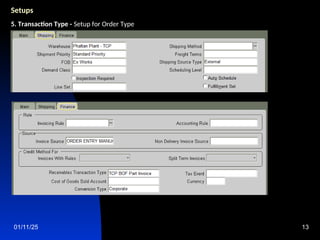
Setups
5. Transaction Type - Setup for Order Type
01/11/25 13
Setups
5. Transaction Type - Setup for Order Type
01/11/25 14
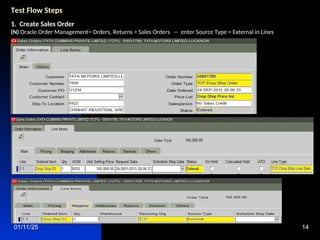
Test Flow Steps
1. Create Sales Order
(N) Oracle Order Management> Orders, Returns > Sales Orders -- enter Source Type = External in Lines
01/11/25 15
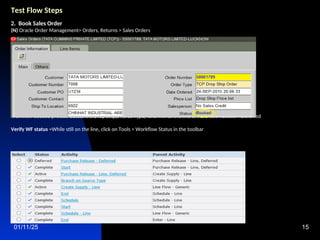
Test Flow Steps
2. Book Sales Order
(N) Oracle Order Management> Orders, Returns > Sales Orders
Order status-Booked & Line status-Booked
Workflow Seeded process detect it is Drop Ship(Source Type) and moves the line to Purchase Release – Deferred
Verify WF status =While still on the line, click on Tools > Workflow Status in the toolbar
01/11/25 16
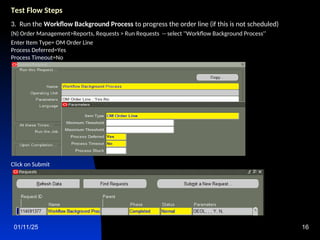
Test Flow Steps
3. Run the Workflow Background Process to progress the order line (if this is not scheduled)
(N) Order Management>Reports, Requests > Run Requests -- select ''Workflow Background Process'‘
Enter Item Type= OM Order Line
Process Deferred=Yes
Process Timeout=No
Click on Submit
01/11/25 17
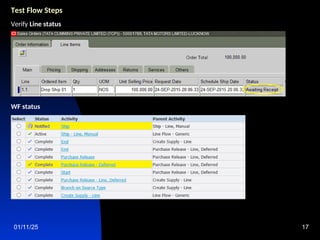
Test Flow Steps
Verify Line status
WF status
01/11/25 18
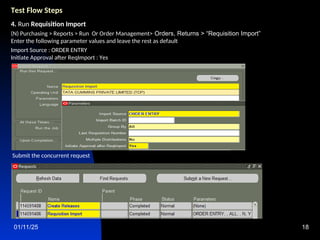
Test Flow Steps
4. Run Requisition Import
(N) Purchasing > Reports > Run Or Order Management> Orders, Returns > “Requisition Import”
Enter the following parameter values and leave the rest as default
Import Source : ORDER ENTRY
Initiate Approval after ReqImport : Yes
Submit the concurrent request
01/11/25 19
Test Flow Steps
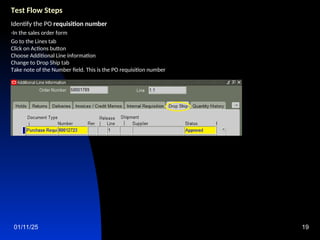
Identify the PO requisition number
-In the sales order form
Go to the Lines tab
Click on Actions button
Choose Additional Line information
Change to Drop Ship tab
Take note of the Number field. This is the PO requisition number
01/11/25 20
Test Flow Steps
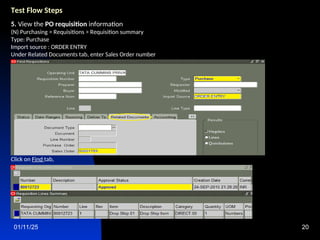
5. View the PO requisition information
(N) Purchasing > Requisitions > Requisition summary
Type: Purchase
Import source : ORDER ENTRY
Under Related Documents tab, enter Sales Order number
Click on Find tab,
01/11/25 21
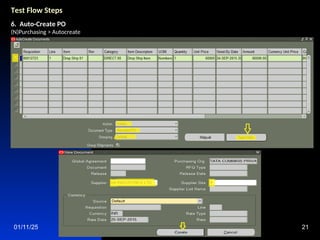
Test Flow Steps
6. Auto-Create PO
(N)Purchasing > Autocreate
01/11/25 22
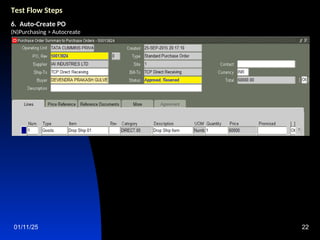
Test Flow Steps
6. Auto-Create PO
(N)Purchasing > Autocreate
01/11/25 23
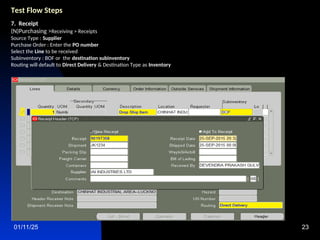
Test Flow Steps
7. Receipt
(N)Purchasing >Receiving > Receipts
Source Type : Supplier
Purchase Order : Enter the PO number
Select the Line to be received
Subinventory : BOF or the destination subinventory
Routing will default to Direct Delivery & Destination Type as Inventory
01/11/25 24
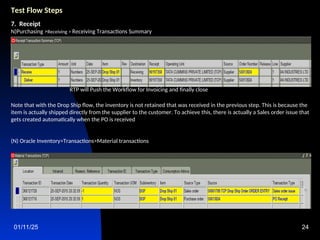
Test Flow Steps
7. Receipt
N)Purchasing >Receiving > Receiving Transactions Summary
RTP will Push the Workflow for Invoicing and finally close
Note that with the Drop Ship flow, the inventory is not retained that was received in the previous step. This is because the
item is actually shipped directly from the supplier to the customer. To achieve this, there is actually a Sales order issue that
gets created automatically when the PO is received
(N) Oracle Inventory>Transactions>Material transactions
01/11/25 25
Test Flow Steps
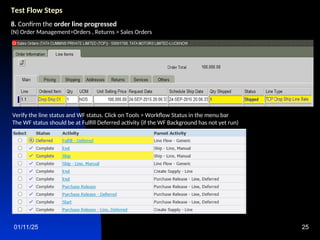
8. Confirm the order line progressed
(N) Order Management>Orders , Returns > Sales Orders
Verify the line status and WF status. Click on Tools > Workflow Status in the menu bar
The WF status should be at Fulfill Deferred activity (if the WF Background has not yet run)
01/11/25 26
Test Flow Steps
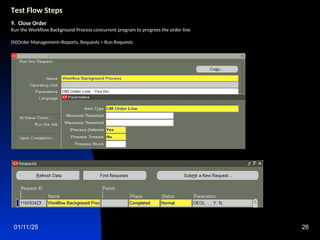
9. Close Order
Run the Workflow Background Process concurrent program to progress the order line
(N)Order Management>Reports, Requests > Run Requests
01/11/25 27
Test Flow Steps
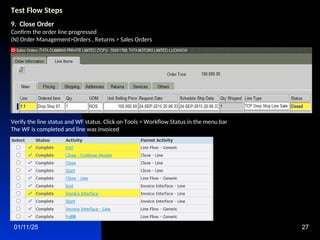
9. Close Order
Confirm the order line progressed
(N) Order Management>Orders , Returns > Sales Orders
Verify the line status and WF status. Click on Tools > Workflow Status in the menu bar
The WF is completed and line was invoiced
01/11/25 28
Test Flow Steps
10. The Autoinvoice Import program launched, Upon its completion confirm the invoice was created.
(N) Order Management>Orders , Returns > Sales Orders
Query Sales Order
Go to Lines tab
Choose Additional Line information> Invoices/Credit memos
Take note of the invoice number and amount
This completes the steps for the Drop Ship order test flow

Drop Ship Cycle in Oracle E-Business Order Management Presentation

  • 1.
    01/11/25 1 Drop Shipcycle in Order Management Introduction This presentation is about Drop Ship cycle in R12
  • 2.
    01/11/25 2 Agenda  GeneralOverview of Drop Shipments  Basic Setups  Demo For Drop Shipment Process Order Management Drop Ship Sales Order Purchase Requisition PO Creation (Auto Create) Receiving Invoicing (AR/AP)
  • 3.
    01/11/25 3 Drop ShipCycle in Order Management Drop shipping functionality enables you to take an order from your customer and fulfill it directly from your supplier's site. Order Management enables you to enter drop ship sales orders and lines for standard, model and kit, and configured items, although you currently cannot perform a drop shipment for Ship Model Complete (SMC) PTO's. You can receive orders for items that you do not stock or for which you lack sufficient inventory, and have a supplier provide the items directly to your customer. The benefits of drop shipping include: • No inventory is required • Reduced order fulfillment processing costs • Reduced flow times • Elimination of losses on non-sellable goods • Elimination of packing and shipping costs • Reduced inventory space requirements • Reduced shipping time to your customer • Enables you to offer a variety of products to your customers When processing drop shipments for orders, you can: • Optionally receive and electronically process Advanced Shipping Notices (ASN). • Automatically perform logical receipts upon notification of shipment • Perform Drop Ship for both make and buy items, and automatically default the source type of External for order lines which need to be drop shipped
  • 4.
    01/11/25 4 Drop ShipCycle in Order Management The supply and demand details for drop ship orders are not visible to Oracle Planning applications. Therefore, it is recommended that you associate separate logical (dummy) organization for shipping drop ship orders; the logical organization should not be Included in your planning processes. Reservations • Once an order line has been specified as an External order, Order Management does not allow reservations to be placed against the order line. • Both standard and expense items may be drop shipped, although drop shipments currently support a Destination Type (item attribute) of Expense and Inventory only. Change Management If the buyer makes changes to the requisition or purchase order in Oracle Purchasing after Purchase Release has been run, or modifies the sales order after the PO has been created, use the Order Management Sales Order and Purchase Order Discrepancy Report to note differences between the original sales order and its associated purchase order. With new R12i Change management – Now Changes made to OM will reflect in PO.
  • 5.
    01/11/25 5 Setups 1. Createitem (N) Oracle Inventory > Items > Master Items Go to Tools > Copy From -'Purchased Item' template Assign item to required Organizations
  • 6.
    01/11/25 6 Setups 1. Createitem Change to the Purchasing tab -assign a purchase price and the Default Buyer (Optional) Go to the Order Management tab -confirm the Customer ordered & Customer Orders Enabled check
  • 7.
    01/11/25 7 Setups 2. AddItem to Price List - Assign a sales price to the item (N) Oracle Order Management>Pricing > Price Lists> Price List Setup Product Context: Item Product Attribute: Item Number Product Value: Drop Ship 01 Value: 100000 (or any other value) leave other fields with default values Confirm it is active
  • 8.
    01/11/25 8 Setups 3. ProfileOptions (N) System Administrator >Profile > System OM: Population of Buyer Code for Dropship Lines Set the profile value as follows: Set value to Null to have system retrieve the buyer information from the master item Set the value to Order Creator to let the system retrieve the buyer information from the employee id creating the sales order. Note that the sales people need to be defined as buyers in PO
  • 9.
    01/11/25 9 Setups 4. POBuyer - Setup PO Buyer (N) System Administrator >Security > User > Define Query up the user name and make sure it has an employee name (N) Oracle Purchasing > Setup > Personnel > Buyers Click New Buyer button (if buyer is not yet setup) , Enter the employee information
  • 10.
    01/11/25 10 Setups 5. TransactionType - Setup for Line Type (N) Oracle Order Management >Setup>Transaction Types>Define
  • 11.
    01/11/25 11 Setups 5. TransactionType - Setup for Line Type
  • 12.
    01/11/25 12 Setups 5. TransactionType - Setup for Order Type
  • 13.
    01/11/25 13 Setups 5. TransactionType - Setup for Order Type
  • 14.
    01/11/25 14 Test FlowSteps 1. Create Sales Order (N) Oracle Order Management> Orders, Returns > Sales Orders -- enter Source Type = External in Lines
  • 15.
    01/11/25 15 Test FlowSteps 2. Book Sales Order (N) Oracle Order Management> Orders, Returns > Sales Orders Order status-Booked & Line status-Booked Workflow Seeded process detect it is Drop Ship(Source Type) and moves the line to Purchase Release – Deferred Verify WF status =While still on the line, click on Tools > Workflow Status in the toolbar
  • 16.
    01/11/25 16 Test FlowSteps 3. Run the Workflow Background Process to progress the order line (if this is not scheduled) (N) Order Management>Reports, Requests > Run Requests -- select ''Workflow Background Process'‘ Enter Item Type= OM Order Line Process Deferred=Yes Process Timeout=No Click on Submit
  • 17.
    01/11/25 17 Test FlowSteps Verify Line status WF status
  • 18.
    01/11/25 18 Test FlowSteps 4. Run Requisition Import (N) Purchasing > Reports > Run Or Order Management> Orders, Returns > “Requisition Import” Enter the following parameter values and leave the rest as default Import Source : ORDER ENTRY Initiate Approval after ReqImport : Yes Submit the concurrent request
  • 19.
    01/11/25 19 Test FlowSteps Identify the PO requisition number -In the sales order form Go to the Lines tab Click on Actions button Choose Additional Line information Change to Drop Ship tab Take note of the Number field. This is the PO requisition number
  • 20.
    01/11/25 20 Test FlowSteps 5. View the PO requisition information (N) Purchasing > Requisitions > Requisition summary Type: Purchase Import source : ORDER ENTRY Under Related Documents tab, enter Sales Order number Click on Find tab,
  • 21.
    01/11/25 21 Test FlowSteps 6. Auto-Create PO (N)Purchasing > Autocreate
  • 22.
    01/11/25 22 Test FlowSteps 6. Auto-Create PO (N)Purchasing > Autocreate
  • 23.
    01/11/25 23 Test FlowSteps 7. Receipt (N)Purchasing >Receiving > Receipts Source Type : Supplier Purchase Order : Enter the PO number Select the Line to be received Subinventory : BOF or the destination subinventory Routing will default to Direct Delivery & Destination Type as Inventory
  • 24.
    01/11/25 24 Test FlowSteps 7. Receipt N)Purchasing >Receiving > Receiving Transactions Summary RTP will Push the Workflow for Invoicing and finally close Note that with the Drop Ship flow, the inventory is not retained that was received in the previous step. This is because the item is actually shipped directly from the supplier to the customer. To achieve this, there is actually a Sales order issue that gets created automatically when the PO is received (N) Oracle Inventory>Transactions>Material transactions
  • 25.
    01/11/25 25 Test FlowSteps 8. Confirm the order line progressed (N) Order Management>Orders , Returns > Sales Orders Verify the line status and WF status. Click on Tools > Workflow Status in the menu bar The WF status should be at Fulfill Deferred activity (if the WF Background has not yet run)
  • 26.
    01/11/25 26 Test FlowSteps 9. Close Order Run the Workflow Background Process concurrent program to progress the order line (N)Order Management>Reports, Requests > Run Requests
  • 27.
    01/11/25 27 Test FlowSteps 9. Close Order Confirm the order line progressed (N) Order Management>Orders , Returns > Sales Orders Verify the line status and WF status. Click on Tools > Workflow Status in the menu bar The WF is completed and line was invoiced
  • 28.
    01/11/25 28 Test FlowSteps 10. The Autoinvoice Import program launched, Upon its completion confirm the invoice was created. (N) Order Management>Orders , Returns > Sales Orders Query Sales Order Go to Lines tab Choose Additional Line information> Invoices/Credit memos Take note of the invoice number and amount This completes the steps for the Drop Ship order test flow