Driving Quality Leads with Content
How to Fill Your Pipeline Using LinkedIn Sponsored Updates
Table of Contents
ļ‚§ Why Social Media Drives Leads
ļ‚§ Drive Quality Leads with LinkedIn Sponsored Updates in 4 Easy Steps
– Step 1: Create Content That Drives Leads
– Step 2: Turn Your Content Into Compelling Sponsored Updates
– Step 3: Optimise Your Landing Pages
– Step 4: Tune Your Campaigns for Maximum Effectiveness
ļ‚§ Takeaways: Steps to Lead Generation Success
ļ‚§ Additional Resources
Page 4
Page 7
Page 7
Page 13
Page 19
Page 23
Page 28
Page 29
Table of Contents
1
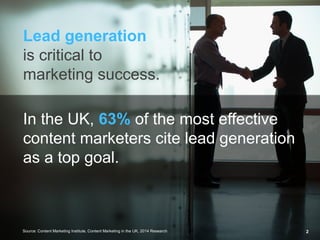
Lead generation
is critical to
marketing success.
In the UK, 63% of the most effective
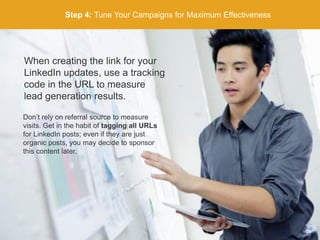
content marketers cite lead generation
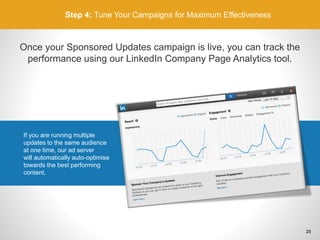
as a top goal.
Source: Content Marketing Institute, Content Marketing in the UK, 2014 Research 2
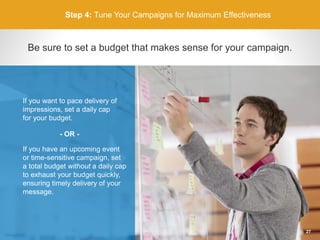
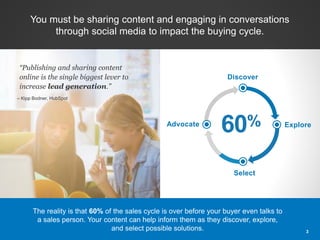
Discover
Explore
Select
Advocate
60%
You must be sharing content and engaging in conversations
through social media to impact the buying cycle.
ā€œPublishing and sharing content
online is the single biggest lever to
increase lead generation.ā€
– Kipp Bodner, HubSpot
The reality is that 60% of the sales cycle is over before your buyer even talks to
a sales person. Your content can help inform them as they discover, explore,
and select possible solutions. 3
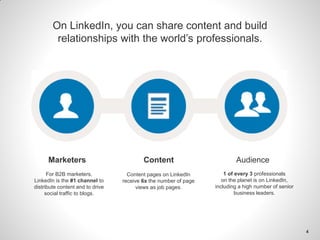
On LinkedIn, you can share content and build
relationships with the world’s professionals.
1 of every 3 professionals
on the planet is on LinkedIn,
including a high number of senior
business leaders.
Content pages on LinkedIn
receive 6x the number of page
views as job pages.
For B2B marketers,
LinkedIn is the #1 channel to
distribute content and to drive
social traffic to blogs.
Marketers Content Audience
4
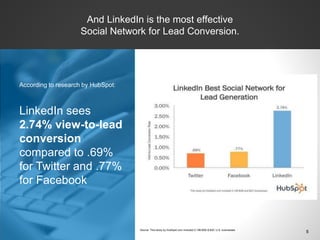
LinkedIn sees
2.74% view-to-lead
conversion
compared to .69%
for Twitter and .77%
for Facebook
According to research by HubSpot:
And LinkedIn is the most effective
Social Network for Lead Conversion.
5Source: This study by HubSpot.com included 5,198 B2B & B2C U.S. businesses
HubSpot drove 400% more leads
within their target audience than lead
generation efforts on other platforms.
HootSuite saw 15% conversion rate
from click-to-lead and 32% lower cost
per form-fill compared to other
paid channels.
LinkedIn Sponsored
Updates help
marketers achieve
lead generation goals.
6
Create Content that
Drives Lead Generation
Step 1
7
Step 1: Create Content that Drives Lead Generation
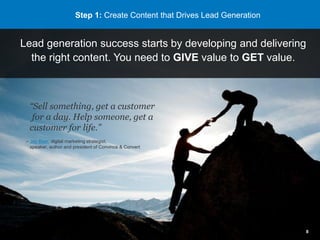
Lead generation success starts by developing and delivering
the right content. You need to GIVE value to GET value.
ā€œSell something, get a customer
for a day. Help someone, get a
customer for life.ā€
– Jay Baer, digital marketing strategist,
speaker, author and president of Convince & Convert
8
Start by asking yourself…
ā€œWhat are the common questions
my audience is asking?ā€
Step 1: Create Content that Drives Lead Generation
Then answer those
questions with
ā€œBig Rockā€ content.
9
Step 1: Create Content that Drives Lead Generation
What is ā€œBig Rockā€ content?
• Delivers VALUE; your
audience will gladly
exchange contact info
to get it
• Includes guides, research
reports, webinars, eBooks
• Timeless content you
can repurpose
• B2B Marketing Expert Doug
Kessler
recommends ONE (1)
Big Rock per quarter
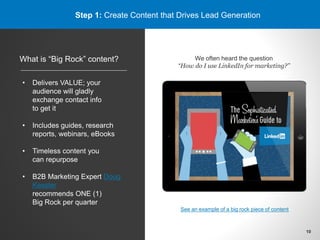
We often heard the question
ā€œHow do I use LinkedIn for marketing?ā€
See an example of a big rock piece of content
10
Step 1: Create Content that Drives Lead Generation
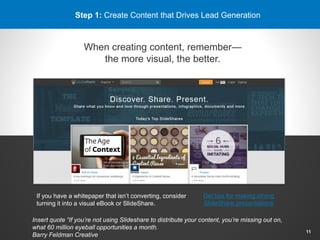
When creating content, remember—
the more visual, the better.
If you have a whitepaper that isn’t converting, consider
turning it into a visual eBook or SlideShare.
Get tips for making strong
SlideShare presentations
11
Insert quote ā€œIf you’re not using Slideshare to distribute your content, you’re missing out on,
what 60 million eyeball opportunities a month.
Barry Feldman Creative
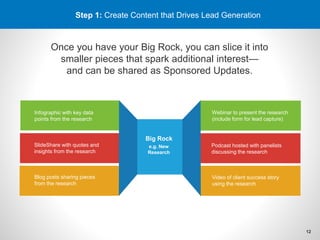
Step 1: Create Content that Drives Lead Generation
Once you have your Big Rock, you can slice it into
smaller pieces that spark additional interest—
and can be shared as Sponsored Updates.
e.g. New
Research
Infographic with key data
points from the research
SlideShare with quotes and
insights from the research
Blog posts sharing pieces
from the research
Webinar to present the research
(include form for lead capture)
Podcast hosted with panelists
discussing the research
Video of client success story
using the research
Big Rock
12
Turn Your Content Into
Compelling Sponsored Updates
Step 2
13
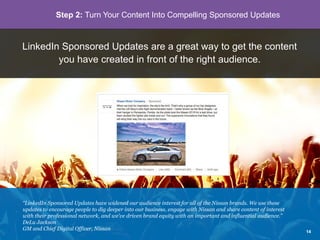
LinkedIn Sponsored Updates are a great way to get the content
you have created in front of the right audience.
ā€œLinkedIn Sponsored Updates have widened our audience interest for all of the Nissan brands. We use these
updates to encourage people to dig deeper into our business, engage with Nissan and share content of interest
with their professional network, and we’ve driven brand equity with an important and influential audience.ā€
DeLu Jackson
GM and Chief Digital Officer, Nissan
Step 2: Turn Your Content Into Compelling Sponsored Updates
14
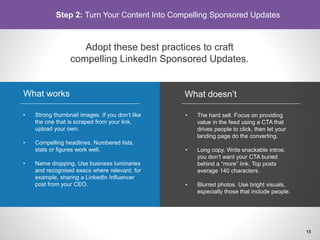
Adopt these best practices to craft
compelling LinkedIn Sponsored Updates.
• Strong thumbnail images. If you don’t like
the one that is scraped from your link,
upload your own.
• Compelling headlines. Numbered lists,
stats or figures work well.
• Name dropping. Use business luminaries
and recognised execs where relevant; for
example, sharing a LinkedIn Influencer
post from your CEO.
What works
• The hard sell. Focus on providing
value in the feed using a CTA that
drives people to click, then let your
landing page do the converting.
• Long copy. Write snackable intros;
you don’t want your CTA buried
behind a ā€œmoreā€ link. Top posts
average 140 characters.
• Blurred photos. Use bright visuals,
especially those that include people.
What doesn’t
Step 2: Turn Your Content Into Compelling Sponsored Updates
15
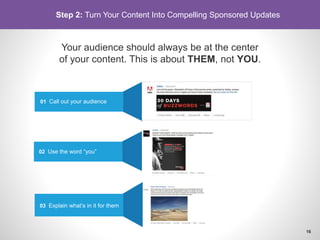
Your audience should always be at the center
of your content. This is about THEM, not YOU.
01 Call out your audience
02 Use the word ā€œyouā€
03 Explain what’s in it for them
Step 2: Turn Your Content Into Compelling Sponsored Updates
16
Use targeting on LinkedIn to deliver the right
message to the right person at the right time.
But be careful NOT
to over-target.
It’s important to reach
everyone who could influence
a buying decision, so cast a
wide net and
then refine your
targeting preferences.
Step 2: Turn Your Content Into Compelling Sponsored Updates
17
Step 2: Turn Your Content Into Compelling Sponsored Updates
Set up a test of different updates to reach different audiences.
Sponsored Update 1:
Targeted to CMOs
These insights can help you drive
transformational change to your business.
[link to white paper landing page with tracking tag 1]
Sponsored Update 2:
Targeted to Marketing Directors
Need to demonstrate the ROI of your
marketing efforts? These insights can help.
[link to white paper landing page with tracking tag 2]
Sponsored Update 3:
Targeted to Social Media Managers
Social media managers: Get the insights you
need to drive the engagement you want.
[link to white paper landing page with tracking tag 3]
Big Rock
Content
Example: B2B Marketing company
XYZ has recently launched a new
piece of research and is publishing
updates to LinkedIn to drive marketers
to download it.
18
Optimise Your
Landing Pages
Step 3
19
Step 3: Optimise Your Landing Pages
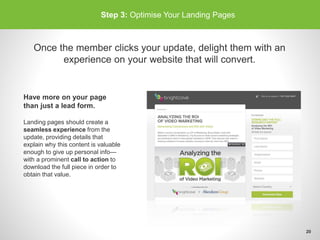
Once the member clicks your update, delight them with an
experience on your website that will convert.
Have more on your page
than just a lead form.
Landing pages should create a
seamless experience from the
update, providing details that
explain why this content is valuable
enough to give up personal info—
with a prominent call to action to
download the full piece in order to
obtain that value.
20
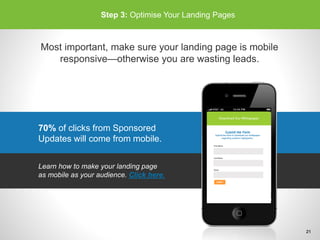
70% of clicks from Sponsored
Updates will come from mobile.
Step 3: Optimise Your Landing Pages
Most important, make sure your landing page is mobile
responsive—otherwise you are wasting leads.
Learn how to make your landing page
as mobile as your audience. Click here.
21
Step 3: Optimise Your Landing Pages
Keep your forms short.
No one wants to spend time filling out a
lengthy form. Only capture the information
you absolutely need—this will help with
conversions, especially on mobile.
See how reducing the number of fields on
your forms can lead to higher conversions
in this Marketo study. Click here.
22
Tune Your Campaigns
for Maximum Effectiveness
Step 4
23
Step 4: Tune Your Campaigns for Maximum Effectiveness
When creating the link for your
LinkedIn updates, use a tracking
code in the URL to measure
lead generation results.
Don’t rely on referral source to measure
visits. Get in the habit of tagging all URLs
for LinkedIn posts; even if they are just
organic posts, you may decide to sponsor
this content later.
24
Step 4: Tune Your Campaigns for Maximum Effectiveness
Once your Sponsored Updates campaign is live, you can track the
performance using our LinkedIn Company Page Analytics tool.
If you are running multiple
updates to the same audience
at one time, our ad server
will automatically auto-optimise
towards the best performing
content.
25
Step 4: Tune Your Campaigns for Maximum Effectiveness
It’s important to determine the value
of a lead to your business. Bid
accordingly and track performance
against this benchmark.
For example, if a lead is worth £100 to your
business and you generally see 5% conversion
rate from click to leads, you should bid up to
Ā£5.00 per click.
26
Step 4: Tune Your Campaigns for Maximum Effectiveness
Be sure to set a budget that makes sense for your campaign.
If you have an upcoming event
or time-sensitive campaign, set
a total budget without a daily cap
to exhaust your budget quickly,
ensuring timely delivery of your
message.
If you want to pace delivery of
impressions, set a daily cap
for your budget.
- OR -
27
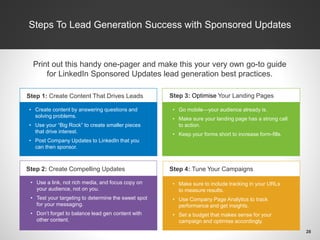
Steps To Lead Generation Success with Sponsored Updates
Print out this handy one-pager and make this your very own go-to guide
for LinkedIn Sponsored Updates lead generation best practices.
Step 2: Create Compelling Updates
Step 3: Optimise Your Landing Pages
Step 4: Tune Your Campaigns
• Create content by answering questions and
solving problems.
• Use your ā€œBig Rockā€ to create smaller pieces
that drive interest.
• Post Company Updates to LinkedIn that you
can then sponsor.
• Use a link, not rich media, and focus copy on
your audience, not on you.
• Test your targeting to determine the sweet spot
for your messaging.
• Don’t forget to balance lead gen content with
other content.
• Go mobile—your audience already is.
• Make sure your landing page has a strong call
to action.
• Keep your forms short to increase form-fills.
• Make sure to include tracking in your URLs
to measure results.
• Use Company Page Analytics to track
performance and get insights.
• Set a budget that makes sense for your
campaign and optimise accordingly.
Step 1: Create Content That Drives Leads
28
Helpful Resources
Best Practices:
The Complete Sponsored Updates Guide for Your Marketing Team
A Gallery of Great Sponsored Updates
How to Optimise Your Sponsored Updates for All Devices
The Sophisticated Marketer’s Guide to LinkedIn
How-To Videos:
• Getting Started with Sponsored Updates
• Targeting Your Sponsored Updates
• Setting Campaign Options
• Making Changes to Your Campaigns
• Reviewing Campaign Performance
• Using Company Page Insights
• How The Sponsored Updates Auction Works
29
Ready to get started
with Sponsored Updates?
Click here
30

Driving Quality Leads with Content - UK

  • 1.
    Driving Quality Leadswith Content How to Fill Your Pipeline Using LinkedIn Sponsored Updates
  • 2.
    Table of Contents ļ‚§Why Social Media Drives Leads ļ‚§ Drive Quality Leads with LinkedIn Sponsored Updates in 4 Easy Steps – Step 1: Create Content That Drives Leads – Step 2: Turn Your Content Into Compelling Sponsored Updates – Step 3: Optimise Your Landing Pages – Step 4: Tune Your Campaigns for Maximum Effectiveness ļ‚§ Takeaways: Steps to Lead Generation Success ļ‚§ Additional Resources Page 4 Page 7 Page 7 Page 13 Page 19 Page 23 Page 28 Page 29 Table of Contents 1
  • 3.
    Lead generation is criticalto marketing success. In the UK, 63% of the most effective content marketers cite lead generation as a top goal. Source: Content Marketing Institute, Content Marketing in the UK, 2014 Research 2
  • 4.
    Discover Explore Select Advocate 60% You must besharing content and engaging in conversations through social media to impact the buying cycle. ā€œPublishing and sharing content online is the single biggest lever to increase lead generation.ā€ – Kipp Bodner, HubSpot The reality is that 60% of the sales cycle is over before your buyer even talks to a sales person. Your content can help inform them as they discover, explore, and select possible solutions. 3
  • 5.
    On LinkedIn, youcan share content and build relationships with the world’s professionals. 1 of every 3 professionals on the planet is on LinkedIn, including a high number of senior business leaders. Content pages on LinkedIn receive 6x the number of page views as job pages. For B2B marketers, LinkedIn is the #1 channel to distribute content and to drive social traffic to blogs. Marketers Content Audience 4
  • 6.
    LinkedIn sees 2.74% view-to-lead conversion comparedto .69% for Twitter and .77% for Facebook According to research by HubSpot: And LinkedIn is the most effective Social Network for Lead Conversion. 5Source: This study by HubSpot.com included 5,198 B2B & B2C U.S. businesses
  • 7.
    HubSpot drove 400%more leads within their target audience than lead generation efforts on other platforms. HootSuite saw 15% conversion rate from click-to-lead and 32% lower cost per form-fill compared to other paid channels. LinkedIn Sponsored Updates help marketers achieve lead generation goals. 6
  • 8.
    Create Content that DrivesLead Generation Step 1 7
  • 9.
    Step 1: CreateContent that Drives Lead Generation Lead generation success starts by developing and delivering the right content. You need to GIVE value to GET value. ā€œSell something, get a customer for a day. Help someone, get a customer for life.ā€ – Jay Baer, digital marketing strategist, speaker, author and president of Convince & Convert 8
  • 10.
    Start by askingyourself… ā€œWhat are the common questions my audience is asking?ā€ Step 1: Create Content that Drives Lead Generation Then answer those questions with ā€œBig Rockā€ content. 9
  • 11.
    Step 1: CreateContent that Drives Lead Generation What is ā€œBig Rockā€ content? • Delivers VALUE; your audience will gladly exchange contact info to get it • Includes guides, research reports, webinars, eBooks • Timeless content you can repurpose • B2B Marketing Expert Doug Kessler recommends ONE (1) Big Rock per quarter We often heard the question ā€œHow do I use LinkedIn for marketing?ā€ See an example of a big rock piece of content 10
  • 12.
    Step 1: CreateContent that Drives Lead Generation When creating content, remember— the more visual, the better. If you have a whitepaper that isn’t converting, consider turning it into a visual eBook or SlideShare. Get tips for making strong SlideShare presentations 11 Insert quote ā€œIf you’re not using Slideshare to distribute your content, you’re missing out on, what 60 million eyeball opportunities a month. Barry Feldman Creative
  • 13.
    Step 1: CreateContent that Drives Lead Generation Once you have your Big Rock, you can slice it into smaller pieces that spark additional interest— and can be shared as Sponsored Updates. e.g. New Research Infographic with key data points from the research SlideShare with quotes and insights from the research Blog posts sharing pieces from the research Webinar to present the research (include form for lead capture) Podcast hosted with panelists discussing the research Video of client success story using the research Big Rock 12
  • 14.
    Turn Your ContentInto Compelling Sponsored Updates Step 2 13
  • 15.
    LinkedIn Sponsored Updatesare a great way to get the content you have created in front of the right audience. ā€œLinkedIn Sponsored Updates have widened our audience interest for all of the Nissan brands. We use these updates to encourage people to dig deeper into our business, engage with Nissan and share content of interest with their professional network, and we’ve driven brand equity with an important and influential audience.ā€ DeLu Jackson GM and Chief Digital Officer, Nissan Step 2: Turn Your Content Into Compelling Sponsored Updates 14
  • 16.
    Adopt these bestpractices to craft compelling LinkedIn Sponsored Updates. • Strong thumbnail images. If you don’t like the one that is scraped from your link, upload your own. • Compelling headlines. Numbered lists, stats or figures work well. • Name dropping. Use business luminaries and recognised execs where relevant; for example, sharing a LinkedIn Influencer post from your CEO. What works • The hard sell. Focus on providing value in the feed using a CTA that drives people to click, then let your landing page do the converting. • Long copy. Write snackable intros; you don’t want your CTA buried behind a ā€œmoreā€ link. Top posts average 140 characters. • Blurred photos. Use bright visuals, especially those that include people. What doesn’t Step 2: Turn Your Content Into Compelling Sponsored Updates 15
  • 17.
    Your audience shouldalways be at the center of your content. This is about THEM, not YOU. 01 Call out your audience 02 Use the word ā€œyouā€ 03 Explain what’s in it for them Step 2: Turn Your Content Into Compelling Sponsored Updates 16
  • 18.
    Use targeting onLinkedIn to deliver the right message to the right person at the right time. But be careful NOT to over-target. It’s important to reach everyone who could influence a buying decision, so cast a wide net and then refine your targeting preferences. Step 2: Turn Your Content Into Compelling Sponsored Updates 17
  • 19.
    Step 2: TurnYour Content Into Compelling Sponsored Updates Set up a test of different updates to reach different audiences. Sponsored Update 1: Targeted to CMOs These insights can help you drive transformational change to your business. [link to white paper landing page with tracking tag 1] Sponsored Update 2: Targeted to Marketing Directors Need to demonstrate the ROI of your marketing efforts? These insights can help. [link to white paper landing page with tracking tag 2] Sponsored Update 3: Targeted to Social Media Managers Social media managers: Get the insights you need to drive the engagement you want. [link to white paper landing page with tracking tag 3] Big Rock Content Example: B2B Marketing company XYZ has recently launched a new piece of research and is publishing updates to LinkedIn to drive marketers to download it. 18
  • 20.
  • 21.
    Step 3: OptimiseYour Landing Pages Once the member clicks your update, delight them with an experience on your website that will convert. Have more on your page than just a lead form. Landing pages should create a seamless experience from the update, providing details that explain why this content is valuable enough to give up personal info— with a prominent call to action to download the full piece in order to obtain that value. 20
  • 22.
    70% of clicksfrom Sponsored Updates will come from mobile. Step 3: Optimise Your Landing Pages Most important, make sure your landing page is mobile responsive—otherwise you are wasting leads. Learn how to make your landing page as mobile as your audience. Click here. 21
  • 23.
    Step 3: OptimiseYour Landing Pages Keep your forms short. No one wants to spend time filling out a lengthy form. Only capture the information you absolutely need—this will help with conversions, especially on mobile. See how reducing the number of fields on your forms can lead to higher conversions in this Marketo study. Click here. 22
  • 24.
    Tune Your Campaigns forMaximum Effectiveness Step 4 23
  • 25.
    Step 4: TuneYour Campaigns for Maximum Effectiveness When creating the link for your LinkedIn updates, use a tracking code in the URL to measure lead generation results. Don’t rely on referral source to measure visits. Get in the habit of tagging all URLs for LinkedIn posts; even if they are just organic posts, you may decide to sponsor this content later. 24
  • 26.
    Step 4: TuneYour Campaigns for Maximum Effectiveness Once your Sponsored Updates campaign is live, you can track the performance using our LinkedIn Company Page Analytics tool. If you are running multiple updates to the same audience at one time, our ad server will automatically auto-optimise towards the best performing content. 25
  • 27.
    Step 4: TuneYour Campaigns for Maximum Effectiveness It’s important to determine the value of a lead to your business. Bid accordingly and track performance against this benchmark. For example, if a lead is worth Ā£100 to your business and you generally see 5% conversion rate from click to leads, you should bid up to Ā£5.00 per click. 26
  • 28.
    Step 4: TuneYour Campaigns for Maximum Effectiveness Be sure to set a budget that makes sense for your campaign. If you have an upcoming event or time-sensitive campaign, set a total budget without a daily cap to exhaust your budget quickly, ensuring timely delivery of your message. If you want to pace delivery of impressions, set a daily cap for your budget. - OR - 27
  • 29.
    Steps To LeadGeneration Success with Sponsored Updates Print out this handy one-pager and make this your very own go-to guide for LinkedIn Sponsored Updates lead generation best practices. Step 2: Create Compelling Updates Step 3: Optimise Your Landing Pages Step 4: Tune Your Campaigns • Create content by answering questions and solving problems. • Use your ā€œBig Rockā€ to create smaller pieces that drive interest. • Post Company Updates to LinkedIn that you can then sponsor. • Use a link, not rich media, and focus copy on your audience, not on you. • Test your targeting to determine the sweet spot for your messaging. • Don’t forget to balance lead gen content with other content. • Go mobile—your audience already is. • Make sure your landing page has a strong call to action. • Keep your forms short to increase form-fills. • Make sure to include tracking in your URLs to measure results. • Use Company Page Analytics to track performance and get insights. • Set a budget that makes sense for your campaign and optimise accordingly. Step 1: Create Content That Drives Leads 28
  • 30.
    Helpful Resources Best Practices: TheComplete Sponsored Updates Guide for Your Marketing Team A Gallery of Great Sponsored Updates How to Optimise Your Sponsored Updates for All Devices The Sophisticated Marketer’s Guide to LinkedIn How-To Videos: • Getting Started with Sponsored Updates • Targeting Your Sponsored Updates • Setting Campaign Options • Making Changes to Your Campaigns • Reviewing Campaign Performance • Using Company Page Insights • How The Sponsored Updates Auction Works 29
  • 31.
    Ready to getstarted with Sponsored Updates? Click here 30