Double Paged
Spread
Progress
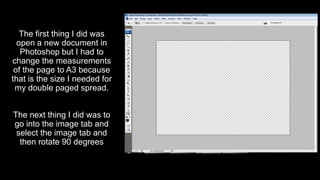
The first thing I did was
open a new document in
Photoshop but I had to
change the measurements
of the page to A3 because
that is the size I needed for
my double paged spread.
The next thing I did was to
go into the image tab and
select the image tab and
then rotate 90 degrees
,mjhkuyjtygf
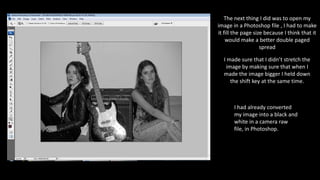
The next thing I did was to open my
image in a Photoshop file , I had to make
it fill the page size because I think that it
would make a better double paged
spread
I made sure that I didn’t stretch the
image by making sure that when I
made the image bigger I held down
the shift key at the same time.
I had already converted
my image into a black and
white in a camera raw
file, in Photoshop.
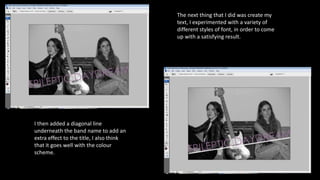
The next thing that I did was create my
text, I experimented with a variety of
different styles of font, in order to come
up with a satisfying result.
I then added a diagonal line
underneath the band name to add an
extra effect to the title, I also think
that it goes well with the colour
scheme.
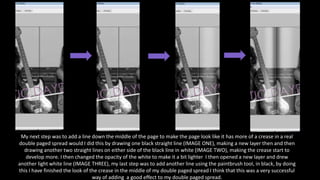
My next step was to add a line down the middle of the page to make the page look like it has more of a crease in a real
double paged spread would I did this by drawing one black straight line (IMAGE ONE), making a new layer then and then
drawing another two straight lines on either side of the black line in white (IMAGE TWO), making the crease start to
develop more. I then changed the opacity of the white to make it a bit lighter I then opened a new layer and drew
another light white line (IMAGE THREE), my last step was to add another line using the paintbrush tool, in black, by doing
this I have finished the look of the crease in the middle of my double paged spread I think that this was a very successful
way of adding a good effect to my double paged spread.
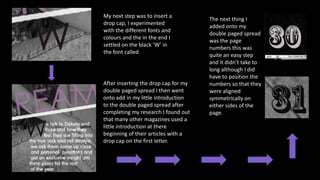
My next step was to insert a
drop cap, I experimented
with the different fonts and
colours and the in the end I
settled on the black ‘W’ in
the font called
The next thing I
added onto my
double paged spread
was the page
numbers this was
quite an easy step
and it didn’t take to
long although I did
have to position the
numbers so that they
were aligned
symmetrically on
either sides of the
page.
After inserting the drop cap for my
double paged spread I then went
onto add in my little introduction
to the double paged spread after
completing my research I found out
that many other magazines used a
little introduction at there
beginning of their articles with a
drop cap on the first letter.
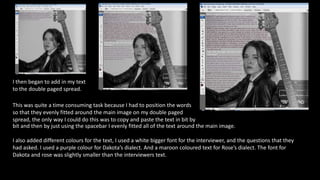
I then began to add in my text
to the double paged spread.
This was quite a time consuming task because I had to position the words
so that they evenly fitted around the main image on my double paged
spread, the only way I could do this was to copy and paste the text in bit by
bit and then by just using the spacebar I evenly fitted all of the text around the main image.
I also added different colours for the text, I used a white bigger font for the interviewer, and the questions that they
had asked. I used a purple colour for Dakota’s dialect. And a maroon coloured text for Rose’s dialect. The font for
Dakota and rose was slightly smaller than the interviewers text.
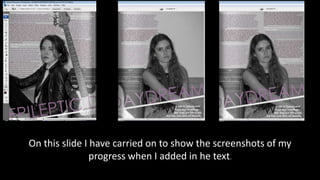
On this slide I have carried on to show the screenshots of my
progress when I added in he text.
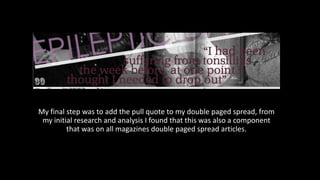
My final step was to add the pull quote to my double paged spread, from
my initial research and analysis I found that this was also a component
that was on all magazines double paged spread articles.
This is
my final
double
paged
spread

Double paged spread progress

  • 1.
  • 2.
    The first thingI did was open a new document in Photoshop but I had to change the measurements of the page to A3 because that is the size I needed for my double paged spread. The next thing I did was to go into the image tab and select the image tab and then rotate 90 degrees ,mjhkuyjtygf
  • 3.
    The next thingI did was to open my image in a Photoshop file , I had to make it fill the page size because I think that it would make a better double paged spread I made sure that I didn’t stretch the image by making sure that when I made the image bigger I held down the shift key at the same time. I had already converted my image into a black and white in a camera raw file, in Photoshop.
  • 4.
    The next thingthat I did was create my text, I experimented with a variety of different styles of font, in order to come up with a satisfying result. I then added a diagonal line underneath the band name to add an extra effect to the title, I also think that it goes well with the colour scheme.
  • 5.
    My next stepwas to add a line down the middle of the page to make the page look like it has more of a crease in a real double paged spread would I did this by drawing one black straight line (IMAGE ONE), making a new layer then and then drawing another two straight lines on either side of the black line in white (IMAGE TWO), making the crease start to develop more. I then changed the opacity of the white to make it a bit lighter I then opened a new layer and drew another light white line (IMAGE THREE), my last step was to add another line using the paintbrush tool, in black, by doing this I have finished the look of the crease in the middle of my double paged spread I think that this was a very successful way of adding a good effect to my double paged spread.
  • 6.
    My next stepwas to insert a drop cap, I experimented with the different fonts and colours and the in the end I settled on the black ‘W’ in the font called The next thing I added onto my double paged spread was the page numbers this was quite an easy step and it didn’t take to long although I did have to position the numbers so that they were aligned symmetrically on either sides of the page. After inserting the drop cap for my double paged spread I then went onto add in my little introduction to the double paged spread after completing my research I found out that many other magazines used a little introduction at there beginning of their articles with a drop cap on the first letter.
  • 7.
    I then beganto add in my text to the double paged spread. This was quite a time consuming task because I had to position the words so that they evenly fitted around the main image on my double paged spread, the only way I could do this was to copy and paste the text in bit by bit and then by just using the spacebar I evenly fitted all of the text around the main image. I also added different colours for the text, I used a white bigger font for the interviewer, and the questions that they had asked. I used a purple colour for Dakota’s dialect. And a maroon coloured text for Rose’s dialect. The font for Dakota and rose was slightly smaller than the interviewers text.
  • 8.
    On this slideI have carried on to show the screenshots of my progress when I added in he text.
  • 9.
    My final stepwas to add the pull quote to my double paged spread, from my initial research and analysis I found that this was also a component that was on all magazines double paged spread articles.
  • 10.