
Developing service component architecture
      applications using Rational Application Developer
      Skill Level: Intermediate


      Lokanadham Nalla (loknalla@in.ibm.com)
      Author1 job title
      IBM


      27 Dec 2010


      This article describes how to develop and access SCA applications using Rational
      Application Developer Version 8 with a sample application. It begins with some basic
      definitions and frequently used terms used, next we describe the pre-requisites and
      references links before start developing SCA applications. Next explains with the
      wizards of the Rational Application Developer to create a sample SCA application,
      create different supported bindings for SCA Services and SCA References like
      default SCA binding, web services binding, and EJB bindings. The article concludes
      by describing how Servlet client application accesses the SCA sample application.


      Overview
      Service Component Architecture (SCA) is a programming model for SOA based
      application development. The specifications for implementing the SCA programming
      model are provided by osoa.org, an open SOA collaboration from industry leaders
      including IBM. The SCA Feature Pack for WebSphere Application Server
      implemented many of the specifications provided by the osoa.org to provide SCA
      programming model for Java/JEE developers.

      Rational Application Developer (RAD) Version 8 provides the tooling facility to
      develop SCA applications. This article describes how to develop SCA applications
      using RAD with a sample application demonstrating supported SCA bindings. We
      begin with the basic definitions of SCA, required software, developing a simple SCA
      application and finally using it from different types of SCA client applications.

      Basic SCA definitions


Developing service component architecture applications using Rational Application Developer    Trademarks
© Copyright IBM Corporation 2010. All rights reserved.                                        Page 1 of 30
developerWorks®                                                                               ibm.com/developerWorks


      This section describes SCA terminology extracted from the RAD 8 Information
      Center.

      Domain:
      A well-bounded runtime entity that contains a set of service components wired
      together to provide a realm of business function that is meaningful to a business.

      Contribution:
      A package of file artifacts, including a contribution metadata document and usually
      one or more composites, collected together for deployment to an SCA domain.

      Component:
      A configuration of an implementation that provides or consumes services

      Composite:
      A unit of assembly of components. Composites may be deployed to a domain and
      become known as deployable composites, or used to implement other components
      and become known as implementation composites or inner composites.

      Service:
      A declaration of a service or set of business operations offered by a component. A
      service is characterized by an interface and by one or more protocol bindings.

      Reference:
      A declaration of a service or set of business operations consumed or required by a
      component. A reference is characterized by an interface and by one or more
      protocol bindings.

      Interface:
      A logically cohesive set of operation signatures describing a service provided or a
      service reference consumed. Though other languages are allowed through the
      extensibility of SCA predominantly, interfaces are written in either Java or WSDL.

      Binding:
      A description of an access mechanism to a service or from a reference. A service
      binding describes how a service is published at runtime and how external entities
      can communicate with it. A reference binding describes how a reference connects to
      and communicates with external services.

      Wire:
      A dependency from a component reference to a component service

      Implementation:
      A unit of language-specific software technology, such as a Java class or an SCA
      composite, that provides the business logic beneath a component.

      Property:


Developing service component architecture applications using Rational Application Developer               Trademarks
© Copyright IBM Corporation 2010. All rights reserved.                                                   Page 2 of 30
ibm.com/developerWorks                                                                        developerWorks®


      A data value computed and injected by a component into an implementation

      Intent:
      A declaration of an abstract policy or quality of service required of a component,
      service or reference. Intents relieve the developer of the burden of having to
      understand frequently complex concrete policies.

      Policy:
      A concrete assertion of some capability, constraint or other non-functional
      requirement to be honored by a component, service or reference.

      Policy Set:
      A collection of mutually compatible concrete policies that can be applied to a specific
      binding type or implementation type. Although policy sets can be attached to
      components, services and references at development time, SCA recommends a late
      binding approach in which policy sets and bindings are selected at deployment time.


      Installation
      This section provides information on the installation of Rational Application
      Developer 8.0 for WebSphere Application Server software.

                • The Information Center for IBM Rational Application Developer 8.0 and
                  WebSphere Application Server provides additional details on the
                  installation steps.
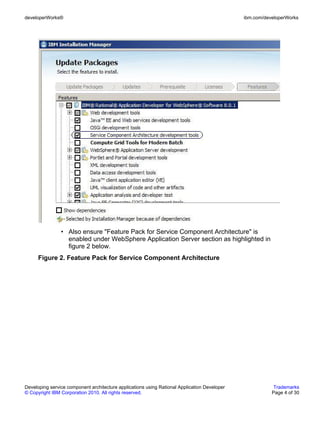
                • Ensure the "Service Component Architecture development tools" feature
                  is enabled from the list of features during RAD installation using IBM
                  Installation Manager Software as highlighted in Figure 1.
      Figure 1. Service Component Architecture development tools


Developing service component architecture applications using Rational Application Developer        Trademarks
© Copyright IBM Corporation 2010. All rights reserved.                                            Page 3 of 30
developerWorks®                                                                               ibm.com/developerWorks


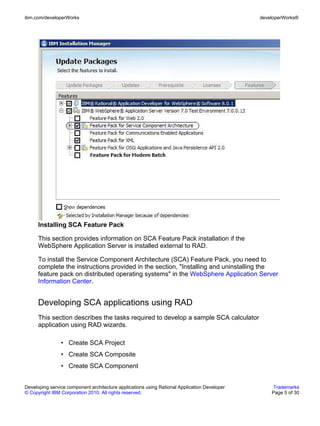
                • Also ensure "Feature Pack for Service Component Architecture" is
                  enabled under WebSphere Application Server section as highlighted in
                  figure 2 below.
      Figure 2. Feature Pack for Service Component Architecture


Developing service component architecture applications using Rational Application Developer               Trademarks
© Copyright IBM Corporation 2010. All rights reserved.                                                   Page 4 of 30
ibm.com/developerWorks                                                                        developerWorks®


      Installing SCA Feature Pack

      This section provides information on SCA Feature Pack installation if the
      WebSphere Application Server is installed external to RAD.

      To install the Service Component Architecture (SCA) Feature Pack, you need to
      complete the instructions provided in the section, "Installing and uninstalling the
      feature pack on distributed operating systems" in the WebSphere Application Server
      Information Center.


      Developing SCA applications using RAD
      This section describes the tasks required to develop a sample SCA calculator
      application using RAD wizards.

                • Create SCA Project
                • Create SCA Composite
                • Create SCA Component


Developing service component architecture applications using Rational Application Developer        Trademarks
© Copyright IBM Corporation 2010. All rights reserved.                                            Page 5 of 30
developerWorks®                                                                               ibm.com/developerWorks


                • Adding service or reference to a Component
                • Apply binding to a service or reference
                • Component implementation
                • Create Contribution
      Creating a SCA project

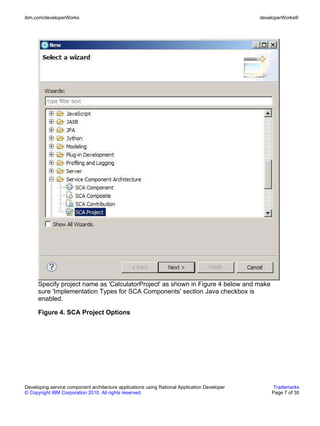
      This section describes how to create a new SCA project using RAD wizards. From
      RAD workspace, open menu options File > New > Other. Select SCA Project as
      shown in Figure 3.

      Figure 3. Create SCA Project


Developing service component architecture applications using Rational Application Developer               Trademarks
© Copyright IBM Corporation 2010. All rights reserved.                                                   Page 6 of 30
ibm.com/developerWorks                                                                        developerWorks®


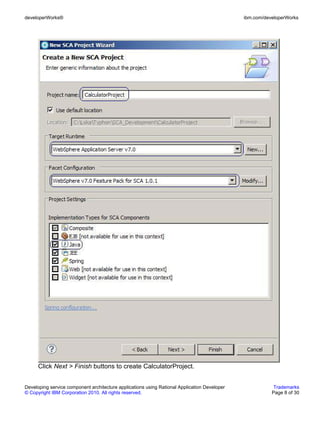
      Specify project name as 'CalculatorProject' as shown in Figure 4 below and make
      sure 'Implementation Types for SCA Components' section Java checkbox is
      enabled.

      Figure 4. SCA Project Options


Developing service component architecture applications using Rational Application Developer        Trademarks
© Copyright IBM Corporation 2010. All rights reserved.                                            Page 7 of 30
developerWorks®                                                                               ibm.com/developerWorks


      Click Next > Finish buttons to create CalculatorProject.


Developing service component architecture applications using Rational Application Developer               Trademarks
© Copyright IBM Corporation 2010. All rights reserved.                                                   Page 8 of 30
ibm.com/developerWorks                                                                        developerWorks®


      Create SCA Composite

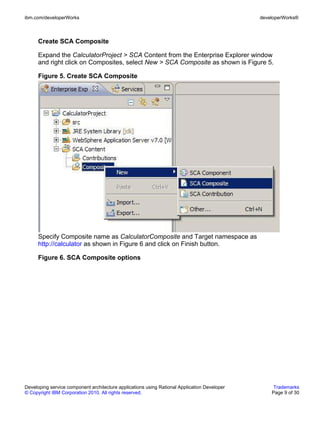
      Expand the CalculatorProject > SCA Content from the Enterprise Explorer window
      and right click on Composites, select New > SCA Composite as shown is Figure 5.

      Figure 5. Create SCA Composite


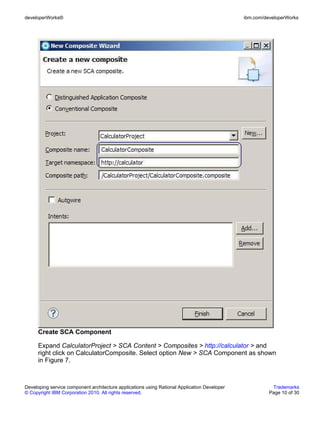
      Specify Composite name as CalculatorComposite and Target namespace as
      http://calculator as shown in Figure 6 and click on Finish button.

      Figure 6. SCA Composite options


Developing service component architecture applications using Rational Application Developer        Trademarks
© Copyright IBM Corporation 2010. All rights reserved.                                            Page 9 of 30
developerWorks®                                                                               ibm.com/developerWorks


      Create SCA Component

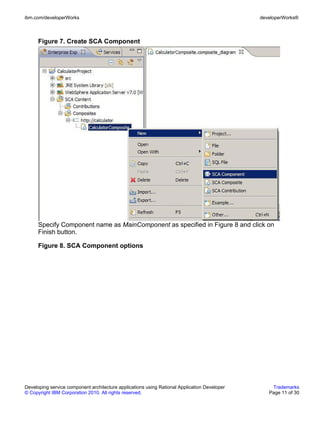
      Expand CalculatorProject > SCA Content > Composites > http://calculator > and
      right click on CalculatorComposite. Select option New > SCA Component as shown
      in Figure 7.


Developing service component architecture applications using Rational Application Developer              Trademarks
© Copyright IBM Corporation 2010. All rights reserved.                                                  Page 10 of 30
ibm.com/developerWorks                                                                        developerWorks®


      Figure 7. Create SCA Component


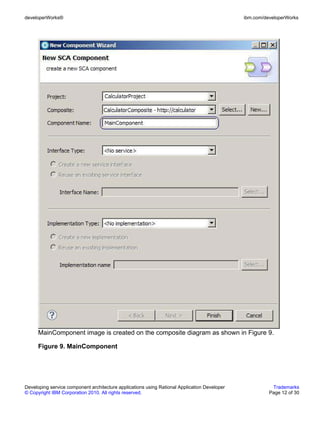
      Specify Component name as MainComponent as specified in Figure 8 and click on
      Finish button.

      Figure 8. SCA Component options


Developing service component architecture applications using Rational Application Developer       Trademarks
© Copyright IBM Corporation 2010. All rights reserved.                                           Page 11 of 30
developerWorks®                                                                               ibm.com/developerWorks


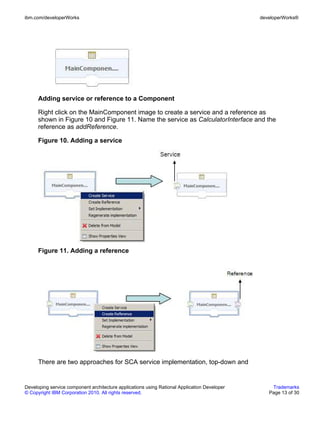
      MainComponent image is created on the composite diagram as shown in Figure 9.

      Figure 9. MainComponent


Developing service component architecture applications using Rational Application Developer              Trademarks
© Copyright IBM Corporation 2010. All rights reserved.                                                  Page 12 of 30
ibm.com/developerWorks                                                                        developerWorks®


      Adding service or reference to a Component

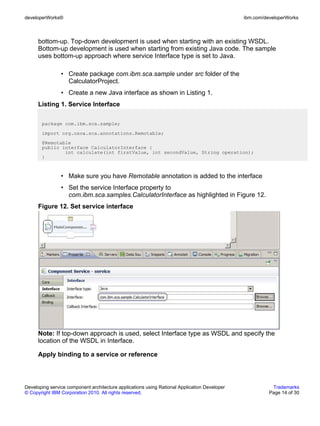
      Right click on the MainComponent image to create a service and a reference as
      shown in Figure 10 and Figure 11. Name the service as CalculatorInterface and the
      reference as addReference.

      Figure 10. Adding a service


      Figure 11. Adding a reference


      There are two approaches for SCA service implementation, top-down and


Developing service component architecture applications using Rational Application Developer       Trademarks
© Copyright IBM Corporation 2010. All rights reserved.                                           Page 13 of 30
developerWorks®                                                                               ibm.com/developerWorks


      bottom-up. Top-down development is used when starting with an existing WSDL.
      Bottom-up development is used when starting from existing Java code. The sample
      uses bottom-up approach where service Interface type is set to Java.

                • Create package com.ibm.sca.sample under src folder of the
                  CalculatorProject.
                • Create a new Java interface as shown in Listing 1.
      Listing 1. Service Interface

       package com.ibm.sca.sample;
       import org.osoa.sca.annotations.Remotable;
       @Remotable
       public interface CalculatorInterface {
               int calculate(int firstValue, int secondValue, String operation);
       }


                • Make sure you have Remotable annotation is added to the interface
                • Set the service Interface property to
                  com.ibm.sca.samples.CalculatorInterface as highlighted in Figure 12.
      Figure 12. Set service interface


      Note: If top-down approach is used, select Interface type as WSDL and specify the
      location of the WSDL in Interface.

      Apply binding to a service or reference


Developing service component architecture applications using Rational Application Developer              Trademarks
© Copyright IBM Corporation 2010. All rights reserved.                                                  Page 14 of 30
ibm.com/developerWorks                                                                        developerWorks®


      The SCA Feature Pack supports following bindings:

                • Web service
                • Atom
                • HTTP
                • EJB
                • JMS
                • SCA
      Users can choose to apply these binding depending on the type of client they are
      using. If the client application is a web service client, then web service binding can
      be applied. If the client application is EJB client, EJB bindings can be applied.

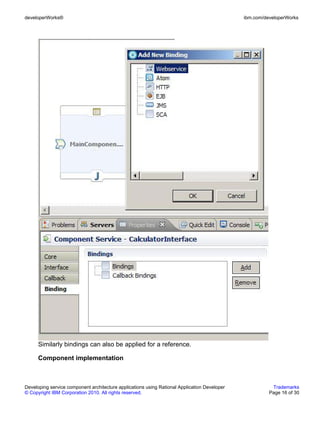
      In the Calculator sample application, the web service binding is used so that the
      client Servlet application can use the generated WSDL file for communication with
      Calculator SCA application. Follow the below steps for applying web service binding
      to the CalculatorInterface service.

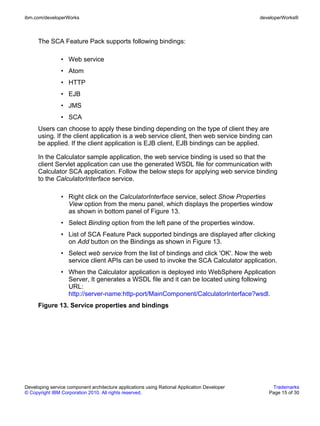
                • Right click on the CalculatorInterface service, select Show Properties
                  View option from the menu panel, which displays the properties window
                  as shown in bottom panel of Figure 13.
                • Select Binding option from the left pane of the properties window.
                • List of SCA Feature Pack supported bindings are displayed after clicking
                  on Add button on the Bindings as shown in Figure 13.
                • Select web service from the list of bindings and click 'OK'. Now the web
                  service client APIs can be used to invoke the SCA Calculator application.
                • When the Calculator application is deployed into WebSphere Application
                  Server, It generates a WSDL file and it can be located using following
                  URL:
                  http://server-name:http-port/MainComponent/CalculatorInterface?wsdl.
      Figure 13. Service properties and bindings


Developing service component architecture applications using Rational Application Developer       Trademarks
© Copyright IBM Corporation 2010. All rights reserved.                                           Page 15 of 30
developerWorks®                                                                               ibm.com/developerWorks


      Similarly bindings can also be applied for a reference.

      Component implementation


Developing service component architecture applications using Rational Application Developer              Trademarks
© Copyright IBM Corporation 2010. All rights reserved.                                                  Page 16 of 30
ibm.com/developerWorks                                                                        developerWorks®


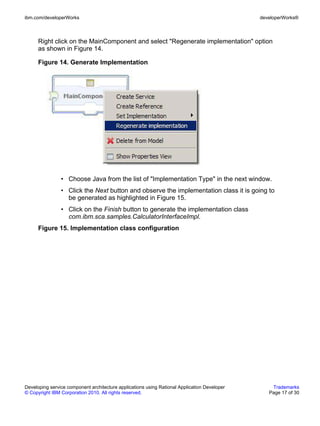
      Right click on the MainComponent and select "Regenerate implementation" option
      as shown in Figure 14.

      Figure 14. Generate Implementation


                • Choose Java from the list of "Implementation Type" in the next window.
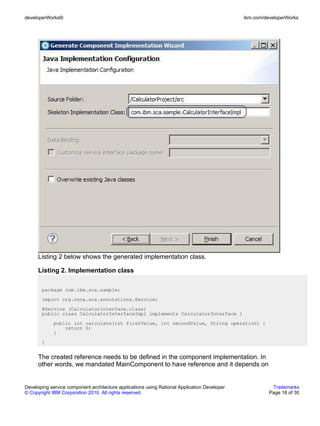
                • Click the Next button and observe the implementation class it is going to
                  be generated as highlighted in Figure 15.
                • Click on the Finish button to generate the implementation class
                  com.ibm.sca.samples.CalculatorInterfaceImpl.
      Figure 15. Implementation class configuration


Developing service component architecture applications using Rational Application Developer       Trademarks
© Copyright IBM Corporation 2010. All rights reserved.                                           Page 17 of 30
developerWorks®                                                                               ibm.com/developerWorks


      Listing 2 below shows the generated implementation class.

      Listing 2. Implementation class

       package com.ibm.sca.sample;
       import org.osoa.sca.annotations.Service;
       @Service (CalculatorInterface.class)
       public class CalculatorInterfaceImpl implements CalculatorInterface {
             public int calculate(int firstValue, int secondValue, String operation) {
                 return 0;
             }
       }


      The created reference needs to be defined in the component implementation. In
      other words, we mandated MainComponent to have reference and it depends on


Developing service component architecture applications using Rational Application Developer              Trademarks
© Copyright IBM Corporation 2010. All rights reserved.                                                  Page 18 of 30
ibm.com/developerWorks                                                                        developerWorks®


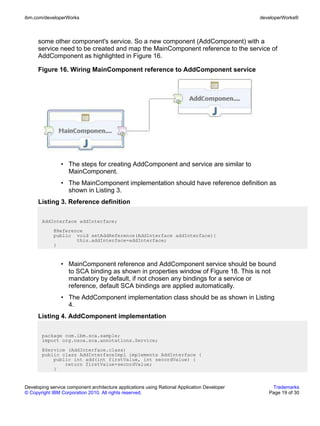
      some other component's service. So a new component (AddComponent) with a
      service need to be created and map the MainComponent reference to the service of
      AddComponent as highlighted in Figure 16.

      Figure 16. Wiring MainComponent reference to AddComponent service


                • The steps for creating AddComponent and service are similar to
                  MainComponent.
                • The MainComponent implementation should have reference definition as
                  shown in Listing 3.
      Listing 3. Reference definition

       AddInterface addInterface;
             @Reference
             public void setAddReference(AddInterface addInterface){
                     this.addInterface=addInterface;
             }


                • MainComponent reference and AddComponent service should be bound
                  to SCA binding as shown in properties window of Figure 18. This is not
                  mandatory by default, if not chosen any bindings for a service or
                  reference, default SCA bindings are applied automatically.
                • The AddComponent implementation class should be as shown in Listing
                  4.
      Listing 4. AddComponent implementation

       package com.ibm.sca.sample;
       import org.osoa.sca.annotations.Service;
       @Service (AddInterface.class)
       public class AddInterfaceImpl implements AddInterface {
           public int add(int firstValue, int secordValue) {
               return firstValue+secordValue;
           }


Developing service component architecture applications using Rational Application Developer       Trademarks
© Copyright IBM Corporation 2010. All rights reserved.                                           Page 19 of 30
developerWorks®                                                                               ibm.com/developerWorks


       }


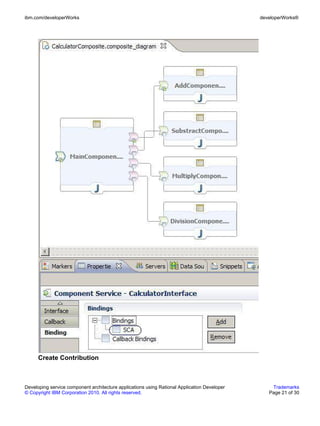
      Similarly SubstractComponent, MultiplyComponent and DivisionComponent and its
      services can be created and wired to the MainComponent's different references.
      Upon creating all the above components, the Calculator SCA composite diagram
      should look as shown in Figure 17.

      Figure 17. Calculator SCA composite diagram


Developing service component architecture applications using Rational Application Developer              Trademarks
© Copyright IBM Corporation 2010. All rights reserved.                                                  Page 20 of 30
ibm.com/developerWorks                                                                        developerWorks®


      Create Contribution


Developing service component architecture applications using Rational Application Developer       Trademarks
© Copyright IBM Corporation 2010. All rights reserved.                                           Page 21 of 30
developerWorks®                                                                               ibm.com/developerWorks


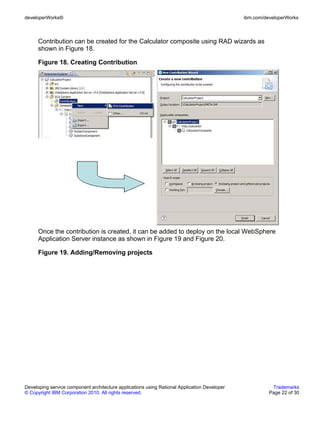
      Contribution can be created for the Calculator composite using RAD wizards as
      shown in Figure 18.

      Figure 18. Creating Contribution


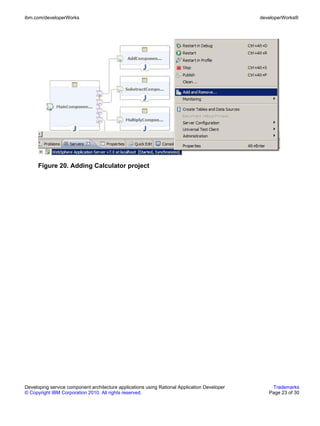
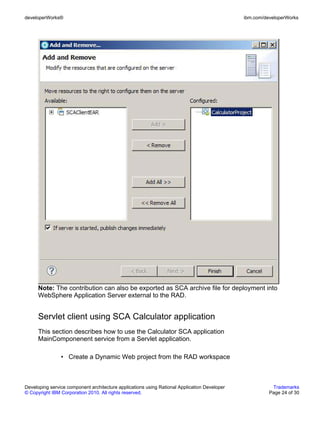
      Once the contribution is created, it can be added to deploy on the local WebSphere
      Application Server instance as shown in Figure 19 and Figure 20.

      Figure 19. Adding/Removing projects


Developing service component architecture applications using Rational Application Developer              Trademarks
© Copyright IBM Corporation 2010. All rights reserved.                                                  Page 22 of 30
ibm.com/developerWorks                                                                        developerWorks®


      Figure 20. Adding Calculator project


Developing service component architecture applications using Rational Application Developer       Trademarks
© Copyright IBM Corporation 2010. All rights reserved.                                           Page 23 of 30
developerWorks®                                                                               ibm.com/developerWorks


      Note: The contribution can also be exported as SCA archive file for deployment into
      WebSphere Application Server external to the RAD.


      Servlet client using SCA Calculator application
      This section describes how to use the Calculator SCA application
      MainComponenent service from a Servlet application.

                • Create a Dynamic Web project from the RAD workspace


Developing service component architecture applications using Rational Application Developer              Trademarks
© Copyright IBM Corporation 2010. All rights reserved.                                                  Page 24 of 30
ibm.com/developerWorks                                                                        developerWorks®


                  • Make sure the WSDL can be located at:
                    http://server-name:http-port/MainComponent/CalculatorInterface?wsdl
      Create the WSDL stub classes using following steps:


             1.     Open File > New > Other and select Web service client project.

             2.     Specify
                    http://server-name:http-port/MainComponent/CalculatorInterface?wsdl in
                    the service definition

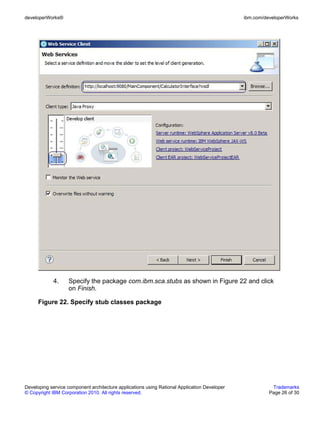
             3.     Specify the Develop client as highlighted in Figure 21 and click Next
                    button.

      Figure 21. Web service client


Developing service component architecture applications using Rational Application Developer       Trademarks
© Copyright IBM Corporation 2010. All rights reserved.                                           Page 25 of 30
developerWorks®                                                                               ibm.com/developerWorks


             4.    Specify the package com.ibm.sca.stubs as shown in Figure 22 and click
                   on Finish.

      Figure 22. Specify stub classes package


Developing service component architecture applications using Rational Application Developer              Trademarks
© Copyright IBM Corporation 2010. All rights reserved.                                                  Page 26 of 30
ibm.com/developerWorks                                                                        developerWorks®


      The Servlet can use the code as highlighted in Listing 5 below.

      Listing 5. Web service stub APIs

       import com.ibm.sca.stubs.CalculatorInterface;
       import com.ibm.sca.stubs.CalculatorInterfaceService;
       ...
       CalculatorInterfaceService service = new CalculatorInterfaceService();
       CalculatorInterface ci = (CalculatorInterface) service.getCalculatorInterfacePort();
       int result = ci.calculate(firstValue, secondValue, operation);


Developing service component architecture applications using Rational Application Developer       Trademarks
© Copyright IBM Corporation 2010. All rights reserved.                                           Page 27 of 30
developerWorks®                                                                               ibm.com/developerWorks


      Working with supplied sample
      This section describes the steps required to deploy the Calculator SCA sample and
      deploying the SCA Servlet client application and working with it.

                • Download and extract the download.zip file located in the download
                  section.
                • Run the following command to deploy the SCA application as BLA and
                  also deploying the Servlet client.
                     • Unix platforms
                       wsadmin.sh –f deploy.py
                     • Windows platform
                       wsadmin.bat –f deploy.py
                • To undeploy the samples run the following command
                     • Unix platforms
                       wsadmin.sh –f undeploy.py
                     • Windows platform
                       wsadmin.bat –f undeploy.py
                • To run the sample application open the following URL:
                  http://server-name:http-port/SCAClient


Developing service component architecture applications using Rational Application Developer              Trademarks
© Copyright IBM Corporation 2010. All rights reserved.                                                  Page 28 of 30
ibm.com/developerWorks                                                                            developerWorks®


      Downloads
      Description                                 Name                                   Size   Download
                                                                                                method
      Sample downloads scripts for this           DoNotLeaveThisLink.zip                 10KB   HTTP
      article

       Information about download methods


Developing service component architecture applications using Rational Application Developer             Trademarks
© Copyright IBM Corporation 2010. All rights reserved.                                                 Page 29 of 30
developerWorks®                                                                               ibm.com/developerWorks


      Resources
         • Rational Application Developer Information Center
         • Education Assistant for WebSphere Application Server V7.0 Feature Pack for
           Service Component Architecture .
         • "Exploring the WebSphere Application Server Feature Pack for SCA, Part 1: An
           overview of the Service Component Architecture feature pack", (Dec 2008) is an
           introduction to open Service Component Architecture (SCA) concepts,
           objectives of the technology, and highlights of some key integration points.


      About the author
      Lokanadham Nalla
                Lokanadham Nalla is a TXSeries Developer located in India Software
                Labs, Bangalore, India with expertise in Java, J2EE and SOA
                technologies.


Developing service component architecture applications using Rational Application Developer              Trademarks
© Copyright IBM Corporation 2010. All rights reserved.                                                  Page 30 of 30

Developing service component architecture applications using rational application developer

  • 1.
    Developing service componentarchitecture applications using Rational Application Developer Skill Level: Intermediate Lokanadham Nalla (loknalla@in.ibm.com) Author1 job title IBM 27 Dec 2010 This article describes how to develop and access SCA applications using Rational Application Developer Version 8 with a sample application. It begins with some basic definitions and frequently used terms used, next we describe the pre-requisites and references links before start developing SCA applications. Next explains with the wizards of the Rational Application Developer to create a sample SCA application, create different supported bindings for SCA Services and SCA References like default SCA binding, web services binding, and EJB bindings. The article concludes by describing how Servlet client application accesses the SCA sample application. Overview Service Component Architecture (SCA) is a programming model for SOA based application development. The specifications for implementing the SCA programming model are provided by osoa.org, an open SOA collaboration from industry leaders including IBM. The SCA Feature Pack for WebSphere Application Server implemented many of the specifications provided by the osoa.org to provide SCA programming model for Java/JEE developers. Rational Application Developer (RAD) Version 8 provides the tooling facility to develop SCA applications. This article describes how to develop SCA applications using RAD with a sample application demonstrating supported SCA bindings. We begin with the basic definitions of SCA, required software, developing a simple SCA application and finally using it from different types of SCA client applications. Basic SCA definitions Developing service component architecture applications using Rational Application Developer Trademarks © Copyright IBM Corporation 2010. All rights reserved. Page 1 of 30
  • 2.
    developerWorks® ibm.com/developerWorks This section describes SCA terminology extracted from the RAD 8 Information Center. Domain: A well-bounded runtime entity that contains a set of service components wired together to provide a realm of business function that is meaningful to a business. Contribution: A package of file artifacts, including a contribution metadata document and usually one or more composites, collected together for deployment to an SCA domain. Component: A configuration of an implementation that provides or consumes services Composite: A unit of assembly of components. Composites may be deployed to a domain and become known as deployable composites, or used to implement other components and become known as implementation composites or inner composites. Service: A declaration of a service or set of business operations offered by a component. A service is characterized by an interface and by one or more protocol bindings. Reference: A declaration of a service or set of business operations consumed or required by a component. A reference is characterized by an interface and by one or more protocol bindings. Interface: A logically cohesive set of operation signatures describing a service provided or a service reference consumed. Though other languages are allowed through the extensibility of SCA predominantly, interfaces are written in either Java or WSDL. Binding: A description of an access mechanism to a service or from a reference. A service binding describes how a service is published at runtime and how external entities can communicate with it. A reference binding describes how a reference connects to and communicates with external services. Wire: A dependency from a component reference to a component service Implementation: A unit of language-specific software technology, such as a Java class or an SCA composite, that provides the business logic beneath a component. Property: Developing service component architecture applications using Rational Application Developer Trademarks © Copyright IBM Corporation 2010. All rights reserved. Page 2 of 30
  • 3.
    ibm.com/developerWorks developerWorks® A data value computed and injected by a component into an implementation Intent: A declaration of an abstract policy or quality of service required of a component, service or reference. Intents relieve the developer of the burden of having to understand frequently complex concrete policies. Policy: A concrete assertion of some capability, constraint or other non-functional requirement to be honored by a component, service or reference. Policy Set: A collection of mutually compatible concrete policies that can be applied to a specific binding type or implementation type. Although policy sets can be attached to components, services and references at development time, SCA recommends a late binding approach in which policy sets and bindings are selected at deployment time. Installation This section provides information on the installation of Rational Application Developer 8.0 for WebSphere Application Server software. • The Information Center for IBM Rational Application Developer 8.0 and WebSphere Application Server provides additional details on the installation steps. • Ensure the "Service Component Architecture development tools" feature is enabled from the list of features during RAD installation using IBM Installation Manager Software as highlighted in Figure 1. Figure 1. Service Component Architecture development tools Developing service component architecture applications using Rational Application Developer Trademarks © Copyright IBM Corporation 2010. All rights reserved. Page 3 of 30
  • 4.
    developerWorks® ibm.com/developerWorks • Also ensure "Feature Pack for Service Component Architecture" is enabled under WebSphere Application Server section as highlighted in figure 2 below. Figure 2. Feature Pack for Service Component Architecture Developing service component architecture applications using Rational Application Developer Trademarks © Copyright IBM Corporation 2010. All rights reserved. Page 4 of 30
  • 5.
    ibm.com/developerWorks developerWorks® Installing SCA Feature Pack This section provides information on SCA Feature Pack installation if the WebSphere Application Server is installed external to RAD. To install the Service Component Architecture (SCA) Feature Pack, you need to complete the instructions provided in the section, "Installing and uninstalling the feature pack on distributed operating systems" in the WebSphere Application Server Information Center. Developing SCA applications using RAD This section describes the tasks required to develop a sample SCA calculator application using RAD wizards. • Create SCA Project • Create SCA Composite • Create SCA Component Developing service component architecture applications using Rational Application Developer Trademarks © Copyright IBM Corporation 2010. All rights reserved. Page 5 of 30
  • 6.
    developerWorks® ibm.com/developerWorks • Adding service or reference to a Component • Apply binding to a service or reference • Component implementation • Create Contribution Creating a SCA project This section describes how to create a new SCA project using RAD wizards. From RAD workspace, open menu options File > New > Other. Select SCA Project as shown in Figure 3. Figure 3. Create SCA Project Developing service component architecture applications using Rational Application Developer Trademarks © Copyright IBM Corporation 2010. All rights reserved. Page 6 of 30
  • 7.
    ibm.com/developerWorks developerWorks® Specify project name as 'CalculatorProject' as shown in Figure 4 below and make sure 'Implementation Types for SCA Components' section Java checkbox is enabled. Figure 4. SCA Project Options Developing service component architecture applications using Rational Application Developer Trademarks © Copyright IBM Corporation 2010. All rights reserved. Page 7 of 30
  • 8.
    developerWorks® ibm.com/developerWorks Click Next > Finish buttons to create CalculatorProject. Developing service component architecture applications using Rational Application Developer Trademarks © Copyright IBM Corporation 2010. All rights reserved. Page 8 of 30
  • 9.
    ibm.com/developerWorks developerWorks® Create SCA Composite Expand the CalculatorProject > SCA Content from the Enterprise Explorer window and right click on Composites, select New > SCA Composite as shown is Figure 5. Figure 5. Create SCA Composite Specify Composite name as CalculatorComposite and Target namespace as http://calculator as shown in Figure 6 and click on Finish button. Figure 6. SCA Composite options Developing service component architecture applications using Rational Application Developer Trademarks © Copyright IBM Corporation 2010. All rights reserved. Page 9 of 30
  • 10.
    developerWorks® ibm.com/developerWorks Create SCA Component Expand CalculatorProject > SCA Content > Composites > http://calculator > and right click on CalculatorComposite. Select option New > SCA Component as shown in Figure 7. Developing service component architecture applications using Rational Application Developer Trademarks © Copyright IBM Corporation 2010. All rights reserved. Page 10 of 30
  • 11.
    ibm.com/developerWorks developerWorks® Figure 7. Create SCA Component Specify Component name as MainComponent as specified in Figure 8 and click on Finish button. Figure 8. SCA Component options Developing service component architecture applications using Rational Application Developer Trademarks © Copyright IBM Corporation 2010. All rights reserved. Page 11 of 30
  • 12.
    developerWorks® ibm.com/developerWorks MainComponent image is created on the composite diagram as shown in Figure 9. Figure 9. MainComponent Developing service component architecture applications using Rational Application Developer Trademarks © Copyright IBM Corporation 2010. All rights reserved. Page 12 of 30
  • 13.
    ibm.com/developerWorks developerWorks® Adding service or reference to a Component Right click on the MainComponent image to create a service and a reference as shown in Figure 10 and Figure 11. Name the service as CalculatorInterface and the reference as addReference. Figure 10. Adding a service Figure 11. Adding a reference There are two approaches for SCA service implementation, top-down and Developing service component architecture applications using Rational Application Developer Trademarks © Copyright IBM Corporation 2010. All rights reserved. Page 13 of 30
  • 14.
    developerWorks® ibm.com/developerWorks bottom-up. Top-down development is used when starting with an existing WSDL. Bottom-up development is used when starting from existing Java code. The sample uses bottom-up approach where service Interface type is set to Java. • Create package com.ibm.sca.sample under src folder of the CalculatorProject. • Create a new Java interface as shown in Listing 1. Listing 1. Service Interface package com.ibm.sca.sample; import org.osoa.sca.annotations.Remotable; @Remotable public interface CalculatorInterface { int calculate(int firstValue, int secondValue, String operation); } • Make sure you have Remotable annotation is added to the interface • Set the service Interface property to com.ibm.sca.samples.CalculatorInterface as highlighted in Figure 12. Figure 12. Set service interface Note: If top-down approach is used, select Interface type as WSDL and specify the location of the WSDL in Interface. Apply binding to a service or reference Developing service component architecture applications using Rational Application Developer Trademarks © Copyright IBM Corporation 2010. All rights reserved. Page 14 of 30
  • 15.
    ibm.com/developerWorks developerWorks® The SCA Feature Pack supports following bindings: • Web service • Atom • HTTP • EJB • JMS • SCA Users can choose to apply these binding depending on the type of client they are using. If the client application is a web service client, then web service binding can be applied. If the client application is EJB client, EJB bindings can be applied. In the Calculator sample application, the web service binding is used so that the client Servlet application can use the generated WSDL file for communication with Calculator SCA application. Follow the below steps for applying web service binding to the CalculatorInterface service. • Right click on the CalculatorInterface service, select Show Properties View option from the menu panel, which displays the properties window as shown in bottom panel of Figure 13. • Select Binding option from the left pane of the properties window. • List of SCA Feature Pack supported bindings are displayed after clicking on Add button on the Bindings as shown in Figure 13. • Select web service from the list of bindings and click 'OK'. Now the web service client APIs can be used to invoke the SCA Calculator application. • When the Calculator application is deployed into WebSphere Application Server, It generates a WSDL file and it can be located using following URL: http://server-name:http-port/MainComponent/CalculatorInterface?wsdl. Figure 13. Service properties and bindings Developing service component architecture applications using Rational Application Developer Trademarks © Copyright IBM Corporation 2010. All rights reserved. Page 15 of 30
  • 16.
    developerWorks® ibm.com/developerWorks Similarly bindings can also be applied for a reference. Component implementation Developing service component architecture applications using Rational Application Developer Trademarks © Copyright IBM Corporation 2010. All rights reserved. Page 16 of 30
  • 17.
    ibm.com/developerWorks developerWorks® Right click on the MainComponent and select "Regenerate implementation" option as shown in Figure 14. Figure 14. Generate Implementation • Choose Java from the list of "Implementation Type" in the next window. • Click the Next button and observe the implementation class it is going to be generated as highlighted in Figure 15. • Click on the Finish button to generate the implementation class com.ibm.sca.samples.CalculatorInterfaceImpl. Figure 15. Implementation class configuration Developing service component architecture applications using Rational Application Developer Trademarks © Copyright IBM Corporation 2010. All rights reserved. Page 17 of 30
  • 18.
    developerWorks® ibm.com/developerWorks Listing 2 below shows the generated implementation class. Listing 2. Implementation class package com.ibm.sca.sample; import org.osoa.sca.annotations.Service; @Service (CalculatorInterface.class) public class CalculatorInterfaceImpl implements CalculatorInterface { public int calculate(int firstValue, int secondValue, String operation) { return 0; } } The created reference needs to be defined in the component implementation. In other words, we mandated MainComponent to have reference and it depends on Developing service component architecture applications using Rational Application Developer Trademarks © Copyright IBM Corporation 2010. All rights reserved. Page 18 of 30
  • 19.
    ibm.com/developerWorks developerWorks® some other component's service. So a new component (AddComponent) with a service need to be created and map the MainComponent reference to the service of AddComponent as highlighted in Figure 16. Figure 16. Wiring MainComponent reference to AddComponent service • The steps for creating AddComponent and service are similar to MainComponent. • The MainComponent implementation should have reference definition as shown in Listing 3. Listing 3. Reference definition AddInterface addInterface; @Reference public void setAddReference(AddInterface addInterface){ this.addInterface=addInterface; } • MainComponent reference and AddComponent service should be bound to SCA binding as shown in properties window of Figure 18. This is not mandatory by default, if not chosen any bindings for a service or reference, default SCA bindings are applied automatically. • The AddComponent implementation class should be as shown in Listing 4. Listing 4. AddComponent implementation package com.ibm.sca.sample; import org.osoa.sca.annotations.Service; @Service (AddInterface.class) public class AddInterfaceImpl implements AddInterface { public int add(int firstValue, int secordValue) { return firstValue+secordValue; } Developing service component architecture applications using Rational Application Developer Trademarks © Copyright IBM Corporation 2010. All rights reserved. Page 19 of 30
  • 20.
    developerWorks® ibm.com/developerWorks } Similarly SubstractComponent, MultiplyComponent and DivisionComponent and its services can be created and wired to the MainComponent's different references. Upon creating all the above components, the Calculator SCA composite diagram should look as shown in Figure 17. Figure 17. Calculator SCA composite diagram Developing service component architecture applications using Rational Application Developer Trademarks © Copyright IBM Corporation 2010. All rights reserved. Page 20 of 30
  • 21.
    ibm.com/developerWorks developerWorks® Create Contribution Developing service component architecture applications using Rational Application Developer Trademarks © Copyright IBM Corporation 2010. All rights reserved. Page 21 of 30
  • 22.
    developerWorks® ibm.com/developerWorks Contribution can be created for the Calculator composite using RAD wizards as shown in Figure 18. Figure 18. Creating Contribution Once the contribution is created, it can be added to deploy on the local WebSphere Application Server instance as shown in Figure 19 and Figure 20. Figure 19. Adding/Removing projects Developing service component architecture applications using Rational Application Developer Trademarks © Copyright IBM Corporation 2010. All rights reserved. Page 22 of 30
  • 23.
    ibm.com/developerWorks developerWorks® Figure 20. Adding Calculator project Developing service component architecture applications using Rational Application Developer Trademarks © Copyright IBM Corporation 2010. All rights reserved. Page 23 of 30
  • 24.
    developerWorks® ibm.com/developerWorks Note: The contribution can also be exported as SCA archive file for deployment into WebSphere Application Server external to the RAD. Servlet client using SCA Calculator application This section describes how to use the Calculator SCA application MainComponenent service from a Servlet application. • Create a Dynamic Web project from the RAD workspace Developing service component architecture applications using Rational Application Developer Trademarks © Copyright IBM Corporation 2010. All rights reserved. Page 24 of 30
  • 25.
    ibm.com/developerWorks developerWorks® • Make sure the WSDL can be located at: http://server-name:http-port/MainComponent/CalculatorInterface?wsdl Create the WSDL stub classes using following steps: 1. Open File > New > Other and select Web service client project. 2. Specify http://server-name:http-port/MainComponent/CalculatorInterface?wsdl in the service definition 3. Specify the Develop client as highlighted in Figure 21 and click Next button. Figure 21. Web service client Developing service component architecture applications using Rational Application Developer Trademarks © Copyright IBM Corporation 2010. All rights reserved. Page 25 of 30
  • 26.
    developerWorks® ibm.com/developerWorks 4. Specify the package com.ibm.sca.stubs as shown in Figure 22 and click on Finish. Figure 22. Specify stub classes package Developing service component architecture applications using Rational Application Developer Trademarks © Copyright IBM Corporation 2010. All rights reserved. Page 26 of 30
  • 27.
    ibm.com/developerWorks developerWorks® The Servlet can use the code as highlighted in Listing 5 below. Listing 5. Web service stub APIs import com.ibm.sca.stubs.CalculatorInterface; import com.ibm.sca.stubs.CalculatorInterfaceService; ... CalculatorInterfaceService service = new CalculatorInterfaceService(); CalculatorInterface ci = (CalculatorInterface) service.getCalculatorInterfacePort(); int result = ci.calculate(firstValue, secondValue, operation); Developing service component architecture applications using Rational Application Developer Trademarks © Copyright IBM Corporation 2010. All rights reserved. Page 27 of 30
  • 28.
    developerWorks® ibm.com/developerWorks Working with supplied sample This section describes the steps required to deploy the Calculator SCA sample and deploying the SCA Servlet client application and working with it. • Download and extract the download.zip file located in the download section. • Run the following command to deploy the SCA application as BLA and also deploying the Servlet client. • Unix platforms wsadmin.sh –f deploy.py • Windows platform wsadmin.bat –f deploy.py • To undeploy the samples run the following command • Unix platforms wsadmin.sh –f undeploy.py • Windows platform wsadmin.bat –f undeploy.py • To run the sample application open the following URL: http://server-name:http-port/SCAClient Developing service component architecture applications using Rational Application Developer Trademarks © Copyright IBM Corporation 2010. All rights reserved. Page 28 of 30
  • 29.
    ibm.com/developerWorks developerWorks® Downloads Description Name Size Download method Sample downloads scripts for this DoNotLeaveThisLink.zip 10KB HTTP article Information about download methods Developing service component architecture applications using Rational Application Developer Trademarks © Copyright IBM Corporation 2010. All rights reserved. Page 29 of 30
  • 30.
    developerWorks® ibm.com/developerWorks Resources • Rational Application Developer Information Center • Education Assistant for WebSphere Application Server V7.0 Feature Pack for Service Component Architecture . • "Exploring the WebSphere Application Server Feature Pack for SCA, Part 1: An overview of the Service Component Architecture feature pack", (Dec 2008) is an introduction to open Service Component Architecture (SCA) concepts, objectives of the technology, and highlights of some key integration points. About the author Lokanadham Nalla Lokanadham Nalla is a TXSeries Developer located in India Software Labs, Bangalore, India with expertise in Java, J2EE and SOA technologies. Developing service component architecture applications using Rational Application Developer Trademarks © Copyright IBM Corporation 2010. All rights reserved. Page 30 of 30