Don’t Let Inefficient Data Access Undermine Your Virtualization GoalsRob StewardVP, Research & DevelopmentDataDirect Technologies
AgendaWhat do I mean by the term “Virtualization”?What is so great about it?What is not so great about it?How do I plan for Data Access in Virtualized Environments?Wrap-up
What is Server Virtualization?Virtualization allows multiple operating system instances to run concurrently on a single computer; it is a means of separating hardware from a single operating system.This is what most of us think about when we hear the term Virtualization, but it is really more than this
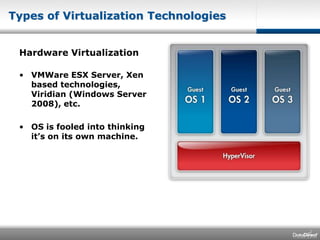
Types of Virtualization TechnologiesHardware VirtualizationVMWare ESX Server, Xen based technologies, Viridian (Windows Server 2008), etc.OS is fooled into thinking it’s on its own machine.
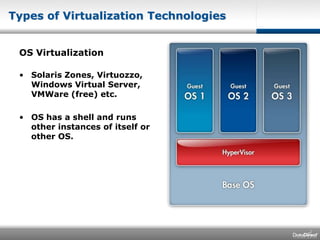
Types of Virtualization TechnologiesOS VirtualizationSolaris Zones, Virtuozzo, Windows Virtual Server, VMWare (free) etc.OS has a shell and runs other instances of itself or other OS.
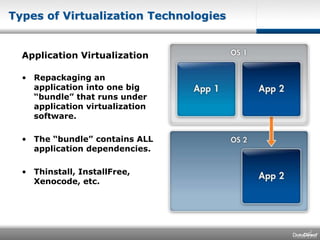
Types of Virtualization TechnologiesApplication VirtualizationRepackaging an application into one big “bundle” that runs under application virtualization software. The “bundle” contains ALL application dependencies.Thinstall, InstallFree, Xenocode, etc.
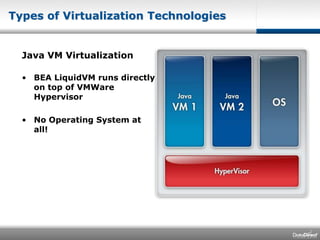
Types of Virtualization TechnologiesJava VM VirtualizationBEA LiquidVM runs directly on top of VMWare HypervisorNo Operating System at all!
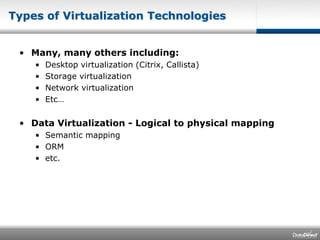
Types of Virtualization TechnologiesMany, many others including:Desktop virtualization (Citrix, Callista)Storage virtualizationNetwork virtualizationEtc…Data Virtualization - Logical to physical mappingSemantic mappingORMetc.
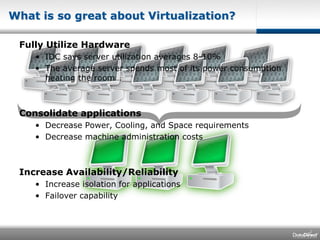
Fully Utilize HardwareIDC says server utilization averages 8-10%The average server spends most of its power consumption heating the room…Consolidate applicationsDecrease Power, Cooling, and Space requirementsDecrease machine administration costsIncrease Availability/ReliabilityIncrease isolation for applicationsFailover capabilityWhat is so great about Virtualization?
What do I hear from customers?The value of virtualization is real!Entire data centers are disappearingTest and Dev environments can also benefit greatlyManagement of many VMs can become difficultInstallation, configuration, deployment, on a larger scalePerformance of applications suffers if data access is not properly planned for these environmentsData Access is a HUGE part of our overall application performanceBottlenecks in virtualized environments often end up in the database middleware
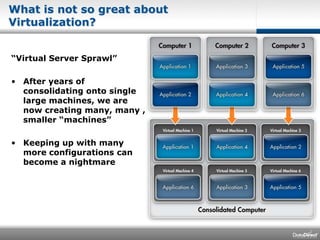
What is not so great about Virtualization?“Virtual Server Sprawl”After years of consolidating onto single large machines, we are now creating many, many , smaller “machines”Keeping up with many more configurations can become a nightmare
What is not so great about Virtualization?Software interoperabilitySome software is tied to individual machines or particular kinds of hardwareSome vendors will not support their software in VM environmentsWhere is my machine?Dynamic virtualization allows for virtual machines to move from one physical machine to another while runningTest and Dev environments using VM images to “store” configurations for temporary use
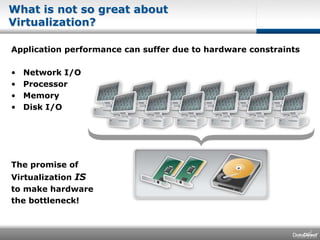
What is not so great about Virtualization?Application performance can suffer due to hardware constraintsNetwork I/OProcessorMemoryDisk I/O The promise ofVirtualization ISto make hardwarethe bottleneck!
You need tools for managing virtual machinesOne big trend we see is setting up a complete OS stack to support a single applicationThere are a lot of new tools on the market today to manage virtualization environmentsYou will need to install and upgrade the same software many more timesEven with base images, you have to keep upDifficult configuration of database clients multiplies already difficult problems of managing and maintaining a large set of Virtual Machines.
Check with your software vendors before virtualizingMake sure the software supports the specific VM environment(s) you want to useVMWareSolaris ZonesAIX LPARsHP PartitionsRed Hat EL 5Windows Server 2008 Hyper-V…
Choose your data access middleware carefully Data access middleware performance and scalability are even more key in VM environmentsWith well tuned applications, 75%-95% of the time is spent in the data access middleware and on the network!Data access middleware needs to be tunableRuntime options to control network buffer sizes, etc. often need to be tweaked in VM environmentsData access middleware can cause VM management nightmaresLook for middleware that supports multiple database versions, has a small footprint, and requires little configuration
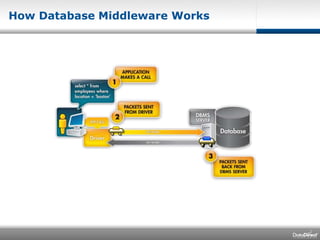
How Database Middleware Works
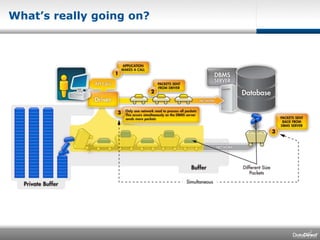
What’s really going on?
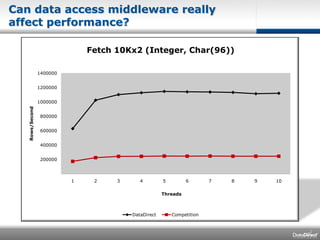
Can data access middleware really affect performance?
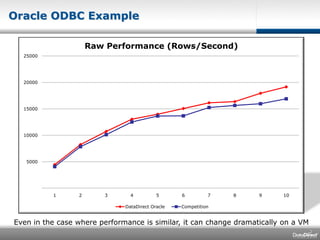
Oracle ODBC ExampleEven in the case where performance is similar, it can change dramatically on a VM
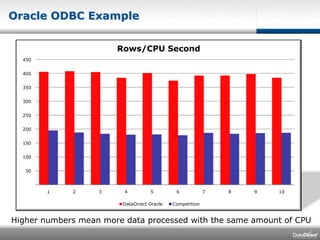
Oracle ODBC ExampleHigher numbers mean more data processed with the same amount of CPU
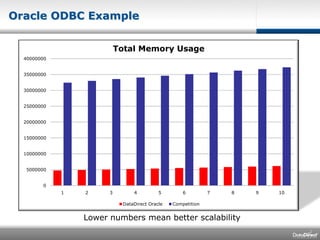
Oracle ODBC ExampleLower numbers mean better scalability
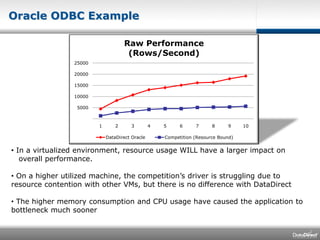
Oracle ODBC Example In a virtualized environment, resource usage WILL have a larger impact on    overall performance. On a higher utilized machine, the competition’s driver is struggling due to resource contention with other VMs, but there is no difference with DataDirect
 The higher memory consumption and CPU usage have caused the application to bottleneck much sooner Wrap UpVirtualization can produce real savings!Plan for “Server Sprawl”Make sure your software supports virtualization Choose and tune your data access middleware carefully in Virtualization environments
Questions?

Dont Let Inefficient Data Access Undermine Your Virtualization Goals

  • 1.
    Don’t Let InefficientData Access Undermine Your Virtualization GoalsRob StewardVP, Research & DevelopmentDataDirect Technologies
  • 2.
    AgendaWhat do Imean by the term “Virtualization”?What is so great about it?What is not so great about it?How do I plan for Data Access in Virtualized Environments?Wrap-up
  • 3.
    What is ServerVirtualization?Virtualization allows multiple operating system instances to run concurrently on a single computer; it is a means of separating hardware from a single operating system.This is what most of us think about when we hear the term Virtualization, but it is really more than this
  • 4.
    Types of VirtualizationTechnologiesHardware VirtualizationVMWare ESX Server, Xen based technologies, Viridian (Windows Server 2008), etc.OS is fooled into thinking it’s on its own machine.
  • 5.
    Types of VirtualizationTechnologiesOS VirtualizationSolaris Zones, Virtuozzo, Windows Virtual Server, VMWare (free) etc.OS has a shell and runs other instances of itself or other OS.
  • 6.
    Types of VirtualizationTechnologiesApplication VirtualizationRepackaging an application into one big “bundle” that runs under application virtualization software. The “bundle” contains ALL application dependencies.Thinstall, InstallFree, Xenocode, etc.
  • 7.
    Types of VirtualizationTechnologiesJava VM VirtualizationBEA LiquidVM runs directly on top of VMWare HypervisorNo Operating System at all!
  • 8.
    Types of VirtualizationTechnologiesMany, many others including:Desktop virtualization (Citrix, Callista)Storage virtualizationNetwork virtualizationEtc…Data Virtualization - Logical to physical mappingSemantic mappingORMetc.
  • 9.
    Fully Utilize HardwareIDCsays server utilization averages 8-10%The average server spends most of its power consumption heating the room…Consolidate applicationsDecrease Power, Cooling, and Space requirementsDecrease machine administration costsIncrease Availability/ReliabilityIncrease isolation for applicationsFailover capabilityWhat is so great about Virtualization?
  • 10.
    What do Ihear from customers?The value of virtualization is real!Entire data centers are disappearingTest and Dev environments can also benefit greatlyManagement of many VMs can become difficultInstallation, configuration, deployment, on a larger scalePerformance of applications suffers if data access is not properly planned for these environmentsData Access is a HUGE part of our overall application performanceBottlenecks in virtualized environments often end up in the database middleware
  • 11.
    What is notso great about Virtualization?“Virtual Server Sprawl”After years of consolidating onto single large machines, we are now creating many, many , smaller “machines”Keeping up with many more configurations can become a nightmare
  • 12.
    What is notso great about Virtualization?Software interoperabilitySome software is tied to individual machines or particular kinds of hardwareSome vendors will not support their software in VM environmentsWhere is my machine?Dynamic virtualization allows for virtual machines to move from one physical machine to another while runningTest and Dev environments using VM images to “store” configurations for temporary use
  • 13.
    What is notso great about Virtualization?Application performance can suffer due to hardware constraintsNetwork I/OProcessorMemoryDisk I/O The promise ofVirtualization ISto make hardwarethe bottleneck!
  • 14.
    You need toolsfor managing virtual machinesOne big trend we see is setting up a complete OS stack to support a single applicationThere are a lot of new tools on the market today to manage virtualization environmentsYou will need to install and upgrade the same software many more timesEven with base images, you have to keep upDifficult configuration of database clients multiplies already difficult problems of managing and maintaining a large set of Virtual Machines.
  • 15.
    Check with yoursoftware vendors before virtualizingMake sure the software supports the specific VM environment(s) you want to useVMWareSolaris ZonesAIX LPARsHP PartitionsRed Hat EL 5Windows Server 2008 Hyper-V…
  • 16.
    Choose your dataaccess middleware carefully Data access middleware performance and scalability are even more key in VM environmentsWith well tuned applications, 75%-95% of the time is spent in the data access middleware and on the network!Data access middleware needs to be tunableRuntime options to control network buffer sizes, etc. often need to be tweaked in VM environmentsData access middleware can cause VM management nightmaresLook for middleware that supports multiple database versions, has a small footprint, and requires little configuration
  • 17.
  • 18.
  • 19.
    Can data accessmiddleware really affect performance?
  • 20.
    Oracle ODBC ExampleEvenin the case where performance is similar, it can change dramatically on a VM
  • 21.
    Oracle ODBC ExampleHighernumbers mean more data processed with the same amount of CPU
  • 22.
    Oracle ODBC ExampleLowernumbers mean better scalability
  • 23.
    Oracle ODBC ExampleIn a virtualized environment, resource usage WILL have a larger impact on overall performance. On a higher utilized machine, the competition’s driver is struggling due to resource contention with other VMs, but there is no difference with DataDirect
  • 24.
    The highermemory consumption and CPU usage have caused the application to bottleneck much sooner Wrap UpVirtualization can produce real savings!Plan for “Server Sprawl”Make sure your software supports virtualization Choose and tune your data access middleware carefully in Virtualization environments
  • 25.