CLOUD JOURNEY USER GROUP
SHARE TO CARE
How to use Microsoft Graph in your
Applications
MOHAMED ASHIQ FALEEL THIRUNAVUKARASU KANNAPPAN
Sanjiv Venkatram
https://www.linkedin.com/in/ashiqf/
@AshiqFaleel
ashiqf@gmail.com
https://ashiqf.com
https://www.linkedin.com/in/thirubaikm/
@thirubai
https://www.linkedin.com/in/Sanjiv-venkatram/
@VenkatramSanjiv
http://prudentia-consulting.com
Agenda
• Keynote from Sanjiv
• Overview of Microsoft Graph
• Authentication Flows
• Tools to call Microsoft Graph
• Demo - Dotnet Core using Graph SDK
• Demo - Power Automate using HTTP connector
• Demo - Power Apps & Power Automate using Custom Connector
• Overview of Graph Toolkit
• Demo – Graph Toolkit
• Q&A
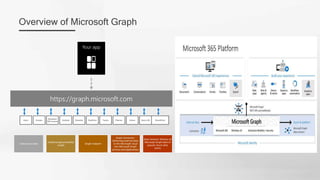
Overview of Microsoft Graph
Users Groups Outlook Calendar SharePoint
Dynamics
365 Central
Intune
Teams Azure AD
OneDrive Planner
https://graph.microsoft.com
Your app
Gateway to data
Unified programmability
model
Single endpoint
Graph Connector:
Delivering external data
to the Microsoft cloud
into Microsoft Graph
services and applications
Data Connect: Delivery of
Microsoft Graph data to
popular Azure data
stores
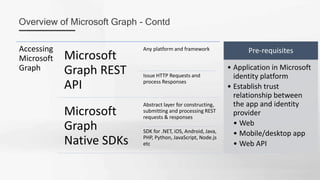
Overview of Microsoft Graph - Contd
Accessing
Microsoft
Graph
Microsoft
Graph REST
API
Any platform and framework
Issue HTTP Requests and
process Responses
Microsoft
Graph
Native SDKs
Abstract layer for constructing,
submitting and processing REST
requests & responses
SDK for .NET, iOS, Android, Java,
PHP, Python, JavaScript, Node.js
etc
Pre-requisites
• Application in Microsoft
identity platform
• Establish trust
relationship between
the app and identity
provider
• Web
• Mobile/desktop app
• Web API
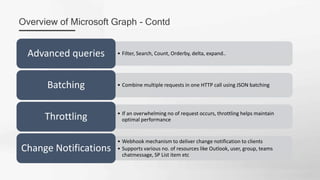
Overview of Microsoft Graph - Contd
• Filter, Search, Count, Orderby, delta, expand..
Advanced queries
• Combine multiple requests in one HTTP call using JSON batching
Batching
• If an overwhelming no of request occurs, throttling helps maintain
optimal performance
Throttling
• Webhook mechanism to deliver change notification to clients
• Supports various no. of resources like Outlook, user, group, teams
chatmessage, SP List item etc
Change Notifications
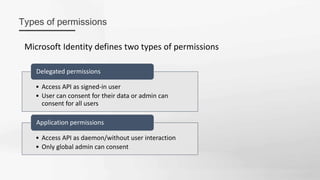
Types of permissions
Microsoft Identity defines two types of permissions
• Access API as signed-in user
• User can consent for their data or admin can
consent for all users
Delegated permissions
• Access API as daemon/without user interaction
• Only global admin can consent
Application permissions
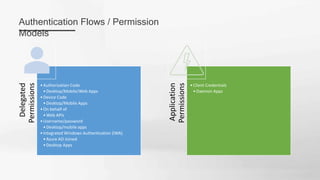
Authentication Flows / Permission
Models
Delegated
Permissions
•Authorization Code
•Desktop/Mobile/Web Apps
•Device Code
•Desktop/Mobile Apps
•On behalf of
•Web APIs
•Username/password
•Desktop/mobile apps
•Integrated Windows Authentication (IWA)
•Azure AD Joined
•Desktop Apps
Application
Permissions
•Client Credentials
•Daemon Apps
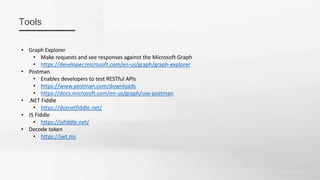
Tools
• Graph Explorer
• Make requests and see responses against the Microsoft Graph
• https://developer.microsoft.com/en-us/graph/graph-explorer
• Postman
• Enables developers to test RESTful APIs
• https://www.postman.com/downloads
• https://docs.microsoft.com/en-us/graph/use-postman
• .NET Fiddle
• https://dotnetfiddle.net/
• JS Fiddle
• https://jsfiddle.net/
• Decode token
• https://jwt.ms
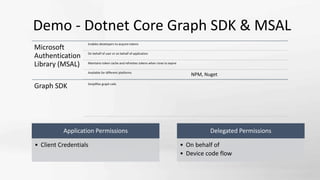
Demo - Dotnet Core Graph SDK & MSAL
Microsoft
Authentication
Library (MSAL)
Enables developers to acquire tokens
On behalf of user or on behalf of application
Maintains token cache and refreshes tokens when close to expire
Available for different platforms
NPM, Nuget
Graph SDK Simplifies graph calls
Application Permissions
• Client Credentials
Delegated Permissions
• On behalf of
• Device code flow
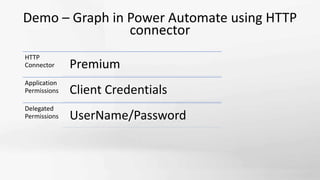
Demo – Graph in Power Automate using HTTP
connector
HTTP
Connector Premium
Application
Permissions Client Credentials
Delegated
Permissions UserName/Password
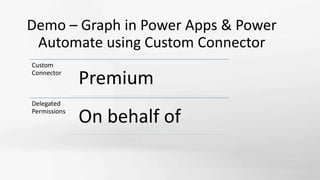
Demo – Graph in Power Apps & Power
Automate using Custom Connector
Custom
Connector
Premium
Delegated
Permissions
On behalf of
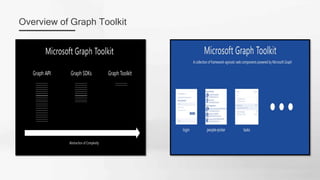
Overview of Graph Toolkit
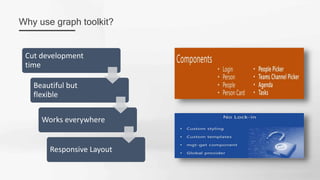
Why use graph toolkit?
Cut development
time
Beautiful but
flexible
Works everywhere
Responsive Layout
Demo – Graph Toolkit
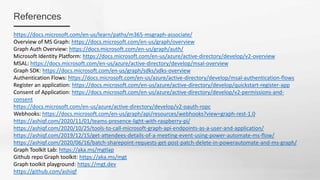
References
https://docs.microsoft.com/en-us/learn/paths/m365-msgraph-associate/
Overview of MS Graph: https://docs.microsoft.com/en-us/graph/overview
Graph Auth Overview: https://docs.microsoft.com/en-us/graph/auth/
Microsoft Identity Platform: https://docs.microsoft.com/en-us/azure/active-directory/develop/v2-overview
MSAL: https://docs.microsoft.com/en-us/azure/active-directory/develop/msal-overview
Graph SDK: https://docs.microsoft.com/en-us/graph/sdks/sdks-overview
Authentication Flows: https://docs.microsoft.com/en-us/azure/active-directory/develop/msal-authentication-flows
Register an application: https://docs.microsoft.com/en-us/azure/active-directory/develop/quickstart-register-app
Consent of Application: https://docs.microsoft.com/en-us/azure/active-directory/develop/v2-permissions-and-
consent
https://docs.microsoft.com/en-us/azure/active-directory/develop/v2-oauth-ropc
Webhooks: https://docs.microsoft.com/en-us/graph/api/resources/webhooks?view=graph-rest-1.0
https://ashiqf.com/2020/11/01/teams-presence-light-with-raspberry-pi/
https://ashiqf.com/2020/10/25/tools-to-call-microsoft-graph-api-endpoints-as-a-user-and-application/
https://ashiqf.com/2019/12/15/get-attendees-details-of-a-meeting-event-using-power-automate-ms-flow/
https://ashiqf.com/2020/06/16/batch-sharepoint-requests-get-post-patch-delete-in-powerautomate-and-ms-graph/
Graph Toolkit Lab: https://aka.ms/mgtlap
Github repo Graph toolkit: https://aka.ms/mgt
Graph toolkit playground: https://mgt.dev
https://github.com/ashiqf
Thank you
https://www.meetup.com/cloudjourneyusergroup/

How to use Microsoft Graph in your applications

  • 1.
    CLOUD JOURNEY USERGROUP SHARE TO CARE How to use Microsoft Graph in your Applications MOHAMED ASHIQ FALEEL THIRUNAVUKARASU KANNAPPAN Sanjiv Venkatram https://www.linkedin.com/in/ashiqf/ @AshiqFaleel ashiqf@gmail.com https://ashiqf.com https://www.linkedin.com/in/thirubaikm/ @thirubai https://www.linkedin.com/in/Sanjiv-venkatram/ @VenkatramSanjiv http://prudentia-consulting.com
  • 2.
    Agenda • Keynote fromSanjiv • Overview of Microsoft Graph • Authentication Flows • Tools to call Microsoft Graph • Demo - Dotnet Core using Graph SDK • Demo - Power Automate using HTTP connector • Demo - Power Apps & Power Automate using Custom Connector • Overview of Graph Toolkit • Demo – Graph Toolkit • Q&A
  • 3.
    Overview of MicrosoftGraph Users Groups Outlook Calendar SharePoint Dynamics 365 Central Intune Teams Azure AD OneDrive Planner https://graph.microsoft.com Your app Gateway to data Unified programmability model Single endpoint Graph Connector: Delivering external data to the Microsoft cloud into Microsoft Graph services and applications Data Connect: Delivery of Microsoft Graph data to popular Azure data stores
  • 4.
    Overview of MicrosoftGraph - Contd Accessing Microsoft Graph Microsoft Graph REST API Any platform and framework Issue HTTP Requests and process Responses Microsoft Graph Native SDKs Abstract layer for constructing, submitting and processing REST requests & responses SDK for .NET, iOS, Android, Java, PHP, Python, JavaScript, Node.js etc Pre-requisites • Application in Microsoft identity platform • Establish trust relationship between the app and identity provider • Web • Mobile/desktop app • Web API
  • 5.
    Overview of MicrosoftGraph - Contd • Filter, Search, Count, Orderby, delta, expand.. Advanced queries • Combine multiple requests in one HTTP call using JSON batching Batching • If an overwhelming no of request occurs, throttling helps maintain optimal performance Throttling • Webhook mechanism to deliver change notification to clients • Supports various no. of resources like Outlook, user, group, teams chatmessage, SP List item etc Change Notifications
  • 6.
    Types of permissions MicrosoftIdentity defines two types of permissions • Access API as signed-in user • User can consent for their data or admin can consent for all users Delegated permissions • Access API as daemon/without user interaction • Only global admin can consent Application permissions
  • 7.
    Authentication Flows /Permission Models Delegated Permissions •Authorization Code •Desktop/Mobile/Web Apps •Device Code •Desktop/Mobile Apps •On behalf of •Web APIs •Username/password •Desktop/mobile apps •Integrated Windows Authentication (IWA) •Azure AD Joined •Desktop Apps Application Permissions •Client Credentials •Daemon Apps
  • 8.
    Tools • Graph Explorer •Make requests and see responses against the Microsoft Graph • https://developer.microsoft.com/en-us/graph/graph-explorer • Postman • Enables developers to test RESTful APIs • https://www.postman.com/downloads • https://docs.microsoft.com/en-us/graph/use-postman • .NET Fiddle • https://dotnetfiddle.net/ • JS Fiddle • https://jsfiddle.net/ • Decode token • https://jwt.ms
  • 9.
    Demo - DotnetCore Graph SDK & MSAL Microsoft Authentication Library (MSAL) Enables developers to acquire tokens On behalf of user or on behalf of application Maintains token cache and refreshes tokens when close to expire Available for different platforms NPM, Nuget Graph SDK Simplifies graph calls Application Permissions • Client Credentials Delegated Permissions • On behalf of • Device code flow
  • 10.
    Demo – Graphin Power Automate using HTTP connector HTTP Connector Premium Application Permissions Client Credentials Delegated Permissions UserName/Password
  • 11.
    Demo – Graphin Power Apps & Power Automate using Custom Connector Custom Connector Premium Delegated Permissions On behalf of
  • 12.
  • 13.
    Why use graphtoolkit? Cut development time Beautiful but flexible Works everywhere Responsive Layout
  • 14.
  • 15.
    References https://docs.microsoft.com/en-us/learn/paths/m365-msgraph-associate/ Overview of MSGraph: https://docs.microsoft.com/en-us/graph/overview Graph Auth Overview: https://docs.microsoft.com/en-us/graph/auth/ Microsoft Identity Platform: https://docs.microsoft.com/en-us/azure/active-directory/develop/v2-overview MSAL: https://docs.microsoft.com/en-us/azure/active-directory/develop/msal-overview Graph SDK: https://docs.microsoft.com/en-us/graph/sdks/sdks-overview Authentication Flows: https://docs.microsoft.com/en-us/azure/active-directory/develop/msal-authentication-flows Register an application: https://docs.microsoft.com/en-us/azure/active-directory/develop/quickstart-register-app Consent of Application: https://docs.microsoft.com/en-us/azure/active-directory/develop/v2-permissions-and- consent https://docs.microsoft.com/en-us/azure/active-directory/develop/v2-oauth-ropc Webhooks: https://docs.microsoft.com/en-us/graph/api/resources/webhooks?view=graph-rest-1.0 https://ashiqf.com/2020/11/01/teams-presence-light-with-raspberry-pi/ https://ashiqf.com/2020/10/25/tools-to-call-microsoft-graph-api-endpoints-as-a-user-and-application/ https://ashiqf.com/2019/12/15/get-attendees-details-of-a-meeting-event-using-power-automate-ms-flow/ https://ashiqf.com/2020/06/16/batch-sharepoint-requests-get-post-patch-delete-in-powerautomate-and-ms-graph/ Graph Toolkit Lab: https://aka.ms/mgtlap Github repo Graph toolkit: https://aka.ms/mgt Graph toolkit playground: https://mgt.dev https://github.com/ashiqf
  • 17.