Docker
An operating system-level virtualization — LXC
Compare to VMs
Before Docker — O(n)
DB, Server,
Cache
DB, Server,
CacheLean
DB, Server,
Cache
LB
Grow
DC #1
LB
Server n
DB n
Cache n
Scale
Dev Env Prod Env
Server1,
2, 3, 4
DB 1,2 Cache1, 2
DB, Server,
Cache
DC #2
LB
Server n
DB n
Cache n
• Setup required for each new box.
• Dev env and prod env are two different stores.
• Good luck with setup different dev env for different
projects.
• A lot of work for maintaining different environments.
• Bottleneck on testing and integration environments.
• Inflexible architecture setup.
Before Docker — O(n)
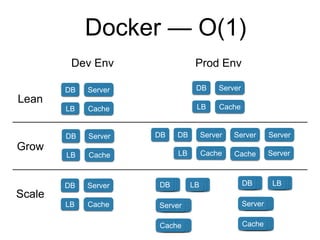
Docker — O(1)
DB
Lean
Grow
Scale
Dev Env Prod Env
Server
CacheLB
DB Server
CacheLB
DB Server
CacheLB
DB Server
CacheLB
DB Server
CacheLB
DB Server Server
Cache Server
Server
DB
Cache
LB
Server
DB
Cache
LB
• Setup once ship to anywhere.
• Dev env can have the identical setup as prod env.
• Easily switch dev env for different projects.
• More than one testing and integration environment
is simple, more than one version of environment is
what you really want.
• Inflexible architecture setup — Easily to try different
setups.
Docker — O(1)
Docker Commands
• docker images
• docker run -it ubuntu:14.04 /bin/bash
• docker rm <container id>
• docker rmi <image id>
• docker commit <container id> <image name>
Demo

Docker talk

  • 1.
    Docker An operating system-levelvirtualization — LXC
  • 2.
  • 3.
    Before Docker —O(n) DB, Server, Cache DB, Server, CacheLean DB, Server, Cache LB Grow DC #1 LB Server n DB n Cache n Scale Dev Env Prod Env Server1, 2, 3, 4 DB 1,2 Cache1, 2 DB, Server, Cache DC #2 LB Server n DB n Cache n
  • 4.
    • Setup requiredfor each new box. • Dev env and prod env are two different stores. • Good luck with setup different dev env for different projects. • A lot of work for maintaining different environments. • Bottleneck on testing and integration environments. • Inflexible architecture setup. Before Docker — O(n)
  • 5.
    Docker — O(1) DB Lean Grow Scale DevEnv Prod Env Server CacheLB DB Server CacheLB DB Server CacheLB DB Server CacheLB DB Server CacheLB DB Server Server Cache Server Server DB Cache LB Server DB Cache LB
  • 6.
    • Setup onceship to anywhere. • Dev env can have the identical setup as prod env. • Easily switch dev env for different projects. • More than one testing and integration environment is simple, more than one version of environment is what you really want. • Inflexible architecture setup — Easily to try different setups. Docker — O(1)
  • 7.
    Docker Commands • dockerimages • docker run -it ubuntu:14.04 /bin/bash • docker rm <container id> • docker rmi <image id> • docker commit <container id> <image name>
  • 8.