Shipping Python Projects
by Docker
Wei-Ting Kuo
Outline
• Introduction to Docker
• define our sample web app
• Build/Run Docker Images
• Docker Index
• Deploy to AWS
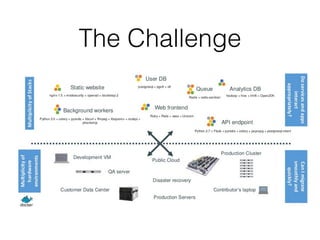
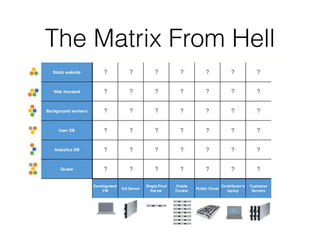
The Challenge
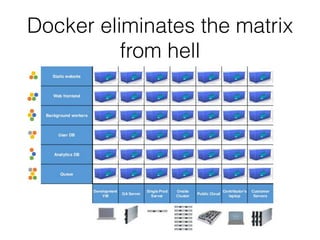
The Matrix From Hell
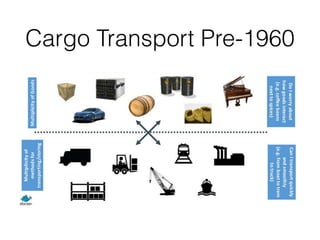
Cargo Transport Pre-1960
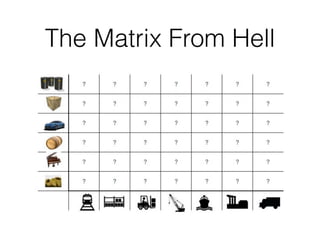
The Matrix From Hell
Solution: 

Intermodal Shipping Container
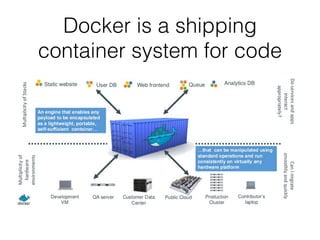
Docker is a shipping
container system for code
Docker eliminates the matrix
from hell
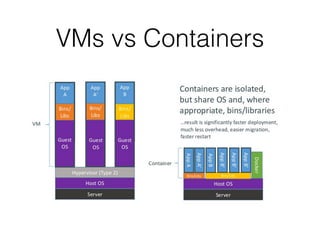
VMs vs Containers
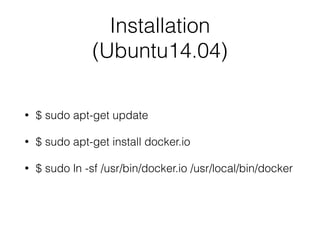
Installation
(Ubuntu14.04)
• $ sudo apt-get update
• $ sudo apt-get install docker.io
• $ sudo ln -sf /usr/bin/docker.io /usr/local/bin/docker
Pull a Base Image
• docker pull ubuntu
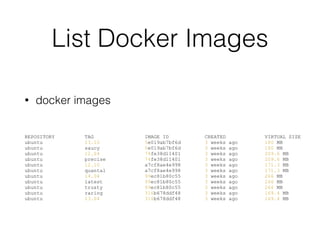
List Docker Images
• docker images
REPOSITORY TAG IMAGE ID CREATED VIRTUAL SIZE
ubuntu 13.10 5e019ab7bf6d 3 weeks ago 180 MB
ubuntu saucy 5e019ab7bf6d 3 weeks ago 180 MB
ubuntu 12.04 74fe38d11401 3 weeks ago 209.6 MB
ubuntu precise 74fe38d11401 3 weeks ago 209.6 MB
ubuntu 12.10 a7cf8ae4e998 3 weeks ago 171.3 MB
ubuntu quantal a7cf8ae4e998 3 weeks ago 171.3 MB
ubuntu 14.04 99ec81b80c55 3 weeks ago 266 MB
ubuntu latest 99ec81b80c55 3 weeks ago 266 MB
ubuntu trusty 99ec81b80c55 3 weeks ago 266 MB
ubuntu raring 316b678ddf48 3 weeks ago 169.4 MB
ubuntu 13.04 316b678ddf48 3 weeks ago 169.4 MB
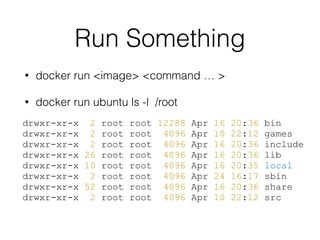
Run Something
• docker run <image> <command … >
• docker run ubuntu ls -l /root
drwxr-xr-x 2 root root 12288 Apr 16 20:36 bin
drwxr-xr-x 2 root root 4096 Apr 10 22:12 games
drwxr-xr-x 2 root root 4096 Apr 16 20:36 include
drwxr-xr-x 26 root root 4096 Apr 16 20:36 lib
drwxr-xr-x 10 root root 4096 Apr 16 20:35 local
drwxr-xr-x 2 root root 4096 Apr 24 16:17 sbin
drwxr-xr-x 52 root root 4096 Apr 16 20:36 share
drwxr-xr-x 2 root root 4096 Apr 10 22:12 src
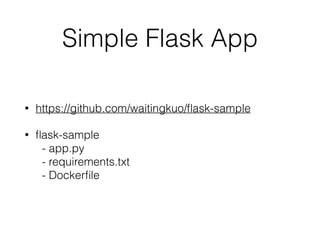
Simple Flask App
• https://github.com/waitingkuo/flask-sample
• flask-sample

- app.py

- requirements.txt

- Dockerfile
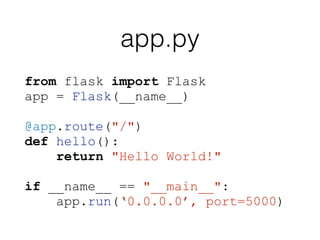
app.py
from flask import Flask
app = Flask(__name__)
!
@app.route("/")
def hello():
return "Hello World!"
!
if __name__ == "__main__":
app.run(‘0.0.0.0’, port=5000)
Requirements.txt
flask
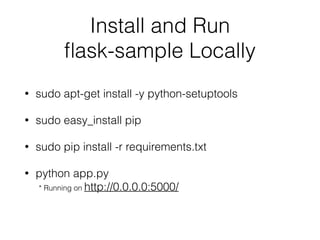
Install and Run 

flask-sample Locally
• sudo apt-get install -y python-setuptools
• sudo easy_install pip
• sudo pip install -r requirements.txt
• python app.py

* Running on http://0.0.0.0:5000/
How to build a 

Docker Image
• Dockerfile

http://docs.docker.io/reference/builder/
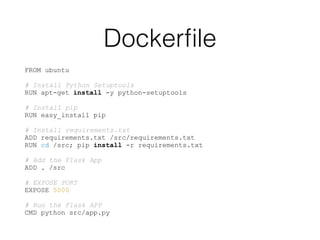
Dockerfile
FROM ubuntu
!
# Install Python Setuptools
RUN apt-get install -y python-setuptools
!
# Install pip
RUN easy_install pip
!
# Install requirements.txt
ADD requirements.txt /src/requirements.txt
RUN cd /src; pip install -r requirements.txt
!
# Add the Flask App
ADD . /src
!
# EXPOSE PORT
EXPOSE 5000
!
# Run the Flask APP
CMD python src/app.py
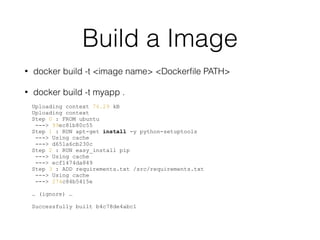
Build a Image
• docker build -t <image name> <Dockerfile PATH>
• docker build -t myapp .
Uploading context 76.29 kB
Uploading context
Step 0 : FROM ubuntu
---> 99ec81b80c55
Step 1 : RUN apt-get install -y python-setuptools
---> Using cache
---> d651a6cb230c
Step 2 : RUN easy_install pip
---> Using cache
---> ecf1474da849
Step 3 : ADD requirements.txt /src/requirements.txt
---> Using cache
---> 274c84b5415e
!
… (ignore) …
!
Successfully built b4c78de4abc1
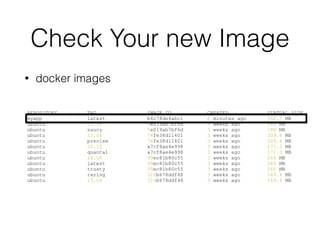
Check Your new Image
• docker images
REPOSITORY TAG IMAGE ID CREATED VIRTUAL SIZE
myapp latest b4c78de4abc1 2 minutes ago 302.7 MB
ubuntu 13.10 5e019ab7bf6d 3 weeks ago 180 MB
ubuntu saucy 5e019ab7bf6d 3 weeks ago 180 MB
ubuntu 12.04 74fe38d11401 3 weeks ago 209.6 MB
ubuntu precise 74fe38d11401 3 weeks ago 209.6 MB
ubuntu 12.10 a7cf8ae4e998 3 weeks ago 171.3 MB
ubuntu quantal a7cf8ae4e998 3 weeks ago 171.3 MB
ubuntu 14.04 99ec81b80c55 3 weeks ago 266 MB
ubuntu latest 99ec81b80c55 3 weeks ago 266 MB
ubuntu trusty 99ec81b80c55 3 weeks ago 266 MB
ubuntu raring 316b678ddf48 3 weeks ago 169.4 MB
ubuntu 13.04 316b678ddf48 3 weeks ago 169.4 MB
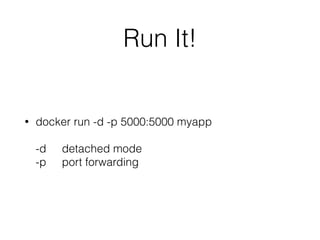
Run It!
• docker run -d -p 5000:5000 myapp


-d detached mode

-p port forwarding
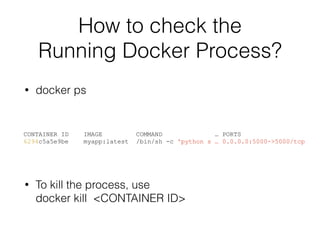
How to check the 

Running Docker Process?
• docker ps
CONTAINER ID IMAGE COMMAND … PORTS
6294c5a5e9be myapp:latest /bin/sh -c 'python s … 0.0.0.0:5000->5000/tcp
• To kill the process, use

docker kill <CONTAINER ID>
Docker Index
• https://index.docker.io/
• You might think it as the GitHub For Docker Image
• You can pull mysql, mongodb, hadoop, … etc
• You can hook your docker index repository on to
your own repository on GitHub!!!


-> Build images automatically once you push something to Github
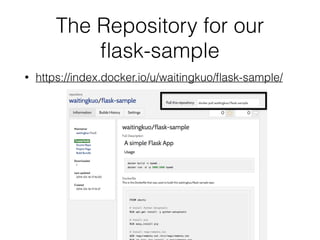
The Repository for our 

flask-sample
• https://index.docker.io/u/waitingkuo/flask-sample/
Deploy!
• Use whatever you want to login to your production
server (ssh, fabric, capistrano, chef, puppet, ….)
• docker pull waitingkuo/flask-sample
• docker run -d -p 5000:5000 waitingkuo/flask-
sample
• Thank you :)

Shipping python project by docker

  • 1.
    Shipping Python Projects byDocker Wei-Ting Kuo
  • 2.
    Outline • Introduction toDocker • define our sample web app • Build/Run Docker Images • Docker Index • Deploy to AWS
  • 3.
  • 4.
  • 5.
  • 6.
  • 7.
  • 8.
    Docker is ashipping container system for code
  • 9.
    Docker eliminates thematrix from hell
  • 10.
  • 11.
    Installation (Ubuntu14.04) • $ sudoapt-get update • $ sudo apt-get install docker.io • $ sudo ln -sf /usr/bin/docker.io /usr/local/bin/docker
  • 12.
    Pull a BaseImage • docker pull ubuntu
  • 13.
    List Docker Images •docker images REPOSITORY TAG IMAGE ID CREATED VIRTUAL SIZE ubuntu 13.10 5e019ab7bf6d 3 weeks ago 180 MB ubuntu saucy 5e019ab7bf6d 3 weeks ago 180 MB ubuntu 12.04 74fe38d11401 3 weeks ago 209.6 MB ubuntu precise 74fe38d11401 3 weeks ago 209.6 MB ubuntu 12.10 a7cf8ae4e998 3 weeks ago 171.3 MB ubuntu quantal a7cf8ae4e998 3 weeks ago 171.3 MB ubuntu 14.04 99ec81b80c55 3 weeks ago 266 MB ubuntu latest 99ec81b80c55 3 weeks ago 266 MB ubuntu trusty 99ec81b80c55 3 weeks ago 266 MB ubuntu raring 316b678ddf48 3 weeks ago 169.4 MB ubuntu 13.04 316b678ddf48 3 weeks ago 169.4 MB
  • 14.
    Run Something • dockerrun <image> <command … > • docker run ubuntu ls -l /root drwxr-xr-x 2 root root 12288 Apr 16 20:36 bin drwxr-xr-x 2 root root 4096 Apr 10 22:12 games drwxr-xr-x 2 root root 4096 Apr 16 20:36 include drwxr-xr-x 26 root root 4096 Apr 16 20:36 lib drwxr-xr-x 10 root root 4096 Apr 16 20:35 local drwxr-xr-x 2 root root 4096 Apr 24 16:17 sbin drwxr-xr-x 52 root root 4096 Apr 16 20:36 share drwxr-xr-x 2 root root 4096 Apr 10 22:12 src
  • 15.
    Simple Flask App •https://github.com/waitingkuo/flask-sample • flask-sample
 - app.py
 - requirements.txt
 - Dockerfile
  • 16.
    app.py from flask importFlask app = Flask(__name__) ! @app.route("/") def hello(): return "Hello World!" ! if __name__ == "__main__": app.run(‘0.0.0.0’, port=5000)
  • 17.
  • 18.
    Install and Run
 flask-sample Locally • sudo apt-get install -y python-setuptools • sudo easy_install pip • sudo pip install -r requirements.txt • python app.py
 * Running on http://0.0.0.0:5000/
  • 19.
    How to builda 
 Docker Image • Dockerfile
 http://docs.docker.io/reference/builder/
  • 20.
    Dockerfile FROM ubuntu ! # InstallPython Setuptools RUN apt-get install -y python-setuptools ! # Install pip RUN easy_install pip ! # Install requirements.txt ADD requirements.txt /src/requirements.txt RUN cd /src; pip install -r requirements.txt ! # Add the Flask App ADD . /src ! # EXPOSE PORT EXPOSE 5000 ! # Run the Flask APP CMD python src/app.py
  • 21.
    Build a Image •docker build -t <image name> <Dockerfile PATH> • docker build -t myapp . Uploading context 76.29 kB Uploading context Step 0 : FROM ubuntu ---> 99ec81b80c55 Step 1 : RUN apt-get install -y python-setuptools ---> Using cache ---> d651a6cb230c Step 2 : RUN easy_install pip ---> Using cache ---> ecf1474da849 Step 3 : ADD requirements.txt /src/requirements.txt ---> Using cache ---> 274c84b5415e ! … (ignore) … ! Successfully built b4c78de4abc1
  • 22.
    Check Your newImage • docker images REPOSITORY TAG IMAGE ID CREATED VIRTUAL SIZE myapp latest b4c78de4abc1 2 minutes ago 302.7 MB ubuntu 13.10 5e019ab7bf6d 3 weeks ago 180 MB ubuntu saucy 5e019ab7bf6d 3 weeks ago 180 MB ubuntu 12.04 74fe38d11401 3 weeks ago 209.6 MB ubuntu precise 74fe38d11401 3 weeks ago 209.6 MB ubuntu 12.10 a7cf8ae4e998 3 weeks ago 171.3 MB ubuntu quantal a7cf8ae4e998 3 weeks ago 171.3 MB ubuntu 14.04 99ec81b80c55 3 weeks ago 266 MB ubuntu latest 99ec81b80c55 3 weeks ago 266 MB ubuntu trusty 99ec81b80c55 3 weeks ago 266 MB ubuntu raring 316b678ddf48 3 weeks ago 169.4 MB ubuntu 13.04 316b678ddf48 3 weeks ago 169.4 MB
  • 23.
    Run It! • dockerrun -d -p 5000:5000 myapp
 
 -d detached mode
 -p port forwarding
  • 24.
    How to checkthe 
 Running Docker Process? • docker ps CONTAINER ID IMAGE COMMAND … PORTS 6294c5a5e9be myapp:latest /bin/sh -c 'python s … 0.0.0.0:5000->5000/tcp • To kill the process, use
 docker kill <CONTAINER ID>
  • 25.
    Docker Index • https://index.docker.io/ •You might think it as the GitHub For Docker Image • You can pull mysql, mongodb, hadoop, … etc • You can hook your docker index repository on to your own repository on GitHub!!!
 
 -> Build images automatically once you push something to Github
  • 26.
    The Repository forour 
 flask-sample • https://index.docker.io/u/waitingkuo/flask-sample/
  • 27.
    Deploy! • Use whateveryou want to login to your production server (ssh, fabric, capistrano, chef, puppet, ….) • docker pull waitingkuo/flask-sample • docker run -d -p 5000:5000 waitingkuo/flask- sample
  • 28.