


Introduction to Django CMS &
integrating it with Django shop.
Presenter: Darshith Kumar Badiyani,
Mindfire Solutions
Date: 04/03/2015
About Me:
- Skillset : Python, Django, HTML, CSS, JavaScript, jQuery,
FileMaker, Twitter Bootstrap, MySQL, SQL Server
darshithb@mindfiresolutions.com
darshith0000@yahoo.com
darsh0000@gmail.com
http://darshithbadiyani.wordpress.com
in.linkedin.com/in/darshith0000
https://www.facebook.com/darshith.badiyani
https://twitter.com/darshith0000
AGENDA :
- What is CMS?
- Installation of Django CMS.
- Placeholder & Static
Placeholder.
- Templates.
- Integration of third party app.
- Demo using Django cms.
What is Content Management System:
- Content management is a process and/or software application used
by groups to plan, create, manage, store and distribute content.
- Content can include: web pages, images, documents, streaming
media, news releases, etc.
What a CMS Can Do:
- Can facilitate sharing of content across multiple Web sites
- Can make it easier for non-technical staff to update content
- Can improve consistency of look and feel
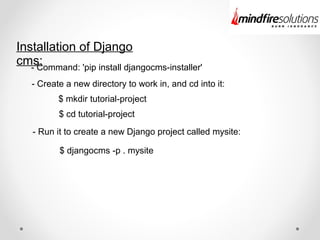
Installation of Django
cms:- Command: 'pip install djangocms-installer'
- Create a new directory to work in, and cd into it:
$ mkdir tutorial-project
$ cd tutorial-project
- Run it to create a new Django project called mysite:
$ djangocms -p . mysite
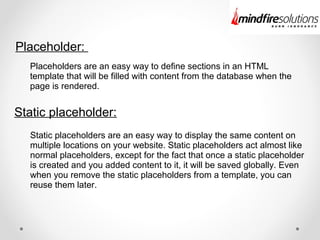
Placeholder:
Static placeholder:
Placeholders are an easy way to define sections in an HTML
template that will be filled with content from the database when the
page is rendered.
Static placeholders are an easy way to display the same content on
multiple locations on your website. Static placeholders act almost like
normal placeholders, except for the fact that once a static placeholder
is created and you added content to it, it will be saved globally. Even
when you remove the static placeholders from a template, you can
reuse them later.
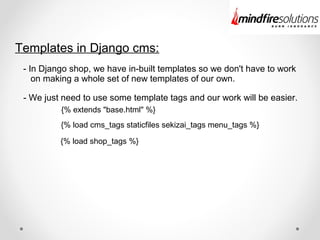
Templates in Django cms:
- In Django shop, we have in-built templates so we don't have to work
on making a whole set of new templates of our own.
- We just need to use some template tags and our work will be easier.
{% extends "base.html" %}
{% load cms_tags staticfiles sekizai_tags menu_tags %}
{% load shop_tags %}
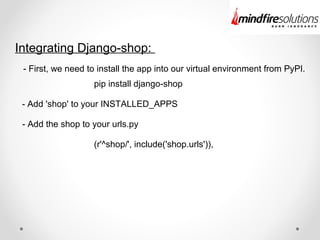
Integrating Django-shop:
- First, we need to install the app into our virtual environment from PyPI.
- Add 'shop' to your INSTALLED_APPS
pip install django-shop
- Add the shop to your urls.py
(r'^shop/', include('shop.urls')),
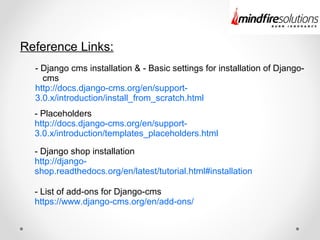
Reference Links:
- Django cms installation & - Basic settings for installation of Django-
cms
http://docs.django-cms.org/en/support-
3.0.x/introduction/install_from_scratch.html
- Placeholders
http://docs.django-cms.org/en/support-
3.0.x/introduction/templates_placeholders.html
- Django shop installation
http://django-
shop.readthedocs.org/en/latest/tutorial.html#installation
- List of add-ons for Django-cms
https://www.django-cms.org/en/add-ons/
Questions
&
Answers
Thank you
Connect Us @Connect Us @
www.mindfiresolutions.com
https://www.facebook.com/MindfireSolutions
http://www.linkedin.com/company/mindfire-solutions
http://twitter.com/mindfires

Django CMS & Integrating it with django shop

  • 1.
    Introduction to DjangoCMS & integrating it with Django shop. Presenter: Darshith Kumar Badiyani, Mindfire Solutions Date: 04/03/2015
  • 2.
    About Me: - Skillset: Python, Django, HTML, CSS, JavaScript, jQuery, FileMaker, Twitter Bootstrap, MySQL, SQL Server darshithb@mindfiresolutions.com darshith0000@yahoo.com darsh0000@gmail.com http://darshithbadiyani.wordpress.com in.linkedin.com/in/darshith0000 https://www.facebook.com/darshith.badiyani https://twitter.com/darshith0000
  • 3.
    AGENDA : - Whatis CMS? - Installation of Django CMS. - Placeholder & Static Placeholder. - Templates. - Integration of third party app. - Demo using Django cms.
  • 4.
    What is ContentManagement System: - Content management is a process and/or software application used by groups to plan, create, manage, store and distribute content. - Content can include: web pages, images, documents, streaming media, news releases, etc. What a CMS Can Do: - Can facilitate sharing of content across multiple Web sites - Can make it easier for non-technical staff to update content - Can improve consistency of look and feel
  • 5.
    Installation of Django cms:-Command: 'pip install djangocms-installer' - Create a new directory to work in, and cd into it: $ mkdir tutorial-project $ cd tutorial-project - Run it to create a new Django project called mysite: $ djangocms -p . mysite
  • 6.
    Placeholder: Static placeholder: Placeholders arean easy way to define sections in an HTML template that will be filled with content from the database when the page is rendered. Static placeholders are an easy way to display the same content on multiple locations on your website. Static placeholders act almost like normal placeholders, except for the fact that once a static placeholder is created and you added content to it, it will be saved globally. Even when you remove the static placeholders from a template, you can reuse them later.
  • 7.
    Templates in Djangocms: - In Django shop, we have in-built templates so we don't have to work on making a whole set of new templates of our own. - We just need to use some template tags and our work will be easier. {% extends "base.html" %} {% load cms_tags staticfiles sekizai_tags menu_tags %} {% load shop_tags %}
  • 8.
    Integrating Django-shop: - First,we need to install the app into our virtual environment from PyPI. - Add 'shop' to your INSTALLED_APPS pip install django-shop - Add the shop to your urls.py (r'^shop/', include('shop.urls')),
  • 9.
    Reference Links: - Djangocms installation & - Basic settings for installation of Django- cms http://docs.django-cms.org/en/support- 3.0.x/introduction/install_from_scratch.html - Placeholders http://docs.django-cms.org/en/support- 3.0.x/introduction/templates_placeholders.html - Django shop installation http://django- shop.readthedocs.org/en/latest/tutorial.html#installation - List of add-ons for Django-cms https://www.django-cms.org/en/add-ons/
  • 10.
  • 11.
  • 12.
    Connect Us @ConnectUs @ www.mindfiresolutions.com https://www.facebook.com/MindfireSolutions http://www.linkedin.com/company/mindfire-solutions http://twitter.com/mindfires