Multi-Tenancy With Django 
Scott Crespo 
Software Engineer 
Director, Orlando Data Science 
Scott@OrlandoDS.com
1. Multi-Tenant Architectures 
2. Django Tenant Schemas Explained 
3. Basic Use + Tips and Tricks
Definition 
Multi-Tenancy: 
A software architecture where a single application 
instance enables multiple organizations 
(tenants) to view their data. 
*This is a key component of XaaS (i.e. Something 
as a Service)
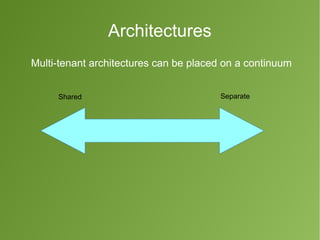
Architectures 
Multi-tenant architectures can be placed on a continuum 
Shared Separate
Common Approaches to Multi-Tenancy
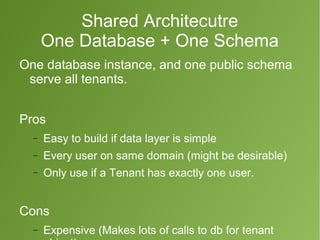
Shared Architecutre 
One Database + One Schema 
One database instance, and one public schema 
serve all tenants. 
Pros 
- Easy to build if data layer is simple 
- Every user on same domain (might be desirable) 
- Only use if a Tenant has exactly one user. 
Cons 
- Expensive (Makes lots of calls to db for tenant 
object)
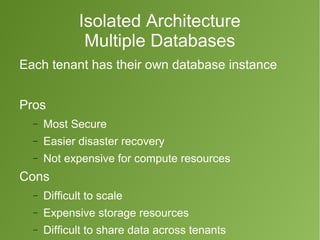
Isolated Architecture 
Multiple Databases 
Each tenant has their own database instance 
Pros 
- Most Secure 
- Easier disaster recovery 
- Not expensive for compute resources 
Cons 
- Difficult to scale 
- Expensive storage resources 
- Difficult to share data across tenants
Hybrid Architecture 
One Database – Multiple Schemas 
One database instance for all tenants. Each 
tenant gets a dedicated schema. 
Shared 'public' schema 
Dedicated 'tenant' schema
What's a Schema? 
Acts as a namespace in Postgres 
Adds an additional layer of organization/isolation 
to the database 
(Database → Schema → Table) 
ex) SELECT * FROM schema_name.table 
When a schema is not specified in the connection 
or query – only the 'public' schema is accessed 
Schemas to be queried can be specified in the 
app's database connection via 
'SEARCH_PATH' parameter
One Database – Multiple Schemas 
Pros 
- Scalable 
- Cheap 
- Simple 
- Semi-secure 
- Sharable 
Cons 
- Difficult disaster 
recovery 
- Less-secure than 
dedicated db's
Django Tenant Schemas 
Implements Multi-Schema Approach 
Requires PostgreSQL 
Installation: 
$ pip install django-tenant-schemas 
Docs: 
Django-tenant-schemas.readthedocs.org
Features 
1.Tenant-based Subdomains 
2.Postgres Support
The Tenant Object 
Stored on the 'public' schema 
Contains 2 Critical Fields 
- domain_url – the tenant's domain (foo.bar.com) 
- schema_name – the schema where the Tenant's 
isolated data is stored (tenant_jw8j23jp)
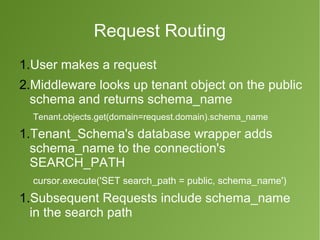
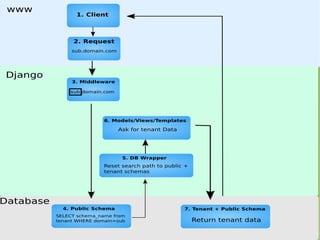
Request Routing 
1.User makes a request 
2.Middleware looks up tenant object on the public 
schema and returns schema_name 
Tenant.objects.get(domain=request.domain).schema_name 
1.Tenant_Schema's database wrapper adds 
schema_name to the connection's 
SEARCH_PATH 
cursor.execute('SET search_path = public, schema_name') 
1.Subsequent Requests include schema_name 
in the search path
Basic Use 
Settings.py 
Specify TENANT and SHARED apps 
 Caution! Don't include new tenant registration on tenants' apps 
Use the tenant_schemas postgres backend 
Use the tenant schemas middleware
Basic use 
models.py 
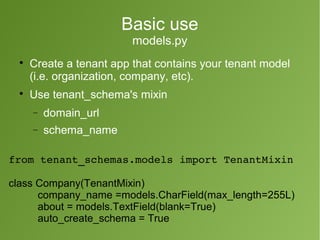
 Create a tenant app that contains your tenant model 
(i.e. organization, company, etc). 
 Use tenant_schema's mixin 
- domain_url 
- schema_name 
from tenant_schemas.models import TenantMixin 
class Company(TenantMixin) 
company_name =models.CharField(max_length=255L) 
about = models.TextField(blank=True) 
auto_create_schema = True
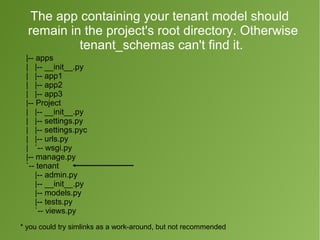
The app containing your tenant model should 
remain in the project's root directory. Otherwise 
tenant_schemas can't find it. 
|-- apps 
| |-- __init__.py 
| |-- app1 
| |-- app2 
| |-- app3 
|-- Project 
| |-- __init__.py 
| |-- settings.py 
| |-- settings.pyc 
| |-- urls.py 
| `-- wsgi.py 
|-- manage.py 
`-- tenant 
|-- admin.py 
|-- __init__.py 
|-- models.py 
|-- tests.py 
`-- views.py 
* you could try simlinks as a work-around, but not recommended
Basic Use 
Command Line & DNS 
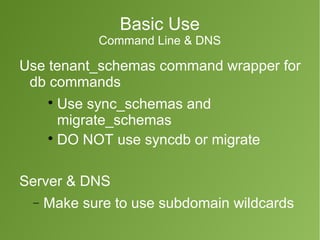
Use tenant_schemas command wrapper for 
db commands 
 Use sync_schemas and 
migrate_schemas 
 DO NOT use syncdb or migrate 
Server & DNS 
- Make sure to use subdomain wildcards
Basic Use 
Custom Commands 
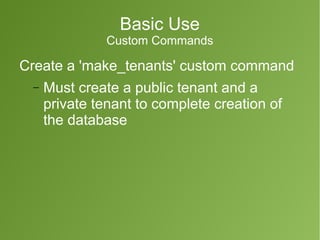
Create a 'make_tenants' custom command 
- Must create a public tenant and a 
private tenant to complete creation of 
the database
Custom Command: 
make_tenants.py 
from lawfirm.models import LawFirm 
from django.core.management.base import NoArgsCommand 
import os 
if os.environ['DJANGO_SETTINGS_MODULE'] == 'settings.base': 
from settings.base import BASE_URL 
else: 
from settings.dev import BASE_URL 
class Command(NoArgsCommand): 
def handle_noargs(self,**options): 
# create your public tenant 
LawFirm(domain_url=BASE_URL, 
schema_name='public', 
firm_name='LawCRM', 
).save() 
#test tenant to verify sub-domain routing 
LawFirm(domain_url='test.'+BASE_URL, 
schema_name='test', 
firm_name='Test Firm', 
).save()
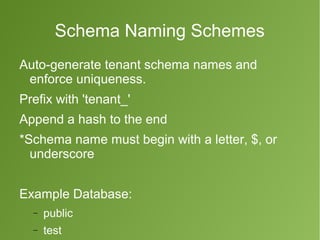
Schema Naming Schemes 
Auto-generate tenant schema names and 
enforce uniqueness. 
Prefix with 'tenant_' 
Append a hash to the end 
*Schema name must begin with a letter, $, or 
underscore 
Example Database: 
- public 
- test 
dev
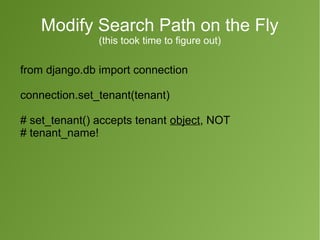
Modify Search Path on the Fly 
(this took time to figure out) 
from django.db import connection 
connection.set_tenant(tenant) 
# set_tenant() accepts tenant object, NOT 
# tenant_name!
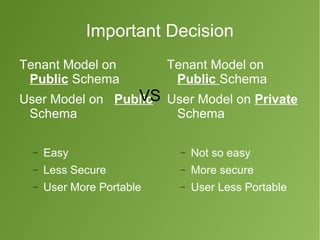
Important Decision 
Tenant Model on 
Public Schema 
User Model on Public 
Schema 
- Easy 
- Less Secure 
- User More Portable 
Tenant Model on 
Public Schema 
User Model on Private 
Schema 
- Not so easy 
- More secure 
- User Less Portable 
VS
Thanks! 
Scott Crespo 
scott@orlandods.com

Multi Tenancy With Python and Django

  • 1.
    Multi-Tenancy With Django Scott Crespo Software Engineer Director, Orlando Data Science Scott@OrlandoDS.com
  • 2.
    1. Multi-Tenant Architectures 2. Django Tenant Schemas Explained 3. Basic Use + Tips and Tricks
  • 3.
    Definition Multi-Tenancy: Asoftware architecture where a single application instance enables multiple organizations (tenants) to view their data. *This is a key component of XaaS (i.e. Something as a Service)
  • 4.
    Architectures Multi-tenant architecturescan be placed on a continuum Shared Separate
  • 5.
    Common Approaches toMulti-Tenancy
  • 6.
    Shared Architecutre OneDatabase + One Schema One database instance, and one public schema serve all tenants. Pros - Easy to build if data layer is simple - Every user on same domain (might be desirable) - Only use if a Tenant has exactly one user. Cons - Expensive (Makes lots of calls to db for tenant object)
  • 7.
    Isolated Architecture MultipleDatabases Each tenant has their own database instance Pros - Most Secure - Easier disaster recovery - Not expensive for compute resources Cons - Difficult to scale - Expensive storage resources - Difficult to share data across tenants
  • 8.
    Hybrid Architecture OneDatabase – Multiple Schemas One database instance for all tenants. Each tenant gets a dedicated schema. Shared 'public' schema Dedicated 'tenant' schema
  • 9.
    What's a Schema? Acts as a namespace in Postgres Adds an additional layer of organization/isolation to the database (Database → Schema → Table) ex) SELECT * FROM schema_name.table When a schema is not specified in the connection or query – only the 'public' schema is accessed Schemas to be queried can be specified in the app's database connection via 'SEARCH_PATH' parameter
  • 10.
    One Database –Multiple Schemas Pros - Scalable - Cheap - Simple - Semi-secure - Sharable Cons - Difficult disaster recovery - Less-secure than dedicated db's
  • 11.
    Django Tenant Schemas Implements Multi-Schema Approach Requires PostgreSQL Installation: $ pip install django-tenant-schemas Docs: Django-tenant-schemas.readthedocs.org
  • 12.
  • 13.
    The Tenant Object Stored on the 'public' schema Contains 2 Critical Fields - domain_url – the tenant's domain (foo.bar.com) - schema_name – the schema where the Tenant's isolated data is stored (tenant_jw8j23jp)
  • 14.
    Request Routing 1.Usermakes a request 2.Middleware looks up tenant object on the public schema and returns schema_name Tenant.objects.get(domain=request.domain).schema_name 1.Tenant_Schema's database wrapper adds schema_name to the connection's SEARCH_PATH cursor.execute('SET search_path = public, schema_name') 1.Subsequent Requests include schema_name in the search path
  • 16.
    Basic Use Settings.py Specify TENANT and SHARED apps  Caution! Don't include new tenant registration on tenants' apps Use the tenant_schemas postgres backend Use the tenant schemas middleware
  • 17.
    Basic use models.py  Create a tenant app that contains your tenant model (i.e. organization, company, etc).  Use tenant_schema's mixin - domain_url - schema_name from tenant_schemas.models import TenantMixin class Company(TenantMixin) company_name =models.CharField(max_length=255L) about = models.TextField(blank=True) auto_create_schema = True
  • 18.
    The app containingyour tenant model should remain in the project's root directory. Otherwise tenant_schemas can't find it. |-- apps | |-- __init__.py | |-- app1 | |-- app2 | |-- app3 |-- Project | |-- __init__.py | |-- settings.py | |-- settings.pyc | |-- urls.py | `-- wsgi.py |-- manage.py `-- tenant |-- admin.py |-- __init__.py |-- models.py |-- tests.py `-- views.py * you could try simlinks as a work-around, but not recommended
  • 19.
    Basic Use CommandLine & DNS Use tenant_schemas command wrapper for db commands  Use sync_schemas and migrate_schemas  DO NOT use syncdb or migrate Server & DNS - Make sure to use subdomain wildcards
  • 20.
    Basic Use CustomCommands Create a 'make_tenants' custom command - Must create a public tenant and a private tenant to complete creation of the database
  • 21.
    Custom Command: make_tenants.py from lawfirm.models import LawFirm from django.core.management.base import NoArgsCommand import os if os.environ['DJANGO_SETTINGS_MODULE'] == 'settings.base': from settings.base import BASE_URL else: from settings.dev import BASE_URL class Command(NoArgsCommand): def handle_noargs(self,**options): # create your public tenant LawFirm(domain_url=BASE_URL, schema_name='public', firm_name='LawCRM', ).save() #test tenant to verify sub-domain routing LawFirm(domain_url='test.'+BASE_URL, schema_name='test', firm_name='Test Firm', ).save()
  • 22.
    Schema Naming Schemes Auto-generate tenant schema names and enforce uniqueness. Prefix with 'tenant_' Append a hash to the end *Schema name must begin with a letter, $, or underscore Example Database: - public - test dev
  • 23.
    Modify Search Pathon the Fly (this took time to figure out) from django.db import connection connection.set_tenant(tenant) # set_tenant() accepts tenant object, NOT # tenant_name!
  • 24.
    Important Decision TenantModel on Public Schema User Model on Public Schema - Easy - Less Secure - User More Portable Tenant Model on Public Schema User Model on Private Schema - Not so easy - More secure - User Less Portable VS
  • 25.
    Thanks! Scott Crespo scott@orlandods.com