GoDataDriven
PROUDLY PART OF THE XEBIA GROUP
@asnare / @fzk / @godatadriven
signal@godatadriven.com
Divolte Collector
Andrew Snare / Friso van Vollenhoven
Because life’s too short for log file parsing
99% of all data in Hadoop
156.68.7.63 - - [28/Jul/1995:11:53:28 -0400] "GET /images/WORLD-logosmall.gif HTTP/1.0" 200 669
137.244.160.140 - - [28/Jul/1995:11:53:29 -0400] "GET /images/WORLD-logosmall.gif HTTP/1.0" 304 0
163.205.160.5 - - [28/Jul/1995:11:53:31 -0400] "GET /shuttle/countdown/ HTTP/1.0" 200 4324
163.205.160.5 - - [28/Jul/1995:11:53:40 -0400] "GET /shuttle/countdown/count70.gif HTTP/1.0" 200 46573
140.229.50.189 - - [28/Jul/1995:11:53:54 -0400] "GET /shuttle/missions/sts-67/images/images.html HTTP/1.0"
163.206.89.4 - - [28/Jul/1995:11:54:02 -0400] "GET /shuttle/technology/sts-newsref/sts-mps.html HTTP/1.0" 2
163.206.89.4 - - [28/Jul/1995:11:54:05 -0400] "GET /images/KSC-logosmall.gif HTTP/1.0" 200 1204
163.206.89.4 - - [28/Jul/1995:11:54:05 -0400] "GET /images/shuttle-patch-logo.gif HTTP/1.0" 200 891
131.110.53.48 - - [28/Jul/1995:11:54:07 -0400] "GET /shuttle/technology/sts-newsref/stsref-toc.html HTTP/1.
163.205.160.5 - - [28/Jul/1995:11:54:14 -0400] "GET /images/KSC-logosmall.gif HTTP/1.0" 200 1204
130.160.196.81 - - [28/Jul/1995:11:54:15 -0400] "GET /shuttle/resources/orbiters/challenger.html HTTP/1.0"
131.110.53.48 - - [28/Jul/1995:11:54:16 -0400] "GET /images/shuttle-patch-small.gif HTTP/1.0" 200 4179
137.244.160.140 - - [28/Jul/1995:11:54:16 -0400] "GET /shuttle/missions/sts-69/mission-sts-69.html HTTP/1.0
131.110.53.48 - - [28/Jul/1995:11:54:18 -0400] "GET /images/KSC-logosmall.gif HTTP/1.0" 200 1204
131.110.53.48 - - [28/Jul/1995:11:54:19 -0400] "GET /images/launch-logo.gif HTTP/1.0" 200 1713
130.160.196.81 - - [28/Jul/1995:11:54:19 -0400] "GET /shuttle/resources/orbiters/challenger-logo.gif HTTP/1
163.205.160.5 - - [28/Jul/1995:11:54:25 -0400] "GET /shuttle/missions/sts-70/images/images.html HTTP/1.0" 2
130.181.4.158 - - [28/Jul/1995:11:54:26 -0400] "GET /history/rocket-history.txt HTTP/1.0" 200 26990
137.244.160.140 - - [28/Jul/1995:11:54:30 -0400] "GET /images/KSC-logosmall.gif HTTP/1.0" 304 0
137.244.160.140 - - [28/Jul/1995:11:54:31 -0400] "GET /images/launch-logo.gif HTTP/1.0" 304 0
137.244.160.140 - - [28/Jul/1995:11:54:38 -0400] "GET /history/apollo/images/apollo-logo1.gif HTTP/1.0" 304
168.178.17.149 - - [28/Jul/1995:11:54:48 -0400] "GET /shuttle/missions/sts-65/mission-sts-65.html HTTP/1.0"
140.229.50.189 - - [28/Jul/1995:11:54:53 -0400] "GET /shuttle/missions/sts-67/images/KSC-95EC-0390.jpg HTTP
131.110.53.48 - - [28/Jul/1995:11:54:58 -0400] "GET /shuttle/missions/missions.html HTTP/1.0" 200 8677
131.110.53.48 - - [28/Jul/1995:11:55:02 -0400] "GET /images/launchmedium.gif HTTP/1.0" 200 11853
131.110.53.48 - - [28/Jul/1995:11:55:05 -0400] "GET /images/NASA-logosmall.gif HTTP/1.0" 200 786
128.159.111.141 - - [28/Jul/1995:11:55:09 -0400] "GET /procurement/procurement.html HTTP/1.0" 200 3499
128.159.111.141 - - [28/Jul/1995:11:55:10 -0400] "GET /images/op-logo-small.gif HTTP/1.0" 200 14915
128.159.111.141 - - [28/Jul/1995:11:55:11 -0400] "GET /images/NASA-logosmall.gif HTTP/1.0" 200 786
128.159.111.141 - - [28/Jul/1995:11:55:11 -0400] "GET /images/KSC-logosmall.gif HTTP/1.0" 200 1204
How do we use our data?
•Ad hoc
•Batch
•Streaming
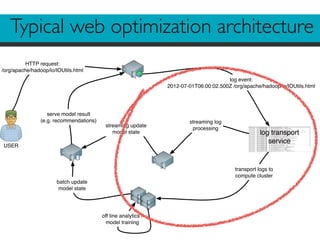
USER
HTTP request:
/org/apache/hadoop/io/IOUtils.html
log transport
service
log event:
2012-07-01T06:00:02.500Z /org/apache/hadoop/io/IOUtils.html
transport logs to
compute cluster
off line analytics /
model training
batch update
model state
serve model result
(e.g. recommendations) streaming log
processing
streaming update
model state
Typical web optimization architecture
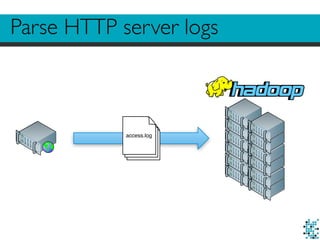
Parse HTTP server logs
access.log
How did it get there?
Option 1: parse HTTP server logs
•Ship log files on a schedule
•Parse using MapReduce jobs
•Batch analytics jobs feed online systems
HTTP server log parsing
•Inherently batch oriented
•Schema-less (URL format is the schema)
•Initial job to parse logs into structured format
•Usually multiple versions of parsers required
•Requires sessionizing
•Logs usually have more than you ask for (bots,
image requests, spiders, health check, etc.)
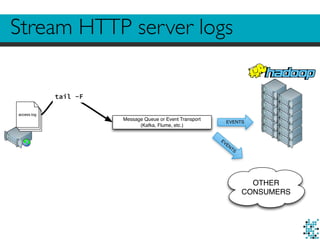
Stream HTTP server logs
access.log
Message Queue or Event Transport
(Kafka, Flume, etc.)
EVENTS
tail -F
EVENTS
OTHER
CONSUMERS
How did it get there?
Option 2: stream HTTP server logs
•tail -F logfiles
•Use a queue for transport (e.g. Flume or Kafka)
•Parse logs on the fly
•Or write semi-schema’d logs, like JSON
•Parse again for batch work load
Stream HTTP server logs
•Allows for near real-time event handling when
consuming from queues
•Sessionizing? Duplicates? Bots?
•Still requires parser logic
•No schema
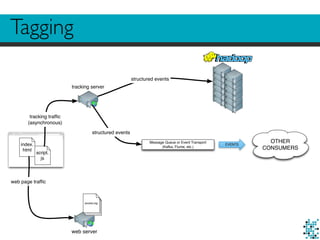
Tagging
index.
html
script.
js
web server
access.log
tracking server
Message Queue or Event Transport
(Kafka, Flume, etc.)
EVENTS
OTHER
CONSUMERS
web page traffic
tracking traffic
(asynchronous)
structured events
structured events
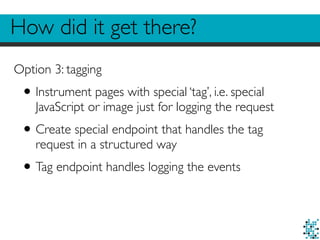
How did it get there?
Option 3: tagging
•Instrument pages with special ‘tag’, i.e. special
JavaScript or image just for logging the request
•Create special endpoint that handles the tag
request in a structured way
•Tag endpoint handles logging the events
Tagging
•Not a new idea (Google Analytics, Omniture,
etc.)
•Less garbage traffic, because a browser is
required to evaluate the tag
•Event logging is asynchronous
•Easier to do inflight processing (apply a schema,
add enrichments, etc.)
•Allows for custom events (other than page view)
Also…
•Manage session through cookies on the client
side
•Incoming data is already sessionized
•Extract additional information from clients
•Screen resolution
•Viewport size
•Timezone
Looks familiar?
<script>
(function(i,s,o,g,r,a,m){i['GoogleAnalyticsObject']=r;i[r]=i[r]||function(){
(i[r].q=i[r].q||[]).push(arguments)},i[r].l=1*new Date();a=s.createElement(o),
m=s.getElementsByTagName(o)[0];a.async=1;a.src=g;m.parentNode.insertBefore(a,m)
})(window,document,'script','//www.google-analytics.com/analytics.js','ga');
ga('create', 'UA-40578233-2', 'godatadriven.com');
ga('send', 'pageview');
</script>
Divolte Collector
Click stream
data collection
for Hadoop
and Kafka.
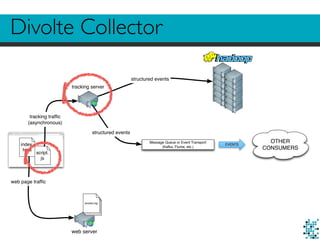
Divolte Collector
index.
html
script.
js
web server
access.log
tracking server
Message Queue or Event Transport
(Kafka, Flume, etc.)
EVENTS
OTHER
CONSUMERS
web page traffic
tracking traffic
(asynchronous)
structured events
structured events
Divolte Collector:Vision
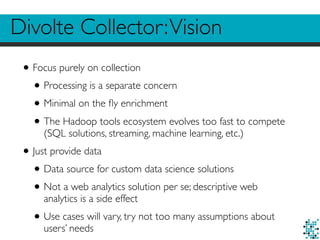
•Focus purely on collection
•Processing is a separate concern
•Minimal on the fly enrichment
•The Hadoop tools ecosystem evolves too fast to compete
(SQL solutions, streaming, machine learning, etc.)
•Just provide data
•Data source for custom data science solutions
•Not a web analytics solution per se; descriptive web
analytics is a side effect
•Use cases will vary, try not too many assumptions about
users’ needs
Divolte Collector:Vision
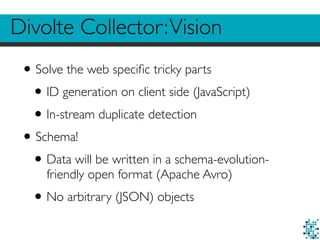
•Solve the web specific tricky parts
•ID generation on client side (JavaScript)
•In-stream duplicate detection
•Schema!
•Data will be written in a schema-evolution-
friendly open format (Apache Avro)
•No arbitrary (JSON) objects
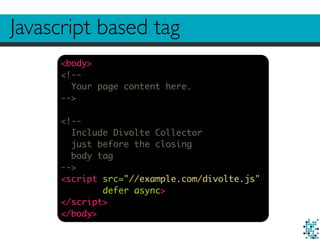
Javascript based tag
<body>
<!--
Your page content here.
-->
<!--
Include Divolte Collector
just before the closing
body tag
-->
<script src="//example.com/divolte.js"
defer async>
</script>
</body>
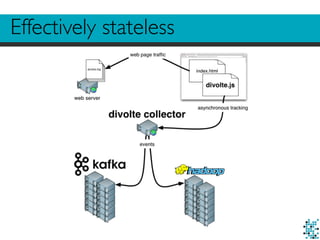
Effectively stateless
Data with a schema in Avro
{
"namespace": "com.example.record",
"type": "record",
"name": "MyEventRecord",
"fields": [
{ "name": "location", "type": "string" },
{ "name": "pageType", "type": "string" },
{ "name": "timestamp", "type": "long" }
]
}
Map incoming data onto Avro records
mapping {
map clientTimestamp() onto 'timestamp'
map location() onto 'location'
def u = parse location() to uri
section {
when u.path().equalTo('/checkout') apply {
map 'checkout' onto 'pageType'
exit()
}
map 'normal' onto 'pageType'
}
}
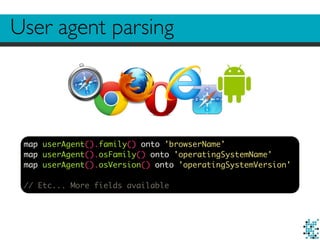
User agent parsing
map userAgent().family() onto 'browserName'
map userAgent().osFamily() onto 'operatingSystemName'
map userAgent().osVersion() onto 'operatingSystemVersion'
// Etc... More fields available
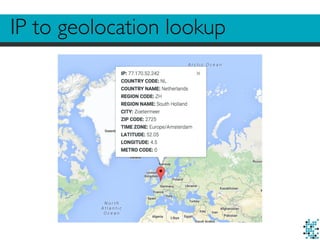
IP to geolocation lookup
Useful performance
Requests per second: 14010.80 [#/sec] (mean)
Time per request: 0.571 [ms] (mean)
Time per request: 0.071 [ms] (mean, across all concurrent requests)
Transfer rate: 4516.55 [Kbytes/sec] received
Connection Times (ms)
min mean[+/-sd] median max
Connect: 0 0 0.1 0 1
Processing: 0 0 0.2 0 3
Waiting: 0 0 0.2 0 3
Total: 0 1 0.2 1 3
Percentage of the requests served within a certain time (ms)
50% 1
66% 1
75% 1
80% 1
90% 1
95% 1
98% 1
99% 1
100% 3 (longest request)
Custom events
divolte.signal('addToBasket', {
productId: 309125,
count: 1
})
In the page (Javascript)
map eventParameter('productId') onto 'basketProductId'
map eventParameter('count') onto 'basketNumProducts'
In the mapping (Groovy)
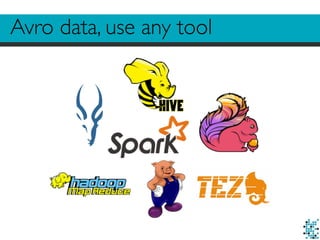
Avro data, use any tool
Divolte Collector
•http://divolte.io
•Apache License,Version 2.0
Examples
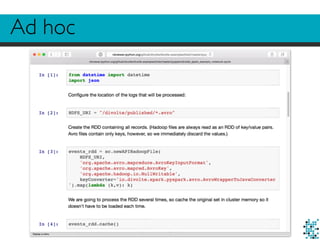
Ad hoc
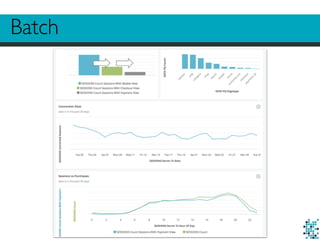
Batch
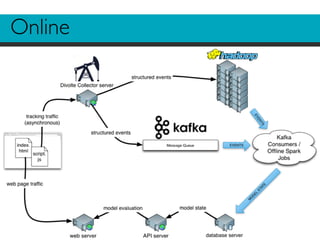
Online
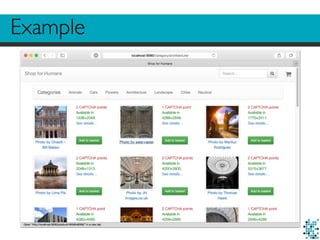
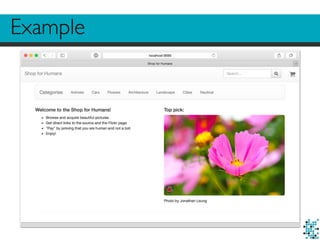
Example
Example
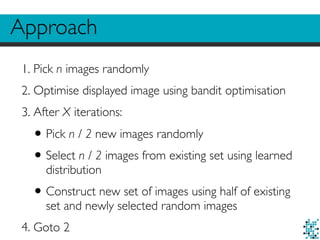
Approach
1. Pick n images randomly
2. Optimise displayed image using bandit optimisation
3. After X iterations:
•Pick n / 2 new images randomly
•Select n / 2 images from existing set using learned
distribution
•Construct new set of images using half of existing
set and newly selected random images
4. Goto 2
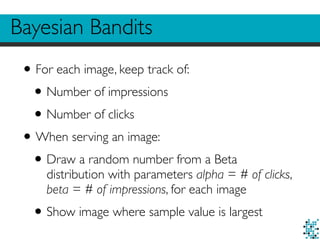
Bayesian Bandits
•For each image, keep track of:
•Number of impressions
•Number of clicks
•When serving an image:
•Draw a random number from a Beta
distribution with parameters alpha = # of clicks,
beta = # of impressions, for each image
•Show image where sample value is largest
Bayesian Bandits
•https://en.wikipedia.org/wiki/Multi-armed_bandit
•http://tdunning.blogspot.nl/2012/02/bayesian-
bandits.html
•https://www.chrisstucchio.com/blog/2013/
bayesian_bandit.html
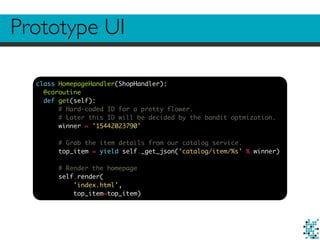
Prototype UI
class HomepageHandler(ShopHandler):
@coroutine
def get(self):
# Hard-coded ID for a pretty flower.
# Later this ID will be decided by the bandit optmization.
winner = '15442023790'
# Grab the item details from our catalog service.
top_item = yield self._get_json('catalog/item/%s' % winner)
# Render the homepage
self.render(
'index.html',
top_item=top_item)
Prototype UI
<div class="col-md-6">
<h4>Top pick:</h4>
<p>
<!-- Link to the product page with a source identifier for tracking -->
<a href="/product/{{ top_item['id'] }}/#/?source=top_pick">
<img class="img-responsive img-rounded" src="{{ top_item['variants']['Medium']['img_source'] }}">
<!-- Signal that we served an impression of this image -->
<script>divolte.signal('impression', { source: 'top_pick', productId: '{{ top_item['id'] }}'})</script>
</a>
</p>
<p>
Photo by {{ top_item['owner']['real_name'] or top_item['owner']['user_name']}}
</p>
</div>
Data collection in Divolte Collector
{
"name": "source",
"type": ["null", "string"],
"default": null
}
def locationUri = parse location() to uri
when eventType().equalTo('pageView') apply {
def fragmentUri = parse locationUri.rawFragment() to uri
map fragmentUri.query().value('source') onto 'source'
}
when eventType().equalTo('impression') apply {
map eventParameters().value('productId') onto 'productId'
map eventParameters().value('source') onto 'source'
}
Keep counts in Redis
{
'c|14502147379': '2',
'c|15106342717': '2',
'c|15624953471': '1',
'c|9609633287': '1',
'i|14502147379': '2',
'i|15106342717': '3',
'i|15624953471': '2',
'i|9609633287': '3'
}
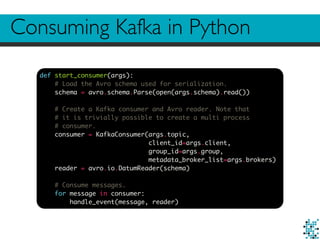
Consuming Kafka in Python
def start_consumer(args):
# Load the Avro schema used for serialization.
schema = avro.schema.Parse(open(args.schema).read())
# Create a Kafka consumer and Avro reader. Note that
# it is trivially possible to create a multi process
# consumer.
consumer = KafkaConsumer(args.topic,
client_id=args.client,
group_id=args.group,
metadata_broker_list=args.brokers)
reader = avro.io.DatumReader(schema)
# Consume messages.
for message in consumer:
handle_event(message, reader)
Consuming Kafka in Python
def handle_event(message, reader):
# Decode Avro bytes into a Python dictionary.
message_bytes = io.BytesIO(message.value)
decoder = avro.io.BinaryDecoder(message_bytes)
event = reader.read(decoder)
# Event logic.
if 'top_pick' == event['source'] and 'pageView' == event['eventType']:
# Register a click.
redis_client.hincrby(
ITEM_HASH_KEY,
CLICK_KEY_PREFIX + ascii_bytes(event['productId']),
1)
elif 'top_pick' == event['source'] and 'impression' == event['eventType']:
# Register an impression and increment experiment count.
p = redis_client.pipeline()
p.incr(EXPERIMENT_COUNT_KEY)
p.hincrby(
ITEM_HASH_KEY,
IMPRESSION_KEY_PREFIX + ascii_bytes(event['productId']),
1)
experiment_count, ingnored = p.execute()
if experiment_count == REFRESH_INTERVAL:
refresh_items()
def refresh_items():
# Fetch current model state. We convert everything to str.
current_item_dict = redis_client.hgetall(ITEM_HASH_KEY)
current_items = numpy.unique([k[2:] for k in current_item_dict.keys()])
# Fetch random items from ElasticSearch. Note we fetch more than we need,
# but we filter out items already present in the current set and truncate
# the list to the desired size afterwards.
random_items = [
ascii_bytes(item)
for item in random_item_set(NUM_ITEMS + NUM_ITEMS - len(current_items) // 2)
if not item in current_items][:NUM_ITEMS - len(current_items) // 2]
# Draw random samples.
samples = [
numpy.random.beta(
int(current_item_dict[CLICK_KEY_PREFIX + item]),
int(current_item_dict[IMPRESSION_KEY_PREFIX + item]))
for item in current_items]
# Select top half by sample values. current_items is conveniently
# a Numpy array here.
survivors = current_items[numpy.argsort(samples)[len(current_items) // 2:]]
# New item set is survivors plus the random ones.
new_items = numpy.concatenate([survivors, random_items])
# Update model state to reflect new item set. This operation is atomic
# in Redis.
p = redis_client.pipeline(transaction=True)
p.set(EXPERIMENT_COUNT_KEY, 1)
p.delete(ITEM_HASH_KEY)
for item in new_items:
p.hincrby(ITEM_HASH_KEY, CLICK_KEY_PREFIX + item, 1)
p.hincrby(ITEM_HASH_KEY, IMPRESSION_KEY_PREFIX + item, 1)
p.execute()
Serving a recommendation
class BanditHandler(web.RequestHandler):
redis_client = None
def initialize(self, redis_client):
self.redis_client = redis_client
@gen.coroutine
def get(self):
# Fetch model state.
item_dict = yield gen.Task(self.redis_client.hgetall, ITEM_HASH_KEY)
items = numpy.unique([k[2:] for k in item_dict.keys()])
# Draw random samples.
samples = [
numpy.random.beta(
int(item_dict[CLICK_KEY_PREFIX + item]),
int(item_dict[IMPRESSION_KEY_PREFIX + item]))
for item in items]
# Select item with largest sample value.
winner = items[numpy.argmax(samples)]
self.write(winner)
Integrate
class HomepageHandler(ShopHandler):
@coroutine
def get(self):
http = AsyncHTTPClient()
request = HTTPRequest(url='http://localhost:8989/item', method='GET')
response = yield http.fetch(request)
winner = json_decode(response.body)
top_item = yield self._get_json('catalog/item/%s' % winner)
self.render(
'index.html',
top_item=top_item)
Roadmap
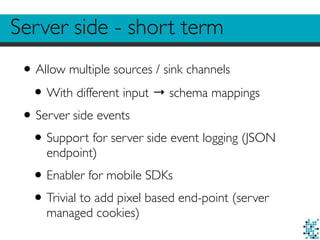
Server side - short term
•Allow multiple sources / sink channels
•With different input → schema mappings
•Server side events
•Support for server side event logging (JSON
endpoint)
•Enabler for mobile SDKs
•Trivial to add pixel based end-point (server
managed cookies)
Client side
•Specific browser related bug fixes (IE9)
•Allow for setting session scoped parameters
•JavaScript Data Layer
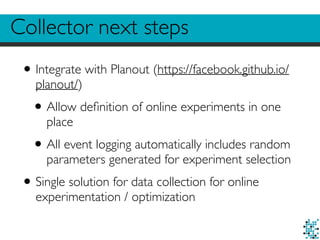
Collector next steps
•Integrate with Planout (https://facebook.github.io/
planout/)
•Allow definition of online experiments in one
place
•All event logging automatically includes random
parameters generated for experiment selection
•Single solution for data collection for online
experimentation / optimization
References
•http://blog.godatadriven.com/rapid-prototyping-
online-machine-learning-divolte-collector.html
•http://divolte.io
•https://github.com/divolte/divolte-collector
•https://github.com/divolte/divolte-examples
GoDataDriven
We’re hiring / Questions? / Thank you!
@asnare / @fzk / @godatadriven
signal@godatadriven.com
Andrew Snare / Friso van Vollenhoven

Divolte collector overview

  • 1.
    GoDataDriven PROUDLY PART OFTHE XEBIA GROUP @asnare / @fzk / @godatadriven signal@godatadriven.com Divolte Collector Andrew Snare / Friso van Vollenhoven Because life’s too short for log file parsing
  • 2.
    99% of alldata in Hadoop 156.68.7.63 - - [28/Jul/1995:11:53:28 -0400] "GET /images/WORLD-logosmall.gif HTTP/1.0" 200 669 137.244.160.140 - - [28/Jul/1995:11:53:29 -0400] "GET /images/WORLD-logosmall.gif HTTP/1.0" 304 0 163.205.160.5 - - [28/Jul/1995:11:53:31 -0400] "GET /shuttle/countdown/ HTTP/1.0" 200 4324 163.205.160.5 - - [28/Jul/1995:11:53:40 -0400] "GET /shuttle/countdown/count70.gif HTTP/1.0" 200 46573 140.229.50.189 - - [28/Jul/1995:11:53:54 -0400] "GET /shuttle/missions/sts-67/images/images.html HTTP/1.0" 163.206.89.4 - - [28/Jul/1995:11:54:02 -0400] "GET /shuttle/technology/sts-newsref/sts-mps.html HTTP/1.0" 2 163.206.89.4 - - [28/Jul/1995:11:54:05 -0400] "GET /images/KSC-logosmall.gif HTTP/1.0" 200 1204 163.206.89.4 - - [28/Jul/1995:11:54:05 -0400] "GET /images/shuttle-patch-logo.gif HTTP/1.0" 200 891 131.110.53.48 - - [28/Jul/1995:11:54:07 -0400] "GET /shuttle/technology/sts-newsref/stsref-toc.html HTTP/1. 163.205.160.5 - - [28/Jul/1995:11:54:14 -0400] "GET /images/KSC-logosmall.gif HTTP/1.0" 200 1204 130.160.196.81 - - [28/Jul/1995:11:54:15 -0400] "GET /shuttle/resources/orbiters/challenger.html HTTP/1.0" 131.110.53.48 - - [28/Jul/1995:11:54:16 -0400] "GET /images/shuttle-patch-small.gif HTTP/1.0" 200 4179 137.244.160.140 - - [28/Jul/1995:11:54:16 -0400] "GET /shuttle/missions/sts-69/mission-sts-69.html HTTP/1.0 131.110.53.48 - - [28/Jul/1995:11:54:18 -0400] "GET /images/KSC-logosmall.gif HTTP/1.0" 200 1204 131.110.53.48 - - [28/Jul/1995:11:54:19 -0400] "GET /images/launch-logo.gif HTTP/1.0" 200 1713 130.160.196.81 - - [28/Jul/1995:11:54:19 -0400] "GET /shuttle/resources/orbiters/challenger-logo.gif HTTP/1 163.205.160.5 - - [28/Jul/1995:11:54:25 -0400] "GET /shuttle/missions/sts-70/images/images.html HTTP/1.0" 2 130.181.4.158 - - [28/Jul/1995:11:54:26 -0400] "GET /history/rocket-history.txt HTTP/1.0" 200 26990 137.244.160.140 - - [28/Jul/1995:11:54:30 -0400] "GET /images/KSC-logosmall.gif HTTP/1.0" 304 0 137.244.160.140 - - [28/Jul/1995:11:54:31 -0400] "GET /images/launch-logo.gif HTTP/1.0" 304 0 137.244.160.140 - - [28/Jul/1995:11:54:38 -0400] "GET /history/apollo/images/apollo-logo1.gif HTTP/1.0" 304 168.178.17.149 - - [28/Jul/1995:11:54:48 -0400] "GET /shuttle/missions/sts-65/mission-sts-65.html HTTP/1.0" 140.229.50.189 - - [28/Jul/1995:11:54:53 -0400] "GET /shuttle/missions/sts-67/images/KSC-95EC-0390.jpg HTTP 131.110.53.48 - - [28/Jul/1995:11:54:58 -0400] "GET /shuttle/missions/missions.html HTTP/1.0" 200 8677 131.110.53.48 - - [28/Jul/1995:11:55:02 -0400] "GET /images/launchmedium.gif HTTP/1.0" 200 11853 131.110.53.48 - - [28/Jul/1995:11:55:05 -0400] "GET /images/NASA-logosmall.gif HTTP/1.0" 200 786 128.159.111.141 - - [28/Jul/1995:11:55:09 -0400] "GET /procurement/procurement.html HTTP/1.0" 200 3499 128.159.111.141 - - [28/Jul/1995:11:55:10 -0400] "GET /images/op-logo-small.gif HTTP/1.0" 200 14915 128.159.111.141 - - [28/Jul/1995:11:55:11 -0400] "GET /images/NASA-logosmall.gif HTTP/1.0" 200 786 128.159.111.141 - - [28/Jul/1995:11:55:11 -0400] "GET /images/KSC-logosmall.gif HTTP/1.0" 200 1204
  • 3.
    How do weuse our data? •Ad hoc •Batch •Streaming
  • 4.
    USER HTTP request: /org/apache/hadoop/io/IOUtils.html log transport service logevent: 2012-07-01T06:00:02.500Z /org/apache/hadoop/io/IOUtils.html transport logs to compute cluster off line analytics / model training batch update model state serve model result (e.g. recommendations) streaming log processing streaming update model state Typical web optimization architecture
  • 5.
    Parse HTTP serverlogs access.log
  • 6.
    How did itget there? Option 1: parse HTTP server logs •Ship log files on a schedule •Parse using MapReduce jobs •Batch analytics jobs feed online systems
  • 7.
    HTTP server logparsing •Inherently batch oriented •Schema-less (URL format is the schema) •Initial job to parse logs into structured format •Usually multiple versions of parsers required •Requires sessionizing •Logs usually have more than you ask for (bots, image requests, spiders, health check, etc.)
  • 8.
    Stream HTTP serverlogs access.log Message Queue or Event Transport (Kafka, Flume, etc.) EVENTS tail -F EVENTS OTHER CONSUMERS
  • 9.
    How did itget there? Option 2: stream HTTP server logs •tail -F logfiles •Use a queue for transport (e.g. Flume or Kafka) •Parse logs on the fly •Or write semi-schema’d logs, like JSON •Parse again for batch work load
  • 10.
    Stream HTTP serverlogs •Allows for near real-time event handling when consuming from queues •Sessionizing? Duplicates? Bots? •Still requires parser logic •No schema
  • 11.
    Tagging index. html script. js web server access.log tracking server MessageQueue or Event Transport (Kafka, Flume, etc.) EVENTS OTHER CONSUMERS web page traffic tracking traffic (asynchronous) structured events structured events
  • 12.
    How did itget there? Option 3: tagging •Instrument pages with special ‘tag’, i.e. special JavaScript or image just for logging the request •Create special endpoint that handles the tag request in a structured way •Tag endpoint handles logging the events
  • 13.
    Tagging •Not a newidea (Google Analytics, Omniture, etc.) •Less garbage traffic, because a browser is required to evaluate the tag •Event logging is asynchronous •Easier to do inflight processing (apply a schema, add enrichments, etc.) •Allows for custom events (other than page view)
  • 14.
    Also… •Manage session throughcookies on the client side •Incoming data is already sessionized •Extract additional information from clients •Screen resolution •Viewport size •Timezone
  • 15.
  • 16.
    Divolte Collector Click stream datacollection for Hadoop and Kafka.
  • 17.
    Divolte Collector index. html script. js web server access.log trackingserver Message Queue or Event Transport (Kafka, Flume, etc.) EVENTS OTHER CONSUMERS web page traffic tracking traffic (asynchronous) structured events structured events
  • 18.
    Divolte Collector:Vision •Focus purelyon collection •Processing is a separate concern •Minimal on the fly enrichment •The Hadoop tools ecosystem evolves too fast to compete (SQL solutions, streaming, machine learning, etc.) •Just provide data •Data source for custom data science solutions •Not a web analytics solution per se; descriptive web analytics is a side effect •Use cases will vary, try not too many assumptions about users’ needs
  • 19.
    Divolte Collector:Vision •Solve theweb specific tricky parts •ID generation on client side (JavaScript) •In-stream duplicate detection •Schema! •Data will be written in a schema-evolution- friendly open format (Apache Avro) •No arbitrary (JSON) objects
  • 20.
    Javascript based tag <body> <!-- Yourpage content here. --> <!-- Include Divolte Collector just before the closing body tag --> <script src="//example.com/divolte.js" defer async> </script> </body>
  • 21.
  • 22.
    Data with aschema in Avro { "namespace": "com.example.record", "type": "record", "name": "MyEventRecord", "fields": [ { "name": "location", "type": "string" }, { "name": "pageType", "type": "string" }, { "name": "timestamp", "type": "long" } ] }
  • 23.
    Map incoming dataonto Avro records mapping { map clientTimestamp() onto 'timestamp' map location() onto 'location' def u = parse location() to uri section { when u.path().equalTo('/checkout') apply { map 'checkout' onto 'pageType' exit() } map 'normal' onto 'pageType' } }
  • 24.
    User agent parsing mapuserAgent().family() onto 'browserName' map userAgent().osFamily() onto 'operatingSystemName' map userAgent().osVersion() onto 'operatingSystemVersion' // Etc... More fields available
  • 25.
  • 26.
    Useful performance Requests persecond: 14010.80 [#/sec] (mean) Time per request: 0.571 [ms] (mean) Time per request: 0.071 [ms] (mean, across all concurrent requests) Transfer rate: 4516.55 [Kbytes/sec] received Connection Times (ms) min mean[+/-sd] median max Connect: 0 0 0.1 0 1 Processing: 0 0 0.2 0 3 Waiting: 0 0 0.2 0 3 Total: 0 1 0.2 1 3 Percentage of the requests served within a certain time (ms) 50% 1 66% 1 75% 1 80% 1 90% 1 95% 1 98% 1 99% 1 100% 3 (longest request)
  • 27.
    Custom events divolte.signal('addToBasket', { productId:309125, count: 1 }) In the page (Javascript) map eventParameter('productId') onto 'basketProductId' map eventParameter('count') onto 'basketNumProducts' In the mapping (Groovy)
  • 28.
  • 29.
  • 30.
  • 31.
  • 32.
  • 33.
  • 34.
  • 35.
  • 36.
    Approach 1. Pick nimages randomly 2. Optimise displayed image using bandit optimisation 3. After X iterations: •Pick n / 2 new images randomly •Select n / 2 images from existing set using learned distribution •Construct new set of images using half of existing set and newly selected random images 4. Goto 2
  • 37.
    Bayesian Bandits •For eachimage, keep track of: •Number of impressions •Number of clicks •When serving an image: •Draw a random number from a Beta distribution with parameters alpha = # of clicks, beta = # of impressions, for each image •Show image where sample value is largest
  • 38.
  • 39.
    Prototype UI class HomepageHandler(ShopHandler): @coroutine defget(self): # Hard-coded ID for a pretty flower. # Later this ID will be decided by the bandit optmization. winner = '15442023790' # Grab the item details from our catalog service. top_item = yield self._get_json('catalog/item/%s' % winner) # Render the homepage self.render( 'index.html', top_item=top_item)
  • 40.
    Prototype UI <div class="col-md-6"> <h4>Toppick:</h4> <p> <!-- Link to the product page with a source identifier for tracking --> <a href="/product/{{ top_item['id'] }}/#/?source=top_pick"> <img class="img-responsive img-rounded" src="{{ top_item['variants']['Medium']['img_source'] }}"> <!-- Signal that we served an impression of this image --> <script>divolte.signal('impression', { source: 'top_pick', productId: '{{ top_item['id'] }}'})</script> </a> </p> <p> Photo by {{ top_item['owner']['real_name'] or top_item['owner']['user_name']}} </p> </div>
  • 41.
    Data collection inDivolte Collector { "name": "source", "type": ["null", "string"], "default": null } def locationUri = parse location() to uri when eventType().equalTo('pageView') apply { def fragmentUri = parse locationUri.rawFragment() to uri map fragmentUri.query().value('source') onto 'source' } when eventType().equalTo('impression') apply { map eventParameters().value('productId') onto 'productId' map eventParameters().value('source') onto 'source' }
  • 42.
    Keep counts inRedis { 'c|14502147379': '2', 'c|15106342717': '2', 'c|15624953471': '1', 'c|9609633287': '1', 'i|14502147379': '2', 'i|15106342717': '3', 'i|15624953471': '2', 'i|9609633287': '3' }
  • 43.
    Consuming Kafka inPython def start_consumer(args): # Load the Avro schema used for serialization. schema = avro.schema.Parse(open(args.schema).read()) # Create a Kafka consumer and Avro reader. Note that # it is trivially possible to create a multi process # consumer. consumer = KafkaConsumer(args.topic, client_id=args.client, group_id=args.group, metadata_broker_list=args.brokers) reader = avro.io.DatumReader(schema) # Consume messages. for message in consumer: handle_event(message, reader)
  • 44.
    Consuming Kafka inPython def handle_event(message, reader): # Decode Avro bytes into a Python dictionary. message_bytes = io.BytesIO(message.value) decoder = avro.io.BinaryDecoder(message_bytes) event = reader.read(decoder) # Event logic. if 'top_pick' == event['source'] and 'pageView' == event['eventType']: # Register a click. redis_client.hincrby( ITEM_HASH_KEY, CLICK_KEY_PREFIX + ascii_bytes(event['productId']), 1) elif 'top_pick' == event['source'] and 'impression' == event['eventType']: # Register an impression and increment experiment count. p = redis_client.pipeline() p.incr(EXPERIMENT_COUNT_KEY) p.hincrby( ITEM_HASH_KEY, IMPRESSION_KEY_PREFIX + ascii_bytes(event['productId']), 1) experiment_count, ingnored = p.execute() if experiment_count == REFRESH_INTERVAL: refresh_items()
  • 45.
    def refresh_items(): # Fetchcurrent model state. We convert everything to str. current_item_dict = redis_client.hgetall(ITEM_HASH_KEY) current_items = numpy.unique([k[2:] for k in current_item_dict.keys()]) # Fetch random items from ElasticSearch. Note we fetch more than we need, # but we filter out items already present in the current set and truncate # the list to the desired size afterwards. random_items = [ ascii_bytes(item) for item in random_item_set(NUM_ITEMS + NUM_ITEMS - len(current_items) // 2) if not item in current_items][:NUM_ITEMS - len(current_items) // 2] # Draw random samples. samples = [ numpy.random.beta( int(current_item_dict[CLICK_KEY_PREFIX + item]), int(current_item_dict[IMPRESSION_KEY_PREFIX + item])) for item in current_items] # Select top half by sample values. current_items is conveniently # a Numpy array here. survivors = current_items[numpy.argsort(samples)[len(current_items) // 2:]] # New item set is survivors plus the random ones. new_items = numpy.concatenate([survivors, random_items]) # Update model state to reflect new item set. This operation is atomic # in Redis. p = redis_client.pipeline(transaction=True) p.set(EXPERIMENT_COUNT_KEY, 1) p.delete(ITEM_HASH_KEY) for item in new_items: p.hincrby(ITEM_HASH_KEY, CLICK_KEY_PREFIX + item, 1) p.hincrby(ITEM_HASH_KEY, IMPRESSION_KEY_PREFIX + item, 1) p.execute()
  • 46.
    Serving a recommendation classBanditHandler(web.RequestHandler): redis_client = None def initialize(self, redis_client): self.redis_client = redis_client @gen.coroutine def get(self): # Fetch model state. item_dict = yield gen.Task(self.redis_client.hgetall, ITEM_HASH_KEY) items = numpy.unique([k[2:] for k in item_dict.keys()]) # Draw random samples. samples = [ numpy.random.beta( int(item_dict[CLICK_KEY_PREFIX + item]), int(item_dict[IMPRESSION_KEY_PREFIX + item])) for item in items] # Select item with largest sample value. winner = items[numpy.argmax(samples)] self.write(winner)
  • 47.
    Integrate class HomepageHandler(ShopHandler): @coroutine def get(self): http= AsyncHTTPClient() request = HTTPRequest(url='http://localhost:8989/item', method='GET') response = yield http.fetch(request) winner = json_decode(response.body) top_item = yield self._get_json('catalog/item/%s' % winner) self.render( 'index.html', top_item=top_item)
  • 48.
  • 49.
    Server side -short term •Allow multiple sources / sink channels •With different input → schema mappings •Server side events •Support for server side event logging (JSON endpoint) •Enabler for mobile SDKs •Trivial to add pixel based end-point (server managed cookies)
  • 50.
    Client side •Specific browserrelated bug fixes (IE9) •Allow for setting session scoped parameters •JavaScript Data Layer
  • 51.
    Collector next steps •Integratewith Planout (https://facebook.github.io/ planout/) •Allow definition of online experiments in one place •All event logging automatically includes random parameters generated for experiment selection •Single solution for data collection for online experimentation / optimization
  • 52.
  • 53.
    GoDataDriven We’re hiring /Questions? / Thank you! @asnare / @fzk / @godatadriven signal@godatadriven.com Andrew Snare / Friso van Vollenhoven