Disaster Recovery (Business Continuity) in SharePoint 2010John BurkholderWelcome to SharePoint Saturday – New York@N8ivWarrior
Welcome to SharePoint Saturday – New YorkThank you for being a part of SharePoint Saturday!Please turn off all electronic devices or set them to vibrate.If you must take a phone call, please do so in the hall so as not to disturb others.Feel free to “tweet and blog” during the session
What is a necessity?The presence or pressure of circumstances that justify or compel a certain course of actionNecessary for human welfareFound at nearly every businessHighest product sold in America*Some content for this presentation provided from Microsoft Corporation published materials.

What is a necessity?
New FeaturesImproved Backup and RestoreImprovements in scale, performance, and resiliencyNew configuration only backupNew SQL Server Snapshot supportNew Granular Backup optionsUnattached Content Database Data RecoveryNew high availability scenariosNew support for SQL Server Database MirroringNew flexible Service Application architectureNew disaster recovery scenariosImproved read-only database support
Site Deletions
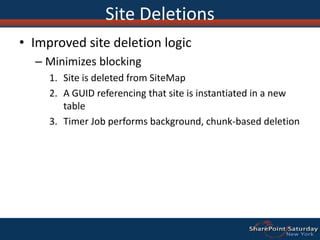
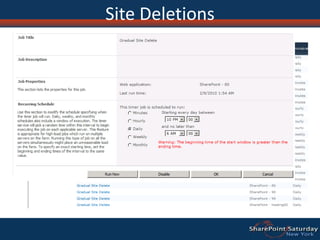
Site DeletionsImproved site deletion logicMinimizes blockingSite is deleted from SiteMapA GUID referencing that site is instantiated in a new tableTimer Job performs background, chunk-based deletion
Site Deletions
Backup/restore
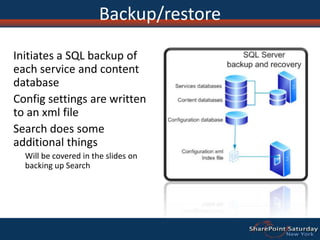
Backup/restoreInitiates a SQL backup of each service and content databaseConfig settings are written to an xml fileSearch does some additional thingsWill be covered in the slides on backing up Search
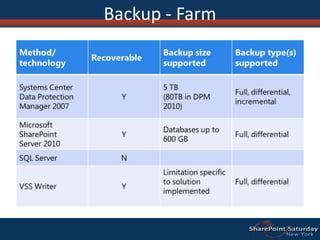
Backup - Farm
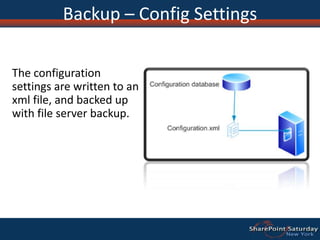
Backup – Config SettingsThe configuration settings are written to an xml file, and backed up with file server backup.
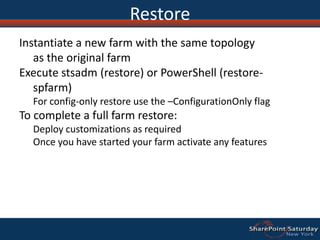
RestoreInstantiate a new farm with the same topology as the original farm Execute stsadm (restore) or PowerShell (restore-spfarm) For config-only restore use the –ConfigurationOnly flagTo complete a full farm restore:Deploy customizations as requiredOnce you have started your farm activate any features
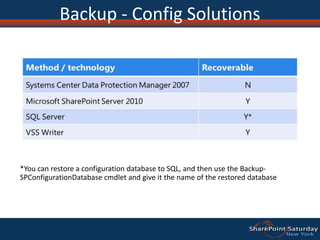
Backup - Config Solutions*You can restore a configuration database to SQL, and then use the Backup-SPConfigurationDatabasecmdlet and give it the name of the restored database
Backup – Content DBWhen you backup a web application or single content database, SharePoint starts a SQL Server backup of each content database
Restore – Content DBRestore with a new name- OR – Restore database and overwrite
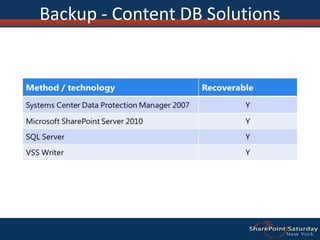
Backup - Content DB Solutions
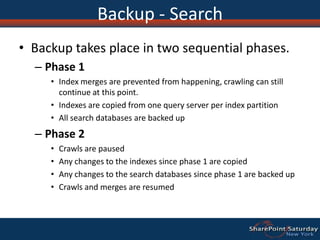
Backup - SearchBackup takes place in two sequential phases.
Phase 1
Index merges are prevented from happening, crawling can still continue at this point.
Indexes are copied from one query server per index partition
All search databases are backed up
Phase 2
Crawls are paused
Any changes to the indexes since phase 1 are copied
Any changes to the search databases since phase 1 are backed up
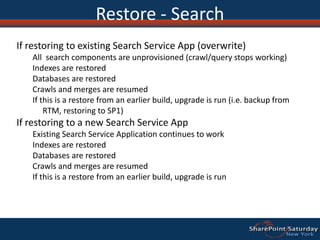
Crawls and merges are resumedRestore - SearchIf restoring to existing Search Service App (overwrite)All  search components are unprovisioned (crawl/query stops working)Indexes are restoredDatabases are restoredCrawls and merges are resumedIf this is a restore from an earlier build, upgrade is run (i.e. backup from RTM, restoring to SP1)If restoring to a new Search Service AppExisting Search Service Application continues to workIndexes are restoredDatabases are restoredCrawls and merges are resumedIf this is a restore from an earlier build, upgrade is run
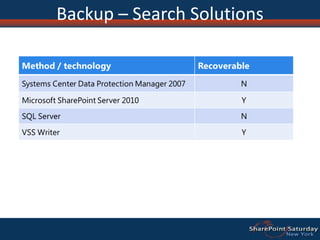
Backup – Search Solutions
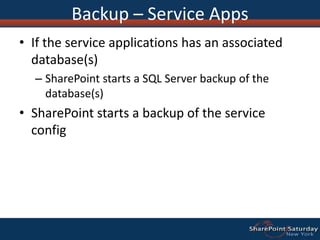
Backup – Service AppsIf the service applications has an associated database(s)SharePoint starts a SQL Server backup of the database(s)SharePoint starts a backup of the service config
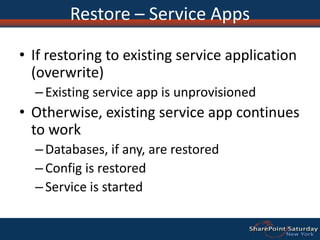
Restore – Service AppsIf restoring to existing service application (overwrite)Existing service app is unprovisionedOtherwise, existing service app continues to workDatabases, if any, are restoredConfig is restoredService is started
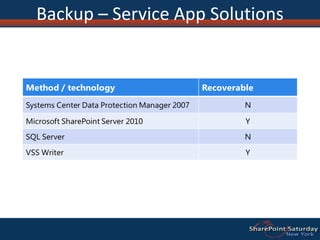
Backup – Service App Solutions
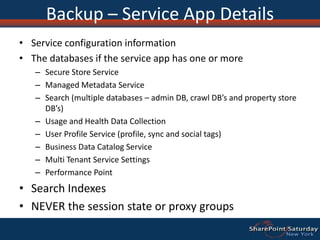
Backup – Service App DetailsService configuration informationThe databases if the service app has one or moreSecure Store ServiceManaged Metadata ServiceSearch (multiple databases – admin DB, crawl DB’s and property store DB’s)Usage and Health Data CollectionUser Profile Service (profile, sync and social tags)Business Data Catalog ServiceMulti Tenant Service SettingsPerformance PointSearch IndexesNEVER the session state or proxy groups
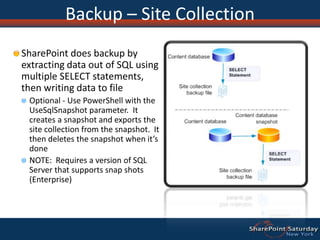
Backup – Site CollectionSharePoint does backup by extracting data out of SQL using multiple SELECT statements, then writing data to fileOptional - Use PowerShell with the UseSqlSnapshot parameter.  It creates a snapshot and exports the site collection from the snapshot.  It then deletes the snapshot when it’s doneNOTE:  Requires a version of SQL Server that supports snap shots (Enterprise)
Restore – Site CollectionRestore from an unattached content databaseDo a site collection backup from the unattached content dbUse PowerShell or stsadm to restore the site collection from a backupPowerShell:  restore-spsite
Backup – Site or ListNow possible from within central adminSharePoint exports the identified site or list by extracting data out of SQL using multiple SELECT statements, then writing data to a packageOptional:  Use PowerShell (export-SPWeb) with the UseSqlSnapshot parameter
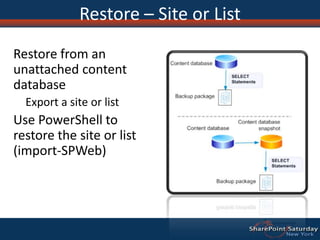
Restore – Site or ListRestore from an unattached content databaseExport a site or listUse PowerShell to restore the site or list (import-SPWeb)
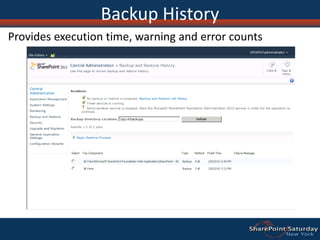
Backup HistoryProvides execution time, warning and error counts
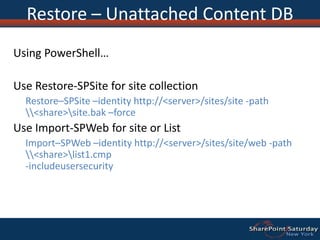
Restore – Unattached Content DBGranular restore and content browsing of “offline” databaseBrowse contentExplore site collection contentBackup site collectionBacks up to File System as .bakExport site or listExports to File System as .cmp artifactCan include Security and VersionsMitigates requirements to support expensive dedicated restore environments
Restore – Unattached Content DBUsing PowerShell…Use Restore-SPSite for site collectionRestore–SPSite –identity http://<server>/sites/site -path \\<share>\site.bak –forceUse Import-SPWeb for site or ListImport–SPWeb –identity http://<server>/sites/site/web -path \\<share>\list1.cmp  -includeusersecurity
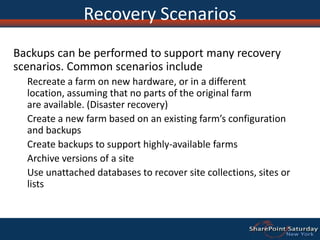
Recovery ScenariosBackups can be performed to support many recovery scenarios. Common scenarios includeRecreate a farm on new hardware, or in a different location, assuming that no parts of the original farm are available. (Disaster recovery)Create a new farm based on an existing farm’s configuration and backupsCreate backups to support highly-available farmsArchive versions of a siteUse unattached databases to recover site collections, sites or lists
High Availability
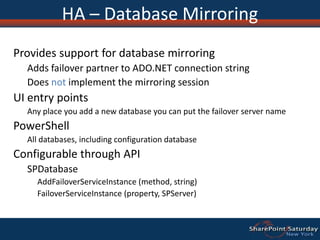
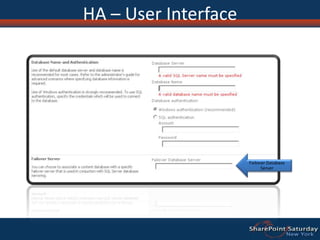
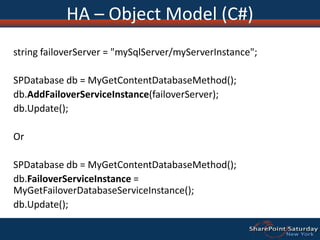
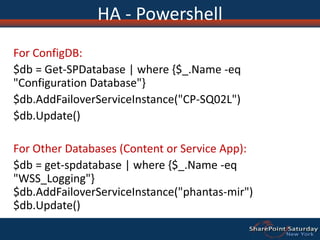
HA – Database MirroringProvides support for database mirroringAdds failover partner to ADO.NET connection stringDoes not implement the mirroring sessionUI entry pointsAny place you add a new database you can put the failover server namePowerShellAll databases, including configuration databaseConfigurable through APISPDatabaseAddFailoverServiceInstance (method, string)FailoverServiceInstance (property, SPServer)
HA – User InterfaceFailover Database Server
HA – Object Model (C#)string failoverServer = "mySqlServer/myServerInstance"; SPDatabasedb = MyGetContentDatabaseMethod();db.AddFailoverServiceInstance(failoverServer);db.Update(); OrSPDatabasedb = MyGetContentDatabaseMethod();db.FailoverServiceInstance = MyGetFailoverDatabaseServiceInstance();db.Update();
HA - PowershellFor ConfigDB:$db = Get-SPDatabase | where {$_.Name -eq "Configuration Database"}$db.AddFailoverServiceInstance("CP-SQ02L")$db.Update()For Other Databases (Content or Service App):$db = get-spdatabase | where {$_.Name -eq "WSS_Logging"}$db.AddFailoverServiceInstance("phantas-mir")$db.Update()
Disaster Recovery
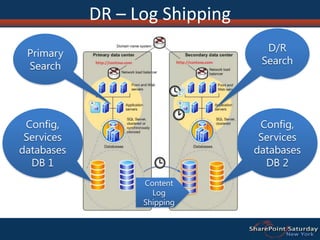
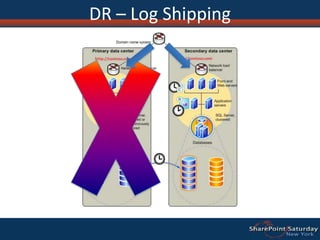
DR – Log ShippingD/RSearchPrimary SearchConfig, Services databases DB 1Config, Services databases DB 2Content Log Shipping
DR – Log Shipping
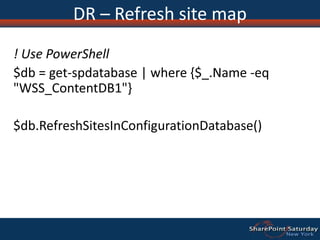
DR – Refresh site map! Use PowerShell$db = get-spdatabase | where {$_.Name -eq "WSS_ContentDB1"} $db.RefreshSitesInConfigurationDatabase()

John Burkholder: Disaster Recovery in SharePoint 2010

  • 1.
    Disaster Recovery (BusinessContinuity) in SharePoint 2010John BurkholderWelcome to SharePoint Saturday – New York@N8ivWarrior
  • 2.
    Welcome to SharePointSaturday – New YorkThank you for being a part of SharePoint Saturday!Please turn off all electronic devices or set them to vibrate.If you must take a phone call, please do so in the hall so as not to disturb others.Feel free to “tweet and blog” during the session
  • 3.
    What is anecessity?The presence or pressure of circumstances that justify or compel a certain course of actionNecessary for human welfareFound at nearly every businessHighest product sold in America*Some content for this presentation provided from Microsoft Corporation published materials.
  • 4.
    What is anecessity?
  • 5.
    New FeaturesImproved Backupand RestoreImprovements in scale, performance, and resiliencyNew configuration only backupNew SQL Server Snapshot supportNew Granular Backup optionsUnattached Content Database Data RecoveryNew high availability scenariosNew support for SQL Server Database MirroringNew flexible Service Application architectureNew disaster recovery scenariosImproved read-only database support
  • 6.
  • 7.
    Site DeletionsImproved sitedeletion logicMinimizes blockingSite is deleted from SiteMapA GUID referencing that site is instantiated in a new tableTimer Job performs background, chunk-based deletion
  • 8.
  • 9.
  • 10.
    Backup/restoreInitiates a SQLbackup of each service and content databaseConfig settings are written to an xml fileSearch does some additional thingsWill be covered in the slides on backing up Search
  • 11.
  • 12.
    Backup – ConfigSettingsThe configuration settings are written to an xml file, and backed up with file server backup.
  • 13.
    RestoreInstantiate a newfarm with the same topology as the original farm Execute stsadm (restore) or PowerShell (restore-spfarm) For config-only restore use the –ConfigurationOnly flagTo complete a full farm restore:Deploy customizations as requiredOnce you have started your farm activate any features
  • 14.
    Backup - ConfigSolutions*You can restore a configuration database to SQL, and then use the Backup-SPConfigurationDatabasecmdlet and give it the name of the restored database
  • 15.
    Backup – ContentDBWhen you backup a web application or single content database, SharePoint starts a SQL Server backup of each content database
  • 16.
    Restore – ContentDBRestore with a new name- OR – Restore database and overwrite
  • 17.
    Backup - ContentDB Solutions
  • 18.
    Backup - SearchBackuptakes place in two sequential phases.
  • 19.
  • 20.
    Index merges areprevented from happening, crawling can still continue at this point.
  • 21.
    Indexes are copiedfrom one query server per index partition
  • 22.
  • 23.
  • 24.
  • 25.
    Any changes tothe indexes since phase 1 are copied
  • 26.
    Any changes tothe search databases since phase 1 are backed up
  • 27.
    Crawls and mergesare resumedRestore - SearchIf restoring to existing Search Service App (overwrite)All  search components are unprovisioned (crawl/query stops working)Indexes are restoredDatabases are restoredCrawls and merges are resumedIf this is a restore from an earlier build, upgrade is run (i.e. backup from RTM, restoring to SP1)If restoring to a new Search Service AppExisting Search Service Application continues to workIndexes are restoredDatabases are restoredCrawls and merges are resumedIf this is a restore from an earlier build, upgrade is run
  • 28.
  • 29.
    Backup – ServiceAppsIf the service applications has an associated database(s)SharePoint starts a SQL Server backup of the database(s)SharePoint starts a backup of the service config
  • 30.
    Restore – ServiceAppsIf restoring to existing service application (overwrite)Existing service app is unprovisionedOtherwise, existing service app continues to workDatabases, if any, are restoredConfig is restoredService is started
  • 31.
    Backup – ServiceApp Solutions
  • 32.
    Backup – ServiceApp DetailsService configuration informationThe databases if the service app has one or moreSecure Store ServiceManaged Metadata ServiceSearch (multiple databases – admin DB, crawl DB’s and property store DB’s)Usage and Health Data CollectionUser Profile Service (profile, sync and social tags)Business Data Catalog ServiceMulti Tenant Service SettingsPerformance PointSearch IndexesNEVER the session state or proxy groups
  • 33.
    Backup – SiteCollectionSharePoint does backup by extracting data out of SQL using multiple SELECT statements, then writing data to fileOptional - Use PowerShell with the UseSqlSnapshot parameter. It creates a snapshot and exports the site collection from the snapshot. It then deletes the snapshot when it’s doneNOTE: Requires a version of SQL Server that supports snap shots (Enterprise)
  • 34.
    Restore – SiteCollectionRestore from an unattached content databaseDo a site collection backup from the unattached content dbUse PowerShell or stsadm to restore the site collection from a backupPowerShell: restore-spsite
  • 35.
    Backup – Siteor ListNow possible from within central adminSharePoint exports the identified site or list by extracting data out of SQL using multiple SELECT statements, then writing data to a packageOptional: Use PowerShell (export-SPWeb) with the UseSqlSnapshot parameter
  • 36.
    Restore – Siteor ListRestore from an unattached content databaseExport a site or listUse PowerShell to restore the site or list (import-SPWeb)
  • 37.
    Backup HistoryProvides executiontime, warning and error counts
  • 38.
    Restore – UnattachedContent DBGranular restore and content browsing of “offline” databaseBrowse contentExplore site collection contentBackup site collectionBacks up to File System as .bakExport site or listExports to File System as .cmp artifactCan include Security and VersionsMitigates requirements to support expensive dedicated restore environments
  • 39.
    Restore – UnattachedContent DBUsing PowerShell…Use Restore-SPSite for site collectionRestore–SPSite –identity http://<server>/sites/site -path \\<share>\site.bak –forceUse Import-SPWeb for site or ListImport–SPWeb –identity http://<server>/sites/site/web -path \\<share>\list1.cmp -includeusersecurity
  • 40.
    Recovery ScenariosBackups canbe performed to support many recovery scenarios. Common scenarios includeRecreate a farm on new hardware, or in a different location, assuming that no parts of the original farm are available. (Disaster recovery)Create a new farm based on an existing farm’s configuration and backupsCreate backups to support highly-available farmsArchive versions of a siteUse unattached databases to recover site collections, sites or lists
  • 41.
  • 42.
    HA – DatabaseMirroringProvides support for database mirroringAdds failover partner to ADO.NET connection stringDoes not implement the mirroring sessionUI entry pointsAny place you add a new database you can put the failover server namePowerShellAll databases, including configuration databaseConfigurable through APISPDatabaseAddFailoverServiceInstance (method, string)FailoverServiceInstance (property, SPServer)
  • 43.
    HA – UserInterfaceFailover Database Server
  • 44.
    HA – ObjectModel (C#)string failoverServer = "mySqlServer/myServerInstance"; SPDatabasedb = MyGetContentDatabaseMethod();db.AddFailoverServiceInstance(failoverServer);db.Update(); OrSPDatabasedb = MyGetContentDatabaseMethod();db.FailoverServiceInstance = MyGetFailoverDatabaseServiceInstance();db.Update();
  • 45.
    HA - PowershellForConfigDB:$db = Get-SPDatabase | where {$_.Name -eq "Configuration Database"}$db.AddFailoverServiceInstance("CP-SQ02L")$db.Update()For Other Databases (Content or Service App):$db = get-spdatabase | where {$_.Name -eq "WSS_Logging"}$db.AddFailoverServiceInstance("phantas-mir")$db.Update()
  • 46.
  • 47.
    DR – LogShippingD/RSearchPrimary SearchConfig, Services databases DB 1Config, Services databases DB 2Content Log Shipping
  • 48.
    DR – LogShipping
  • 49.
    DR – Refreshsite map! Use PowerShell$db = get-spdatabase | where {$_.Name -eq "WSS_ContentDB1"} $db.RefreshSitesInConfigurationDatabase()
  • 50.
  • 51.
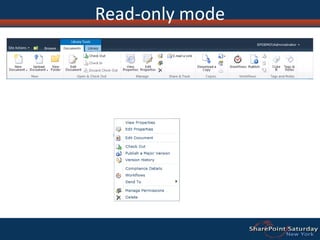
    Read-only modeRead-only modeintroduced in SharePoint 2007 SP2Hides parts of UI that aren’t applicable in read only modeRead-only support provided forContent databasesSome Service ApplicationsSome service apps don’t function when their databases are set to read-only, including those associated with Search and ProjectMake it read only in SQLContent databases can set the IsReadOnlySPDatabase property programmaticallyLink fix-up and list schema changes don’t occur in read-only mode
  • 52.
  • 53.
    SummarySeveral new andextended features in SharePoint 2010 to support BCMReduced blocking for site deletionConfiguration-only backup and restoreExport sites and lists from central adminUsed unattached content databases for restoreUse SQL snapshots during backupUI trimmed for read-only environments
  • 54.
    Thank You!John BurkholderSr.Project Manager, SharePointDigicon CorporationJohn.burkholder@digiconasp.com@n8ivwarrior
  • 55.
  • 56.
    For a chanceto win cool prizes2 ASUS Netbooks3 Apple IPAD 32 GB WifiAlso Some Books1 Typemock Isolator LicenseA 2-5 Day Course from SetFocus on SharePointTelerik RAD Controls Set1 DeliverPoint WFE 2010 license (Worth $1500)1 BCS Meta Man license (Worth $1200)1 Lightning Conductor 2010 WFE license (Worth $800)1 Lightning Storm Forums license. (Worth $600)
  • 57.
    Session EvaluationRemember tofill out your evaluationsPresenter:John BurkholderSession Name:SharePoint 2010 in a multi-tenant & hosted environment