SharePoint 2010 – Backup and RestoreAlpesh Nakar
About MeNative of Mumbai, India | Based on Brisbane, AustraliaOwner / Director - Just SharePoint  Consulting | Training  - Online and OnsiteSharePoint Evangelist Contributing Author – Microsoft SharePoint 2010 UnleashedBlog http://alpesh.nakars.comSharePoint  Resource  Centre  http://justsharepoint.comSharePoint Community URL Shortening Service http://mysp.in
AgendaBusiness Continuity PlanRecovering ContentSharePoint Components To BackupTools to Backup and RestoreBackup and Restore OperationsRecovering From A DisasterBest Practices
Business Continuity PlanBusiness RequirementsRPO, RTORecovery NeedsWhat’s not enough and what do you need to recoverTools Required
Recovering ContentItem level recoveryAt Site Collection or Site levelTwo optionsVersioningRecycle BinEliminate the need for third-partyRecover deleted items easilyReduce overheads
Backup Critical SharePoint Components
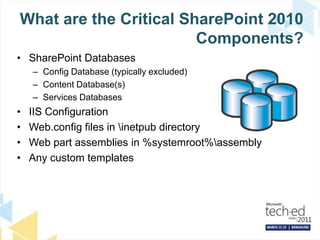
What are the Critical SharePoint 2010 Components?SharePoint DatabasesConfig Database (typically excluded)Content Database(s)Services DatabasesIIS ConfigurationWeb.config files in \inetpub directoryWeb part assemblies in %systemroot%\assemblyAny custom templates
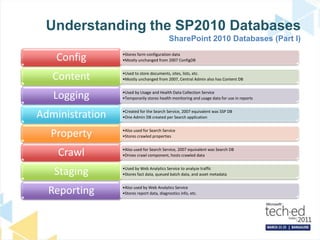
Understanding the SP2010 DatabasesSharePoint 2010 Databases (Part I)
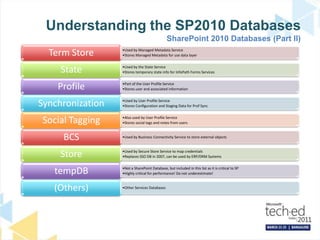
Understanding the SP2010 DatabasesSharePoint 2010 Databases (Part II)
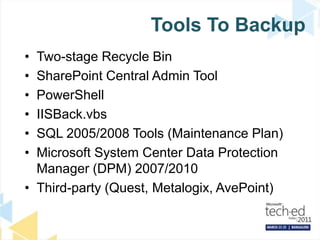
Tools To BackupTwo-stage Recycle BinSharePoint Central Admin ToolPowerShellIISBack.vbsSQL 2005/2008 Tools (Maintenance Plan)Microsoft System Center Data Protection Manager (DPM) 2007/2010Third-party (Quest, Metalogix, AvePoint)
Backup with the SharePoint 2010  Central Administration site
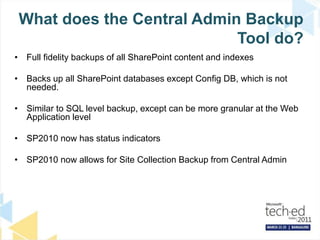
What does the Central Admin Backup Tool do?Full fidelity backups of all SharePoint content and indexesBacks up all SharePoint databases except Config DB, which is not needed.Similar to SQL level backup, except can be more granular at the Web Application levelSP2010 now has status indicatorsSP2010 now allows for Site Collection Backup from Central Admin
SharePoint 2010: Central Administration
Disadvantages of Central Admin Backup ToolNot automatedIf XML catalog is damaged, entire backup can be at riskNo item-level restore capabilitiesNot enterprise level
Farm BackupCannot be scheduledNot rely on SQL DBA for backupsFull or differentialBackup Components Only1 Component at a time – e.g. Web ApplicationConfiguration Only backupBackup LocationBackup to tape not possible
Granular Backup/RestoreNew in SharePoint 2010   Granular Backup/Restore From Central AdministrationSite Collection BackupExport a site or listRecover data from an unattached content databaseGranular Backup Job Status indicatorsGranular restore operations only using PowerShell
Site Collection Backup Full Fidelity BackupLargest of the Granular BackupsFastest of the Granular BackupsPerformance LoadRead-Only Lock
Export Site / ListExporting List – Max Level of Granular BackupOption to include security permissions setOption to include versionsProcessor intensiveMove Operations
Using SharePoint 2010 Management Shell for Backup & Restore
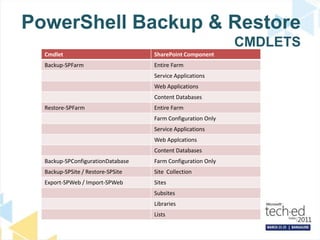
PowerShell Backup in SP2010PowerShell can be used to automate BackupsBackup-SPConfigurationDatabaseBackup-SPFarmBackup-SPSiteEquivalent to Central Admin or STSADMCan pipe out results and backup multiple site collections, etc.
PowerShell Backup & Restore CMDLETS
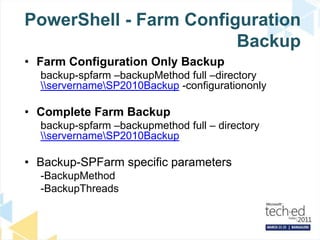
PowerShell - Farm Configuration BackupFarm Configuration Only Backupbackup-spfarm –backupMethod full –directory \\servername\SP2010Backup -configurationonlyComplete Farm Backupbackup-spfarm –backupmethod full – directory \\servername\SP2010BackupBackup-SPFarm specific parameters-BackupMethod-BackupThreads
PowerShell - Configuration DB BackupConfiguration Database Backupbackup-spconfigurationdatabase –directory \\servername\\sp2010backup –databaseserver server –databasenamemss_configdbBackup Farm Configuration InformationInformation Rights ManagementWorkflowDiagnostic loggingCustomizations [solutions deployed]Outbound e-mail configurationAntivirus settings
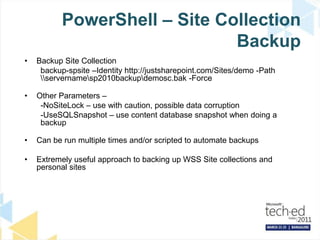
PowerShell – Site Collection BackupBackup Site Collectionbackup-spsite–Identity http://justsharepoint.com/Sites/demo -Path \\servername\sp2010backup\demosc.bak -ForceOther Parameters – -NoSiteLock – use with caution, possible data corruption-UseSQLSnapshot – use content database snapshot when doing a backupCan be run multiple times and/or scripted to automate backupsExtremely useful approach to backing up WSS Site collections and personal sites
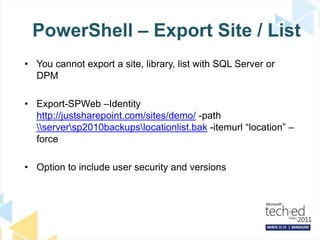
PowerShell – Export Site / ListYou cannot export a site, library, list with SQL Server or DPMExport-SPWeb –Identity http://justsharepoint.com/sites/demo/ -path \\server\sp2010backups\locationlist.bak -itemurl “location” –forceOption to include user security and versions
PowerShell - Import Site/ListYou cannot import a site or a list from SharePoint 2010 Central Administration sitePowerShell or STSADM is your only optionSite Definition MatchingContent Merging
Unattached Content DatabasesNew feature of SharePoint 2010Granular restores of SharePoint contentRead-only content databasesRestored SharePoint content databasesContent database snapshotsRestore Site Collections, Sites, Libraries and Lists
DEMORecover from Unattached Content Database
Export a ListMerge a ListDEMO
Using SQL SnapshotsNew to SharePoint 2010Use of native SQL Server database snapshotsRead-only copy of a databaseUsed primarily with site collection backupPrevents read-only locks Supported only in Enterprise of SQL Server
DEMOSharePoint Site Collection Backup Using SQL SnapShot
Read Only DatabaseNew to SharePoint 2010Set from SQL ServerPrevent changes to SharePoint content databaseBlanket read only for all, including SharePoint Administrators
Read Only Database
What are the Critical SharePoint 2010 Components?SharePoint DatabasesConfig DatabaseContent Database(s)Service Application DatabasesIIS ConfigurationWeb.config files in \inetpub directoryWeb part assemblies in %systemroot%\assembly [GAC]Any custom templatesSharePoint Root [ The 14 HIVE]Virtual Directories
Third-party Backup SolutionsMetalogix Selective Restore ManagerQuest Recovery Manager for SharePointDocAveAvePoint Backup for Microsoft Office SharePoint Products and Technologies
Questions?
ResourcesSoftware Application Developershttp://msdn.microsoft.com/Infrastructure Professionalshttp://technet.microsoft.com/technetindia msdnindia@technetindia@msdnindia
© 2011 Microsoft Corporation. All rights reserved. Microsoft, Windows, Windows Vista and other product names are or may be registered trademarks and/or trademarks in the U.S. and/or other countries.The information herein is for informational purposes only and represents the current view of Microsoft Corporation as of the date of this presentation.  Because Microsoft must respond to changing market conditions, it should not be interpreted to be a commitment on the part of Microsoft, and Microsoft cannot guarantee the accuracy of any information provided after the date of this presentation.  MICROSOFT MAKES NO WARRANTIES, EXPRESS, IMPLIED OR STATUTORY, AS TO THE INFORMATION IN THIS PRESENTATION.

[Tech.Ed India 2011] Backup and Restore SharePoint 2010

  • 1.
    SharePoint 2010 –Backup and RestoreAlpesh Nakar
  • 2.
    About MeNative ofMumbai, India | Based on Brisbane, AustraliaOwner / Director - Just SharePoint Consulting | Training - Online and OnsiteSharePoint Evangelist Contributing Author – Microsoft SharePoint 2010 UnleashedBlog http://alpesh.nakars.comSharePoint Resource Centre http://justsharepoint.comSharePoint Community URL Shortening Service http://mysp.in
  • 3.
    AgendaBusiness Continuity PlanRecoveringContentSharePoint Components To BackupTools to Backup and RestoreBackup and Restore OperationsRecovering From A DisasterBest Practices
  • 4.
    Business Continuity PlanBusinessRequirementsRPO, RTORecovery NeedsWhat’s not enough and what do you need to recoverTools Required
  • 5.
    Recovering ContentItem levelrecoveryAt Site Collection or Site levelTwo optionsVersioningRecycle BinEliminate the need for third-partyRecover deleted items easilyReduce overheads
  • 6.
  • 7.
    What are theCritical SharePoint 2010 Components?SharePoint DatabasesConfig Database (typically excluded)Content Database(s)Services DatabasesIIS ConfigurationWeb.config files in \inetpub directoryWeb part assemblies in %systemroot%\assemblyAny custom templates
  • 8.
    Understanding the SP2010DatabasesSharePoint 2010 Databases (Part I)
  • 9.
    Understanding the SP2010DatabasesSharePoint 2010 Databases (Part II)
  • 10.
    Tools To BackupTwo-stageRecycle BinSharePoint Central Admin ToolPowerShellIISBack.vbsSQL 2005/2008 Tools (Maintenance Plan)Microsoft System Center Data Protection Manager (DPM) 2007/2010Third-party (Quest, Metalogix, AvePoint)
  • 11.
    Backup with theSharePoint 2010 Central Administration site
  • 12.
    What does theCentral Admin Backup Tool do?Full fidelity backups of all SharePoint content and indexesBacks up all SharePoint databases except Config DB, which is not needed.Similar to SQL level backup, except can be more granular at the Web Application levelSP2010 now has status indicatorsSP2010 now allows for Site Collection Backup from Central Admin
  • 13.
  • 14.
    Disadvantages of CentralAdmin Backup ToolNot automatedIf XML catalog is damaged, entire backup can be at riskNo item-level restore capabilitiesNot enterprise level
  • 15.
    Farm BackupCannot bescheduledNot rely on SQL DBA for backupsFull or differentialBackup Components Only1 Component at a time – e.g. Web ApplicationConfiguration Only backupBackup LocationBackup to tape not possible
  • 16.
    Granular Backup/RestoreNew inSharePoint 2010 Granular Backup/Restore From Central AdministrationSite Collection BackupExport a site or listRecover data from an unattached content databaseGranular Backup Job Status indicatorsGranular restore operations only using PowerShell
  • 17.
    Site Collection BackupFull Fidelity BackupLargest of the Granular BackupsFastest of the Granular BackupsPerformance LoadRead-Only Lock
  • 18.
    Export Site /ListExporting List – Max Level of Granular BackupOption to include security permissions setOption to include versionsProcessor intensiveMove Operations
  • 19.
    Using SharePoint 2010Management Shell for Backup & Restore
  • 20.
    PowerShell Backup inSP2010PowerShell can be used to automate BackupsBackup-SPConfigurationDatabaseBackup-SPFarmBackup-SPSiteEquivalent to Central Admin or STSADMCan pipe out results and backup multiple site collections, etc.
  • 21.
    PowerShell Backup &Restore CMDLETS
  • 22.
    PowerShell - FarmConfiguration BackupFarm Configuration Only Backupbackup-spfarm –backupMethod full –directory \\servername\SP2010Backup -configurationonlyComplete Farm Backupbackup-spfarm –backupmethod full – directory \\servername\SP2010BackupBackup-SPFarm specific parameters-BackupMethod-BackupThreads
  • 23.
    PowerShell - ConfigurationDB BackupConfiguration Database Backupbackup-spconfigurationdatabase –directory \\servername\\sp2010backup –databaseserver server –databasenamemss_configdbBackup Farm Configuration InformationInformation Rights ManagementWorkflowDiagnostic loggingCustomizations [solutions deployed]Outbound e-mail configurationAntivirus settings
  • 24.
    PowerShell – SiteCollection BackupBackup Site Collectionbackup-spsite–Identity http://justsharepoint.com/Sites/demo -Path \\servername\sp2010backup\demosc.bak -ForceOther Parameters – -NoSiteLock – use with caution, possible data corruption-UseSQLSnapshot – use content database snapshot when doing a backupCan be run multiple times and/or scripted to automate backupsExtremely useful approach to backing up WSS Site collections and personal sites
  • 25.
    PowerShell – ExportSite / ListYou cannot export a site, library, list with SQL Server or DPMExport-SPWeb –Identity http://justsharepoint.com/sites/demo/ -path \\server\sp2010backups\locationlist.bak -itemurl “location” –forceOption to include user security and versions
  • 26.
    PowerShell - ImportSite/ListYou cannot import a site or a list from SharePoint 2010 Central Administration sitePowerShell or STSADM is your only optionSite Definition MatchingContent Merging
  • 27.
    Unattached Content DatabasesNewfeature of SharePoint 2010Granular restores of SharePoint contentRead-only content databasesRestored SharePoint content databasesContent database snapshotsRestore Site Collections, Sites, Libraries and Lists
  • 28.
  • 29.
  • 30.
    Using SQL SnapshotsNewto SharePoint 2010Use of native SQL Server database snapshotsRead-only copy of a databaseUsed primarily with site collection backupPrevents read-only locks Supported only in Enterprise of SQL Server
  • 31.
    DEMOSharePoint Site CollectionBackup Using SQL SnapShot
  • 32.
    Read Only DatabaseNewto SharePoint 2010Set from SQL ServerPrevent changes to SharePoint content databaseBlanket read only for all, including SharePoint Administrators
  • 33.
  • 34.
    What are theCritical SharePoint 2010 Components?SharePoint DatabasesConfig DatabaseContent Database(s)Service Application DatabasesIIS ConfigurationWeb.config files in \inetpub directoryWeb part assemblies in %systemroot%\assembly [GAC]Any custom templatesSharePoint Root [ The 14 HIVE]Virtual Directories
  • 35.
    Third-party Backup SolutionsMetalogixSelective Restore ManagerQuest Recovery Manager for SharePointDocAveAvePoint Backup for Microsoft Office SharePoint Products and Technologies
  • 36.
  • 37.
    ResourcesSoftware Application Developershttp://msdn.microsoft.com/InfrastructureProfessionalshttp://technet.microsoft.com/technetindia msdnindia@technetindia@msdnindia
  • 38.
    © 2011 MicrosoftCorporation. All rights reserved. Microsoft, Windows, Windows Vista and other product names are or may be registered trademarks and/or trademarks in the U.S. and/or other countries.The information herein is for informational purposes only and represents the current view of Microsoft Corporation as of the date of this presentation. Because Microsoft must respond to changing market conditions, it should not be interpreted to be a commitment on the part of Microsoft, and Microsoft cannot guarantee the accuracy of any information provided after the date of this presentation. MICROSOFT MAKES NO WARRANTIES, EXPRESS, IMPLIED OR STATUTORY, AS TO THE INFORMATION IN THIS PRESENTATION.

Editor's Notes

  • #2 PlanningRecovering ContentSharePoint ComponentsTools available to backup and restoreBackup and Restore OperationsRecovering From A DisasterBest Practices
  • #16 You can use the built in backup tools in CA in SharePoint 2010 to back up a farm up to 200GB in size. It supports full and differential and can be used to restore an entire farm.
  • #17 Granular backup of SharePoint 2010, previously available only from the STSADM command-line tool, is now available from within the GUI.
  • #18 At the time when this chapter was written, Microsoft’s TechNet site included a specificnote stating that site collection backups did not include workflow information. This note isincorrect. Backups that are performed with the site collection backup approach are full-fidelityand contain all workflow information, including workflow history and workflow state. Thenote was originally intended as a warning for exports that are performed with granular exportoperations through types within the Content Deployment API, not site collection backups.Slower then Content Database Backups
  • #21 [twitter]#SharePoint 2010 Management Shell – gives additional options for backup/restore – compression/sql snapshots [/twitter][twitter]Permissions required to run PowerShell – member of the admin group on the server running Central Admin[/twitter]
  • #26 Versions – last major, current version, last major and minor, all
  • #31 Can use –UseSqlsnapshot for Export-SPWeb
  • #32 Backup Server:81/Sites/Demo