








Webinar
How You Can Make Use of Localytics Raw Data
06/14/17
Meet Your Hosts
Aaron Sawitsky
Localytics
Head of Product Marketing
Kristina Lisacki
Localytics
Account Manager
Marc Tollin
Localytics
Product Manager
Agenda
Intro
Options for Accessing Raw Data
Use Cases
Direct Access Demo
What is Raw Data
Q & A
Raw Data
What Is Raw Data?
Every Session Open, Event, and Session Close is captured
by Localytics, time-stamped and recorded as a unique data
point.
This is known as Raw Data.
What Is Raw Data Used For?
Simply put, if you want to explore something that’s not
shown in our Dashboard reports, raw data is the answer:
• Execute custom queries and perform cross-app reporting
• Evaluate user-level behaviors
• Integrate Localytics data with data from other sources for an omni-channel
view of customers
Accessing
Raw Data
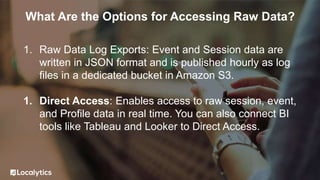
What Are the Options for Accessing Raw Data?
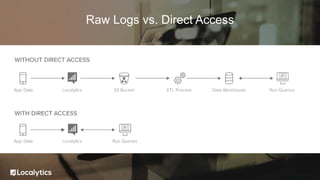
1. Raw Data Log Exports: Event and Session data are
written in JSON format and is published hourly as log
files in a dedicated bucket in Amazon S3.
1. Direct Access: Enables access to raw session, event,
and Profile data in real time. You can also connect BI
tools like Tableau and Looker to Direct Access.
Raw Logs vs. Direct Access
Use Cases
Run queries across all your apps and
understand how users move from one app to the
other
Examples:
• “How many users across my iOS, Android,
web performed a purchase event in the last
30 days?”
• “What is the average LTV of users who sign
up on iOS and perform a checkout event on
iPad?”
Cross-App Queries
With raw data, you can identify and analyze all
data points created by a specific user (assuming
your app hasn’t blocked the capture of PII).
Examples:
• “User 123 experienced a crash, what did they
do leading up to the crash?”
• “User 456 is one of our most loyal customers,
do they behave differently from our average
customer when interacting with our app?”
Evaluate Behavior of Specific Users
By joining raw data with data from other sources,
you can obtain an omni-channel view of
customers and understand how they move
between your brand’s marketing channels.
Examples:
• “Out of the users whose last in-store visit was
within the last 30 days, how many of them
have performed a mobile Check Out event?”
• “If we Tweet at a user, do they become more
active in our app?”
• “Are customers who actively use our app less
likely to call customer service?”
Obtain an Omni-Channel View of Customers
With Direct Access, you can connect your app’s
usage data with your users’ Profile information to
understand more about what types of users are
performing specific actions.
Examples:
• “Out of the users whose favorite category is
clothing, how many of them have performed
a mobile Check Out event?”
Analyze Profile Data
Since you have all your session, event, and
Profile data, you can use Direct Access to
construct incredibly complex Audiences.
You can also evaluate the health of an Audience
by looking at its users’ downstream behavior or
even export your Custom Audiences to other
systems.
Examples:
• “iOS users who abandoned cart on the web”
• “Premium Subscribers who are using my app
on both iOS and Android devices”
Build Custom Audiences
Direct Access
Why Direct Access?
Easy
Whenever you need a
question answered, simply
type in a SQL query. You
can even connect a BI Tool
like Looker or Tableau for
enhanced reporting.
More Efficient
You pay your data scientists
to run queries, not to
maintain a complex ETL
process. Direct Access
eliminates this busy work,
letting your team get back to
what they do best.
No Warehouses
Since we store all the raw
data for you, there is no
need for an expensive data
warehouse or the
headaches that come with it.
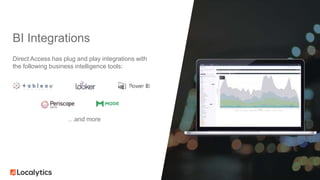
BI Integrations
Direct Access has plug and play integrations with
the following business intelligence tools:
…and more
upday is Europe’s largest news app with over 8 million
active users.
The team at upday was experiencing significant pain
around:
• Growing data storage costs
• Engineering time wasted on ETL process
• Difficulty collecting and sharing data across the org
By using Direct Access, they obtained:
• 60% Reduction in data storage costs
• 10% Engineering time freed up
Case Study - upday
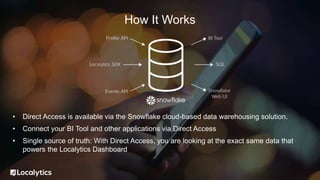
How It Works
• Direct Access is available via the Snowflake cloud-based data warehousing solution.
• Connect your BI Tool and other applications via Direct Access
• Single source of truth: With Direct Access, you are looking at the exact same data that
powers the Localytics Dashboard
How It Works
Demo
Questions?

Localytics Webinar: Direct Access

  • 1.
    Webinar How You CanMake Use of Localytics Raw Data 06/14/17
  • 2.
    Meet Your Hosts AaronSawitsky Localytics Head of Product Marketing Kristina Lisacki Localytics Account Manager Marc Tollin Localytics Product Manager
  • 3.
    Agenda Intro Options for AccessingRaw Data Use Cases Direct Access Demo What is Raw Data Q & A
  • 4.
  • 5.
    What Is RawData? Every Session Open, Event, and Session Close is captured by Localytics, time-stamped and recorded as a unique data point. This is known as Raw Data.
  • 7.
    What Is RawData Used For? Simply put, if you want to explore something that’s not shown in our Dashboard reports, raw data is the answer: • Execute custom queries and perform cross-app reporting • Evaluate user-level behaviors • Integrate Localytics data with data from other sources for an omni-channel view of customers
  • 8.
  • 9.
    What Are theOptions for Accessing Raw Data? 1. Raw Data Log Exports: Event and Session data are written in JSON format and is published hourly as log files in a dedicated bucket in Amazon S3. 1. Direct Access: Enables access to raw session, event, and Profile data in real time. You can also connect BI tools like Tableau and Looker to Direct Access.
  • 10.
    Raw Logs vs.Direct Access
  • 11.
  • 12.
    Run queries acrossall your apps and understand how users move from one app to the other Examples: • “How many users across my iOS, Android, web performed a purchase event in the last 30 days?” • “What is the average LTV of users who sign up on iOS and perform a checkout event on iPad?” Cross-App Queries
  • 13.
    With raw data,you can identify and analyze all data points created by a specific user (assuming your app hasn’t blocked the capture of PII). Examples: • “User 123 experienced a crash, what did they do leading up to the crash?” • “User 456 is one of our most loyal customers, do they behave differently from our average customer when interacting with our app?” Evaluate Behavior of Specific Users
  • 14.
    By joining rawdata with data from other sources, you can obtain an omni-channel view of customers and understand how they move between your brand’s marketing channels. Examples: • “Out of the users whose last in-store visit was within the last 30 days, how many of them have performed a mobile Check Out event?” • “If we Tweet at a user, do they become more active in our app?” • “Are customers who actively use our app less likely to call customer service?” Obtain an Omni-Channel View of Customers
  • 15.
    With Direct Access,you can connect your app’s usage data with your users’ Profile information to understand more about what types of users are performing specific actions. Examples: • “Out of the users whose favorite category is clothing, how many of them have performed a mobile Check Out event?” Analyze Profile Data
  • 16.
    Since you haveall your session, event, and Profile data, you can use Direct Access to construct incredibly complex Audiences. You can also evaluate the health of an Audience by looking at its users’ downstream behavior or even export your Custom Audiences to other systems. Examples: • “iOS users who abandoned cart on the web” • “Premium Subscribers who are using my app on both iOS and Android devices” Build Custom Audiences
  • 17.
  • 18.
    Why Direct Access? Easy Wheneveryou need a question answered, simply type in a SQL query. You can even connect a BI Tool like Looker or Tableau for enhanced reporting. More Efficient You pay your data scientists to run queries, not to maintain a complex ETL process. Direct Access eliminates this busy work, letting your team get back to what they do best. No Warehouses Since we store all the raw data for you, there is no need for an expensive data warehouse or the headaches that come with it.
  • 19.
    BI Integrations Direct Accesshas plug and play integrations with the following business intelligence tools: …and more
  • 20.
    upday is Europe’slargest news app with over 8 million active users. The team at upday was experiencing significant pain around: • Growing data storage costs • Engineering time wasted on ETL process • Difficulty collecting and sharing data across the org By using Direct Access, they obtained: • 60% Reduction in data storage costs • 10% Engineering time freed up Case Study - upday
  • 21.
  • 22.
    • Direct Accessis available via the Snowflake cloud-based data warehousing solution. • Connect your BI Tool and other applications via Direct Access • Single source of truth: With Direct Access, you are looking at the exact same data that powers the Localytics Dashboard How It Works
  • 23.
  • 24.

Editor's Notes

  • #12 Marketers dream. -Direct access to tap your users on the shoulder -much better than email -keeps getting better (rich push)
  • #18 Marketers dream. -Direct access to tap your users on the shoulder -much better than email -keeps getting better (rich push)
  • #22 Marketers dream. -Direct access to tap your users on the shoulder -much better than email -keeps getting better (rich push)
  • #24 Marketers dream. -Direct access to tap your users on the shoulder -much better than email -keeps getting better (rich push)
  • #25 Marketers dream. -Direct access to tap your users on the shoulder -much better than email -keeps getting better (rich push)