Digital Storytelling Presented by: Pam Friedman Westfield School District
What is Digital Storytelling? Digital Storytelling is the modern expression of the ancient art of storytelling.  Digital stories derive their power by weaving images, music, narrative and voice together, thereby giving deep dimension and vivid color to characters, situations, experiences and insights. (Leslie Rule, Digital Storytelling Association)
Digital Stories in the Classroom Digital stories can be used in almost every area of the curriculum: Some ideas are: Biographies Science Experiments Fictional Story or Poem Personal Experience Interview a relative Historical Events
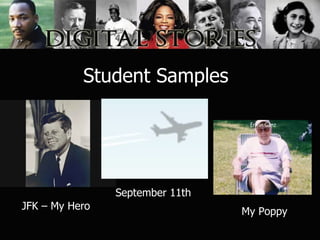
Student Samples JFK – My Hero September 11th My Poppy
Getting Started: The Story Idea Original script: fictional story, poem, personal experience, relatives’ stories Prompts: a special vacation, someone who inspires you, a subject in school Research: a topic, biography, or event A visual start: find an image that moves you and build a story around that image
The Script Pre-write using a word processing document Use bullets For each bullet, suggest an image or images that may work Think visually!
Recording Use a good sound recorder or the built-in microphone on your computer Make sure the room is relatively quiet Remind students to speak slowly and clearly using emotion Record using either Sound Recorder or Audacity:  http://audacity.sourceforge.net/
Software Most computers have standard software that can be used PCs: Windows MovieMaker Mac: iMovie Several good software programs can be purchased for classrooms: Adobe Premiere Power Director
Images/Videos Copyright issues Document sources by title and URL United Streaming:  www.unitedstreaming.com Flickr Creative Commons   http://flickr.com/creativecommons Our Media   http://ourmedia.org/learning-center/images/free-photo-sites World Images http://worldart.sjsu.edu/
Resources There are numerous websites containing resources and information about Digital Storytelling. Tech Head Stories  -  http://www.tech-head.com/dstory.htm Another great resource for digital stories is  United Streaming  (our school district has a subscription):  www.unitedstreaming.com Memory’s Voices  – one of the best resources on the net  http://www.storycenter.org/memvoice/pages/cookbook.html
Contact Information Pamela Friedman is the Instructional Technology Specialist at Roosevelt Intermediate School in Westfield, NJ and was selected as a Google Certified Teacher in February 2007. Email:  [email_address] Website:  www.westfieldnjk12.org/computerlab Digital Stories:  Click Here Blog:  http://friedman-techtalk.blogspot.com Google Certified Teacher:  http://sites.google.com/site/gtaresources/pam-friedman

Digital Storytelling Presentation

  • 1.
    Digital Storytelling Presentedby: Pam Friedman Westfield School District
  • 2.
    What is DigitalStorytelling? Digital Storytelling is the modern expression of the ancient art of storytelling.  Digital stories derive their power by weaving images, music, narrative and voice together, thereby giving deep dimension and vivid color to characters, situations, experiences and insights. (Leslie Rule, Digital Storytelling Association)
  • 3.
    Digital Stories inthe Classroom Digital stories can be used in almost every area of the curriculum: Some ideas are: Biographies Science Experiments Fictional Story or Poem Personal Experience Interview a relative Historical Events
  • 4.
    Student Samples JFK– My Hero September 11th My Poppy
  • 5.
    Getting Started: TheStory Idea Original script: fictional story, poem, personal experience, relatives’ stories Prompts: a special vacation, someone who inspires you, a subject in school Research: a topic, biography, or event A visual start: find an image that moves you and build a story around that image
  • 6.
    The Script Pre-writeusing a word processing document Use bullets For each bullet, suggest an image or images that may work Think visually!
  • 7.
    Recording Use agood sound recorder or the built-in microphone on your computer Make sure the room is relatively quiet Remind students to speak slowly and clearly using emotion Record using either Sound Recorder or Audacity: http://audacity.sourceforge.net/
  • 8.
    Software Most computershave standard software that can be used PCs: Windows MovieMaker Mac: iMovie Several good software programs can be purchased for classrooms: Adobe Premiere Power Director
  • 9.
    Images/Videos Copyright issuesDocument sources by title and URL United Streaming: www.unitedstreaming.com Flickr Creative Commons http://flickr.com/creativecommons Our Media http://ourmedia.org/learning-center/images/free-photo-sites World Images http://worldart.sjsu.edu/
  • 10.
    Resources There arenumerous websites containing resources and information about Digital Storytelling. Tech Head Stories - http://www.tech-head.com/dstory.htm Another great resource for digital stories is United Streaming (our school district has a subscription): www.unitedstreaming.com Memory’s Voices – one of the best resources on the net http://www.storycenter.org/memvoice/pages/cookbook.html
  • 11.
    Contact Information PamelaFriedman is the Instructional Technology Specialist at Roosevelt Intermediate School in Westfield, NJ and was selected as a Google Certified Teacher in February 2007. Email: [email_address] Website: www.westfieldnjk12.org/computerlab Digital Stories: Click Here Blog: http://friedman-techtalk.blogspot.com Google Certified Teacher: http://sites.google.com/site/gtaresources/pam-friedman