Introduction to the
Salesforce Mobile SDK for Android

Joshua Birk, salesforce.com, Developer Evangelist
@joshbirk

Wolfgang Mathurin, salesforce.com, Software Engineering PMTS
Safe Harbor
 Safe harbor statement under the Private Securities Litigation Reform Act of 1995:

 This presentation may contain forward-looking statements that involve risks, uncertainties, and assumptions. If any such uncertainties materialize or if
 any of the assumptions proves incorrect, the results of salesforce.com, inc. could differ materially from the results expressed or implied by the forward-
 looking statements we make. All statements other than statements of historical fact could be deemed forward-looking, including any projections of
 product or service availability, subscriber growth, earnings, revenues, or other financial items and any statements regarding strategies or plans of
 management for future operations, statements of belief, any statements concerning new, planned, or upgraded services or technology developments
 and customer contracts or use of our services.

 The risks and uncertainties referred to above include – but are not limited to – risks associated with developing and delivering new functionality for our
 service, new products and services, our new business model, our past operating losses, possible fluctuations in our operating results and rate of growth,
 interruptions or delays in our Web hosting, breach of our security measures, the outcome of intellectual property and other litigation, risks associated
 with possible mergers and acquisitions, the immature market in which we operate, our relatively limited operating history, our ability to expand, retain,
 and motivate our employees and manage our growth, new releases of our service and successful customer deployment, our limited history reselling
 non-salesforce.com products, and utilization and selling to larger enterprise customers. Further information on potential factors that could affect the
 financial results of salesforce.com, inc. is included in our annual report on Form 10-Q for the most recent fiscal quarter ended July 31, 2012. This
 documents and others containing important disclosures are available on the SEC Filings section of the Investor Information section of our Web site.

 Any unreleased services or features referenced in this or other presentations, press releases or public statements are not currently available and may
 not be delivered on time or at all. Customers who purchase our services should make the purchase decisions based upon features that are currently
 available. Salesforce.com, inc. assumes no obligation and does not intend to update these forward-looking statements.
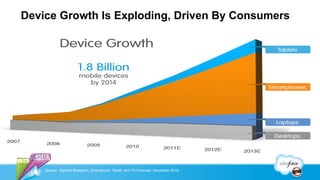
Device Growth Is Exploding, Driven By Consumers


    Source: Gartner Research; Smartphone, Tablet, and PC Forecast, December 2010.
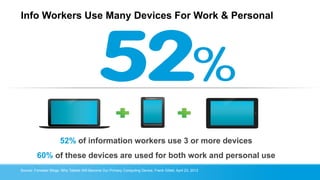
Info Workers Use Many Devices For Work & Personal


                       52% of information workers use 3 or more devices
         60% of these devices are used for both work and personal use
Source: Forrester Blogs: Why Tablets Will Become Our Primary Computing Device, Frank Gillett, April 23, 2012
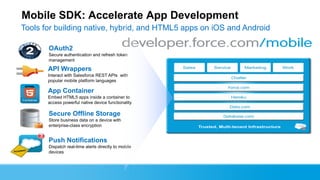
Mobile SDK: Accelerate App Development
Tools for building native, hybrid, and HTML5 apps on iOS and Android

       OAuth2
       Secure authentication and refresh token
       management

       API Wrappers
       Interact with Salesforce REST APIs with
       popular mobile platform languages

       App Container
       Embed HTML5 apps inside a container to
       access powerful native device functionality

       Secure Offline Storage
       Store business data on a device with
       enterprise-class encryption


       Push Notifications
       Dispatch real-time alerts directly to mobile
       devices
Mobile Application
Building Blocks
OAuth
An industry standard method of validating user credentials
while avoiding password anti-patterns.
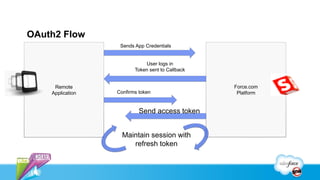
OAuth2 Flow
                   Sends App Credentials


                             User logs in
                         Token sent to Callback


     Remote                                       Force.com
    Application   Confirms token                   Platform


                           Send access token


                    Maintain session with
                       refresh token
REST Explorer
Representational State Transfer (REST)
A stateless data transport based on standard HTTP
methods for delivering as JSON or XML
5 Minute Android
Application
Step 0: Setup Dev Environment

Required tools
   Git [distributed version control system]
   Ant [java based software build system]
   Eclipse [integrated development environment]
   Android SDK
   ADT Plugin [Android Plugin for Eclipse]
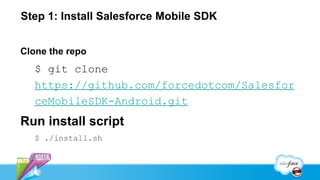
Step 1: Install Salesforce Mobile SDK


Clone the repo
   $ git clone
   https://github.com/forcedotcom/Salesfor
   ceMobileSDK-Android.git
Run install script
   $ ./install.sh
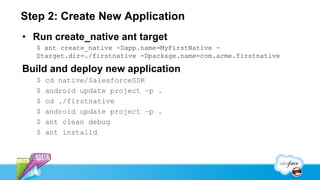
Step 2: Create New Application
• Run create_native ant target
  $ ant create_native -Dapp.name=MyFirstNative -
  Dtarget.dir=./firstnative -Dpackage.name=com.acme.firstnative

Build and deploy new application
  $   cd native/SalesforceSDK
  $   android update project –p .
  $   cd ./firstnative
  $   android update project –p .
  $   ant clean debug
  $   ant installd
In Just Five Minutes…

We have created a new application that leverages the Salesforce
Mobile SDK for Android.
Exploring the code
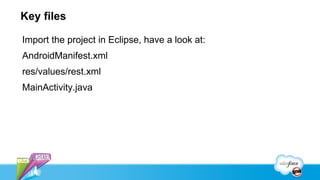
Key files

Import the project in Eclipse, have a look at:
AndroidManifest.xml
res/values/rest.xml
MainActivity.java
Login/logout

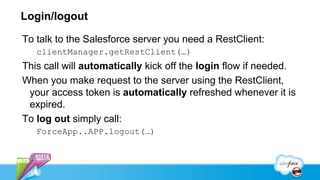
To talk to the Salesforce server you need a RestClient:
   clientManager.getRestClient(…)
This call will automatically kick off the login flow if needed.
When you make request to the server using the RestClient,
 your access token is automatically refreshed whenever it is
 expired.
To log out simply call:
   ForceApp..APP.logout(…)
REST calls

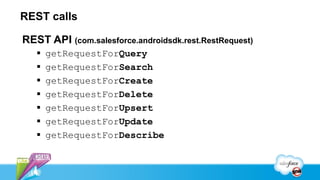
REST API (com.salesforce.androidsdk.rest.RestRequest)
      getRequestForQuery
      getRequestForSearch
      getRequestForCreate
      getRequestForDelete
      getRequestForUpsert
      getRequestForUpdate
      getRequestForDescribe
Let’s add Search
Modify User Interface
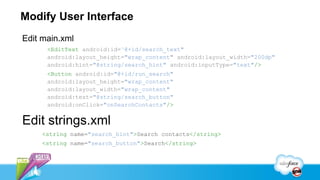
Edit main.xml
      <EditText android:id="@+id/search_text"
      android:layout_height="wrap_content" android:layout_width="200dp"
      android:hint="@string/search_hint" android:inputType="text"/>
      <Button android:id="@+id/run_search"
      android:layout_height="wrap_content"
      android:layout_width="wrap_content"
      android:text="@string/search_button"
      android:onClick="onSearchContacts"/>


Edit strings.xml
     <string name="search_hint">Search contacts</string>
     <string name="search_button">Search</string>
Hookup Server Call

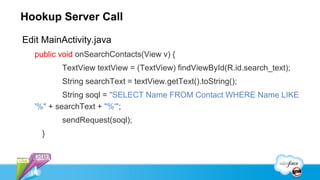
Edit MainActivity.java
   public void onSearchContacts(View v) {
          TextView textView = (TextView) findViewById(R.id.search_text);
          String searchText = textView.getText().toString();
           String soql = "SELECT Name FROM Contact WHERE Name LIKE
   '%" + searchText + "%'";
          sendRequest(soql);
     }
In Just A Few Minutes…

We have modified our application to do contact search…
Speaker Name      Speaker Name      Speaker Name      Speaker Name
 Speaker Title,    Speaker Title,    Speaker Title,    Speaker Title,
 @twittername      @twittername      @twittername      @twittername
Introduction to the Salesforce Mobile SDK for Android

Introduction to the Salesforce Mobile SDK for Android

  • 1.
    Introduction to the SalesforceMobile SDK for Android Joshua Birk, salesforce.com, Developer Evangelist @joshbirk Wolfgang Mathurin, salesforce.com, Software Engineering PMTS
  • 2.
    Safe Harbor Safeharbor statement under the Private Securities Litigation Reform Act of 1995: This presentation may contain forward-looking statements that involve risks, uncertainties, and assumptions. If any such uncertainties materialize or if any of the assumptions proves incorrect, the results of salesforce.com, inc. could differ materially from the results expressed or implied by the forward- looking statements we make. All statements other than statements of historical fact could be deemed forward-looking, including any projections of product or service availability, subscriber growth, earnings, revenues, or other financial items and any statements regarding strategies or plans of management for future operations, statements of belief, any statements concerning new, planned, or upgraded services or technology developments and customer contracts or use of our services. The risks and uncertainties referred to above include – but are not limited to – risks associated with developing and delivering new functionality for our service, new products and services, our new business model, our past operating losses, possible fluctuations in our operating results and rate of growth, interruptions or delays in our Web hosting, breach of our security measures, the outcome of intellectual property and other litigation, risks associated with possible mergers and acquisitions, the immature market in which we operate, our relatively limited operating history, our ability to expand, retain, and motivate our employees and manage our growth, new releases of our service and successful customer deployment, our limited history reselling non-salesforce.com products, and utilization and selling to larger enterprise customers. Further information on potential factors that could affect the financial results of salesforce.com, inc. is included in our annual report on Form 10-Q for the most recent fiscal quarter ended July 31, 2012. This documents and others containing important disclosures are available on the SEC Filings section of the Investor Information section of our Web site. Any unreleased services or features referenced in this or other presentations, press releases or public statements are not currently available and may not be delivered on time or at all. Customers who purchase our services should make the purchase decisions based upon features that are currently available. Salesforce.com, inc. assumes no obligation and does not intend to update these forward-looking statements.
  • 3.
    Device Growth IsExploding, Driven By Consumers Source: Gartner Research; Smartphone, Tablet, and PC Forecast, December 2010.
  • 4.
    Info Workers UseMany Devices For Work & Personal 52% of information workers use 3 or more devices 60% of these devices are used for both work and personal use Source: Forrester Blogs: Why Tablets Will Become Our Primary Computing Device, Frank Gillett, April 23, 2012
  • 5.
    Mobile SDK: AccelerateApp Development Tools for building native, hybrid, and HTML5 apps on iOS and Android OAuth2 Secure authentication and refresh token management API Wrappers Interact with Salesforce REST APIs with popular mobile platform languages App Container Embed HTML5 apps inside a container to access powerful native device functionality Secure Offline Storage Store business data on a device with enterprise-class encryption Push Notifications Dispatch real-time alerts directly to mobile devices
  • 6.
  • 8.
    OAuth An industry standardmethod of validating user credentials while avoiding password anti-patterns.
  • 9.
    OAuth2 Flow Sends App Credentials User logs in Token sent to Callback Remote Force.com Application Confirms token Platform Send access token Maintain session with refresh token
  • 10.
  • 11.
    Representational State Transfer(REST) A stateless data transport based on standard HTTP methods for delivering as JSON or XML
  • 12.
  • 13.
    Step 0: SetupDev Environment Required tools Git [distributed version control system] Ant [java based software build system] Eclipse [integrated development environment] Android SDK ADT Plugin [Android Plugin for Eclipse]
  • 14.
    Step 1: InstallSalesforce Mobile SDK Clone the repo $ git clone https://github.com/forcedotcom/Salesfor ceMobileSDK-Android.git Run install script $ ./install.sh
  • 15.
    Step 2: CreateNew Application • Run create_native ant target $ ant create_native -Dapp.name=MyFirstNative - Dtarget.dir=./firstnative -Dpackage.name=com.acme.firstnative Build and deploy new application $ cd native/SalesforceSDK $ android update project –p . $ cd ./firstnative $ android update project –p . $ ant clean debug $ ant installd
  • 16.
    In Just FiveMinutes… We have created a new application that leverages the Salesforce Mobile SDK for Android.
  • 17.
  • 18.
    Key files Import theproject in Eclipse, have a look at: AndroidManifest.xml res/values/rest.xml MainActivity.java
  • 19.
    Login/logout To talk tothe Salesforce server you need a RestClient: clientManager.getRestClient(…) This call will automatically kick off the login flow if needed. When you make request to the server using the RestClient, your access token is automatically refreshed whenever it is expired. To log out simply call: ForceApp..APP.logout(…)
  • 20.
    REST calls REST API(com.salesforce.androidsdk.rest.RestRequest)  getRequestForQuery  getRequestForSearch  getRequestForCreate  getRequestForDelete  getRequestForUpsert  getRequestForUpdate  getRequestForDescribe
  • 21.
  • 22.
    Modify User Interface Editmain.xml <EditText android:id="@+id/search_text" android:layout_height="wrap_content" android:layout_width="200dp" android:hint="@string/search_hint" android:inputType="text"/> <Button android:id="@+id/run_search" android:layout_height="wrap_content" android:layout_width="wrap_content" android:text="@string/search_button" android:onClick="onSearchContacts"/> Edit strings.xml <string name="search_hint">Search contacts</string> <string name="search_button">Search</string>
  • 23.
    Hookup Server Call EditMainActivity.java public void onSearchContacts(View v) { TextView textView = (TextView) findViewById(R.id.search_text); String searchText = textView.getText().toString(); String soql = "SELECT Name FROM Contact WHERE Name LIKE '%" + searchText + "%'"; sendRequest(soql); }
  • 24.
    In Just AFew Minutes… We have modified our application to do contact search…
  • 25.
    Speaker Name Speaker Name Speaker Name Speaker Name Speaker Title, Speaker Title, Speaker Title, Speaker Title, @twittername @twittername @twittername @twittername