OpenID Connect & Single Sign-On for 
Beginners 
Abhishek Sivasubramanian 
Senior Developer Evangelist 
Suyati Technologies, India 
@abhisheksubbu 
Vikas Jain 
Director, Product Management, Salesforce Identity 
salesforce.com 
@VikasJainTweet
Safe Harbor 
Safe harbor statement under the Private Securities Litigation Reform Act of 1995: 
This presentation may contain forward-looking statements that involve risks, uncertainties, and assumptions. If any such uncertainties materialize or if any of 
the assumptions proves incorrect, the results of salesforce.com, inc. could differ materially from the results expressed or implied by the forward-looking 
statements we make. All statements other than statements of historical fact could be deemed forward-looking, including any projections of product or service 
availability, subscriber growth, earnings, revenues, or other financial items and any statements regarding strategies or plans of management for future 
operations, statements of belief, any statements concerning new, planned, or upgraded services or technology developments andcustomer contracts or use of 
our services. 
The risks and uncertainties referred to above include – but are not limited to – risks associated with developing and delivering new functionality for our service, 
new products and services, our new business model, our past operating losses, possible fluctuations in our operating results and rate of growth, interruptions or 
delays in our Web hosting, breach of our security measures, the outcome of any litigation, risks associated with completed and any possible mergers and 
acquisitions, the immature market in which we operate, our relatively limited operating history, our ability to expand, retain, and motivate our employees and 
manage our growth, new releases of our service and successful customer deployment, our limited history reselling non-salesforce.com products, and utilization 
and selling to larger enterprise customers. Further information on potential factors that could affect the financial results of salesforce.com, inc. is included in our 
annual report on Form 10-K for the most recent fiscal year and in our quarterly report on Form 10-Q for the most recent fiscal quarter. These documents and 
others containing important disclosures are available on the SEC Filings section of the Investor Information section of our Web site. 
Any unreleased services or features referenced in this or other presentations, press releases or public statements are not currently available and may not be 
delivered on time or at all. Customers who purchase our services should make the purchase decisions based upon features that are currently available. 
Salesforce.com, inc. assumes no obligation and does not intend to update these forward-looking statements.
Abhishek 
Sivasubramanian 
Senior Developer Evangelist
Vikas Jain 
Director, Product Management 
Salesforce Identity
Agenda 
• Problem 
•OpenID Connect protocol 
• Solution and demo 
•Q&A
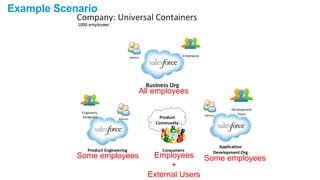
Example Scenario 
All employees 
Some employees Employees Some employees 
+ 
External Users
Problems Identified 
Universal Containers 
1. Administrative overload for user management. 
a) Lots of Reset Password & Change Password requests from users 
b) Headache in maintaining same users in different orgs 
2. Community users do not effectively use the product community. 
a) Standard Sign up, Waiting for activation email, activating the account, login is not bringing in 
more users. 
b) Easiness for users to socialize is missing 
3. Employee productivity is reduced. 
a) Different username/password for same user across different org 
b) Tend of forget username/password combinations 
c) Takes more time for employees to recollect, access and login to an org
Business Expectation 
Universal Containers 
1. Solution for : Administrative overload for user management. 
a) Manage user identity checks from enterprise org 
b) Admin should be able to do reset/change password for a user from one org 
2. Solution for : Community users do not effectively use the product 
community. 
a) Enable Salesforce Single Sign On 
b) Take advantage of the Salesforce Community phenomenon 
3. Solution for : Employee productivity is reduced. 
a) Enable Single Sign-On in the Enterprise 
b) Employee should only have one username-password to access all orgs
One thing is for sure 
We have to get Universal Containers on 
SINGLE SIGN-ON
OpenID Connect 
What is that ?
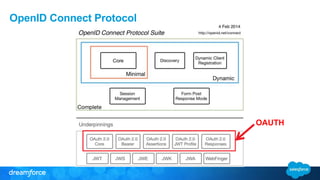
OpenID Connect Protocol 
OAUTH
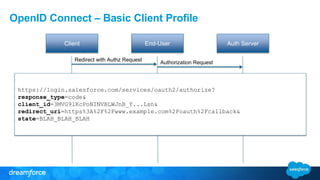
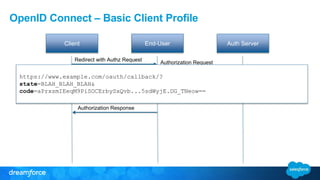
OpenID Connect – Basic Client Profile 
Client End-User Auth Server 
Authorization Request 
Redirect with Authz Request 
https://login.salesforce.com/services/oauth2/authorize? 
response_type=code& 
client_id=3MVG9lKcPoNINVBLWJnB_Y...Lsn& 
redirect_uri=https%3A%2F%2Fwww.example.com%2Foauth%2Fcallback& 
state=BLAH_BLAH_BLAH
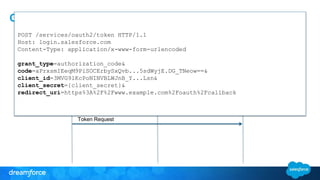
OpenID Connect – Basic Client Profile 
Client End-User Auth Server 
Authenticate End-User 
Credentials/Constent 
Redirect to Client 
Redirect with Authz Request 
Authorization Response 
Authorization Request 
https://www.example.com/oauth/callback/? 
state=BLAH_BLAH_BLAH& 
code=aPrxsmIEeqM9PiSOCErbySxQvb...5sdWyjE.DG_TNeow==
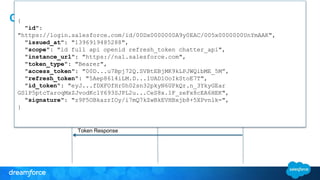
OpenID Connect – Basic Client Profile 
POST /services/oauth2/token HTTP/1.1 
Host: login.salesforce.com 
Content-Type: application/x-www-form-urlencoded 
Client End-User Auth Server 
grant_type=authorization_code& 
code=aPrxsmIEeqM9PiSOCErbySxQvb...5sdWyjE.DG_TNeow==& 
Authenticate End-User 
client_id=3MVG9lKcPoNINVBLWJnB_Y...Lsn& 
client_secret={client_secret}& 
Credentials/Constent 
redirect_uri=https%3A%2F%2Fwww.example.com%2Foauth%2Fcallback 
Redirect to Client 
Redirect with Authz Request 
Authorization Response 
Token Request
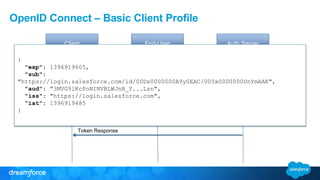
OpenID Connect – Basic Client Profile 
Client End-User Auth Server 
Authenticate End-User 
Credentials/Constent 
Redirect to Client 
Redirect with Authz Request 
Authorization Response 
Token Request 
Token Response 
Authorization Request 
{ 
"id": 
"https://login.salesforce.com/id/00Dx0000000A9y0EAC/005x0000000UnYmAAK", 
"issued_at": "1396919485288", 
"scope": "id full api openid refresh_token chatter_api", 
"instance_url": "https://na1.salesforce.com", 
"token_type": "Bearer", 
"access_token": "00D...u7Bpj72Q.SVBtEBjMK9kLPJWQibME_5M”, 
"refresh_token": "5Aep8614iLM.D...1UAD1OoIkStoE7T", 
"id_token": "eyJ...fDXFOfHr0h02sn32pkyN6UPkQr.n_3YkyGEar 
GSlP5ptcTaroqMxZJvodKc1Y693SJPL2u...CeS8x.1F_zeFx8cEA6HEK", 
"signature": "z9F5OBkazrIOy/i7mQ7kZwBkEVHBxjb8+5XPvnlk=", 
}
OpenID Connect – Basic Client Profile 
Client End-User Auth Server 
Authorization Request { 
Authenticate End-User 
"https://login.salesforce.com/id/00Dx0000000A9y0EAC/005x0000000UnYmAAK", 
Credentials/Constent 
Redirect to Client 
Redirect with Authz Request 
"exp": 1396919605, 
"sub": 
"aud": "3MVG9lKcPoNINVBLWJnB_Y...Lsn", 
"iss": "https://login.salesforce.com", 
"iat": 1396919485 
Authorization Response 
Token Request 
Token Response 
}
OpenID Connect – Basic Client Profile 
Client End-User Auth Server 
Authenticate End-User 
Credentials/Constent 
Redirect to Client 
Redirect with Authz Request 
Authorization Response 
Token Request 
Token Response 
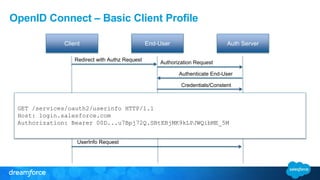
UserInfo Request 
Authorization Request 
GET /services/oauth2/userinfo HTTP/1.1 
Host: login.salesforce.com 
Authorization: Bearer 00D...u7Bpj72Q.SBtEBjMK9kLPJWQibME_5M
OpenID Connect – Basic Client Profile 
Client End-User Auth Server 
Authenticate End-User 
Credentials/Constent 
Redirect to Client 
Redirect with Authz Request 
Authorization Response 
Token Request 
Token Response 
UserInfo Request 
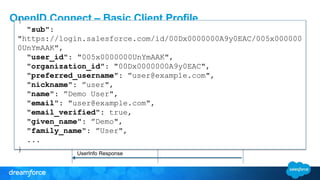
UserInfo Response 
Authorization Request 
{ 
"sub": 
"https://login.salesforce.com/id/00Dx0000000A9y0EAC/005x000000 
0UnYmAAK", 
"user_id": "005x0000000UnYmAAK", 
"organization_id": "00Dx0000000A9y0EAC", 
"preferred_username": ”user@example.com", 
"nickname": ”user", 
"name": ”Demo User", 
"email": "user@example.com", 
"email_verified": true, 
"given_name": ”Demo", 
"family_name": ”User", 
... 
}
OpenID Connect – Salesforce Implementation 
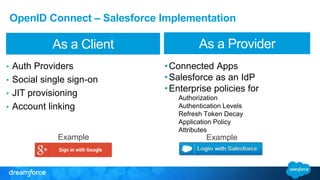
As a Client As a Provider 
• Auth Providers 
• Social single sign-on 
• JIT provisioning 
• Account linking 
•Connected Apps 
•Salesforce as an IdP 
•Enterprise policies for 
Authorization 
Authentication Levels 
Refresh Token Decay 
Application Policy 
Attributes 
Example Example
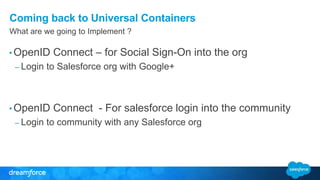
Coming back to Universal Containers 
What are we going to Implement ? 
•OpenID Connect – for Social Sign-On into the org 
– Login to Salesforce org with Google+ 
•OpenID Connect - For salesforce login into the community 
– Login to community with any Salesforce org
IMPLEMENTATION 
STEPS 
Social Sign-On with Google+ into Enterprise Org
Steps for Social Sign-On with Google+ into Enterprise Org 
1. Setup MyDomain in the org 
2. Configure an OpenID Connect type Authentication Provider 
pointing to Google. 
3. Set a google plus user ID field on user record – for account 
linking. 
4. Update a user record with a valid google plus user ID. 
5. Configure enterprise branding page to enable Login with 
Google. 
6. Test Login with Google into the enterprise org.
DEMO 
Social Sign-On with Google+ into Enterprise Org
IMPLEMENTATION 
STEPS 
Single Sign On into Community with any Salesforce Org
Steps for Single Sign On into Community with any 
Salesforce Org 
1. Setup OpenID Connect Auth Provider pointing to a 
Connected App in IdP 
2. Registration Handler code can do user checks based on 
Email or FederationID 
3. Set the Community Login Page to use this Auth Provider
DEMO 
Single Sign On into Community with any Salesforce Org
OpenID Connect Playground 
openidconnect.herokuapp.com
Key Takeaways 
• OpenID Connect is a modern Identity protocol that leverages OAUTH 
• It provides an ID token and /UserInfo endpoint 
• You can use it for Single sign-on (SSO) 
• Salesforce can act as an OpenID Connect client. Example: Sign in with Google 
• Salesforce can act as an OpenID Connect provider. Example: Login with Salesforce
Q & A
OpenID Connect and Single Sign-On for Beginners

OpenID Connect and Single Sign-On for Beginners

  • 1.
    OpenID Connect &Single Sign-On for Beginners Abhishek Sivasubramanian Senior Developer Evangelist Suyati Technologies, India @abhisheksubbu Vikas Jain Director, Product Management, Salesforce Identity salesforce.com @VikasJainTweet
  • 2.
    Safe Harbor Safeharbor statement under the Private Securities Litigation Reform Act of 1995: This presentation may contain forward-looking statements that involve risks, uncertainties, and assumptions. If any such uncertainties materialize or if any of the assumptions proves incorrect, the results of salesforce.com, inc. could differ materially from the results expressed or implied by the forward-looking statements we make. All statements other than statements of historical fact could be deemed forward-looking, including any projections of product or service availability, subscriber growth, earnings, revenues, or other financial items and any statements regarding strategies or plans of management for future operations, statements of belief, any statements concerning new, planned, or upgraded services or technology developments andcustomer contracts or use of our services. The risks and uncertainties referred to above include – but are not limited to – risks associated with developing and delivering new functionality for our service, new products and services, our new business model, our past operating losses, possible fluctuations in our operating results and rate of growth, interruptions or delays in our Web hosting, breach of our security measures, the outcome of any litigation, risks associated with completed and any possible mergers and acquisitions, the immature market in which we operate, our relatively limited operating history, our ability to expand, retain, and motivate our employees and manage our growth, new releases of our service and successful customer deployment, our limited history reselling non-salesforce.com products, and utilization and selling to larger enterprise customers. Further information on potential factors that could affect the financial results of salesforce.com, inc. is included in our annual report on Form 10-K for the most recent fiscal year and in our quarterly report on Form 10-Q for the most recent fiscal quarter. These documents and others containing important disclosures are available on the SEC Filings section of the Investor Information section of our Web site. Any unreleased services or features referenced in this or other presentations, press releases or public statements are not currently available and may not be delivered on time or at all. Customers who purchase our services should make the purchase decisions based upon features that are currently available. Salesforce.com, inc. assumes no obligation and does not intend to update these forward-looking statements.
  • 3.
    Abhishek Sivasubramanian SeniorDeveloper Evangelist
  • 4.
    Vikas Jain Director,Product Management Salesforce Identity
  • 5.
    Agenda • Problem •OpenID Connect protocol • Solution and demo •Q&A
  • 6.
    Example Scenario Allemployees Some employees Employees Some employees + External Users
  • 7.
    Problems Identified UniversalContainers 1. Administrative overload for user management. a) Lots of Reset Password & Change Password requests from users b) Headache in maintaining same users in different orgs 2. Community users do not effectively use the product community. a) Standard Sign up, Waiting for activation email, activating the account, login is not bringing in more users. b) Easiness for users to socialize is missing 3. Employee productivity is reduced. a) Different username/password for same user across different org b) Tend of forget username/password combinations c) Takes more time for employees to recollect, access and login to an org
  • 8.
    Business Expectation UniversalContainers 1. Solution for : Administrative overload for user management. a) Manage user identity checks from enterprise org b) Admin should be able to do reset/change password for a user from one org 2. Solution for : Community users do not effectively use the product community. a) Enable Salesforce Single Sign On b) Take advantage of the Salesforce Community phenomenon 3. Solution for : Employee productivity is reduced. a) Enable Single Sign-On in the Enterprise b) Employee should only have one username-password to access all orgs
  • 9.
    One thing isfor sure We have to get Universal Containers on SINGLE SIGN-ON
  • 10.
  • 11.
  • 12.
    OpenID Connect –Basic Client Profile Client End-User Auth Server Authorization Request Redirect with Authz Request https://login.salesforce.com/services/oauth2/authorize? response_type=code& client_id=3MVG9lKcPoNINVBLWJnB_Y...Lsn& redirect_uri=https%3A%2F%2Fwww.example.com%2Foauth%2Fcallback& state=BLAH_BLAH_BLAH
  • 13.
    OpenID Connect –Basic Client Profile Client End-User Auth Server Authenticate End-User Credentials/Constent Redirect to Client Redirect with Authz Request Authorization Response Authorization Request https://www.example.com/oauth/callback/? state=BLAH_BLAH_BLAH& code=aPrxsmIEeqM9PiSOCErbySxQvb...5sdWyjE.DG_TNeow==
  • 14.
    OpenID Connect –Basic Client Profile POST /services/oauth2/token HTTP/1.1 Host: login.salesforce.com Content-Type: application/x-www-form-urlencoded Client End-User Auth Server grant_type=authorization_code& code=aPrxsmIEeqM9PiSOCErbySxQvb...5sdWyjE.DG_TNeow==& Authenticate End-User client_id=3MVG9lKcPoNINVBLWJnB_Y...Lsn& client_secret={client_secret}& Credentials/Constent redirect_uri=https%3A%2F%2Fwww.example.com%2Foauth%2Fcallback Redirect to Client Redirect with Authz Request Authorization Response Token Request
  • 15.
    OpenID Connect –Basic Client Profile Client End-User Auth Server Authenticate End-User Credentials/Constent Redirect to Client Redirect with Authz Request Authorization Response Token Request Token Response Authorization Request { "id": "https://login.salesforce.com/id/00Dx0000000A9y0EAC/005x0000000UnYmAAK", "issued_at": "1396919485288", "scope": "id full api openid refresh_token chatter_api", "instance_url": "https://na1.salesforce.com", "token_type": "Bearer", "access_token": "00D...u7Bpj72Q.SVBtEBjMK9kLPJWQibME_5M”, "refresh_token": "5Aep8614iLM.D...1UAD1OoIkStoE7T", "id_token": "eyJ...fDXFOfHr0h02sn32pkyN6UPkQr.n_3YkyGEar GSlP5ptcTaroqMxZJvodKc1Y693SJPL2u...CeS8x.1F_zeFx8cEA6HEK", "signature": "z9F5OBkazrIOy/i7mQ7kZwBkEVHBxjb8+5XPvnlk=", }
  • 16.
    OpenID Connect –Basic Client Profile Client End-User Auth Server Authorization Request { Authenticate End-User "https://login.salesforce.com/id/00Dx0000000A9y0EAC/005x0000000UnYmAAK", Credentials/Constent Redirect to Client Redirect with Authz Request "exp": 1396919605, "sub": "aud": "3MVG9lKcPoNINVBLWJnB_Y...Lsn", "iss": "https://login.salesforce.com", "iat": 1396919485 Authorization Response Token Request Token Response }
  • 17.
    OpenID Connect –Basic Client Profile Client End-User Auth Server Authenticate End-User Credentials/Constent Redirect to Client Redirect with Authz Request Authorization Response Token Request Token Response UserInfo Request Authorization Request GET /services/oauth2/userinfo HTTP/1.1 Host: login.salesforce.com Authorization: Bearer 00D...u7Bpj72Q.SBtEBjMK9kLPJWQibME_5M
  • 18.
    OpenID Connect –Basic Client Profile Client End-User Auth Server Authenticate End-User Credentials/Constent Redirect to Client Redirect with Authz Request Authorization Response Token Request Token Response UserInfo Request UserInfo Response Authorization Request { "sub": "https://login.salesforce.com/id/00Dx0000000A9y0EAC/005x000000 0UnYmAAK", "user_id": "005x0000000UnYmAAK", "organization_id": "00Dx0000000A9y0EAC", "preferred_username": ”user@example.com", "nickname": ”user", "name": ”Demo User", "email": "user@example.com", "email_verified": true, "given_name": ”Demo", "family_name": ”User", ... }
  • 19.
    OpenID Connect –Salesforce Implementation As a Client As a Provider • Auth Providers • Social single sign-on • JIT provisioning • Account linking •Connected Apps •Salesforce as an IdP •Enterprise policies for Authorization Authentication Levels Refresh Token Decay Application Policy Attributes Example Example
  • 20.
    Coming back toUniversal Containers What are we going to Implement ? •OpenID Connect – for Social Sign-On into the org – Login to Salesforce org with Google+ •OpenID Connect - For salesforce login into the community – Login to community with any Salesforce org
  • 21.
    IMPLEMENTATION STEPS SocialSign-On with Google+ into Enterprise Org
  • 22.
    Steps for SocialSign-On with Google+ into Enterprise Org 1. Setup MyDomain in the org 2. Configure an OpenID Connect type Authentication Provider pointing to Google. 3. Set a google plus user ID field on user record – for account linking. 4. Update a user record with a valid google plus user ID. 5. Configure enterprise branding page to enable Login with Google. 6. Test Login with Google into the enterprise org.
  • 23.
    DEMO Social Sign-Onwith Google+ into Enterprise Org
  • 24.
    IMPLEMENTATION STEPS SingleSign On into Community with any Salesforce Org
  • 25.
    Steps for SingleSign On into Community with any Salesforce Org 1. Setup OpenID Connect Auth Provider pointing to a Connected App in IdP 2. Registration Handler code can do user checks based on Email or FederationID 3. Set the Community Login Page to use this Auth Provider
  • 26.
    DEMO Single SignOn into Community with any Salesforce Org
  • 27.
    OpenID Connect Playground openidconnect.herokuapp.com
  • 28.
    Key Takeaways •OpenID Connect is a modern Identity protocol that leverages OAUTH • It provides an ID token and /UserInfo endpoint • You can use it for Single sign-on (SSO) • Salesforce can act as an OpenID Connect client. Example: Sign in with Google • Salesforce can act as an OpenID Connect provider. Example: Login with Salesforce
  • 29.

Editor's Notes

  • #3 Key Takeaway: We are a publicly traded company. Please make your buying decisions only on the products commercially available from Salesforce.com. Talk Track: Before I begin, just a quick note that when considering future developments, whether by us or with any other solution provider, you should always base your purchasing decisions on what is currently available.